
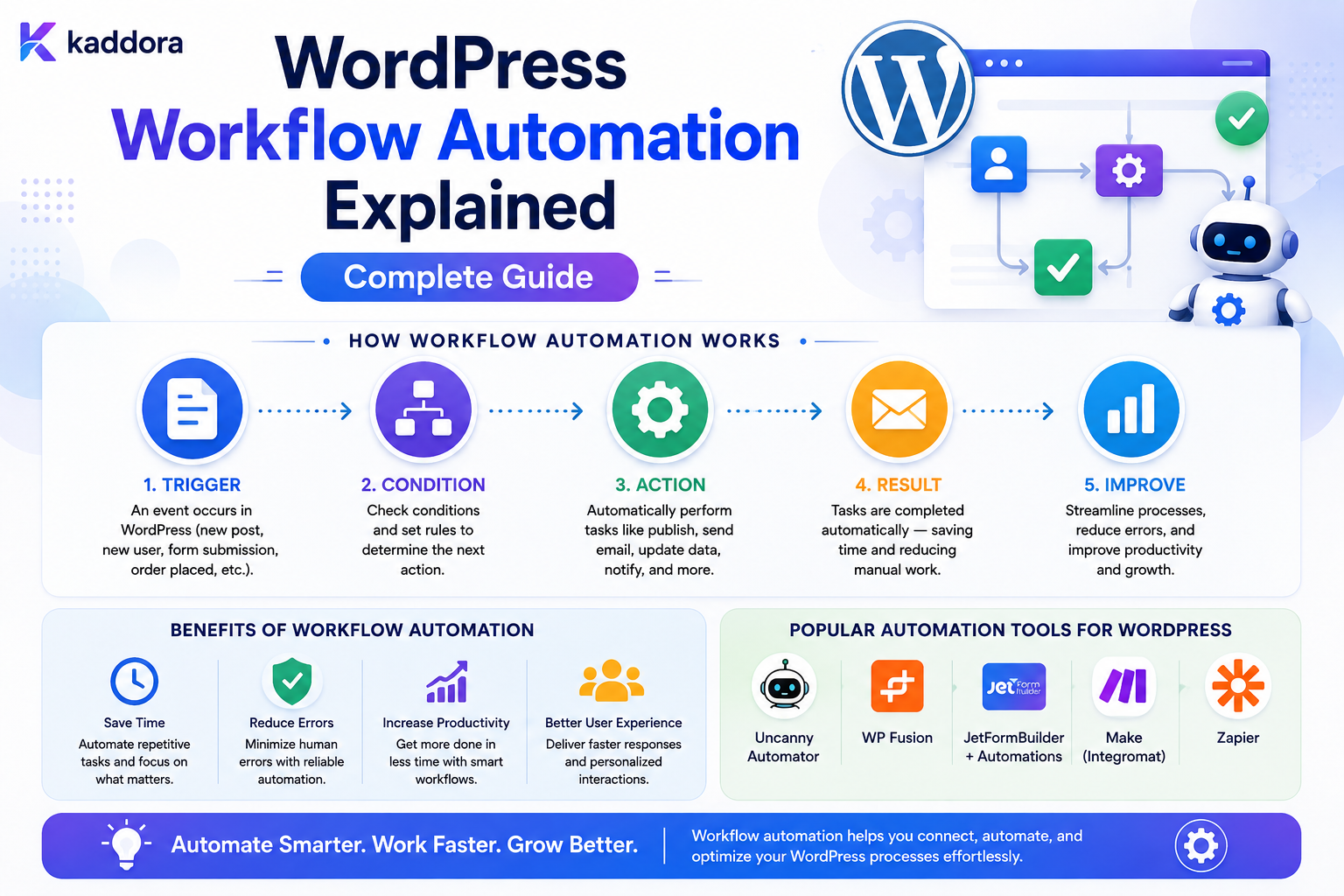
WordPress Workflow Automation Explained: Complete Guide
Introduction
Many WordPress websites begin with simple tasks:
New Form Submission ↓ Send Email
As a business grows, the number of repeated operations also grows.
For example:
New Lead ↓ Create CRM Record ↓ Assign Sales Representative ↓ Send Notification ↓ Create Follow-Up Task ↓ Schedule Reminder
Another workflow might look like:
New Order ↓ Check Payment ↓ Update Customer ↓ Send Confirmation ↓ Create Fulfillment Task
Doing these operations manually is slow, inconsistent, and difficult to scale.
This is where WordPress workflow automation becomes valuable.
Workflow automation allows WordPress to react to events and execute predefined actions automatically.
A basic model is:
Trigger ↓ Condition ↓ Action ↓ Result
A more advanced workflow can contain:
Trigger ↓ Conditions ↓ Action ↓ Delay ↓ Action ↓ Retry ↓ Notification ↓ Completion
A production automation system also needs:
Queues Logging Retries Idempotency Scheduling Error Handling Permissions Security
The key principle is:
Workflow automation should turn predictable business events into controlled, repeatable actions while keeping rules explicit, failures recoverable, and important operations secure and observable.
What Is WordPress Workflow Automation?
WordPress workflow automation is the process of automatically executing predefined actions in response to events.
For example:
Trigger: Form Submitted Action: Create Lead
Or:
Trigger: Order Completed Condition: Order Value > Threshold Action: Create Priority Task
The system performs the workflow without requiring a person to manually execute each step.
Why Workflow Automation Matters
Automation can help reduce:
Repetitive work
Manual errors
Response delays
Administrative overhead
Duplicate data entry
Missed follow-ups
Inconsistent processes
It can also improve consistency because the same rule executes the same way every time.
What Can WordPress Automate?
A WordPress workflow engine can automate:
Form submissions
User registration
Content publishing
WooCommerce events
Customer follow-ups
Notifications
CRM synchronization
ERP updates
Webhooks
Email sequences
Scheduled tasks
Internal approvals
Data updates
AI processing
The exact capabilities depend on the system.
The Basic Trigger-Condition-Action Model
A common workflow structure is:
Trigger ↓ Condition ↓ Action
For example:
Trigger: New Lead Condition: Budget > 10,000 Action: Assign Enterprise Sales
This model is simple enough for basic automation and can be extended for more complex workflows.
What Is a Trigger?
A trigger starts the workflow.
Common triggers include:
Form Submitted User Registered Post Published Order Completed Payment Received Comment Created Webhook Received Scheduled Time
A good workflow engine treats triggers as structured events.
What Is an Action?
An action performs work.
Examples include:
Send Email Create Record Update Record Assign User Create Task Call API Send Webhook Generate Document Add Tag Change Status
Actions should have predictable inputs and outputs.
What Is a Condition?
A condition determines whether a workflow should continue.
For example:
Order Total > 500
or:
Customer Type = Enterprise
Conditions help create branching workflows.
Simple Workflow Example
Consider a contact form:
Form Submitted ↓ Create Lead ↓ Send Email to Sales
This is a linear workflow.
Conditional Workflow Example
A more advanced workflow:
Form Submitted ↓ Is Budget > 10,000? ├── Yes → Priority Sales └── No → Standard Follow-Up
The rule determines the workflow path.
Multi-Action Workflows
An event may trigger several actions:
Lead Created ├── Save CRM Record ├── Notify Sales ├── Create Task └── Track Analytics
These operations may run synchronously or asynchronously depending on their cost.
Sequential vs Parallel Actions
Sequential
Action A ↓ Action B ↓ Action C
Useful when:
B depends on A
Parallel
Action A ├── Action B ├── Action C └── Action D
Useful when the actions are independent.
Workflow State
Complex workflows need state.
For example:
Workflow: Lead Follow-Up State: Step 3
Other useful state fields can include:
workflow_id execution_id current_step status attempts scheduled_at created_at updated_at
Workflow Statuses
Common states include:
pending running waiting completed failed cancelled paused
A clear status model makes monitoring easier.
Workflow Execution vs Workflow Definition
Keep these separate.
Workflow Definition
Describes:
Trigger Conditions Actions Branches Delays
Workflow Execution
Represents:
One actual run of that workflow
This distinction is essential.
Example
Definition:
When lead is created: Notify sales Create task Sync CRM
Execution:
Execution ID: 100502 Lead: 501 Status: Completed
One definition can produce thousands of executions.
Store Workflow Definitions as Structured Data
A workflow might be represented conceptually as:
{ "trigger": { "event": "lead.created" }, "steps": [ { "action": "notify_sales" }, { "action": "create_task" } ] }
The schema can become more advanced as the workflow engine grows.
Avoid Hardcoding Every Workflow
A system becomes difficult to maintain if every workflow is written as custom PHP:
if form A... if form B... if order C...
A schema-driven workflow engine can make behavior configurable and reusable.
Workflow Node Model
A more flexible system may represent workflows as nodes:
Trigger ↓ Condition ↓ Action ↓ Delay ↓ Action
Each node has:
id type configuration next
This provides a foundation for visual workflow builders.
Branching Workflows
For conditions:
Condition ├── True → Action A └── False → Action B
The engine must determine which branch to follow.
Nested Branches
More advanced workflows may have:
Condition A ├── Yes │ ↓ │ Condition B │ ├── Yes → Action C │ └── No → Action D │ └── No → Action E
Complex branching increases the importance of validation and execution tracing.
Prevent Circular Workflows
An automation system should detect or limit loops such as:
Action A ↓ Trigger B ↓ Action A ↓ Trigger B
Without controls, this can cause:
Infinite Execution High CPU Large Queues External API Abuse
Workflow Depth Limits
A practical engine can enforce limits on:
Maximum Steps Maximum Branch Depth Maximum Runtime Maximum Executions
This protects the system from accidental runaway workflows.
Trigger Events in WordPress
WordPress provides many opportunities for event-driven automation through hooks and application logic.
Examples include:
Content Created Content Updated User Registered Comment Added Order Changed Form Submitted
A workflow engine can translate these events into standardized internal triggers.
Normalize Events
Different plugins may expose different data structures.
A workflow engine benefits from normalized events such as:
user.created post.published form.submitted order.completed
This makes workflows easier to configure.
Event Payloads
A trigger may carry:
Event ID Entity ID Entity Type Timestamp Tenant Metadata
Keep payloads focused.
Do not attach large unrelated objects to every event.
Event IDs
Every important event can have a unique identifier:
event_id = 8f3...
This helps with:
Deduplication Tracing Idempotency Debugging
Idempotency
An automation action should not accidentally execute twice when the same event is delivered twice.
For example:
Lead Created
should not create two identical CRM records merely because the event was retried.
Use stable event or operation identifiers.
Workflow Execution IDs
Each workflow run should have a unique execution ID:
execution_id = 105021
This lets administrators trace all actions belonging to one execution.
Execution Logs
A useful execution history can show:
Trigger Received ↓ Condition Evaluated ↓ CRM Action Started ↓ CRM Action Completed ↓ Email Started ↓ Email Completed
This makes troubleshooting far easier.
Do Not Log Sensitive Payloads Unnecessarily
Execution logs should avoid storing:
Passwords API Secrets Private Messages Payment Credentials Full Sensitive Documents
Log event metadata and safe summaries instead.
Error Handling
Every action can fail.
For example:
CRM API → Timeout
The engine should decide whether to:
Retry Skip Pause Fail Workflow Notify Administrator
Retry Policies
A retryable action can use bounded retries:
Attempt 1 ↓ Fail ↓ Wait ↓ Attempt 2 ↓ Fail ↓ Wait ↓ Attempt 3
Do not retry indefinitely.
Exponential Backoff
Retry delays can increase:
10 seconds 30 seconds 2 minutes
The exact policy should depend on the service and workload.
Do Not Retry Permanent Errors
For example:
Invalid API Credential
should not normally be retried repeatedly.
Differentiate:
Transient Error
from:
Permanent Error
Queue-Based Automation
Heavy actions should run asynchronously.
For example:
Form Submitted ↓ Save Entry ↓ Queue Workflow ↓ Worker ├── CRM ├── Email └── PDF
This keeps the user's request fast.
Why Queues Matter
Without queues:
User Request ↓ CRM ↓ Email ↓ PDF ↓ Webhook ↓ Response
The user waits for everything.
With a queue:
User Request ↓ Save ↓ Queue ↓ Response
Background workers handle expensive processing.
Scheduled Actions
Workflows can also run later.
For example:
Lead Created ↓ Wait 24 Hours ↓ Send Follow-Up
The delay should be represented as workflow state rather than a blocked PHP request.
Never Use Long PHP Requests for Delays
Avoid:
sleep(86400)
inside a web request.
Use:
Scheduled Job + Queued Execution
instead.
Workflow Delays
A workflow might store:
waiting_until
The worker can resume it after the scheduled time.
WordPress Scheduled Processing
Scheduled workflows can be processed through an appropriate background scheduling mechanism.
For larger systems, a dedicated queue or worker architecture may provide stronger guarantees than relying only on page-triggered scheduling.
Approval Workflows
Some operations require humans.
For example:
New Enterprise Lead ↓ Manager Approval ↓ CRM Assignment
The workflow enters:
waiting
until an authorized user approves it.
Approval Security
Only users with the appropriate capability should be able to approve.
Do not allow the browser to submit:
approved=true
and treat that as proof of authorization.
Workflow Tasks
Approval steps can create tasks:
Task: Review Quote Assigned To: Sales Manager Status: Pending
The workflow continues when the task is completed.
User Notifications
Workflows can notify:
Email Dashboard Push Webhook
The notification channel should be separate from the workflow state.
Workflow and Email
For example:
Trigger: New Lead Action: Save Entry Action: Notify Sales
If email fails, the lead record should generally remain intact.
Workflow and CRM
A common automation:
Lead Created ↓ CRM Sync ↓ CRM ID Saved
If the CRM fails:
CRM Status: Retrying
rather than losing the original lead.
Workflow and ERP
Business workflows can update ERP systems:
Order Completed ↓ ERP Order ↓ Inventory Update ↓ Finance Task
External systems should be treated as separate reliability boundaries.
Webhook Actions
A workflow can send:
POST /external/webhook
The webhook should use:
HTTPS Authentication Timeout Retry Policy Idempotency
where appropriate.
Webhook Triggers
The reverse also matters:
External System ↓ Webhook ↓ WordPress ↓ Workflow
Webhook payloads must be authenticated and validated.
Workflow Security
A workflow engine can perform powerful operations.
Protect:
Create Workflow Edit Workflow Publish Workflow Execute Workflow Approve Workflow Delete Workflow View Execution Logs
using appropriate capabilities.
Least Privilege
A content editor may need:
Create Content
but should not automatically have:
Manage Automation
Separate capabilities reduce risk.
Tenant Isolation
In a SaaS environment:
Tenant A Workflow
must never execute using:
Tenant B Data
Every workflow execution should carry the correct tenant context.
Do Not Trust Tenant IDs From Workflow Payloads
Tenant context should be derived from:
Authenticated User Trusted Application Context Workflow Ownership
rather than blindly accepting a client-supplied ID.
Workflow Data Mapping
An action may need values from the trigger.
For example:
Trigger: form.submitted
contains:
entry_id email company budget
An email action can map:
Recipient: {{entry.email}}
A CRM action can map:
Company: {{entry.company}}
Use a controlled variable system rather than arbitrary code execution.
Template Variables
A workflow engine may support:
{{user.email}} {{entry.reference}} {{order.total}} {{site.name}}
The variable resolver should validate which fields are available in the current execution context.
Prevent Variable Injection
Do not allow users to execute arbitrary PHP or unrestricted expressions through variables.
Use a controlled expression language.
Workflow Conditions
Conditions can inspect:
Numbers Strings Dates Statuses Flags Relationships
For example:
order.total > 500
or:
customer.type == enterprise
Avoid Arbitrary Code in Conditions
A workflow builder should not evaluate user-supplied PHP or unrestricted executable expressions.
Use a controlled condition engine.
Workflow Scheduling
Useful schedule types include:
Immediately After Delay At Specific Time Recurring On Event
Each should have clear execution semantics.
Recurring Workflows
For example:
Every Monday ↓ Find Unassigned Leads ↓ Send Summary
The workflow engine needs to ensure the recurring trigger does not accidentally create duplicate executions.
Duplicate Prevention
A recurring workflow can accidentally execute twice if:
Scheduler Runs Twice
Use stable execution identifiers or scheduling guards where necessary.
Workflow Concurrency
Two workers may attempt to process the same execution.
Use:
Locks Atomic State Changes Execution Claims
to prevent duplicate processing.
Workflow Action Locks
For important operations:
Execution ↓ Claim Action ↓ Process
Only one worker should own the action at a time.
Queue Priorities
Not every workflow has the same urgency.
A queue can support:
High Normal Low
For example:
Payment Processing: High Daily Report: Low
Queue Backpressure
If thousands of workflows arrive at once:
Queue ↓↓↓↓↓↓↓↓↓ Workers
the system needs backpressure.
Possible controls include:
Concurrency Limits Rate Limits Queue Priorities Batching
Protect External APIs
If an external API allows:
100 requests / minute
your worker system should respect that limit.
Use an outbound rate limiter.
Workflow Timeouts
An action that never finishes should not block a workflow indefinitely.
Set appropriate:
Request Timeout Action Timeout Execution Timeout
Then mark the action as failed or retryable.
Workflow Cancellation
Administrators may need to stop a workflow:
Running ↓ Cancel ↓ Cancelled
The system should define what happens to actions already running.
Cancellation cannot always undo an external operation that already completed.
Compensation Workflows
For complex processes, failures sometimes require a compensating action.
For example:
Create External Record ↓ Local Save Fails
The system may need a cleanup or reconciliation process.
Do not assume distributed operations can be rolled back automatically.
Workflow Audit Trail
Record:
Workflow Created Workflow Published Workflow Started Action Executed Action Retried Workflow Failed Workflow Completed
Audit records should remain separate from editable workflow definitions.
Workflow Execution Log
A useful execution page can show:
Execution: 100501 Trigger: form.submitted Status: Completed Steps: 1. Create Lead ✓ 2. Notify Sales ✓ 3. CRM Sync ✓
This greatly simplifies troubleshooting.
Workflow Error Logs
Store safe technical context:
Action Error Code Attempt Timestamp Execution ID
Avoid logging secrets or full sensitive payloads.
Monitoring Automation Health
Useful metrics include:
Workflows Started Completed Failed Retrying Queue Depth Average Execution Time Action Failure Rate
Workflow Dashboard
A useful admin dashboard can show:
Active Workflows Running Waiting Failed Completed Today Queue Size
This gives operators visibility into the automation system.
Workflow Testing
Before publishing a workflow, test:
Trigger Conditions Branches Actions Delays Retries Failure Paths Permissions
Dry-Run Mode
A useful advanced capability is:
Dry Run
The engine evaluates:
Trigger Conditions Action Mapping
without actually performing destructive actions.
This can help administrators validate workflows safely.
Workflow Versioning
Published workflows should often be versioned.
For example:
Workflow: Lead Follow-Up Version: 3
Older executions can remain associated with the version that started them.
Why Workflow Versioning Matters
Suppose a workflow changes from:
Step 1 → Email
to:
Step 1 → CRM Step 2 → Email
An execution already in progress should not necessarily change behavior halfway through.
Versioning can make execution behavior predictable.
Workflow Drafts
Like form builders, workflow designers can use:
Draft
and:
Published Version
Keep live automation separate from unpublished edits.
Workflow Import and Export
Reusable workflow definitions can be exported for:
Backup Migration Templates Development Testing
Validate imported workflows before activation.
Prevent Dangerous Workflow Imports
An imported workflow could attempt to:
Delete Records Send Thousands of Emails Call External APIs
Validate actions against the importing user's permissions.
Never treat an imported workflow as automatically trusted.
Workflow Templates
A marketplace could provide reusable templates:
New Lead Follow-Up Customer Onboarding Support Escalation Order Processing Review Request
Templates should be copied into the user's workflow space rather than directly shared mutable definitions.
WordPress Workflow Automation With AI
AI can assist with:
Classifying Submissions Summarizing Messages Extracting Structured Data Suggesting Next Actions Generating Draft Content
For example:
Support Request ↓ AI Classification ↓ Category = Technical ↓ Create Technical Ticket
The AI result should still be validated before it triggers privileged actions.
AI Should Not Directly Control Sensitive Actions
Avoid:
AI Says: Delete Customer
being executed without deterministic authorization and safety rules.
AI should provide information or recommendations.
Explicit workflow rules should control sensitive actions.
Automation Costs
Some actions have significant costs:
AI PDF External API SMS Email
Workflow systems can assign execution budgets or quotas where necessary.
Workflow Quotas
A SaaS product may define:
Free: 1,000 executions / month Business: 10,000 Enterprise: Custom
These are usage quotas and should be monitored separately from short-term execution rate limits.
Workflow Rate Limiting
A workflow may need to limit:
Emails / minute API calls / second AI operations / hour
This protects both infrastructure and external services.
Common WordPress Workflow Automation Mistakes
Running Everything Synchronously
Long workflows create slow web requests.
No Idempotency
Retries create duplicate records or messages.
No Retry Policy
Temporary failures become permanent workflow failures.
Infinite Loops
Events trigger themselves repeatedly.
No Authorization
Users can execute workflows they should not control.
No Tenant Isolation
One customer can affect another customer's data.
No Execution Logs
Troubleshooting becomes guesswork.
No Versioning
Live workflow changes affect active executions unpredictably.
Hardcoded Rules Everywhere
Maintenance becomes difficult.
AI Controls Privileged Actions Directly
Unreliable or unsafe automation decisions can create serious problems.
WordPress Workflow Automation Checklist
- [ ] Define workflow triggers - [ ] Define actions - [ ] Define conditions - [ ] Separate definitions from executions - [ ] Add execution IDs - [ ] Add event IDs - [ ] Implement idempotency - [ ] Add retries - [ ] Use exponential backoff where appropriate - [ ] Add timeouts - [ ] Add delays through scheduling - [ ] Add queue processing - [ ] Add concurrency control - [ ] Prevent circular workflows - [ ] Add execution depth limits - [ ] Secure workflow management - [ ] Enforce tenant isolation - [ ] Add audit logs - [ ] Add execution logs - [ ] Version published workflows - [ ] Test failure paths - [ ] Monitor queue health - [ ] Protect external APIs
Best Practices for WordPress Workflow Automation
A professional automation platform should:
Define workflows using explicit triggers, conditions, and actions.
Separate workflow definitions from individual executions.
Give every event and execution a stable identifier.
Use idempotency to prevent duplicate side effects.
Run expensive work through queues or background workers.
Retry only transient failures with bounded retry policies.
Use timeouts for external operations.
Schedule delayed actions instead of blocking web requests.
Prevent circular workflows and runaway executions.
Enforce action-specific permissions and least privilege.
Maintain tenant isolation in multi-tenant systems.
Keep published workflow versions stable for active executions where needed.
Log execution progress without storing unnecessary sensitive payloads.
Provide administrators with failure and queue visibility.
Use dry-run or preview capabilities for complex workflows.
Treat imported workflows as untrusted configuration until validated.
Keep AI-assisted decisions behind deterministic business and authorization rules.
Monitor workflow cost, execution time, failure rates, retries, and queue depth.
Why choose ThemeKaddora?
ThemeKaddora provides WordPress plugins and digital products designed for website owners, developers, agencies, and businesses.
Its product categories include solutions for:
WooCommerce
AI
Analytics
Marketing
Automation
Productivity
Business growth
ThemeKaddora focuses on practical functionality, modern WordPress development, performance, compatibility, and professional website requirements.
When searching for a WordPress plugin alternative, businesses should evaluate the actual problem first and then choose a solution that provides long-term value.
Conclusion
WordPress workflow automation turns repeated business operations into structured, repeatable processes.
A basic automation:
Trigger ↓ Action
can evolve into:
Trigger ↓ Condition ↓ Action ↓ Delay ↓ Condition ↓ Action ↓ Retry ↓ Completion
The first principle is define the event model clearly.
Triggers should be predictable and structured.
The second principle is separate workflow definitions from executions.
One workflow can produce thousands of executions, each with its own state.
The third principle is make important actions idempotent.
Retries and duplicate events should not create duplicate business operations.
The fourth principle is use queues for expensive work.
CRM synchronization, email, AI, document generation, and external APIs should not unnecessarily block user-facing requests.
The fifth principle is design failure handling from the beginning.
A workflow is not production-ready if it only defines the success path.
The sixth principle is prevent loops and runaway automation.
Circular triggers can create huge costs and system instability.
The seventh principle is protect powerful actions with authorization.
A user who can create content should not automatically be allowed to execute financial or administrative workflows.
The eighth principle is version live workflows when execution consistency matters.
Changing a workflow definition should not necessarily alter an execution already in progress.
The ninth principle is monitor automation health.
Track:
Queue Depth Failures Retries Latency Executions
The tenth principle is use AI carefully.
AI can classify, summarize, extract, and recommend.
Deterministic authorization and business rules should still govern sensitive actions.
For ThemeKaddora, a reusable workflow engine can support:
Lead Management Customer Onboarding Support Escalation Quote Processing CRM Synchronization ERP Workflows AI Automation Business Notifications
The most important principle is:
Build WordPress workflow automation as a reliable event-processing system with explicit rules, secure permissions, recoverable failures, controlled concurrency, and observable execution—not as a collection of disconnected callbacks.
A professional WordPress automation platform should be:
Event-Driven
→ Reliable
→ Idempotent
→ Queue-Based
→ Secure
→ Observable
→ Versioned
→ Tenant-Aware
→ Extensible
→ Scalable
When these principles are applied, workflow automation becomes a foundation for repeatable business processes rather than a fragile collection of one-off scripts.
Frequently Asked Questions
What is WordPress workflow automation?
WordPress workflow automation uses predefined triggers, conditions, and actions to execute business processes automatically when specific events occur.
What is the difference between a trigger and an action?
A trigger starts the workflow. An action performs work after the workflow starts.
Why are conditions important in WordPress automation?
Conditions allow workflows to branch based on values such as customer type, order amount, form data, status, or other application state.
Should WordPress workflows run synchronously?
Simple, fast actions may run immediately. Expensive or slow operations should generally be processed asynchronously through queues or background workers.
What is workflow idempotency?
Idempotency ensures that repeating the same logical event does not accidentally create duplicate business side effects.
How should failed automation jobs be handled?
Classify failures, retry transient errors with bounded backoff, and surface permanent failures for investigation or manual resolution.
How do I prevent WordPress automation loops?
Use event rules, execution depth limits, recursion guards, idempotency, and workflow validation to detect or prevent circular execution.
Can WordPress automation use webhooks?
Yes. Webhooks can trigger workflows or be sent as workflow actions, provided authentication, validation, timeout, retry, and idempotency controls are implemented appropriately.
Can WordPress workflow automation use AI?
Yes. AI can classify content, summarize submissions, extract data, and suggest decisions. Sensitive or privileged actions should still be controlled by deterministic application rules.
How should workflow automation work in a multi-tenant WordPress SaaS?
Every workflow, execution, event, action, record, and external integration must remain within the appropriate tenant boundary.
How should workflow versions work?
Published versions can remain stable while a new draft version is edited. This prevents active executions from unexpectedly changing behavior.
Why choose Themekaddora?
Themekaddora provides lightweight, responsive, SEO-friendly WordPress themes with fast performance, WooCommerce compatibility, flexible customization, accessibility-conscious design, modern templates, regular updates, and professional support—providing a strong foundation for businesses building digital products and product-focused websites.
Comments (0)