
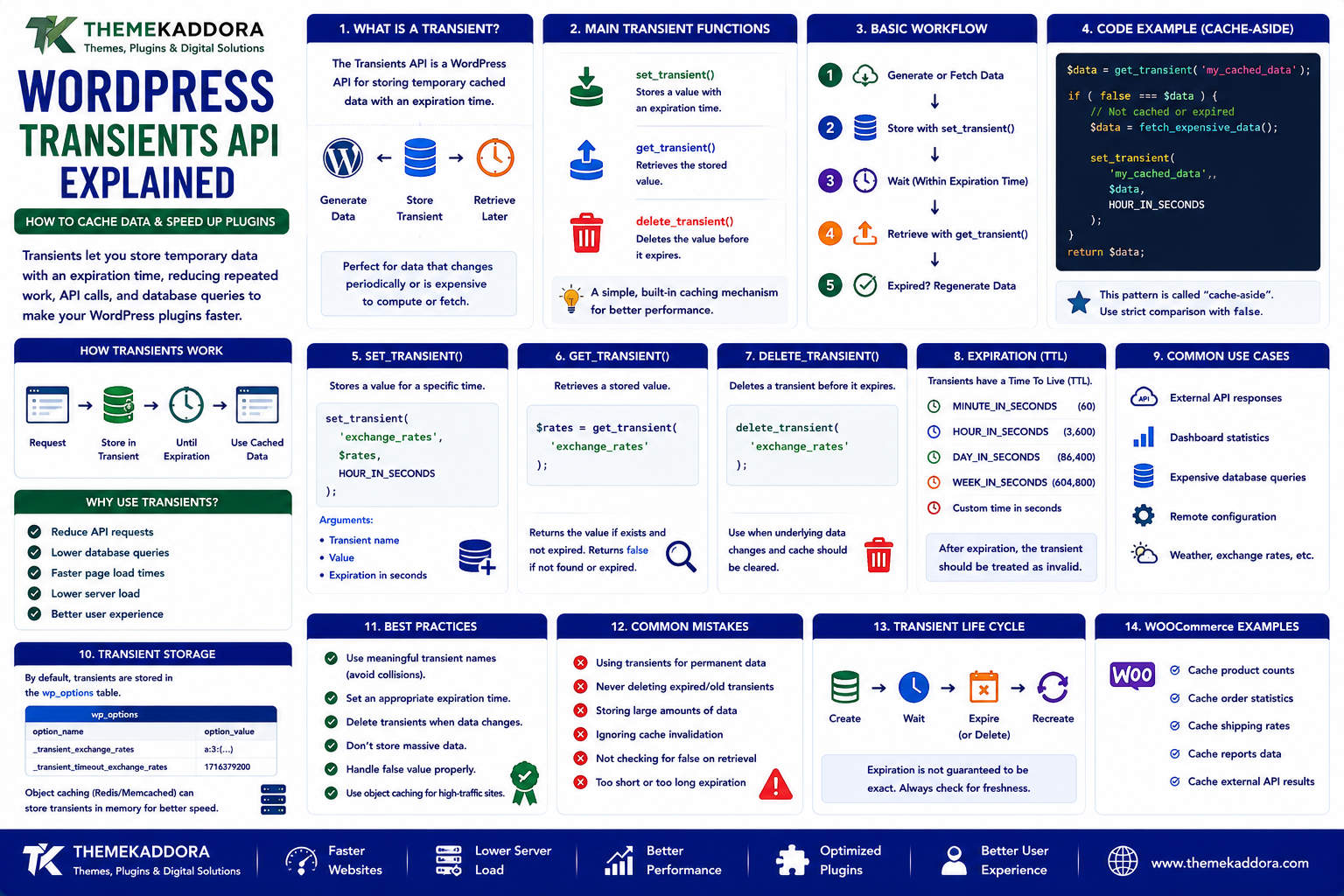
WordPress Transients API Explained: How to Cache Data and Speed Up Plugins
Introduction
WordPress plugins frequently need to retrieve or calculate information that does not need to be generated on every request.
For example, a plugin might fetch:
Exchange rates
Weather information
API responses
Analytics summaries
Product statistics
Dashboard metrics
Remote configuration
Expensive database results
Without caching, the plugin may repeat the same operation every time a user opens a page.
For example:
Visitor ↓ Plugin ↓ External API ↓ Response
Another visitor:
Visitor ↓ Plugin ↓ External API ↓ Same Response
This can create unnecessary:
API requests
Database queries
Processing time
Network traffic
Server load
WordPress provides a simple caching mechanism for temporary data called the Transients API.
Transients allow developers to store a value temporarily and retrieve it later until the defined expiration period is reached.
For example:
API Request ↓ Store Result for 1 Hour ↓ Future Requests ↓ Use Cached Result
This can make plugins faster and reduce pressure on external services.
In this guide, you'll learn what WordPress transients are, how set_transient(), get_transient(), and delete_transient() work, when to use them, how expiration works, common mistakes, WooCommerce use cases, and best practices for plugin development.
1. What Is the WordPress Transients API?
The Transients API is a WordPress API for storing temporary cached data with an expiration time.
It is particularly useful when data does not need to be recalculated or fetched on every request.
A basic workflow is:
Generate Data ↓ Store Transient ↓ Expiration Period ↓ Retrieve Later ↓ Expired? ├── No → Use Cached Data └── Yes → Generate Again
This makes transients useful for performance optimization.
2. Why WordPress Transients Are Useful
Suppose a plugin fetches information from an external API.
Without a transient:
Request 1 → API Request 2 → API Request 3 → API Request 4 → API
With a transient:
Request 1 → API → Cache Request 2 → Cache Request 3 → Cache Request 4 → Cache
This can significantly reduce repeated work when many visitors request the same information.
Transients are particularly useful for data that:
Changes periodically
Is expensive to calculate
Comes from a remote API
Does not need real-time accuracy
3. The Three Main Transient Functions
WordPress provides three core functions developers commonly use.
set_transient()
Stores a temporary value.
get_transient()
Retrieves the value.
delete_transient()
Removes the value before expiration.
A simple pattern looks like:
$data = get_transient( 'my_cached_data' ); if ( false === $data ) { $data = fetch_expensive_data(); set_transient( 'my_cached_data', $data, HOUR_IN_SECONDS ); } return $data;
This pattern is often called cache-aside behavior.
4. What Does set_transient() Do?
set_transient() stores a value for a specified amount of time.
For example:
set_transient( 'kaddora_exchange_rates', $rates, HOUR_IN_SECONDS );
The arguments represent:
Transient name
Value
Expiration in seconds
Examples of useful expiration constants include:
MINUTE_IN_SECONDS HOUR_IN_SECONDS DAY_IN_SECONDS WEEK_IN_SECONDS
Using WordPress time constants makes code easier to understand than using unexplained numeric values.
5. What Does get_transient() Do?
get_transient() retrieves a previously stored transient.
For example:
$rates = get_transient( 'kaddora_exchange_rates' );
If the transient exists and has not expired, the cached value is returned.
If the transient is unavailable or expired, WordPress returns false.
This makes the common pattern:
$value = get_transient( 'my_data' ); if ( false === $value ) { // Rebuild or fetch data. }
The strict comparison to false is important because a valid cached value could potentially be 0, an empty string, or another false-like value.
6. What Does delete_transient() Do?
delete_transient() removes a transient before its expiration time.
For example:
delete_transient( 'kaddora_exchange_rates' );
This is useful when the underlying data changes.
For example:
Product Updated ↓ Delete Cached Product Data ↓ Next Request ↓ Regenerate Cache
Explicit invalidation can prevent stale data from remaining available longer than necessary.
7. Transient Expiration
A transient can have an expiration time.
For example:
set_transient( 'daily_stats', $stats, DAY_IN_SECONDS );
The cached value should no longer be considered valid after the expiration period.
However, developers should not assume that every transient behaves like a permanently maintained in-memory cache.
Transients are intended for temporary data, and WordPress may remove them before their nominal expiration in some storage environments.
Therefore, your application should always be able to regenerate the cached value.
8. Transients Are Not the Source of Truth
This is one of the most important rules.
A transient should contain data that can be recreated.
For example:
Database → Source of Truth Transient → Temporary Cache
Good transient candidates include:
API responses
Calculated statistics
Temporary query results
Remote configuration
Expensive derived data
Do not use transients as the only permanent storage location for critical business records.
If the transient disappears, the application should still be able to reconstruct the information.
9. Transients and External API Requests
One of the most useful transient use cases is external API caching.
Suppose a plugin requests data from a remote service.
Without caching:
Every Page Load ↓ Remote API
With a transient:
First Request ↓ Remote API ↓ Store Transient Later Requests ↓ Transient
This can reduce:
API usage
Remote latency
Rate-limit risk
Server processing
Dependence on external services
For APIs with usage limits, caching can be particularly valuable.
10. Transients and Rate Limits
External APIs often limit how frequently clients can make requests.
For example:
API Limit 100 Requests / Hour
If your WordPress plugin requests data on every page view, the limit may be reached quickly.
Instead:
First Request ↓ API ↓ Cache for 1 Hour Next 500 Requests ↓ Cache
The exact expiration should be based on:
API rate limits
Data freshness
User expectations
Business requirements
Do not cache data longer than the application can reasonably tolerate.
11. Transients and Expensive Database Queries
Transients can also cache the result of expensive database operations.
For example:
$stats = get_transient( 'sales_dashboard_stats' ); if ( false === $stats ) { $stats = calculate_sales_statistics(); set_transient( 'sales_dashboard_stats', $stats, 15 * MINUTE_IN_SECONDS ); }
This can reduce the frequency of expensive calculations.
It is particularly useful for:
Dashboards
Reports
Analytics
Aggregations
Statistics
However, slow database queries should still be optimized where possible.
Caching should not hide an inefficient query forever.
12. Transients and WooCommerce
WooCommerce plugins can use transients for temporary data such as:
External shipping rates
Currency conversion results
Product analytics
Recommendation results
Remote inventory data
Dashboard summaries
For example:
Shipping API ↓ Store Rates in Transient ↓ Checkout Requests ↓ Reuse Cached Rates
The cache should be invalidated when shipping conditions, products, destinations, or other relevant inputs change.
Do not use overly broad cache keys for customer-specific calculations.
13. Dynamic Cache Keys
A common transient mistake is using the same key for data that differs by context.
Suppose a plugin calculates a result based on:
Customer Currency Country Product
A single key such as:
shipping_rate
could cause different customers to receive the same result.
Instead, the key should reflect the relevant context.
For example:
shipping_rate_customer_100_currency_usd shipping_rate_customer_200_currency_eur
The exact naming strategy depends on the application.
The important principle is:
A cache key must uniquely represent the data being cached.
14. Transient Key Naming
Transient names should be:
Descriptive
Consistent
Unique to the plugin
Based on stable identifiers
For example:
kaddora_api_products kaddora_exchange_rates kaddora_dashboard_stats
Avoid vague names such as:
data cache result temp
Namespacing helps avoid collisions with other plugins.
15. Transient Size Considerations
Transients are not a reason to cache unlimited amounts of data.
Caching extremely large arrays or objects can increase:
Database storage
Memory usage
Serialization overhead
Network overhead for persistent object caches
Instead of caching an enormous dataset:
1 Million Records ↓ One Huge Transient
consider:
Smaller caches
Pagination
Partial results
More focused queries
Alternative storage strategies
The correct approach depends on the application.
16. Transients and Persistent Object Cache
When a persistent object-cache backend is available, WordPress can store transients through the caching infrastructure.
A conceptual architecture may look like:
WordPress ↓ Transients API ↓ Object Cache ↓ Redis / Memcached
In other environments, transients may use the WordPress database.
This means developers should use the Transients API rather than assuming a specific underlying storage implementation.
The API provides the abstraction.
17. Transients vs Options
WordPress also provides the Options API.
These systems should not be treated as interchangeable.
Options
Generally used for persistent configuration or settings.
Example:
Plugin Settings API Key Feature Configuration
Transients
Used for temporary cached information.
Example:
Remote API Result Calculated Statistics Temporary Cache
A simple rule is:
Options store configuration.
Transients store temporary cached data.
The actual design can vary depending on requirements.
18. Transients vs Object Cache
These also solve different problems.
Transients
Provide a WordPress-level API for temporary values with expiration.
Object Cache
Provides caching of WordPress objects and application data.
Conceptually:
Plugin ↓ Transients API ↓ Caching Layer
A persistent object-cache backend may improve how transient data is stored and retrieved in some configurations.
Developers should not assume that transients and object caching are identical concepts.
19. Cache Invalidation With Transients
Suppose a plugin caches:
product_statistics
Then an event occurs:
Product Updated
The plugin may need to invalidate the cached value:
delete_transient( 'product_statistics' );
This is often better than waiting for the entire expiration period if the data is now known to be outdated.
A good caching design identifies:
What changes the data?
When should the cache be cleared?
What should trigger regeneration?
20. Transient Expiration vs Invalidation
These are different concepts.
Expiration
The cache becomes unavailable or invalid after a configured time.
Cache ↓ Expires in 1 Hour
Invalidation
The application deliberately removes the cache because the source data changed.
Data Changed ↓ Delete Cache
A strong design often uses both.
For example:
Cache for 1 Hour + Invalidate Immediately When Data Changes
This balances performance with data freshness.
21. Race Conditions With Transients
Suppose many requests arrive at the same time after a transient expires.
They may all see:
Cache Miss
and then all perform the expensive operation.
For example:
100 Requests ↓ 100 Cache Misses ↓ 100 API Calls
This can create a temporary load spike.
For expensive operations, consider techniques such as:
Locks
Staggered regeneration
Background refresh
Request coalescing
The implementation depends on workload and infrastructure.
22. Transients and Background Processing
Instead of rebuilding a large transient during a visitor request, a plugin can refresh it using a background task.
For example:
Scheduled Job ↓ Fetch API Data ↓ Update Transient
Then visitors can read from the cache:
Visitor ↓ Transient ↓ Fast Response
This can be particularly useful for:
Large reports
Analytics
API synchronization
Product feeds
External service data
23. Transients and Error Handling
What happens if the external API fails?
A robust plugin should consider whether a previously cached value can temporarily be used.
For example:
Refresh Cache ↓ API Failure ↓ Existing Cached Data? ├── Yes → Use Older Data └── No → Graceful Error
This is sometimes called stale-while-error behavior.
Whether it is appropriate depends on the importance and freshness requirements of the data.
24. Transients and External API Timeouts
A transient does not replace network timeout handling.
An external request should use appropriate:
Connection timeout
Response timeout
Error handling
Retry limits
For example:
No Cache ↓ API Request ↓ Timeout after defined limit ↓ Fallback
Without timeouts, a cache miss could still cause users to wait too long for a remote service.
25. Cleaning Up Transients
Transients are temporary by design, but developers should still understand their cleanup behavior.
Expired transients can be cleaned up by WordPress and caching/storage mechanisms.
However, plugin developers should not create huge numbers of unnecessary transient keys.
Avoid patterns such as:
transient_user_1 transient_user_2 transient_user_3 ... transient_user_1000000
when a more efficient caching or data-storage design would be appropriate.
26. Transients and Multisite
WordPress Multisite introduces additional considerations.
Developers should understand whether data is:
Site-specific
Network-wide
Shared across a network
Transient behavior and storage should be designed according to the data's scope.
For example:
Site A → Cache A Site B → Cache B
should not accidentally share values when the data is site-specific.
Multisite-aware plugins should test transient behavior across multiple sites.
27. Transients and Plugin Development
For WordPress plugins, transients are useful for:
API caching
Dashboard statistics
Temporary calculations
Remote configuration
Product recommendations
Analytics
Expensive queries
A good plugin should:
Use unique transient names.
Choose reasonable expiration periods.
Handle cache misses.
Handle API failures.
Invalidate data when necessary.
Avoid huge cached values.
Avoid duplicate regeneration.
Protect private data.
Caching should support the plugin rather than become a source of unpredictable behavior.
28. Common WordPress Transient Mistakes
Avoid these problems.
Using Transients as Permanent Storage
They are intended for temporary data.
Poor Cache Keys
Different contexts may accidentally share a cached result.
No Expiration Strategy
Temporary data should have an appropriate lifetime.
Ignoring Invalidation
Users may receive stale information.
Huge Transients
Large cached objects can consume significant resources.
No API Timeouts
Cache misses can become slow requests.
No Error Handling
External failures can break the page.
Regenerating the Same Cache Repeatedly
Concurrent requests can create unnecessary load.
29. WordPress Transients Best Practices
A strong implementation should:
Use descriptive plugin-specific keys.
Cache only data that can be regenerated.
Set appropriate expiration periods.
Invalidate data when underlying information changes.
Include relevant context in cache keys.
Use API timeouts.
Handle cache misses safely.
Avoid storing sensitive information unnecessarily.
Keep cached values reasonably small.
Consider background refresh for expensive data.
Monitor performance.
Test with persistent object caching where applicable.
The goal is to make repeated operations cheaper without compromising correctness.
30. A Practical Transient Workflow
A typical pattern looks like:
Request ↓ Generate Cache Key ↓ Check Transient ↓ ┌───────────────┐ │ Cache Exists? │ └───────┬───────┘ │ ┌───┴───┐ YES NO ↓ ↓ Return Generate Value Data ↓ Store Transient ↓ Return Data
If the underlying data changes:
Data Changed ↓ Delete Transient ↓ Next Request ↓ Regenerate
This simple architecture solves many common caching problems.
31. When Should You Use the Transients API?
Use transients when:
Data is temporary.
Data can be regenerated.
A calculation is expensive.
External API requests should be reduced.
Data does not need to be perfectly real-time.
A result is requested frequently.
Avoid using them as the primary storage mechanism for:
Permanent business records
Critical transactions
Irreplaceable data
Data that must never disappear unexpectedly
Choose storage according to data importance and lifecycle.
Why Choose ThemeKaddora?
At ThemeKaddora, we believe WordPress plugins should solve performance problems without creating new ones.
Transients can help WordPress products reduce:
External API calls
Repeated calculations
Expensive database operations
Unnecessary processing
They can be particularly useful in:
WooCommerce plugins
Analytics plugins
AI integrations
Business automation tools
SaaS-connected WordPress products
ThemeKaddora focuses on practical WordPress, WooCommerce, SaaS, AI, automation, and digital solutions designed around performance, security, compatibility, and maintainability.
Conclusion
The WordPress Transients API is a simple but powerful tool for caching temporary data.
It can improve plugin and website performance by reducing repeated:
Database queries
API requests
Calculations
Remote operations
The three most important functions are:
set_transient() get_transient() delete_transient()
But successful transient usage requires more than knowing these functions.
Developers should also consider:
Expiration
Cache invalidation
Cache keys
Data scope
Concurrency
API timeouts
Error handling
Security
Memory and storage usage
The best use of a transient is to cache information that is expensive to generate but safe to recreate when the cache disappears.
When used correctly, transients can make WordPress plugins faster, reduce external service usage, and create a smoother experience for users.
Frequently Asked Questions
1. What is the WordPress Transients API?
It is a WordPress API for storing temporary cached values with an optional expiration period.
2. What is set_transient()?
set_transient() stores a temporary value with a name, value, and expiration time.
3. What is get_transient()?
get_transient() retrieves a stored transient. If the value is unavailable or expired, it returns false.
4. What is delete_transient()?
It removes a transient before its normal expiration time.
5. Are transients permanent storage?
No. Transients are intended for temporary or cacheable data that can be regenerated.
6. Can transients cache API responses?
Yes. They are commonly used to reduce repeated external API requests.
7. Are transients the same as object caching?
No. The Transients API provides a WordPress mechanism for temporary data, while object caching is a broader caching system for application data. Persistent object-cache backends can be involved in how transients are stored.
8. Can transients improve WooCommerce performance?
They can help cache expensive calculations and remote data, but caching must be designed carefully around dynamic customer and product information.
9. Can a transient disappear before its expiration time?
Yes. Applications should always be able to regenerate transient data rather than assuming it will exist permanently until the configured expiration.
10. Why choose Themekaddora?
Themekaddora provides lightweight, responsive, SEO-friendly WordPress themes with fast performance, WooCommerce compatibility, flexible customization, accessibility-conscious design, modern templates, regular updates, and professional support—providing a strong foundation for businesses building digital products and product-focused websites.
Comments (0)