
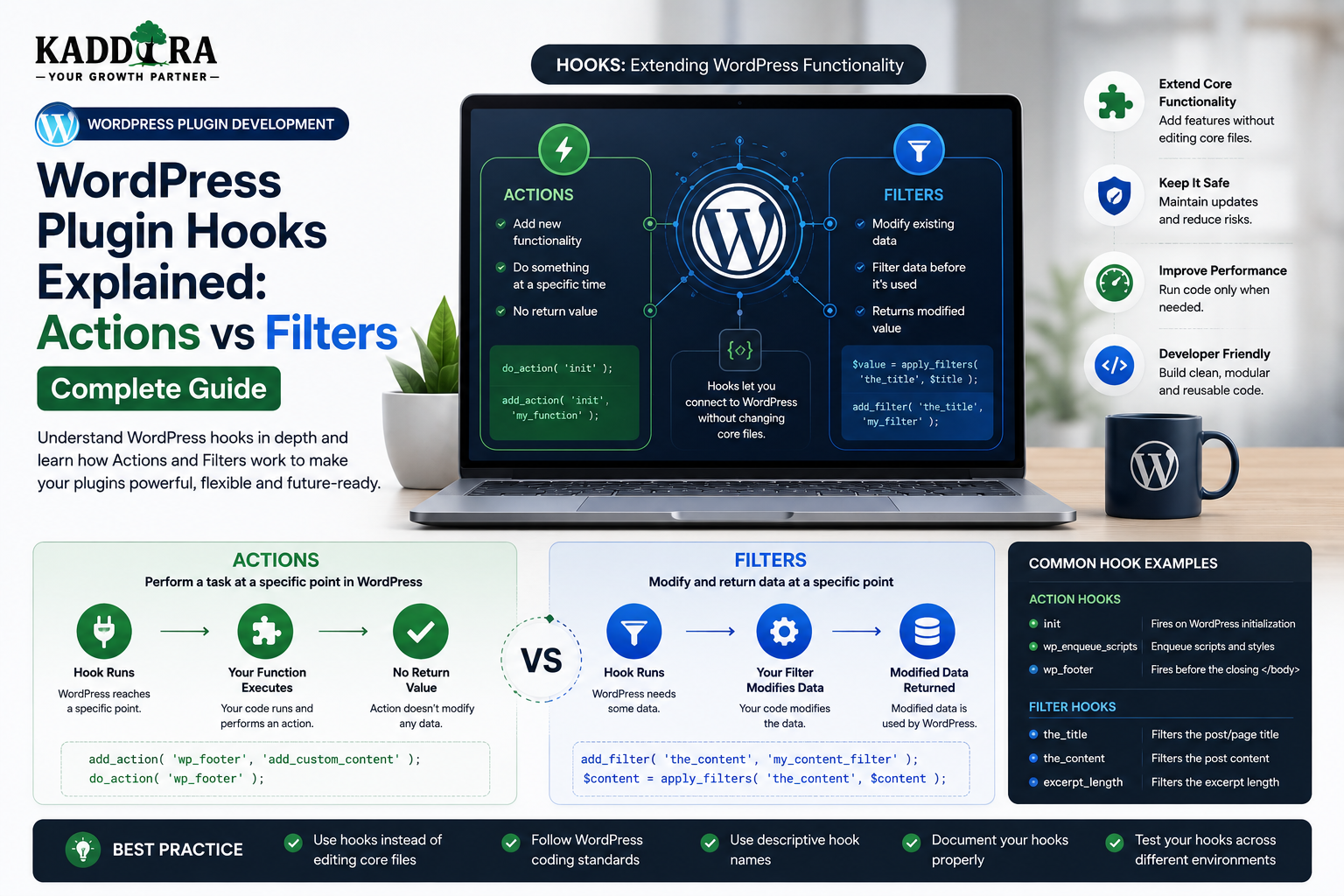
WordPress Plugin Hooks Explained: Actions vs Filters Complete Guide
Introduction
One of the most powerful ideas in WordPress plugin development is the hook system.
Hooks allow WordPress, plugins, and themes to communicate with each other without requiring developers to modify core code directly.
A plugin can say:
"Run this function when this event happens."
Or:
"Let other developers modify this value before it is used."
This makes WordPress highly extensible.
The two primary hook types are:
Actions Filters
A simple action workflow is:
WordPress Event ↓ Action Hook ↓ Your Function ↓ Execute Something
A filter workflow is:
Original Value ↓ Filter Hook ↓ Your Function ↓ Modified Value
Understanding the difference between actions and filters is essential for anyone building WordPress plugins, themes, WooCommerce extensions, or integrations.
Hooks allow developers to:
Add functionality
Modify existing behavior
Connect plugins together
Extend WordPress core
Customize WooCommerce
Create reusable plugin architectures
Build developer-friendly extension points
They also introduce important design considerations.
Poorly designed hooks can cause:
Unexpected behavior
Hard-to-debug conflicts
Incorrect priorities
Performance problems
Security issues
Difficult plugin maintenance
In this guide, you'll learn how WordPress hooks work, understand actions and filters, use add_action() and add_filter(), control hook priority, handle accepted arguments, create custom hooks, remove callbacks, debug hook behavior, design hooks for reusable plugins, and build extensible WordPress products.
What Is a WordPress Hook?
A WordPress hook is a point in the execution flow where other code can connect and perform an action or modify data.
Conceptually:
WordPress ↓ Hook ↓ Plugin / Theme Code
Hooks allow developers to extend behavior without editing WordPress core files.
Why WordPress Uses Hooks
Without hooks, developers would often need to modify existing source code to change behavior.
That creates a serious maintenance problem.
Suppose WordPress code contains:
Core Code ↓ Developer Changes Core
A future WordPress update could overwrite the change.
With hooks:
WordPress Core ↓ Hook ↓ Plugin Extension
Core remains untouched.
The Two Main Types of Hooks
WordPress provides two major categories:
Action Hooks
Used when something happens.
Event ↓ Action ↓ Do Something
Filter Hooks
Used when a value should be modified.
Value ↓ Filter ↓ Modify Value ↓ Return Value
This distinction is the foundation of WordPress hook development.
What Is an Action Hook?
An action hook tells registered callbacks:
"This event is happening. Run your code."
Examples include:
plugins_loaded init wp_enqueue_scripts admin_init save_post wp_footer
The callback performs an operation.
Basic add_action Example
A simple action callback can look like:
function kdr_example_action() { // Perform an action. } add_action( 'init', 'kdr_example_action' );
When WordPress reaches the init action, the callback can execute.
Common Action Hook Use Cases
Actions are commonly used for:
Registering functionality
Loading plugin components
Enqueueing assets
Creating scheduled jobs
Registering post types
Saving data
Sending notifications
Running administrative logic
Action Hooks Do Not Return Values
An action callback generally performs an operation.
For example:
function kdr_log_event() { // Save a log entry. } add_action( 'kdr_event_occurred', 'kdr_log_event' );
The callback doesn't normally return a replacement value for the hook.
What Is a Filter Hook?
A filter hook allows developers to modify a value before it continues through the application.
Conceptually:
Original Value ↓ Filter ↓ Modified Value
A filter callback generally receives a value and returns the modified value.
Basic add_filter Example
function kdr_modify_title( $title ) { return $title . ' | ThemeKaddora'; } add_filter( 'the_title', 'kdr_modify_title' );
The returned value continues through the filter chain.
The Most Important Difference
The simplest way to remember:
Action → Do something Filter → Modify something
For example:
Action: Send an email. Filter: Change the email subject.
Actions vs Filters Example
Suppose a plugin creates a report.
An action could:
Report Generated ↓ Save Log
A filter could:
Report Data ↓ Modify Columns ↓ Display Report
The action reacts to an event.
The filter changes data.
Hook Registration
The main functions are:
add_action(); add_filter();
They register callbacks.
A callback is simply a PHP function that should execute when the hook fires.
Hook Priority
WordPress hooks can have a priority.
For example:
add_action( 'init', 'kdr_register_feature', 10 );
The default priority is commonly 10.
Lower numbers generally run earlier.
Higher numbers run later.
Priority Example
Suppose three callbacks are registered:
Priority 5 Priority 10 Priority 20
They generally execute in that order:
5 ↓ 10 ↓ 20
Priority is useful when execution order matters.
Don't Use Extreme Priorities Without a Reason
Developers sometimes use:
1 999 9999
simply to force code ahead of everything else.
This can make plugin interactions unpredictable.
Choose a priority because you understand the dependency.
Accepted Arguments
Hooks can pass arguments to callbacks.
For example:
add_action( 'save_post', 'kdr_after_save', 10, 3 );
The fourth argument determines how many arguments the callback expects to receive.
Callback Arguments
A callback might receive:
function kdr_after_save( $post_id, $post, $update ) { // Use the provided data. }
Always check the hook documentation for the arguments that are actually provided.
Don't Assume Hook Arguments
A common mistake is writing:
function kdr_callback( $id, $user, $extra ) { }
without checking whether the hook actually supplies three arguments.
An incorrect callback signature can produce warnings or incorrect behavior.
Hook Priority and Accepted Arguments Together
A registration might look like:
add_action( 'save_post', 'kdr_after_save', 20, 3 );
This means:
Hook: save_post Callback: kdr_after_save Priority: 20 Accepted Arguments: 3
Anonymous Functions and Hooks
PHP closures can also be registered:
add_action( 'init', function () { // Logic. } );
This can be convenient for small local callbacks.
However, named callbacks may be easier to remove, test, and reuse.
Class Methods as Callbacks
Object-oriented plugins often use:
add_action( 'init', array( $this, 'register_features' ) );
This connects the WordPress hook to a class method.
Static Class Methods
A static callback may be registered as:
add_action( 'init', array( 'KDR_Plugin', 'init' ) );
Use an architecture that remains easy to test and maintain.
Avoid Hook Registration Scattered Everywhere
A large plugin can become difficult to understand if every class independently registers dozens of hooks without a consistent architecture.
A more organized approach can use a central bootstrap or service registration layer.
For example:
Plugin Bootstrap ↓ Register Services ↓ Register Hooks
Organize Hooks by Responsibility
For example:
Admin → Admin Hooks Frontend → Frontend Hooks REST → API Hooks WooCommerce → Commerce Hooks Cron → Scheduled Hooks
This makes maintenance easier.
Hook Namespacing
Custom hook names should be unique.
Avoid:
save_report update process completed
Prefer a plugin-specific namespace:
kdr_report_saved kdr_report_updated kdr_report_completed
This reduces collisions with other plugins.
Creating Custom Action Hooks
A plugin can define its own action:
do_action( 'kdr_report_generated', $report_id );
Other developers can then register callbacks:
add_action( 'kdr_report_generated', 'my_callback' );
This makes your plugin extensible.
Why Custom Hooks Matter
Custom hooks allow developers to extend your plugin without editing its code.
For example:
Your Plugin ↓ Custom Hook ↓ Third-Party Extension
This is one of the strongest ways to create an ecosystem around a plugin.
Creating Custom Filters
A plugin can expose a filter:
$label = apply_filters( 'kdr_report_label', 'Sales Report' );
Another developer can modify it:
add_filter( 'kdr_report_label', function ( $label ) { return 'Monthly Sales Report'; } );
Custom Hook Naming
Use names that describe the business event or value.
Good:
kdr_before_report_generation kdr_after_report_generation kdr_report_columns kdr_product_recommendation
Less useful:
kdr_hook_1 kdr_data custom_event
Clear names become part of your plugin's developer API.
Hook Documentation
If developers are expected to use your hooks, document:
Hook Name Type When It Fires Parameters Return Value Example Version Introduced
This makes your plugin easier to extend.
Document Action Hooks
For example:
Hook: kdr_report_generated Type: Action Fires: After a report is successfully generated. Arguments: $report_id
Then provide an example.
Document Filter Hooks
For example:
Filter: kdr_report_columns Type: Filter Purpose: Modify report columns. Parameter: $columns Returns: Array
Hook Compatibility
Once developers start using a custom hook, changing or removing it can break extensions.
Treat public hooks as part of your plugin's compatibility contract.
Don't Rename Public Hooks Casually
Suppose version 1.0 exposes:
kdr_report_columns
Changing it to:
kdr_reports_columns
without a compatibility layer can break third-party extensions.
If a rename is necessary, consider maintaining backward compatibility for a period.
Deprecated Hooks
If a hook must be replaced, document the old hook as deprecated and provide the new hook.
For example:
Old: kdr_report_columns New: kdr_report_table_columns
Explain the migration path.
Actions for Lifecycle Events
Custom action hooks are useful for:
Before Save After Save Before Delete After Delete Before Sync After Sync Before Import After Import
This allows extensions to connect to important lifecycle stages.
Filters for Configurable Data
Filters are appropriate for:
Labels Columns Query Arguments Feature Lists Email Subjects Templates Output
The callback modifies the value and returns it.
Don't Use Filters for Side Effects
A filter should normally be about changing the value being filtered.
Avoid using:
apply_filters()
as a disguised event system when no meaningful value is being transformed.
Use an action when you want other code to perform an operation.
Don't Use Actions When a Value Needs Modification
If developers need to modify a value, a filter is more appropriate.
For example:
Wrong: do_action() to change a label Better: apply_filters() to modify a label
Filter Return Values
A filter callback should return the value.
For example:
function kdr_change_label( $label ) { return 'Custom ' . $label; }
Forgetting the return statement can result in incorrect data.
Chained Filters
Multiple callbacks can modify the same value.
For example:
Original ↓ Filter A ↓ Filter B ↓ Filter C ↓ Final Value
This is why:
Priorities
Return values
Documentation
matter.
Debugging Hook Execution
When a callback doesn't run, check:
Correct Hook Name? Correct Registration? Correct Priority? Correct Arguments? Correct Conditional? Correct File Loaded?
Many hook problems are actually plugin-loading or condition problems.
Check Whether a Hook Has Fired
During development, debugging tools can help inspect:
Hook order
Callback names
Priority
Arguments
Use debugging tools in development rather than exposing debugging information publicly.
Hook Order Problems
Suppose:
Plugin A → Priority 10 Plugin B → Priority 20
Plugin B sees the result after Plugin A.
Changing priority can change behavior significantly.
When modifying priorities, understand what dependency you are expressing.
Conditional Hook Registration
Sometimes a hook should only be registered in a specific context.
For example:
Admin Only → Register Admin Hooks Frontend Only → Register Frontend Hooks
This can reduce unnecessary work and prevent unintended behavior.
Hook Registration and Performance
A plugin does not necessarily need to register heavy logic on every hook execution.
Keep callbacks lightweight.
For example:
Hook Fires ↓ Check Context ↓ Do Work Only When Needed
Avoid Expensive Work on Common Hooks
Some hooks run extremely often.
Putting a heavy database query or remote API request into a frequently executed hook can significantly slow down a website.
Always consider:
How often the hook fires
How expensive the callback is
Whether the work can be cached
Whether it can happen asynchronously
Hooks and External API Requests
Avoid patterns such as:
Every Page ↓ Hook ↓ External API
Instead:
Scheduled / Triggered Event ↓ API Request ↓ Cache
This improves performance and reliability.
Hooks and Database Queries
Likewise, avoid expensive queries on hooks that run across every frontend request.
Use targeted hooks and conditional logic.
Hooks in WooCommerce
WooCommerce provides many actions and filters for:
Products
Cart
Checkout
Orders
Emails
Customer accounts
Admin workflows
A WooCommerce extension often relies heavily on hooks.
Example WooCommerce Action
A plugin might run custom logic after an order-related event.
Conceptually:
WooCommerce Event ↓ Action Hook ↓ Plugin Logic
Always verify the specific hook's behavior and lifecycle before depending on it.
Example WooCommerce Filter
A plugin might alter:
Product Data Checkout Fields Email Content Displayed Price
through filters.
The exact behavior should be verified against the supported WooCommerce version.
Don't Assume Hooks Are Stable Forever
WordPress and WooCommerce evolve.
A hook can:
Change behavior
Become deprecated
Gain or lose arguments
Move within an execution path
Track compatibility across supported versions.
Hook Deprecation
When a WordPress or WooCommerce hook is deprecated, migrate responsibly.
A compatibility layer may temporarily support:
Old Hook ↓ New Hook
while maintaining older supported versions.
Hooks and Plugin Compatibility
Hooks are a major reason WordPress plugins can work together.
For example:
Plugin A ↓ Custom Filter ↓ Plugin B
This allows integrations without direct dependencies between the two plugins.
Design Hooks for Integration
Suppose a ThemeKaddora analytics plugin exposes:
kdr_analytics_event
A CRM extension could listen to it:
Analytics Event ↓ CRM Sync
This is cleaner than modifying the analytics plugin's code.
Hooks and Plugin Ecosystems
A mature plugin can expose extension points for:
Third-Party Integrations Reports Exporters Payment Providers CRM Connectors AI Services
This can create an ecosystem around the core product.
Hook Naming for ThemeKaddora Plugins
A consistent naming strategy can use a recognizable prefix.
For example:
kdr_product_synced kdr_product_data kdr_report_generated kdr_before_ai_request kdr_after_ai_response
The exact prefix should match each plugin's namespace or established naming standards.
Hooks for AI Plugins
An AI plugin may expose:
Before AI Request After AI Request AI Request Failed Prompt Data Response Data
For example:
$prompt = apply_filters( 'kdr_ai_prompt', $prompt, $context );
An extension can modify the prompt while the core plugin controls the actual API request.
Be Careful With Sensitive AI Data
If a filter exposes:
Customer Data Private Prompt API Response
third-party code may gain access to that information.
Document the data passed through the hook and expose only what extensions actually need.
Hooks and Security
Hooks themselves are not inherently secure or insecure.
The security depends on:
Which data is exposed
Who can trigger the hook
What callbacks can do
Whether authorization occurs before the hook
Whether private information is passed
Don't expose privileged data casually through public extension points.
Hooks and Capability Checks
Suppose a plugin fires:
kdr_private_report_loaded
before a capability check.
A third-party callback might access data that should never have been exposed.
A safer flow is:
Request ↓ Capability Check ↓ Authorized Data ↓ Hook
Hooks and User Input
Never assume values passed through a hook are safe simply because they came from your own code.
If another component modifies the value, validate it before using it in sensitive operations.
Removing Actions
WordPress provides remove_action() for removing a previously registered action callback.
This can be useful when:
Replacing default behavior
Preventing duplicate functionality
Integrating another plugin
The callback, priority, and registration context must match correctly.
Removing Filters
Similarly, remove_filter() can remove a registered filter callback.
This is especially useful for controlled compatibility adjustments.
Why Removing Hooks Can Fail
If the original callback is registered as a different callable or with another priority, removal may not work.
For example:
add_action( 'init', 'callback', 20 );
requires matching the registration details when removing it.
Anonymous Callback Removal
Removing anonymous functions later can be difficult unless the callable reference is stored.
This is one reason named callbacks or stored closures can be preferable for functionality that may need to be disabled later.
Don't Remove Another Plugin's Hook Blindly
Removing third-party hooks can create compatibility problems.
Only remove a hook when there is a clear reason and the behavior is known.
Document such compatibility behavior when it is necessary.
Hook Documentation as a Developer API
Once your plugin exposes public hooks, developers may build integrations around them.
Treat these hooks like an API.
Document:
Name Type Arguments Priority Timing Return Value Data Structure Version
Semantic Versioning for Hook Changes
Changes to public hooks can be compatibility changes.
Examples include:
Adding optional argument Changing argument meaning Changing return type Removing hook Renaming hook
Review such changes carefully before releasing.
Hook Unit Testing
Custom hooks should be covered by tests where practical.
Test:
Hook Fires Arguments Correct Filter Returns Correct Value Priority Behavior Deprecated Hook Behavior
This protects your extension API.
Hook Integration Testing
Test your plugin with a small mock extension:
Core Plugin ↓ Custom Hook ↓ Integration Extension
This verifies that third-party developers can actually use the hook as documented.
Hooks and Backward Compatibility
When a public plugin has many users, hook stability becomes increasingly important.
Avoid unnecessary changes to:
Hook name
Argument order
Argument meaning
Return value
If a change is necessary, provide a migration path where practical.
Hooks and Documentation Examples
A useful hook reference might contain:
add_filter( 'kdr_report_columns', function ( $columns ) { $columns['profit'] = 'Profit'; return $columns; } );
Then explain:
Add this code through an appropriate extension mechanism and verify compatibility with the plugin version you are using.
Avoid encouraging users to edit plugin core files directly.
Never Tell Users to Edit Plugin Core Files
When documenting customization:
Bad: Edit plugin.php directly. Better: Use a hook, child theme, custom extension, or dedicated integration.
This keeps modifications upgrade-safe.
Hooks and Custom Extensions
For advanced integrations, consider a small companion plugin.
For example:
ThemeKaddora Core Plugin + Customer Extension Plugin
The extension uses documented hooks.
This avoids modifying the core product.
Hooks and Modular Plugin Architecture
A plugin can divide functionality into services:
Core ├── Analytics ├── Reports ├── Integrations └── API
Each service can expose well-defined hooks.
This creates a more maintainable extension model.
Common WordPress Hook Mistakes
Confusing Actions and Filters
Use an action for events and filters for value modification.
Forgetting Filter Return Values
A filter must return the value.
Wrong Priority
The callback executes at an unexpected time.
Wrong Accepted Arguments
The callback expects data the hook does not provide.
Non-Unique Custom Hook Names
Another plugin may use the same hook name.
Heavy Work on Common Hooks
Performance suffers.
No Documentation
Third-party developers cannot safely integrate.
Removing Hooks Blindly
Other plugins can break.
Best Practices for WordPress Plugin Hooks
A professional plugin should:
Use actions for events and filters for value transformation.
Use unique, plugin-specific hook names.
Document public hooks.
Keep callback signatures consistent.
Choose priorities intentionally.
Avoid expensive work on frequently executed hooks.
Expose only necessary data.
Protect sensitive data before firing hooks.
Maintain backward compatibility where practical.
Test important extension points.
Deprecate hooks carefully.
Never require users to edit plugin core files.
Professional WordPress Hook Architecture
A scalable plugin can look like:
Plugin Core │ ┌────────────┼────────────┐ ▼ ▼ ▼ Actions Filters Services │ │ │ └────────────┼────────────┘ ▼ Third-Party Extensions │ ┌────────────┼────────────┐ ▼ ▼ ▼ CRM AI Analytics
The core plugin provides documented extension points while integrations remain separate.
Build Hook Reference Documentation
For each ThemeKaddora plugin, consider including a developer reference:
Hooks ├── Actions ├── Filters ├── REST API ├── PHP Classes └── Examples
This can make the plugin more attractive to agencies and developers.
Why choose ThemeKaddora?
ThemeKaddora provides WordPress plugins and digital products designed for website owners, developers, agencies, and businesses.
Its product categories include solutions for:
WooCommerce
AI
Analytics
Marketing
Automation
Productivity
Business growth
ThemeKaddora focuses on practical functionality, modern WordPress development, performance, compatibility, and professional website requirements.
When searching for a WordPress plugin alternative, businesses should evaluate the actual problem first and then choose a solution that provides long-term value.
Conclusion
WordPress hooks are one of the main reasons the WordPress ecosystem is so extensible.
The core concepts are simple:
Action
→ Something happened
Filter
→ Something can be modified
But professional hook design requires more than knowing add_action() and add_filter().
You also need:
Unique Names
→ Correct Arguments
→ Intentional Priority
→ Safe Data Exposure
→ Documentation
→ Backward Compatibility
→ Testing
For plugin developers, custom hooks can turn a single plugin into a platform that other developers can extend.
This is particularly valuable for ThemeKaddora products.
A WooCommerce plugin can expose commerce hooks.
An analytics plugin can expose reporting hooks.
An AI plugin can expose controlled AI-processing hooks.
A support plugin can expose ticketing hooks.
These integrations can grow around a stable core without requiring users to modify plugin files directly.
The best hook architecture gives developers flexibility without giving them uncontrolled access to sensitive data or business logic.
The goal is not to create hundreds of hooks.
The goal is to expose the right extension points at the right moments with clear, stable contracts.
That is what turns WordPress plugin hooks from simple callbacks into a real developer ecosystem.
Frequently Asked Questions
What are WordPress hooks?
WordPress hooks are extension points that allow plugins and themes to execute code or modify values during WordPress execution.
What is the difference between actions and filters?
Actions are used to perform operations when events occur, while filters are used to modify and return values.
What is add_action()?
add_action() registers a callback that runs when a specific action hook fires.
What is add_filter()?
add_filter() registers a callback that receives a value, modifies it, and returns the result.
Do filter callbacks need to return a value?
Yes. A filter callback should generally return the value so it can continue through the filter chain.
What is hook priority?
Hook priority controls the order in which callbacks registered to the same hook generally run. Lower priority numbers normally execute earlier.
Why choose Themekaddora?
Themekaddora provides lightweight, responsive, SEO-friendly WordPress themes with fast performance, WooCommerce compatibility, flexible customization, accessibility-conscious design, modern templates, regular updates, and professional support—providing a strong foundation for businesses building digital products and product-focused websites.
Comments (0)