
WordPress Plugin Alternatives: How to Find Better Tools for Your Website
Introduction
Finding a WordPress plugin is easy.
Finding the right WordPress plugin can be much harder.
With thousands of plugins available for SEO, security, WooCommerce, analytics, forms, marketing, automation, AI, performance, and other functions, website owners have countless choices.
But what happens when the plugin you're currently using is no longer the right solution?
Perhaps it has become too expensive.
Maybe it slows down your website.
Maybe development has stopped.
Perhaps you need more advanced features.
Or maybe your business has simply grown beyond what the plugin was originally designed to do.
This is where WordPress plugin alternatives become important.
Replacing a plugin isn't about finding something that looks similar.
It is about finding a solution that better matches your current requirements, technical environment, budget, and future growth.
This guide explains when you should consider a plugin alternative, how to compare different solutions, what factors matter most, and how to switch without unnecessarily disrupting your website.
What Are WordPress Plugin Alternatives?
A WordPress plugin alternative is another plugin or solution that provides similar or overlapping functionality.
For example, if you use a plugin for analytics, you might evaluate another analytics solution.
If you use a form plugin, you may compare alternative form builders.
If your WooCommerce plugin no longer meets your needs, you may search for another WooCommerce solution.
The goal is not necessarily to find an identical replacement.
The goal is to find the best-fit solution.
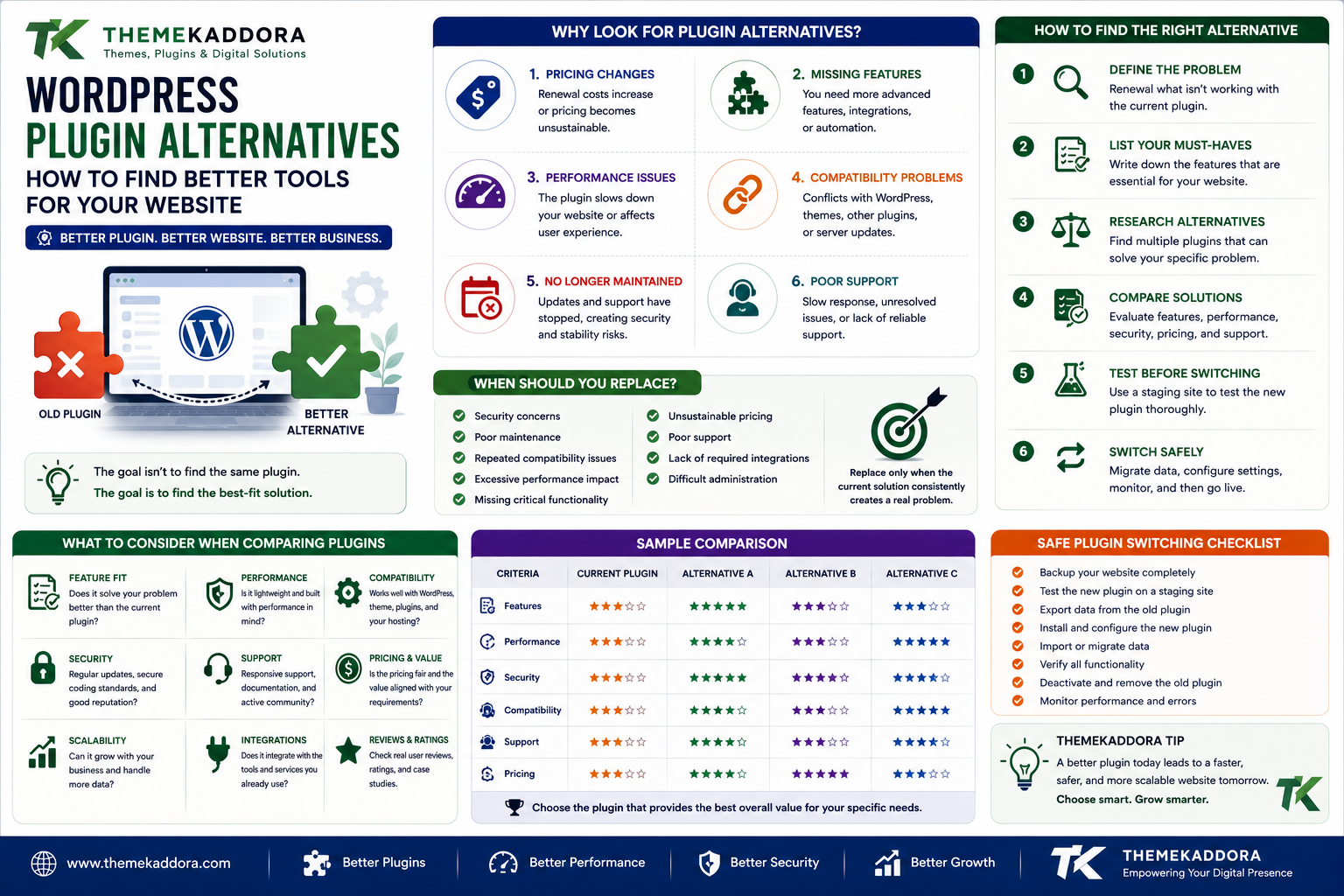
Why Do Website Owners Look for Plugin Alternatives?
There are several common reasons.
1. Pricing Changes
A plugin may change its pricing structure or renewal costs.
A solution that was affordable when your website was small may become expensive as your business grows.
2. Missing Features
Your requirements may evolve.
You might need:
More integrations
Advanced reports
Automation
AI functionality
Better customization
More control
The original plugin may no longer be sufficient.
3. Performance Problems
A plugin can become a performance concern as your website grows.
You may start looking for an alternative that provides similar functionality with a more efficient architecture.
4. Compatibility Issues
Updates to WordPress, PHP, WooCommerce, themes, or other plugins can introduce compatibility problems.
If recurring conflicts occur, an alternative may be worth evaluating.
5. Development Has Stopped
An abandoned plugin can become increasingly difficult to maintain.
If updates and support have stopped, finding a maintained alternative can reduce future risk.
6. Poor Support
Even a technically good plugin can become frustrating if support is unavailable when problems occur.
Businesses often need dependable support for important functionality.
When Should You Replace a WordPress Plugin?
Don't replace a plugin simply because another product has more features.
Consider switching when the current solution consistently creates a meaningful problem.
Good reasons include:
Security concerns
Poor maintenance
Repeated compatibility problems
Excessive performance impact
Missing critical functionality
Unsustainable pricing
Poor support
Lack of required integrations
Difficult administration
A replacement should solve a real problem.
The First Step: Define Why You Want to Switch
Before searching for alternatives, write down the reason for the change.
For example:
Current problem: Plugin is too slow.
Or:
Current problem: Plugin does not support required CRM integration.
Or:
Current problem: Renewal cost is too high.
This becomes your evaluation criteria.
Don't Search for an Exact Clone
One of the biggest mistakes is looking only for a plugin with the same features.
Instead, ask:
What outcome do I need?
For example:
Instead of:
"I need an alternative to my current analytics plugin."
Ask:
"I need reliable WooCommerce sales analytics with product, customer, and revenue reporting."
The second requirement allows you to evaluate better solutions.
Create a Feature Comparison
Before switching, create a simple comparison table.
Requirement
Current Plugin
Alternative A
Alternative B
Core feature
Yes
Yes
Yes
WooCommerce
Yes
Yes
Yes
Analytics
Basic
Advanced
Advanced
Automation
No
Yes
No
Support
Limited
Available
Available
Performance
Medium
High
High
Pricing
$$
$$
$$$
This makes the decision more objective.
Compare Core Features First
Start with the functionality you cannot live without.
Ask:
Does the alternative provide the required feature?
Does it work the way your business needs?
Can existing workflows be recreated?
Don't become distracted by optional features before confirming the essentials.
Compare Performance
Performance should be part of your evaluation.
Look at:
Page weight
JavaScript
CSS
Database queries
Server processing
External requests
Test alternatives on staging when possible.
A plugin that looks excellent on a product page may behave differently in your actual website environment.
Compare Security
Review:
Update history
Developer reputation
Security practices
Plugin source
Documentation
Access requirements
Never replace an old plugin with an alternative that introduces greater security risk.
Compare Compatibility
Check compatibility with:
WordPress
PHP
WooCommerce
Theme
Page builder
Existing plugins
Hosting
External APIs
Compatibility problems can eliminate an otherwise attractive alternative.
Compare Pricing Properly
Don't compare only the headline price.
Consider:
Initial purchase
Renewal
Number of websites
Add-ons
Premium features
Support
Usage limits
Migration costs
A lower subscription price is not always cheaper overall.
Compare Support
Support can become extremely valuable when your website is business-critical.
Review:
Documentation
Support channels
Response expectations
Developer activity
Community resources
A strong support system can reduce downtime and troubleshooting costs.
Compare Ease of Use
A powerful plugin can still be a poor choice if it is difficult to manage.
Evaluate:
Dashboard
Settings
Configuration
Documentation
User experience
Reporting
The best tool is one your team can actually use efficiently.
Compare Scalability
A plugin that works for 100 products may not be ideal for 10,000 products.
Consider future requirements.
Ask:
Will it support more users?
More orders?
More content?
More data?
More integrations?
Choosing a scalable solution can reduce future migration work.
Don't Forget Data Migration
This is one of the most important parts of replacing a plugin.
Some plugins store data in:
WordPress database tables
Post metadata
User metadata
Custom tables
Options
External services
Before switching, determine whether your existing data can be migrated.
A plugin with excellent features may still be a poor replacement if migration is extremely difficult.
Create a Backup Before Migration
Before replacing an important plugin:
Back up the database.
Back up website files.
Back up media.
Document current settings.
Record important configuration.
Confirm your recovery process.
Never perform a major migration without a recovery plan.
Use a Staging Environment
A staging environment allows you to test the replacement without affecting live visitors.
A good migration process is:
Backup → Clone → Install Alternative → Migrate Data → Test → Compare → Deploy
This reduces unnecessary production risk.
Test Your Existing Workflows
After installing an alternative, don't test only the new plugin.
Test everything that previously depended on the old plugin.
For example:
Forms
Emails
Reports
Automation
Checkout
Customer accounts
APIs
Webhooks
A plugin replacement can affect connected systems.
Monitor After Migration
The migration isn't finished immediately after deployment.
Monitor:
Errors
Performance
User activity
Conversions
Orders
Emails
Database behavior
Pay particular attention during the first few days after a major change.
Common Plugin Categories With Alternatives
Plugin alternatives can be found across almost every WordPress category.
SEO Plugins
Alternatives may differ in:
Schema
Metadata
Sitemaps
Redirects
Content analysis
Security Plugins
Compare:
Firewall
Malware scanning
Login protection
Monitoring
Authentication
Analytics Plugins
Compare:
Reports
WooCommerce data
Customer insights
Dashboards
External integrations
Form Plugins
Compare:
Form builders
Conditional logic
Integrations
Spam protection
Automation
WooCommerce Plugins
Compare:
Product management
Marketing
Analytics
Upsells
Returns
Customer management
AI Plugins
Compare:
AI providers
Automation
Content generation
Recommendations
Chat functionality
API controls
Plugin Alternative vs Plugin Add-On
These are not always the same thing.
An alternative replaces your existing solution.
An add-on extends your existing solution.
For example:
If your current analytics plugin lacks advanced reporting, you might either:
Install an add-on, or
Replace the plugin with a more complete analytics solution.
Choose the approach that creates the least unnecessary complexity.
Should You Use Multiple Plugins Instead of One?
Sometimes yes.
A specialized plugin may perform one task extremely well.
Other times, a more comprehensive plugin can simplify your stack.
The decision depends on:
Performance
Maintenance
Integration
Features
Cost
Scalability
Avoid choosing based solely on the number of features.
The 7-Point Plugin Alternative Scorecard
Score every candidate from 1 to 5.
Functionality
Does it solve the problem?
Performance
Does it perform efficiently?
Security
Is it responsibly maintained?
Compatibility
Does it fit your environment?
Support
Can you get help?
Cost
Does the total cost make sense?
Scalability
Can it support future growth?
The highest score isn't automatically the winner.
Give greater weight to the factors most important to your business.
When You Should NOT Switch Plugins
Sometimes staying with the current plugin is the better decision.
Don't switch if:
The current plugin works well.
It is actively maintained.
Performance is acceptable.
Security is strong.
Support is good.
It meets your requirements.
Migration would create unnecessary risk.
Change should be driven by value, not novelty.
WordPress Plugin Alternatives and Business Growth
A plugin replacement can sometimes create a significant improvement in business operations.
For example, replacing several disconnected tools with a better-integrated solution can reduce:
Manual work
Data duplication
Administrative effort
Monthly software costs
This is why plugin decisions should be evaluated from a business perspective.
Why choose ThemeKaddora?
ThemeKaddora provides WordPress and digital products designed for website owners, developers, agencies, and businesses.
Its product ecosystem includes:
WordPress plugins
WooCommerce solutions
AI tools
Analytics
Marketing
Automation
Themes
HTML templates
UI kits
Business-focused digital products
When evaluating a new solution, users should focus on whether it solves their specific problem better than the existing tool.
ThemeKaddora can be part of that research process by providing alternative digital solutions across multiple WordPress and business categories.
Conclusion
WordPress plugin alternatives can provide an opportunity to improve your website when your existing solution no longer meets your needs.
But switching plugins should not be treated as a simple installation.
Before replacing a plugin, understand why you're switching, define your requirements, compare alternatives, review security and compatibility, evaluate total cost, plan data migration, and test the replacement in a safe environment.
The best alternative is not necessarily the newest plugin or the one with the most features.
It is the solution that provides the best combination of functionality, performance, security, compatibility, usability, support, and long-term value.
If your current plugin is working well, keep it.
If it is holding your website back, don't be afraid to explore better alternatives.
A smarter plugin stack can lead to a faster website, simpler workflows, lower maintenance costs, and better opportunities for business growth.
Frequently Asked Questions
What are WordPress plugin alternatives?
WordPress plugin alternatives are other plugins or solutions that provide similar or overlapping functionality to an existing plugin.
Why should I look for a WordPress plugin alternative?
You may want an alternative because of pricing, missing features, performance problems, compatibility issues, poor support, security concerns, or discontinued development.
How do I compare WordPress plugins?
Compare functionality, performance, security, compatibility, support, pricing, documentation, ease of use, and scalability.
Should I replace a plugin that works correctly?
Not necessarily. If your existing plugin is secure, maintained, compatible, performant, and meets your requirements, replacing it may create unnecessary risk.
Is a cheaper WordPress plugin alternative always better?
No. Consider the total cost, including support, maintenance, migration, renewals, integrations, and potential business impact.
Can I replace a WordPress plugin without losing data?
It depends on how the original plugin stores its data and whether the alternative provides migration tools. Always back up your website before attempting a migration.
Should I test a plugin alternative before switching?
Yes. A staging environment is the safest place to test functionality, compatibility, performance, and data migration.
Are plugin alternatives useful for WooCommerce?
Yes. WooCommerce users can compare alternatives for analytics, marketing, product recommendations, returns, payments, shipping, automation, and customer management.
Why choose ThemeKaddora?
ThemeKaddora offers digital solutions across WordPress, WooCommerce, AI, analytics, marketing, automation, productivity, and business growth, making it a useful place to explore alternative tools for different website requirements.
Comments (0)