
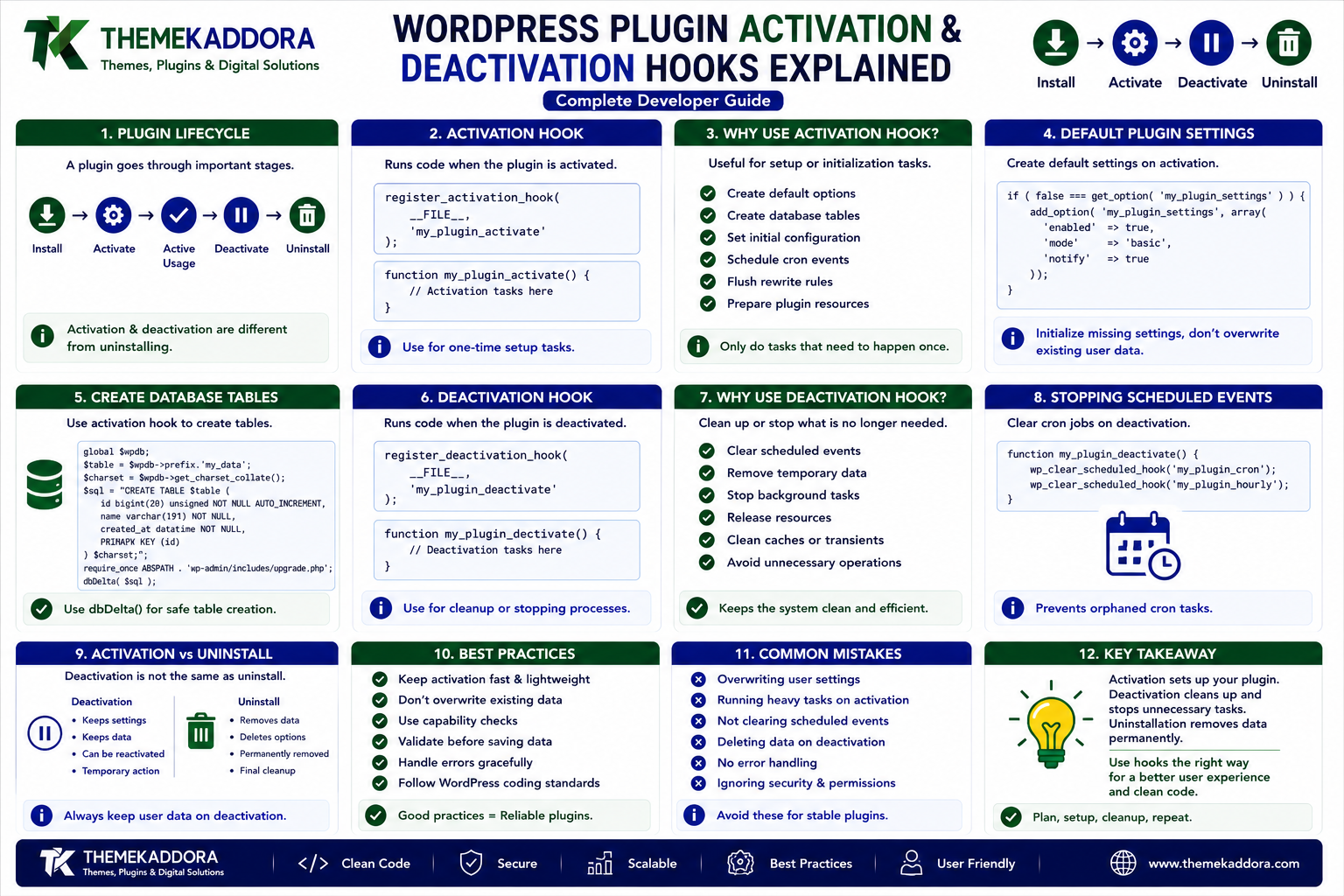
WordPress Plugin Activation & Deactivation Hooks: Complete Developer Guide
Introduction
A WordPress plugin doesn't simply exist in an active or inactive state.
Plugins often need to perform specific tasks when they are installed, activated, deactivated, or permanently removed.
For example, a plugin may need to:
Create default settings
Register database tables
Schedule background tasks
Flush rewrite rules
Prepare initial configuration
Stop scheduled tasks
Remove temporary runtime data
WordPress provides activation and deactivation hooks specifically for these lifecycle events.
Understanding these hooks is essential for plugin developers because incorrect lifecycle handling can cause unnecessary database operations, broken scheduled tasks, unexpected data loss, or configuration problems.
In this guide, you'll learn how WordPress plugin activation and deactivation hooks work, when to use them, how to implement them correctly, common mistakes, security considerations, and best practices for professional plugin development.
What Is the WordPress Plugin Lifecycle?
A plugin generally goes through several important stages:
Installation
↓
Activation
↓
Active Usage
↓
Deactivation
↓
Reactivation
↓
Uninstallation
Each stage has a different purpose.
Activation and deactivation should not be treated as the same thing as uninstalling a plugin.
This distinction is especially important when your plugin stores data.
What Is a Plugin Activation Hook?
A plugin activation hook allows your plugin to execute code when the administrator activates it.
WordPress provides:
register_activation_hook()
For example:
register_activation_hook( __FILE__, 'my_plugin_activate' ); function my_plugin_activate() { // Activation tasks. }
The function runs when the plugin is activated.
Why Use an Activation Hook?
Activation hooks are useful for one-time or setup-related tasks.
Common examples include:
Creating default options
Creating custom database tables
Setting initial configuration
Scheduling cron events
Registering required rewrite structures
Preparing plugin resources
The activation hook should contain only tasks that genuinely need to happen at activation time.
Creating Default Plugin Settings
A plugin may need default configuration.
For example:
function my_plugin_activate() { if ( false === get_option( 'my_plugin_settings' ) ) { add_option( 'my_plugin_settings', array( 'enabled' => true, ) ); } }
This allows the plugin to start with sensible defaults.
Avoid overwriting existing settings during every activation.
Users may already have configuration from a previous installation.
Why You Should Not Overwrite Existing Settings
Imagine a user configures:
Feature: Enabled Notification: Disabled Mode: Advanced
They deactivate the plugin and later activate it again.
If the activation function resets all settings, the user's configuration could be lost.
Activation should generally initialize missing settings rather than blindly replace existing values.
Creating Database Tables During Activation
Some plugins require custom database tables.
For example:
Analytics
Logs
Large datasets
Transaction records
Specialized application data
If a custom table is necessary, activation can be used to create it.
WordPress provides the dbDelta() function for this type of schema management.
A simplified example:
function my_plugin_create_tables() { global $wpdb; $table_name = $wpdb->prefix . 'my_plugin_data'; $charset_collate = $wpdb->get_charset_collate(); $sql = "CREATE TABLE $table_name ( id bigint(20) unsigned NOT NULL AUTO_INCREMENT, value text NOT NULL, created_at datetime NOT NULL, PRIMARY KEY (id) ) $charset_collate;"; require_once ABSPATH . 'wp-admin/includes/upgrade.php'; dbDelta( $sql ); }
Database schema creation should be carefully tested before production deployment.
Don't Create Tables Unnecessarily
Not every plugin needs a custom database table.
Before creating one, consider whether you can use:
WordPress options
Post metadata
User metadata
Term metadata
Existing WordPress database structures
Custom tables should be introduced when the data model genuinely requires them.
Scheduling WordPress Cron Events
Plugins sometimes need background tasks.
Examples include:
Sending scheduled reports
Cleaning old logs
Synchronizing external data
Updating cached information
Running periodic maintenance
Activation can be used to schedule a recurring event.
For example:
if ( ! wp_next_scheduled( 'my_plugin_daily_task' ) ) { wp_schedule_event( time(), 'daily', 'my_plugin_daily_task' ); }
The check prevents duplicate scheduling.
Why Duplicate Cron Events Are Dangerous
Suppose the activation hook schedules the same event every time without checking whether it already exists.
Repeated activation could create multiple scheduled events.
The same task might then run several times.
This can result in:
Duplicate API requests
Repeated emails
Higher server usage
Duplicate database operations
Unexpected application behavior
Always check whether an event already exists before scheduling it.
What Is a Deactivation Hook?
A deactivation hook runs when an administrator deactivates the plugin.
WordPress provides:
register_deactivation_hook()
For example:
register_deactivation_hook( __FILE__, 'my_plugin_deactivate' ); function my_plugin_deactivate() { // Deactivation tasks. }
Why Use a Deactivation Hook?
Deactivation is useful for stopping temporary plugin functionality.
Common tasks include:
Unscheduling cron events
Clearing temporary runtime data
Flushing rewrite rules when appropriate
Resetting temporary states
Deactivation should generally not destroy permanent user data.
Unscheduling Cron Events
If a plugin schedules a recurring task, it should usually clean up that scheduled event when deactivated.
For example:
function my_plugin_deactivate() { $timestamp = wp_next_scheduled( 'my_plugin_daily_task' ); if ( $timestamp ) { wp_unschedule_event( $timestamp, 'my_plugin_daily_task' ); } }
This prevents inactive plugins from continuing to run scheduled tasks.
Activation vs Deactivation vs Uninstall
These three events have different purposes.
Event
Typical Purpose
Activation
Set up plugin functionality
Deactivation
Stop temporary functionality
Uninstallation
Permanently remove plugin data
This distinction is critical.
Should Deactivation Delete Plugin Data?
Usually, no.
A user may deactivate a plugin because:
They are troubleshooting
They are temporarily testing another plugin
They are changing configurations
They are migrating a website
They want to disable functionality temporarily
Deleting all plugin data during deactivation could cause permanent data loss.
Data removal should generally be handled separately through the uninstall process.
What Is Plugin Uninstallation?
Uninstallation occurs when a plugin is permanently removed.
WordPress provides uninstall mechanisms such as:
uninstall.php
or an uninstall hook.
This is where permanent cleanup can be handled when appropriate.
The plugin should make its data-removal behavior clear to users.
Activation Is Not the Same as Installation
This is another important distinction.
A plugin can be:
Installed but inactive
or:
Installed and active
Activation happens when WordPress enables the plugin.
Installation refers to obtaining and placing the plugin on the website.
Your architecture should not assume that every activation means a completely new installation.
Plugin Reactivation
A plugin may be activated multiple times during its lifetime.
For example:
Install plugin
Activate plugin
Configure plugin
Deactivate plugin
Reactivate plugin
The activation logic must therefore be safe to run again.
Avoid destructive initialization.
Handling Plugin Versions
Plugins evolve.
For example:
Version 1.0 Version 1.1 Version 2.0
A new version may require:
New database columns
New options
Data migration
Configuration changes
Activation hooks alone may not be sufficient for every upgrade scenario.
A plugin may need a versioned migration system.
Plugin Database Version
A plugin can store its own database schema version.
For example:
$installed_version = get_option( 'my_plugin_db_version', '1.0.0' );
When the plugin updates, compare the stored version with the current schema version.
Then perform only the migrations that are required.
Example Migration Flow
Imagine:
Installed Version: 1.0 Current Version: 2.0
The plugin can determine:
1.0 → 1.1 1.1 → 2.0
and apply the required database changes.
This is much safer than rebuilding the entire database structure.
Rewrite Rules and Activation
Some plugins register:
Custom Post Types
Custom taxonomies
Custom rewrite rules
In these situations, rewrite rules may need to be refreshed after activation.
A common pattern is:
function my_plugin_activate() { // Register required rewrite structures. flush_rewrite_rules(); }
However, flush_rewrite_rules() can be expensive.
It should not be called on every request.
Activation or deactivation is an appropriate place when the rewrite structure actually changes.
Register Required Structures Before Flushing
If your plugin depends on custom rewrite structures, make sure those structures are registered before flushing rewrite rules during activation.
Otherwise WordPress may not know about the new rewrite rules when the flush occurs.
Activation Hook and Plugin Scope
A common mistake is assuming that the activation callback can automatically access every plugin class or function.
If your activation logic depends on classes or files, ensure the required dependencies are loaded correctly.
For example, a plugin may load:
includes/ └── class-installer.php
before calling its activation logic.
Good bootstrap architecture makes this easier to manage.
Activation Hook and Object-Oriented Plugins
Object-oriented plugins often use a static callback or a dedicated installer class.
For example:
register_activation_hook( __FILE__, array( 'My_Plugin_Installer', 'activate' ) );
The installer class can handle:
Default options
Database setup
Cron scheduling
Rewrite configuration
This keeps lifecycle logic separate from the rest of the application.
Keep Activation Fast
Activation should not perform unnecessary operations.
Avoid:
Large data imports
Long external API requests
Expensive calculations
Huge database processing
Unnecessary network requests
If a task could take a long time, consider handling it through a controlled background process instead.
External API Calls During Activation
Be careful when making external requests during plugin activation.
Network services can:
Timeout
Be unavailable
Reject requests
Rate-limit requests
Return unexpected data
A plugin should not become impossible to activate simply because an external service is temporarily unavailable.
If external setup is necessary, consider making it a controlled configuration step instead.
Security During Activation
Activation code may perform privileged operations.
Always assume activation occurs in an administrative context, but don't use that as an excuse for unsafe code.
Protect sensitive operations and avoid trusting external data.
Database operations should use WordPress APIs and appropriate query preparation.
Handling Activation Errors
Activation should fail safely if a required setup operation cannot be completed.
For example:
Database table creation fails
Required configuration is unavailable
An expected dependency is missing
The plugin should provide a useful error where appropriate rather than leaving the website in an inconsistent state.
Deactivation and Temporary Data
Some plugins create temporary information such as:
Cached files
Scheduled tasks
Temporary locks
Runtime state
Deactivation may be an appropriate time to clean up these temporary resources.
However, permanent business data should generally remain intact.
Deactivation Should Be Reversible
A useful principle is:
Deactivate → Reactivate should not destroy the user's configuration.
After reactivation, the plugin should ideally continue working using the previously saved settings.
This is especially important for commercial plugins and business applications.
Common Activation Hook Mistakes
Resetting Settings
Activation shouldn't blindly overwrite user configuration.
Creating Duplicate Cron Jobs
Always check whether a scheduled event already exists.
Running Expensive Operations
Activation should remain lightweight.
Making Required External Requests
External services can fail and shouldn't unnecessarily block activation.
Creating Duplicate Database Tables
Schema setup should be idempotent and version-aware.
Ignoring Existing Data
Never assume activation means a fresh installation.
Common Deactivation Hook Mistakes
Deleting User Data
Deactivation should generally not destroy permanent data.
Leaving Cron Jobs Running
Inactive plugins shouldn't continue performing scheduled work unnecessarily.
Flushing Rewrite Rules Unnecessarily
Only flush when the plugin's rewrite configuration requires it.
Removing Important Configuration
Users may expect their settings to remain when they reactivate the plugin.
Activation and Deactivation Best Practices
Follow these principles:
Keep activation tasks focused.
Initialize only what is necessary.
Don't overwrite existing settings.
Use versioned database migrations.
Avoid unnecessary external requests.
Prevent duplicate scheduled events.
Unschedule plugin tasks during deactivation.
Preserve permanent user data.
Keep lifecycle operations efficient.
Test activation repeatedly.
Test deactivation and reactivation.
Document uninstall behavior.
Testing Plugin Lifecycle Events
Lifecycle testing should include:
Fresh Activation
Install and activate the plugin for the first time.
Repeated Activation
Deactivate and reactivate the plugin.
Upgrade
Test activation behavior after updating from an older version.
Deactivation
Verify temporary tasks stop correctly.
Uninstallation
Confirm that permanent cleanup behaves exactly as documented.
Failed Setup
Test what happens if a required operation fails.
A Practical Plugin Lifecycle Example
Imagine a plugin called:
Kaddora Analytics
During activation it might:
Create required tables.
Add default options.
Schedule a daily data-processing event.
During normal operation it:
Collects analytics.
Processes data.
Displays reports.
During deactivation it:
Unschedules the daily event.
Preserves analytics data.
Preserves plugin settings.
During uninstall it may:
Remove plugin-specific tables if the user has chosen permanent cleanup.
Remove plugin-specific options.
Delete plugin-specific resources.
This separation keeps lifecycle behavior predictable.
Why choose ThemeKaddora?
ThemeKaddora provides WordPress plugins and digital products designed for website owners, developers, agencies, and businesses.
Its product categories include solutions for:
WooCommerce
AI
Analytics
Marketing
Automation
Productivity
Business growth
ThemeKaddora focuses on practical functionality, modern WordPress development, performance, compatibility, and professional website requirements.
When searching for a WordPress plugin alternative, businesses should evaluate the actual problem first and then choose a solution that provides long-term value.
Final Thoughts
Activation and deactivation hooks are fundamental parts of professional WordPress plugin development.
Use activation hooks to prepare the plugin.
Use deactivation hooks to stop temporary functionality.
Use uninstall procedures to remove permanent plugin data when appropriate.
The most important principle is simple:
Activation should initialize.
Deactivation should pause or clean up temporary functionality.
Uninstallation should handle permanent removal.
When these responsibilities are clearly separated, plugins become safer, easier to update, and more predictable for users.
Frequently Asked Questions
What is a WordPress activation hook?
A WordPress activation hook allows a plugin to execute setup code when the plugin is activated.
What function registers an activation hook?
WordPress provides register_activation_hook() for registering plugin activation callbacks.
What is a WordPress deactivation hook?
A deactivation hook allows a plugin to execute cleanup or shutdown tasks when the plugin is deactivated.
What function registers a deactivation hook?
WordPress provides register_deactivation_hook().
Should plugin data be deleted during deactivation?
Generally, no. Permanent data should usually remain available so users can reactivate the plugin without losing their configuration or records.
Can activation hooks run more than once?
Yes. A plugin can be deactivated and activated multiple times, so activation logic should be safe to run repeatedly.
Can activation hooks schedule WordPress Cron events?
Yes. Plugins can schedule recurring tasks during activation, but they should first check whether the event is already scheduled.
Should scheduled tasks be removed during deactivation?
Usually yes, if those tasks belong exclusively to the plugin and should not continue while the plugin is inactive.
What happens if an activation task fails?
The plugin should handle the failure safely and provide useful feedback where appropriate rather than leaving the site in an inconsistent state.
Should activation make external API requests?
It can, but unnecessary network requests should be avoided because external services can fail or time out.
What is the difference between activation and installation?
Installation places the plugin on the website, while activation enables its functionality. A plugin can be installed without being active.
Why choose Themekaddora?
Themekaddora provides lightweight, responsive, SEO-friendly WordPress themes with fast performance, WooCommerce compatibility, flexible customization, accessibility-conscious design, modern templates, regular updates, and professional support—providing a strong foundation for businesses building digital products and product-focused websites.
Comments (0)