
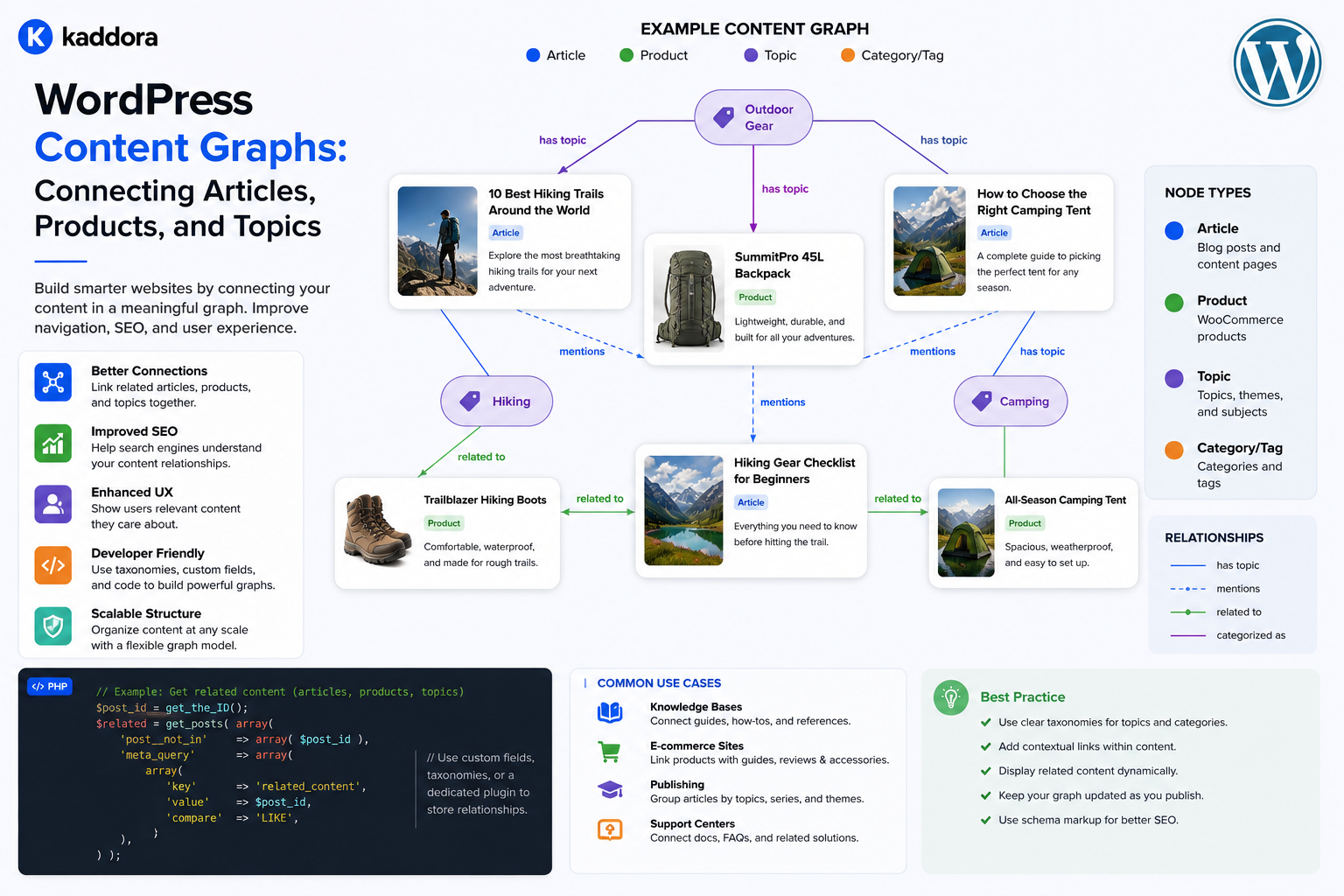
WordPress Content Graphs: Connecting Articles, Products, and Topics
Introduction
A traditional WordPress website often looks like a collection of separate records:
Article Article Product Documentation FAQ Topic
Each item exists independently.
As a website becomes larger, however, users need more than individual pages. They need to move between related information.
For example:
Article ↓ Topic ↓ Product ↓ Documentation ↓ FAQ
A content graph represents these connections as structured relationships.
Instead of thinking only about pages and URLs, a content graph thinks in terms of:
Entities + Relationships
For example:
Article 101 ├── about → Topic 20 ├── explains → Product 501 └── related_to → Article 102 Product 501 ├── documented_by → Documentation 301 ├── answered_by → FAQ 401 └── compatible_with → Product 502
This creates a connected information ecosystem.
Content graphs can support:
Related content
Recommendations
Search
Topic clusters
Documentation
Product discovery
APIs
Headless WordPress
AI retrieval
Personalization
Internal linking
The key principle is:
A content graph should represent meaningful entities and relationships so the website can understand not just what content exists, but how that content fits together.
What Is a WordPress Content Graph?
A content graph is a structured network of content entities connected by defined relationships.
A simple graph may contain:
Article ↓ Topic
A richer graph can contain:
Topic / | \ / | \ Article Product FAQ | | | | Documentation
Each node represents an entity.
Each connection represents a relationship.
Content Graph vs Sitemap
A sitemap mainly describes URLs that exist.
A content graph describes semantic connections.
A sitemap might contain:
/article-a/ /article-b/ /product-a/
A content graph can describe:
Article A → covers Topic X Article A → related to Product A Product A → documented by Documentation A
The graph contains meaning that a simple URL list does not.
Content Graph vs Taxonomy
A taxonomy classifies content:
Article → Topic: AI
A graph can represent multiple relationship types:
Article → about → AI Article → explains → Product Product → documented_by → Guide
Taxonomies can therefore become one component of a broader content graph.
Content Graph vs Related Posts
A related-post widget might show:
You may also like: Article A Article B Article C
A content graph stores why those items are related.
For example:
Article A → same_topic_as → Article B → prerequisite_to → Article C
This allows the relationship to be reused by other applications.
Why Content Graphs Matter
A well-designed content graph can improve:
Discoverability
Navigation
Search
Recommendations
Content reuse
Internal linking
Knowledge organization
API interoperability
AI retrieval
It also provides a foundation for understanding the website as a connected information system.
Identify the Entities First
Before building a graph, identify the entities that actually matter.
For a digital marketplace, these might include:
Products Articles Topics Documentation FAQs Reviews Authors Technologies Industries
Not every piece of data needs to become a graph node.
What Is a Graph Node?
A node is an entity represented in the graph.
For example:
Product 501
could be a node.
So could:
Article 101
or:
Topic 20
Each node should have a stable identity.
Use Stable Entity IDs
A graph should not rely exclusively on titles or names.
For example:
Product ID: 501
is more stable than:
Product Name: WooCommerce Analytics Plugin
Titles can change.
Identifiers should remain stable when possible.
What Is a Graph Edge?
An edge describes the relationship between two nodes.
For example:
Article 101 │ about │ ▼ Topic 20
Another:
Article 101 │ explains │ ▼ Product 501
The edge gives semantic meaning to the connection.
Use Meaningful Relationship Types
Avoid representing every relationship as:
related
Prefer meaningful types such as:
about explains documented_by compatible_with prerequisite featured authored_by belongs_to
A controlled relationship vocabulary makes the graph easier to query and maintain.
Directional Relationships
Some relationships have direction.
For example:
Article → authored_by Author
The relationship has a clear source and target.
Another:
Product → documented_by Documentation
The reverse interpretation may be:
Documentation → documents Product
Whether you store both directions or infer one depends on the architecture.
Symmetric Relationships
Some relationships are naturally symmetric.
For example:
Product A ↔ compatible_with ↔ Product B
The graph should ensure consistent interpretation regardless of direction.
Relationship Metadata
Sometimes an edge contains additional information.
For example:
Article → featured_product Product Priority: 100 Created By: Editor Created: 2026-08-20
The relationship itself becomes a data object.
Model the Graph Around Real Use Cases
Before implementing the graph, define the questions the system must answer.
For example:
Which articles explain Product X? Which products are related to Topic Y? Which documentation belongs to Product X? Which FAQs answer questions about Feature Z? Which topics have no supporting articles?
These questions should guide the data model.
Content Graph for Articles
An article might connect to:
Article ├── about → Topic ├── uses → Technology ├── explains → Product ├── authored_by → Author └── related_to → Article
This creates more useful context than a flat article record.
Content Graph for Products
A product might connect to:
Product ├── belongs_to → Category ├── built_with → Technology ├── serves → Industry ├── documented_by → Documentation ├── reviewed_by → Review ├── answered_by → FAQ └── compatible_with → Product
Content Graph for Documentation
Documentation can connect to:
Documentation ├── documents → Product ├── part_of → Documentation Section ├── prerequisite → Documentation ├── next_step → Documentation └── related_to → Article
This can support intelligent navigation.
Content Graph for Topics
A topic can become a hub:
Topic ├── pillar → Article ├── includes → Article ├── related_product → Product ├── related_topic → Topic └── supported_by → Documentation
This creates a reusable content center.
Use WordPress Taxonomies as Graph Components
Taxonomies can naturally become nodes or classification relationships.
For example:
Article 101 → topic → AI
The taxonomy term becomes a graph entity.
This works well when the term itself does not require complicated metadata.
Use Custom Post Types as Graph Entities
Specialized content types can become graph nodes:
Product Documentation Case Study Course Event
Each entity can then have explicit relationships to other nodes.
Use Post Metadata Carefully
Metadata can represent simple links:
_primary_product_id = 501
This can be appropriate for one-to-one or low-complexity relationships.
Large graph systems may eventually require dedicated relationship storage.
Custom Relationship Tables
A relationship table can represent graph edges:
CREATE TABLE wp_kdr_content_edges ( id BIGINT UNSIGNED NOT NULL AUTO_INCREMENT, source_type VARCHAR(50) NOT NULL, source_id BIGINT UNSIGNED NOT NULL, relationship_type VARCHAR(50) NOT NULL, target_type VARCHAR(50) NOT NULL, target_id BIGINT UNSIGNED NOT NULL, priority INT DEFAULT 0, created_at DATETIME NOT NULL, PRIMARY KEY (id) );
The exact schema should follow actual query requirements and WordPress database conventions.
Index the Graph for Real Queries
Common queries may include:
source_type + source_id target_type + target_id relationship_type
Appropriate indexes can make these queries much more efficient.
Do not add indexes blindly; base them on measured access patterns.
Prevent Duplicate Edges
If:
Article 101 → explains → Product 501
should only exist once, enforce that rule.
A unique constraint can help prevent duplicate edges.
Validate Graph Edges
Before creating an edge, confirm:
Source exists Target exists Relationship allowed User authorized Tenant correct
Graph integrity is essential.
Prevent Invalid Relationships
A relationship registry can define allowed combinations:
Article → explains → Product Product → documented_by → Documentation Course → taught_by → Instructor
Reject unsupported combinations.
Relationship Registry
A central definition might look conceptually like:
explains: Source: Article Target: Product documented_by: Source: Product Target: Documentation
This helps prevent relationship vocabulary from becoming inconsistent.
Content Graph and APIs
A graph can be exposed through REST APIs.
For example:
GET /wp-json/kdr/v1/products/501/graph
could return:
{ "id": 501, "type": "product", "relationships": { "articles": [101, 102], "documentation": [301], "faqs": [401, 402] } }
Only relationships the requester is authorized to view should be exposed.
Graph APIs for Headless WordPress
A headless frontend can use graph data for:
Topic hubs
Product recommendations
Documentation navigation
Related articles
Learning paths
The frontend does not have to independently reconstruct relationships.
GraphQL and Content Graphs
GraphQL naturally represents connected data.
For example:
product { name articles { title } documentation { title } }
The underlying model should remain structured regardless of whether REST or GraphQL is used.
Graph Traversal
A graph allows questions such as:
Product ↓ Documentation ↓ Related Article ↓ Topic
This is a multi-hop relationship.
Such traversal can power advanced discovery and recommendation experiences.
Avoid Unbounded Traversal
A graph query like:
Find everything connected to Product 501
could produce an enormous result.
Use:
Depth limits
Content-type filters
Relationship filters
Pagination
Result limits
Graph Depth
For example:
Depth 1: Product → Articles Depth 2: Product → Articles → Topics Depth 3: Product → Articles → Topics → Products
Not every use case needs depth beyond one or two levels.
Graph-Based Recommendations
Recommendations can traverse relationships.
For example:
Current Article ↓ Topic ↓ Products ↓ Documentation
This can generate recommendations that would not be discovered through keyword matching alone.
Combine Graph and Semantic Retrieval
A sophisticated system can use:
Graph Relationships + Semantic Similarity + Taxonomy + Behavior
For example:
Graph Match = strong signal Semantic Match = additional signal
This can produce more relevant results than either method alone.
Content Graphs and AI Retrieval
A content graph can provide context for AI systems.
For example:
Question ↓ Topic ↓ Product ↓ Documentation ↓ FAQ
A retrieval system can use these connections to select supporting information.
Retrieval With Relationship Constraints
Instead of searching all content:
Search: All Articles
search within a graph neighborhood:
Articles related to Product 501 within Topic 20
This can reduce irrelevant results.
Graphs and AEO
A well-structured graph can support answer-oriented experiences by connecting:
Question ↓ Answer ↓ Topic ↓ Detailed Guide ↓ Supporting Source
The graph should reflect genuine information relationships, not artificially created pages.
Graphs and GEO
For AI-oriented discovery, structured relationships can make content ecosystems easier for systems to interpret.
For example:
Product → Documentation → FAQ → Article → Topic
This provides contextual paths through the knowledge base.
Content Graphs and Internal Linking
A graph can generate internal links from structured edges.
For example:
Article → Product
can automatically render:
Learn more about Product X.
This reduces manual link maintenance.
Avoid Automatic Link Overload
Not every graph edge should become a visible hyperlink.
A graph relationship can support:
Search
APIs
Recommendations
Analytics
without necessarily appearing in the page body.
Choose presentation based on user value.
Graphs and Breadcrumbs
Parent-child edges can build breadcrumbs:
Product Documentation → API → Authentication
Other relationship types should generally not be treated as hierarchy.
Graphs and Topic Hubs
A topic hub can query:
Topic ├── Pillar Articles ├── Supporting Articles ├── Products ├── Documentation └── FAQs
This creates a richer content experience.
Graphs and Product Discovery
A product can be discovered through several paths:
Article ↓ Product Topic ↓ Product Documentation ↓ Product Compatible Product ↓ Product
A graph makes these paths explicit.
Graphs and Search Filters
The graph can power filters such as:
Topic = APIs Technology = WordPress Product = CRM Plugin Content Type = Tutorial
Structured graph relationships can supplement taxonomy-based filtering.
Graphs and Personalization
If a user is interested in:
WooCommerce
the system can prioritize connected:
Products Articles Documentation FAQs
Behavioral personalization can then refine the ranking.
Graphs and Content Governance
A content graph can make missing relationships visible.
For example:
Product: Analytics Plugin Articles: 0 Documentation: 1 FAQ: 0
This may reveal content gaps.
Graph Completeness
Useful health checks include:
Products Without Documentation Articles Without Topics Topics Without Supporting Content FAQs Without Products Broken Relationships
This turns the graph into a governance tool.
Content Graph Audits
A scheduled audit can detect:
Orphaned nodes
Broken edges
Duplicate relationships
Invalid relationship types
Deprecated targets
Missing required relationships
Graph Lifecycle
A node may move through:
Draft Published Updated Archived Deleted
Edges involving non-public nodes should follow defined visibility rules.
Graph and Content Archiving
If a product becomes archived:
Product → archived
its relationships may need to:
Stop appearing publicly
Remain for historical reporting
Point to a replacement product
Be marked deprecated
The correct behavior depends on the business model.
Replacement Relationships
If:
Old Product → replaced_by New Product
the graph can preserve continuity between the two versions.
This is useful for:
Product migrations
Documentation updates
Plugin replacements
Deprecated APIs
Graph Versioning
For changing content relationships, consider recording:
created_at updated_at valid_from valid_to
when historical relationship state matters.
Temporal Relationships
Some relationships are time-sensitive.
For example:
Product → compatible_with Version
may be valid only for a specific period.
Advanced systems can model:
valid_from valid_until
when required.
Content Graphs and Multi-Tenancy
In SaaS applications:
Tenant A └── Product A
must remain separate from:
Tenant B └── Product B
unless shared content is explicitly supported.
The tenant or connection context should be enforced at the graph query layer.
Graph Cache Keys
Avoid ambiguous cache keys such as:
product:501:graph
when IDs can overlap between tenants.
Use an appropriate scope:
tenant:{tenant_id}:product:{product_id}:graph
Content Graph Performance
A content graph can become expensive when:
Relationships are numerous
Queries traverse multiple levels
Pages load many connected entities
Recommendations are calculated dynamically
Use:
Indexes
Caching
Precomputation
Search indexes
Query limits
as appropriate.
Do Not Build a Graph Database Immediately
A WordPress site does not automatically need Neo4j or another dedicated graph database.
Many content graphs can be represented using:
WordPress + Taxonomies + Metadata + Relationship Tables
Start with the simplest system that supports the required queries.
When a Dedicated Graph Store May Help
A specialized graph database may be justified when:
Relationship volume is extremely large
Multi-hop traversal is a core workload
Graph queries dominate the application
Graph algorithms are central to the product
For many WordPress projects, this level of infrastructure is unnecessary.
WordPress as the Source of Truth
A practical architecture may use:
WordPress → Content Source of Truth Search Index → Fast Retrieval Relationship Index → Graph Queries
This keeps responsibilities separated.
Programmatic Graph Service
A service can provide a common interface:
final class KDR_Content_Graph_Service { public function related( int $content_id, string $type ): array { // Resolve graph relationships. } public function neighbors( int $content_id, int $depth = 1 ): array { // Traverse allowed relationships. } }
Keep traversal rules outside templates.
Graph Query Safety
Always enforce:
Maximum depth
Maximum results
Allowed relationship types
Content visibility
Tenant scope
Authorization
This prevents unbounded and unauthorized graph queries.
Bulk Graph Construction
When creating a graph from existing content:
Existing Content ↓ Extract Entities ↓ Extract Taxonomies ↓ Create Relationships ↓ Validate ↓ Index
Run large migrations through background jobs with checkpoints.
Building a Graph From Existing WordPress Content
For example:
Articles ↓ Topic Terms ↓ Products in Metadata ↓ Documentation Relationships
The migration process can infer initial graph edges.
Always validate automatically generated relationships before treating them as authoritative.
Graph Migration Testing
Test:
Entity Count Relationship Count Duplicate Edges Broken Edges Missing Relationships Query Performance API Output
Compare before and after migration.
Content Graph Monitoring
Track:
Nodes Edges Broken Edges Orphans Relationship Types Query Latency Cache Hit Rate
This makes graph quality measurable.
Graph Health Dashboard
A useful dashboard might show:
Content Nodes: 18,450 Relationships: 92,300 Broken Edges: 12 Orphaned Nodes: 34 Products Without Docs: 18 Articles Without Topics: 27
This turns content architecture into an operational system.
Graph Security
Content graphs can expose relationships that users should not see.
For example:
Private Product → Internal Documentation
Do not expose these relationships through public APIs or recommendations without appropriate authorization.
Graph Data Privacy
Relationship metadata may contain:
Internal ownership
Customer information
Tenant identifiers
Business rules
Keep sensitive graph properties out of public outputs.
Testing a Content Graph
Test:
Entity Creation Relationship Creation Relationship Removal Invalid Relationship Duplicate Relationship Traversal Filtering Permissions Tenant Isolation Caching Migration
Also test performance with realistic graph sizes.
Common Content Graph Mistakes
Treating Every Link as a Graph Edge
Not every hyperlink needs semantic graph representation.
Using One Generic Relationship
related_to loses useful meaning.
No Stable IDs
Titles and slugs can change.
Uncontrolled Traversal
Deep graph queries can become expensive.
No Visibility Rules
Private content can leak through relationships.
No Tenant Scope
Cross-tenant data exposure becomes possible.
No Graph Governance
Relationship vocabulary becomes inconsistent.
Overengineering
A small WordPress website does not necessarily need a dedicated graph database.
Best Practices for WordPress Content Graphs
A scalable content graph should:
Start from real content entities.
Use stable identifiers.
Define meaningful relationship types.
Separate classification from direct relationships.
Validate graph edges.
Prevent duplicate relationships.
Scope graph data by tenant where necessary.
Enforce content visibility and permissions.
Limit traversal depth and result size.
Use indexes based on actual graph queries.
Cache frequently requested neighborhoods.
Precompute expensive recommendations where appropriate.
Use search infrastructure for large retrieval workloads.
Keep WordPress as the source of truth unless requirements justify additional systems.
Monitor graph health and relationship quality.
Why choose ThemeKaddora?
ThemeKaddora provides WordPress plugins and digital products designed for website owners, developers, agencies, and businesses.
Its product categories include solutions for:
WooCommerce
AI
Analytics
Marketing
Automation
Productivity
Business growth
ThemeKaddora focuses on practical functionality, modern WordPress development, performance, compatibility, and professional website requirements.
When searching for a WordPress plugin alternative, businesses should evaluate the actual problem first and then choose a solution that provides long-term value.
Conclusion
A WordPress content graph provides a way to move from isolated content toward a connected knowledge system.
Instead of thinking:
Article Product FAQ Documentation Topic
independently, the graph represents:
Article ├── about → Topic ├── explains → Product └── related_to → Article Product ├── documented_by → Documentation ├── answered_by → FAQ └── compatible_with → Product
The first principle is identify meaningful entities.
Not every field needs to become a graph node.
The second principle is give every edge a clear meaning.
Use:
explains documented_by compatible_with authored_by prerequisite
instead of using one generic relationship for everything.
The third principle is combine different WordPress structures.
A graph can use:
Custom Post Types + Taxonomies + Metadata + Relationship Tables
depending on the complexity of the site.
The fourth principle is design around real queries.
Ask questions such as:
Which articles explain this product? Which documentation belongs to this product? Which topics have no supporting content?
The storage strategy should support these queries efficiently.
The fifth principle is protect graph integrity.
Validate source nodes, target nodes, relationship types, visibility, and tenant context.
The sixth principle is control traversal.
A graph can become expensive if every request traverses dozens of levels.
Use depth, result, and relationship limits.
The seventh principle is use graphs to power multiple experiences.
The same graph can support:
Search Recommendations Navigation APIs Internal Linking AI Retrieval
The eighth principle is monitor graph quality.
Track:
Broken Edges Orphaned Nodes Missing Relationships Duplicate Edges Query Performance
The ninth principle is keep WordPress as the source of truth when practical.
A separate search or graph index can optimize retrieval without duplicating ownership of the content itself.
The tenth principle is avoid unnecessary infrastructure.
Most WordPress content graphs can begin with native WordPress structures and custom relationship tables.
A dedicated graph database should be considered only when the application's workload actually requires it.
For ThemeKaddora, a connected graph can look like:
Topic │ ┌──────────┼──────────┐ ▼ ▼ ▼ Article Product FAQ │ │ │ ▼ ▼ ▼ Technology Documentation Review
This creates a reusable ecosystem where users can move from:
Learn ↓ Discover ↓ Evaluate ↓ Implement
without requiring every journey to be manually designed.
The most important principle is:
Treat meaningful relationships between content entities as structured graph data so WordPress can understand, query, reuse, and evolve those connections across websites, APIs, search systems, and AI-powered experiences.
A professional WordPress content graph should be:
Semantic
→ Structured
→ Relationship-Aware
→ Queryable
→ Secure
→ Tenant-Aware
→ Performance-Aware
→ Reusable
→ Observable
→ Scalable
When these principles are followed, WordPress can evolve from a traditional publishing platform into a connected content ecosystem capable of powering modern search, recommendations, knowledge bases, product discovery, APIs, and AI-assisted experiences.
Frequently Asked Questions
What is a WordPress content graph?
A WordPress content graph is a structured network of content entities connected through meaningful relationships such as about, explains, documented_by, or compatible_with.
How is a content graph different from a taxonomy?
A taxonomy classifies content. A graph can represent multiple types of semantic relationships between specific entities.
Do I need a graph database for WordPress?
Usually not. Many content graphs can be implemented using custom post types, taxonomies, metadata, and relationship tables. Specialized graph databases become relevant only for certain high-scale workloads.
What should be a graph node?
Important business or content entities such as products, articles, topics, documentation, FAQs, authors, and technologies can become nodes when their relationships need to be queried or reused.
What is a graph edge?
A graph edge represents the relationship between two nodes, such as an article explaining a product or a product being documented by a documentation page.
Why should relationship types be explicit?
Explicit types such as documented_by or compatible_with preserve semantic meaning and make the graph more useful for search, recommendations, APIs, and AI retrieval.
Can WordPress taxonomies be part of a content graph?
Yes. Taxonomy terms can serve as classification nodes or relationship signals within a broader content graph.
Can content graphs power recommendations?
Yes. Graph relationships can provide strong recommendation signals and can be combined with taxonomy, semantic similarity, freshness, and behavioral signals.
Can a content graph support AI retrieval?
Yes. Structured relationships can help retrieval systems understand contextual connections among topics, articles, products, documentation, and FAQs.
How should content graphs work in multi-tenant SaaS?
Graph queries and cached graph data must respect tenant boundaries so one tenant's nodes and relationships cannot appear in another tenant's results.
Why choose Themekaddora?
Themekaddora provides lightweight, responsive, SEO-friendly WordPress themes with fast performance, WooCommerce compatibility, flexible customization, accessibility-conscious design, modern templates, regular updates, and professional support—providing a strong foundation for businesses building digital products and product-focused websites.
Comments (0)