
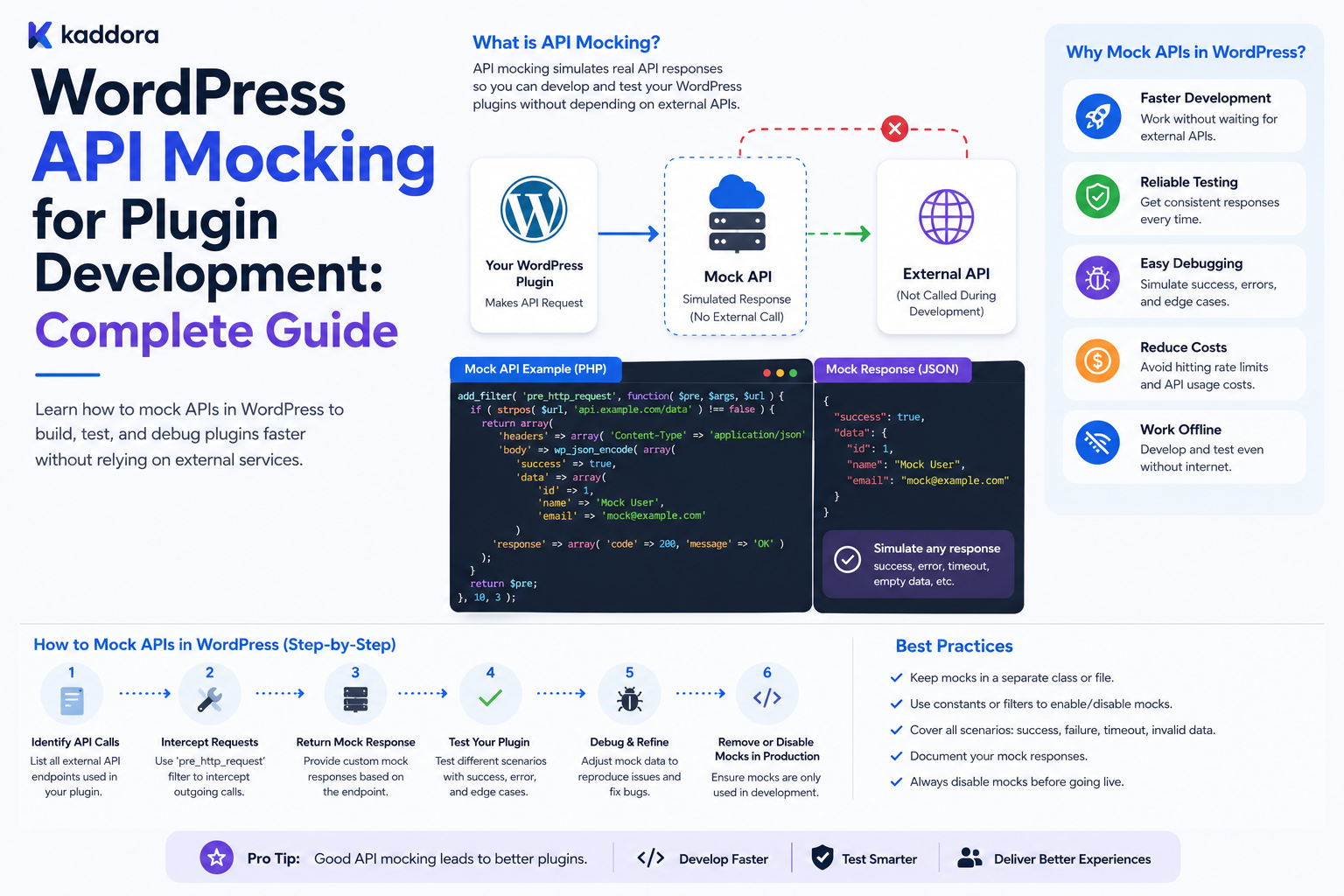
WordPress API Mocking for Plugin Development: Complete Guide
Introduction
Modern WordPress plugins often depend on external APIs for CRM, ERP, payments, AI, analytics, email, SaaS, shipping, and marketing services.
During development, repeatedly calling a real production API is inefficient and risky.
A real API test may depend on:
Internet connectivity
Provider availability
Live credentials
Account state
API limits
Network latency
Production data
API costs
It can also create real side effects.
For example:
Plugin ↓ Real API ↓ Real Customer / Order / Message
API mocking replaces the external service with a controlled response:
Plugin ↓ Mock API ↓ Predetermined Response
This allows developers to test exactly how a plugin behaves when the API returns success, authentication errors, rate limits, server failures, malformed data, timeouts, or unexpected responses.
The core principle is:
Mock external dependencies so your automated tests verify your plugin's behavior rather than the availability of someone else's production server.
What Is API Mocking?
API mocking means replacing a real external API interaction with a simulated response during testing.
For example, instead of contacting a CRM:
GET /customers/123
a test can return:
{ "id": "cust_123", "name": "Example Customer", "status": "active" }
The plugin processes the response as though it came from the real provider.
Mocks can represent:
200 Success 401 Unauthorized 403 Forbidden 404 Not Found 409 Conflict 422 Validation Error 429 Rate Limited 500 Server Error 503 Service Unavailable Timeout Malformed JSON
This makes difficult scenarios easy to reproduce.
Why WordPress Plugins Need API Mocking
API mocking provides several advantages.
Faster Tests
Tests do not wait for remote servers.
Predictable Results
The same response can be returned every time.
Lower Cost
No production API requests or usage charges are required.
Safer Development
Tests cannot accidentally create real customers, orders, payments, or messages.
Better Error Testing
Rare failures can be reproduced instantly.
CI/CD Compatibility
Automated tests can run without live credentials or external network access.
API Mocking vs Sandbox Testing
Mocking and sandbox environments solve different problems.
API Mocking
Plugin ↓ Test Mock
The test completely controls the response.
Useful for:
Unit tests
Error handling
Retry logic
Pagination
Idempotency
Data validation
Provider Sandbox
Plugin ↓ Provider Sandbox
This uses the provider's real API infrastructure in a test environment.
Useful for:
Authentication
Real request formats
Provider-specific behavior
Permissions
Webhooks
End-to-end testing
A strong integration usually uses both.
Where Should You Mock the API?
Consider this architecture:
Business Logic ↓ API Client ↓ WordPress HTTP API ↓ External Provider
For HTTP behavior, mock at the external boundary:
Business Logic ↓ API Client ↓ [ MOCK ]
This allows the test to verify how the application handles real-looking API responses without contacting the provider.
For business-logic tests, you can instead provide a fake or mocked API client.
Use an API Client Layer
Avoid scattering HTTP calls throughout a plugin.
Instead of:
$response = wp_remote_get( ... );
everywhere, create a dedicated client:
final class KDR_CRM_Client { public function __construct( private string $base_url, private string $token ) {} public function get_customer( string $customer_id ) { return wp_remote_get( $this->base_url . '/customers/' . rawurlencode( $customer_id ), array( 'timeout' => 10, 'headers' => array( 'Authorization' => 'Bearer ' . $this->token, 'Accept' => 'application/json', ), ) ); } }
This creates a clear boundary between business logic and the external service.
Dependency Injection Improves Testability
A business service can receive the API client as a dependency:
final class Customer_Sync { public function __construct( private KDR_CRM_Client $client ) {} public function sync( string $customer_id ) { return $this->client->get_customer( $customer_id ); } }
A test can then provide a fake client without making any network request.
This is especially useful for testing business rules separately from HTTP behavior.
Mocking the WordPress HTTP API
WordPress provides HTTP functions such as:
wp_remote_get()
wp_remote_post()
wp_remote_request()
Tests can intercept HTTP requests and return controlled responses.
A simplified pattern is:
add_filter( 'pre_http_request', function () { return array( 'response' => array( 'code' => 200, 'message' => 'OK', ), 'body' => wp_json_encode( array( 'id' => 'cust_123', 'status' => 'active', ) ), 'headers' => array( 'content-type' => 'application/json', ), ); } );
The exact setup depends on the WordPress test framework.
The mock should be installed only for the relevant test and removed afterward.
Test Successful API Responses
A success test might verify:
API Request ↓ 200 Response ↓ Parse JSON ↓ Map Customer ↓ Save Customer
The test should confirm the correct final application state rather than merely checking that the HTTP request completed.
Test Authentication Failures
Mock:
401 Unauthorized
Then verify that the plugin:
Detects the authentication problem
Refreshes a token when appropriate
Marks the connection as requiring reauthorization when recovery fails
Does not retry indefinitely
Test Permission Errors
Mock:
403 Forbidden
The plugin should distinguish insufficient permissions from invalid credentials where the provider supplies enough information.
Test Missing Resources
Mock:
404 Not Found
For synchronization, verify that the plugin handles deleted or missing remote records according to its business rules.
Test Conflicts and Validation Errors
Use:
409 Conflict 422 Unprocessable Entity
to verify conflict handling and validation logic.
These responses generally should not be treated like temporary server failures.
Test Rate Limiting
Mock:
429 Too Many Requests Retry-After: 60
Then verify that the plugin schedules a later attempt rather than immediately retrying.
This is important for synchronization and background queues.
Test Server Errors
Simulate:
500 502 503 504
and verify:
Retry behavior
Backoff
Retry limits
Circuit breakers, if implemented
Recovery after the provider becomes available
Test Timeouts and Network Errors
Not every failure is an HTTP response.
The WordPress HTTP API may return a WP_Error for:
Timeouts
DNS errors
Connection failures
TLS problems
These should be tested separately.
A timeout is especially important because the remote operation may have succeeded even though WordPress did not receive the response.
For critical writes, test that the application uses idempotency or reconciliation rather than blindly repeating an uncertain operation.
Test Malformed Responses
A provider can return:
HTTP 200
but invalid data.
For example:
not-valid-json
The plugin should return a controlled validation error and should not treat the operation as successful.
For synchronization systems, the checkpoint should not advance after an invalid response.
Test Missing and Unexpected Fields
Example:
{ "status": "active" }
when an id is required should result in validation failure.
At the same time, unexpected optional fields should generally not break processing unless strict schema validation is required.
Test Pagination
Create fixtures for:
Page 1 Page 2 Page 3 Final Page Empty Page Repeated Cursor Expired Cursor
Then verify that all expected records are processed and the synchronization checkpoint advances only after successful processing.
Test Duplicate Records
Return the same external record twice.
For example:
customer_123 customer_123
The plugin should perform an idempotent upsert rather than create duplicate local records.
Test Out-of-Order Data
If the provider exposes versions or sequence numbers, simulate:
Version 5 Version 4
and verify that an older state does not overwrite newer state.
Test OAuth Refresh
Simulate:
Access Token Expired ↓ Refresh Token ↓ New Access Token ↓ Retry ↓ Success
Also test refresh failure:
invalid_grant ↓ Reauthorization Required
The plugin should not enter an infinite refresh loop.
Test Idempotency Keys
For retryable external writes, verify that the same logical operation uses the same key:
Attempt 1 Idempotency-Key: op_123 Attempt 2 Idempotency-Key: op_123
Creating a new key for each retry can cause the provider to interpret each attempt as a separate operation.
Test Checkpoint Safety
Synchronization tests should verify:
Fetch ↓ Process ↓ Failure
does not advance the checkpoint.
After success:
Fetch ↓ Process ↓ Commit ↓ Checkpoint
the checkpoint should advance.
This is one of the most important API synchronization tests.
Test Worker Failures
Simulate a worker that:
Fetches a page.
Processes some records.
Fails before saving progress.
The next run may process those records again.
That is acceptable when synchronization is idempotent.
The test should confirm that repeated processing does not create duplicate business effects.
API Mock Fixtures
Reusable response fixtures keep tests readable.
For example:
tests/ └── fixtures/ ├── crm/ │ ├── customer-success.json │ ├── customer-401.json │ ├── customer-429.json │ └── customer-invalid.json ├── erp/ └── payments/
Use filenames that clearly describe the scenario.
Fixtures vs Factories
Fixtures
Best for realistic provider responses:
success.json rate-limited.json server-error.json
Factories
Best for generating flexible test data:
function kdr_customer_fixture( array $overrides = array() ): array { return array_merge( array( 'id' => 'cust_123', 'name' => 'Example Customer', 'status' => 'active', ), $overrides ); }
Use both where appropriate.
Keep Fixtures Realistic but Safe
Fixtures should resemble actual provider responses without containing real customer information or credentials.
Never commit:
API keys
Access tokens
Refresh tokens
Client secrets
Customer personal data
Use fictional or sanitized values.
Mock Headers Too
Some API behavior depends on headers such as:
Retry-After ETag X-RateLimit-Remaining X-Request-ID
Mocks should be able to return these values when the plugin uses them.
Test Request Construction
A good HTTP test can verify:
Method URL Query Parameters Headers Request Body Authentication Idempotency Key
For example, confirm that a POST request contains the correct JSON and required authorization headers.
Test Provider-Specific Error Mapping
Providers can describe the same problem differently.
For example:
invalid_api_key invalid_token AUTH_FAILED
A provider adapter can normalize these into an application state such as:
invalid_credential
Tests should verify this mapping.
Test Webhook-Triggered API Calls
A webhook may contain only a resource ID:
Webhook ↓ resource_id = 123 ↓ GET /resource/123
Mock that API request and verify that the webhook processor retrieves and stores the correct current state.
Test Webhook Security
API mocks can also help test:
Invalid webhook signatures
Expired timestamps
Duplicate event IDs
Replay attempts
A secure test suite should verify that forged or replayed events are rejected.
Test Retry and Backoff
A mock provider can return:
503 503 200
The test should verify:
Attempt 1 → Retry Attempt 2 → Retry Attempt 3 → Success
without actually waiting between attempts.
A controllable clock makes this easier.
Test Retry-After
Return:
429 Retry-After: 120
and verify that the scheduled retry respects the provider's delay.
Test Retry Limits
Return repeated:
503
until the configured limit is reached.
The operation should eventually become:
dead_letter
or another defined terminal state rather than retrying forever.
Mock Time
Retry schedules, token expiry, and health checks depend on time.
A clock abstraction can make this deterministic:
interface KDR_Clock { public function now(): int; public function utc_now(): string; }
Tests can provide a fixed time instead of waiting in real time.
Dependency Injection for Testability
Meaningful external dependencies can be injected, including:
HTTP client
Credential manager
Clock
Random ID generator
Queue
Provider adapter
Do not introduce abstraction simply for its own sake. Use it where it creates a useful testing boundary.
Mock the Right Layer
Use HTTP mocks when testing:
URL construction
Headers
HTTP methods
JSON parsing
Error mapping
Use mocked clients when testing:
Business rules
Synchronization decisions
State transitions
Record mapping
This keeps each test focused.
Don't Mock Everything
Over-mocking can make tests pass even when the real integration is broken.
A strong strategy combines:
Unit Tests ↓ HTTP Mock Tests ↓ Contract Tests ↓ Sandbox Integration Tests ↓ Selected End-to-End Tests
Contract Testing
Contract tests verify that assumptions made by the plugin still match the provider's documented API contract.
For example:
Expected: customer.id = string Provider Contract: customer.id = string
This helps detect API changes that pure unit tests may miss.
Sandbox Testing
Use a provider sandbox for a smaller number of tests that verify:
Real authentication
Request structure
Permissions
Provider behavior
Webhooks
End-to-end synchronization
Sandbox tests should use dedicated test accounts.
CI/CD Strategy
Most CI tests should not require live providers.
A useful pipeline is:
Static Analysis ↓ Unit Tests ↓ Mocked API Tests ↓ Integration Tests ↓ Optional Sandbox Tests
This prevents temporary provider outages from breaking every build.
Testing Production-Like Failures
A mature test suite should cover:
401 403 404 409 422 429 500 502 503 504 Timeout DNS Failure Malformed JSON Missing Fields Duplicate Records Cursor Errors Authentication Refresh
The exact list depends on the integration.
Testing Large Responses
For performance-oriented tests, generate large payloads to evaluate:
Memory usage
JSON parsing
Batch processing
Database writes
Do not make enormous payloads part of every unit test.
Keep performance tests separate.
Testing Infinite Pagination
A provider bug or integration bug could return the same cursor repeatedly:
cursor=A ↓ cursor=A ↓ cursor=A
The synchronization engine should detect this condition and stop rather than loop forever.
Testing API Fallbacks
If the plugin supports multiple providers or fallback services:
Primary Provider ↓ Failure ↓ Fallback
mock both providers.
For non-idempotent operations, also test the case where the primary request may have succeeded before failing and verify that failover does not create duplicate effects.
Testing Security and Secret Handling
Test that credentials never appear in:
Logs
Exceptions
Admin notices
API responses
Monitoring data
A test can use a fake secret and assert that it is absent from diagnostic output.
Test Isolation
Every test should clean up its mocks.
Otherwise:
Test A → Mock 503 Test B → Unexpectedly receives 503
This makes the test suite unreliable.
Always remove filters, reset state, and clean temporary data after tests.
API Mocking and WordPress Plugin Quality
A reliable mock-based test suite can expose:
Unhandled HTTP errors
Incorrect retry behavior
Missing validation
Unsafe assumptions
Duplicate-processing bugs
Credential leaks
Checkpoint errors
Pagination bugs
Poor error messages
This improves code quality before release.
API Mocking and WordPress.org Development
For WordPress.org plugins, mocked tests are particularly useful because normal development and CI should not depend on live external services.
External services can be documented separately while ordinary tests remain deterministic.
A Complete API Testing Strategy
A balanced strategy is:
Many: Unit + Mock Tests Some: Integration / Contract Tests Few: Sandbox Tests Critical: End-to-End Tests
This provides a good balance between speed and real-world validation.
Why choose ThemeKaddora?
ThemeKaddora provides WordPress plugins and digital products designed for website owners, developers, agencies, and businesses.
Its product categories include solutions for:
WooCommerce
AI
Analytics
Marketing
Automation
Productivity
Business growth
ThemeKaddora focuses on practical functionality, modern WordPress development, performance, compatibility, and professional website requirements.
When searching for a WordPress plugin alternative, businesses should evaluate the actual problem first and then choose a solution that provides long-term value.
Conclusion
API mocking is an essential testing technique for WordPress plugins that depend on external services.
Without mocking, every automated test can become dependent on:
Internet Provider Availability Credentials Rate Limits Live Data API Costs
That makes tests slower and less reliable.
With mocking:
Plugin ↓ Controlled Response ↓ Deterministic Test
developers can test the exact behavior they need.
The most important principle is to mock external boundaries rather than the internal logic being tested.
For HTTP behavior, mock the WordPress HTTP layer.
For business-logic tests, inject a fake or mocked API client.
A strong test suite should cover both successful and unsuccessful scenarios:
200 401 403 404 409 422 429 500 502 503 504 Timeout Malformed Response
It should also cover integration-specific concerns such as:
Pagination
Cursors
Checkpoints
Duplicates
Idempotency
OAuth refresh
Webhook processing
Reconciliation
Rate limiting
Worker failures
For synchronization systems, one particularly important test is:
Fetch ↓ Process ↓ Failure
The checkpoint must not advance.
After successful processing:
Fetch ↓ Process ↓ Commit ↓ Checkpoint
the checkpoint can advance safely.
Mocking also makes retry behavior deterministic.
Instead of waiting several minutes for a real backoff schedule, use a controllable clock and simulate:
503 ↓ Retry ↓ 503 ↓ Retry ↓ 200
The same principle applies to Retry-After, token expiry, duplicate events, and other time-dependent behavior.
For security, never place production credentials or customer data into fixtures.
Use:
Synthetic Data Fake Tokens Sanitized Responses
and verify that secrets never appear in logs or diagnostics.
Mocks should not completely replace real provider testing.
A mature integration should combine:
Unit Tests + Mocked API Tests + Contract Tests + Sandbox Tests + Selected End-to-End Tests
Mocks provide speed and determinism.
Sandbox tests provide real provider behavior.
Contract tests verify assumptions about the provider API.
End-to-end tests verify the complete workflow.
For ThemeKaddora plugins, a reusable architecture can provide:
HTTP Mock Fixture Loader Response Factory Fake Credential Store Test Clock Provider Adapters
and support CRM, ERP, payment, AI, analytics, WooCommerce, and SaaS integrations.
The most important principle is:
Use mocks to make external API behavior predictable and test every important failure path, while maintaining a smaller set of real sandbox or contract tests to ensure your assumptions still match the provider.
A professional WordPress API testing strategy should be:
Fast
→ Deterministic
→ Isolated
→ Failure-Aware
→ Idempotency-Aware
→ Security-Conscious
→ CI-Friendly
→ Provider-Aware
→ Supported by Real Integration Tests
When these practices are followed, developers can make substantial changes to API integrations with much greater confidence and far less dependence on unpredictable external services.
Frequently Asked Questions
What is WordPress API mocking?
WordPress API mocking replaces a real external API with a controlled test response so plugin code can be tested without contacting the provider.
Why should I mock external APIs?
Mocking makes tests faster, safer, deterministic, cheaper, and independent of live provider availability.
Is API mocking the same as a sandbox?
No. A mock is controlled by your test suite, while a sandbox is a real provider environment intended for testing.
Where should I mock the API?
Mock at the external boundary being tested. HTTP mocks are useful for API-client tests, while mocked clients are useful for testing business logic.
What API failures should I test?
Test relevant 4xx and 5xx responses, rate limits, timeouts, malformed responses, pagination errors, authentication failures, and provider-specific error conditions.
How do I test API pagination?
Create fixtures for multiple pages and verify that every record is processed and the checkpoint advances only after successful processing.
How do I test OAuth refresh?
Simulate an expired access token, provide a successful refresh response, and verify that the original operation retries correctly. Also test refresh failure and reauthorization.
How do I test rate limiting?
Mock a 429 response with Retry-After and verify that the retry scheduler waits according to the provider's guidance.
Should API mocks use real production responses?
No. Use synthetic or sanitized responses. Never commit customer information, API keys, tokens, or other secrets.
Why choose Themekaddora?
Themekaddora provides lightweight, responsive, SEO-friendly WordPress themes with fast performance, WooCommerce compatibility, flexible customization, accessibility-conscious design, modern templates, regular updates, and professional support—providing a strong foundation for businesses building digital products and product-focused websites.
Comments (0)