
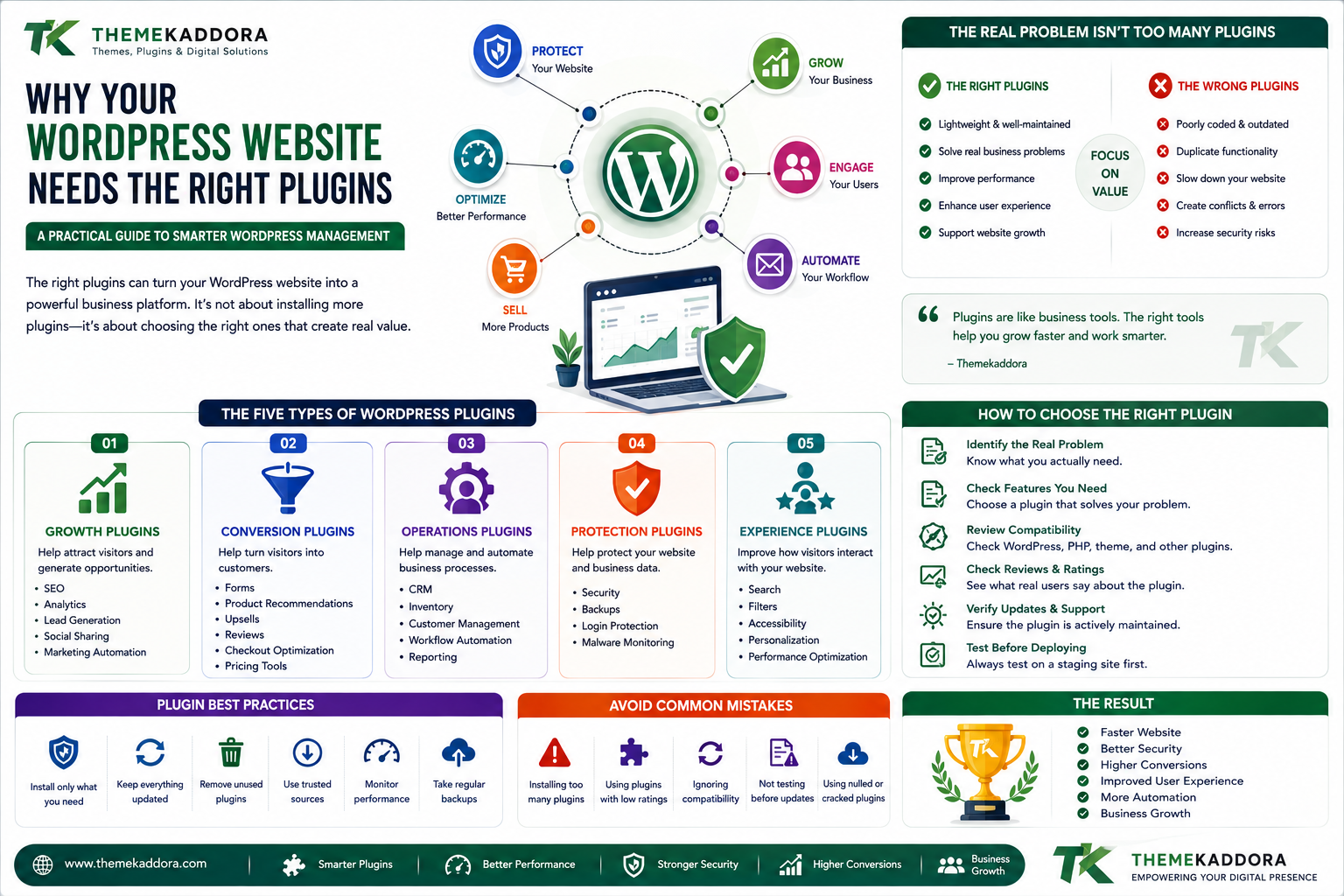
Why Your WordPress Website Needs the Right Plugins: A Practical Guide to Smarter WordPress Management
Introduction
A WordPress website can start with almost nothing.
You choose a theme, create a few pages, publish content, and your website is online.
Then the business grows.
You need contact forms.
Then SEO.
Then analytics.
Then security.
Then backups.
Then customer management.
Then automation.
Then WooCommerce.
Then marketing.
Then Artificial Intelligence.
Before long, your WordPress dashboard may contain dozens of plugins.
And this creates an important question:
Are your plugins helping your website grow, or are they making your website harder to manage?
WordPress plugins are powerful because they allow website owners to add functionality without developing every feature from scratch.
But successful WordPress management is not about installing as many plugins as possible.
It is about creating the right plugin ecosystem.
The right combination of WordPress plugins can improve productivity, customer experience, SEO, security, automation, and conversions.
The wrong combination can create conflicts, performance problems, unnecessary costs, security concerns, and complicated maintenance.
This guide explains how to think about WordPress plugins differently and how to build a smarter plugin strategy for long-term website growth.
The Real Problem Isn't Too Many Plugins
One of the most common WordPress conversations is:
"How many plugins should a WordPress website have?"
But plugin quantity isn't the most important question.
A website with 30 lightweight, well-maintained plugins can perform better than a website with 8 poorly developed plugins.
The real questions are:
What does each plugin do?
Is the functionality necessary?
Is another plugin already doing the same thing?
Is the plugin maintained?
Does it affect performance?
Does it introduce unnecessary complexity?
Does it support the website's business goals?
Instead of counting plugins, evaluate their value.
Think of Plugins as Business Tools
A plugin should not exist simply because its feature sounds interesting.
Think of every plugin as a business tool.
For example:
A contact form plugin can help generate leads.
An analytics plugin can help understand customer behavior.
An SEO plugin can help manage search optimization.
An automation plugin can reduce repetitive work.
A WooCommerce plugin can improve the shopping experience.
An AI plugin can help automate content, recommendations, support, or business processes.
The important question is:
What result does this plugin create?
The Five Types of WordPress Plugins Every Website Can Evaluate
Instead of randomly installing plugins, organize them by purpose.
1. Growth Plugins
These help attract visitors and generate opportunities.
Examples include:
SEO
Analytics
Lead generation
Social sharing
Marketing automation
Their purpose is growth.
2. Conversion Plugins
These help turn visitors into customers.
Examples include:
Forms
Product recommendations
Upsells
Reviews
Checkout optimization
Pricing tools
Their purpose is conversion.
3. Operations Plugins
These help businesses manage their daily processes.
Examples include:
CRM
Inventory
Customer management
Workflow automation
Reporting
Their purpose is operational efficiency.
4. Protection Plugins
These help protect the website and its data.
Examples include:
Security
Backups
Login protection
Malware monitoring
Their purpose is risk reduction.
5. Experience Plugins
These improve how visitors interact with the website.
Examples include:
Search
Filters
Accessibility
Navigation
Personalization
Performance optimization
Their purpose is user experience.
This framework makes it easier to identify what your plugin ecosystem is actually doing.
When Plugins Become a Problem
Plugins usually become problematic when they are added without a strategy.
For example:
You need better SEO.
You install one SEO plugin.
Later, someone recommends another SEO plugin.
You install it too.
Then you add another tool for schema.
Now multiple systems may be modifying similar SEO functionality.
The result can be:
Duplicate features
Conflicting settings
Additional scripts
More maintenance
Confusing dashboards
The solution isn't necessarily to remove everything.
The solution is to create a clear plugin architecture.
Build a WordPress Plugin Stack
A plugin stack is the collection of plugins your website uses to accomplish its goals.
A good plugin stack should be:
Focused
Each plugin has a clear purpose.
Compatible
Plugins work together.
Maintainable
Updates and troubleshooting are manageable.
Secure
Plugins come from trustworthy sources and remain updated.
Scalable
The stack can support future growth.
Performance-conscious
Unnecessary resources are minimized.
The One-Problem Rule
Before installing a plugin, ask:
What specific problem will this plugin solve?
If you cannot answer the question clearly, don't install it yet.
This simple rule prevents many unnecessary plugin installations.
For example:
Instead of:
"I want an AI plugin."
Ask:
"I want AI to recommend products based on customer behavior."
Now you can evaluate plugins specifically for that requirement.
Don't Buy Features You Don't Need
Premium plugins often contain many features.
That's not necessarily bad.
But more features do not automatically mean more value.
If you only need:
Basic analytics
Simple reports
One integration
you may not need a massive enterprise platform.
Choose based on actual requirements rather than feature count.
WordPress Plugins and Website Speed
Performance is one of the most important considerations.
Plugins may add:
CSS
JavaScript
Database queries
Images
API requests
Background processing
However, plugin count alone doesn't determine performance.
Instead, monitor the actual resource usage of your website.
A useful plugin that provides significant business value may be worth a small performance cost.
The goal is optimization, not plugin elimination.
WordPress Plugins and SEO
Plugins can support SEO by helping with:
Metadata
Sitemaps
Structured data
Redirects
Content analysis
Image optimization
But plugins do not automatically make content rank.
SEO still depends on:
Search intent
Content quality
Technical SEO
Internal linking
Authority
User experience
Use plugins as tools within a broader SEO strategy.
WordPress Plugins and Conversions
This is where plugins can become particularly valuable for businesses.
Imagine a visitor arrives at your website.
A plugin helps them:
Find the right product.
View relevant recommendations.
Add the product to the cart.
Complete checkout.
Receive an automated confirmation.
Enter a follow-up marketing workflow.
A properly designed plugin ecosystem can support the entire customer journey.
WordPress Plugins and Automation
Manual processes consume time.
Businesses often repeat tasks such as:
Sending emails
Updating records
Creating reports
Managing customers
Processing orders
Tracking leads
Automation-focused plugins can reduce repetitive work.
The value isn't simply technical.
It is the time saved.
A Simple Plugin ROI Formula
When evaluating a business plugin, think about:
Plugin ROI = Business Value ÷ Total Cost
Total cost can include:
Purchase price
Renewal fees
Setup time
Maintenance
Support
Performance impact
Training
A plugin that costs $50 but saves hours every month may provide significant value.
A free plugin that creates hours of troubleshooting may have a very different cost.
Free Doesn't Always Mean Cheap
A free plugin may have no purchase price.
But it can still have other costs.
For example:
Configuration time
Learning time
Troubleshooting
Compatibility problems
Missing features
Limited support
Evaluate total ownership cost rather than price alone.
Premium Doesn't Always Mean Better
The opposite is also true.
A premium plugin isn't automatically the best solution.
Before buying, ask:
Do I need the features?
Is the plugin maintained?
Does it fit my environment?
Is support available?
Is the pricing sustainable?
Buy based on value.
When Should You Replace a WordPress Plugin?
Sometimes a plugin that worked well in the past is no longer the right choice.
Consider replacement if:
Development has stopped.
It is no longer compatible.
Performance has become problematic.
Support is unavailable.
Security concerns exist.
A better solution fits your requirements.
Don't replace plugins simply because something newer exists.
Migration has its own costs.
The Plugin Audit Method
A regular plugin audit can help maintain a healthy website.
Create a list of all installed plugins.
For each plugin, record:
Question
Answer
What does it do?
Define purpose
Is it essential?
Yes/No
Is it maintained?
Check updates
Does it overlap?
Check duplicates
Does it affect performance?
Test
Is it secure?
Review
Does it support growth?
Evaluate
Should we keep it?
Decide
This turns plugin management into a structured process.
A Better Way to Manage WordPress Plugins
Instead of installing plugins whenever a new need appears, follow a process.
Step 1: Identify the problem
What needs improvement?
Step 2: Define the requirement
What exactly should the solution do?
Step 3: Research options
Compare multiple solutions.
Step 4: Check compatibility
Review WordPress, PHP, theme, WooCommerce, and integration requirements.
Step 5: Test
Use staging when possible.
Step 6: Measure
Check performance and functionality.
Step 7: Deploy
Install the solution on production.
Step 8: Monitor
Continue evaluating the plugin after deployment.
WordPress Plugin Strategy for Different Businesses
Small Business
Focus on:
Website security
SEO
Forms
Analytics
Backup
Performance
Keep the ecosystem simple.
eCommerce Business
Focus on:
WooCommerce
Payments
Shipping
Analytics
Product discovery
Marketing
Customer management
Performance and reliability become especially important.
Content Website
Focus on:
SEO
Performance
Content management
Analytics
Social distribution
Agency
Agencies need:
Reusable tools
Reliable workflows
Client management
Performance
Security
Compatibility
Growing Business
As a business grows, consider:
Automation
CRM
Analytics
AI
Reporting
Customer segmentation
Workflow management
The plugin stack should evolve with the business.
Why choose ThemeKaddora?
ThemeKaddora provides digital products designed for WordPress users, developers, agencies, and businesses.
Its ecosystem covers areas such as:
WordPress plugins
WooCommerce
AI
Analytics
Marketing
Automation
Business tools
Themes
HTML templates
UI kits
Instead of viewing plugins as isolated pieces of software, businesses can evaluate them as components of a larger digital workflow.
The best plugin is not necessarily the one with the longest feature list.
It is the one that fits the problem, workflow, technology, and growth strategy.
Conclution
They should be treated as part of your digital infrastructure.
Every plugin should have a purpose.
Every plugin should provide value.
Every plugin should be evaluated for compatibility, security, performance, maintenance, and scalability.
The strongest WordPress websites are not necessarily those with the most plugins.
They are the websites where every important plugin has a reason to exist.
Build your plugin stack around your business goals, not around trends.
Choose carefully.
Test before deployment.
Measure the results.
Remove unnecessary complexity.
And continuously improve the system as your website grows.
Frequently Asked Questions
What is a WordPress plugin stack?
A WordPress plugin stack is the collection of plugins used together to provide the functionality required by a website or business.
How many plugins should a WordPress website have?
There is no universal limit. The focus should be on plugin quality, necessity, compatibility, security, performance, and business value rather than a specific number.
Do plugins affect website performance?
Some plugins can affect performance through scripts, styles, database queries, API requests, and background processing. The actual impact should be measured.
Should I use free or premium WordPress plugins?
Choose based on your requirements, security, support, compatibility, features, maintenance, and total cost rather than price alone.
How often should I audit WordPress plugins?
A regular review helps identify unused, outdated, duplicate, or poorly maintained plugins. The appropriate frequency depends on the complexity and importance of your website.
Should I remove unused plugins?
If a plugin is no longer needed and its data or functionality is not required, removing it can simplify maintenance and reduce unnecessary software.
Can plugins help increase sales?
Yes. Plugins can support lead generation, product recommendations, upselling, checkout optimization, marketing automation, analytics, and customer engagement.
Are more WordPress plugins always better?
No. More plugins can provide more functionality, but unnecessary plugins can increase maintenance and compatibility complexity.
Why choose ThemeKaddora?
ThemeKaddora provides digital solutions for WordPress, WooCommerce, AI, analytics, marketing, automation, productivity, and business growth, with an emphasis on practical functionality, usability, performance, compatibility, and maintainability.
Comments (0)