
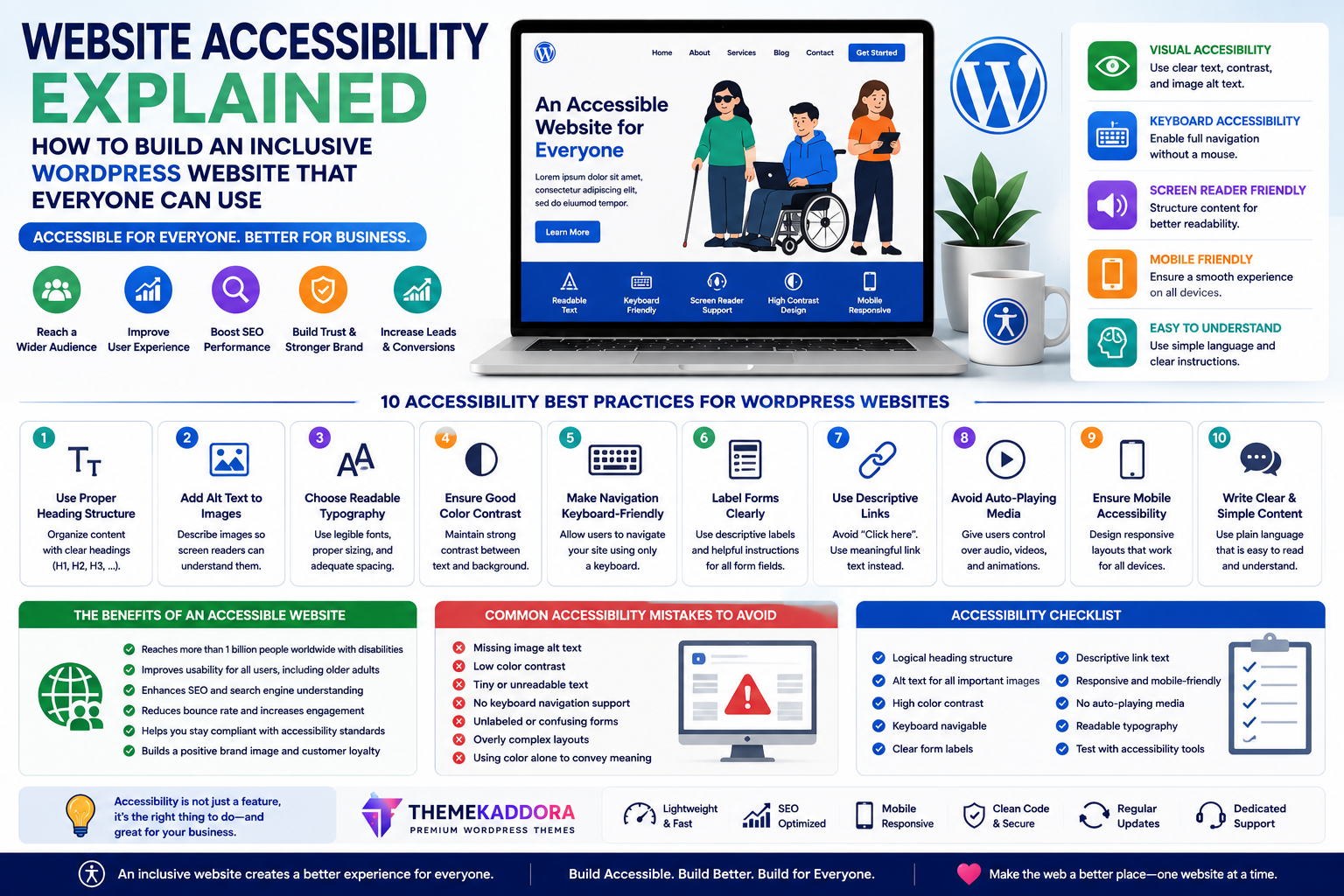
Website Accessibility Explained: How to Build an Inclusive WordPress Website That Everyone Can Use
Introduction
Imagine visiting a website where the text is impossible to read, the navigation doesn't work with a keyboard, or important images have no descriptions. For many users with disabilities, these challenges can make a website difficult—or even impossible—to use.
Website accessibility is about creating digital experiences that everyone can access, regardless of their abilities, devices, or browsing methods.
An accessible website benefits not only people with disabilities but also older adults, mobile users, visitors with slow internet connections, and even search engines.
If you're building a WordPress website, accessibility should be part of your design strategy from the beginning—not an afterthought.
In this guide, you'll learn what website accessibility is, why it matters, and how to make your WordPress website more inclusive.
What Is Website Accessibility?
Website accessibility is the practice of designing and developing websites so that people with a wide range of abilities can use them effectively.
This includes users who may have:
Visual impairments
Hearing impairments
Limited mobility
Cognitive differences
Temporary injuries
Age-related limitations
Accessibility focuses on removing unnecessary barriers so more people can access your content and services.
Why Accessibility Matters
An accessible website helps you:
Reach a wider audience
Improve user experience
Increase customer trust
Support SEO
Improve usability across devices
Create a more inclusive online presence
Accessibility is both a user experience improvement and a business opportunity.
Who Benefits from Accessible Websites?
Accessibility improvements help many types of visitors, including:
People with Visual Impairments
They may rely on screen readers, enlarged text, or high-contrast displays.
Keyboard Users
Some visitors navigate websites without using a mouse.
Mobile Users
Clear layouts and larger touch targets improve usability on smaller screens.
Older Adults
Readable typography and simple navigation improve accessibility for aging users.
Users with Slow Internet Connections
Lightweight websites load faster and remain easier to use.
Accessibility Best Practices
1. Use Proper Heading Structure
Organize content with logical headings.
Clear structure improves navigation for both visitors and assistive technologies.
2. Add Alternative Text to Images
Describe important images using meaningful alt text.
This helps screen reader users understand visual content.
3. Choose Readable Typography
Good typography includes:
Comfortable font sizes
Adequate spacing
Strong contrast
Clear letterforms
Readable text benefits everyone.
4. Maintain Good Color Contrast
Text should remain readable against its background.
Avoid relying on color alone to communicate important information.
5. Make Navigation Keyboard-Friendly
Users should be able to navigate menus, forms, and buttons using only a keyboard.
6. Label Forms Clearly
Every input field should include descriptive labels.
Helpful instructions reduce confusion.
7. Use Descriptive Links
Instead of generic phrases like "Click Here," use descriptive link text.
Examples:
View Pricing
Download the Guide
Contact Our Team
Clear links improve usability.
8. Avoid Automatic Media Playback
Unexpected audio or video can disrupt the browsing experience.
Allow visitors to control media playback.
9. Create Mobile-Friendly Layouts
Responsive design improves accessibility across different devices and screen sizes.
10. Write Plain, Clear Content
Simple language helps visitors understand information more easily.
Avoid unnecessary complexity.
Accessibility and SEO
Accessibility and SEO often complement each other.
Both benefit from:
Logical headings
Alternative text
Clear navigation
Fast loading pages
Mobile responsiveness
Well-organized content
Improving accessibility can also improve your website's overall usability.
Common Accessibility Mistakes
Avoid:
Low color contrast
Missing image descriptions
Tiny text
Confusing navigation
Unlabeled forms
Poor keyboard support
Overly complex layouts
Auto-playing media
Small improvements can make a significant difference.
Accessibility Checklist
Before publishing your website, verify that you have:
✅ Responsive design
✅ Clear heading hierarchy
✅ Image alt text
✅ Readable typography
✅ Accessible forms
✅ Keyboard navigation
✅ Descriptive links
✅ High color contrast
✅ Mobile-friendly layouts
✅ Fast loading pages
Why Your WordPress Theme Matters
Accessibility begins with your theme.
A well-designed theme should include:
Responsive layouts
Clean HTML structure
Keyboard-friendly navigation
Accessible typography
Fast performance
Flexible customization
Choosing an accessibility-conscious theme reduces the amount of additional work required.
Why Businesses Choose Themekaddora
Themekaddora WordPress themes are built with modern usability standards in mind.
Features include:
Responsive design
Clean HTML5 structure
SEO-friendly architecture
Fast loading performance
WooCommerce compatibility
Flexible customization
Cross-browser compatibility
Modern business layouts
These features help businesses create websites that are easier for more people to use.
The Future of Accessible Web Design
As technology continues to evolve, accessibility is becoming a core expectation rather than an optional feature.
Businesses that prioritize inclusive design today are better positioned to serve diverse audiences, improve user satisfaction, and strengthen their online reputation.
Accessibility is an ongoing process of continuous improvement—not a one-time task.
Conclusion
Website accessibility is about ensuring that every visitor has a fair opportunity to access your content, products, and services.
By focusing on readable content, responsive design, keyboard navigation, alternative text, and clear user experiences, you create a website that benefits everyone—not just specific groups of users.
Themekaddora WordPress themes provide a solid foundation with responsive layouts, SEO-friendly architecture, clean code, and performance-focused design, helping businesses build websites that are modern, professional, and accessible.
Frequently Asked Questions (FAQs)
What is website accessibility?
Website accessibility is the practice of designing websites so that people with different abilities and technologies can use them effectively.
Does accessibility improve SEO?
Accessibility and SEO share many best practices, such as logical headings, image alt text, responsive design, and clear navigation, which can improve overall website quality.
Is accessibility only for people with disabilities?
No. Accessibility improvements benefit many users, including mobile visitors, older adults, people with temporary injuries, and users with slower internet connections.
Can I improve accessibility without redesigning my website?
Yes. Many improvements—such as adding alt text, improving headings, increasing color contrast, and simplifying navigation—can be implemented without a complete redesign.
Why choose Themekaddora WordPress themes?
Themekaddora themes combine responsive layouts, clean code, SEO-friendly architecture, WooCommerce compatibility, and performance-focused design to help businesses build professional WordPress websites that deliver a better experience for all visitors.
Comments (0)