
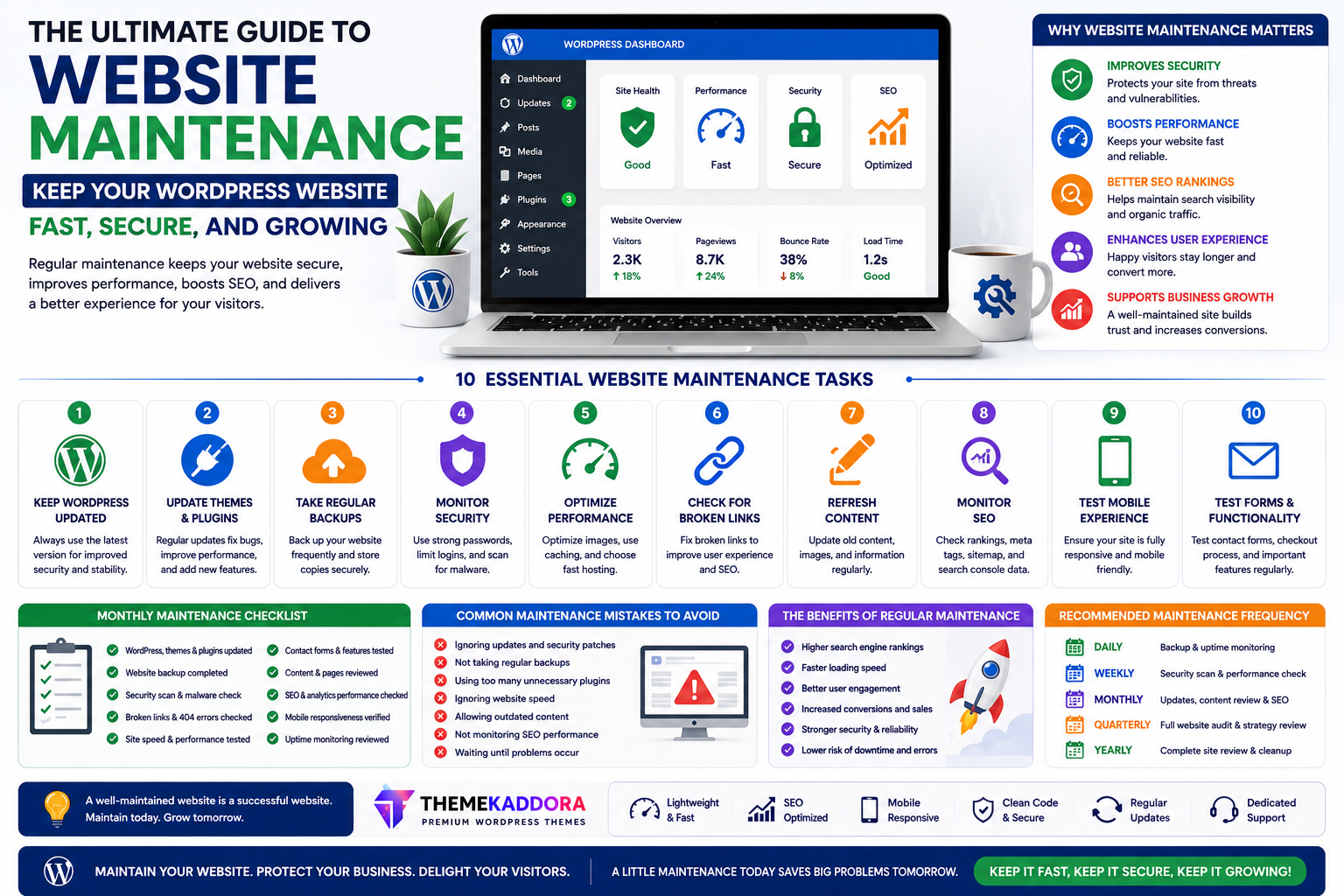
The Ultimate Guide to Website Maintenance: Keep Your WordPress Website Fast, Secure, and Growing
Introduction
Launching a WordPress website is only the beginning of your online journey. Like a car or a home, a website requires regular maintenance to remain secure, fast, and reliable.
Many businesses invest heavily in building a professional website but overlook ongoing maintenance. As a result, they experience slower performance, outdated content, security vulnerabilities, broken functionality, and declining search rankings.
Regular maintenance helps your website stay competitive while protecting your investment.
In this complete guide, you'll learn everything you need to know about maintaining a WordPress website, from updates and backups to SEO monitoring and performance optimization.
Why Website Maintenance Matters
Website maintenance helps you:
Improve security
Enhance performance
Maintain SEO rankings
Prevent downtime
Improve user experience
Extend website lifespan
Protect customer trust
Support business growth
A well-maintained website performs better for both users and search engines.
What Happens If You Ignore Website Maintenance?
Neglecting maintenance may lead to:
Security vulnerabilities
Slow loading pages
Broken forms
Outdated information
Plugin conflicts
Poor user experience
Lower search rankings
Lost sales opportunities
Small issues can quickly become expensive problems if left unresolved.
1. Keep WordPress Updated
WordPress regularly releases updates that improve:
Security
Stability
Compatibility
Performance
Updating your installation helps protect your website and ensures compatibility with modern plugins and themes.
2. Update Themes and Plugins
Outdated themes or plugins can introduce security risks and compatibility issues.
Before updating:
Create a backup
Review update notes
Test important functionality afterward
Consistent updates reduce long-term maintenance issues.
3. Perform Regular Backups
Backups protect your website in case of:
Human error
Malware
Hosting issues
Plugin conflicts
Unexpected failures
Store backups securely and verify they can be restored if needed.
4. Monitor Website Security
A secure website builds visitor confidence.
Security best practices include:
Strong passwords
HTTPS
Limited administrator accounts
Trusted plugins
Regular monitoring
Security is an ongoing process rather than a one-time setup.
5. Improve Website Speed
Performance affects user experience and SEO.
Review:
Image optimization
Hosting quality
Plugin usage
Caching
Theme performance
Small speed improvements can have a noticeable impact.
6. Check for Broken Links
Broken links create frustration for visitors and make websites appear neglected.
Regularly review:
Internal links
External links
Downloadable resources
Images
Fix or replace broken links promptly.
7. Refresh Website Content
Search engines and visitors appreciate current information.
Update:
Blog posts
Service pages
Product information
Team details
Contact information
Case studies
Fresh content demonstrates that your business remains active.
8. Monitor SEO Performance
SEO maintenance involves reviewing:
Organic traffic
Keyword rankings
Internal linking
Metadata
Crawl issues
Regular monitoring helps identify opportunities for improvement.
9. Review Mobile Experience
Test your website across multiple devices.
Check:
Navigation
Typography
Buttons
Forms
Images
A smooth mobile experience supports better engagement.
10. Test Contact Forms
Contact forms should be tested regularly to ensure inquiries are delivered correctly.
A broken form may result in missed business opportunities.
Monthly Website Maintenance Checklist
Every month, review:
✅ WordPress updates
✅ Theme updates
✅ Plugin updates
✅ Website backups
✅ Security checks
✅ Broken links
✅ Contact forms
✅ Website speed
✅ Mobile usability
✅ Analytics
A simple checklist makes maintenance easier to manage.
Quarterly Website Maintenance Tasks
Every few months:
Review old blog content
Remove unused plugins
Update images
Improve SEO
Refresh homepage messaging
Test conversion paths
Evaluate user experience
Periodic reviews help keep your website aligned with business goals.
Annual Website Review
Once a year, evaluate:
Website design
Branding
Navigation
Performance
Accessibility
Security strategy
Content strategy
Major reviews ensure your website continues supporting long-term growth.
Common Website Maintenance Mistakes
Avoid:
Ignoring updates
Skipping backups
Using weak passwords
Forgetting mobile testing
Allowing outdated content
Installing unnecessary plugins
Ignoring analytics
Waiting until problems occur
Preventive maintenance is more effective than emergency fixes.
Why Your WordPress Theme Matters
A reliable theme reduces maintenance challenges.
Look for themes that offer:
Regular updates
Lightweight performance
Clean code
Responsive layouts
SEO-friendly architecture
WooCommerce compatibility
A quality theme helps keep your website stable over time.
Why Businesses Choose Themekaddora
Themekaddora develops WordPress themes designed for long-term reliability.
Features include:
Lightweight architecture
Responsive design
SEO-friendly code
WooCommerce compatibility
Fast loading performance
Clean HTML5 and CSS3 standards
Easy customization
Cross-browser compatibility
Regular updates
Professional support
These features simplify maintenance while helping businesses build future-ready websites.
Maintenance Tools That Can Help
While every website has unique needs, many businesses benefit from using tools that assist with:
Website backups
Security monitoring
Performance optimization
Analytics
SEO
Uptime monitoring
Choose tools that match your workflow and avoid installing unnecessary plugins.
Conclusion
Website maintenance isn't just about fixing problems—it's about preventing them.
By regularly updating WordPress, monitoring security, optimizing performance, refreshing content, and reviewing SEO, you create a website that continues delivering value to both visitors and your business.
Starting with a high-quality WordPress theme also makes maintenance easier. Themekaddora themes combine clean code, responsive design, SEO-friendly architecture, and performance-focused development to help businesses maintain professional websites with confidence.
Frequently Asked Questions (FAQs)
How often should I maintain my WordPress website?
Basic maintenance should be performed monthly, while more comprehensive reviews are recommended quarterly and annually.
Why are backups important?
Backups allow you to restore your website if something goes wrong, helping reduce downtime and data loss.
Does website maintenance improve SEO?
Yes. Updating content, fixing broken links, improving speed, and monitoring technical issues all contribute to better SEO performance.
What is the biggest maintenance mistake?
Ignoring updates is one of the most common mistakes because outdated software can create security and compatibility problems.
Why choose Themekaddora WordPress themes?
Themekaddora themes provide responsive layouts, clean code, fast performance, WooCommerce compatibility, regular updates, and SEO-friendly architecture, helping businesses maintain reliable and professional WordPress websites over the long term.
Comments (0)