
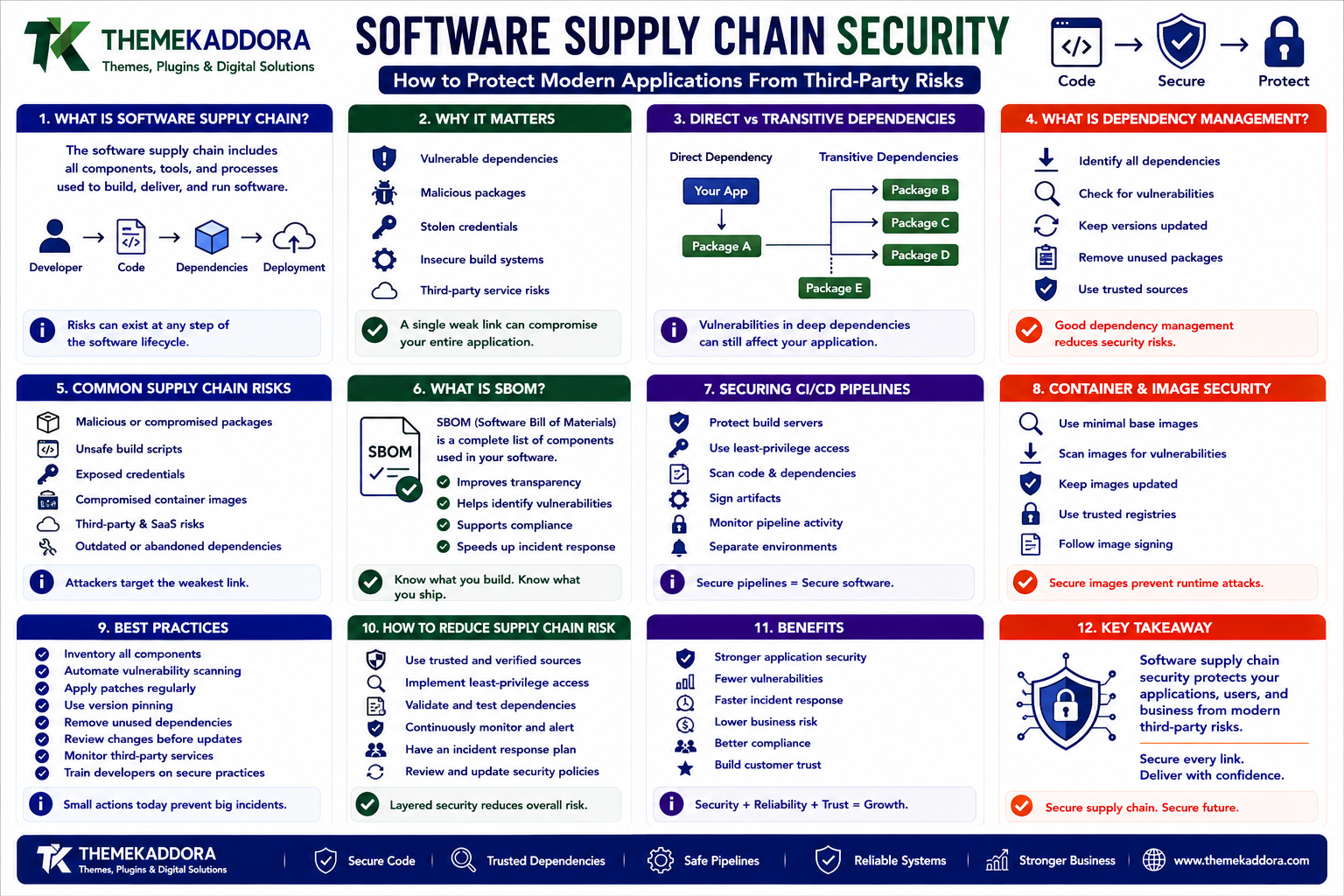
Software Supply Chain Security: How to Protect Modern Applications From Third-Party Risks
Introduction
Modern software is rarely built entirely from code written by one development team.
A typical application may depend on:
Open-source libraries
Frameworks
Package managers
APIs
Cloud services
Container images
CI/CD tools
Third-party SDKs
Monitoring services
Authentication providers
AI services
A simplified application can look like:
Your Application ↓ Framework ↓ Libraries ↓ Packages ↓ Third-Party Services ↓ Cloud Infrastructure
This creates a hidden risk.
Your organization may write excellent application code while still depending on software that contains:
Vulnerabilities
Malicious code
Compromised packages
Stolen credentials
Unsafe build scripts
Outdated dependencies
This entire ecosystem is often referred to as the software supply chain.
Software supply chain security is the practice of identifying, evaluating, protecting, and monitoring the components and processes involved in creating and delivering software.
A secure development lifecycle therefore needs to consider more than source code:
Developer Code + Dependencies + Build System + CI/CD + Artifacts + Deployment
A compromise in any one of these areas can potentially affect the final application.
This is particularly important for:
SaaS companies
WordPress developers
Plugin developers
Mobile applications
Enterprise software
AI products
APIs
Cloud-native applications
Digital marketplaces
In this guide, you'll learn what software supply chain security means, why third-party dependencies create risk, how package managers can introduce vulnerabilities, what an SBOM is, how CI/CD systems should be protected, how to secure container images, how to manage open-source dependencies, how to reduce supply-chain risk, and how to build a practical security program.
1. What Is a Software Supply Chain?
The software supply chain includes the technologies, people, tools, components, and processes used to create and deliver an application.
A typical lifecycle may look like:
Developer ↓ Source Code ↓ Dependencies ↓ Build ↓ Testing ↓ Artifact ↓ Deployment ↓ Production
Every stage can introduce risk.
For example:
Compromised Dependency ↓ Application Build ↓ Production Software
or:
Compromised CI/CD Credential ↓ Malicious Build ↓ Production Deployment
Supply-chain security attempts to reduce these risks.
2. Why Software Supply Chain Security Matters
Modern applications depend on thousands of external components in some environments.
A vulnerability in a widely used dependency can affect many applications simultaneously.
Businesses may also depend on:
External package repositories
Cloud providers
Container registries
Code-hosting services
Build systems
SaaS APIs
This means application security is partly dependent on the security of the surrounding ecosystem.
3. Direct vs Transitive Dependencies
A developer may intentionally install:
Package A
But Package A may depend on:
Package B Package C Package D
These are transitive dependencies.
The dependency tree can therefore become:
Application └── Package A ├── Package B │ └── Package E └── Package C └── Package F
A vulnerability deep inside the dependency tree can still affect the application.
This is why simply reviewing direct dependencies is not enough.
4. What Is Dependency Management?
Dependency management is the process of controlling external software components used by an application.
It includes:
Tracking dependencies
Pinning versions
Updating packages
Reviewing changes
Detecting vulnerabilities
Removing unnecessary libraries
A healthy project should know:
What dependencies do we use? Which versions? Where did they come from? Who maintains them? Are they vulnerable?
5. Why Outdated Dependencies Are Risky
Software dependencies receive updates for many reasons:
Security fixes
Bug fixes
Performance improvements
Compatibility
New functionality
If a project remains on an old version for too long, known vulnerabilities may remain unresolved.
For example:
Dependency v1 ↓ Security Issue Discovered ↓ v2 Released ↓ Application Still Uses v1
The vulnerability remains in the deployed application.
Dependency updates should therefore be part of routine maintenance.
6. Should You Always Use the Latest Version?
Not necessarily.
Blindly upgrading every dependency can introduce compatibility problems.
A more controlled approach is:
New Version ↓ Review Changes ↓ Run Tests ↓ Security Check ↓ Deploy
Organizations should balance:
Security
Compatibility
Stability
Upgrade effort
Security patches may require faster action than ordinary feature upgrades.
7. Lock Files and Reproducible Builds
Package managers often use lock files to record exact dependency versions.
This helps ensure that:
Developer Machine = CI Environment = Production
rather than allowing slightly different dependency versions to be installed in each environment.
Reproducibility makes builds easier to trust and investigate.
8. Dependency Integrity
A dependency should not simply be trusted because its package name is familiar.
Organizations can verify:
Package source
Version
Checksums
Signatures
Publisher information
Repository history
The goal is to ensure that the software being downloaded is actually the intended software.
Integrity checks become particularly important for production builds.
9. Typosquatting Attacks
Attackers sometimes register malicious packages with names that look similar to popular packages.
For example:
legitimate-package
versus:
legitimate-packge
A developer can accidentally install the malicious package.
This technique is often called typosquatting.
Reduce this risk by:
Verifying package names
Checking maintainers
Reviewing package history
Using approved dependency sources
Limiting who can add dependencies
10. Malicious Package Updates
A dependency that was previously safe may later become compromised.
For example:
Package v1 → Safe Package v2 → Compromised
Automatic dependency updates can therefore introduce new risk.
A secure workflow should include testing and review for important production dependencies.
11. Open-Source Dependency Security
Open-source software provides enormous value to developers.
However, open source still needs security management.
Organizations should consider:
Dependency age
Maintainer activity
Security history
License
Number of dependencies
Known vulnerabilities
Project health
A popular package may still require careful management.
12. Dependency Vulnerability Scanning
Automated scanning tools can identify known vulnerabilities in dependencies.
A simplified workflow is:
Source Code ↓ Dependency Scan ↓ Vulnerability Found? ├── No → Continue └── Yes → Review / Update
Scanning should happen throughout development rather than only before a major release.
13. Software Bill of Materials (SBOM)
An SBOM, or Software Bill of Materials, is an inventory of the components contained in a software product.
It can describe:
Application ├── Framework ├── Library A ├── Library B ├── Package C └── Runtime
A useful SBOM can help organizations answer:
Which applications are affected by this vulnerable component?
Without an inventory, answering that question can take much longer.
14. Why SBOMs Matter
Suppose a vulnerability is discovered in:
Library X
An organization with an SBOM can search:
Which Products Use Library X?
and identify potentially affected systems.
Without an SBOM:
Search Repositories + Search Builds + Search Servers + Ask Teams
This is slower and more error-prone.
15. SBOM and Digital Products
Digital marketplaces can benefit from component inventories.
For example, a plugin or application may include:
Product ├── Open-Source Library A ├── Library B ├── Font C └── JavaScript Package D
Knowing exactly what is included helps with:
Security
Licensing
Updates
Support
Vulnerability response
16. Container Image Security
Modern applications frequently use containers.
A container image may contain:
Base Image + OS Packages + Runtime + Application Dependencies + Application Code
A vulnerable package inside the container can become a production risk.
Container scanning can identify such issues before deployment.
17. Base Image Security
Developers sometimes use large generic base images.
For example:
Large Base Image ↓ Many Packages ↓ More Potential Vulnerabilities
A smaller, purpose-built base image can reduce unnecessary components.
However, minimizing an image should not compromise required functionality or maintenance.
18. CI/CD Security
CI/CD systems have powerful access.
They can:
Build software
Access repositories
Publish artifacts
Deploy production
Access secrets
A compromised CI/CD account can therefore become extremely dangerous.
The pipeline should be protected with:
Strong authentication
Least-privilege permissions
Secret management
Branch protections
Build isolation
Audit logs
19. Protecting CI/CD Secrets
Never place production credentials directly inside source code.
Avoid:
DATABASE_PASSWORD = "..." API_KEY = "..."
inside repositories.
Use secure secret-management mechanisms instead.
A safer workflow is:
CI/CD ↓ Secret Store ↓ Temporary Credential ↓ Build / Deploy
Secrets should also be rotated when necessary.
20. Build Environment Security
A build environment can be an attack target.
For example:
Pull Request ↓ CI Build ↓ Dependency Installation ↓ Script Execution
Third-party code may execute during installation or build processes.
Therefore, CI environments should:
Restrict permissions
Isolate jobs
Limit network access where practical
Avoid unnecessary production credentials
Log important actions
Build systems should be treated as part of the production security boundary.
21. Protecting Source Code Repositories
Source repositories contain valuable intellectual property.
Protect them using:
MFA
Role-based permissions
Branch protections
Required code reviews
Secret scanning
Audit logs
Repository backups
Do not allow every developer to modify critical production branches without review.
22. Code Review and Supply Chain Security
Code review can help identify:
New dependencies
Suspicious scripts
Unexpected network calls
Permission changes
Credential handling
For example:
Pull Request ↓ Code Review ↓ Dependency Review ↓ Security Scan ↓ Merge
Security should be part of the normal development process.
23. Dependency Pinning
Dependency versions should be controlled.
For example:
Allowed: Library 2.4.x Avoid: "Always install latest"
The exact strategy depends on the ecosystem.
The goal is to prevent an unexpected dependency change from silently entering a production build.
24. Automated Dependency Updates
Automation can help keep dependencies current.
A mature workflow may:
New Dependency Version ↓ Automated Update Proposal ↓ Tests ↓ Security Scan ↓ Review ↓ Merge
This creates a balance between keeping dependencies fresh and preventing untested upgrades.
25. Supply Chain Security for AI Applications
AI applications often use additional dependencies and external services.
For example:
AI Application ├── Model SDK ├── Vector Database ├── Search Library ├── API Client ├── Agent Framework └── Cloud Services
Each dependency can introduce risk.
AI applications should therefore apply the same supply-chain controls as other software.
26. Supply Chain Security for AI Agents
AI agents may use many tools:
AI Agent ├── Search ├── CRM ├── ERP ├── Email └── Database
Each integration introduces another security boundary.
An agent should use:
Limited credentials
Approved tools
Version-controlled dependencies
Secure APIs
Logging
Permission controls
An AI model should never be allowed to bypass software-level security controls.
27. Supply Chain Security for SaaS
SaaS companies depend on:
Cloud infrastructure
Open-source libraries
CI/CD
Third-party APIs
Identity services
Monitoring platforms
A mature SaaS security program tracks these dependencies continuously.
A useful model is:
Code + Dependencies + Build + Infrastructure + Third-Party Services
All should be considered part of the supply chain.
28. Third-Party Vendor Risk
A business may depend on external providers for critical functionality.
Examples:
Payment gateway
Email provider
Cloud storage
Analytics
Customer support
Authentication
AI APIs
If a provider has an outage or compromise, your application may be affected.
Vendor assessment can include:
Security practices
Availability
Data handling
Incident response
Compliance
Business continuity
Third-party risk cannot be eliminated, but it can be managed.
29. Supply Chain Security for Digital Marketplaces
A marketplace distributing digital products has additional responsibilities.
Products may contain:
Plugins
Libraries
Templates
Scripts
Fonts
Images
Third-party components
A stronger publishing workflow can include:
Product Submission ↓ Component Review ↓ Malware Scan ↓ Dependency Review ↓ License Review ↓ Quality Checks ↓ Publish
This helps protect both the marketplace and its customers.
30. Secure Software Release Pipeline
A mature release pipeline can look like:
Developer ↓ Code Review ↓ Dependency Scan ↓ Secret Scan ↓ Unit Tests ↓ Security Tests ↓ Build ↓ SBOM ↓ Artifact Scan ↓ Deploy ↓ Monitor
Security becomes part of every stage.
31. Artifact Integrity
After software is built, the resulting artifact should be protected.
Artifacts may include:
Container images
Packages
Binary files
Plugins
Extensions
Deployment bundles
Organizations should know:
What was built? Who built it? From which source? With which dependencies? Was it modified afterward?
This improves release integrity.
32. Signing Software Artifacts
Software signing can help verify that an artifact came from a trusted source and was not modified unexpectedly.
Conceptually:
Build Artifact ↓ Sign ↓ Publish ↓ Verify Before Deployment
The exact implementation depends on the software ecosystem.
The principle is establishing trust in the artifact itself.
33. Secure Package Registries
Private package registries can help organizations control internal dependencies.
For example:
Internal Package ↓ Private Registry ↓ Approved Applications
Controls can include:
Authentication
Access permissions
Package scanning
Version policies
Audit logs
This can reduce uncontrolled dependency sources.
34. Dependency Removal Is Also Security
Unused dependencies create unnecessary attack surface.
If a package is no longer needed:
Unused Dependency ↓ Remove
Fewer components generally mean:
Fewer vulnerabilities
Less maintenance
Smaller builds
Easier auditing
Don't keep packages simply because they were once useful.
35. Software Supply Chain Monitoring
Security should continue after deployment.
Monitor:
New dependency vulnerabilities
Package changes
Expired certificates
CI/CD activity
Unexpected builds
New external connections
Compromised vendors
A vulnerability discovered months after deployment should still be traceable back to affected products.
36. Incident Response for Supply Chain Attacks
Organizations should prepare for the possibility that a dependency or vendor becomes compromised.
A response plan may include:
Security Alert ↓ Identify Affected Components ↓ Find Affected Products ↓ Disable / Isolate ↓ Patch / Replace ↓ Rebuild ↓ Deploy ↓ Monitor
SBOMs and dependency inventories can significantly accelerate this process.
37. Common Supply Chain Security Mistakes
Avoid these problems:
Installing Unknown Packages
Package names alone do not establish trust.
Ignoring Transitive Dependencies
Deep dependencies can also contain vulnerabilities.
No Dependency Inventory
Teams cannot quickly determine what is affected.
Exposing CI/CD Secrets
Build credentials can provide powerful access.
No Code Review
Malicious or unexpected dependency changes may be missed.
Uncontrolled Automated Updates
New versions can introduce security or compatibility problems.
Ignoring Container Images
Base images can contain vulnerable packages.
No Vendor Assessment
Third-party services can become attack paths.
38. Software Supply Chain Security Best Practices
A strong program should:
Maintain a complete dependency inventory.
Monitor direct and transitive dependencies.
Review new packages before adoption.
Use lock files where appropriate.
Scan dependencies continuously.
Generate and maintain SBOMs.
Protect CI/CD systems.
Secure build secrets.
Scan container images.
Review third-party vendors.
Protect source repositories.
Validate artifact integrity.
Remove unused dependencies.
Prepare a supply-chain incident-response plan.
Security should be continuous rather than a one-time release checklist.
39. A Practical Supply Chain Security Workflow
Businesses can implement supply-chain security in stages:
1. Inventory Dependencies ↓ 2. Identify Critical Vendors ↓ 3. Protect Source Repositories ↓ 4. Secure CI/CD ↓ 5. Scan Dependencies ↓ 6. Generate SBOM ↓ 7. Scan Artifacts ↓ 8. Verify Releases ↓ 9. Monitor Production ↓ 10. Prepare Incident Response
Start with visibility.
You cannot secure components you do not know you are using.
Why Choose ThemeKaddora?
At ThemeKaddora, digital products can involve many components:
WordPress plugins
Themes
WooCommerce extensions
SaaS applications
AI tools
Website templates
JavaScript packages
PHP libraries
Third-party APIs
As a digital-product ecosystem grows, software supply-chain security becomes increasingly important.
A trustworthy product-development lifecycle can include:
Development ↓ Dependency Review ↓ Security Testing ↓ License Review ↓ Build Validation ↓ Release ↓ Monitoring
ThemeKaddora focuses on practical digital products and technology solutions built around:
Security
Compatibility
Reliability
Performance
Maintainability
Responsible product development
Conclusion
Modern software is built from an ecosystem of components.
That creates enormous development advantages, but it also creates supply-chain risk.
A secure application therefore requires more than secure source code.
It requires:
Secure Dependencies + Secure Build Systems + Secure Artifacts + Secure Deployment
Organizations should know:
What components they use
Which versions are installed
Where those components came from
Who maintains them
Which vulnerabilities affect them
Which products depend on them
SBOMs, dependency scanning, secure CI/CD, artifact verification, vendor assessment, and continuous monitoring can all contribute to a stronger security posture.
The most important principle is:
You cannot protect your software supply chain if you cannot see your software supply chain.
Start with visibility.
Inventory your dependencies.
Secure your build process.
Automate security checks.
Monitor what changes.
Prepare for compromise.
The goal is not to eliminate every third-party dependency. The goal is to understand, control, and continuously monitor the dependencies and processes that your software business relies on.
Frequently Asked Questions
1. What is software supply chain security?
Software supply chain security protects the code, dependencies, tools, build processes, artifacts, and third-party services involved in creating and delivering software.
2. Why are software dependencies a security risk?
Dependencies may contain vulnerabilities, malicious code, compromised releases, or outdated components that can affect applications using them.
3. What is an SBOM?
An SBOM, or Software Bill of Materials, is an inventory describing the software components included in a product.
4. Why are transitive dependencies important?
A direct dependency can rely on many additional packages. A vulnerability in one of these transitive dependencies can still affect the application.
5. Should businesses automatically update dependencies?
Not blindly. Automated updates should generally be combined with testing, compatibility checks, and security review for important production systems.
6. How can CI/CD systems become a supply-chain risk?
CI/CD systems often have access to source code, secrets, build artifacts, and production environments. A compromised pipeline can therefore affect the entire software-delivery process.
7. Does container security matter for software supply chains?
Yes. Container images include base images, operating-system packages, runtimes, and application dependencies that should be reviewed and scanned.
8. Can AI applications have software supply-chain risks?
Yes. AI applications may depend on model SDKs, libraries, agent frameworks, APIs, containers, and cloud services, all of which form part of the broader supply chain.
9. How can digital marketplaces improve software supply chain security?
Marketplaces can use dependency review, malware scanning, license checks, secure publishing workflows, artifact validation, and ongoing product monitoring.
10. Why choose Themekaddora?
Themekaddora provides lightweight, responsive, SEO-friendly WordPress themes with fast performance, WooCommerce compatibility, flexible customization, accessibility-conscious design, modern templates, regular updates, and professional support—providing a strong foundation for businesses building digital products and product-focused websites.
Comments (0)