
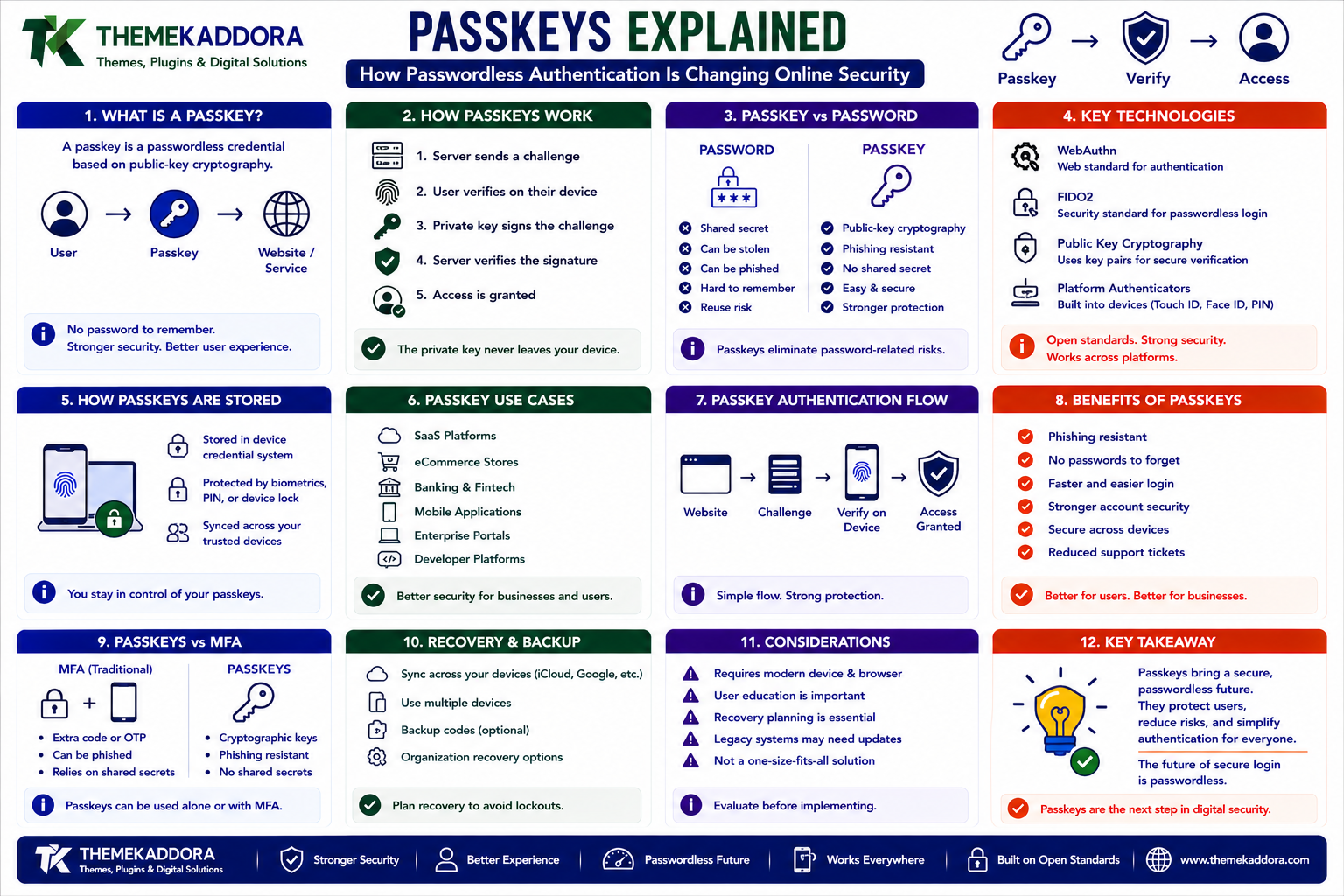
Passkeys Explained: How Passwordless Authentication Is Changing Online Security
Introduction
Passwords have been the foundation of online authentication for decades.
Users create:
Username + Password
and use those credentials to access websites and applications.
The problem is that passwords create significant security and usability challenges.
Users may:
Reuse passwords
Choose weak passwords
Forget passwords
Store passwords insecurely
Fall for phishing attacks
Share credentials
Lose access to accounts
Businesses then have to manage:
Password resets
Credential storage
Login attacks
Account recovery
Credential stuffing
Phishing incidents
Support requests
As digital services become more important, organizations are looking for authentication methods that are both easier for users and harder for attackers to exploit.
This is where passkeys come in.
Passkeys provide a passwordless authentication approach based on public-key cryptography and standards such as WebAuthn and the FIDO ecosystem.
Instead of asking a user to remember a password:
Website ↓ Passkey ↓ Device Verification ↓ Authenticated
The user's device may use a local unlock mechanism such as:
Fingerprint
Face recognition
Device PIN
Screen lock
The website does not need to receive the user's biometric information.
A simplified authentication flow looks like:
User ↓ Website ↓ Authentication Challenge ↓ Device / Passkey ↓ Cryptographic Response ↓ Server Verification ↓ Login
Passkeys can reduce reliance on passwords while providing strong protection against many common phishing attacks.
They are becoming increasingly relevant to:
eCommerce
Banking and financial applications
Mobile applications
Enterprise software
Customer portals
Developer platforms
In this guide, you'll learn what passkeys are, how they work, how they differ from passwords and traditional MFA, how WebAuthn and public-key cryptography fit into the system, how passkeys work across devices, what recovery challenges businesses need to consider, how SaaS and eCommerce platforms can adopt them, and what organizations should consider before implementing passwordless authentication.
1. What Is a Passkey?
A passkey is a credential based on public-key cryptography that can be used to authenticate a user without requiring a traditional password.
Instead of a shared secret:
User + Password
authentication uses a cryptographic key pair:
Public Key + Private Key
The basic concept is:
Device ↓ Private Key ↓ Cryptographic Signature ↓ Server ↓ Public Key Verification
The private key remains protected by the user's credential system.
The server stores the corresponding public key.
2. How Passkeys Work
When a user creates a passkey, the system generates a credential associated with the website or application.
Conceptually:
Create Passkey ↓ Generate Key Pair ↓ Private Key → Protected on Device / Credential System Public Key → Registered With Service
Later, during login:
Login ↓ Server Sends Challenge ↓ User Unlocks Device ↓ Private Key Signs Challenge ↓ Server Verifies Signature ↓ Access Granted
The private key is not sent to the website during authentication.
3. Why Passkeys Are Different From Passwords
With passwords:
User Knows Secret ↓ Sends Password ↓ Server Verifies
The password itself is a secret that can be stolen or phished.
With passkeys:
Server → Stores Public Key User Device → Protects Private Key
Authentication involves proving possession of the private key rather than transmitting a password.
This changes the security model significantly.
4. Passkeys and Public-Key Cryptography
Passkeys rely on asymmetric cryptography.
The basic idea is:
Public Key → Can Be Shared Private Key → Must Remain Secret
The public key can be stored by the service.
The private key remains protected by the credential system.
During authentication, the private key signs a challenge.
The server verifies the signature using the public key.
5. What Is WebAuthn?
Web Authentication, commonly called WebAuthn, is a web standard that enables websites and applications to interact with authenticators for strong authentication.
A simplified model is:
Website ↓ WebAuthn ↓ Authenticator ↓ Cryptographic Credential
WebAuthn provides the browser and operating system integration needed for modern passwordless authentication experiences.
6. What Is FIDO2?
FIDO2 refers to a set of technologies and standards supporting strong, passwordless authentication.
It involves technologies such as:
WebAuthn
Client-to-Authenticator Protocols
The broader ecosystem helps enable authentication that does not depend on shared passwords.
Passkeys are part of this evolution toward easier and more phishing-resistant authentication.
7. Why Passkeys Are Phishing Resistant
One of the major security benefits of passkeys is their origin binding.
A passkey credential is associated with the website or service for which it was created.
Consider a fake website:
real-bank.example
versus:
fake-bank.example
A properly implemented passkey credential for the legitimate site is not simply a password that can be typed into the fake site.
This makes phishing substantially harder.
8. Password Phishing vs Passkey Authentication
Traditional phishing:
Fake Website ↓ User Enters Password ↓ Attacker Captures Password
Passkey authentication:
Fake Website ↓ Cannot Simply Collect Legitimate Passkey Secret
This does not mean every authentication attack disappears.
Attackers can still target:
Account recovery
Devices
Email accounts
Session tokens
User behavior
Passkeys address an important part of the authentication problem rather than every security problem.
9. Passkeys and Biometrics
People often think:
"A passkey is my fingerprint."
That's not quite right.
The fingerprint or face scan can be used by the device to unlock the credential.
Conceptually:
Fingerprint ↓ Unlock Credential ↓ Private Key Used ↓ Authentication
The website generally does not receive the biometric itself.
The biometric is part of the local user-verification process.
10. Passkeys and Device PINs
A biometric is not always required.
Depending on the platform, a device PIN or other local unlock method may be used.
For example:
Passkey ↓ Device Verification ├── Fingerprint ├── Face └── PIN
This gives users flexibility while preserving strong authentication.
11. Are Passkeys Stored on the Website?
The service generally stores the public part of the credential.
Conceptually:
Website Database ↓ Credential Public Key
The private key remains under the protection of the user's credential system.
This is fundamentally different from storing a password hash and asking the user to repeatedly submit a shared secret.
12. Synced Passkeys vs Device-Bound Credentials
Passkey implementations can involve credentials that are synchronized across devices through credential-management systems or credentials that are more tightly bound to a specific authenticator.
This distinction matters for:
Convenience
Recovery
Device migration
Enterprise policies
Security requirements
Businesses should understand how the credential ecosystem they support handles synchronization and recovery.
13. Cross-Device Passkey Login
Users increasingly expect to access services from multiple devices.
For example:
Phone + Laptop + Tablet
Passkey ecosystems can support credentials that are available across a user's trusted devices, depending on the platform and configuration.
This reduces the need to manually create a separate traditional password for every device.
14. Passkeys on Mobile Devices
Mobile devices are especially suitable for passkey authentication because they already provide secure local authentication mechanisms.
A typical flow may look like:
Mobile App ↓ Sign In ↓ Device Authentication ↓ Passkey ↓ Authenticated
Users can often authenticate using the same mechanism they already use to unlock their device.
15. Passkeys on Desktop
Desktop browsers and operating systems can also support passkeys.
A user may authenticate through:
Local device credentials
Security hardware
A paired device
Credential synchronization mechanisms
The exact experience depends on the operating system, browser, hardware, and account ecosystem.
16. Passkeys and Security Keys
Hardware security keys can also participate in strong authentication.
For example:
Website ↓ Security Key ↓ Cryptographic Authentication
This can be useful for:
Administrators
Security teams
Enterprise environments
High-risk accounts
Hardware-backed credentials can provide strong protection against credential theft.
17. Passkeys vs Passwords
A simple comparison:
Passwords
Passkeys
Shared secret
Public/private key model
Can be phished
Designed to resist common phishing
Users must remember them
Device handles credential use
Password resets required
Different recovery model
Credential reuse is common
No password reuse
Server verifies password-derived credential
Server verifies cryptographic proof
Passkeys can improve both usability and security, although migration and recovery need careful planning.
18. Passkeys vs SMS OTP
SMS one-time passwords are commonly used as an additional authentication factor.
A simplified flow:
Login ↓ SMS Code ↓ User Enters Code
Passkeys can provide stronger phishing resistance because authentication is cryptographically tied to the service.
SMS also depends on the security of the user's phone number and mobile network.
For high-security environments, organizations should carefully evaluate their authentication options rather than treating SMS as equivalent to phishing-resistant credentials.
19. Passkeys vs Authenticator Apps
Authenticator apps can generate time-based one-time passwords.
For example:
Password + Authenticator Code
This provides stronger security than a password alone.
Passkeys can go further by eliminating the password from the normal login flow.
A modern application may support both during a transition period.
20. Passkeys for SaaS Applications
SaaS platforms can use passkeys to simplify account authentication.
A signup flow could become:
Create Account ↓ Create Passkey ↓ Verify Device ↓ Account Ready
Later:
Return User ↓ Use Passkey ↓ Login
This can reduce password-reset support and improve login experience.
21. Passkeys for Enterprise SaaS
Enterprise customers often have stronger authentication requirements.
Passkeys can participate in broader identity strategies alongside:
Single sign-on
Multi-factor authentication
Identity providers
Device management
Conditional access
Privileged access controls
Passkeys should therefore be treated as one authentication mechanism within the larger enterprise identity architecture.
22. Passkeys for eCommerce
eCommerce platforms can use passkeys for customer accounts.
A customer might authenticate:
Account ↓ Passkey ↓ Orders Addresses Preferences
This can reduce friction during repeat visits.
For an eCommerce business, the important question is not only:
"Can customers log in?"
but:
"Can customers securely authenticate without slowing down their shopping experience?"
23. Passkeys and Checkout
Passkeys can help simplify account authentication, but they do not automatically solve payment security.
A checkout may still require:
Payment authentication
Fraud detection
Address verification
Transaction controls
Payment-provider security
For example:
Passkey ↓ Authenticate Customer ↓ Checkout ↓ Payment Security Controls
Authentication and payment authorization remain separate concerns.
24. Passkeys for Digital Marketplaces
A marketplace can use passkeys for:
Customer accounts
Seller accounts
Developer accounts
Administrative accounts
For example:
Seller ↓ Passkey ↓ Seller Dashboard
High-privilege marketplace administrators may also require additional security controls.
25. Passkeys for Developer Platforms
Developer platforms can use passkeys for:
Account login
Dashboard access
API management
Deployment controls
Security-sensitive actions
For example:
Developer ↓ Passkey ↓ Developer Dashboard ↓ API Credentials
Sensitive actions should still use authorization and potentially step-up authentication.
26. Passkeys for AI Applications
AI applications often contain sensitive:
Conversations
Documents
Business information
API keys
Project data
Passkeys can provide a strong authentication mechanism for accessing such systems.
For example:
AI Workspace ↓ Passkey ↓ User Authentication ↓ Workspace Access
Authorization remains separate.
A user authenticated to the platform may still need limited access to specific projects or resources.
27. Passkeys and AI Agents
AI agents may operate on behalf of users.
Authentication architecture should distinguish:
Human Identity
from:
Machine / Agent Identity
A passkey is primarily useful for the human authentication side.
An AI agent may require:
Service credentials
Scoped tokens
Short-lived authorization
Tool-specific permissions
Do not give an AI agent a human's passkey or personal authentication credential.
28. Passkeys and Zero Trust
Passkeys can strengthen the identity layer of a Zero Trust architecture.
A simplified model is:
User ↓ Passkey ↓ Strong Authentication ↓ Policy ↓ Application ↓ Least-Privilege Access
Passkeys provide authentication.
Zero Trust also requires:
Authorization
Device assessment
Policy
Monitoring
Data protection
One does not replace the other.
29. Account Recovery Is the Hard Part
Removing passwords also changes recovery.
With a password:
Forgot Password ↓ Reset Email ↓ Create New Password
Passkey recovery may depend on the user's:
Trusted devices
Credential synchronization
Account recovery mechanisms
Backup authentication methods
Businesses need a recovery strategy before removing passwords completely.
30. Recovery Should Not Become the Weakest Link
A strong passkey system can be undermined by weak recovery.
For example:
Strong Passkey ↓ Weak Recovery Email ↓ Account Compromised
Recovery mechanisms should receive security attention comparable to normal authentication.
Consider:
Identity verification
Recovery codes
Backup authentication
Support procedures
Rate limiting
Fraud detection
31. Passkey Enrollment
A good enrollment experience should be clear.
For example:
Account Settings ↓ Add Passkey ↓ Verify Device ↓ Credential Created ↓ Success
Explain what happened without overwhelming users with cryptographic terminology.
32. Multiple Passkeys Per Account
Users may have multiple devices.
An account can potentially support multiple credentials.
For example:
User Account ├── Phone ├── Laptop ├── Tablet └── Security Key
This can improve resilience if one device becomes unavailable.
Users should be able to manage and revoke credentials they no longer trust.
33. Passkey Management
A useful account-management interface can show:
Your Passkeys ✓ Personal Phone ✓ Work Laptop ✓ Security Key Last Used: Today
Management features may include:
Credential naming
Last-used information
Revocation
Device association
Adding new credentials
The exact features depend on the authentication platform.
34. Revoking a Passkey
Suppose a user loses a device.
The service should provide a way to revoke the associated credential when appropriate.
A workflow may look like:
Lost Device ↓ Account Security ↓ Revoke Credential ↓ Future Authentication Blocked
This is an important part of credential lifecycle management.
35. Passkeys and Privacy
Passkey authentication can reduce the need to expose passwords to websites.
However, privacy still depends on the overall identity architecture.
Businesses should consider:
What account information is stored
What device information is processed
What authentication metadata is retained
How account activity is logged
Security and privacy should be evaluated together.
36. Passkeys and Account Enumeration
Authentication systems should avoid unnecessarily revealing whether an account exists.
For example:
Bad: "Email not registered." Better: "Unable to continue. Check your account information."
The exact messaging should balance usability and security.
Passkeys do not automatically solve account-enumeration vulnerabilities.
37. Passkeys and Session Security
Authentication is only the beginning.
After successful passkey verification, the application creates a session or access credential.
Protect:
Session cookies
Tokens
Refresh credentials
Device sessions
A compromised session can potentially bypass the login step until revoked or expired.
Strong authentication therefore needs strong session security.
38. Passkeys and API Authentication
Passkeys are primarily user-authentication credentials.
APIs generally require different mechanisms such as:
OAuth
Scoped access tokens
Service credentials
API keys
Short-lived tokens
For example:
Human ↓ Passkey ↓ Application Session ↓ OAuth Token ↓ API
Do not use passkeys as a universal replacement for every machine-to-machine authentication mechanism.
39. Passkeys and Passwordless Migration
Organizations can adopt passkeys gradually.
For example:
Phase 1 Passwords + Passkeys ↓ Phase 2 Passkeys Preferred ↓ Phase 3 Passwordless for Most Users
During migration, users may still need fallback authentication.
The transition should be measured and supported.
40. Passkeys and User Education
Users may initially ask:
"Where is my passkey?"
Explain in simple language:
Your device securely stores the credential used to sign you in. You don't need to remember a password.
Helpful onboarding can reduce confusion.
Provide clear instructions for:
Creating a passkey
Using it
Adding another device
Recovering the account
Revoking a lost device
41. Passkeys and Accessibility
Authentication should remain accessible.
Consider users who may:
Use screen readers
Use keyboards
Have limited mobility
Use alternative authentication methods
The surrounding interface should support accessible:
Buttons
Dialogs
Error messages
Device-selection flows
Recovery processes
A secure authentication method should also provide a usable authentication experience.
42. Passkeys and International Users
Global applications should consider:
Localized instructions
Different device ecosystems
Regional support
Language-specific help content
Passkey implementation should not assume every customer uses the same device or operating system.
43. Common Passkey Implementation Mistakes
Avoid these problems:
Removing Passwords Before Building Recovery
Account lockout can increase.
Weak Recovery Security
Attackers may target the fallback mechanism.
No Credential Management
Users need to remove lost or compromised credentials.
Treating Passkeys as Authorization
Authentication identifies the user; authorization determines what they can access.
Ignoring Session Security
Strong authentication does not protect an already-compromised session.
No Transition Strategy
Existing users need a clear migration path.
Poor User Education
Confusing authentication experiences lead to support requests.
44. Passkey Best Practices
A strong passkey implementation should:
Use established authentication standards.
Protect private credentials through trusted authenticators.
Use HTTPS.
Provide clear enrollment.
Support multiple credentials where appropriate.
Provide secure recovery.
Allow credential revocation.
Protect sessions after login.
Separate authentication from authorization.
Support accessible authentication flows.
Monitor authentication events.
Protect high-risk accounts with additional controls where appropriate.
Provide a gradual migration strategy.
The goal is passwordless authentication without creating new operational weaknesses.
45. A Practical Passkey Implementation Workflow
A business can start with:
1. Evaluate User Needs ↓ 2. Review Authentication Architecture ↓ 3. Implement WebAuthn / Passkey Support ↓ 4. Build Enrollment ↓ 5. Build Credential Management ↓ 6. Design Secure Recovery ↓ 7. Test Devices / Browsers ↓ 8. Pilot With Users ↓ 9. Monitor Authentication ↓ 10. Expand Gradually
Start with a controlled pilot before making passwords optional for everyone.
46. When Should a Business Use Passkeys?
Passkeys are particularly attractive when:
Account security is important.
Password-reset requests are costly.
Phishing resistance matters.
Users access the service from modern devices.
The application has a strong mobile or web presence.
The organization wants a simpler login experience.
The platform is investing in modern identity infrastructure.
They may be especially useful for SaaS, marketplaces, eCommerce, developer platforms, and customer portals.
Why Choose ThemeKaddora?
At ThemeKaddora, modern digital products can involve:
SaaS platforms
eCommerce
AI tools
Developer portals
Digital marketplaces
Business applications
Customer accounts
As online products become more interconnected, secure and convenient identity management becomes increasingly important.
A modern authentication architecture may combine:
Passkeys + MFA + Identity Provider + Authorization + Session Security + Monitoring
ThemeKaddora focuses on practical digital products and technology solutions built around:
Security
Usability
Integration
Scalability
Reliability
Modern digital experiences
Conclusion
Passkeys represent a major shift away from password-based authentication.
Instead of relying primarily on:
Something the user remembers
authentication can rely on:
A cryptographic credential protected by the user's trusted device or authenticator.
This can improve both usability and resistance to common credential attacks.
Passkeys are not a complete security strategy.
A secure application still needs:
Authorization
Session security
Account recovery
Device controls
Monitoring
Fraud prevention
Data protection
The strongest approach is:
Strong Authentication + Strong Authorization + Secure Recovery + Secure Sessions
For SaaS platforms, eCommerce stores, AI applications, marketplaces, and business software, passwordless authentication can create a simpler path to secure account access.
The goal is not simply to remove the password field. The goal is to build an authentication system that is easier for legitimate users and significantly harder for attackers to exploit.
Frequently Asked Questions
1. What is a passkey?
A passkey is a public-key-cryptography-based credential that allows a user to authenticate without relying on a traditional password.
2. Are passkeys more secure than passwords?
Passkeys can provide strong protection against many common phishing and credential-theft attacks, but overall security still depends on account recovery, session security, device security, and authorization.
3. Do passkeys use fingerprints?
A fingerprint or face scan may be used by the device to unlock the passkey credential, but the biometric itself is not simply sent to the website as the authentication secret.
4. What is WebAuthn?
WebAuthn is a web standard that enables websites and applications to use strong public-key-based authentication through supported authenticators.
5. What is FIDO2?
FIDO2 is a set of technologies and standards supporting strong passwordless authentication, including WebAuthn.
6. Can passkeys work on phones and computers?
Yes. Modern platforms can support passkey authentication across supported devices and credential ecosystems.
7. What happens if I lose my device?
The account should have a secure recovery and credential-management process. Users may also have other registered credentials or trusted-device options depending on the platform.
8. Can passkeys replace MFA?
A passkey can provide a strong authentication mechanism and may satisfy some multi-factor security properties depending on how it is implemented. Organizations should evaluate their specific security requirements.
9. Can passkeys be used for SaaS and eCommerce?
Yes. SaaS platforms, eCommerce stores, marketplaces, customer portals, and other account-based applications can adopt passkeys.
10. Why choose Themekaddora?
Themekaddora provides lightweight, responsive, SEO-friendly WordPress themes with fast performance, WooCommerce compatibility, flexible customization, accessibility-conscious design, modern templates, regular updates, and professional support—providing a strong foundation for businesses building digital products and product-focused websites.
Comments (0)