
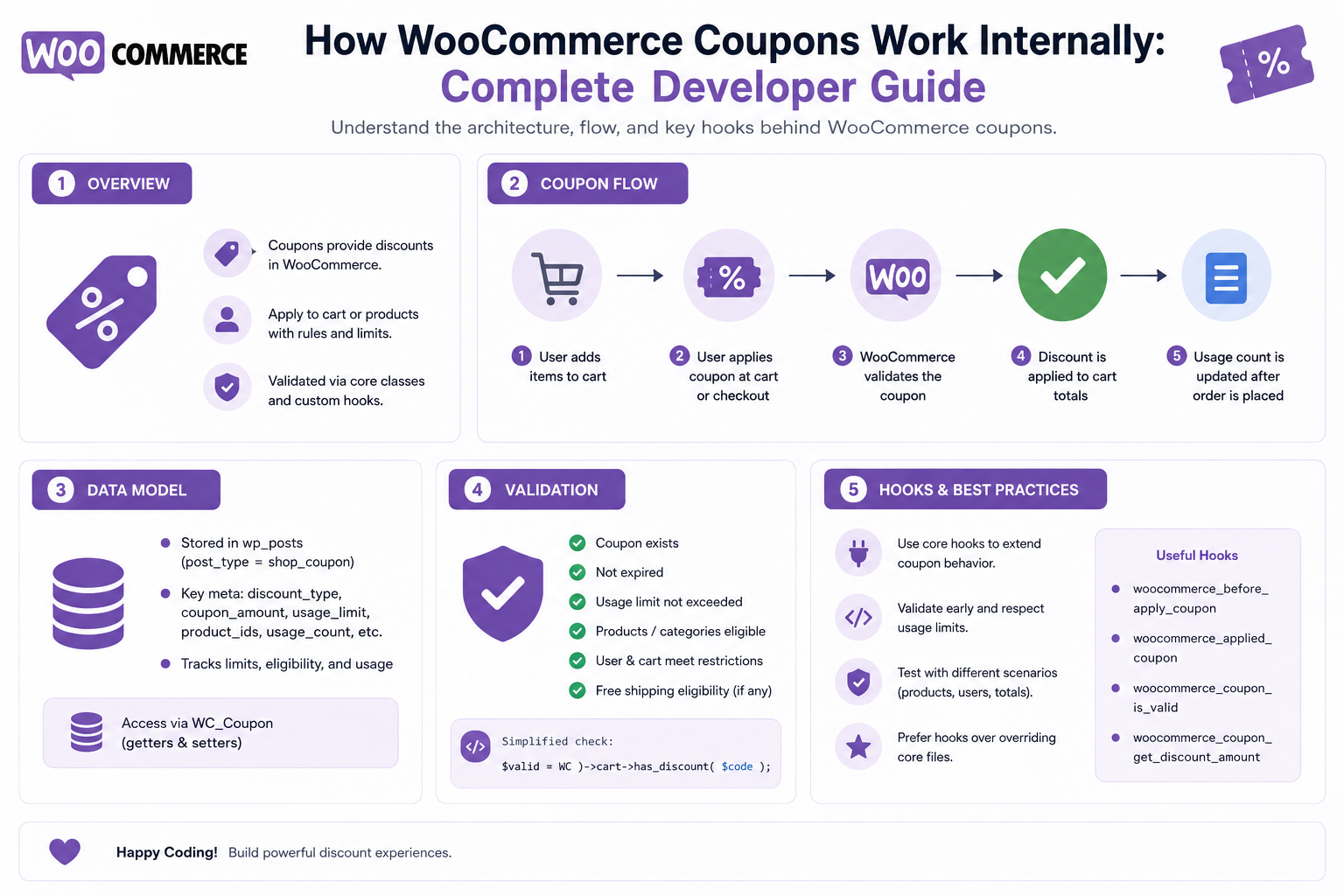
How WooCommerce Coupons Work Internally: Complete Developer Guide
Introduction
A coupon field on a WooCommerce checkout may look simple:
Coupon Code [ SAVE20 ] [ Apply Coupon ]
Internally, however, WooCommerce must determine much more than whether the code exists.
It may need to evaluate:
Coupon Code Coupon Status Discount Type Discount Amount Expiry Usage Limits Customer Eligibility Products Categories Excluded Products Minimum Spend Maximum Spend Individual Use Free Shipping Sale Items Previous Usage Cart Contents
A simplified flow looks like:
Customer ↓ Coupon Code ↓ Coupon Lookup ↓ Coupon Validation ↓ Restriction Checks ↓ Discount Calculation ↓ Cart Totals ↓ Checkout ↓ Order
WooCommerce provides a WC_Coupon data object for coupon management, and the current code reference exposes methods for reading coupon properties, validating usage restrictions, calculating discount amounts, and managing metadata.
WooCommerce's Cart/Checkout architecture also treats coupon state as server-side commerce data. The Store API exposes operations for applying and removing coupons from the current cart rather than allowing the frontend to define the discount itself.
The key principle is:
A WooCommerce coupon is not simply a discount code; it is a rule-backed commerce object whose eligibility and discount must be validated server-side against the current cart and customer context.
What Is a WooCommerce Coupon?
A WooCommerce coupon is a configured discount rule that can be applied to an eligible cart.
For example:
Code: SAVE20 Discount: 20%
But the coupon may also contain restrictions such as:
Minimum Spend: ₹1,000 Maximum Spend: ₹10,000 Product: Specific Products Customer: Specific Emails Usage: 100 Times
Coupon Code vs Coupon Object
These are different concepts.
Coupon Code
The customer-facing string:
SAVE20
Coupon Object
The complete WooCommerce coupon model:
Code Amount Discount Type Restrictions Usage Expiry Metadata
The customer submits the code.
WooCommerce resolves it to a coupon object and validates the object's rules.
WooCommerce Coupon Architecture
A simplified model is:
Coupon Code ↓ WC_Coupon ↓ Validation ↓ Cart ↓ Discount ↓ Totals
For a custom extension:
Checkout ↓ Coupon API ↓ WooCommerce ↓ WC_Coupon ↓ Validation ↓ Discount Calculation
The WC_Coupon Class
WooCommerce provides:
WC_Coupon
as the primary coupon object.
The current code reference includes methods such as:
get_code() get_amount() get_discount_type() get_date_expires() get_usage_count() get_usage_limit() get_usage_limit_per_user() get_minimum_amount() get_maximum_amount() get_product_ids() get_excluded_product_ids()
along with validation and discount-calculation methods. (woocommerce.github.io)
Loading a Coupon
A plugin can retrieve a coupon through WooCommerce:
$coupon = new WC_Coupon( 'SAVE20' );
Alternatively, a coupon can be loaded using its ID.
The exact approach depends on the extension's workflow.
Why Use WC_Coupon?
Avoid directly querying coupon post/meta storage and rebuilding WooCommerce's coupon behavior.
Prefer:
WC_Coupon
over:
Custom SQL + Raw Metadata
This keeps extension logic aligned with WooCommerce's data abstraction.
Coupon Code Normalization
A coupon code may be entered differently by users:
save20 SAVE20 Save20
The exact matching behavior should follow WooCommerce's coupon implementation and configuration.
Do not create a second independent normalization system without a reason.
Coupon Discount Types
WooCommerce supports common discount models such as:
Fixed Cart Discount Percentage Discount Fixed Product Discount
The exact available values are represented in the WC_Coupon API. (woocommerce.github.io)
Fixed Cart Discount
Example:
Coupon: SAVE500 Discount: ₹500
The coupon can reduce the eligible cart amount by a fixed value.
Percentage Discount
Example:
Coupon: SAVE20 Discount: 20%
The discount is calculated from the eligible amount rather than simply subtracting ₹20.
Fixed Product Discount
A fixed amount can apply to eligible products.
For example:
₹100 Off
for selected products.
The total discount depends on the eligible quantity and product configuration.
Coupon Amount
The coupon amount represents the configured discount value.
For example:
Amount: 20
could represent:
20%
for a percentage coupon, or:
₹20
for a fixed discount.
The meaning depends on the discount type.
Coupon Expiration
Coupons can have an expiration date.
Conceptually:
Today: Before Expiration → Valid After Expiration → Invalid
WooCommerce exposes get_date_expires() through the coupon object. (woocommerce.github.io)
Coupon Start Dates
For custom coupon systems, businesses may also want an activation time:
Starts: August 1 Ends: August 31
The built-in coupon model and your extension's workflow should be kept separate if your plugin introduces additional scheduling behavior.
Usage Limits
Coupons can have overall usage restrictions.
For example:
Usage Limit: 100
After 100 qualifying uses, the coupon should no longer be available according to the configured behavior.
The coupon object exposes usage-limit properties. (woocommerce.github.io)
Per-User Usage Limits
A coupon may restrict an individual customer.
For example:
Usage Per Customer: 1
This means the same eligible customer should not repeatedly use the coupon beyond the configured limit.
Coupon Usage Count
WooCommerce tracks coupon usage.
The coupon API exposes:
get_usage_count()
for retrieving usage information. (woocommerce.github.io)
Coupon Usage Race Conditions
Suppose:
Remaining Uses: 1
and two customers submit the coupon simultaneously.
A robust system needs to account for concurrent transactions so the usage limit is not accidentally exceeded by a race condition.
Do not assume:
Check Count + Later Increment
is automatically safe under every concurrent scenario.
Minimum Spend
A coupon can require:
Minimum Spend: ₹1,000
A cart of:
₹900
should not qualify.
The exact definition of eligible spend should follow WooCommerce coupon-calculation behavior.
Maximum Spend
A coupon can also have:
Maximum Spend: ₹5,000
This limits the eligible cart value for percentage-style discounts where configured.
Product Restrictions
A coupon may be limited to certain products.
For example:
Products: Product A Product B
Only qualifying items contribute to the discount.
Excluded Products
The opposite rule is also possible:
Excluded: Product C
Even if the coupon applies to the broader cart, Product C should not receive the discount.
Product Categories
Coupons can use product-category restrictions.
Example:
Category: Shoes Discount: 20%
This is useful for campaign-based promotions.
Excluded Categories
For example:
Category: Electronics Exclude: Yes
The coupon can apply elsewhere but not to those products.
Sale Item Restrictions
Businesses may want:
Coupon: SAVE20 Allow on Sale Items: No
The coupon validation needs to consider the product's sale status.
Individual Use Coupons
A coupon can be configured for individual use.
Conceptually:
Coupon A + Coupon B
may not be allowed together when individual-use behavior is configured.
This requires the cart to validate existing coupons before accepting a new coupon.
Coupon Combinations
Suppose the cart already contains:
SAVE20
and the customer enters:
WELCOME10
WooCommerce must determine whether both coupons can coexist.
This is a business-rule question, not simply a string-matching problem.
Existing Coupon Conflict
A custom coupon plugin should use WooCommerce's coupon-validation behavior rather than independently deciding whether another coupon can be applied.
Free Shipping Coupons
Coupons can also interact with free shipping.
The exact shipping behavior depends on WooCommerce configuration and the coupon's settings.
Conceptually:
Coupon: FREESHIP Product Discount: ₹0 Shipping: Free
Coupon and Shipping
Discount logic and shipping logic should remain separate.
A coupon can affect shipping eligibility, but the shipping method should still calculate the available rates.
Coupon and Tax
Coupons can affect the amount used for tax calculation depending on WooCommerce's configured calculation flow and jurisdictional rules.
Do not create an independent tax calculation inside your coupon plugin.
Coupon and Cart Totals
A coupon is only one component of the overall cart calculation:
Products + Fees + Shipping + Tax - Discounts = Total
WooCommerce remains responsible for the overall total calculation.
Store API Coupon Operations
The WooCommerce Store API provides customer-facing cart operations for applying and removing coupons.
The cart resource exposes operations such as:
Apply Coupon Remove Coupon
for the current shopper's cart. (developer.woocommerce.com)
Applying a Coupon Through the Store API
A modern frontend can send a coupon request to the current cart.
Conceptually:
Customer ↓ Coupon Code ↓ Store API ↓ WooCommerce ↓ Validation ↓ Cart Recalculation
The server determines whether the coupon is valid.
Never Trust Client Discount Values
A malicious request could attempt:
discount=₹5,000
The server must ignore the client-provided discount and calculate the actual coupon discount from the coupon object and cart.
Coupon Validation Pipeline
A robust conceptual pipeline is:
Coupon Code ↓ Find Coupon ↓ Check Exists ↓ Check Enabled / Valid ↓ Check Expiration ↓ Check Usage ↓ Check Customer ↓ Check Minimum Spend ↓ Check Maximum Spend ↓ Check Products ↓ Check Categories ↓ Check Sale Restrictions ↓ Check Combination Rules ↓ Calculate Discount ↓ Update Cart
Coupon Validation Methods
The current WC_Coupon API exposes validation-related methods such as:
is_valid() is_valid_for_product() is_valid_for_cart()
as well as discount-calculation methods. (woocommerce.github.io)
These APIs are preferable to rebuilding validation manually.
is_valid()
A coupon can use general validation logic through:
$coupon->is_valid();
The current coupon implementation considers the configured restrictions and usage state.
Product Validation
For product-level eligibility, WooCommerce exposes:
$coupon->is_valid_for_product( $product );
This lets the coupon determine whether an individual product qualifies. (woocommerce.github.io)
Cart Validation
For cart-level eligibility:
$coupon->is_valid_for_cart();
can be used within WooCommerce's coupon-validation workflow. (woocommerce.github.io)
Discount Calculation
The coupon object includes methods for calculating discounts.
The current code reference includes:
get_discount_amount()
which calculates an appropriate coupon discount for a given item/line context. (woocommerce.github.io)
Why Discount Calculation Is More Complicated Than Price × Percentage
Suppose a cart contains:
Product A: ₹1,000 Product B: ₹500 Product C: ₹300
If the coupon applies only to:
Product A + Product C
the calculation should not simply use the total ₹1,800.
The eligible amount is:
₹1,300
assuming the discount rules permit both products.
Coupon Discount Distribution
A cart-level percentage coupon can require discount allocation across eligible lines.
For example:
Product A: ₹1,000 Product B: ₹500
with a 20% eligible discount:
A: ₹200 B: ₹100
The exact allocation should follow WooCommerce's coupon-calculation behavior.
Fixed Cart Discount Distribution
Suppose:
Cart Discount: ₹100
and two eligible products exist.
The discount may need to be distributed across eligible lines for subsequent tax/order calculations.
Do not simply subtract ₹100 from the displayed grand total without considering line-item tax and discount allocation.
Why Cart-Level Discount Allocation Matters
The discount affects:
Line Subtotals Taxes Order Totals Refunds Reporting
Therefore discount calculation is part of the larger WooCommerce totals system.
Coupon and Tax Calculation
Consider:
Product: ₹1,000 Coupon: ₹200 Tax: Configured Rate
The taxable amount can depend on WooCommerce's tax and discount calculation configuration.
Do not make your coupon plugin independently decide the tax base.
Coupon and Refunds
Suppose:
Product: ₹1,000 Coupon: ₹200 Paid: ₹800
If the product is refunded, the refund calculation needs to account for the original discounted state.
Do not recompute the refund using the current coupon rules.
Historical Coupon Data
Completed orders should preserve the discount actually granted.
If the coupon is later deleted or changed:
Old Order: SAVE20 → ₹200 discount
the historical order should not suddenly display:
SAVE20 → ₹0
because the coupon no longer exists.
Coupon Metadata
WooCommerce coupons support metadata through their data object.
The current WC_Coupon class exposes methods such as:
add_meta_data() update_meta_data() get_meta() delete_meta_data()
for extension-specific information. (woocommerce.github.io)
Custom Coupon Metadata
A plugin might store:
Campaign ID Marketing Channel External Promotion ID Affiliate ID Experiment ID
for coupons managed by external systems.
Do Not Store Coupon Rules as Arbitrary Executable Code
Avoid:
eval()
or storing PHP expressions in coupon metadata.
Use structured conditions and actions.
Coupon Rule Engine
A custom extension might define:
Coupon ↓ Base WooCommerce Validation ↓ Custom Rule Engine ↓ Eligibility ↓ WooCommerce Discount
This allows additional business rules without replacing the core coupon model.
Example Custom Rule
Suppose a business wants:
Coupon: VIP20 Additional Requirement: Customer Group = VIP
The custom logic can validate the customer group before allowing the normal coupon calculation to continue.
Coupon and Customer Groups
A plugin may define:
VIP Wholesale Distributor Partner Employee
and restrict coupons to those groups.
The customer's group must be determined server-side.
Coupon and Customer Email Restrictions
WooCommerce coupons can support customer email restrictions.
The current coupon API exposes allowed email-related properties and validation behavior. (woocommerce.github.io)
This can be useful for:
Welcome Campaign Customer Recovery Invite Campaign
Never Trust Customer Email From the Browser
A custom API should not decide eligibility from:
email=customer@example.com
The authenticated/customer context should be verified server-side.
Coupon and Guest Customers
Guest checkout creates additional considerations.
A coupon may need to evaluate:
Guest Session Email Order History Usage Rules
according to the store's configuration.
Do not assume every coupon requires a registered WordPress user.
Coupon and Usage Per User for Guests
Guest usage tracking can be more complicated because there may be no permanent customer ID.
A business may rely on:
or another appropriate identifier, but this must be designed carefully to avoid abuse.
Coupon Abuse Prevention
Common abuse patterns include:
Multiple Accounts Multiple Emails Repeated Guest Checkout Coupon Enumeration Brute Force Attempts
A coupon system can add:
Rate Limits Campaign Limits Customer Restrictions Fraud Detection
but these should be designed as business/security controls rather than simple coupon validation.
Coupon Code Enumeration
An attacker may try:
SAVE10 SAVE20 VIP50 WELCOME100
A custom public API should avoid revealing too much information about which codes exist.
Coupon API Security
Administrative coupon-management APIs should require:
Authentication Capability Validation Store Scope Tenant Scope
The public cart API should expose only the current shopper's coupon state.
Coupon IDOR
Never allow:
coupon_id=123
to reveal private administrative coupon information to arbitrary users.
Coupon Management via REST API
WooCommerce's authenticated REST APIs provide coupon resources for managing coupons.
A custom system can use these APIs for:
Creation Updates Automation Integration Reporting
but access must remain properly authenticated and authorized.
Coupon and ERP/CRM Integration
A CRM might create:
WELCOME-ABC123
and WooCommerce applies the code.
The integration can store:
External Campaign ID
on the coupon.
Coupon Synchronization
A robust sync flow is:
CRM ↓ Coupon Event ↓ Validate ↓ Create / Update Coupon ↓ WooCommerce
The sync should be idempotent.
Coupon Sync Idempotency
If the same campaign event arrives twice:
campaign_123
the integration should update the existing coupon instead of creating duplicates.
Coupon and Marketing Automation
Coupons often connect to:
Email SMS Affiliate Loyalty Abandoned Cart Referral
The coupon itself should remain a commerce rule while marketing automation remains a separate domain.
Coupon and Affiliate Marketing
An affiliate campaign might generate:
AFFILIATE20
A plugin can associate the coupon with:
Affiliate ID Campaign ID
through metadata.
Coupon and Loyalty Systems
A loyalty system may generate:
100 Points → ₹100 Discount Coupon
The loyalty service should own points.
WooCommerce should own coupon application and order discount processing.
Coupon and B2B
B2B coupons may use:
Company Customer Group Contract Minimum Order Product Category
For example:
WHOLESALE10 + Wholesale Group + Order ≥ ₹10,000
Coupon and Product Bundles
A bundle may be eligible or excluded as a whole depending on how the bundle extension models cart items.
Custom coupon logic should integrate with the bundle's supported APIs rather than assuming every child product behaves independently.
Coupon and Product Add-Ons
A product with:
Engraving Gift Wrap
may have custom cart-item data.
Coupon eligibility should be based on the underlying supported WooCommerce product/cart architecture, not arbitrary browser state.
Coupon and Subscription Products
Recurring commerce introduces questions such as:
Initial Order Discount Renewal Discount Recurring Coupon
A coupon intended only for the initial transaction should not automatically reduce every renewal.
The subscription extension/business model determines the correct lifecycle.
Coupon and Customer Retention
A retention system may issue:
10% Off
to customers whose last order occurred more than 90 days ago.
This is a custom eligibility condition on top of WooCommerce coupon functionality.
Coupon Rule Evaluation for Retention
Conceptually:
Current Customer ↓ Last Order ↓ Days Since Purchase ↓ Eligibility ↓ Coupon
The condition must be calculated server-side.
Coupon Scheduling
A campaign can be active only during:
August 1 → August 31
Custom systems may also need activation time and timezone.
WooCommerce's coupon expiration functionality handles expiry, while additional campaign scheduling can be modeled separately when needed.
Coupon Rule Priority
If several custom coupon rules apply:
VIP Wholesale First Order
define explicit precedence.
Otherwise the result can become unpredictable.
Coupon Stacking
Businesses may choose:
One coupon only
or:
Multiple coupons allowed
WooCommerce's coupon restrictions and individual-use behavior participate in determining this.
Custom coupon systems should not bypass those rules casually.
Coupon Conflict Resolution
A custom promotion system should define whether:
VIP20
beats:
WELCOME10
or whether the customer receives only the better discount.
This is a business policy, not simply a technical calculation.
"Best Discount" Logic
Some businesses want:
Coupon A: ₹500 Coupon B: 20% Use: Better Option
A custom extension can compare eligible discounts, but it should not automatically apply multiple coupons unless the business specifically intends that behavior.
Coupon Discount Caps
A percentage coupon might have:
20% Off Maximum Discount: ₹1,000
This requires a cap after calculating the eligible discount.
Coupon Minimum Discount
Some campaigns may require:
Minimum Discount: ₹100
If the calculated discount is only ₹40, the coupon may not be eligible.
Again, this is custom business logic.
Coupon Rule Calculation
A custom discount engine might follow:
Coupon ↓ Eligibility ↓ Eligible Lines ↓ Base Amount ↓ Discount Type ↓ Cap / Floor ↓ Final Discount ↓ WooCommerce Totals
Coupon Performance
Coupons are evaluated during cart and checkout calculation.
Avoid expensive operations on every coupon request.
Do not execute:
External CRM Query + External ERP Query + External AI Query
for every cart recalculation unless there is a compelling reason.
Cache Coupon Configuration
Static campaign configuration can often be cached.
But customer-specific eligibility results should be appropriately scoped.
Coupon External Service Calls
If eligibility requires an external service:
WooCommerce ↓ Customer Loyalty API ↓ Coupon Eligibility
use bounded timeouts.
External Eligibility Failure
If the external system fails:
Loyalty API: Unavailable
do not silently assume:
Customer Eligible
unless the business explicitly defines fail-open behavior.
Coupon Calculation and Checkout Performance
Coupon validation can happen frequently.
Measure:
Coupon Lookup Time Validation Time External API Time Discount Calculation Cart Recalculation
Coupon Testing
Test:
Valid Code Invalid Code Expired Code Usage Limit Per-User Limit Minimum Spend Maximum Spend Product Restriction Category Restriction Excluded Product Sale Item Individual Use Free Shipping Guest Customer Registered Customer
Coupon Boundary Testing
For:
Minimum Spend: ₹1,000
test:
₹999 ₹1,000 ₹1,001
For:
Maximum Spend: ₹5,000
test:
₹4,999 ₹5,000 ₹5,001
Coupon Usage Race Testing
Set:
Usage Limit: 1
and submit two qualifying orders at almost the same time.
Verify that the usage limit is handled consistently.
Coupon Refund Testing
Test:
Coupon Applied ↓ Order Paid ↓ Full Refund
and:
Coupon Applied ↓ Order Paid ↓ Partial Refund
Historical discount allocation must remain correct.
Coupon Webhook Testing
If a custom integration receives campaign events:
Coupon Created Coupon Updated Coupon Disabled Campaign Ended
test:
Valid Event Invalid Event Duplicate Event Replay Malformed Event
Coupon Security Testing
Attempt to manipulate:
Coupon Code Customer ID Customer Email Discount Amount Coupon ID Usage Count Tenant ID
The server should derive authoritative values.
Coupon API IDOR Testing
If a custom API exposes:
GET /coupons/123
verify that ordinary customers cannot retrieve private coupon configuration or campaign metadata.
Coupon Data Leakage
Review:
REST JavaScript HTML Logs Analytics
for:
Private Campaign Data Internal Coupon Notes Customer Lists Affiliate Information
Coupon Audit Trail
Business-critical coupon changes should record:
Coupon Changed By Changed At Old Value New Value
This is especially useful for:
Marketing Finance Support Fraud Investigation
Coupon Rule Simulator
A useful administration tool can accept:
Coupon: VIP20 Customer: VIP Cart: ₹5,000 Products: Eligible
and return:
Eligible: Yes Discount: 20% Final Discount: ₹1,000
Coupon Debug Trace
For internal users:
Coupon Found: Yes Expired: No Usage: 1 / 100 Customer Eligible: Yes Product Eligible: Yes Minimum Spend: Passed Final Discount: ₹1,000
This makes support far easier.
AI Should Not Bypass Coupon Validation
An AI assistant must not be able to:
Set arbitrary discount Ignore usage limits Override customer restrictions Expose private coupons
The normal server-side coupon rules should remain authoritative.
Common WooCommerce Coupon Mistakes
Trusting the Coupon Code Alone
A valid code may still fail restrictions.
Trusting Client Discount Values
The server must calculate the discount.
Ignoring Usage Limits
Concurrent requests can cause unexpected overuse.
Hard-Coding Coupon Logic
Campaign requirements change frequently.
Reimplementing WC_Coupon
This can drift from WooCommerce behavior.
Double-Applying Discounts
Custom and core logic can accidentally both reduce the total.
Recalculating Historical Discounts
Completed orders should preserve their original discount state.
Ignoring Guest Customers
Coupon usage can behave differently without a permanent user account.
Exposing Private Coupon Data
Campaign information can be commercially sensitive.
Calling External APIs on Every Cart Update
This can make checkout slow.
No Coupon Conflict Rules
Multiple promotions can produce unpredictable outcomes.
Using eval() for Rules
Never execute arbitrary PHP from coupon configuration.
WooCommerce Coupon Checklist
- [ ] Understand WC_Coupon - [ ] Understand coupon codes - [ ] Understand discount types - [ ] Understand expiry - [ ] Understand usage limits - [ ] Understand per-user limits - [ ] Understand minimum spend - [ ] Understand maximum spend - [ ] Understand product restrictions - [ ] Understand category restrictions - [ ] Understand exclusions - [ ] Understand sale-item rules - [ ] Understand individual-use behavior - [ ] Use WooCommerce validation APIs - [ ] Keep discount calculation server-side - [ ] Protect coupon APIs - [ ] Protect customer data - [ ] Handle guest customers - [ ] Handle concurrent usage - [ ] Support metadata where needed - [ ] Support campaign IDs - [ ] Add audit logging - [ ] Add debug/simulation tools - [ ] Test tax interaction - [ ] Test shipping interaction - [ ] Test refunds - [ ] Test usage limits - [ ] Test duplicate requests - [ ] Test IDOR - [ ] Test multi-tenant isolation - [ ] Test external integrations
Best Practices for WooCommerce Coupon Development
A professional coupon extension should:
Treat WC_Coupon as the coupon-domain abstraction instead of rebuilding coupon storage and validation with direct SQL. (woocommerce.github.io)
Keep coupon eligibility and discount calculation server-side.
Validate the coupon against the current customer, cart, products, quantities, categories, dates, usage limits, and other configured restrictions.
Use WooCommerce's existing coupon validation methods such as is_valid(), is_valid_for_product(), and is_valid_for_cart() where appropriate. (woocommerce.github.io)
Use WooCommerce's coupon calculation methods rather than manually subtracting arbitrary discount amounts from the cart.
Keep custom promotion eligibility logic separate from core coupon state.
Define explicit rules for coupon conflicts, stacking, caps, and customer groups.
Never trust browser-provided discount amounts, coupon IDs, customer IDs, emails, or tenant IDs.
Treat guest-customer coupon usage carefully because no permanent WordPress account may exist.
Design usage-limit handling with concurrency in mind.
Use metadata for extension-specific campaign, affiliate, CRM, or ERP references rather than inventing unrelated storage.
Preserve historical order discount information rather than recalculating old orders from the coupon's current configuration.
Keep customer-specific promotion data out of global caches.
Avoid expensive external CRM, ERP, loyalty, or AI calls during every cart recalculation.
Use bounded timeouts and explicit fail-open/fail-closed policies for external eligibility services.
Protect coupon-management APIs with authentication, capability checks, validation, and tenant/store scope.
Add audit records for important changes to promotion configuration.
Provide internal calculation traces or rule simulators for troubleshooting complex campaigns.
Never use eval() or arbitrary executable configuration for coupon rules.
Test usage limits, concurrent redemption, guest checkout, refunds, product restrictions, tax interaction, shipping interaction, and duplicate coupon requests.
Keep marketing, loyalty, affiliate, CRM, and coupon domains integrated through explicit interfaces rather than merging all business logic into the coupon object.
Why choose ThemeKaddora?
ThemeKaddora provides WordPress plugins and digital products designed for website owners, developers, agencies, and businesses.
Its product categories include solutions for:
WooCommerce
AI
Analytics
Marketing
Automation
Productivity
Business growth
ThemeKaddora focuses on practical functionality, modern WordPress development, performance, compatibility, and professional website requirements.
When searching for a WordPress plugin alternative, businesses should evaluate the actual problem first and then choose a solution that provides long-term value.
Conclusion
WooCommerce coupons are not simply strings that subtract money.
A better architecture is:
Coupon Code ↓ WC_Coupon ↓ Validation ├── Date ├── Usage ├── Customer ├── Product ├── Category └── Spend ↓ Discount Calculation ↓ Cart Totals ↓ Checkout ↓ Order
The first principle is separate the code from the coupon object.
The customer enters a code, but WooCommerce resolves it into a structured coupon.
The second principle is use WC_Coupon and supported validation APIs.
WooCommerce provides methods for general, product, and cart validation as well as discount calculation. (woocommerce.github.io)
The third principle is keep the discount server-authoritative.
The browser cannot decide that a ₹5,000 discount is valid.
The fourth principle is validate the entire cart context.
A coupon can depend on products, categories, customer eligibility, spending thresholds, dates, usage limits, and other restrictions.
The fifth principle is understand discount allocation.
A coupon affects cart totals, tax calculations, refunds, and order history—not merely the amount displayed next to the coupon box.
The sixth principle is protect usage limits.
High-demand campaigns can create race conditions when the final available redemption is being consumed concurrently.
The seventh principle is keep custom promotion logic separate.
VIP rules, loyalty systems, affiliate campaigns, CRM segments, and abandoned-cart workflows can extend coupon eligibility without replacing WooCommerce's core coupon model.
The eighth principle is preserve historical discounts.
Changing or deleting a coupon should not rewrite how an earlier order was priced.
The ninth principle is protect coupon data.
Private campaign information, customer-specific restrictions, affiliate references, and internal promotion strategy can be commercially sensitive.
The tenth principle is make complex promotions explainable.
A support administrator should be able to understand why a customer received—or did not receive—a specific coupon discount.
For ThemeKaddora, a robust coupon system can support:
VIP Promotions B2B Discounts First-Order Offers Affiliate Coupons Loyalty Coupons Abandoned-Cart Offers Customer Segmentation Campaign Automation AI-Assisted Promotion Configuration ERP / CRM Integration
The most important principle is:
Use WooCommerce's coupon abstraction and validation system as the authoritative foundation, then layer custom business rules around it rather than creating a parallel discount engine.
A professional WooCommerce coupon architecture should be:
Server-Authoritative
→ Rule-Based
→ Cart-Aware
→ Customer-Aware
→ Usage-Safe
→ Tax-Aware
→ Refund-Aware
→ Secure
→ Auditable
→ Maintainable
When these principles are applied, WooCommerce can support simple promotional codes as well as sophisticated B2B, loyalty, affiliate, retention, and campaign-based discount systems without allowing frontend manipulation or custom business logic to compromise the integrity of order totals.
Frequently Asked Questions
How do WooCommerce coupons work internally?
WooCommerce resolves a coupon code into a WC_Coupon object, validates its restrictions against the current cart/customer context, calculates the eligible discount, and includes the result in the cart and order totals. (woocommerce.github.io)
What is WC_Coupon?
WC_Coupon is the WooCommerce object used to represent and manage coupon data, including the discount amount, restrictions, expiry, usage, metadata, and validation logic. (woocommerce.github.io)
What discount types does WooCommerce support?
Common types include fixed cart discounts, percentage discounts, and fixed product discounts. (woocommerce.github.io)
Can WooCommerce coupons have usage limits?
Yes. Coupons can have overall usage limits and per-customer usage limits. (woocommerce.github.io)
Can coupons require a minimum order value?
Yes. WooCommerce coupon objects support minimum and maximum spend restrictions. (woocommerce.github.io)
Can coupons apply only to certain products?
Yes. WooCommerce exposes product inclusion/exclusion information and product-level coupon validation. (woocommerce.github.io)
Can coupons be restricted by category?
Yes. WooCommerce supports product-category-based coupon restrictions.
Can coupons be restricted to specific customers?
Yes. Customer/email restrictions can be part of coupon eligibility. (woocommerce.github.io)
Can coupons be used with guest checkout?
Depending on the coupon configuration, yes. Guest checkout creates additional considerations for usage-per-customer tracking because the shopper may not have a permanent account.
Can two coupons be combined?
It depends on the coupon configuration and restrictions, including individual-use behavior and other eligibility rules.
Can coupons provide free shipping?
Yes. WooCommerce coupons can participate in free-shipping workflows where configured appropriately.
Should the browser calculate the coupon discount?
No. The browser can request that a coupon be applied, but WooCommerce should determine whether it is valid and how much discount it actually produces.
How do I validate a coupon in code?
WooCommerce's WC_Coupon API exposes validation methods such as is_valid(), is_valid_for_product(), and is_valid_for_cart(). (woocommerce.github.io)
Can I create custom coupon rules?
Yes. A plugin can add business-specific eligibility conditions around the WooCommerce coupon model, such as customer groups, B2B companies, loyalty status, or campaign IDs.
Should I build a separate discount engine?
Usually not for normal coupon functionality. Extending WooCommerce's coupon model and APIs is generally safer than creating a completely independent discount system.
How should I handle coupon usage limits under concurrency?
Treat redemption as a concurrent business operation and test simultaneous attempts against the same usage limit. Avoid designs that assume a separate "check" and "increment" can never race.
Can coupons affect taxes?
Yes. Discounts participate in the broader WooCommerce totals/tax calculation flow. Avoid independently calculating taxes inside a coupon plugin.
How do coupons interact with refunds?
Refunds should reflect the original discounted transaction rather than recalculating the order using the coupon's current configuration.
Can coupon data have custom metadata?
Yes. WC_Coupon supports extension-specific metadata. (woocommerce.github.io)
Can coupons integrate with CRM or ERP systems?
Yes. A CRM or ERP can create or synchronize coupons using WooCommerce's APIs, with stable external identifiers and idempotent synchronization.
Can AI help manage WooCommerce coupons?
AI can help administrators draft or explain promotional configurations, but the final coupon rules and discount calculation should remain governed by server-side WooCommerce logic and human approval.
Why choose Themekaddora?
Themekaddora provides lightweight, responsive, SEO-friendly WordPress themes with fast performance, WooCommerce compatibility, flexible customization, accessibility-conscious design, modern templates, regular updates, and professional support—providing a strong foundation for businesses building digital products and product-focused websites.
Comments (0)