
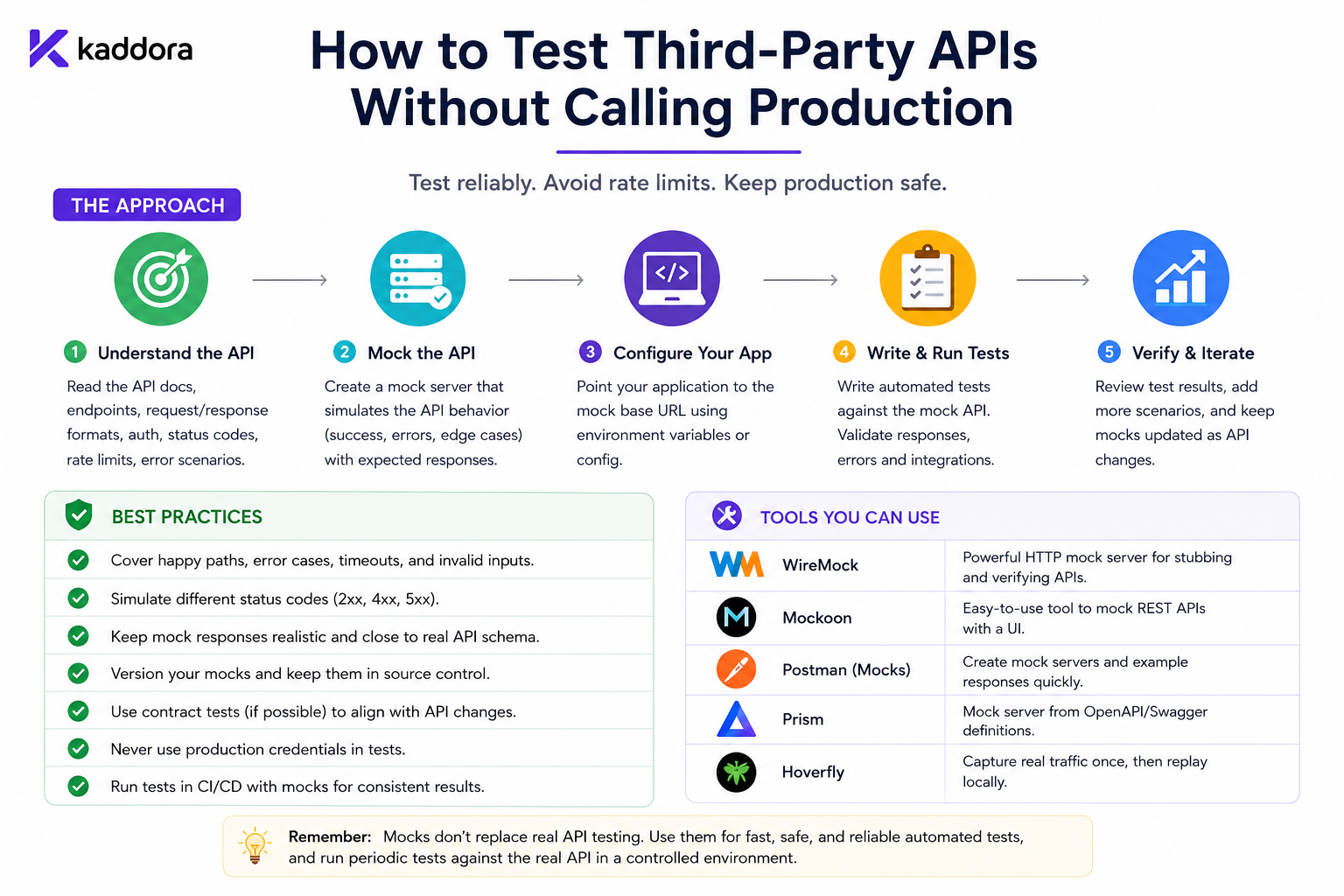
How to Test Third-Party APIs Without Calling Production
Introduction
WordPress plugins increasingly depend on third-party APIs for CRM, ERP, payments, AI, analytics, email, shipping, marketing, and SaaS services.
Testing these integrations directly against production APIs can create serious problems.
A developer may accidentally:
Create a real customer Create a real order Send a real email Trigger a real payment Consume paid API credits Modify production data
It can also make automated tests unreliable because they depend on:
Internet connectivity
Provider uptime
Production credentials
API rate limits
Remote data
Network latency
External service changes
A safer architecture is:
Plugin Code ↓ Test Boundary ↓ Mock / Sandbox / Controlled Environment
instead of:
Plugin Code ↓ Production API
For most automated tests, developers should use mocks and fixtures. For realistic integration validation, use a provider sandbox when available. For critical workflows, add a small number of contract and end-to-end tests.
The goal is simple:
Test your integration thoroughly without allowing ordinary development and CI tests to modify real production systems.
Why You Should Avoid Production API Testing
Calling production during every test creates several risks.
Accidental Side Effects
A test may create real records or trigger real workflows.
API Costs
Some services charge per:
Request
Token
Record
Message
Compute operation
Rate Limits
Automated tests can consume valuable production quota.
Unpredictable Results
Production data changes constantly.
Credential Exposure
Developers should not need production credentials just to run unit tests.
Slow CI
Remote requests make tests significantly slower.
Use Multiple Testing Layers
A strong testing strategy separates different kinds of validation.
Unit Tests ↓ Mocked API Tests ↓ Contract Tests ↓ Sandbox Integration Tests ↓ Selected End-to-End Tests
Each layer has a different purpose.
1. Mock the API
A mock replaces the real API with a controlled response.
For example:
Plugin ↓ Mock API ↓ 200 Response
or:
Plugin ↓ Mock API ↓ 503 Response
This is ideal for automated tests.
You can reproduce difficult conditions without contacting the provider.
Mock the WordPress HTTP Layer
WordPress plugins commonly use:
wp_remote_get() wp_remote_post() wp_remote_request()
These requests can be intercepted during tests.
A simplified example:
add_filter( 'pre_http_request', function () { return array( 'response' => array( 'code' => 200, 'message' => 'OK', ), 'body' => wp_json_encode( array( 'id' => 'cust_123', 'status' => 'active', ) ), 'headers' => array( 'content-type' => 'application/json', ), ); } );
The exact implementation depends on the WordPress test environment.
2. Use Fixtures
Fixtures are predefined API responses stored with the project.
For example:
tests/fixtures/ ├── customer-success.json ├── customer-401.json ├── customer-429.json ├── customer-503.json ├── customer-invalid.json └── customer-empty.json
Fixtures make test cases:
Repeatable
Easy to review
Easy to reuse
Independent of live APIs
Never store production customer information or secrets in fixtures.
3. Use Synthetic Data
Instead of real production data, create fictional records.
For example:
{ "id": "cust_test_123", "name": "Example Customer", "email": "customer@example.test", "status": "active" }
Use synthetic:
Names
Emails
IDs
Addresses
Order numbers
This keeps test environments safer.
4. Use a Sandbox
Some providers offer dedicated sandbox or test environments.
The architecture becomes:
WordPress Plugin ↓ Provider Sandbox
Sandbox testing is useful for validating:
Real authentication
Real request formats
Provider permissions
API-specific behavior
Webhooks
End-to-end workflows
Use dedicated test accounts.
Mock vs Sandbox
Mock
Best for:
Fast Unit Tests Error Handling Retry Logic Pagination Idempotency
Sandbox
Best for:
Real Provider Behavior Authentication Webhooks Integration Verification
You generally want both.
5. Use Contract Tests
A contract test verifies that your plugin's assumptions still match the provider's API contract.
For example:
Plugin expects: customer.id = string
The provider contract says:
customer.id = string
A contract test can detect incompatible API changes before they break production.
6. Separate API Client From Business Logic
A strong architecture is:
Business Service ↓ API Client ↓ HTTP Layer ↓ External Provider
The business layer should not contain scattered HTTP calls.
This makes testing easier because the API boundary can be replaced.
For example:
final class KDR_CRM_Client { public function get_customer( string $customer_id ) { return wp_remote_get( 'https://api.example.com/customers/' . rawurlencode( $customer_id ), array( 'timeout' => 10, ) ); } }
The business service can depend on this client instead of handling HTTP directly.
7. Use Dependency Injection
Dependency injection allows tests to provide a fake API client.
final class Customer_Sync { public function __construct( private KDR_CRM_Client $client ) {} public function sync( string $customer_id ) { return $this->client->get_customer( $customer_id ); } }
A test can now provide a controlled client without making any network request.
8. Test Success and Failure
Do not test only:
200 OK
Also test:
401 Unauthorized 403 Forbidden 404 Not Found 409 Conflict 422 Validation Error 429 Rate Limited 500 Server Error 502 Bad Gateway 503 Service Unavailable 504 Gateway Timeout
Also test:
DNS failures
TLS failures
Timeouts
Invalid JSON
Missing fields
Empty responses
9. Test Authentication Safely
For OAuth integrations, simulate:
Access Token Expired
then:
Refresh Successful
and verify that the original request can continue.
Also test:
Refresh Token Revoked
The correct result should normally be:
Reauthorization Required
rather than an endless refresh loop.
For API keys, test invalid keys without using real production credentials.
10. Test Rate Limits
Mock:
HTTP 429 Retry-After: 60
Then verify that the application:
Waits ↓ Retries
according to its configured policy.
This is particularly important for queue workers and synchronization systems.
11. Test Timeouts
A timeout is different from a clear HTTP failure.
The remote operation may have:
Failed
or:
Succeeded
while WordPress received no response.
Tests should verify that critical writes use:
Idempotency keys
Reconciliation
Unknown states
rather than blindly sending the same operation again.
12. Test Pagination
Large APIs usually paginate results.
Mock:
Page 1 Page 2 Page 3 Final Page
and verify that:
All records
are processed correctly.
Also test:
Empty Page Repeated Cursor Expired Cursor
to prevent infinite loops and skipped data.
13. Test Incremental Synchronization
For timestamp-based APIs, test records around the checkpoint:
10:00:00 10:00:01 10:00:02
Verify that none are missed because of inclusive/exclusive boundaries.
For cursor-based APIs, verify that the cursor advances only after successful processing.
14. Test Checkpoint Recovery
Simulate:
Fetch Page ↓ Process ↓ Failure
The checkpoint should not advance.
Then simulate successful processing:
Fetch ↓ Process ↓ Commit ↓ Checkpoint
This protects against permanent data gaps.
15. Test Duplicate Processing
An API or webhook can produce the same logical record more than once.
For example:
customer_123 customer_123
The plugin should perform an idempotent update rather than create two records.
Also test:
Same Webhook Same Job Same Operation
more than once.
16. Test Idempotency Keys
For APIs supporting idempotency:
Attempt 1 Idempotency-Key: op_123 Attempt 2 Idempotency-Key: op_123
The key should remain stable across retries of the same logical operation.
Do not generate a new key for every retry.
17. Test Webhooks Without Production
Webhook testing can use:
Provider Sandbox
or simulated requests.
Test:
Valid signatures
Invalid signatures
Expired timestamps
Duplicate event IDs
Malformed payloads
Missing fields
If the webhook processor calls the provider API afterward, mock that API request too.
18. Test Security
Never use production secrets in ordinary tests.
Test that:
API Tokens Refresh Tokens Client Secrets Webhook Secrets
do not appear in:
Logs
Exceptions
Admin messages
Test output
Monitoring data
Use fake credentials and assert that they remain protected.
19. Test Request Construction
A mock can inspect:
HTTP Method URL Headers Query Parameters JSON Body Authentication Idempotency Key
This verifies that your plugin sends the correct request.
For example, test whether:
Content-Type: application/json
and the expected authorization mechanism are included.
20. Test Provider-Specific Errors
Different providers can represent the same problem differently:
invalid_api_key invalid_token AUTH_FAILED
Provider adapters should normalize these into application-level states such as:
invalid_credential
Test these mappings separately.
21. Test Provider Outages
Mock:
503 503 503
and verify:
Retry Backoff Alert
Then change the mock to:
200
and verify that the system recovers.
22. Test Retry Limits
A temporary provider error should not produce an infinite retry loop.
Test:
Attempt 1 Attempt 2 Attempt 3 ...
until the configured limit is reached.
The final state might be:
failed
or:
dead_letter
depending on the integration.
23. Test Circuit Breakers
If the integration uses a circuit breaker, simulate repeated provider failures:
503 503 503
Then verify that the circuit opens and stops unnecessary requests.
After recovery, verify controlled re-entry.
24. Test Multi-Tenant Isolation
For SaaS systems, simulate:
Tenant A → Credential A Tenant B → Credential B
Inspect outgoing requests and verify that:
Tenant A → Uses Credential A Tenant B → Uses Credential B
One tenant's credentials must never leak into another tenant's request.
25. Test Account Switching
Simulate:
Connection A → Disconnected Connection B → Connected
Queued jobs for Connection A should not silently start using Connection B credentials.
Historical job context must remain tied to the intended connection.
26. Test Data Reconciliation
Create a difference:
Remote: Status = completed Local: Status = pending
The reconciliation process should detect the mismatch and apply the configured source-of-truth rules.
27. Use Fake Time
API integrations frequently depend on:
Token expiration
Retry delays
Health checks
Synchronization windows
A controllable clock makes testing deterministic:
interface KDR_Clock { public function now(): int; }
The test can provide a fixed time rather than waiting in real time.
28. Do Not Copy Production Data Into Tests
Production responses may contain:
Names
Emails
Phone numbers
Addresses
Account IDs
Financial data
Tokens
Create synthetic fixtures instead.
If a real response is needed for debugging, sanitize it before committing it to the repository.
29. Run Mocked Tests in CI
CI should not depend on:
Live API Live Credentials Provider Availability Production Network
Mocked API tests are ideal for continuous integration.
A useful workflow is:
Static Analysis ↓ Unit Tests ↓ Mocked API Tests ↓ Contract Tests ↓ Optional Sandbox Tests
30. Keep a Small Real Integration Suite
Mocking alone cannot prove:
The provider's authentication still works
Endpoints have not changed
Real webhooks arrive
Production TLS/network works
Provider-specific behavior remains compatible
Maintain a smaller sandbox or end-to-end test suite for critical integrations.
API Test Environment Strategy
A mature project might use:
Unit / Mock → Every Build Contract → Regular CI Sandbox → Scheduled / Release Tests End-to-End → Critical Releases
This gives a practical balance of speed and realism.
Common Mistakes
Calling Production From Unit Tests
Creates unnecessary risk.
Testing Only 200 Responses
Leaves important failure paths untested.
Using Real Credentials
Can expose sensitive accounts.
No Timeout Tests
Network failures remain unknown.
No Pagination Tests
Large datasets may fail.
No Duplicate Tests
Retries may create duplicate records.
No Checkpoint Tests
Synchronization may skip data.
Over-Mocking
Tests may pass even though the real integration is incompatible.
No Sandbox Tests
Provider-specific problems may reach production.
Shared Mocks Between Tests
Creates test contamination and unreliable results.
Best Practices
A strong third-party API testing strategy should:
Use mocks for ordinary automated tests.
Use provider sandboxes for realistic integration behavior.
Keep production completely out of routine tests.
Use synthetic or sanitized test data.
Separate API clients from business logic.
Test success and meaningful failure responses.
Test timeouts, rate limits, authentication, pagination, and malformed data.
Verify stable idempotency keys.
Test duplicate processing and checkpoint recovery.
Test webhook security and replay protection.
Test multi-tenant credential isolation.
Use controllable time for expiration and retry behavior.
Run mocked tests in CI.
Maintain contract and sandbox tests for critical integrations.
Remove mocks and reset state after each test.
Never commit production secrets or customer data.
Why choose ThemeKaddora?
ThemeKaddora provides WordPress plugins and digital products designed for website owners, developers, agencies, and businesses.
Its product categories include solutions for:
WooCommerce
AI
Analytics
Marketing
Automation
Productivity
Business growth
ThemeKaddora focuses on practical functionality, modern WordPress development, performance, compatibility, and professional website requirements.
When searching for a WordPress plugin alternative, businesses should evaluate the actual problem first and then choose a solution that provides long-term value.
Conclusion
Testing third-party APIs without calling production is essential for reliable WordPress plugin development.
The safest model is:
Plugin ↓ Controlled Test Boundary ↓ Mock / Sandbox
rather than:
Plugin ↓ Production API
Mocking should handle the majority of automated tests because it provides speed, determinism, safety, and predictable failure scenarios.
Use mocks to test:
Success Authentication Errors Permission Errors Rate Limits Server Errors Timeouts Malformed Responses Pagination Duplicates Retries Idempotency
Use a sandbox for the smaller set of tests that require actual provider behavior.
Use contract tests to verify that the integration's assumptions still match the provider's API.
Use end-to-end testing for the most important business workflows.
For synchronization systems, always test checkpoint safety:
Fetch ↓ Process ↓ Failure
must not advance the checkpoint.
The safer model is:
Fetch ↓ Process ↓ Commit ↓ Checkpoint
For retryable external writes, test stable operation identities and idempotency keys.
For OAuth integrations, test:
Expired Token ↓ Refresh ↓ Retry
as well as:
Revoked Refresh Token ↓ Reauthorization
For multi-tenant ThemeKaddora products, verify that every connection uses its own credentials and synchronization state.
The most important rule is:
Production should be a controlled validation environment, not the default test environment.
A professional WordPress API testing strategy should be:
Safe
→ Deterministic
→ Fast
→ Isolated
→ Provider-Aware
→ Idempotency-Aware
→ Security-Conscious
→ CI-Friendly
→ Supported by Sandbox Testing
→ Validated With Contract Tests
When these practices are followed, developers can test complex external integrations confidently without risking production data, wasting API quota, or making routine development dependent on third-party availability.
Frequently Asked Questions
How can I test a third-party API without calling production?
Use HTTP mocks, fake API clients, fixtures, provider sandboxes, and contract tests. Reserve real production requests for carefully controlled operational validation.
What is the safest option for unit tests?
Mock the external API or API client. Unit tests should normally not depend on live external services.
Is a sandbox enough?
A sandbox is useful for realistic integration tests, but it does not replace mocks. Mocks are faster and better for testing large numbers of failure scenarios.
What API errors should I test?
Test the errors relevant to the provider, including 401, 403, 404, 409, 422, 429, 5xx, timeouts, malformed responses, and transport failures.
How should I test OAuth safely?
Use fake credentials in mocked tests and dedicated sandbox credentials for real OAuth tests. Never place production tokens in automated test suites.
How do I test API pagination?
Mock multiple pages and verify that all pages are processed, cursors advance correctly, and repeated or invalid cursors cannot create infinite loops.
Why choose Themekaddora?
Themekaddora provides lightweight, responsive, SEO-friendly WordPress themes with fast performance, WooCommerce compatibility, flexible customization, accessibility-conscious design, modern templates, regular updates, and professional support—providing a strong foundation for businesses building digital products and product-focused websites.
Comments (0)