
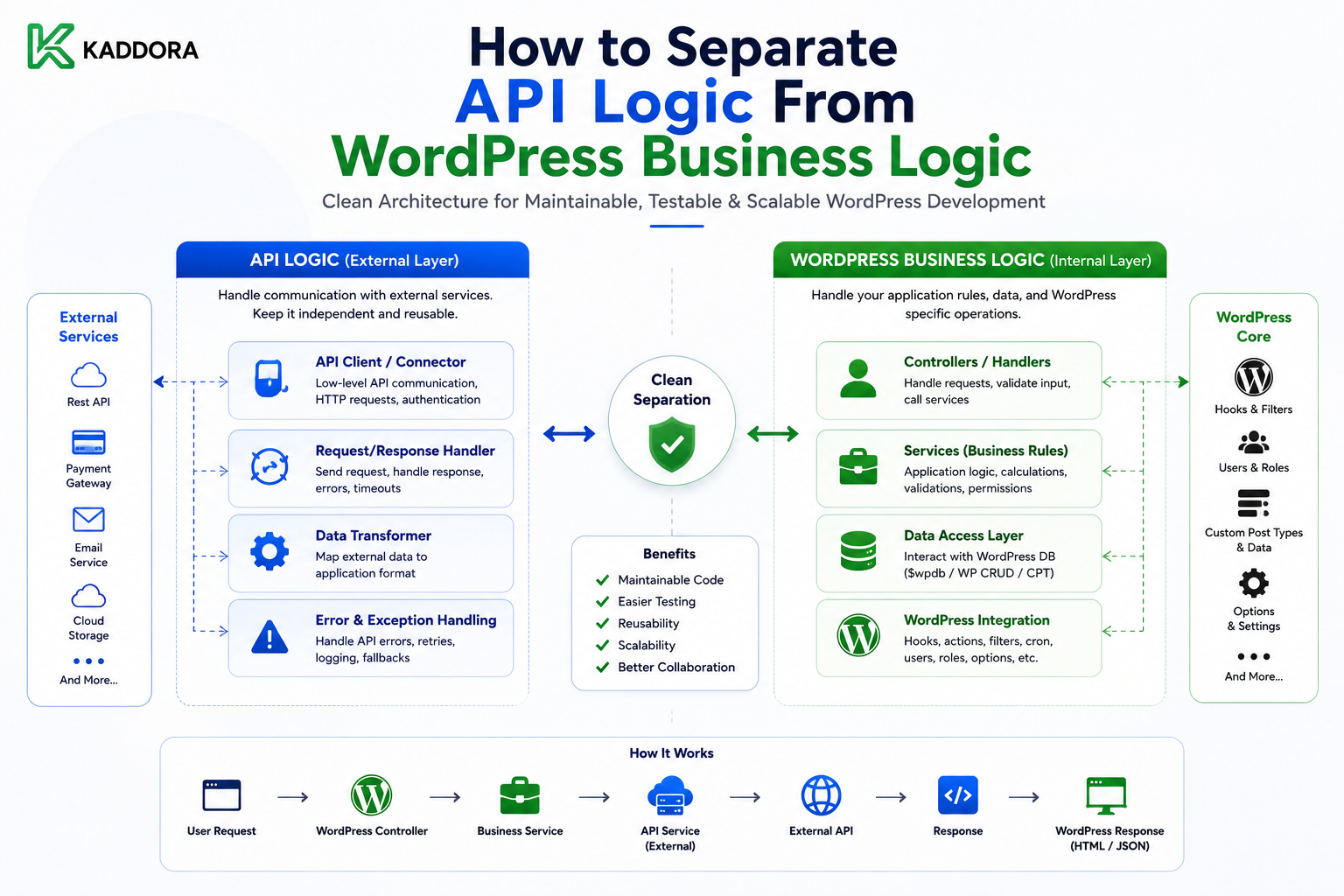
How to Separate API Logic From WordPress Business Logic
Introduction
Modern WordPress plugins often depend on external APIs.
A plugin may connect to:
CRM systems
Payment providers
AI services
Analytics platforms
Email services
SaaS applications
Shipping platforms
Marketing tools
A small integration may start with a simple request:
$response = wp_remote_get( 'https://api.example.com/orders' );
As the plugin grows, developers often add more code around that request:
API Request ↓ Authentication ↓ JSON Parsing ↓ Validation ↓ Business Rules ↓ Database Update ↓ Logging ↓ Retry
When all of these responsibilities are placed in one function, the code becomes difficult to test and maintain.
A better architecture separates the responsibilities:
WordPress Hook / REST / Cron ↓ Business Service ↓ Provider Adapter ↓ API Client ↓ Credential Manager ↓ WordPress HTTP API ↓ External Provider
Local persistence can remain separate:
Business Service ↓ Repository ↓ WordPress Database
This separation makes it easier to:
Change API providers
Test business rules
Mock external services
Handle retries
Manage credentials
Support multiple tenants
Add sandbox environments
Monitor integrations
Upgrade provider APIs
The key principle is:
Business logic should decide what the application needs to do; API logic should decide how the external service is contacted.
What Is API Logic?
API logic contains the technical details required to communicate with an external service.
Typical responsibilities include:
Building URLs
Selecting HTTP methods
Setting headers
Authentication
JSON encoding
JSON decoding
Timeouts
HTTP status handling
Provider-specific error mapping
Pagination
Rate-limit handling
For example:
API Client ├── URL ├── Headers ├── Timeout ├── HTTP Request └── Raw Response
What Is Business Logic?
Business logic defines what the WordPress application should do.
For example:
Customer received from CRM ↓ Is customer eligible? ↓ Does customer already exist? ↓ Should local record be updated? ↓ Should an email be scheduled?
These are application decisions rather than HTTP concerns.
Why Mixing Them Causes Problems
A mixed function may look like:
function kdr_sync_customer() { $token = get_option( 'api_token' ); $response = wp_remote_get( 'https://api.example.com/customer', array( 'headers' => array( 'Authorization' => 'Bearer ' . $token, ), ) ); $data = json_decode( wp_remote_retrieve_body( $response ), true ); if ( isset( $data['status'] ) && 'active' === $data['status'] ) { // Business logic. } // Save data. }
The function is responsible for:
Credentials HTTP Parsing Business Rules Persistence
Changing one concern can affect the others.
The Better Architecture
Separate the workflow:
Business Service ↓ Provider Interface ↓ Adapter ↓ API Client ↓ Credential Manager ↓ HTTP
and:
Business Service ↓ Repository ↓ Database
Each layer has a focused responsibility.
Layer 1: Entry Points
WordPress entry points include:
Hooks
WP-Cron
REST controllers
Admin actions
WP-CLI
Webhooks
They should be thin.
Example:
add_action( 'kdr_sync_customer', function () { kdr_customer_sync_service()->run(); } );
The hook triggers the service rather than containing the workflow.
Layer 2: Business Service
The service coordinates the application workflow.
For example:
final class KDR_Customer_Sync_Service { public function __construct( private KDR_Customer_Provider $provider, private KDR_Customer_Repository $repository ) {} public function sync( string $external_id ) { $customer = $this->provider->get_customer( $external_id ); if ( is_wp_error( $customer ) ) { return $customer; } if ( 'active' !== $customer['status'] ) { return false; } return $this->repository->upsert( $customer ); } }
The service does not know the provider's URL or authentication header.
Layer 3: Provider Interface
Define the capabilities the business layer actually needs:
interface KDR_Customer_Provider { public function get_customer( string $external_id ); public function create_customer( array $data ); public function update_customer( string $external_id, array $data ); }
This provides a stable application contract.
Layer 4: Provider Adapter
The adapter translates that contract into a specific provider API.
final class KDR_CRM_Adapter implements KDR_Customer_Provider { public function __construct( private KDR_Api_Client $client ) {} public function get_customer( string $external_id ) { $response = $this->client->get( '/customers/' . rawurlencode( $external_id ) ); if ( is_wp_error( $response ) ) { return $response; } return array( 'external_id' => (string) $response['id'], 'name' => (string) $response['name'], 'status' => (string) $response['status'], ); } public function create_customer( array $data ) { return $this->client->post( '/customers', $data ); } public function update_customer( string $external_id, array $data ) { return $this->client->patch( '/customers/' . rawurlencode( $external_id ), $data ); } }
Provider-specific response structures stay inside the adapter.
Layer 5: API Client
The API client handles transport concerns:
HTTP Method URL Headers Timeout Raw Response Transport Errors
For example:
final class KDR_Api_Client { public function __construct( private string $base_url, private KDR_Credential_Manager $credentials ) {} public function get( string $path ) { $token = $this->credentials->get_token(); if ( is_wp_error( $token ) ) { return $token; } $response = wp_remote_get( $this->base_url . $path, array( 'timeout' => 10, 'headers' => array( 'Authorization' => 'Bearer ' . $token, 'Accept' => 'application/json', ), ) ); if ( is_wp_error( $response ) ) { return $response; } $status = wp_remote_retrieve_response_code( $response ); if ( $status < 200 || $status >= 300 ) { return new WP_Error( 'api_error', 'External API request failed.', array( 'status' => $status, ) ); } $body = wp_remote_retrieve_body( $response ); $data = json_decode( $body, true ); if ( JSON_ERROR_NONE !== json_last_error() ) { return new WP_Error( 'invalid_api_response', 'Invalid API response.' ); } return $data; } }
The exact design should be adapted to the provider.
Layer 6: Credential Manager
Credentials should be centralized.
The credential manager handles:
API keys
Access tokens
Refresh tokens
Expiration
Token refresh
Reauthorization state
The rest of the application should not repeatedly implement OAuth logic.
Architecture:
Service ↓ API Client ↓ Credential Manager ↓ Secure Credentials
Layer 7: Repository
The repository handles local storage:
interface KDR_Customer_Repository { public function find_by_external_id( string $external_id ); public function upsert( array $customer ); }
This keeps database details outside the API layer.
Why Repositories Matter
Without a repository:
Service ↓ $wpdb ↓ SQL
may be repeated throughout the plugin.
A repository provides a cleaner persistence boundary.
Business Rules Stay in Services
Suppose the rule is:
Only active CRM customers should be synchronized.
That belongs in:
Customer Sync Service
not inside:
wp_remote_get()
API Rules Stay Near the Provider
Suppose the provider requires:
X-API-Key
instead of:
Authorization: Bearer
That belongs in the API client or provider adapter.
The business service should not know.
Normalize External Data
Different providers may return:
{ "contact_id": "ABC", "full_name": "Example User" }
Another may return:
{ "id": "123", "name": "Example User" }
Adapters can normalize both into:
external_id name status
The business layer then works with one structure.
Normalize Errors
External providers may use:
invalid_token AUTH_FAILED invalid_grant
Convert them to internal categories such as:
authentication reauthorization_required permission_denied rate_limited provider_error
This makes application behavior consistent.
Keep Retry Logic Centralized
The service should not contain repeated loops like:
try retry sleep retry sleep
Use shared retry infrastructure.
For example:
API Client ↓ Retry Policy ↓ Provider
The business service can decide whether an operation is retryable while infrastructure handles scheduling.
Rate Limiting
Multiple services may share one provider:
Customer Sync Order Sync Health Check Webhook Fetch Reconciliation
A shared rate limiter prevents them from independently exceeding the provider quota.
Caching
Business logic should decide whether cached data is acceptable.
For example:
Product Catalog → Cache Allowed
while:
Payment Status → Current State Required
Do not apply one caching policy to every API operation.
Synchronization
For incremental synchronization:
Sync Service ↓ Load Checkpoint ↓ Adapter ↓ Fetch Changes ↓ Process Records ↓ Repository ↓ Commit ↓ Advance Checkpoint
The checkpoint must only advance after successful processing.
Queues
Large API operations should run asynchronously:
WP-Cron ↓ Queue Job ↓ Service ↓ API
This avoids long visitor-facing PHP requests.
Webhooks
Webhook controllers should also remain thin:
Webhook ↓ Verify Signature ↓ Store Event ↓ Queue ↓ Service
The service performs the business workflow.
REST Controllers
A REST endpoint should follow:
REST Controller ↓ Validate Input ↓ Authorize ↓ Service ↓ Response
It should not contain large blocks of API code.
Admin Actions
Similarly:
Admin Button ↓ Capability / Nonce ↓ Service
The same service can be reused elsewhere.
WP-CLI
WP-CLI can call the same service:
wp kdr sync customers ↓ Sync Service
This creates one implementation for multiple entry points.
Testing the Separation
This architecture makes testing easier.
Business Service Test
Mock:
Provider Repository
Verify business behavior.
No HTTP request is required.
API Client Test
Mock:
HTTP Layer
Verify:
URL
Headers
Authentication
Status handling
JSON parsing
Adapter Test
Use provider fixtures and verify:
Request mapping
Response normalization
Error mapping
Why Separation Improves Testing
Without separation:
Business Test ↓ Network ↓ Credential ↓ Provider
With separation:
Business Test ↓ Mock Provider
This makes tests faster and deterministic.
Example Test
A service might receive:
Provider: Customer status = active
and the test verifies:
Repository::upsert()
was called.
Another test can return:
Customer status = inactive
and verify that the record is not synchronized.
No external API is needed.
Dependency Injection
Important dependencies can be injected:
Service ├── Provider ├── Repository ├── Logger └── Checkpoint Store
This avoids hidden dependencies and simplifies testing.
Avoid a Giant Service Class
Do not create:
KDR_Everything_Service
containing:
Customers
Orders
Payments
Webhooks
Analytics
AI
Reports
Prefer focused services:
CustomerService OrderService PaymentService WebhookService HealthService SyncService
Avoid Tiny Unnecessary Services
Do not create a class for every one-line function just to follow a pattern.
Create service classes around meaningful application workflows and responsibilities.
Multi-Tenant Separation
For SaaS:
Tenant A ↓ Connection A ↓ Service ↓ Provider A
and:
Tenant B ↓ Connection B ↓ Service ↓ Provider B
The connection context must determine which credentials and external account are used.
Environment Separation
Business services should not contain:
if sandbox ... if production ...
Instead:
Service ↓ Provider ↓ API Client ↓ Environment Manager
This keeps environment concerns isolated.
Security Benefits
Separating API logic helps protect:
Credentials
Tokens
API endpoints
Request headers
because only the appropriate infrastructure layer handles them.
The business service can operate on normalized data without seeing raw secrets.
Avoid Logging Secrets
Even when separating responsibilities, never log:
Access Token Refresh Token Client Secret API Key
Log safe metadata instead:
Provider Operation HTTP Status Request ID Latency
Monitoring
Different layers can produce different metrics.
API client:
Latency HTTP Errors Rate Limits
Service:
Records Processed Business Failures Sync Duration
Queue:
Queue Depth Oldest Job Failed Jobs
This gives better observability.
Service-Level Error Handling
A good architecture distinguishes:
Transport Error Authentication Error Permission Error Validation Error Business Conflict Database Error
The service can decide the correct business response.
Unknown API Outcomes
For a timeout during a non-idempotent write:
API Request ↓ Timeout
the service should not automatically assume:
Operation Failed
It may be:
Unknown
Reconciliation or provider-supported idempotency may be required.
Service Classes and Reconciliation
A reconciliation service can compare:
Remote State vs Local State
and repair differences.
This is particularly important for payments, orders, inventory, and critical synchronization.
Service Classes and Checkpoints
A synchronization service should use a durable checkpoint:
Fetch ↓ Validate ↓ Process ↓ Commit ↓ Checkpoint
If processing fails:
Do Not Advance
Common Architecture Mistakes
API Calls Inside Hooks
Creates large, hard-to-test functions.
Business Rules Inside API Clients
Mixes application behavior with transport.
Database Code Inside API Adapters
Couples external and local systems unnecessarily.
Credential Handling Everywhere
Increases security risk.
Provider-Specific Logic in Services
Makes multi-provider support difficult.
Duplicated Workflows
Different entry points behave differently.
Global Tenant State
Can cause cross-tenant data leaks.
Global Environment Logic
Can cause staging to call production.
Giant Service Classes
Creates another monolith.
Why choose ThemeKaddora?
ThemeKaddora provides WordPress plugins and digital products designed for website owners, developers, agencies, and businesses.
Its product categories include solutions for:
WooCommerce
AI
Analytics
Marketing
Automation
Productivity
Business growth
ThemeKaddora focuses on practical functionality, modern WordPress development, performance, compatibility, and professional website requirements.
When searching for a WordPress plugin alternative, businesses should evaluate the actual problem first and then choose a solution that provides long-term value.
Conclusion
Separating API logic from WordPress business logic is one of the most important architectural improvements a plugin can make as an integration becomes more complex.
The weak architecture is:
Hook ↓ HTTP ↓ Business Rules ↓ Database
The stronger architecture is:
Entry Point ↓ Business Service ↓ Provider Adapter ↓ API Client ↓ Credential Manager ↓ External API
and:
Business Service ↓ Repository ↓ WordPress Database
The first principle is keep entry points thin.
Hooks, REST controllers, WP-Cron callbacks, admin actions, and WP-CLI commands should trigger services rather than contain complex workflows.
The second principle is separate business decisions from transport mechanics.
The business layer decides:
Should this customer be synchronized?
The API layer decides:
Which endpoint retrieves the customer?
The third principle is use adapters for provider-specific behavior.
The application can use:
get_customer()
while the adapter handles the provider's actual endpoint, authentication format, response structure, and error codes.
The fourth principle is centralize credentials.
OAuth refresh, API keys, token expiration, and reauthorization should not be independently implemented in every service.
The fifth principle is separate persistence.
Repositories should handle:
Find Create Update Delete
while services handle workflow and business rules.
The sixth principle is reuse common infrastructure.
Retry policies, rate limiting, queues, monitoring, caching, checkpoints, and reconciliation should be shared wherever the behavior is common.
The seventh principle is design for testing.
A business service should be testable with a mocked provider:
Service ↓ Mock Provider
while the API client can be tested independently against mocked HTTP responses.
The eighth principle is protect synchronization state.
Incremental synchronization should follow:
Fetch ↓ Process ↓ Commit ↓ Checkpoint
The checkpoint should never advance before the relevant data is safely processed.
The ninth principle is make connection context explicit.
For ThemeKaddora SaaS:
Tenant ↓ Connection ↓ Service ↓ Provider
This prevents cross-tenant credentials and data.
The tenth principle is reuse the same service from multiple entry points:
Cron ───┐ REST ───┼→ Service CLI ────┤ Admin ──┘
This prevents duplicated business workflows.
For ThemeKaddora products, the recommended architecture is:
WordPress Entry Point ↓ Application Service ↓ Provider Interface ↓ Provider Adapter ↓ API Client ↓ Credential Manager ↓ WordPress HTTP API ↓ External Provider Application Service ↓ Repository ↓ WordPress Database
This approach can scale across:
CRM
ERP
AI
Payments
Analytics
WooCommerce
SaaS
Marketing
without allowing API details to spread through the entire plugin.
The most important principle is:
Business logic should express what the application needs to accomplish, while API logic should handle how external services are accessed.
A professional WordPress integration architecture should be:
Modular
→ Provider-Aware
→ Testable
→ Secure
→ Queue-Friendly
→ Tenant-Aware
→ Environment-Aware
→ Observable
→ Maintainable
When these boundaries are respected, developers can change providers, update APIs, improve authentication, add sandbox support, or modify database behavior without rewriting the entire application.
Frequently Asked Questions
What is the difference between API logic and business logic?
API logic handles external communication such as HTTP requests, authentication, headers, parsing, and provider errors. Business logic handles application decisions, workflows, validation, and business rules.
Why should API calls not be placed directly inside WordPress hooks?
Large API workflows inside hooks become difficult to test, reuse, and maintain. Thin hooks that call services provide clearer architecture.
What should an API client handle?
An API client should generally handle HTTP transport, headers, timeouts, authentication integration, raw responses, and transport-level errors.
What should a service class handle?
A service class should coordinate application workflows and business rules while using adapters, repositories, and other infrastructure services.
What is the role of an API adapter?
The adapter translates provider-specific endpoints, response formats, pagination, and errors into the stable interface expected by the application.
Why use a repository?
A repository separates local database operations from business workflows and external API communication.
Should OAuth refresh logic be inside every service?
No. Centralize credential and token management so all services use consistent authentication behavior.
How should API errors be handled?
Normalize provider-specific errors into application-level categories such as authentication, authorization, rate limiting, provider failure, validation, and conflict.
Why choose Themekaddora?
Themekaddora provides lightweight, responsive, SEO-friendly WordPress themes with fast performance, WooCommerce compatibility, flexible customization, accessibility-conscious design, modern templates, regular updates, and professional support—providing a strong foundation for businesses building digital products and product-focused websites.
Comments (0)