
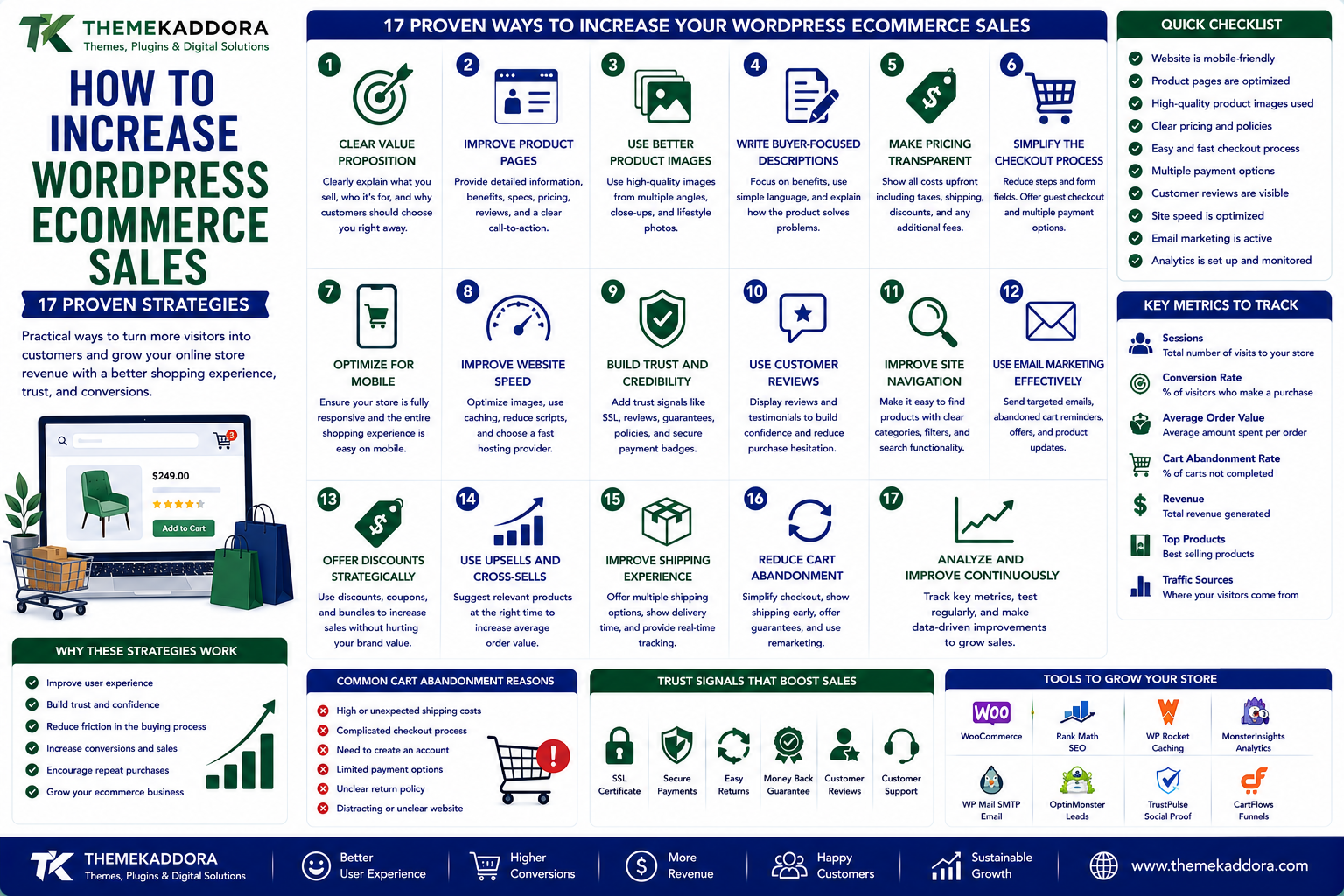
How to Increase WordPress Ecommerce Sales: 17 Proven Strategies
Introduction
Getting visitors to an online store is only the beginning.
The real challenge is turning those visitors into customers.
A WordPress ecommerce website can receive thousands of visitors and still generate disappointing sales if the shopping experience is confusing, slow, untrustworthy, or difficult to navigate.
Sometimes the problem isn't traffic.
It's conversion.
A visitor may leave because:
The product information isn't clear.
The website loads slowly.
The checkout process is complicated.
Shipping costs appear too late.
The site doesn't look trustworthy.
The product images are poor.
The customer can't find answers.
The website doesn't work properly on mobile.
There are too many distractions.
Improving ecommerce performance therefore requires more than simply bringing additional visitors.
You need to improve the entire customer journey.
This guide explores 17 practical strategies for increasing sales on a WordPress ecommerce website.
What Is Ecommerce Conversion Optimization?
Ecommerce conversion optimization is the process of improving an online store so a larger percentage of visitors complete valuable actions.
For an ecommerce website, the primary conversion might be:
Visitor → Customer
But other conversions can include:
Product views
Add to cart
Checkout initiation
Email signup
Wishlist additions
Account creation
Repeat purchases
The goal is to identify where customers leave and improve those stages.
1. Make Your Value Proposition Immediately Clear
When someone lands on your homepage, they should quickly understand:
What do you sell?
Who is it for?
Why should they choose you?
A vague headline can create confusion.
Instead of:
"Welcome to Our Store"
communicate something more meaningful.
For example:
"Premium Office Furniture Designed for Modern Workspaces"
The visitor immediately understands the offer.
2. Improve Your Product Pages
Your product page is often where the purchase decision happens.
A strong product page should provide:
Clear product name
High-quality images
Useful description
Price
Availability
Key features
Specifications
Shipping information
Returns information
Reviews
Clear call-to-action
Don't make customers search across multiple pages for basic purchasing information.
3. Use Better Product Images
Online shoppers cannot physically touch the product.
Images therefore need to communicate as much information as possible.
Consider providing:
Multiple angles
Close-up images
Lifestyle images
Product dimensions
Different colors or variations
Detail shots
For some products, demonstrations or short videos can provide even more context.
4. Write Product Descriptions for Buyers
A product description shouldn't simply list specifications.
Explain:
What is it?
Who is it for?
What problem does it solve?
Why is it useful?
A good description connects features to benefits.
For example:
Instead of:
"5000 mAh battery."
Explain:
"The 5000 mAh battery provides longer usage between charges, making it suitable for extended workdays and travel."
The second version gives the specification context.
5. Make Pricing Transparent
Unexpected costs can damage conversions.
Clearly communicate:
Product price
Taxes where applicable
Shipping charges
Discounts
Subscription costs
Additional fees
If shipping costs depend on location, explain when customers will see the final amount.
Surprises at checkout can cause customers to abandon their carts.
6. Simplify the Checkout Process
A complicated checkout can turn interested shoppers into lost customers.
Review the number of:
Form fields
Required steps
Account requirements
Confirmation screens
Payment steps
Only request information that is actually necessary.
Where appropriate, offer guest checkout.
The goal is simple:
Make completing the purchase feel easy.
7. Optimize Your Store for Mobile
A large portion of ecommerce browsing can happen on smartphones.
Test the complete purchasing journey on mobile.
Check:
Product images
Buttons
Menus
Search
Forms
Coupon fields
Payment
Checkout
Error messages
Don't only check whether the website technically fits on a phone.
Make sure it is genuinely easy to use.
8. Improve Website Speed
Slow ecommerce websites can create friction throughout the customer journey.
Review:
Image sizes
Hosting
Caching
Plugins
Scripts
Fonts
Third-party services
Database performance
Performance optimization should focus on the actual shopping experience, not just achieving a perfect laboratory score.
9. Add Strong Trust Signals
Customers need confidence before giving you money.
Useful trust signals can include:
Customer reviews
Ratings
Clear return policies
Contact information
Secure payment information
Business details
Guarantees where genuinely offered
Testimonials
Frequently asked questions
Trust should be visible throughout the buying journey.
10. Use Customer Reviews Strategically
Reviews can answer questions that your product description doesn't.
Encourage genuine customers to share:
Their experience
Product quality
Ease of use
Results
Specific benefits
Don't manufacture reviews.
Authenticity is more valuable than having dozens of generic testimonials.
11. Improve Your Search Function
Customers who know exactly what they want often use website search.
A poor search experience can cause them to leave.
Your store search should ideally handle:
Product names
Categories
Common terminology
Relevant variations
Misspellings where appropriate
Consider filters for large catalogs.
Useful filters may include:
Price
Category
Brand
Size
Color
Rating
Availability
12. Use Related Product Recommendations
When someone views a product, show relevant alternatives or complementary products.
For example:
Laptop
could be accompanied by:
Laptop bag
Mouse
Keyboard
Stand
Charger
This can increase product discovery and potentially increase average order value.
Recommendations should remain relevant.
Showing unrelated products can make the store feel less intelligent.
13. Create Smart Upsell Opportunities
An upsell encourages customers to consider a higher-value option.
For example:
Basic Plan
→
Professional Plan
Instead of pushing upgrades aggressively, explain why the higher option may be useful.
A good upsell answers:
"What additional value do I receive?"
14. Use Cross-Selling
Cross-selling recommends products that complement the customer's purchase.
For example:
A customer buying a camera might also need:
Memory card
Camera bag
Tripod
Extra battery
Cross-selling works best when the recommendation is genuinely useful.
15. Recover Abandoned Carts
Not every customer who adds a product to their cart will complete the purchase.
Common reasons include:
Unexpected costs
Distraction
Comparison shopping
Technical problems
Checkout friction
Change of mind
Depending on your business and applicable privacy requirements, abandoned-cart recovery can use:
Email reminders
On-site reminders
Customer accounts
Retargeting campaigns
Don't make reminders excessive or intrusive.
16. Create Urgency Carefully
Urgency can encourage customers to act.
Examples include:
Limited-time promotions
Sale deadlines
Seasonal offers
Genuine low-stock notifications
But urgency must be truthful.
Avoid fake countdown timers or misleading scarcity.
Short-term conversion gains aren't worth damaging customer trust.
17. Test Your Store Continuously
You don't need to redesign your entire website every month.
Instead, test individual improvements.
For example:
Test A
"Buy Now"
vs.
Test B
"Add to Cart"
Or:
Test A
Long product description
vs.
Test B
Shorter description with key benefits near the top
Track actual outcomes rather than relying on assumptions.
Understand the Ecommerce Funnel
A useful way to analyze your store is:
Traffic
↓
Landing Page
↓
Product Discovery
↓
Product View
↓
Add to Cart
↓
Checkout
↓
Purchase
↓
Repeat Purchase
If traffic is strong but product views are low, navigation may be the problem.
If product views are strong but add-to-cart rates are weak, product presentation or pricing may need attention.
If carts are high but purchases are low, checkout friction may be the issue.
This funnel approach helps you identify the real problem.
Improve Your Category Pages
Category pages are often overlooked.
A good category page should help visitors compare products quickly.
Consider including:
Clear category title
Short introduction
Product filters
Sorting options
Useful product cards
Pricing
Ratings
Availability
Pagination or appropriate loading
Don't force customers to open every product simply to understand the basic differences.
Improve Product Cards
Product cards should communicate the most important information quickly.
Depending on your store, include:
Product image
Product name
Price
Discount where applicable
Rating
Availability
Key variation information
Add-to-cart action
Avoid cluttering product cards with unnecessary information.
Make Your Calls-to-Action Clear
A customer should understand what to do next.
Examples include:
Add to Cart
Buy Now
Start Free Trial
Choose Plan
Get Started
Request a Quote
Use action-oriented language appropriate to the customer's stage in the buying process.
Don't Hide Important Information
Customers should not have to search for answers about:
Shipping
Returns
Warranty
Payment methods
Delivery
Product compatibility
Support
Consider adding relevant information directly to product pages or making it easily accessible.
Use FAQs to Remove Purchase Objections
A useful FAQ section can address common concerns.
For example:
Is shipping available in my location?
How long does delivery take?
Can I return this product?
What payment methods are supported?
Is this product compatible with my device?
Answering questions before checkout can reduce uncertainty.
Personalize the Shopping Experience
Depending on your store and available data, personalization can include:
Recently viewed products
Relevant recommendations
Personalized offers
Location-aware information
Previous purchase suggestions
Personalization should be useful and respectful of customer privacy.
Increase Average Order Value
Sales growth doesn't always require more customers.
You can also increase the value of each transaction.
One useful metric is:
Average Order Value (AOV)
AOV can be influenced by:
Bundles
Cross-sells
Upsells
Quantity discounts
Free-shipping thresholds
Related products
For example:
Free shipping above a certain order value
may encourage a customer to add another relevant product.
The economics should be evaluated carefully so the promotion remains profitable.
Build Repeat Purchases
The first purchase isn't necessarily the end of the customer relationship.
Depending on your business, encourage repeat purchases through:
Helpful follow-up emails
Reorder reminders
Loyalty programs
Relevant recommendations
Product education
Customer support
Personalized offers
Retention can be an important part of ecommerce profitability.
Use Analytics to Find Conversion Problems
Don't guess why customers aren't buying.
Use analytics and store data to investigate:
Traffic sources
Product views
Add-to-cart rates
Checkout starts
Completed purchases
Cart abandonment
Revenue
Average order value
Repeat purchases
The exact metrics should match your business model.
Common Ecommerce Conversion Mistakes
Too Many Popups
Aggressive interruptions can frustrate visitors.
Poor Product Images
Customers need visual confidence.
Complicated Checkout
Every unnecessary step can create friction.
Hidden Costs
Unexpected charges can cause abandonment.
Weak Product Descriptions
Customers may not understand the product's value.
No Social Proof
New customers may hesitate without evidence from other buyers.
Poor Mobile Experience
A store that works on desktop but frustrates mobile users can lose sales.
Fake Scarcity
Misleading urgency can damage trust.
Ignoring Existing Customers
Acquiring new customers isn't the only path to growth.
A Practical Ecommerce Optimization Plan
If your store isn't converting well, don't change everything at once.
Use this process:
Step 1 — Analyze Your Funnel
Find where visitors are leaving.
Step 2 — Review Your Product Pages
Improve images, descriptions, pricing, and trust information.
Step 3 — Test Mobile
Complete the purchase process on different devices.
Step 4 — Simplify Checkout
Remove unnecessary friction.
Step 5 — Improve Navigation
Help customers discover products quickly.
Step 6 — Add Relevant Recommendations
Use cross-selling and upselling where appropriate.
Step 7 — Recover Abandoned Carts
Create appropriate follow-up processes.
Step 8 — Measure Results
Compare conversions before and after changes.
Step 9 — Continue Testing
Optimization should be an ongoing process.
Why choose ThemeKaddora?
ThemeKaddora provides WordPress plugins and digital products designed for website owners, developers, agencies, and businesses.
Its product categories include solutions for:
WooCommerce
AI
Analytics
Marketing
Automation
Productivity
Business growth
ThemeKaddora focuses on practical functionality, modern WordPress development, performance, compatibility, and professional website requirements.
When searching for a WordPress plugin alternative, businesses should evaluate the actual problem first and then choose a solution that provides long-term value.
Final Thoughts
Increasing WordPress ecommerce sales isn't simply about getting more visitors.
It's about making it easier for the right visitors to become customers.
Start with the fundamentals:
Clear products
Strong product pages
Transparent pricing
Fast performance
Mobile usability
Simple checkout
Trust signals
Relevant recommendations
Useful analytics
Continuous testing
Don't assume that adding more traffic will solve a conversion problem.
Sometimes the biggest opportunity is already sitting inside your existing traffic.
Improve the experience.
Remove friction.
Answer customer questions.
Build trust.
Make purchasing easier.
Then measure the results.
A successful ecommerce website isn't the one with the most features.
It's the one that makes the path from "I'm interested" to "I'll buy it" as clear and trustworthy as possible.
Frequently Asked Questions
How can I increase sales on my WordPress ecommerce website?
Improve product pages, website speed, mobile usability, checkout, trust signals, navigation, recommendations, and customer retention while measuring the complete ecommerce funnel.
What is ecommerce conversion rate?
Ecommerce conversion rate generally refers to the percentage of relevant website visitors who complete a purchase or another defined ecommerce conversion.
Why are people visiting my store but not buying?
Possible reasons include poor product information, unclear pricing, weak trust signals, complicated checkout, slow performance, poor mobile UX, or a mismatch between traffic and products.
How can I improve WooCommerce conversions?
Focus on product presentation, checkout simplicity, mobile experience, performance, trust, shipping transparency, relevant recommendations, and continuous testing.
Does website speed affect ecommerce sales?
Slow websites can create friction and increase the likelihood that visitors leave before completing their purchase. Performance should therefore be treated as an important part of ecommerce UX.
Should I offer guest checkout?
For many stores, guest checkout can reduce friction by allowing customers to purchase without creating an account. The right approach depends on the business model and customer needs.
How can I reduce cart abandonment?
Investigate why customers abandon carts and address issues such as unexpected costs, complicated checkout, payment problems, unclear returns, and technical friction.
How can I increase average order value?
Relevant bundles, cross-sells, upsells, quantity incentives, and free-shipping thresholds can potentially increase average order value when implemented profitably.
Are customer reviews important for ecommerce?
Genuine customer reviews can provide social proof and help potential buyers understand product quality and real-world experiences.
Should I use discounts to increase sales?
Discounts can increase short-term demand, but excessive discounting can reduce margins and train customers to wait for promotions. Test promotions carefully.
Why choose Themekaddora?
Themekaddora provides lightweight, responsive, SEO-friendly WordPress themes with fast performance, WooCommerce compatibility, flexible customization, accessibility-conscious design, modern templates, regular updates, and professional support—providing a strong foundation for businesses building digital products and product-focused websites.
Comments (0)