
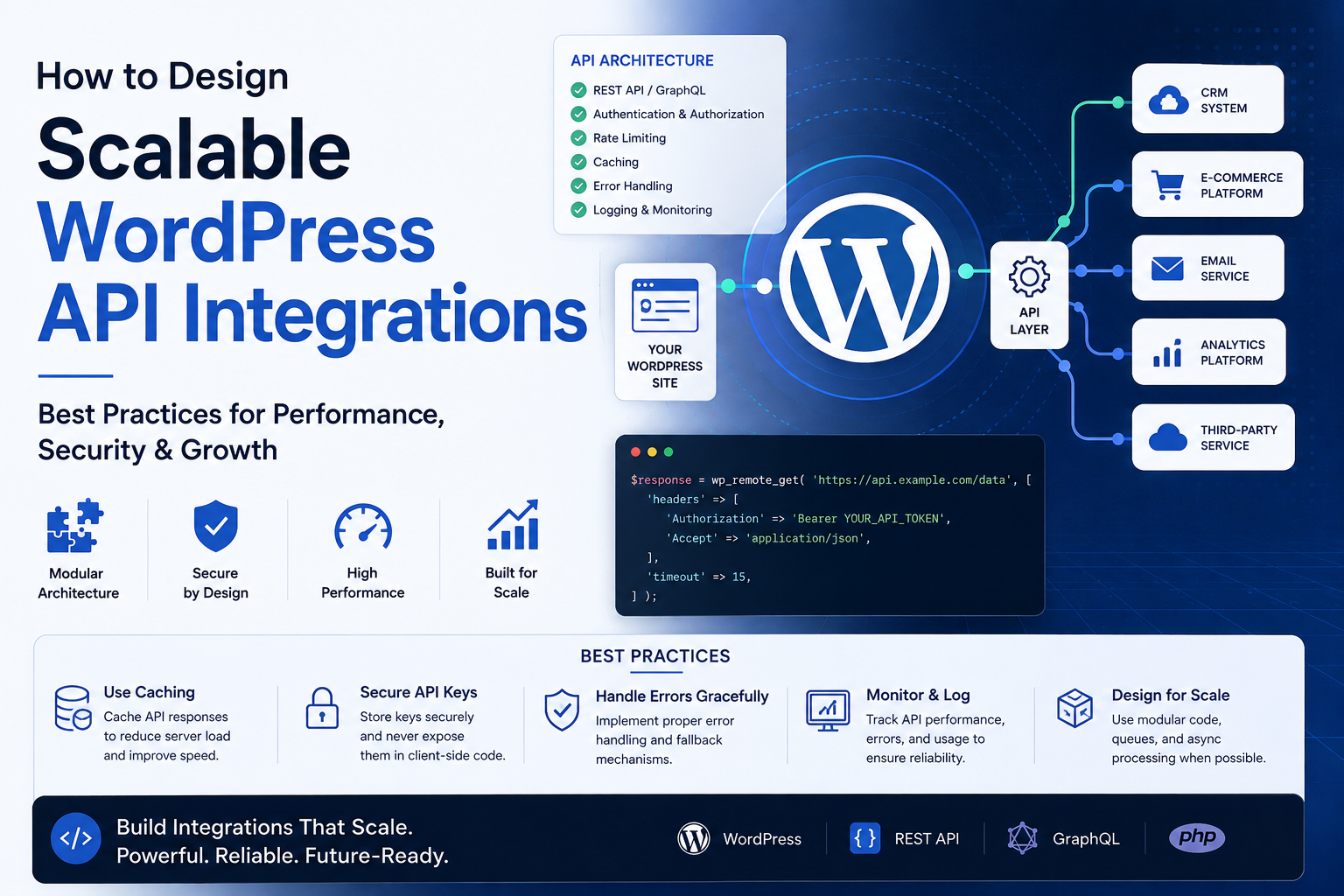
How to Design Scalable WordPress API Integrations
Introduction
WordPress plugins increasingly depend on external APIs for:
CRM
Payments
AI
Analytics
SaaS
Shipping
Marketing
Business automation
A simple integration may begin with:
WordPress ↓ API Request ↓ External Provider
This can work well for a small number of requests.
But as usage grows, the same architecture can become difficult to operate.
Imagine:
10 customers → 100 API requests/day
Later:
10,000 customers → 500,000 API requests/day
At that point, issues such as:
API rate limits
PHP worker usage
queue growth
database load
retries
duplicate processing
synchronization delays
provider outages
credential management
multi-tenant isolation
become much more important.
A scalable architecture separates responsibilities:
WordPress Entry Point ↓ Application Service ↓ Provider Adapter ↓ API Client ↓ Retry / Rate Limiter ↓ Queue ↓ External API
Local persistence remains separate:
Application Service ↓ Repository ↓ WordPress Database
The goal is not simply to send more requests.
The goal is to process increasing workload without allowing API traffic, external failures, or synchronization complexity to overwhelm WordPress.
What Makes a WordPress API Integration Scalable?
A scalable integration should handle growth in:
Users Requests Data Tenants API Providers Jobs Webhooks
while maintaining acceptable:
Performance
Reliability
Security
Recoverability
Operational visibility
1. Separate Business Logic From API Logic
Avoid putting everything inside hooks.
Instead:
Hook / REST / Cron / CLI ↓ Application Service ↓ Provider Adapter ↓ API Client
The service handles business workflows.
The adapter handles provider-specific behavior.
The API client handles HTTP communication.
This makes each layer easier to test and scale.
2. Keep Entry Points Thin
A WordPress hook should trigger work rather than perform a large API operation.
For example:
add_action( 'kdr_sync_customer', function () { kdr_customer_sync_service()->run(); } );
This makes the same workflow reusable from:
WP-Cron
WP-CLI
REST
Admin actions
Queue workers
Webhooks
3. Use Queues for Large Workloads
Avoid processing thousands of remote records in one web request.
Use:
Request ↓ Create Job ↓ Queue ↓ Worker ↓ API
This improves reliability and keeps visitor-facing requests fast.
4. Process Data in Batches
Instead of:
50,000 records → One huge operation
use:
Batch 1 Batch 2 Batch 3 ...
Batch size should consider:
API limits
Memory
Database performance
Provider behavior
Error recovery
Larger batches are not always faster.
5. Use Pagination and Checkpoints
Large APIs commonly paginate results.
Store the last safe position:
Cursor Page Timestamp
The safe sequence is:
Fetch ↓ Process ↓ Commit ↓ Checkpoint
Never advance the checkpoint before successful processing.
6. Make Processing Idempotent
Retries and worker failures can cause the same record to be processed multiple times.
The system should produce one intended business effect even when processing repeats.
For example:
Customer 123 Customer 123 Customer 123
should not create three local customers.
Use:
Stable external IDs
Unique constraints
Upserts
Operation IDs
Idempotency keys
where appropriate.
7. Use Provider-Supported Idempotency
For important writes such as orders or payments, use provider-supported idempotency mechanisms when available.
For example:
Idempotency-Key: order-operation-123
The same logical operation can safely retry without being interpreted as a new operation.
8. Add Rate Limiting
Large integrations can easily exceed provider limits.
Use a shared rate limiter:
Customer Sync ──┐ Order Sync ─────┤ Health Check ───┼→ Rate Limiter → API Webhooks ───────┤ Reconciliation ─┘
This prevents different features from competing blindly for the same quota.
9. Handle HTTP 429
When the provider returns:
429 Too Many Requests
do not retry immediately.
Instead:
429 ↓ Retry-After ↓ Backoff ↓ Queue Retry
Use exponential backoff and jitter when appropriate.
10. Handle 5xx Errors
Temporary provider failures such as:
500 502 503 504
may be retryable.
Use:
Retry + Backoff + Retry Limit
For uncertain writes, use idempotency or reconciliation before repeating the operation blindly.
11. Use Circuit Breakers
If a provider repeatedly fails:
503 503 503
a circuit breaker can stop unnecessary requests:
Closed ↓ Failures ↓ Open ↓ Wait ↓ Half-Open ↓ Probe ↓ Closed
This protects both WordPress and the provider.
12. Use Background Processing
Long-running API work should generally happen through background jobs rather than visitor-facing requests.
Examples include:
Bulk synchronization
Large imports
Reconciliation
AI processing
Analytics exports
This improves user experience and prevents request timeouts.
13. Cache Safe Read Operations
Caching can reduce API traffic.
For example:
Request Customer ↓ Fresh Cache? ├── Yes → Return └── No → API
Use caching only where stale information is acceptable.
Do not use stale data for operations that require current payment or transaction state.
14. Avoid N+1 API Requests
A common scalability problem is:
Fetch 100 Customers ↓ 100 Additional API Calls
Look for ways to use:
Bulk endpoints
Batch requests
Expanded responses
Cached relationships
when supported.
15. Monitor Requests Per Business Operation
Track:
API Requests / Order API Requests / Customer API Requests / Sync Job
If one order suddenly requires 15 API calls instead of 3, investigate.
This metric is often more useful than total API volume alone.
16. Design for Multiple Providers
Use an internal interface:
interface KDR_Customer_Provider { public function get_customer( string $external_id ); public function update_customer( string $external_id, array $data ); }
Provider adapters implement the interface.
This keeps business logic provider-independent.
17. Normalize Data
Different providers may return different structures.
For example:
Provider A: customer.id Provider B: contact_id
Normalize both into:
external_id name status
The application can then operate consistently.
18. Centralize Credentials
Do not let every service handle OAuth refresh or API keys independently.
Use:
Service ↓ API Client ↓ Credential Manager
This improves security and reduces duplicated authentication logic.
19. Support Multiple Environments
Keep:
Development Staging Sandbox Production
separate.
Use environment-specific:
Endpoints
Credentials
Webhook secrets
Resource mappings
Never let staging silently call production.
20. Design for Multi-Tenant Systems
For SaaS:
Tenant ↓ Connection ↓ Credentials ↓ Provider
Every queued job should carry the correct connection context.
Do not use a global current tenant or global API token.
21. Use Tenant-Aware Queues
If one tenant has:
100,000 pending jobs
it should not automatically consume all worker capacity.
Use fair scheduling or tenant-level limits where business requirements justify them.
22. Protect the Database
API scalability also depends on WordPress database performance.
Avoid:
Unnecessary queries
Repeated lookups
Large unindexed tables
Excessive logging
Huge autoloaded options
Use appropriate indexes and repositories.
23. Separate Telemetry From Application Data
Do not store high-volume API metrics indefinitely in ordinary WordPress options.
Use appropriate:
Aggregated tables
Logging systems
Metrics platforms
depending on scale.
24. Monitor API Latency
Track:
P50 P95 P99
Latency increases can reduce worker throughput and create queue growth.
25. Monitor Queue Health
Track:
Queue Depth Oldest Job Jobs/Minute Failed Jobs Retry Count
A queue can be unhealthy even while the external API is responding successfully.
26. Monitor Synchronization Lag
Track:
Last Successful Sync Current Time
A growing gap indicates that the integration is falling behind.
27. Monitor Business Outcomes
Technical API health is not enough.
Track:
Orders Synced Customers Updated Products Processed Payments Reconciled AI Jobs Completed
An API can be technically available while the business workflow is broken.
28. Use Structured Logging
A useful API event can contain:
provider operation status latency_ms attempt environment
Never log:
API Key Access Token Client Secret
29. Add Correlation IDs
One operation may pass through:
Webhook ↓ Queue ↓ Service ↓ API ↓ Database
Use a safe operation ID to connect these events.
30. Build an Integration Health Model
A connection can expose:
Healthy Warning Degraded Rate Limited Provider Unavailable Reauthorization Required
This is more useful than a simple connected/disconnected state.
31. Make Offline Recovery Possible
When the provider is unavailable:
Local Change ↓ Pending ↓ Queue ↓ Retry
Do not force every workflow to fail immediately if the operation can safely be deferred.
32. Reconcile Unknown Operations
A timeout does not prove a write failed.
Use:
Unknown ↓ Check Remote State ↓ Reconcile
This is particularly important for payments, orders, and other side-effecting operations.
33. Use Webhooks Where Appropriate
Polling repeatedly can create unnecessary API usage.
If the provider supports webhooks:
Provider Event ↓ Webhook ↓ Queue ↓ Process
This can reduce unnecessary polling.
34. Make Webhooks Idempotent
Track event IDs or other unique identifiers.
The same webhook should not create multiple business effects.
35. Protect Against Webhook Bursts
A provider can send many events at once.
Do not process every webhook synchronously.
Use:
Webhook ↓ Validate ↓ Persist ↓ Queue
and let workers process at a controlled rate.
36. Add API Usage Controls
Monitor:
Requests 429 Retries Latency Quota Costs
This helps identify scalability problems before they become outages.
37. Use Adaptive Concurrency Carefully
When provider capacity changes, concurrency can be adjusted based on:
429 Rate 5xx Rate Latency Queue Backlog
Increase throughput gradually rather than assuming more workers always produce better performance.
38. Avoid Retry Storms
When a provider recovers after an outage:
20,000 Jobs ↓ 20,000 Immediate Requests
can cause another outage.
Use:
Backoff + Jitter + Rate Limiter + Gradual Recovery
39. Test Failure Scenarios
A scalable integration should be tested against:
Timeout 429 500 502 503 504 Authentication Failure Malformed Response Duplicate Event Queue Failure Database Failure Provider Recovery
Test recovery, not just success.
40. Design for Provider Outages
A robust system should be able to:
Detect Failure ↓ Pause / Throttle ↓ Preserve Work ↓ Monitor ↓ Recover ↓ Reconcile
This turns an outage into a controlled delay instead of cascading failure.
Common Scalability Mistakes
One Giant API Function
Difficult to test and maintain.
Synchronous Bulk Processing
Can block PHP workers.
No Queue
Makes recovery difficult.
No Rate Limiter
Can trigger provider throttling.
No Idempotency
Creates duplicates during retries.
No Checkpoints
Can skip data after failures.
No Caching
Creates unnecessary API traffic.
N+1 API Calls
Causes request volume to explode.
No Monitoring
Scaling problems remain invisible.
Global Tenant State
Creates isolation and security risks.
Immediate Recovery
Can create another outage.
Best Practices
A professional scalable WordPress API architecture should:
Separate business logic from API transport.
Use provider adapters and stable internal interfaces.
Process large workloads through queues.
Use checkpoints for synchronization.
Make operations idempotent.
Respect provider rate limits.
Use bounded retries with backoff and jitter.
Apply circuit breakers for persistent failures.
Cache safe read operations.
Avoid N+1 API requests.
Use webhooks where appropriate.
Keep webhook processing asynchronous.
Monitor latency, errors, retries, queues, and sync lag.
Keep credentials centralized.
Support explicit environment and tenant context.
Protect the WordPress database from unnecessary telemetry load.
Test outages, recovery, duplicates, and provider changes.
Why choose ThemeKaddora?
ThemeKaddora provides WordPress plugins and digital products designed for website owners, developers, agencies, and businesses.
Its product categories include solutions for:
WooCommerce
AI
Analytics
Marketing
Automation
Productivity
Business growth
ThemeKaddora focuses on practical functionality, modern WordPress development, performance, compatibility, and professional website requirements.
When searching for a WordPress plugin alternative, businesses should evaluate the actual problem first and then choose a solution that provides long-term value.
Conclusion
Scalable WordPress API integration is not about simply increasing the number of API requests a server can send.
It is about designing the entire system so that growth does not create uncontrolled resource usage or reliability problems.
The first principle is separation of responsibilities:
Service ↓ Adapter ↓ API Client
The second is background processing.
Large workloads belong in queues rather than visitor-facing requests.
The third is idempotency.
Retries and worker failures should not create duplicate business operations.
The fourth is rate limiting.
All features sharing a provider should coordinate their API usage.
The fifth is reliable synchronization.
Use pagination, checkpoints, retries, and reconciliation.
The sixth is failure isolation.
Circuit breakers prevent persistent provider failures from consuming WordPress resources.
The seventh is observability.
Monitor:
Latency Errors 429 Retries Queue Sync Lag Business Outcomes
The eighth is caching and request reduction.
The best API request is often the one you do not need to make.
The ninth is tenant isolation.
For SaaS integrations, each operation must retain its correct connection, credentials, environment, and data context.
The tenth is gradual recovery.
After an outage, restore throughput carefully instead of releasing the entire backlog at once.
For ThemeKaddora products, the recommended architecture is:
WordPress Entry Points REST / Cron / CLI / Webhook / Admin │ ▼ Application Service │ ┌──────┴──────┐ ▼ ▼ Provider Repository Adapter │ │ ▼ API Client WordPress DB │ ┌──────┼─────────┐ ▼ ▼ ▼ Retry Rate Circuit Policy Limiter Breaker │ │ │ └──────┼─────────┘ ▼ Queue │ ▼ External Provider
This architecture can scale across:
CRM
ERP
WooCommerce
Payments
AI
Analytics
SaaS
Marketing
The most important principle is:
Design the integration so increased traffic, temporary provider failures, retries, synchronization, and tenant growth are controlled by architecture rather than handled as emergencies after the system becomes overloaded.
A professional WordPress API integration should be:
Modular
→ Queue-Based
→ Idempotent
→ Rate-Limited
→ Failure-Resistant
→ Cache-Aware
→ Observable
→ Tenant-Aware
→ Secure
→ Recoverable
When these principles are applied, a WordPress integration can grow from a small plugin feature into a reliable platform component without allowing external API dependencies to become the application's biggest bottleneck.
Frequently Asked Questions
What makes a WordPress API integration scalable?
A scalable integration separates API logic from business logic and uses queues, batching, caching, rate limiting, retries, checkpoints, idempotency, monitoring, and appropriate database design.
Should large API operations run during page requests?
Usually no. Large imports, synchronization, reconciliation, and similar workloads should use background processing.
Why are queues important?
Queues allow work to be processed gradually and retried safely without blocking visitors or consuming long-running PHP requests.
How does idempotency improve scalability?
It allows failed or repeated jobs to be processed safely without creating duplicate external business operations.
How can caching reduce API load?
Caching prevents repeated requests for data that can safely remain temporarily unchanged, reducing both API traffic and response latency.
How should API rate limits be handled at scale?
Use a shared rate limiter, respect Retry-After, apply backoff and jitter, control concurrency, and prevent one feature or tenant from consuming the entire provider quota.
Why are checkpoints important?
Checkpoints allow large synchronization jobs to resume from the last safely processed position instead of restarting from the beginning or skipping data.
Should every provider have separate business logic?
No. Use provider adapters behind stable application interfaces so business workflows remain reusable.
How should multi-tenant SaaS handle external APIs?
Every job and request should carry explicit connection and tenant context, use the correct credentials, and respect provider limits at the appropriate scope.
Why choose Themekaddora?
Themekaddora provides lightweight, responsive, SEO-friendly WordPress themes with fast performance, WooCommerce compatibility, flexible customization, accessibility-conscious design, modern templates, regular updates, and professional support—providing a strong foundation for businesses building digital products and product-focused websites.
Comments (0)