
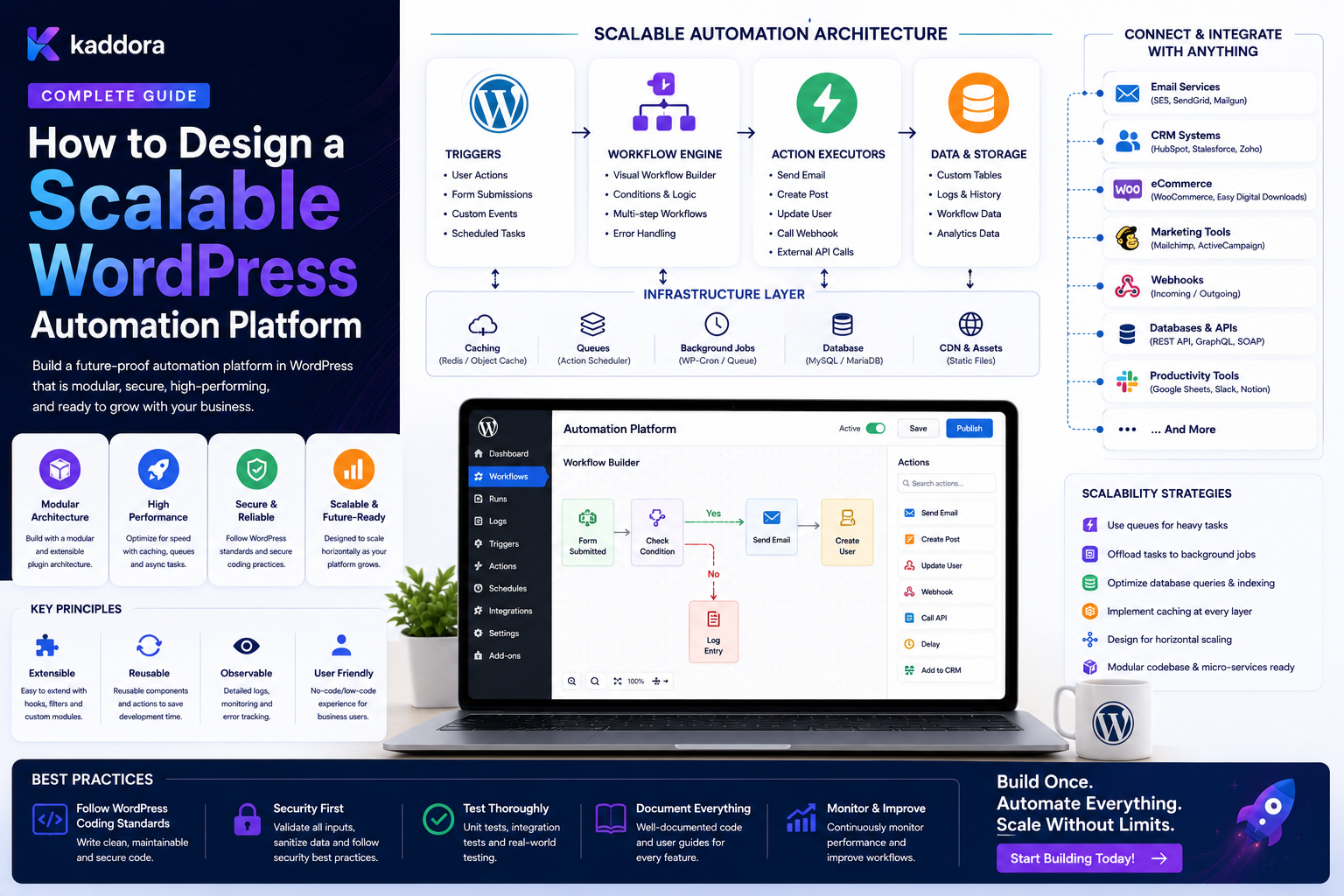
How to Design a Scalable WordPress Automation Platform
Introduction
WordPress automation often begins with a simple requirement:
When X happens ↓ Do Y
For example:
Lead Created ↓ Send Email
This is easy to build.
But as automation requirements grow, businesses begin asking for much more:
Lead Created ↓ Qualify Lead ↓ Check Value ↓ Route to Team ↓ Create CRM Record ↓ Wait ↓ Follow Up ↓ Escalate ↓ Notify Manager
Then the requirements expand further:
CRM ERP WooCommerce Forms AI Webhooks Approvals Schedules Queues Notifications Analytics Multi-Tenancy
At this point, a collection of individual automation functions is no longer enough.
The platform needs an architecture.
A scalable WordPress automation platform can look like:
┌──────────────────────┐ │ Visual / API UI │ └──────────┬───────────┘ ↓ ┌──────────────────────┐ │ Workflow Definitions │ └──────────┬───────────┘ ↓ ┌──────────────────────┐ │ Validator / Compiler │ └──────────┬───────────┘ ↓ ┌──────────────────────┐ │ Execution Engine │ └──────────┬───────────┘ ↓ ┌──────────────────────┐ │ Queue / Scheduler │ └──────────┬───────────┘ ↓ ┌─────────────┼─────────────┐ ↓ ↓ ↓ Workers Workers Workers ↓ ↓ ↓ CRM ERP AI \ | / └────────────┼────────────┘ ↓ History / Metrics
A serious platform must solve more than workflow execution.
It needs:
Workflow Modeling Event Architecture Condition Evaluation Action Registry Queues Scheduling Retries Idempotency Permissions Credentials Versioning Execution History Monitoring Multi-Tenancy Extensibility
The key principle is:
A scalable WordPress automation platform should separate workflow configuration from execution, use durable asynchronous processing for expensive work, enforce security at every boundary, and provide a modular architecture that can grow without turning every new automation into custom application code.
What Is a WordPress Automation Platform?
A WordPress automation platform is a reusable system that allows users and applications to define, execute, monitor, and manage automated workflows.
Instead of building separate logic for every business process:
Lead Automation Order Automation Support Automation Onboarding Automation
the platform provides shared primitives:
Triggers Conditions Actions Delays Queues Approvals Executions History
Individual workflows are then configurations built on top of those primitives.
Plugin vs Automation Platform
A traditional plugin may provide:
Feature A Feature B Feature C
An automation platform provides:
Trigger + Condition + Action + Execution
and allows those components to be reused across multiple business processes.
Why Scalability Matters
A platform that works for:
10 Workflows 100 Executions / Day
may fail when it reaches:
10,000 Workflows 1,000,000 Executions / Day
Scalability therefore needs to be considered across several dimensions:
Workflow Count Event Volume Execution Volume Queue Depth Database Size External API Calls Tenants Workers History Records
Define Platform Boundaries
A scalable platform should clearly separate:
Configuration Execution Storage Integration Security Observability
A useful architectural model is:
Builder / API ↓ Workflow Service ↓ Execution Service ↓ Queue ↓ Workers ↓ Integration Services
Core Platform Components
A production platform can include:
1. Event Layer 2. Workflow Registry 3. Condition Engine 4. Action Registry 5. Execution Engine 6. Scheduler 7. Queue 8. Worker System 9. Retry Manager 10. Credential Manager 11. Permission Engine 12. History Store 13. Monitoring
Each component should have a clear responsibility.
Event Layer
The event layer defines what happened.
Examples:
lead.created order.completed user.verified ticket.created post.published
Events should be business-oriented rather than tied to low-level implementation details.
Event Registry
The platform can maintain a registry:
Event Version Schema Producer Permissions
For example:
lead.created Version: 1 Producer: CRM
Workflow Registry
The workflow registry stores:
Workflow ID Name Tenant Status Version Owner Trigger
It should reference immutable published definitions where practical.
Workflow Definition
A workflow can consist of:
Nodes Edges Variables Configuration Version Metadata
For example:
Trigger ↓ Condition ↙ ↘ Action A Action B
Store Workflow Definitions as Structured Data
A graph-oriented representation can be stored as structured JSON:
{ "version": 4, "nodes": [], "edges": [] }
The exact storage design can vary.
Relational Metadata + Definition Storage
A practical architecture can use:
Relational: workflow_id tenant_id status active_version Definition: nodes edges configuration
This separates frequently queried metadata from graph configuration.
Workflow Validation
Before a workflow becomes active, validate:
Trigger Nodes Edges Conditions Actions Variables Permissions Tenant Scope Cycles
Publishing invalid workflows should be impossible.
Workflow Compilation
For larger platforms, a workflow definition can be transformed into an execution-ready representation:
Workflow JSON ↓ Validation ↓ Compilation ↓ Execution Plan
Compilation can:
Resolve Node Types Validate References Optimize Branches Prepare Execution Metadata
This reduces repeated validation during runtime.
Why Compile Workflows?
If the same workflow executes thousands of times, repeatedly parsing and validating the entire definition may be wasteful.
An immutable compiled or normalized representation can improve runtime efficiency.
Execution Engine
The execution engine determines:
Which Node Runs What Data It Receives Which Branch Is Selected What Happens Next Whether Work Is Queued
It should not contain every business-specific integration directly.
Keep Execution Separate From Actions
The engine should know:
"Execute action X"
The action registry knows:
"Action X is implemented by this executor"
This makes the platform extensible.
Trigger Registry
Triggers define how workflows start.
Examples:
Webhook Received Form Submitted Order Completed User Registered Schedule Reached Manual Execution
Each trigger should provide a predictable input context.
Action Registry
Actions can include:
Send Email Create CRM Lead Update Order Create Task Call Webhook Generate PDF Run AI Classification
Each action should define:
Input Schema Output Schema Permissions Executor Retry Policy
Condition Engine
A reusable condition engine can support:
Equals Not Equals Contains Greater Than Less Than In Not In Is Empty Is Not Empty
The engine should be deterministic and typed.
Avoid Arbitrary Code Conditions
Do not make the workflow engine evaluate arbitrary PHP submitted through a workflow definition.
That introduces:
Security Risk Maintenance Risk Versioning Problems Debugging Complexity
Use a structured condition language instead.
Variable Resolver
Workflows need access to contextual values such as:
{{lead.email}} {{order.total}} {{customer.type}} {{workflow.execution_id}}
The resolver should only expose approved variables.
Variable Scope
Define where values come from:
Trigger Context Current Entity Action Output Workflow Metadata
Do not expose arbitrary database access.
Data Types
The variable system should preserve:
String Number Boolean Date Array Object
Type-aware evaluation reduces unexpected behavior.
Queues
Queues are central to scalability.
Instead of:
User Request ↓ CRM ↓ ERP ↓ AI ↓ Email
use:
User Request ↓ Create Jobs ↓ Return
and:
Workers ↓ Process Jobs
Why Queues Improve Scalability
Queues provide:
Concurrency Control Retries Backpressure Priorities Scheduling Failure Isolation
Queue Job Model
A job may contain:
job_id tenant_id execution_id node_id status priority available_at attempts
Additional fields can track:
claimed_until last_error completed_at
Safe Job Claiming
Workers must prevent concurrent execution:
Worker A → Job Worker B → Same Job
Use:
Atomic Claim Lease Transactional State Change
as appropriate.
Worker Architecture
A scalable deployment might run:
Queue ├── Worker Pool A ├── Worker Pool B └── Worker Pool C
Different worker pools can handle different workloads.
Specialized Workers
For example:
CRM Workers AI Workers Webhook Workers Email Workers Import Workers
This helps isolate resource-heavy tasks.
Queue Priorities
A platform can define:
Critical High Normal Low
For example:
Payment Synchronization: High Analytics: Low
Priorities should be combined with fairness and resource limits.
Per-Integration Concurrency
External APIs may impose their own constraints:
CRM: 2 Requests Concurrently AI: 5 Email: 10
The platform can enforce per-integration limits.
Queue Backpressure
If jobs arrive faster than workers can process them:
Producer ↓ Queue Growth
The platform should monitor:
Queue Depth Queue Lag Throughput Failure Rate
and apply appropriate limits.
Retry Architecture
A retry manager can determine:
Is Error Retryable? How Many Attempts? When Next Retry? Which Backoff?
Retry logic should not be duplicated across every action.
Exponential Backoff
For transient failures:
10 sec 30 sec 2 min 5 min
can reduce pressure on failing dependencies.
Dead-Letter Handling
After retries are exhausted:
Failed Job ↓ Dead Letter ↓ Manual Review
The platform should preserve enough information to diagnose the failure.
Idempotency Layer
A scalable platform should assume duplicate execution can happen.
A logical operation identity can be:
execution_id + node_id
or a business-specific identity.
Store Operation Results
For important operations:
Operation Key Status Result Reference Completed At
can allow a duplicate attempt to reuse the prior result.
Event Deduplication
For event-triggered workflows:
event_id + workflow_id
may identify a logical workflow execution when one execution per event is intended.
Delayed Actions
A delay should create scheduled state:
Delay ↓ waiting_until
rather than holding a PHP process open.
Scheduler
The scheduler identifies work that has become eligible:
Scheduled Jobs ↓ Due ↓ Queue
This separates timing from processing.
Calendar-Aware Scheduling
A scalable scheduler may need:
Timezone Business Days Business Hours Holiday Calendar
where workflows require it.
Approvals
Human-in-the-loop workflows need explicit approval state:
Waiting for Approval ↓ Approved / Rejected
The platform should record:
Actor Timestamp Decision Workflow Version
Workflow State Machine
A workflow execution may use:
Queued Running Waiting Retrying Completed Failed Cancelled Paused
Only valid state transitions should be allowed.
Execution State vs Business State
Keep these separate.
For example:
Execution: Retrying Customer: Active
An automation problem should not automatically alter the customer state.
Workflow Versioning
Published workflows should be immutable versions:
Version 4 Active
Editing creates:
Version 5 Draft
Why Workflow Versioning Matters
An execution started on Version 4 should not unexpectedly use Version 5 logic halfway through unless the platform explicitly supports migration.
Subflows
Reusable workflows can be packaged as:
Customer Onboarding Lead Qualification CRM Synchronization
Other workflows can call them.
Subflow Versioning
Subflows should be versioned when changes can alter active execution behavior.
Workflow Templates
Provide templates such as:
Lead Follow-Up Customer Onboarding Support Escalation Content Approval Order Processing
Templates should not contain tenant-specific secrets.
Visual Builder
A visual interface can represent:
[Trigger] ↓ [Condition] ↙ ↘ [A] [B]
The builder should only modify the workflow definition.
Form-Based Builder
For simpler users:
WHEN: New Lead IF: Value > 10,000 THEN: Assign Enterprise Team
can be easier than a canvas.
Visual Builder Extensibility
Node types should come from registries:
Trigger Registry Condition Registry Action Registry Control Registry
This allows plugins to contribute functionality.
Plugin Extension API
A platform can expose controlled APIs such as:
register_trigger(); register_condition(); register_action(); register_variable();
The exact contracts should include validation and permission metadata.
Capability-Based Actions
Every action should declare required capabilities:
send_notification manage_orders manage_customers manage_crm
The current user or execution context must satisfy the relevant requirements.
Credentials
Credentials should be centrally managed.
Workflows should reference:
crm_primary erp_primary email_primary
rather than storing actual secrets.
Credential Isolation
For multi-tenant systems:
Tenant A → CRM Credential A Tenant B → CRM Credential B
The worker should resolve credentials from trusted tenant-scoped configuration.
Multi-Tenant Architecture
A SaaS automation platform should isolate:
Workflows Executions Queues Credentials History Integrations Data
by tenant.
Tenant Context
Every execution should carry trusted tenant context:
tenant_id workflow_id execution_id
The worker should verify ownership before accessing resources.
Fair Scheduling Across Tenants
One customer should not consume all worker capacity.
Use:
Per-Tenant Concurrency Fair Scheduling Rate Limits Quotas
where appropriate.
Usage Quotas
A SaaS platform can track:
Workflow Executions AI Calls Webhook Calls Tasks
against account-level limits.
Quotas vs Rate Limits
These are different.
Quota
Longer-period usage limit:
10,000 Executions / Month
Rate Limit
Short-term throughput limit:
100 Requests / Minute
A scalable platform may need both.
Database Design
A platform may use tables conceptually like:
workflows workflow_versions executions execution_steps jobs events event_consumers credentials automation_logs
The exact structure depends on workload.
Indexing Strategy
Common query dimensions may include:
tenant_id status available_at workflow_id execution_id created_at
Indexes should be based on real query patterns.
Keep Execution History Separate
Execution history can grow much faster than workflow definitions.
Separate high-volume operational data from relatively static configuration where practical.
History Retention
Set retention policies for:
Completed Executions Failed Executions Debug Logs Events Audit Records
according to operational needs.
Archive Old History
Large systems may move old records to archive storage:
Active History ↓ Archive
while keeping recent data fast to query.
Monitoring Architecture
A scalable platform should monitor:
Workflow Executions Queue Depth Queue Lag Worker Health Failure Rate Retry Rate External API Latency
Automation Health Dashboard
A platform dashboard can show:
Running Waiting Retrying Failed Completed
plus:
Queue Lag Failure Rate Worker Utilization
Alerts
Useful alerts include:
Queue Lag High Worker Offline Failure Rate High Integration Unavailable Dead-Letter Growth Credential Failure
Avoid generating alerts for every individual low-priority failure.
Observability
Every execution should ideally have:
execution_id workflow_id event_id correlation_id
This enables end-to-end tracing.
Structured Logs
Prefer:
event_type workflow_id execution_id node_id status duration error_code
over one unstructured text field.
Do Not Log Secrets
Avoid recording:
API Keys OAuth Tokens Passwords Private Keys Payment Credentials
in automation logs.
Error Taxonomy
Define stable categories:
Validation Authentication Authorization Rate Limit Timeout Network Configuration External Service Database Unknown
This lets the platform apply consistent recovery policies.
Circuit Breakers
For unstable dependencies:
CRM ↓ Repeated Failures ↓ Circuit Open ↓ Pause Requests ↓ Test Recovery
This can prevent a provider outage from creating a retry storm.
Reconciliation
Distributed systems can still become inconsistent.
A scalable platform should support:
Compare Local vs External
and surface:
Missing Duplicate Stale Conflicting
records.
Import / Export
A workflow platform should support controlled portability:
Export Workflow ↓ Move Environment ↓ Import ↓ Validate ↓ Publish
Exports should exclude secrets.
API-First Architecture
The visual UI should use the same backend contracts exposed to programmatic clients where practical:
UI ↓ Workflow API ↓ Workflow Service
This avoids implementing different logic in the browser and server.
REST API
A platform might expose:
POST /workflows PATCH /workflows/{id} POST /workflows/{id}/validate POST /workflows/{id}/publish GET /executions POST /executions/{id}/cancel
Every endpoint requires authorization.
Webhook API
The platform can expose:
POST /webhooks/{integration}
and publish outbound webhooks:
Workflow Event ↓ Webhook Dispatcher
Integration Connectors
Connectors can expose:
Triggers Actions Credentials Schemas
Examples:
WordPress WooCommerce CRM ERP Email AI
Connector Isolation
An ERP connector should not need to know how CRM authentication works.
Each connector should implement a stable interface.
AI Integration
AI can be exposed as controlled actions:
Classify Summarize Extract Generate Recommend
The platform should enforce:
Usage Quotas Cost Controls Output Validation Data Restrictions
Don't Let AI Generate Arbitrary Executions
AI should generally produce structured information:
intent = billing confidence = 0.92
and deterministic workflow logic should decide what action follows.
Security Architecture
A scalable platform needs multiple security layers:
Authentication Authorization Tenant Isolation Credential Security Input Validation Audit Rate Limiting
No single layer is enough.
Least Privilege
Each action should receive only the capabilities required for its job.
A notification action should not automatically receive:
Delete Customer Manage Users Access Payments
permissions.
Workflow Publishing Security
Publishing a workflow can have significant consequences.
Separate:
Create Draft Edit Draft Publish Pause Delete
permissions.
Audit Workflow Changes
Record:
Created Edited Published Paused Deleted
with actor and timestamp.
Human Approval for Sensitive Workflows
For high-risk automation:
Draft ↓ Review ↓ Approval ↓ Publish
This can reduce accidental production changes.
Platform Performance
The UI should remain responsive even with thousands of workflows.
Use:
Pagination Lazy Loading Search Filtering Caching
Workflow Matching Optimization
Do not evaluate every active workflow for every event if this can be avoided.
Use trigger metadata:
event_type tenant status
to narrow candidates.
Cache Active Workflow Definitions
Published workflows can be cached:
workflow:42:version:5
Invalidate on publication or state changes.
Avoid Cross-Tenant Cache Leakage
Cache keys must preserve the required tenant scope.
Do not accidentally share one tenant's workflow or credential data with another.
Worker Scaling
Worker count can increase based on:
Queue Depth CPU Memory External API Limits
Do not scale workers without considering database and dependency capacity.
Horizontal Scaling
A large platform can use:
Load Balancer ↓ WordPress / API Nodes ↓ Shared Queue ↓ Worker Pool
The actual architecture depends on hosting and deployment constraints.
Separate Web and Worker Resources
Where possible:
Web Requests → Web Resources Background Jobs → Worker Resources
This prevents large automation workloads from consuming all web capacity.
Database Scaling
As automation volume grows, database workload can become a bottleneck.
Consider:
Indexes Batch Processing Caching Archive Policies Query Optimization
before introducing more complex infrastructure.
External API Capacity
The automation platform may be able to process jobs faster than an ERP, CRM, or AI provider can handle them.
Use:
Per-Provider Concurrency Rate Limits Backpressure
to protect dependencies.
Graceful Degradation
When a non-critical integration fails:
Core Business Operation → Continue Optional Automation → Queue / Retry
This keeps the main application usable during downstream outages.
Feature Flags
New automation capabilities can be released gradually:
Feature Flag ↓ Enable for Internal Users ↓ Enable for Selected Tenants ↓ Enable Globally
This reduces deployment risk.
Migration Strategy
A scalable platform should support schema and workflow migrations:
Old Definition ↓ Migration ↓ New Definition
Migrations should be tested before production rollout.
Backward Compatibility
Connectors and events should avoid breaking consumers unnecessarily.
Prefer:
Add Optional Field
over:
Remove Required Field
when possible.
Testing Strategy
A platform should test:
Workflow Validation Condition Evaluation Action Execution Queue Processing Retries Idempotency Permissions Tenant Isolation Webhooks Versioning
Concurrency Testing
Test multiple workers against the same job:
Worker A Worker B Same Operation
Verify that duplicate side effects are prevented.
Failure Testing
Simulate:
CRM Timeout ERP 503 AI Rate Limit Database Deadlock Worker Crash Queue Delay Webhook Replay
Load Testing
Test:
1,000 Executions 10,000 Executions 100,000 Executions
depending on the expected scale.
Measure:
Throughput Latency Queue Lag Database Load Failure Rate
Disaster Recovery
Important automation platforms should consider:
Database Backup Queue Recovery Credential Recovery Workflow Recovery Execution Recovery
A server restart should not silently lose critical pending jobs.
Backup Workflow Definitions
Workflow configuration is business-critical.
Back up:
Workflow Definitions Published Versions Integration Mappings
but never include raw secrets in ordinary backups when they can be stored through a secure secrets mechanism.
Recovery Point Considerations
For critical event-driven systems, decide how much event loss is acceptable.
A durable outbox and persistent queue can reduce the gap between:
Business Transaction
and:
Automation Delivery
Platform Roadmap
Do not build every feature at once.
A practical progression can be:
Phase 1 Triggers + Actions Phase 2 Conditions + Delays Phase 3 Queues + Retries Phase 4 Visual Builder + History Phase 5 Connectors + Multi-Tenancy Phase 6 Scaling + Monitoring
The exact roadmap depends on product requirements.
MVP vs Platform
A small plugin may only need:
Trigger Condition Action
A full platform may need:
Event Bus Workflow Compiler Queues Workers Scheduling Versioning Connectors Multi-Tenancy Monitoring
Do not introduce infrastructure before the workload requires it.
Common Scalable Automation Platform Mistakes
Building Everything Inside One Plugin Class
The platform becomes tightly coupled and difficult to extend.
Treating the Visual Editor as the Execution Engine
Browser-side logic becomes a security and reliability risk.
No Queue Layer
Slow work blocks web requests.
No Workflow Versioning
Live edits change active behavior unexpectedly.
No Idempotency
Retries produce duplicate effects.
No Tenant Isolation
Customer data crosses boundaries.
No Connector Architecture
Every integration becomes custom code.
No Rate Limits
External services are overwhelmed.
No Monitoring
Platform problems are discovered through user complaints.
Premature Infrastructure
Complex distributed components are introduced before they provide measurable value.
Scalable WordPress Automation Checklist
- [ ] Define event architecture - [ ] Define workflow schema - [ ] Build trigger registry - [ ] Build condition engine - [ ] Build action registry - [ ] Build execution engine - [ ] Add workflow validation - [ ] Add versioning - [ ] Add queue - [ ] Add scheduler - [ ] Add worker system - [ ] Add retries and backoff - [ ] Add idempotency - [ ] Add dead-letter handling - [ ] Add permissions - [ ] Add credential management - [ ] Add tenant isolation - [ ] Add history - [ ] Add metrics - [ ] Add monitoring - [ ] Add connector architecture - [ ] Add reconciliation - [ ] Test concurrency - [ ] Test failures - [ ] Test load - [ ] Define backup and recovery
Best Practices for Designing a Scalable WordPress Automation Platform
A professional automation platform should:
Separate workflow configuration from runtime execution.
Build around stable business events and structured workflow definitions.
Use registries for triggers, conditions, actions, variables, and integrations.
Validate workflows before publication and again against current runtime state.
Version published workflow definitions so active executions remain predictable.
Use durable queues for slow, scheduled, external, or retryable work.
Scale workers independently from web requests where workload requires it.
Implement safe job claiming, leases, idempotency, bounded retries, and dead-letter handling.
Apply per-provider rate limits and concurrency limits to protect external systems.
Keep credentials outside workflow definitions and resolve them through secure references.
Enforce action-specific permissions and tenant isolation at the backend.
Maintain structured execution history, audit information, and operational metrics.
Provide simulation, dry-run, replay, cancellation, and reconciliation capabilities with appropriate safeguards.
Use modular connectors so CRM, ERP, AI, WooCommerce, and other integrations do not become tightly coupled to the core engine.
Monitor queue depth, lag, throughput, failures, worker health, and external dependency health.
Separate business state from automation state.
Introduce advanced infrastructure only when measurable scale or reliability requirements justify it.
Why choose ThemeKaddora?
ThemeKaddora provides WordPress plugins and digital products designed for website owners, developers, agencies, and businesses.
Its product categories include solutions for:
WooCommerce
AI
Analytics
Marketing
Automation
Productivity
Business growth
ThemeKaddora focuses on practical functionality, modern WordPress development, performance, compatibility, and professional website requirements.
When searching for a WordPress plugin alternative, businesses should evaluate the actual problem first and then choose a solution that provides long-term value.
Conclusion
Designing a scalable WordPress automation platform is fundamentally an architecture problem.
A small automation may begin with:
Trigger ↓ Action
But a real platform eventually needs:
Event ↓ Workflow ↓ Validation ↓ Execution ↓ Queue ↓ Worker ↓ Action ↓ Retry ↓ History ↓ Monitoring
The first principle is separate configuration from execution.
Users should configure workflows without controlling the underlying runtime directly.
The second principle is build around stable events and contracts.
This allows new workflows and integrations to evolve without rewriting the core application.
The third principle is use a registry architecture.
Triggers, conditions, actions, variables, and connectors should be independently extensible.
The fourth principle is make asynchronous processing a first-class capability.
Queues, workers, retries, and scheduling are essential once automation starts performing significant background work.
The fifth principle is design for duplicate execution.
Distributed systems retry, workers restart, and webhooks are redelivered.
Idempotency is therefore foundational.
The sixth principle is treat security as part of workflow execution.
Permissions, credentials, tenant boundaries, and action capabilities must be enforced server-side.
The seventh principle is keep external dependencies isolated.
CRM, ERP, AI, email, and webhook integrations should not become tangled into the workflow engine itself.
The eighth principle is make the platform observable.
Operators should be able to see:
Running Waiting Retrying Failed Completed
alongside:
Queue Lag Failure Rate Worker Health Integration Health
The ninth principle is support recovery.
Retries, dead letters, reconciliation, replay, and manual recovery are essential features of a serious automation platform.
The tenth principle is scale deliberately.
Start with the simplest architecture that satisfies actual requirements, then add workers, specialized queues, caching, horizontal scaling, and other infrastructure as measurable workloads demand them.
For ThemeKaddora, a scalable automation platform can become the foundation for:
CRM ERP WooCommerce Forms AI Approvals Notifications Content Customer Onboarding Business Automation
The most important principle is:
Build a reusable automation engine rather than a collection of isolated automations: stable events define what happened, workflows define what should happen, queues provide reliable execution, and security, observability, and recovery make the system safe to operate at scale.
A professional WordPress automation platform should be:
Modular
→ Event-Driven
→ Declarative
→ Asynchronous
→ Idempotent
→ Versioned
→ Secure
→ Observable
→ Tenant-Aware
→ Scalable
When these principles are applied, WordPress can support sophisticated business automation without turning every new requirement into another fragile collection of custom hooks and functions.
Frequently Asked Questions
What is a scalable WordPress automation platform?
It is a reusable system for defining, executing, monitoring, and managing workflows that can handle growing numbers of workflows, events, executions, users, integrations, and background jobs.
What are the main components of a scalable automation platform?
Common components include an event layer, workflow registry, condition engine, action registry, execution engine, scheduler, queue, workers, retry manager, credential manager, permissions, history, and monitoring.
Does every WordPress automation project need a queue?
No. Small, fast, local operations may not need one. Queues become increasingly valuable for slow, external, scheduled, retryable, and high-volume workloads.
Why is workflow versioning important?
It prevents changes to published workflows from unexpectedly altering executions that are already running under an earlier workflow definition.
How should a scalable platform handle duplicate execution?
Use stable event and execution identifiers, safe job claiming, uniqueness constraints, and idempotent action implementations.
How should integrations such as CRM and ERP be added?
Use connector interfaces and registries so each integration defines its own triggers, actions, schemas, authentication, permissions, and retry behavior without tightly coupling it to the core engine.
Should workflow definitions contain API credentials?
No. Use secure credential references and resolve the actual secrets only during authorized execution.
How does multi-tenancy affect automation architecture?
Workflows, executions, credentials, queues, history, integrations, and data access must all enforce tenant isolation.
Can AI be part of a scalable automation platform?
Yes. AI can provide controlled actions for classification, extraction, summarization, recommendations, and generation. AI output should be validated before it influences consequential actions.
How should automation failures be handled?
Use structured error categories, bounded retries, exponential backoff, dead-letter handling, current-state validation, reconciliation, and appropriate alerts.
How can a platform prevent one tenant from consuming all resources?
Use per-tenant concurrency limits, quotas, fair scheduling, rate limits, and resource controls.
Why choose Themekaddora?
Themekaddora provides lightweight, responsive, SEO-friendly WordPress themes with fast performance, WooCommerce compatibility, flexible customization, accessibility-conscious design, modern templates, regular updates, and professional support—providing a strong foundation for businesses building digital products and product-focused websites.
Comments (0)