
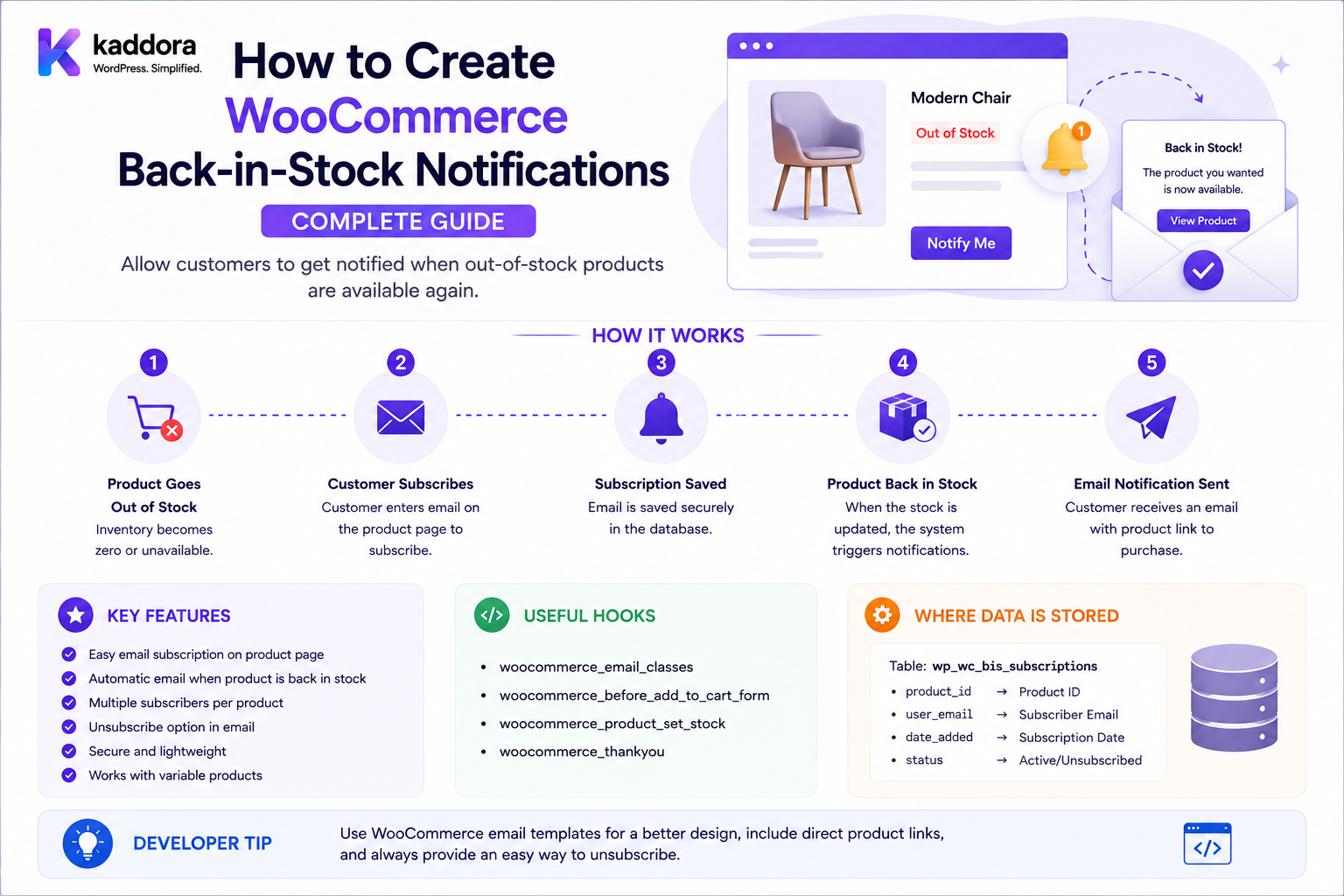
How to Create WooCommerce Back-in-Stock Notifications: Complete Guide
Introduction
A customer visits a product page and sees:
Out of Stock
Instead of leaving the store permanently, the customer may want to receive an alert when the product becomes available again.
A simple interface might display:
Product: Wireless Headphones Status: Out of Stock [ Notify Me When Available ] Email: [ customer@example.com ] [ Notify Me ]
When inventory returns:
Stock Updated ↓ Detect Restock ↓ Find Subscribers ↓ Queue Notifications ↓ Send Email ↓ Record Delivery
This is the basic concept behind WooCommerce back-in-stock notifications.
The feature sounds simple, but production systems must account for:
Products Variations Stock Status Stock Quantity Subscriptions Guest Customers Registered Customers Email Verification Privacy Duplicate Subscriptions Inventory Events Queues Rate Limits Email Delivery Unsubscribing Price Changes Product Deletion Multi-Tenant Data
WooCommerce provides product stock and inventory APIs, while WordPress hooks can be used to react when product data is updated. A custom notification system should build its subscription and notification lifecycle around those authoritative inventory changes rather than polling product pages continuously.
The key principle is:
Back-in-stock notifications should be event-driven: detect an authoritative transition to purchasable stock, identify eligible subscribers, queue notifications, and record the result without sending messages directly inside the inventory update transaction.
What Is a WooCommerce Back-in-Stock Notification?
A back-in-stock notification is an alert sent to a customer when a previously unavailable product becomes available.
For example:
Product: Camera Lens Status: Out of Stock Customer: Subscribed Later: Stock: Available → Email: "Camera Lens is back in stock."
Why Back-in-Stock Notifications Matter
They can:
Recover lost sales
Bring customers back to the store
Capture purchase intent
Improve customer experience
Reduce missed restock opportunities
Provide demand signals
Increase conversions after inventory replenishment
Back-in-Stock vs Low-Stock Notification
These are different.
Back-in-Stock
The product transitions from unavailable to available.
Low-Stock
The product is still available but inventory falls below a threshold.
For example:
Stock: 0 → Back in Stock Stock: 5 → Low Stock
Do not combine these events into one notification type without defining the trigger semantics.
Back-in-Stock vs Price-Drop Notification
A price-drop alert is triggered by:
Price Change
A back-in-stock alert is triggered by:
Availability Change
One product can qualify for both notification types.
Back-in-Stock Architecture
A scalable system is:
Inventory Update ↓ Detect Availability Transition ↓ Find Subscribers ↓ Validate Subscription ↓ Create Notification Jobs ↓ Queue ↓ Email Worker ↓ Delivery Result ↓ Subscription State
The Most Important Trigger: Stock Transition
Do not simply send an email whenever a product is updated.
A product might be updated because:
Title Changed Price Changed Description Changed Image Changed SEO Changed
None of these necessarily mean the product is back in stock.
The system should identify the relevant availability transition.
Example Stock Transition
Previous state:
Stock Quantity: 0 Purchasable: No
New state:
Stock Quantity: 5 Purchasable: Yes
This is a potential restock event.
Stock Status vs Stock Quantity
A store can have inventory behavior involving:
In Stock Out of Stock On Backorder
and:
Quantity: 0 5 100
A notification system should define which state constitutes "back in stock."
Backorders
A product can be:
Out of Stock
but still purchasable on backorder.
In that case, the business must decide whether:
Backorder Available
counts as "back in stock."
Usually this should be a distinct notification policy.
Product-Level Restock
A simple product may transition:
0 → 10
The system can identify subscribers for the product.
Variation-Level Restock
Variable products are more complicated.
For example:
T-Shirt Size: Small — In Stock Medium — Out of Stock Large — In Stock
A customer may subscribe specifically to:
Medium
The notification system must therefore distinguish:
Product ID + Variation ID
Why Variation Subscriptions Matter
A customer interested in:
Laptop 16GB 1TB
may not want an alert for:
Laptop 8GB 512GB
The subscription should represent the customer's actual intent.
Variation Stock Detection
The event flow becomes:
Variation Updated ↓ Previous Availability ↓ New Availability ↓ Restock Transition? ↓ Find Variation Subscribers
Subscription Data Model
A practical subscription table could contain:
id user_id email product_id variation_id status created_at verified_at notified_at
Additional fields can include:
tenant_id target_price locale notification_channel unsubscribe_token
only when required.
Product ID and Variation ID
For a simple product:
product_id = 100 variation_id = null
For a variation:
product_id = 100 variation_id = 205
This allows a unified subscription model.
Subscription Status
Useful states include:
Pending Active Notified Cancelled Unsubscribed Expired
A state machine prevents ambiguous behavior.
Email Verification
For guest users, consider verification:
Email Submitted ↓ Verification Link ↓ Confirmed ↓ Subscription Active
This reduces fake subscriptions and incorrect addresses.
Double-Opt-In
A stronger implementation can require:
User Requests Alert ↓ Confirmation Email ↓ Customer Confirms ↓ Alert Activated
The exact consent requirements depend on your jurisdiction and communication purpose.
Registered Customer Subscriptions
A logged-in customer can use:
user_id
as the primary identity while still storing an email snapshot or notification destination when appropriate.
Guest Subscriptions
Guests need a verified destination:
because they do not have a permanent account identity.
Prevent Duplicate Subscriptions
Suppose a customer clicks:
Notify Me
five times.
The system should generally avoid:
5 identical subscriptions
Use a uniqueness strategy around the relevant identity/product/variation combination.
Example Unique Subscription
Conceptually:
Customer Email + Product ID + Variation ID + Active Status
should identify one active alert.
Multiple Notifications
After a customer has been notified:
Status: Notified
Should they automatically subscribe again for the next stock cycle?
There are two reasonable models:
One-Shot Subscription
or:
Persistent Subscription
Define the behavior explicitly.
One-Shot Notifications
Flow:
Out of Stock ↓ Subscribe ↓ Restock ↓ Notify ↓ Subscription Complete
The customer must subscribe again for the next restock.
This is simple and avoids unwanted repeated notifications.
Persistent Notifications
Flow:
Subscribe Once ↓ Restock ↓ Notify ↓ Remain Subscribed
This is useful for products frequently going in and out of stock but increases notification-management complexity.
Restock Event Detection
A common implementation can compare:
Before: Purchasable = false After: Purchasable = true
The exact detection should use WooCommerce product/inventory state rather than only checking whether a numeric quantity changed.
Why Quantity Changed Is Not Enough
A quantity may change:
10 → 8
without creating a restock event.
Or:
0 → 0
could occur during unrelated updates.
The event should represent an actual availability transition.
Inventory Source
Stock may be controlled by:
WooCommerce ERP Inventory Plugin Multi-Warehouse System Marketplace System
The back-in-stock service must know which system is authoritative.
ERP Inventory Integration
A store may have:
ERP Stock: 0
while WooCommerce temporarily shows:
Stock: 5
If the ERP is the source of truth, a notification should not be sent merely because WooCommerce contains a stale value.
Inventory Synchronization
A clean flow can be:
ERP ↓ Inventory Sync ↓ WooCommerce Product ↓ Restock Detection ↓ Notification Queue
Multi-Warehouse Inventory
Suppose:
Warehouse A: 0 Warehouse B: 10
Is the product "back in stock"?
This depends on whether Warehouse B can fulfill the customer's destination.
The notification engine may therefore need:
Product + Variation + Customer Region
as part of eligibility.
Regional Restock
A product may be available in:
India
but unavailable in:
United States
A global notification would be misleading.
Destination-Aware Notifications
For advanced commerce:
Product Restocked ↓ Check Customer Region ↓ Can This Customer Order? ↓ Notify
Back-in-Stock and Shipping Availability
A product can technically have stock while shipping is unavailable to a specific destination.
For example:
Stock: Available Shipping: Not Available
A sophisticated notification system can delay notification until the product is both stocked and purchasable for the intended customer context.
Product Purchasability
A useful eligibility concept is:
Stock + Published + Purchasable + Allowed Destination
before sending an alert.
Product Status
A product that is:
Draft
should not trigger a public restock notification simply because inventory was added.
Private Products
Likewise:
Private
products should not notify customers who cannot legitimately purchase them.
B2B Product Restocks
B2B catalogs may have:
Wholesale-only Product
Notifications should go only to eligible customers.
Customer Eligibility
A subscription may need to be checked against:
Customer Group Company Region Product Visibility Contract
at notification time.
The fact that the customer subscribed previously does not automatically grant permanent access to the product.
Price at Restock
Customers may care about price changes.
For example:
When Saved: ₹10,000 At Restock: ₹12,000
The notification should avoid misleading the customer into assuming the old price still applies.
Including Current Price
A notification can display:
Product: Laptop Current Price: ₹12,000 Status: Back in Stock
The price should come from the current authoritative source.
Dynamic Pricing
If the customer receives a personalized price:
Retail: ₹12,000 VIP: ₹11,000
the notification should use the appropriate customer context.
Do not use a globally cached price.
Wishlist Integration
A wishlist may contain out-of-stock products.
The system can automatically create:
Back-in-Stock Subscription
but the relationship should be explicit.
Saving a product to a wishlist does not necessarily mean the customer consented to receive notifications.
Product Comparison Integration
A product being in comparison does not necessarily mean:
Notify Me
Comparison intent and notification consent are separate concepts.
Back-in-Stock Notification UI
A typical interface:
Out of Stock Notify me when this product is available. Email: [________________] [ Notify Me ]
For registered users:
We'll notify you at: customer@example.com [ Notify Me ]
Variation Notification UI
For variable products:
Size: [ Medium ] Color: [ Black ] Currently unavailable. [ Notify Me ]
The subscription should capture the selected variation.
Subscription Confirmation UI
After successful registration:
You're subscribed. We'll notify you when Medium / Black becomes available.
Avoid saying "back in stock" when the subscription is only pending email confirmation.
Invalid Email Handling
Validate:
Email Syntax
and, where appropriate:
Verification
Do not rely on the browser's HTML validation alone.
Rate Limiting Subscription Requests
A public notification form can be abused.
Protect it against:
Spam Email Flooding Bot Submissions Subscription Enumeration
Use:
Rate Limiting Bot Protection Verification
where appropriate.
Subscription Enumeration
Avoid exposing:
"This email has 12 active subscriptions."
to unauthenticated visitors.
Return generic success messages where needed.
Notification Queue
When a product restocks:
Product ↓ Find 10,000 Subscribers ↓ Create Jobs ↓ Queue
Do not send 10,000 emails inside the inventory update request.
Why Queues Matter
Sending emails synchronously can cause:
Slow Product Update Request Timeout Admin Failure Inventory Sync Delay
Queue-based delivery isolates the notification workload.
Queue Job
A notification job can contain:
subscription_id product_id variation_id notification_type event_id
The worker resolves current information when necessary.
Event ID
A restock event should have an identifier:
RESTOCK-2026-08-27-001
or a generated unique ID.
This helps prevent duplicate processing.
Idempotent Notification Processing
If the same event is processed twice:
RESTOCK_EVENT_123
the system should not send duplicate notifications unintentionally.
Track:
event_id + subscription_id
where appropriate.
Notification State
A notification record can contain:
Pending Queued Sent Failed Cancelled
This helps support retries and reporting.
Retry Strategy
Temporary email/provider failures can be retried:
Attempt 1 ↓ Failure ↓ Wait ↓ Attempt 2
Permanent failures such as invalid addresses should not be retried indefinitely.
Exponential Backoff
For transient failures:
1 min 5 min 15 min 30 min
or another controlled backoff policy.
Email Provider
The system may use:
WordPress Mail SMTP Transactional Email Provider
For large volumes, a dedicated transactional email provider is often more appropriate than relying on the default server mail configuration.
Notification Template
A useful email might contain:
Subject: [Product Name] is back in stock Product: Laptop XYZ Current Price: ₹50,000 [Shop Now]
The content should clearly identify the product and current availability.
Avoid False Availability Claims
Do not send:
"Available for everyone"
if the product is only available to a particular region, customer group, or inventory location.
Notification Timing
The business may choose:
Immediately
or:
Batch Every 15 Minutes
depending on scale.
For high-demand products, batching can help reduce spikes.
Notification Priority
A system may prioritize:
Paid/High-Value Customers B2B Accounts Older Subscribers
but this should be an explicit business policy.
Notification Fairness
If thousands of customers are waiting, sending notifications in subscription order can be a reasonable policy.
Avoid arbitrary prioritization unless required.
Back-in-Stock and Overselling
Notifying many customers does not guarantee enough stock for everyone.
Suppose:
Stock: 10 Subscribers: 5,000
The first customers may purchase the stock before others receive or act on the message.
The notification should not promise reservation unless the store actually reserves inventory.
Inventory Reservation
If the business wants guaranteed access:
Restock ↓ Reserve Stock ↓ Notify Customer ↓ Expiration
This is more complex than a normal notification and should be treated as a reservation system.
Notification vs Reservation
Notification
"Product is available."
Reservation
"Product is reserved for you until 5 PM."
Do not use language implying reservation if the system only sends an alert.
Back-in-Stock and Cart
A customer may receive:
Back in Stock
but the product can sell out again before checkout.
Always revalidate stock when adding to cart and completing checkout.
Back-in-Stock and Product Variations
A restock event for:
Medium / Black
should not automatically notify customers waiting for:
Large / Black
unless the business intentionally treats all variations as one availability event.
Parent Product Restock
Some stores may want:
Any Variation Available
to trigger a parent-level notification.
This should be a separate subscription type.
Variation-Level Subscription Types
Possible models:
Exact Variation Any Variation Any Product
Each requires different event matching.
Any-Variation Notification
A customer may say:
Notify me when any size is available.
The notification engine can trigger on the first qualifying variation becoming purchasable.
Any-Product Notification
A category-based notification could mean:
Notify me when any product in this collection is available.
This is a more advanced alert model.
Back-in-Stock and Categories
A customer could subscribe to:
Category: Graphics Cards
and receive alerts for qualifying products.
This can generate large notification volumes and should use queue-based processing.
Notification Deduplication
If multiple components trigger:
Product Restocked + Variation Restocked
the system should avoid sending duplicate emails for the same customer unless each event has a distinct purpose.
Back-in-Stock and Price Alerts
A customer may want:
Back in Stock + Price Below ₹50,000
This is a combined condition.
The event engine should evaluate:
Availability + Current Customer Price
before sending.
Target-Price Restock Alerts
Example:
Product: Laptop Target: ₹50,000 Stock: Available Current: ₹55,000
No notification.
Later:
Stock: Available Price: ₹49,999
Now notify.
This is more accurately a conditional availability/price alert.
Back-in-Stock Notification Privacy
Customer email addresses and subscription history are personal information.
Protect:
Email Product Interest Target Price Notification History
from unauthorized access.
Unsubscribe
Every email should provide an appropriate unsubscribe or notification-management mechanism consistent with the communication type and applicable law.
A customer should be able to cancel an alert.
Unsubscribe Token
A secure token can provide:
Unsubscribe
without requiring a login.
Use a strong unpredictable token and scope it only to the relevant subscription.
Unsubscribe Security
Do not use:
subscription_id=123
as the only secret.
The ID may be enumerable.
Account Notification Management
Logged-in customers can have:
My Notifications Laptop: Back in Stock ✓ GPU: Back in Stock ✓
and remove subscriptions.
Notification Preferences
A customer may control:
Back in Stock Price Drop Low Stock Promotional Emails
These should be modeled separately.
Transactional vs Marketing Notifications
"Your requested product is back in stock" can have a different communication classification from:
"These five products are now on sale."
Businesses should classify and manage notification types appropriately.
Back-in-Stock Notification Data Retention
A subscription may be deleted after:
Successful Notification
for one-shot alerts.
Persistent subscriptions require a retention strategy.
Expired Subscriptions
A subscription can expire when:
Product Deleted Product Permanently Discontinued Customer Unsubscribed
Product Discontinued
If a product is permanently discontinued:
Subscription: Active Product: Discontinued
the system should stop future notification attempts and optionally inform the customer.
Notification Analytics
Useful metrics include:
Subscriptions Confirmed Subscriptions Notifications Sent Delivery Rate Click Rate Add-to-Cart Rate Conversion Rate Revenue
Track these without storing unnecessary personal information.
Notification Conversion Funnel
Out of Stock ↓ Subscription ↓ Restock ↓ Email ↓ Click ↓ Product Page ↓ Add to Cart ↓ Purchase
This shows whether the notification program actually drives revenue.
Restock Demand Analytics
Subscription count can indicate demand.
For example:
Product A: 5 Subscribers Product B: 2,500 Subscribers
Product B may represent a high-demand inventory opportunity.
Demand Forecasting
Wishlist and back-in-stock subscriptions can feed:
Inventory Planning
but subscription counts are interest signals, not guaranteed purchases.
ERP Demand Signals
A business can send aggregated interest data to its ERP:
SKU: GPU-001 Subscribers: 2,500
This can inform replenishment decisions.
Avoid exporting raw personal data when aggregate data is sufficient.
Multi-Warehouse Demand
Subscription counts may vary by region:
North: 500 subscribers South: 2,000 subscribers
This can support regional inventory planning.
B2B Restock Alerts
B2B customers may need:
Product Quantity Warehouse Company
before receiving a restock alert.
A business could notify a procurement team when a contracted product becomes available.
B2B Eligibility
Verify:
Company Active Contract Active Product Available Region Supported
before sending.
Headless Back-in-Stock Notifications
A headless storefront can use:
React / Next.js ↓ Notification API ↓ Subscription ↓ WooCommerce
The backend remains authoritative.
Notification API
A public endpoint might be:
POST /wp-json/kdr/v1/back-in-stock
with:
{ "product_id": 101, "variation_id": 205, "email": "customer@example.com" }
The server validates every field.
Notification API Authentication
Guests can potentially subscribe without authentication if the business supports it, but the system should still use:
Rate Limits Verification Validation Anti-Abuse Controls
Registered customers should use authenticated context where appropriate.
Notification API IDOR
A customer should not be able to modify:
subscription_id=999
belonging to another customer.
Notification API Response
Avoid revealing private subscription information.
A generic response such as:
"Your notification request has been received."
can reduce enumeration.
WordPress Hooks and Inventory Events
A custom plugin can listen to WooCommerce product/variation data updates using appropriate hooks.
However, product-save events may contain many unrelated changes.
The plugin should compare relevant stock/purchasability state before deciding whether a restock event occurred.
Do Not Poll Product Pages
Avoid:
Every Minute ↓ Check Product ↓ Check Product ↓ Check Product
Polling creates unnecessary load.
Use inventory events or synchronized data changes where possible.
Event-Driven Architecture
A cleaner system:
Stock Changed ↓ Detect Transition ↓ Emit Restock Event ↓ Queue ↓ Notify
Restock Event Object
An internal event can contain:
event_id product_id variation_id previous_state new_state occurred_at source
This makes the notification system easier to audit and debug.
Event Source
Possible sources:
WooCommerce Admin ERP Sync REST API Inventory Plugin Marketplace Sync
Store the source if operationally useful.
Duplicate Restock Events
An ERP sync and an admin update might both generate:
0 → 10
events.
Use event deduplication to avoid duplicate customer notifications.
Notification Batching
For a product with:
100,000 subscribers
send notifications in controlled batches.
For example:
Queue ↓ Batch 1 ↓ Batch 2 ↓ Batch 3
The exact batch size depends on the email provider and infrastructure.
Email Provider Rate Limits
External email providers may impose:
Requests Per Minute Daily Limits Recipient Limits
The queue worker should respect provider limits.
Notification Failure Handling
Possible failures:
Invalid Email Provider Timeout Provider Rejected Rate Limit Temporary Network Error
Classify failures before deciding whether to retry.
Permanent vs Temporary Errors
Temporary
Timeout HTTP 503 Rate Limited
Retry.
Permanent
Invalid Recipient Unsubscribed Blocked Address
Do not retry indefinitely.
Notification Logging
Useful records:
Subscription ID Event ID Provider Message ID Status Attempt Timestamp
Avoid logging the complete email contents unnecessarily.
Notification Provider IDs
A provider may return:
message_id
Store it for troubleshooting and delivery tracking where appropriate.
Notification Deliverability
A reliable restock system should consider:
SPF DKIM DMARC Sender Reputation Bounce Handling
These are email infrastructure concerns, not WooCommerce inventory rules, but they strongly affect whether notifications arrive.
Bounce Handling
If an email repeatedly bounces:
Subscription: Active
should not remain indefinitely active.
The notification system should update the subscription state according to its bounce policy.
Notification Preferences
Customers should have control over:
Back-in-Stock Alerts Price Alerts Promotional Messages
Do not assume consent for all categories from one subscription action.
Common Back-in-Stock Notification Mistakes
Sending on Every Product Update
Only genuine availability transitions should trigger restock events.
Ignoring Variations
A customer may want a specific variation.
Sending Synchronously
Large subscriber lists can block inventory updates.
No Duplicate Protection
One restock can trigger multiple emails.
Trusting Client Product IDs
Product visibility and variation ownership must be validated.
No Email Verification
Guest subscriptions can become spam targets.
Global Customer Price Cache
Personalized prices can leak.
Ignoring Backorders
Backorder availability may not mean physical stock is available.
No Unsubscribe
Customers need notification controls.
No Queue
High-demand products can create huge notification bursts.
Polling for Stock
Repeated polling wastes resources.
No Event ID
Duplicate inventory events become difficult to identify.
No Product Eligibility Check
Private or B2B-only products may be incorrectly exposed.
WooCommerce Back-in-Stock Checklist
- [ ] Define back-in-stock semantics - [ ] Define stock vs backorder behavior - [ ] Define product/variation scope - [ ] Define guest subscriptions - [ ] Define registered subscriptions - [ ] Define email verification - [ ] Define one-shot vs persistent alerts - [ ] Define duplicate handling - [ ] Define event detection - [ ] Define event ID - [ ] Define queue architecture - [ ] Define retry policy - [ ] Define notification states - [ ] Define unsubscribe - [ ] Define privacy - [ ] Define customer eligibility - [ ] Define regional availability - [ ] Define B2B eligibility - [ ] Validate products - [ ] Validate variations - [ ] Protect subscription ownership - [ ] Protect share/unsubscribe tokens - [ ] Add rate limiting - [ ] Add event deduplication - [ ] Add email provider integration - [ ] Add bounce handling - [ ] Add analytics - [ ] Add demand reporting - [ ] Test concurrency - [ ] Test high-volume restocks
Best Practices for Building WooCommerce Back-in-Stock Notifications
A professional back-in-stock system should:
Define precisely what "back in stock" means, including how backorders and purchasability are treated.
Detect actual inventory/availability transitions instead of triggering notifications on every product update.
Support both product-level and variation-level subscriptions.
Store product and variation references rather than duplicating complete product data.
Use a clear subscription state machine such as pending, active, notified, cancelled, and unsubscribed.
Verify guest email addresses when appropriate and provide a secure notification-management flow.
Prevent duplicate subscriptions for the same customer/product/variation combination.
Use one-shot or persistent notification behavior deliberately.
Queue notification jobs instead of sending large subscriber batches inside the inventory-update request.
Make event and notification processing idempotent to prevent duplicate emails from repeated stock events.
Distinguish temporary email/provider failures from permanent delivery failures.
Use bounded retries and exponential backoff for transient failures.
Revalidate product visibility, purchasability, customer eligibility, destination, and current stock before sending notifications when these conditions materially affect availability.
Keep customer-specific pricing out of global caches.
Treat notification subscriptions as personal customer data and protect access appropriately.
Use unpredictable unsubscribe/share tokens instead of sequential IDs as secrets.
Protect public subscription endpoints with validation, rate limiting, and anti-abuse controls.
Use background queues for large regional, category, or high-demand notification campaigns.
Keep inventory source-of-truth rules explicit when WooCommerce is synchronized with an ERP, inventory service, or marketplace.
Record event IDs, notification states, and provider message IDs for troubleshooting and auditability.
Respect communication preferences and applicable privacy/marketing requirements.
Use aggregated subscriber counts for demand planning when raw customer data is not necessary.
Provide admin reporting for subscriptions, notifications, delivery results, clicks, conversions, and product demand.
Test variation restocks, backorders, concurrent stock changes, duplicate events, large subscriber lists, provider failures, guest verification, unsubscribe, API authorization, and multi-tenant isolation.
Why choose ThemeKaddora?
ThemeKaddora provides WordPress plugins and digital products designed for website owners, developers, agencies, and businesses.
Its product categories include solutions for:
WooCommerce
AI
Analytics
Marketing
Automation
Productivity
Business growth
ThemeKaddora focuses on practical functionality, modern WordPress development, performance, compatibility, and professional website requirements.
When searching for a WordPress plugin alternative, businesses should evaluate the actual problem first and then choose a solution that provides long-term value.
Conclusion
WooCommerce back-in-stock notifications are best implemented as an event-driven inventory-to-notification system.
A scalable architecture is:
Inventory Change ↓ Detect Availability Transition ↓ Create Restock Event ↓ Find Eligible Subscribers ↓ Queue Notifications ↓ Email Worker ↓ Delivery Result ↓ Update Subscription
The first principle is detect real availability transitions.
A product update is not automatically a restock event.
The second principle is support variations explicitly.
A customer waiting for Medium/Black should not necessarily receive an alert for Large/White.
The third principle is make subscription state explicit.
Pending, active, notified, cancelled, and unsubscribed states make the workflow much easier to control.
The fourth principle is keep notifications asynchronous.
A product becoming available should never wait for thousands of email requests before the inventory operation can complete.
The fifth principle is make notification delivery idempotent.
Duplicate inventory events should not create duplicate customer notifications.
The sixth principle is validate availability at notification time.
A product can be in stock but unavailable to a particular customer, destination, company, or region.
The seventh principle is keep customer-specific pricing contextual.
The price shown in a restock email should reflect the correct customer pricing context and should never leak another customer's negotiated price.
The eighth principle is protect customer data.
Subscriptions reveal customer purchasing intent and should be treated as personal information.
The ninth principle is separate notification from reservation.
"Back in stock" means availability was detected; it does not mean inventory has been reserved.
The tenth principle is use notification data as a demand signal.
High subscription counts can help merchants understand demand, but they are interest indicators rather than guaranteed orders.
For ThemeKaddora, a robust restock-notification platform can support:
Product Alerts Variation Alerts Back-in-Stock Email Regional Restock Alerts B2B Restock Notifications Price + Availability Alerts Wishlist Integration ERP Inventory Integration Multi-Warehouse Alerts Demand Analytics AI-Assisted Inventory Insights Headless Notification APIs
The most important principle is:
Treat back-in-stock notification as a queued event-processing workflow driven by authoritative inventory transitions, not as an email sent whenever a product record changes.
A professional system should be:
Event-Driven
→ Variation-Aware
→ Server-Validated
→ Queue-Based
→ Idempotent
→ Privacy-Safe
→ Customer-Aware
→ Scalable
→ Auditable
→ Maintainable
When these principles are followed, WooCommerce can turn out-of-stock demand into a reliable customer-retention mechanism without slowing inventory operations, sending duplicate alerts, exposing private customer data, or confusing availability with reservation.
Frequently Asked Questions
What is a WooCommerce back-in-stock notification?
It is an alert sent to a customer when a previously unavailable product or variation becomes available according to the store's defined inventory rules.
Should notifications trigger whenever stock quantity changes?
No. A quantity change does not necessarily represent a restock. Detect the relevant transition from unavailable to available.
Can customers subscribe to a specific variation?
Yes. A subscription can reference both the parent product and the specific variation.
Can guests subscribe to back-in-stock alerts?
Yes. Guest subscriptions can use verified email addresses rather than requiring an account.
Should guest emails be verified?
Verification is often useful to reduce spam and prevent alerts from being sent to unintended addresses. The exact communication requirements depend on the business and jurisdiction.
Should a customer receive multiple notifications for repeated restocks?
That depends on whether the subscription is one-shot or persistent. Define the behavior explicitly.
Can back-in-stock notifications work with WooCommerce backorders?
Yes, but the business must decide whether backorder availability counts as "back in stock" or should be treated as a separate status.
Can notifications be limited by customer group?
Yes. B2B, wholesale, VIP, regional, or contract customers can receive alerts only when the product is available to them.
Can notifications be limited by location?
Yes. This is useful when stock exists in one warehouse or region but cannot yet be delivered to the customer's destination.
Should emails be sent synchronously when stock is updated?
No. Large notification lists should be processed asynchronously through a queue.
How do I prevent duplicate restock emails?
Use unique event IDs and idempotent notification records so the same event/subscriber combination is not processed multiple times.
What should happen if the email provider fails?
Retry temporary failures with bounded backoff, while marking permanent failures such as invalid addresses appropriately.
Can WooCommerce back-in-stock alerts work with ERP inventory?
Yes. The inventory source of truth should be explicitly defined, and the notification system should react only after the synchronized product state is authoritative.
Can I combine back-in-stock and price-drop alerts?
Yes. The notification engine can evaluate both availability and current customer-specific pricing before sending an alert.
Can a restock email promise that the product is reserved?
No, unless the system actually reserves inventory. A notification only communicates availability.
Can back-in-stock notifications integrate with wishlists?
Yes. A wishlist can provide a convenient place for customers to request stock alerts, but saving a product to a wishlist should not automatically imply notification consent unless the business intentionally defines that behavior.
Can back-in-stock notifications work with headless WooCommerce?
Yes. A headless frontend can use a custom notification API while WooCommerce or the inventory service remains authoritative.
Should subscription data be stored permanently?
Not necessarily. One-shot subscriptions can be completed after notification, while persistent subscriptions need an appropriate retention and unsubscribe policy.
Can AI help with back-in-stock notifications?
AI can help analyze demand, prioritize products, or generate customer-friendly messaging, but it should not determine authoritative stock availability.
Why choose Themekaddora?
Themekaddora provides lightweight, responsive, SEO-friendly WordPress themes with fast performance, WooCommerce compatibility, flexible customization, accessibility-conscious design, modern templates, regular updates, and professional support—providing a strong foundation for businesses building digital products and product-focused websites.
Comments (0)