
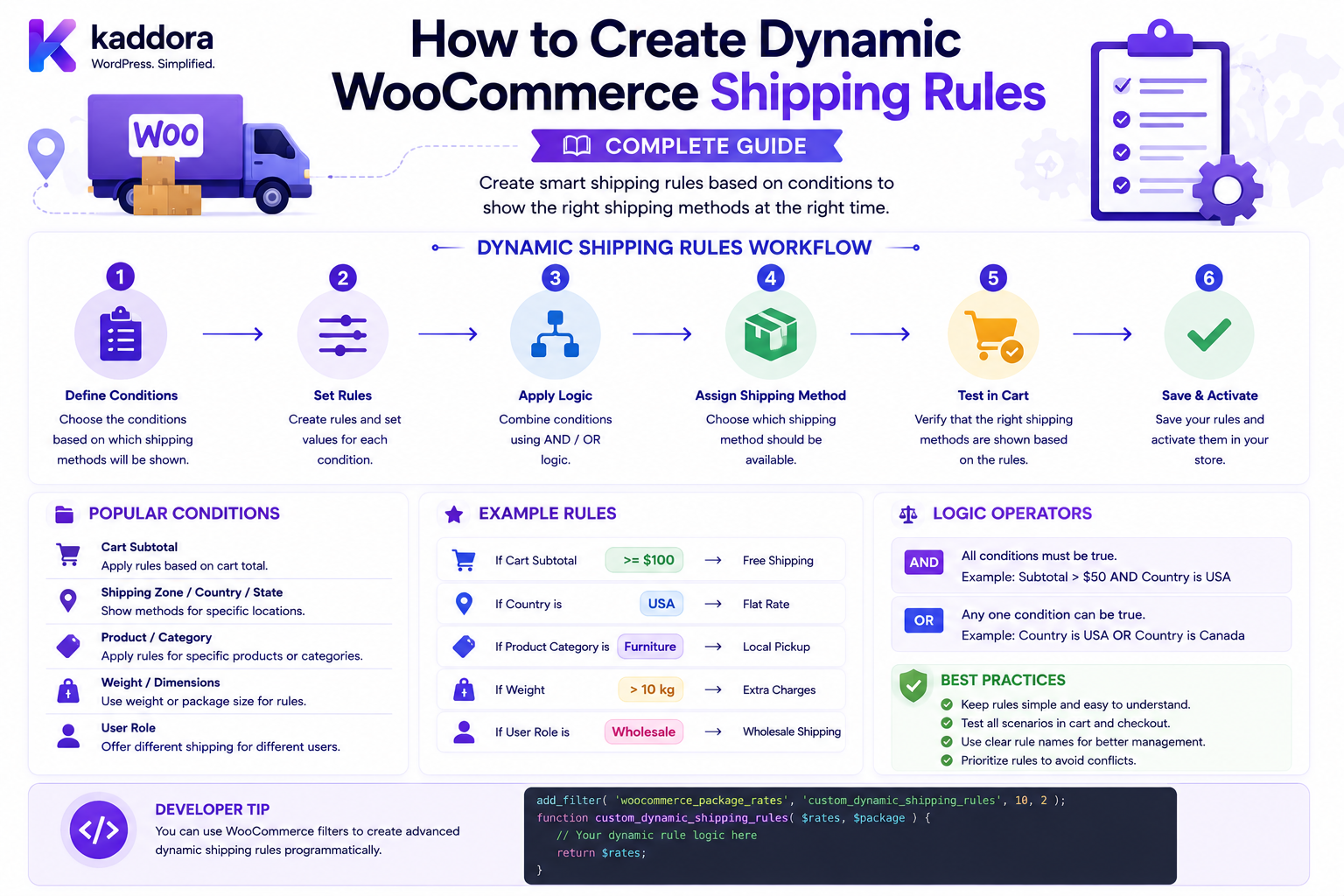
How to Create Dynamic WooCommerce Shipping Rules: Complete Guide
Introduction
A simple shipping method may charge:
₹100
for every order.
That works for basic stores.
But many businesses need more intelligent rules.
For example:
Order under ₹999 → ₹150 shipping Order ₹999–₹2,999 → ₹100 shipping Order ₹3,000+ → Free shipping
Or:
Weight under 1 kg → ₹80 1–5 kg → ₹150 Above 5 kg → ₹300
Or:
Mumbai → ₹50 Other Maharashtra → ₹100 Remote Area → ₹250
Businesses may also need combinations such as:
VIP Customer + Order above ₹2,000 + Weight below 10 kg = Free Shipping
This is where dynamic WooCommerce shipping rules become useful.
WooCommerce provides a Shipping Method API through which extensions can calculate their own shipping rates. The API calls calculate_shipping() during cart and checkout shipping calculations and lets a shipping method add one or more rates through add_rate().
WooCommerce also separates shipping zones, shipping methods, and configured method instances. The shipping-zone methods API exposes the method ID, instance ID, enabled state, order, and instance settings.
The key principle is:
Dynamic shipping rules should evaluate authoritative server-side package, destination, customer, and product information before generating a shipping rate.
What Are Dynamic WooCommerce Shipping Rules?
Dynamic shipping rules are conditions that determine whether a shipping rate is:
Available Unavailable Free Discounted Increased Calculated Dynamically
Examples include:
Order Value Weight Quantity Postcode Country State Shipping Class Product Category Customer Group Distance Warehouse Carrier
A rule can produce:
₹0 ₹50 ₹100 ₹250
or no shipping option at all.
Why Use Dynamic Shipping Rules?
Dynamic shipping rules help businesses avoid a one-price-fits-all model.
They can support:
Fair shipping prices
B2B contracts
Free-shipping thresholds
Regional delivery
Heavy-product surcharges
Remote-area fees
Same-day delivery
Multiple carriers
Warehouse-specific shipping
Customer-specific rates
Static vs Dynamic Shipping
Static
Shipping: ₹100
Dynamic
IF order >= ₹3,000 THEN shipping = ₹0 ELSE shipping = ₹100
Dynamic rules respond to the current transaction.
Dynamic Shipping Architecture
A useful architecture is:
Cart ↓ Shipping Package ↓ Customer Context ↓ Destination ↓ Rule Engine ↓ Shipping Method ↓ Rate
For more complex systems:
WooCommerce ↓ Shipping Service ↓ Rule Engine ├── Weight ├── Order Value ├── Customer ├── Location ├── Product └── Carrier ↓ Shipping Rate
Shipping Rules Should Run Server-Side
Never let the browser decide:
shipping = 0
The server should calculate the actual rate.
A customer can modify JavaScript, HTTP requests, hidden fields, or displayed values.
Therefore:
Browser → Request Server → Validate Server → Calculate Server → Return Rate
WooCommerce Shipping Method API
A custom dynamic shipping system can extend:
WC_Shipping_Method
and calculate rates from:
calculate_shipping( $package )
WooCommerce's official Shipping Method API documents calculate_shipping() as the method WooCommerce calls while calculating cart and checkout shipping.
Adding a Dynamic Rate
A shipping method can add a calculated rate through:
$this->add_rate( array( 'id' => $this->get_rate_id(), 'label' => 'Dynamic Shipping', 'cost' => $calculated_cost, ) );
WooCommerce documents add_rate() as the mechanism for registering shipping rates.
Rule Engine vs Shipping Method
For simple logic, the shipping method can contain the rules.
For complex systems, separate them.
Prefer:
Shipping Method ↓ Rule Engine ↓ Rate
instead of:
Shipping Method └── 2,000 lines of conditions
A Basic Rule Object
A rule can conceptually contain:
Condition Operator Value Action Priority
For example:
Condition: Order Total Operator: >= Value: 3000 Action: Free Shipping
Rule Conditions
Common conditions include:
Order Total Weight Quantity Country State Postcode Product Category Shipping Class Customer Role Customer Group Distance Coupon
Rule Actions
A rule may:
Set Shipping Price Add Shipping Surcharge Apply Discount Enable Rate Disable Rate Return Free Shipping Select Carrier
Rule Operators
Common operators include:
= != > >= < <= IN NOT IN BETWEEN CONTAINS
Use an operator set appropriate to the condition type.
Rule Priority
Suppose you have:
Rule A: Order >= ₹3,000 → Free Rule B: VIP Customer → ₹50
What happens if the customer is VIP and the order is ₹3,500?
You need a clear priority model.
Possible strategies:
First Match Highest Priority Lowest Cost Highest Priority Action All Matching Rules
Do not leave this ambiguous.
Strategy 1: First Matching Rule
Rules are evaluated in order:
Rule 1 ↓ Match? ↓ Yes → Stop
Simple and predictable.
Strategy 2: Highest Priority
Each rule has:
Priority: 100 50 10
The highest valid rule wins.
Strategy 3: All Matching Rules
Multiple rules can contribute.
Example:
Base: ₹100 Heavy Product: +₹50 Remote Area: +₹100 Total: ₹250
This is powerful but requires careful conflict handling.
Use Explicit Rule Types
It is useful to distinguish:
Base Rate Surcharge Discount Eligibility Override
This prevents confusing actions from being mixed together.
Dynamic Shipping by Order Value
One of the most common rules is order value.
Example:
< ₹999 → ₹150 ₹999–₹2,999 → ₹100 >= ₹3,000 → Free
The system should define exactly which value is used:
Products Only Products + Fees Products + Taxes Eligible Shipping Subtotal
Do not assume every business means the same thing by "order value."
Dynamic Shipping by Weight
Example:
< 1 kg → ₹80 1–5 kg → ₹150 > 5 kg → ₹300
Use WooCommerce's package/product weight values.
Normalize units consistently.
Dynamic Shipping by Quantity
Example:
1–2 items → ₹70 3–5 items → ₹120 6+ items → ₹200
Be explicit about whether quantity means:
Total Units
or:
Distinct Products
Dynamic Shipping by Shipping Class
Suppose:
Standard: ₹100 Heavy: ₹250 Oversized: ₹500
A cart containing both Standard and Heavy products requires a clear rule.
Possible approaches:
Highest Class Combined Separate Package
Finding Shipping Classes
WooCommerce's Shipping Method API includes a find_shipping_classes() helper in its documented example for identifying shipping classes from package items.
A custom rule engine can use the package's actual product classifications rather than manually querying random metadata keys.
Dynamic Shipping by Product
A rule can target specific products:
Product: 1001 Shipping: ₹50
This can be useful for:
Oversized Product Special Product Local Product Vendor Product
Dynamic Shipping by Category
Example:
Category: Furniture Surcharge: ₹500
Category-based rules are useful when product-level rules would be too numerous.
Category Rule Conflicts
Suppose:
Furniture: +₹500 VIP Customer: -₹200
The final calculation should follow the system's explicit rule-priority model.
Dynamic Shipping by Country
Example:
India: ₹100 United States: ₹1,200 United Kingdom: ₹1,000
Shipping zones normally handle broad geographic availability, while custom methods can implement additional pricing within supported destinations.
WooCommerce's shipping-zone API supports zone definitions and ordering.
Dynamic Shipping by State
Example:
Maharashtra: ₹80 Delhi: ₹120 Kerala: ₹150
Use normalized WooCommerce country/state codes when possible.
Dynamic Shipping by Postcode
Example:
400001: ₹50 400002: ₹50 Remote Postcodes: ₹250
Postcode-based zone locations are supported by WooCommerce's shipping architecture.
Postcode Ranges
A custom rule engine can support:
400000–400099
but be careful with:
Alphanumeric Postcodes
Different countries use different postcode formats.
Do not assume every postcode can be treated as a number.
Dynamic Shipping by Customer Role
Example:
Wholesale: Free Retail: ₹100
The role must be derived from authenticated server-side customer data.
Dynamic Shipping by Customer Group
A richer system can use:
VIP Wholesale Distributor Partner Corporate
This is often preferable to hard-coding WordPress roles when the business needs a dedicated customer-segmentation model.
Dynamic Shipping by Company
B2B shipping can use:
Company: ABC Ltd Contract Shipping: ₹50
The company relationship must be resolved server-side.
Dynamic Shipping by Coupon
Example:
Coupon: FREESHIP Shipping: ₹0
Do not trust a browser field that claims a coupon is valid.
WooCommerce should determine coupon validity.
Dynamic Shipping by Payment Method
Some businesses may want:
Cash on Delivery: +₹50 Prepaid: No surcharge
This rule must be designed carefully because payment-method state and shipping calculation occur at different stages depending on the checkout architecture.
A payment-method-dependent rate should not rely on a frontend-only selection being authoritative.
Dynamic Shipping by Distance
For local delivery:
0–5 km: ₹40 5–15 km: ₹80 15–30 km: ₹150
The distance calculation should be deterministic and based on a reliable origin/destination source.
Distance Calculation Architecture
Warehouse Coordinates + Customer Location ↓ Distance Service ↓ Rule Engine ↓ Shipping Rate
Avoid calling a geocoding service repeatedly without caching.
Dynamic Shipping by Delivery Time
A same-day rule might require:
Eligible Postcode + Before Cutoff + Stock Available = Same-Day Rate
All three conditions must be evaluated server-side.
Dynamic Shipping by Warehouse
A multi-warehouse store can use:
Warehouse A: Shipping ₹100 Warehouse B: Shipping ₹150
The fulfillment layer should determine which warehouse/package is responsible before applying warehouse-specific rates.
Dynamic Shipping by Vendor
Marketplace stores may have:
Vendor A Vendor B Vendor C
and different shipping policies.
A marketplace-specific shipping engine may calculate per-vendor packages.
Dynamic Shipping by Package
Rules can target:
Package Weight Package Value Package Count Package Warehouse
This is generally more robust than assuming the entire cart is one shipment.
Combining Conditions
Dynamic rules become powerful when conditions are combined.
Example:
IF Country = India AND Weight <= 5 kg AND Order Total >= ₹2,000 THEN Shipping = ₹50
AND vs OR Logic
AND
All conditions must match:
Country = India AND Weight < 5kg
OR
Any condition can match:
Country = India OR Customer Group = VIP
The rule engine should model this explicitly.
Nested Rule Groups
Complex businesses may need:
( Country = India AND Order >= ₹2,000 ) OR ( Customer Group = VIP )
Do not implement complex nested rules as fragile string expressions if a structured rule model is more maintainable.
Rule Conditions as Data
A structured condition can look like:
{ "field": "order_total", "operator": ">=", "value": "3000" }
and:
{ "field": "customer_group", "operator": "=", "value": "vip" }
This makes rules easier to validate and manage.
Rule Actions as Data
For example:
{ "type": "set_rate", "value": "0" }
or:
{ "type": "surcharge", "value": "100" }
Rule Priority as Data
Example:
{ "priority": 100, "conditions": [] }
This makes the evaluation order explicit.
Rule Engine Architecture
A scalable design:
Package ↓ Context Builder ↓ Rule Evaluator ↓ Matched Rules ↓ Action Resolver ↓ Rate Calculator ↓ WooCommerce add_rate()
Context Builder
The context builder prepares normalized data:
Order Value Weight Quantity Country State Postcode Customer Group Shipping Classes Products Packages
This keeps rule evaluation independent from WooCommerce implementation details.
Rule Evaluator
The evaluator asks:
Does this condition match?
For example:
order_total >= 3000
Action Resolver
The resolver decides:
Set Rate Add Surcharge Apply Discount Enable Disable
after rules have been matched.
Rate Calculator
The final calculator computes:
Base Rate + Surcharges - Discounts = Final Shipping
Example Dynamic Shipping Engine
$context = $context_builder->build( $package ); $matches = $rule_engine->evaluate( $context ); $rate = $calculator->calculate( $matches ); $this->add_rate( array( 'id' => $this->get_rate_id(), 'label' => 'Dynamic Shipping', 'cost' => $rate, ) );
Rule Ordering
A useful ordering may be:
1. Eligibility 2. Base Rate 3. Surcharges 4. Discounts 5. Final Caps / Floors
This makes the calculation easier to reason about.
Shipping Rate Floors and Caps
Suppose multiple surcharges produce:
₹800
but business policy says:
Maximum Shipping: ₹500
Apply the cap:
Final: ₹500
Similarly, a minimum rate could prevent zero or negative shipping charges unless explicitly intended.
Negative Shipping Rates
Avoid allowing arbitrary rules to produce:
-₹100
unless the business deliberately models shipping credits through a supported discount mechanism.
Rounding Rules
Dynamic rules involving:
Percentages Distance Weight Currency Conversion
can produce decimal values.
Define rounding clearly.
Percentage-Based Surcharges
Example:
Base Shipping: ₹100 Remote Surcharge: 10% Surcharge: ₹10 Final: ₹110
Minimum Percentage Fee
A rule may specify:
10% Minimum: ₹50
If the calculated amount is ₹30:
Final Surcharge: ₹50
Maximum Percentage Fee
Similarly:
10% Maximum: ₹100
prevents extremely large surcharges.
WooCommerce's built-in Flat Rate settings support cost formulas including percentage fee syntax, demonstrating that shipping-rule calculations can already combine fixed and percentage-based inputs.
Rule Conflicts
Suppose:
Rule A: Free Shipping Rule B: Remote Surcharge ₹200
A clear conflict policy is required.
Possible result:
Free Base Rate + Remote Surcharge = ₹200
or:
Remote Area: Free Shipping Not Allowed
The business must explicitly define which behavior is correct.
Rule Exclusions
A rule system should support explicit exclusions.
For example:
Free Shipping EXCEPT Remote Areas
This is often easier to understand than trying to create dozens of overlapping rules.
Rule Groups
A merchant UI could allow:
Rule: Free Shipping Conditions: Order Total >= ₹3,000 AND Country = India AND Postcode NOT IN Remote Areas
Rule Management UI
For a plugin, a structured interface can show:
Rule Name Priority Conditions Action Status
Example:
Rule
Priority
Conditions
Action
India Free Shipping
100
India + Order ≥ ₹3,000
Free
Remote Surcharge
90
Remote postcode
+₹150
Heavy Package
80
Weight > 10 kg
+₹200
Avoid Requiring Technical Users to Edit Code
A dynamic shipping plugin is more useful when merchants can configure rules without changing PHP.
Store rules as structured configuration.
Rule Validation
Before saving a rule, validate:
Field Exists Operator Valid Value Correct Type Action Supported Priority Numeric
For example:
Weight >= "heavy"
should be rejected because the value is not numeric.
Rule Sanitization
Shipping configuration is admin-controlled data, but it still needs proper validation and escaping when rendered or processed.
Never execute arbitrary PHP or SQL from shipping-rule configuration.
Do Not Build an "Eval" Rule Engine
Avoid configurations like:
eval("$weight > 5 ? 300 : 100");
This creates major security and maintainability problems.
Use structured operators and known actions.
Rule Storage
Rules can be stored as:
WordPress Options Custom Table WooCommerce Instance Settings
The correct choice depends on scale.
Instance Settings vs Custom Tables
Simple rules can often fit into shipping-method instance settings.
Complex systems involving:
Hundreds of Rules Versioning Audit Logs Rule History Multi-Tenant Configuration
may benefit from dedicated database structures.
Rule Versioning
For business-critical shipping:
Version 1 Version 2 Version 3
can preserve historical configuration.
This helps explain why an order received a specific rate.
Audit Logs
Record:
Rule ID Changed By Changed At Old Value New Value
This is especially useful when shipping prices directly affect revenue.
Rule Simulation
A powerful feature is a shipping-rule simulator.
Input:
Order: ₹3,200 Weight: 4.5 kg Customer: VIP Postcode: 400001
Output:
Matched: Free Shipping Standard Rule Not Matched: Heavy Package Remote Area
This makes complex shipping logic much easier to troubleshoot.
Shipping Rule Debug Mode
A development/debug mode could show:
Rule 1 → Match Rule 2 → No Match Rule 3 → Match Final Rate → ₹150
Do not expose internal rules to customers unless intentionally designed as public information.
Dynamic Shipping and Carrier Rates
Rules can modify carrier rates.
For example:
Carrier: ₹200 VIP Discount: -₹50 Final: ₹150
Or:
Carrier: ₹200 Remote Surcharge: +₹100 Final: ₹300
Dynamic Shipping and Multiple Carriers
A rule engine can select:
Carrier A
for:
City Delivery
and:
Carrier B
for:
Remote Delivery
Carrier Selection Rules
Example:
IF: Country = India AND Weight < 5kg THEN: Carrier = A
Shipping Rules and Service Availability
A provider may return:
Express: Unavailable
The rule engine should not create an Express rate that the carrier cannot fulfill.
Dynamic Shipping and Delivery Estimates
Rules can adjust delivery options based on:
Warehouse Destination Cutoff Carrier Stock
Example:
Same Day: Available Next Day: Available
Dynamic Shipping and Product Bundles
A bundle may have special shipping rules:
Bundle A: Fixed ₹250 Bundle B: Free
The rule engine should understand bundle architecture rather than simply counting child products as unrelated items.
Dynamic Shipping and Product Add-Ons
An add-on can affect:
Weight Dimensions Handling
For example:
Gift Packaging: +₹20 shipping
The additional shipping impact should be explicitly modeled.
Dynamic Shipping and Subscriptions
Subscription stores may require:
Initial Shipping Renewal Shipping Recurring Shipping
Do not assume the initial checkout rate automatically applies to every renewal.
Dynamic Shipping and B2B
B2B rules can include:
Company Customer Group Contract Order Value Weight Destination
A rule engine can evaluate them together.
Dynamic Shipping and Marketplace Vendors
Marketplace shipping can calculate:
Vendor A Package: ₹100 Vendor B Package: ₹150
The total may be:
₹250
or may follow a combined-shipping policy.
Dynamic Shipping and Multi-Warehouse
Warehouse-level rules may use:
Warehouse + Destination + Package
to calculate the final rate.
Dynamic Shipping and International Shipping
International rules often require:
Country Weight Dimensions Product Type Customs Constraints Carrier
Avoid hard-coding country lists without an update strategy.
Customs and Shipping Rules
Customs-related data can affect:
Carrier Service Destination Package
But customs duty and shipping charges are not necessarily the same concept.
Do not combine them into one opaque "shipping price" without defining what it represents.
Dynamic Shipping and Currency Conversion
If a carrier returns:
USD 10
but WooCommerce operates in:
INR
the shipping service needs a defined conversion strategy.
Use an appropriate exchange-rate source and consistent rounding.
Dynamic Shipping and Tax
A shipping rule should determine the shipping price.
WooCommerce's tax system should determine the applicable shipping tax according to store configuration.
Avoid implementing a second, conflicting tax engine inside the shipping plugin.
Dynamic Shipping and Discounts
Shipping discounts can be represented as:
Base: ₹200 Discount: ₹50 Final: ₹150
Be careful not to create a negative shipping amount.
Dynamic Shipping and Free Shipping
Free shipping should normally be represented as:
Rate: ₹0
rather than:
Base: ₹100 Discount: ₹100
unless the rule system intentionally uses discounts.
Dynamic Shipping Performance
Rule evaluation should be efficient.
Avoid:
100 Rules × 10 Database Queries Each = 1,000 Queries Per Cart Update
Instead:
Load Rule Set ↓ Build Context Once ↓ Evaluate In Memory
where practical.
Cache Rule Configuration
Rules that rarely change can be cached in memory for the request.
Persistent caching may also be appropriate depending on the architecture.
Avoid Caching Customer-Specific Results Globally
The rule definitions may be safely cached.
The final customer-specific shipping result may not be.
Dynamic Shipping and Checkout Performance
Every cart/checkout recalculation can trigger shipping rules.
Measure:
Rule Evaluation Carrier API Database Queries Total Calculation Time
Dynamic Shipping Monitoring
Useful metrics:
Rule Evaluation Time Carrier API Time Rate Cache Hit Rate No-Rate Count Shipping Calculation Errors Checkout Latency
Dynamic Shipping Testing
Test:
Exact Threshold Below Threshold Above Threshold No Match Multiple Matches Conflicting Rules Excluded Customer Excluded Postcode Carrier Failure Multiple Packages
Rule Regression Testing
Whenever a shipping rule changes, test:
Previous Scenario New Scenario Boundary Scenario Conflict Scenario
Shipping rules are business logic and should be regression-tested like code.
Shipping Rule Security Testing
Attempt to manipulate:
Customer Group Postcode Order Value Weight Tenant Rate ID
from the browser.
The server must derive or validate every important value.
Multi-Tenant Rule Security
For SaaS:
Tenant A Rules
must never be evaluated for:
Tenant B
Resolve tenant context from trusted authentication/server state.
Dynamic Shipping Rule API
If a plugin exposes rule-management APIs, protect them with:
Authentication Capability Nonce Where Appropriate Tenant Scope Validation
Shipping Rule API Example
An administrative endpoint might conceptually use:
POST /wp-json/kdr/v1/shipping-rules
with:
{ "condition": "order_total", "operator": ">=", "value": 3000, "action": "free_shipping" }
Do not expose unrestricted public rule-management endpoints.
Rule Export and Import
Businesses may need:
Export Rules Import Rules
This is useful for moving configuration between:
Staging Production Multiple Stores
Validate imported rules before activation.
Rule Import Validation
Verify:
Field Operator Value Type Action Priority Dependencies
Never execute arbitrary imported expressions.
Rule Dependencies
A rule may depend on:
Customer Group Shipping Class Carrier Product Category
The plugin should detect missing dependencies.
Rule Activation
Use:
Draft Active Disabled Scheduled
states for complex stores.
Scheduled Shipping Rules
For promotions:
August 1–31: Free Shipping
the rule can include:
Start End Timezone
Always use a defined business/store timezone.
Temporary Promotional Shipping
Example:
Weekend Promotion + Order >= ₹2,000 = Free
After the promotion ends, the rule should automatically stop applying.
Rule Scheduling and Historical Orders
A future rule should affect only eligible future calculations.
It should not rewrite completed orders created while an earlier rule was active.
Dynamic Shipping Rule Auditability
For business-critical stores, administrators should be able to answer:
Why did this customer receive ₹150 shipping?
The system should identify:
Rule Context Calculation Final Rate
Example Shipping Calculation Trace
Order: ₹3,200 Weight: 4.2 kg Customer: VIP Destination: Mumbai Matched: Rule #100 — Order ≥ ₹3,000 Action: Free Shipping Rule #80 — VIP Action: No additional charge Final: ₹0
Common Dynamic Shipping Rule Mistakes
Too Many Hard-Coded Conditions
Rules become impossible to maintain.
No Rule Priority
Conflicting rules produce unpredictable rates.
Client-Side Rules
Customers can manipulate them.
No Package Context
Multi-package carts produce incorrect prices.
No Unit Normalization
Weight/distance calculations become inconsistent.
No Currency Definition
Provider and store amounts can be mixed.
Global Caching
Customer-specific rates can leak.
No Rule Audit Trail
Administrators cannot explain historical shipping decisions.
Arbitrary eval()
Dynamic PHP execution creates unnecessary security risk.
No Boundary Testing
Threshold bugs are easy to introduce.
Mixing Tax With Shipping Logic
Creates conflicting calculation systems.
Mixing Shipping With Fulfillment
Rate logic becomes tangled with tracking and shipment operations.
Dynamic WooCommerce Shipping Rules Checklist
- [ ] Define shipping objectives - [ ] Define rule conditions - [ ] Define operators - [ ] Define rule actions - [ ] Define priority - [ ] Define conflict resolution - [ ] Define exclusions - [ ] Define packages - [ ] Define zones - [ ] Build context builder - [ ] Build rule evaluator - [ ] Build action resolver - [ ] Calculate rate - [ ] Use WooCommerce Shipping Method API - [ ] Keep logic server-side - [ ] Validate customer context - [ ] Validate destination - [ ] Validate package - [ ] Normalize units - [ ] Define currency - [ ] Define rounding - [ ] Validate carrier responses - [ ] Add timeout handling - [ ] Add caching carefully - [ ] Add audit logging - [ ] Add rule simulation - [ ] Add import/export validation - [ ] Test boundaries - [ ] Test conflicts - [ ] Test multiple packages - [ ] Test guest checkout - [ ] Test B2B - [ ] Test multi-tenant isolation - [ ] Monitor performance
Best Practices for Dynamic WooCommerce Shipping Rules
A professional dynamic-shipping system should:
Build on WooCommerce's Shipping Method API rather than bypassing the normal rate-calculation lifecycle.
Separate geographic shipping-zone selection from dynamic rate calculation.
Use shipping-method instances for merchant-specific configuration where appropriate.
Build a normalized server-side context before evaluating rules.
Keep conditions and actions structured instead of executing arbitrary expressions.
Define explicit rule priority and conflict-resolution behavior.
Support clear rule types such as eligibility, base rate, surcharge, discount, and override.
Calculate rules using authoritative WooCommerce package, product, customer, and destination data.
Never trust browser-provided customer roles, order totals, package weights, shipping prices, or tenant identifiers.
Normalize weight, dimensions, distance, currencies, and numeric values before comparing them.
Define precise threshold and rounding behavior.
Keep carrier API calls isolated behind a dedicated client/service layer.
Use bounded timeouts and safe retries for external shipping providers.
Cache rule configuration aggressively when safe, but keep customer-specific final results properly scoped.
Avoid globally caching private contract or customer-specific rates.
Preserve shipping-rule versions or audit information when rate decisions have business or financial significance.
Provide administrators with a rule simulator or calculation trace for troubleshooting.
Validate imported rules and never use eval() or arbitrary executable configuration.
Keep shipping taxes within the WooCommerce tax/calculation architecture rather than building a conflicting tax engine.
Keep shipping rate calculation separate from shipment creation, tracking, and fulfillment.
Test exact thresholds, overlapping rules, exclusions, package splits, carrier failures, customer groups, currencies, and checkout transitions.
Monitor rule-evaluation time, carrier latency, rate errors, and checkout impact.
Why choose ThemeKaddora?
ThemeKaddora provides WordPress plugins and digital products designed for website owners, developers, agencies, and businesses.
Its product categories include solutions for:
WooCommerce
AI
Analytics
Marketing
Automation
Productivity
Business growth
ThemeKaddora focuses on practical functionality, modern WordPress development, performance, compatibility, and professional website requirements.
When searching for a WordPress plugin alternative, businesses should evaluate the actual problem first and then choose a solution that provides long-term value.
Conclusion
Dynamic WooCommerce shipping rules turn shipping from a static price into a configurable decision system.
A useful architecture is:
Cart ↓ Package ↓ Context Builder ↓ Rule Engine ↓ Rate Calculator ↓ Shipping Method ↓ WooCommerce ↓ Checkout
The first principle is define the rule model before writing code.
Know what conditions, operators, actions, priorities, and exclusions the business actually needs.
The second principle is keep rule evaluation structured.
Represent rules as data rather than executing arbitrary PHP expressions.
The third principle is separate context building from evaluation.
Build the shipping context once, then allow many rules to evaluate it.
The fourth principle is make conflict behavior explicit.
When multiple rules match, the system needs a predictable answer.
The fifth principle is use authoritative package and customer data.
Weight, value, destination, customer group, shipping class, and product information must come from the server-side WooCommerce context.
The sixth principle is remember that packages matter.
Multi-warehouse and split-shipment stores cannot safely assume one cart equals one shipping calculation.
The seventh principle is handle external carriers as dependencies.
Timeouts, invalid responses, unavailable services, and stale rates must have deliberate behavior.
The eighth principle is make rule decisions explainable.
For financially important shipping systems, administrators should be able to understand why a particular rate was produced.
The ninth principle is preserve historical behavior.
A rule change tomorrow should not rewrite the shipping price on an order placed today.
The tenth principle is test rules like application code.
Thresholds, overlapping conditions, exclusions, customer groups, packages, and carrier failures all require regression testing.
For ThemeKaddora, a dynamic-shipping engine can support:
Free Shipping Weight Rules Order-Value Rules Distance Rules Postcode Rules B2B Contracts Customer Groups Multi-Warehouse Carrier Selection Same-Day Delivery AI-Assisted Recommendations
The most important principle is:
A dynamic WooCommerce shipping system should behave like a deterministic, validated rule engine that produces a server-authoritative rate for the current package—not like a collection of ad-hoc frontend conditions.
A professional dynamic-shipping architecture should be:
Rule-Driven
→ Server-Side
→ Package-Aware
→ Zone-Aware
→ Deterministic
→ Explainable
→ Carrier-Aware
→ Cache-Safe
→ Scalable
→ Auditable
→ Maintainable
When these principles are applied, WooCommerce can support sophisticated shipping policies for retail, B2B, marketplaces, multi-warehouse stores, carrier integrations, promotions, and enterprise commerce without turning shipping calculations into an unmaintainable collection of hard-coded conditions.
Frequently Asked Questions
What are dynamic WooCommerce shipping rules?
They are conditional rules that determine whether shipping is available and what rate should be charged based on information such as order value, weight, destination, product, customer, or package.
How do I create dynamic shipping rules in WooCommerce?
The normal developer approach is to create a custom shipping method extending WC_Shipping_Method, evaluate the current package in calculate_shipping(), and add the resulting rate through add_rate().
Can shipping rules depend on order value?
Yes. For example, an order above ₹3,000 can qualify for free shipping.
Can shipping rules depend on weight?
Yes. Weight-based rules are common for calculating different shipping tiers.
Can shipping rules depend on postcode?
Yes. WooCommerce supports postcode-based shipping-zone locations, and custom shipping methods can apply more detailed postcode rules.
Can shipping rules depend on customer groups?
Yes. B2B and loyalty systems can provide customer groups such as VIP or Wholesale, provided the server determines the customer's group securely.
Can multiple shipping rules apply to one order?
Yes. A rule engine can use first-match, highest-priority, cumulative, or other explicitly defined strategies.
How should conflicting shipping rules be handled?
Define a clear priority and conflict-resolution model. Never allow the result to depend on accidental evaluation order.
Can dynamic shipping rules use external carriers?
Yes. Rules can influence which carrier or service is selected, while the carrier can provide the actual rate.
Should shipping rules run in JavaScript?
No. Frontend code can help display information, but the authoritative shipping calculation should run on the server.
Can I create a visual shipping-rule builder?
Yes. A plugin can provide fields for conditions, operators, values, actions, priorities, exclusions, and schedules.
Should shipping rules be stored in WooCommerce settings?
Simple rule sets can use shipping-method instance settings. More complex systems with many rules, versions, audits, or multi-tenant data may justify dedicated storage.
Should I use eval() for dynamic rules?
No. Use structured conditions and known actions instead of dynamically executing PHP.
Can dynamic rules provide free shipping?
Yes. A matching rule can produce a rate with zero shipping cost.
Can dynamic rules add surcharges?
Yes. For example, a remote postcode or oversized package can add a fixed or percentage surcharge.
Can dynamic shipping rules work with multiple warehouses?
Yes. The broader fulfillment architecture can split the cart into packages and evaluate shipping rules separately for each package.
Can dynamic shipping rules work with B2B contracts?
Yes. Customer/company context can be used to select negotiated shipping prices or carrier services.
How should dynamic shipping rules be tested?
Test exact thresholds, overlapping rules, exclusions, customer groups, packages, currencies, carrier failures, caching, checkout validation, and security boundaries.
Why choose Themekaddora?
Themekaddora provides lightweight, responsive, SEO-friendly WordPress themes with fast performance, WooCommerce compatibility, flexible customization, accessibility-conscious design, modern templates, regular updates, and professional support—providing a strong foundation for businesses building digital products and product-focused websites.
Comments (0)