
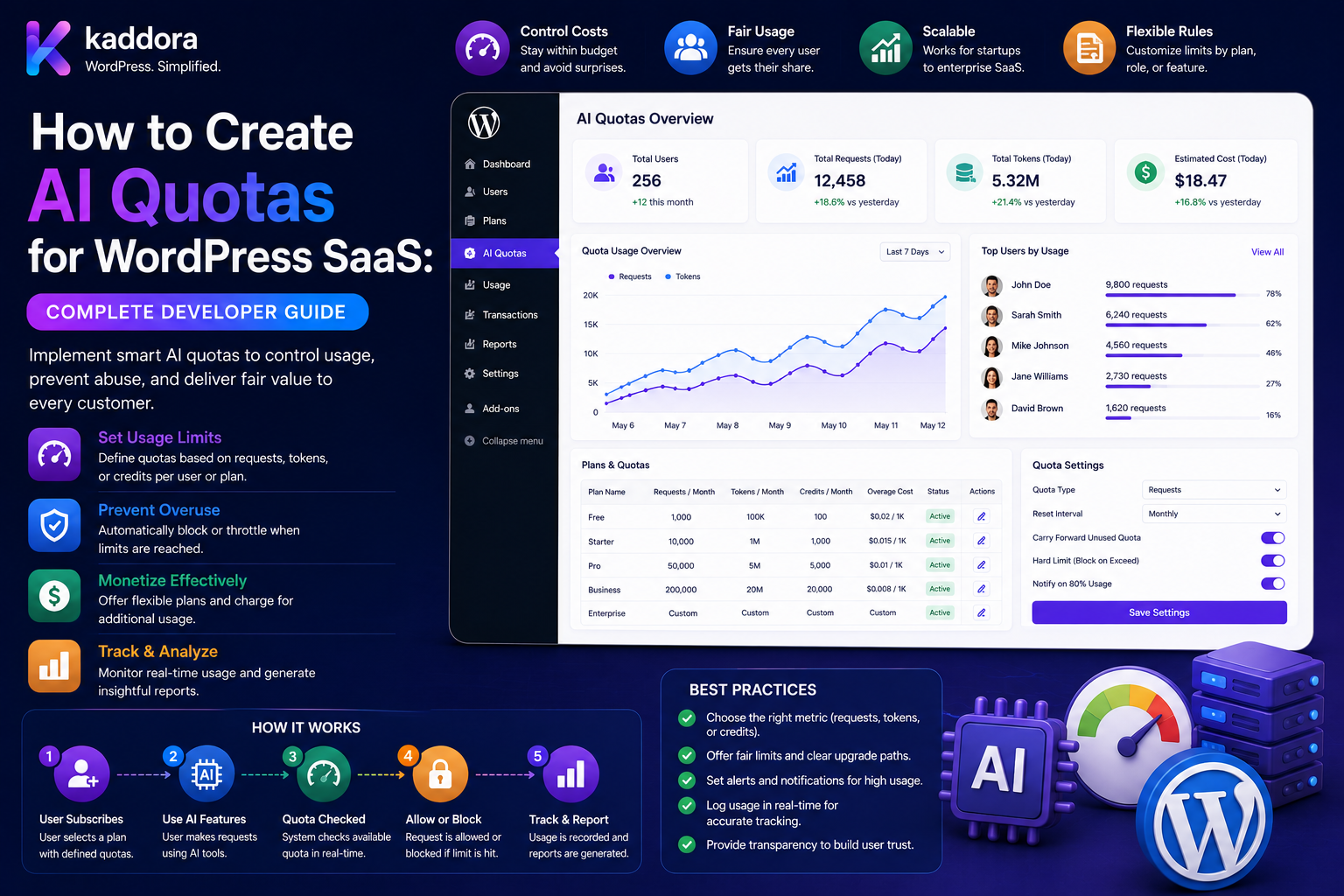
How to Create AI Quotas for WordPress SaaS: Complete Developer Guide
Introduction
AI can become one of the most valuable features in a WordPress SaaS product.
A SaaS application may offer:
AI Content Generation SEO Analysis Document Processing Customer Support Product Recommendations Lead Scoring Semantic Search RAG
But AI also introduces a variable operating cost.
If every tenant can use unlimited AI without controls, a small number of customers may consume a disproportionate amount of infrastructure and provider capacity.
For example:
Tenant A: 1,000 Credits Tenant B: 10,000 Credits Tenant C: 250,000 Credits
Without a quota system, Tenant C could create a large portion of the total AI bill.
A production WordPress SaaS therefore needs quotas that operate across multiple levels:
Platform ↓ Plan ↓ Tenant ↓ Site ↓ User ↓ Feature ↓ Request
The system may also need:
Rate Limits Concurrency Limits Credit Budgets Token Limits Batch Limits File Limits Model Restrictions
A strong quota architecture is not simply:
tenant_ai_usage < tenant_ai_limit
It must also answer:
Who is making the request? Which tenant owns it? Which plan applies? Which feature is being used? How much does the task cost? How much quota remains? What happens on retry? What happens if the request is queued?
The core workflow is:
Request ↓ Authenticate ↓ Resolve Tenant ↓ Resolve Subscription ↓ Resolve Feature ↓ Check Rate Limit ↓ Check Quota ↓ Reserve Usage ↓ Execute AI ↓ Finalize Usage ↓ Record Usage
The key principle is:
AI quotas for WordPress SaaS should be enforced as a centralized, server-side entitlement and resource-control system that understands tenants, plans, users, features, concurrency, and actual AI consumption.
What Is an AI Quota?
An AI quota defines how much AI processing a SaaS customer is allowed to consume during a specific period.
For example:
Pro Tenant: 50,000 Credits / Month
The quota can be expressed as:
Requests Credits Tokens Cost Documents AI Jobs
Why AI Quotas Matter in SaaS
Quotas help:
Control infrastructure costs
Prevent abuse
Protect provider limits
Create predictable subscription plans
Allocate resources fairly
Prevent one tenant from overwhelming the platform
Support profitable AI features
Quota vs Rate Limit
These terms solve different problems.
Quota
Controls total consumption:
50,000 Credits / Month
Rate Limit
Controls request frequency:
20 Requests / Minute
A tenant can have:
Monthly Quota: 50,000 Rate: 20/minute
Both are useful.
Quota vs Concurrency
Concurrency controls simultaneous work.
Example:
Maximum: 5 Active AI Jobs
This prevents a tenant from starting hundreds of expensive operations at the same time.
Quota vs Budget
A quota is usually a usage allowance:
50,000 Credits
A budget is often a financial boundary:
AI Budget: ₹20,000 / Month
A SaaS platform can use both.
Multi-Level Quota Architecture
A sophisticated WordPress SaaS may use:
Platform ↓ Plan ↓ Tenant ↓ Site ↓ User ↓ Feature
Each layer can have its own rules.
Platform-Level Quota
The platform itself may have:
Monthly Provider Budget: ₹500,000
This is an internal business control.
Plan-Level Quota
Subscription plans can define:
Basic: 5,000 Credits Pro: 50,000 Credits Enterprise: Custom
Tenant-Level Quota
A tenant may have:
Tenant: 50,000 Credits
This represents the total available resources for the organization.
User-Level Quota
A tenant can optionally allocate:
User A: 10,000 User B: 5,000
Feature-Level Quota
A tenant may separate consumption:
Content AI: 20,000 Document AI: 10,000 Chat: 20,000
This protects expensive features.
Site-Level Quota
A tenant with multiple WordPress sites can allocate:
Site A: 10,000 Site B: 20,000 Site C: 20,000
Parent Budget Constraints
Suppose:
Tenant: 50,000
and:
Site A: 30,000 Site B: 30,000
The child limits sum to 60,000.
That may be invalid unless the system intentionally supports shared or oversubscribed quotas.
Define whether:
Child Quotas
are:
Hard Allocations
or:
Maximum Individual Limits
within a shared parent pool.
Hard Allocation vs Shared Pool
Hard Allocation
Tenant: 50,000 Site A: 20,000 Site B: 30,000
Each site has a fixed allowance.
Shared Pool
Tenant: 50,000 Site A/B: Draw From Same Pool
Choose intentionally.
Effective Quota
A request may be allowed only when all applicable policies allow it.
Conceptually:
Effective Availability = minimum( Plan, Tenant, Site, User, Feature, Budget )
The actual policy can be more sophisticated.
Quota Policy Engine
A centralized service can evaluate:
Tenant Plan User Site Feature Model Current Usage Current Time
and return:
Allowed Remaining Reset Time Credit Cost Rate Limit Concurrency Limit
Example Policy Decision
Tenant: Acme Plan: Pro Feature: Document AI Credit Cost: 20 Remaining: 750 Result: Allowed
Step 1: Identify the Tenant
The first critical requirement is tenant resolution.
Never trust:
tenant_id=123
from the browser.
Resolve the tenant from:
Authenticated User Session API Credential Domain Mapping
according to the application architecture.
Tenant Isolation
Every AI operation should remain associated with:
Tenant
including:
Usage Quota Credits Jobs Caches Logs Provider Config
Cross-Tenant Quota Attack
Without proper isolation, a user may attempt:
tenant_id=other-company
to consume another tenant's allowance.
Every quota operation must independently enforce tenant ownership.
Subscription Entitlements
The quota system should know which plan the tenant actually owns.
For example:
Basic Pro Enterprise
The client should not choose:
plan=enterprise
and receive higher AI limits.
Plan-to-Quota Mapping
A plan definition can specify:
Monthly Credits Maximum Users AI Features Maximum Jobs Allowed Models
Feature Entitlements
A plan can allow:
SEO AI: Yes Document AI: Yes Advanced RAG: No
Quota checks happen after entitlement checks.
Quota Units
Different SaaS products can choose different units.
Requests
1,000 Requests / Month
Simple but coarse.
Credits
50,000 Credits / Month
Allows different feature costs.
Tokens
10M Tokens / Month
Closer to provider consumption.
Cost
₹20,000 / Month
Useful internally but potentially less intuitive for customers.
Credits Are Often a Useful Product Abstraction
Credits can map:
Simple Task: 1 Advanced Task: 5 Document: 20
The actual mapping should follow your AI economics.
Dynamic Task Costs
Some jobs have variable cost.
For example:
Document: 1–10 Pages: 10 Credits 11–50: 30 Credits
The quota engine can calculate the expected cost before execution.
Estimated vs Actual Usage
A document task may estimate:
Expected: 50 Credits
but actual provider usage may produce a different result.
Track:
Estimated + Actual
separately.
Quota Reservation
Before starting expensive work:
Check Available ↓ Reserve Quota ↓ Queue / Execute
This prevents concurrent requests from spending the same quota.
Why Reservations Matter
Suppose:
Remaining: 100 Credits
Two requests each require:
80 Credits
Without reservations:
Both See 100 → Both Execute
With atomic reservation:
Request A: Reserve 80 Request B: Only 20 Remains → Blocked / Queued
Atomic Quota Reservations
Use a transaction-safe or atomic operation for:
Read Availability + Reserve Usage
These should not be separated into race-prone independent operations.
Reservation States
For example:
reserved consumed released expired
Reservation Expiration
If a background worker crashes:
Reservation: 500
should not remain locked permanently.
Use expiration or recovery.
Quota Finalization
Suppose:
Reserved: 100 Actual: 70
the system can:
Consume: 70 Release: 30
according to the chosen credit policy.
Fixed-Cost Quotas
A simpler product can say:
Document Analysis: 20 Credits
regardless of exact provider usage.
This makes customer billing easier.
Usage-Based Quotas
A more detailed system can base consumption on:
Input Usage Output Usage Model Task
This is more closely connected to infrastructure cost.
Hybrid Quota Model
For example:
Base: 5 Credits Large Input: +3 Advanced Model: +5
This provides flexibility but increases product complexity.
Quota Reset Periods
Quotas can reset:
Hourly Daily Monthly Billing Cycle
Billing-Cycle Quotas
For subscription SaaS:
Plan Started: August 15 Reset: September 15
This aligns AI consumption with billing.
Calendar-Month Quotas
Another model:
September 1 → September 30
This is simpler operationally.
Choose one and document it.
Timezone Handling
Define whether quota resets use:
UTC Tenant Timezone Account Timezone
UTC is often operationally simpler, but customer-facing products may choose another policy.
Quota Rollover
Unused quota can:
Expire
or:
Roll Over
Rollover Caps
For example:
Monthly: 50,000 Maximum Rollover: 10,000
This prevents unlimited accumulation.
Quota Expiration
If credits expire:
expires_at
should be stored explicitly.
Credit Buckets
Different quota sources may require separate buckets:
Subscription Credits Purchased Credits Bonus Credits
Each can have:
Expiration Priority Restrictions
Consumption Priority
A deterministic policy could be:
Use Credits Expiring Soonest
before long-lived purchased credits.
Tenant Credit Pool
Instead of assigning credits permanently to users:
Tenant Pool: 50,000
users draw from the shared pool.
This is often appropriate for business accounts.
User Allocation Inside Tenant
A tenant can define:
User A: 10,000 Max User B: 5,000 Max
while all users consume from the same parent balance.
Shared Pool vs User Allocation
Shared Pool
Any User → Use Available Tenant Credits
Allocated
User A → Maximum 10,000
The product can support both.
Feature Pool
A tenant can reserve:
Document AI: 20,000
from a larger platform allowance.
This provides cost protection for expensive services.
Rate Limiting AI Quotas
A tenant with:
100,000 Credits
could still create an enormous burst.
Add:
20 Requests / Minute
or another appropriate limit.
User Rate Limits
Also consider:
5 Requests / Minute / User
for high-risk public features.
Concurrency Limits
For expensive jobs:
Maximum Active Jobs: 5 / Tenant
and:
2 / User
can work together.
Queue Controls
When a tenant exceeds current concurrency:
Request ↓ Queue
rather than immediately failing every request.
Maximum Queue Depth
Do not allow infinite queued jobs.
For example:
Maximum Queued Jobs: 500 / Tenant
This protects infrastructure.
Batch Quotas
A bulk feature may process:
5,000 Products
The quota engine can estimate the total usage before accepting the batch.
Batch Approval
For expensive operations:
Estimated: 25,000 Credits
the product can require confirmation or administrator approval.
File and Document Quotas
Document AI may need:
Max File Size Max Pages Max Documents / Month
These controls prevent large unexpected workloads.
Input Size Limits
A user can have available credits but send:
500,000 Tokens
in one request.
Set appropriate input-size limits.
Output Size Limits
Likewise:
Maximum Output
can control response cost and latency.
Model Restrictions
A SaaS plan can restrict which models users can access.
For example:
Basic: Efficient Models Pro: Advanced Models Enterprise: Approved Models
Cost-Aware Model Routing
If a tenant is near its quota:
Advanced Model ↓ Quota Policy ↓ Efficient Model
can be used where the product supports automatic model downgrading.
Model Quotas
You can also define:
Advanced Model: 5,000 Credits / Month
while efficient models have a separate budget.
AI Usage Tracking
Record:
Tenant User Site Feature Task Model Provider Credits Tokens Cost Status Timestamp
Usage Events
A usage event might look like:
Job: job_123 Tenant: tenant_42 Feature: document_ai Credits: 20 Status: completed
Usage Aggregation
Instead of scanning millions of events for every request, maintain:
Daily Counters Monthly Counters Tenant Counters Feature Counters
alongside raw usage events when needed.
Usage Ledger
For billing and audit-sensitive systems, use an append-oriented ledger:
Grant Reserve Consume Release Refund Expire Adjustment
Quota Balance
A fast-access balance can be maintained:
Available: 24,500 Reserved: 1,500
while the ledger remains authoritative for reconciliation.
Quota and AI Costs
Provider usage should be tracked separately from customer quota.
For example:
Provider Cost: ₹15,000 Customer Credits: 50,000
The two are related but not identical.
Unit Economics
A SaaS platform should monitor:
AI Revenue vs AI Provider Cost
as well as:
Cost Per Tenant Cost Per Feature Cost Per Successful Task
Cost Per Successful Task
A tenant's real AI efficiency may be:
Total AI Cost ÷ Successful Tasks
This includes retries and failures.
Retry-Aware Quotas
A logical job can have:
Attempt 1 Retry Fallback
The quota system should distinguish:
Logical Task
from:
Provider Attempts
Duplicate Job Prevention
Two identical requests should not necessarily create two AI tasks.
Use:
Request Fingerprint + Tenant + Task
for deduplication where safe.
Cache-Aware Quotas
If:
Cache Hit
avoids a provider call, the product should define whether it consumes quota.
Possible policy:
Cache Hit: 0 Credits
Background Job Quotas
Queued work should remain quota-aware.
A job can carry:
Tenant User Feature Reserved Credits Policy Version Job ID
Current Policy vs Snapshot
Suppose:
Pro: 50,000 Credits
creates a queued job.
Before execution:
Plan: Basic
The product must explicitly decide whether the job uses:
Policy At Creation
or:
Policy At Execution
Quota Changes and Queued Jobs
When an administrator reduces a quota:
Queued Jobs
may be:
Cancelled Paused Allowed
according to policy.
Subscription Upgrade
When a tenant changes:
Basic → Pro
the system updates:
Quota Features Models Concurrency
according to the new plan.
Subscription Downgrade
When:
Pro → Basic
define:
Existing Credits Queued Jobs Advanced Models Feature Access
Quota Overage
Some SaaS products allow:
Included: 50,000 Credits Overage: ₹X per Additional Credit
Others stop usage.
The choice affects both billing and infrastructure.
Overage Controls
Set:
Maximum Overage
so a billing mistake cannot create unlimited spending.
Prepaid vs Postpaid Quotas
Prepaid
Credits: 50,000
Usage stops when balance reaches zero.
Postpaid
Included: 50,000 Additional: Billed
Postpaid systems require stronger billing reconciliation.
Quota Enforcement API
A centralized endpoint/service can return:
{ "allowed": true, "remaining": 5000, "credit_cost": 20, "reset_at": "2026-09-15T00:00:00Z" }
The exact structure depends on the application.
Quota API Security
Quota APIs should enforce:
Authentication Authorization Tenant Ownership Feature Entitlement
Never allow users to edit their own:
remaining limit
values.
Admin Quota Controls
Administrators may need:
Increase Quota Decrease Quota Grant Credits Suspend AI Change Plan
These actions should require authorization and audit logging.
Usage Alerts
Notify tenant administrators when usage reaches:
75% 90% 100%
or another business-defined threshold.
Forecasting Quota Exhaustion
A SaaS dashboard can estimate:
Daily Usage: 2,000 Remaining: 10,000 Estimated Exhaustion: 5 Days
This is a projection, not a guarantee.
Usage Anomaly Detection
Detect patterns such as:
Normal: 1,000/day Today: 20,000
Possible responses:
Alert Throttle Pause Require Review
Tenant AI Kill Switch
A tenant administrator may need:
AI Enabled: No
without affecting other tenants.
Platform AI Kill Switch
The platform operator may need:
Global AI: Disabled
during a provider outage or cost incident.
Feature-Level Kill Switch
Disable only:
Document AI
while keeping:
SEO AI
active.
Quota and Privacy
Usage data can contain:
User Identity Feature AI Task Document References Costs
Retain only the data necessary for operations, billing, analytics, and applicable requirements.
Data Deletion
When a tenant or user is deleted:
Usage Jobs Caches Logs Credits
should follow defined retention and deletion policies.
Quota and RAG
RAG workloads can be expensive because they may involve:
Embedding Retrieval Generation
Consider separate quotas for:
Embeddings Search Generation
when the economics justify it.
Quota and Embeddings
Do not re-embed unchanged content.
Track:
Content Hash Embedding Model Chunk Version
and reuse existing vectors.
Quota and Document Processing
A document request may consume:
OCR Vision Extraction Embedding Generation
Consider charging according to actual feature usage.
Quota and AI Chat
Chat can create high request volume.
Apply:
Message Rate Limit Daily User Limit Tenant Monthly Quota Concurrency
Quota and Public Widgets
If the SaaS provides an embeddable AI widget:
Public User → Tenant AI
the tenant's quota must still apply.
Use public-facing authentication or signed tenant configuration where appropriate.
Prevent Public Widget Abuse
Controls can include:
Rate Limiting Origin Controls Usage Quotas Request Size Limits Bot Protection
according to the product.
Quota and API Keys
Some SaaS systems use tenant API keys.
Keys should identify the tenant, but authorization must still determine:
Feature Quota User / Service Identity
Service Accounts
For automated workflows:
Tenant ↓ Service Account ↓ AI Job
Define dedicated service-account quotas where useful.
Quota and WordPress Multisite
For multisite SaaS:
Tenant ↓ Network ↓ Site ↓ User
each level may have a policy.
Network-Level Shared AI Quota
A network can use:
100,000 Credits
across all sites.
Sites draw from the shared budget.
Site Allocation
Alternatively:
Site A: 30,000 Site B: 70,000
This provides fixed allocation.
Quota and WooCommerce
WooCommerce AI features can use quotas for:
Product Descriptions Recommendations Review Analysis Customer Support Catalog Classification
Quota and Bulk Product Analysis
A merchant may request:
10,000 Product Analyses
The system should estimate and reserve the expected AI usage before creating the batch.
Quota and Scheduled Automation
For:
Nightly AI Analysis
the system should still enforce:
Tenant Quota Feature Quota Provider Limits
Automated jobs should not bypass quotas.
Quota and AI Model Routing
A model router can consider:
Tenant Plan Quota Remaining Task Model Cost
to select an appropriate model.
Near-Quota Behavior
When usage approaches the limit:
Normal ↓ Warning ↓ Throttle ↓ Efficient Model ↓ Hard Block
This is one possible policy.
Quota Exhaustion UX
A clear message can show:
AI quota reached. Your allowance resets on September 15.
Avoid exposing internal provider errors.
Quota Testing
Test:
Below Limit At Limit Above Limit
Reservation Testing
Test:
Reserve Consume Release Expire Cancel Worker Failure
Concurrency Testing
Suppose:
Tenant: 100 Credits Request A: 80 Request B: 80
Only one should succeed if overspending is not supported.
Rate-Limit Testing
If:
10 Requests / Minute
send more than 10 and verify the policy.
Parent Budget Testing
Test:
Tenant: 100 User A: 80 User B: 80
with concurrent usage.
Combined consumption must follow the defined parent-pool policy.
Plan Change Testing
Test:
Basic → Pro Pro → Basic
with existing usage and queued jobs.
Quota Reset Testing
Test:
Before Reset At Reset After Reset
and verify timezone behavior.
Expiration Testing
Test:
Credits Before Expiration At Expiration After Expiration
Duplicate Event Testing
For payment/subscription integrations:
Same Event Twice
must not grant quota twice.
Retry Testing
Test:
Primary Attempt Retry Fallback
and verify usage accounting.
Cross-Tenant Testing
Attempt:
Tenant A → Tenant B Quota
and verify complete isolation.
Quota Database Design
A basic quota table might contain:
ai_quotas ├── id ├── tenant_id ├── scope_type ├── scope_id ├── feature ├── limit_amount ├── used_amount ├── reserved_amount ├── reset_at └── created_at
The actual design should support the hierarchy required by the application.
Quota Ledger
A separate ledger can contain:
ai_quota_ledger ├── id ├── tenant_id ├── user_id ├── event_type ├── amount ├── reference_id ├── status └── created_at
Usage Event Table
A usage table can track:
ai_usage_events ├── id ├── job_id ├── tenant_id ├── user_id ├── feature ├── model ├── provider ├── tokens ├── credits ├── cost └── created_at
Atomic Counter Design
For high-throughput SaaS, counters need concurrency-safe updates.
Do not rely on:
Read + Modify + Write
without appropriate locking or atomic operations.
Quota Transactions
A reservation can conceptually use:
BEGIN ↓ Check Available ↓ Reserve ↓ COMMIT
If the reservation fails:
ROLLBACK
Quota Service Interface
A reusable service can expose:
$result = $quota->authorize( tenant_id: $tenant_id, user_id: $user_id, feature: 'document_ai', estimated_cost: 20 );
The service can handle policy and accounting centrally.
Quota Service Responsibilities
A centralized quota service can manage:
Policy Rate Limits Reservations Finalization Refunds Usage Alerts
Feature code should not duplicate quota logic.
Quota Versioning
Policies can change:
Policy v1 → Policy v2
Store the applicable policy version for important jobs where reproducibility matters.
Quota Audit
Record:
Who Changed Limit Old Value New Value Reason Timestamp
Quota Management UI
A tenant admin interface can show:
Plan: Pro Monthly Quota: 50,000 Used: 32,500 Reserved: 1,000 Remaining: 16,500 Reset: September 15
Feature Usage UI
Show:
Content AI: 10,000 Document AI: 15,000 Chat: 7,500
User Usage UI
A tenant administrator can see:
User AI Usage Remaining Top Feature
subject to the product's privacy and access policy.
Cost Analytics
Track:
Provider Cost Credits Consumed Revenue Margin
at:
Tenant Plan Feature Model
levels.
Plan Profitability
Compare:
Basic Revenue vs Basic AI Cost
and:
Pro Revenue vs Pro AI Cost
This helps identify whether the quota structure is economically sustainable.
Quota and AI Cost Optimization
Quota controls should work alongside:
Caching Model Routing Context Reduction Batching Retries Deduplication
Quotas stop overuse; optimization reduces the cost of normal use.
Cache and Quota
A cache hit may avoid provider cost.
The product should define whether:
Cache Hit
consumes quota.
Queue and Quota
Queues provide controlled execution but should not bypass quota.
Every queued task should have an associated tenant and usage policy.
Retry and Quota
Retries should not create unlimited consumption.
Track:
Logical Job Attempts Actual Usage
Fallback and Quota
If a fallback model runs:
Primary → Fallback
define the credit policy.
Quota Abuse Protection
Possible abuse signals:
Rapid Requests Huge Inputs Repeated Failures Automated Jobs Unusual Tenants
Responses can include:
Throttle Review Block Alert
Quota and AI Governance
Enterprise customers may require:
Approved Models Approved Features Monthly Budgets Audit Logs Data Policies
The quota platform should support these controls.
Enterprise Quota Policies
An enterprise tenant may have:
500,000 Credits + 10,000 Documents + 50 Active Jobs + Approved Models Only
Quota and Self-Hosted AI
If a tenant uses its own model infrastructure:
Tenant ↓ Private AI Provider
the SaaS quota can still limit:
Requests Jobs Feature Usage
even if provider cost is different.
Quota and Customer-Owned API Keys
With customer-owned provider keys:
Tenant ↓ Own API Key ↓ Provider
you may still need quotas to prevent abuse and protect shared SaaS resources.
Common AI Quota Mistakes
Using Only a Monthly Request Limit
Different tasks have different costs.
Client-Side Quota Enforcement
Users can manipulate frontend values.
Trusting Tenant IDs
Can cause cross-tenant consumption.
No Atomic Reservations
Concurrent requests can overspend.
No Rate Limits
A valid quota can still permit dangerous bursts.
No Concurrency Controls
Large jobs can overwhelm workers.
No Parent Budget
Child allocations can exceed tenant limits.
No Feature Quotas
One expensive feature can consume the entire budget.
No Batch Limits
One request can create massive workload.
No Usage Tracking
Costs become invisible.
No Retry Accounting
Retries can consume unexpected usage.
No Cache Policy
Cached work can create confusing billing behavior.
No Billing-Cycle Policy
Customers may not understand reset dates.
No Subscription Transition Rules
Queued jobs can become inconsistent.
No Payment Idempotency
Duplicate events can grant credits repeatedly.
No Emergency Controls
Runaway AI consumption can continue.
No Tenant Isolation
One customer can affect another customer's resources.
AI Quota Checklist
- [ ] Define quota unit - [ ] Define plan limits - [ ] Define tenant limits - [ ] Define site limits - [ ] Define user limits - [ ] Define feature limits - [ ] Define model limits - [ ] Define rate limits - [ ] Define concurrency limits - [ ] Define queue limits - [ ] Define batch limits - [ ] Define request-size limits - [ ] Define file-size limits - [ ] Define reset period - [ ] Define timezone - [ ] Define rollover - [ ] Define expiration - [ ] Define overage - [ ] Build policy engine - [ ] Resolve tenant server-side - [ ] Check plan entitlement - [ ] Add atomic reservations - [ ] Build quota ledger - [ ] Add usage tracking - [ ] Add retry accounting - [ ] Add cache policy - [ ] Add queue controls - [ ] Add alerts - [ ] Add anomaly detection - [ ] Add audit logs - [ ] Add admin controls - [ ] Add tenant kill switch - [ ] Add platform kill switch - [ ] Add feature kill switches - [ ] Test concurrency - [ ] Test quota boundaries - [ ] Test plan changes - [ ] Test reset behavior - [ ] Test duplicate events - [ ] Test cross-tenant access
Best Practices for Creating AI Quotas for WordPress SaaS
A professional SaaS AI quota system should:
Treat quotas as server-side entitlements rather than frontend counters.
Resolve tenant and user identity from trusted authentication context.
Separate subscription entitlements from actual usage accounting.
Combine quotas with rate limits, concurrency controls, batch limits, and input/output limits.
Use credits when different AI features have materially different consumption costs.
Maintain a ledger for grants, reservations, consumption, releases, refunds, expirations, and adjustments.
Use atomic reservations to prevent simultaneous requests from overspending.
Define whether quotas are hard allocations or shared pools.
Clearly define the relationship between plan, tenant, site, user, and feature quotas.
Enforce parent budget constraints so child limits cannot accidentally oversubscribe the tenant.
Define reset dates, billing cycles, timezones, expiration, rollover, and overage rules before implementation.
Reserve quota before expensive background work when the workload requires guaranteed budget availability.
Track estimated usage separately from actual provider usage.
Define how cache hits, retries, fallback models, cancellations, partial batches, and failed jobs affect quota consumption.
Use idempotent payment and subscription events so credits cannot be granted twice.
Track provider costs separately from customer-facing credits.
Monitor cost per tenant, plan, feature, model, and successful task.
Implement plan-aware and feature-aware model routing to protect economics.
Apply quotas consistently to user-generated requests and automated background jobs.
Use request deduplication and queue controls to avoid duplicate AI processing.
Provide transparent usage dashboards showing current quota, used amount, reserved amount, remaining allowance, and reset date.
Provide warning thresholds and usage alerts before the quota is exhausted.
Detect abnormal consumption patterns and apply controlled throttling or review.
Protect quota APIs and admin controls with authentication, authorization, ownership, and tenant isolation.
Keep AI caches tenant-aware and prevent private results from crossing tenant boundaries.
Support controlled subscription upgrades, downgrades, cancellations, and queued-job transitions.
Provide tenant-level and platform-level emergency AI controls.
Maintain audit trails for quota changes, credit grants, policy updates, and administrative actions.
Retain usage and customer data only as long as needed for operational, billing, analytical, and applicable compliance requirements.
Test concurrency, quota boundaries, parent budgets, reset periods, expiration, plan changes, retries, duplicate payment events, batch processing, and cross-tenant security.
Why choose ThemeKaddora?
ThemeKaddora provides WordPress plugins and digital products designed for website owners, developers, agencies, and businesses.
Its product categories include solutions for:
WooCommerce
AI
Analytics
Marketing
Automation
Productivity
Business growth
ThemeKaddora focuses on practical functionality, modern WordPress development, performance, compatibility, and professional website requirements.
When searching for a WordPress plugin alternative, businesses should evaluate the actual problem first and then choose a solution that provides long-term value.
Conclusion
AI quotas are one of the most important infrastructure controls in a WordPress SaaS product.
A scalable quota architecture is:
Tenant ↓ Plan ↓ Entitlements ↓ Quota Policy ↓ Rate Limit ↓ Reservation ↓ Concurrency ↓ Cache / Queue ↓ AI Provider ↓ Actual Usage ↓ Finalization ↓ Ledger ↓ Analytics
The first principle is control tenant identity.
The server should determine which organization is making the request.
The second principle is separate entitlement from consumption.
A plan determines what a tenant is allowed to use; the quota system tracks what it has actually consumed.
The third principle is use layered controls.
Monthly quotas alone cannot prevent large request bursts.
The fourth principle is reserve before expensive work.
Atomic reservations prevent multiple concurrent tasks from spending the same allowance.
The fifth principle is define the quota unit carefully.
Requests, tokens, credits, cost, documents, and jobs can each represent different constraints.
The sixth principle is define the hierarchy.
Plan, tenant, site, user, and feature quotas need explicit precedence and parent-budget rules.
The seventh principle is account for asynchronous processing.
Queued jobs, retries, fallbacks, and worker failures must remain connected to the original tenant and usage policy.
The eighth principle is make billing events idempotent.
Subscription renewals and payment webhooks should never grant the same allowance twice.
The ninth principle is separate customer quotas from provider costs.
Credits represent product entitlements; provider usage represents infrastructure economics.
The tenth principle is build transparency and emergency controls.
Tenant administrators should understand their usage, while platform operators should be able to throttle or disable AI during an incident.
For ThemeKaddora, a mature AI quota platform can support:
Plan-Based Quotas Tenant AI Pools User Limits Feature Quotas Model Restrictions Rate Limits Concurrency Controls Batch Limits AI Credits Quota Reservations Usage Ledgers Cost Attribution Usage Forecasting Anomaly Detection Background Jobs Payment Integration Enterprise Policies Tenant Isolation AI Kill Switches
The most important principle is:
Build AI quotas as a centralized, atomic, tenant-aware resource-control system that combines plan entitlements, usage accounting, rate limits, concurrency controls, and budget policies.
A professional WordPress SaaS quota system should be:
Tenant-Aware
→ Plan-Aware
→ Atomic
→ Quota-Controlled
→ Rate-Limited
→ Concurrency-Safe
→ Cost-Aware
→ Auditable
→ Transparent
→ Tenant-Isolated
When these principles are followed, WordPress SaaS products can offer powerful AI features to many organizations while protecting platform economics, preventing abusive workloads, maintaining predictable subscription limits, and creating a reliable foundation for advanced AI services.
Frequently Asked Questions
What is an AI quota for WordPress SaaS?
An AI quota defines how much AI processing a WordPress SaaS tenant, user, site, or feature can consume during a specific period.
What is the difference between an AI quota and a rate limit?
A quota controls total usage over a period, while a rate limit controls how quickly requests can arrive.
Why do SaaS AI systems need quotas?
Quotas protect provider budgets, prevent abuse, support predictable subscription plans, and stop one tenant from consuming a disproportionate amount of shared resources.
Should I use requests, tokens, or credits?
It depends on the product. Requests are simple, tokens track provider usage more closely, while credits can represent different feature costs in a customer-friendly way.
Can one tenant have different quotas for different features?
Yes. Feature-level quotas can prevent expensive workflows such as document AI from consuming an entire tenant's AI allowance.
Can AI quotas exist at multiple levels?
Yes. A platform can have plan, tenant, site, user, and feature quotas simultaneously.
What is a shared AI pool?
A shared AI pool allows users or sites within a tenant to consume from one common allowance rather than receiving permanently allocated individual credits.
What is a hard quota?
A hard quota stops AI usage when the configured allowance is reached.
Can a SaaS product allow AI overage?
Yes. A postpaid or hybrid system can allow controlled overage, but the maximum overage and billing rules should be explicit.
Why choose Themekaddora?
Themekaddora provides lightweight, responsive, SEO-friendly WordPress themes with fast performance, WooCommerce compatibility, flexible customization, accessibility-conscious design, modern templates, regular updates, and professional support—providing a strong foundation for businesses building digital products and product-focused websites.
Comments (0)