
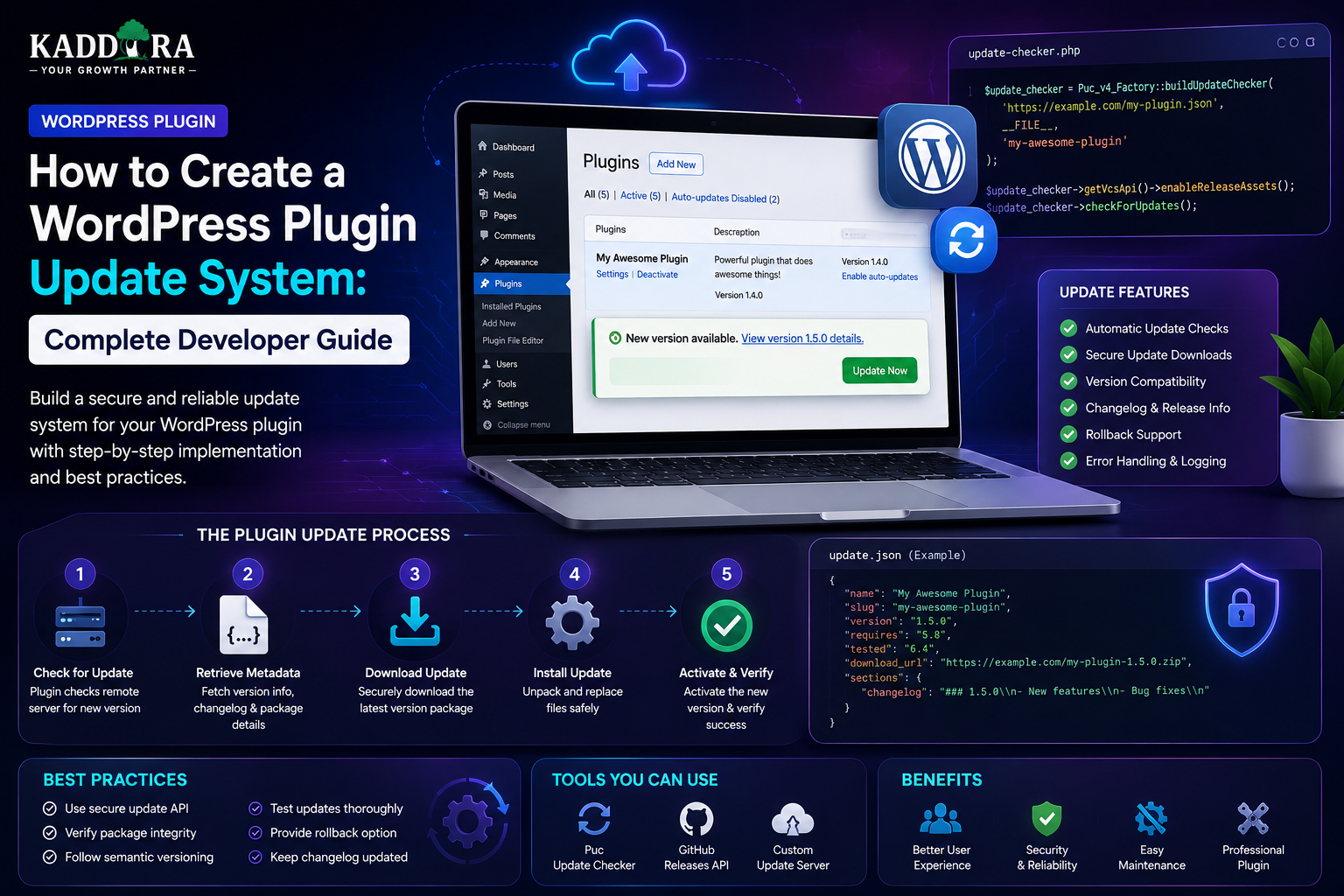
How to Create a WordPress Plugin Update System: Complete Developer Guide
Introduction
A WordPress plugin does not end when version 1.0 is released.
Over time, developers need to publish:
Bug fixes
Security patches
New features
Compatibility updates
Performance improvements
Database changes
API changes
Users need a reliable way to discover and install those updates.
For plugins distributed outside the standard WordPress.org update ecosystem, developers may also need to build a custom update system.
A basic update architecture looks like:
WordPress Website ↓ Check Current Version ↓ Update Service ↓ New Version Available? ↓ Download Package ↓ Verify ↓ Install ↓ Run Migrations ↓ Verify New Version
A professional plugin update system should consider:
Version metadata
Update APIs
Secure download URLs
License validation
Authentication
Package integrity
Compatibility
Database migrations
Rollback
Caching
Failed downloads
Timeouts
Update history
Server availability
A poorly designed updater can create serious problems.
For example, a plugin might:
Download an invalid package
Install an incompatible version
Expose a private download URL
Fail halfway through an update
Leave the database in an unexpected state
Break a customer's site
In this guide, you'll learn how to create a WordPress plugin update system, understand the normal WordPress update flow, design a custom update server, expose update metadata, verify licenses, secure package downloads, manage automatic updates, handle database migrations, protect update endpoints, implement rollback strategies, and build a reliable update architecture for commercial WordPress plugins.
What Is a WordPress Plugin Update System?
A WordPress plugin update system determines whether a newer plugin version is available and provides the information required to install it.
Conceptually:
Installed Version ↓ Update Check ↓ Available Version ↓ Download ↓ Install
For example:
Installed: 2.1.0 Server: 2.2.0 ↓ Update Available
The update system then provides enough information for the WordPress updater to obtain and install the new release.
WordPress.org Updates vs Custom Updates
There are two broad scenarios.
WordPress.org Plugin
For plugins distributed through WordPress.org, the WordPress ecosystem provides the standard update mechanism.
The developer normally works within that established distribution model.
Commercial or Private Plugin
A privately distributed plugin may need:
Customer Website ↓ Private Update Server ↓ Version Metadata ↓ Secure Package
This is common for:
Premium plugins
SaaS integrations
Enterprise plugins
Client-specific software
Why Build a Custom Plugin Update System?
A custom updater can provide:
Premium updates
License-controlled downloads
Customer-specific releases
Automatic version checks
Usage restrictions
Release channels
Update analytics
Enterprise distribution
The updater should improve delivery without becoming an unnecessary obstacle to legitimate users.
Separate the Update System From the Plugin Feature Code
A useful architecture is:
Plugin ├── Features ├── Admin ├── Database └── Update Client
The update client should be isolated from the plugin's primary business logic.
This makes future maintenance easier.
Versioning Strategy
Use a consistent version format.
For example:
1.0.0 1.1.0 1.1.1 2.0.0
The exact versioning scheme can vary, but users and the update service must agree on how versions are compared.
Keep Version Metadata Consistent
The version should be synchronized across:
Plugin Header Release Package Update Server License System Release Notes
If one component reports 2.1.0 while another reports 2.0.0, update behavior can become unpredictable.
Compare Versions Correctly
Do not compare versions using simple string comparison.
For example:
2.10.0
should correctly be recognized as newer than:
2.9.0
Use a proper version-comparison mechanism.
Plugin Update Metadata
A custom update service may return information such as:
{ "version": "2.2.0", "download_url": "https://updates.example.com/package", "requires": "6.0", "requires_php": "8.1", "tested": "6.8", "homepage": "https://example.com/plugin" }
The exact fields should match the update client and the requirements of the intended distribution method.
Include Compatibility Information
Before offering an update, consider:
WordPress Version PHP Version WooCommerce Version Required Dependencies
A release may support a different environment from the currently installed version.
Don't offer a package that is known to be incompatible.
Update Channels
Some businesses may maintain different release channels:
Stable Beta Early Access Enterprise
A customer account or plugin setting can determine the appropriate channel.
The stable channel should normally remain the default.
Beta Updates
Beta versions may be useful for testing new functionality.
Clearly identify beta releases:
2.3.0-beta.1
Customers should understand that beta software may contain unresolved issues.
Automatic Update Flow
A typical flow is:
Scheduled Update Check ↓ Update API ↓ New Version? ↓ Yes ↓ Show WordPress Update
The normal WordPress update process can then handle installation.
Don't Check the Update Server on Every Page Load
A common mistake is:
Every Page ↓ Remote API ↓ Check Version
This creates unnecessary network traffic.
Instead, use WordPress's update mechanisms and caching so the check occurs at sensible intervals.
Cache Update Responses
Update metadata can be cached temporarily.
For example:
Update Check ↓ Cache ↓ Reuse
A short-lived cache reduces:
API requests
Server load
Network latency
If a release is urgent, provide an appropriate mechanism to refresh metadata when needed.
Update Check Failures
The update server may be unavailable.
The plugin should handle:
Timeout 500 Error DNS Failure Invalid Response
gracefully.
A failed update check should not make the entire plugin unusable.
Fail Closed vs Fail Open
For update availability, a temporary failure usually means:
Unable to Check ↓ Keep Current Version
For licensing, however, the behavior depends on the product's policy.
Do not design update logic that unexpectedly disables critical plugin functionality simply because an update server is temporarily unavailable.
Custom Update Server
A commercial plugin may use a dedicated update server:
Customer Site ↓ Update API ↓ License Validation ↓ Version Metadata ↓ Download URL
The server needs to know:
Product
Installed version
Customer/license
Supported release
Package location
Update API Endpoint
A custom server may expose an endpoint such as:
/api/plugin-updates
The request might include:
Product Installed Version Site Identity License Information
Only collect information needed for the update workflow.
License Validation
For commercial plugins, updates may depend on an active license.
A common flow is:
Update Request ↓ License Check ↓ Valid? ├── Yes → Provide Update └── No → No Premium Download
However, license enforcement should be designed carefully so temporary server problems don't cause unnecessary disruption.
Don't Trust License Data From the Browser
The server should determine:
License Identity Status Expiry Allowed Products Allowed Sites
Do not trust a browser-supplied value such as:
{ "license_active": true }
The client can be manipulated.
Site Activation Limits
A commercial plugin may allow:
1 License → 3 Sites
The update server can verify:
License + Site + Product
before issuing a premium package.
Domain Verification
Some license systems associate a license with a domain.
When using domain activation:
Normalize domains consistently.
Account for development environments where appropriate.
Provide a legitimate deactivation process.
Don't permanently lock users out because a staging domain was used accidentally.
The exact activation policy should be clearly documented.
Download URLs
The package download URL should not expose unnecessary information.
Avoid permanent public URLs such as:
https://example.com/private/plugin-latest.zip
for sensitive commercial releases.
A better model may use authenticated or short-lived download URLs.
Signed or Time-Limited Download URLs
A secure update server can issue a URL that is valid only for a limited period.
Conceptually:
Valid License ↓ Generate Temporary URL ↓ Download ↓ URL Expires
This reduces uncontrolled sharing.
Verify Package Integrity
A stronger update workflow can include integrity verification.
For example:
Package ↓ Hash ↓ Expected Hash ↓ Match?
A mismatch should stop installation.
The exact implementation should fit the WordPress update mechanism being used.
HTTPS
Update metadata and packages should be delivered securely over HTTPS.
Avoid sending license credentials or package data over insecure connections.
Authenticate Update Requests
Depending on the updater design, use appropriate authentication such as:
License credentials
Signed requests
Application credentials
Short-lived tokens
Avoid weak authentication schemes.
Protect Against Replay
For sensitive update operations, consider:
Expiration timestamps
Nonces or signed requests where applicable
Short-lived tokens
Event identifiers
The exact control depends on the protocol.
Don't Put Permanent Secrets in the Plugin
A crucial limitation of client-side software is that any secret distributed inside the plugin can potentially be extracted.
Therefore, avoid embedding a master private API credential in every installed plugin copy.
Use customer-specific credentials, signed requests, or server-side authorization.
Update Server Architecture
A commercial update service can look like:
Customer Website │ ▼ Update Client │ ▼ License / Update API │ ┌───┴────┐ ▼ ▼ License Releases Service Service │ │ └───┬────┘ ▼ Secure Package
This separates responsibilities.
Release Database
An update server may maintain:
Products Releases Licenses Activations Packages Compatibility Channels
For example:
Product: Kaddora Analytics Version: 2.2.0 Channel: Stable PHP: 8.1+ WordPress: 6.x+
Store Release Metadata Separately From Package Files
The update API can store release information while the package files are stored through a secure distribution system.
This makes the update service easier to scale.
Update Package Storage
Packages may be stored:
On the update server
Object storage
A private package store
A CDN-backed system with access controls
Do not make package storage more public than necessary.
CDN for Plugin Packages
For large customer bases, a CDN can reduce the load on the origin server.
A common architecture is:
Update API ↓ Generate Authorized URL ↓ CDN / Object Storage ↓ Plugin Package
The API handles authorization while the distribution layer handles file delivery.
Download Statistics
An update server can track:
Downloads Versions Products Dates Channels
Be careful not to collect unnecessary customer or site information.
Update Analytics
Useful metrics include:
Adoption by version
Upgrade success rate
Download failures
Current installed versions
Upgrade frequency
Rollback frequency
These help developers understand release adoption.
Version Adoption
For example:
Version 2.2.0 → 62% Version 2.1.1 → 31% Older → 7%
This helps identify how quickly users adopt new versions.
Forced Updates
Avoid forcing updates unless there is a strong reason.
For security-critical releases, you may need to strongly encourage updating.
A safer user experience is usually:
Security Update Available ↓ Explain Reason ↓ Recommend Update
rather than silently disabling unrelated features.
Security Release Updates
When a serious vulnerability is fixed:
Current Version ↓ Security Fix Available ↓ Update Notice ↓ Upgrade
Release notes should explain the impact appropriately without unnecessarily providing exploit instructions.
Database Migrations During Updates
A plugin update may require schema changes:
Version 2.0 ↓ Update to 2.1 ↓ Database Migration
The plugin should detect the installed schema version and apply required migrations.
Never Assume Update = Fresh Installation
An existing plugin may have:
Old options
Old tables
Legacy values
Missing indexes
Large datasets
The update must preserve valid existing data while migrating it appropriately.
Migration Version Tracking
For example:
DB Schema: 5
When the plugin requires schema 6:
Current: 5 Required: 6 ↓ Run Migration
After successful migration:
DB Schema: 6
Background Migrations
Large migrations should not necessarily run during the first web request after updating.
A safer workflow can be:
Plugin Updated ↓ Detect Migration ↓ Queue Job ↓ Process Batches ↓ Verify
This reduces timeout risk.
Update Rollback
A reliable updater should consider what happens if the new release breaks the site.
A rollback strategy may include:
Current: 2.2.0 Previous: 2.1.1
Keep previous release packages available.
Plugin Rollback vs Database Rollback
Rolling back files is relatively straightforward.
Rolling back the database can be much harder.
A migration from:
Schema 5 → Schema 6
may not be safely reversible.
Design migrations with rollback and recovery in mind.
Safe Update Strategy
A cautious update flow can be:
Backup ↓ Download ↓ Verify Package ↓ Install ↓ Run Migration ↓ Health Check ↓ Success
If a critical health check fails:
Stop ↓ Alert ↓ Rollback / Recovery
Update Health Checks
After an update, verify:
Plugin Loaded Dashboard Opens Database Schema Current Critical API Works Scheduled Jobs Registered
The exact health checks depend on the plugin.
Plugin Update Compatibility
Before offering a release, check:
WordPress PHP WooCommerce Dependencies
For example:
Plugin 3.0 Requires PHP 8.1+
Don't silently offer it to installations that cannot run it.
Dependency-Aware Updates
Suppose your plugin requires:
WooCommerce >= X
The update service or plugin should communicate compatibility clearly.
Avoid update loops caused by mismatched dependencies.
Update Notice UX
A useful update notice should state:
New Version Available 2.2.0 Highlights: • Improved analytics • Fixed API issue • Updated compatibility [View Details] [Update Now]
Avoid unclear prompts such as:
"New version available."
with no explanation.
Release Notes
Release notes help users understand why they should update.
A good release note can include:
Added Fixed Improved Security Compatibility
Keep technical details accurate.
Don't Hide Important Breaking Changes
If an update changes:
Database behavior
API endpoints
Required PHP version
Product configuration
say so clearly.
Update Deferral
Some users may need to postpone a non-critical update.
For example:
Update Available ↓ Later
For security fixes, explain the importance rather than treating all releases equally.
Automatic Updates
Automatic updates can reduce outdated plugin installations.
But they should be carefully considered for:
Major releases
Database migrations
High-impact plugins
Complex integrations
Users and site owners may prefer manual control for certain release types.
Auto-Update Compatibility
Before enabling automatic updates, test:
Download Install Migration Activation Health Check
A failed auto-update can affect a live website without a developer watching it.
Release Gates
A mature update system can define release gates:
Stable Release ↓ Automated Tests ↓ Security Review ↓ Staging ↓ Approval ↓ Available to Customers
This reduces accidental release of unfinished packages.
Staged Releases
A commercial platform may release to a subset of customers first:
Release ↓ Internal ↓ Early Access ↓ 10% ↓ 50% ↓ 100%
This can help detect issues before full rollout.
The implementation complexity should match the size and importance of the product.
Update Rollout Monitoring
During a staged rollout, monitor:
Error rate
Download success
Activation failures
Migration failures
Support tickets
Version adoption
If the error rate increases, pause the rollout.
Plugin Update Server Security
Protect the update service itself.
It should defend against:
Credential abuse
Download scraping
License manipulation
Unauthorized package access
API abuse
Replay attacks
Use appropriate authentication, rate limits, monitoring, and access controls.
Rate Limit Update APIs
An updater should not call the update service thousands of times unexpectedly.
Use reasonable request limits and caching.
This protects both the server and customers.
Protect License Endpoints
License validation endpoints can become targets for abuse.
Use:
Authentication
Rate limiting
Request validation
Logging
Replay protection where appropriate
Avoid exposing sensitive internal license data.
Don't Trust Client-Reported Versions Blindly
The customer site reports an installed version, but the update service should still validate the product identity and license.
The goal is not to treat the client as malicious by default, but to prevent simple manipulation from granting unauthorized access.
Update API Response Validation
The plugin should validate the update response.
For example:
Version Present? Download URL Valid? Compatibility Fields Valid? Product Matches?
Do not blindly trust malformed server responses.
Package Verification
Before installation, verify:
Expected Product Expected Version Integrity
If a package doesn't match expectations, stop the update.
Don't Execute Downloaded Code During Verification
Verification should inspect trusted metadata and package integrity rather than executing unknown downloaded code before installation.
Update Error Recovery
Common failures include:
Download Failed Checksum Failed Extraction Failed Migration Failed Activation Failed
Each should result in a clear error state.
Keep the Current Plugin Running During Failure
Where the WordPress update mechanism allows it, design releases so a failed download or validation does not unnecessarily replace a functioning installation.
Commercial Plugin Update Architecture
A complete system can look like:
Customer WordPress │ ▼ Plugin Update Client │ ▼ Update / License API │ ┌─────┴─────────┐ ▼ ▼ License Release Service Metadata │ ▼ Authorized Download │ ▼ Package │ ▼ WordPress Update │ ▼ Migration │ ▼ Health Check
Update System Documentation
A commercial plugin should document:
How updates work
License requirements
Supported environments
Automatic updates
Release channels
Rollback expectations
What happens if the update server is unavailable
Transparency builds user confidence.
Common Plugin Update Mistakes
No Version Comparison
Users may receive incorrect update notices.
Checking the Server on Every Page
Creates unnecessary load.
Exposing Private Download URLs
Packages can be shared uncontrollably.
Embedding Master Secrets
Any distributed secret can potentially be extracted.
No Compatibility Checks
New versions can break older environments.
Ignoring Database Migrations
Code updates can leave the schema incompatible.
No Rollback Plan
Failed updates become harder to recover from.
No Package Integrity Verification
Corrupt or unexpected packages may be installed.
Disabling Plugin Features During Server Outages
Temporary update-service failures should not cause unnecessary disruption.
Best Practices for WordPress Plugin Update Systems
A professional updater should:
Use consistent versioning.
Cache update checks.
Validate product and license information.
Provide accurate compatibility metadata.
Protect package downloads.
Use HTTPS.
Verify package integrity.
Keep credentials server-side.
Handle API failures gracefully.
Support tested database migrations.
Maintain previous release packages.
Provide rollback and recovery procedures.
Monitor adoption and failure rates.
Document update behavior clearly.
Use staged releases for high-impact products where appropriate.
Why choose ThemeKaddora?
ThemeKaddora provides WordPress plugins and digital products designed for website owners, developers, agencies, and businesses.
Its product categories include solutions for:
WooCommerce
AI
Analytics
Marketing
Automation
Productivity
Business growth
ThemeKaddora focuses on practical functionality, modern WordPress development, performance, compatibility, and professional website requirements.
When searching for a WordPress plugin alternative, businesses should evaluate the actual problem first and then choose a solution that provides long-term value.
Conclusion
A WordPress plugin update system is more than an endpoint that says:
"Version 2.0 is available."
A professional system manages the entire lifecycle:
Version Check
→ Compatibility
→ License
→ Secure Download
→ Integrity Verification
→ Installation
→ Migration
→ Health Check
→ Monitoring
For commercial WordPress products, the update system becomes a critical part of the customer experience.
A reliable updater should make updates feel simple for users while handling complicated engineering concerns behind the scenes.
For ThemeKaddora, a centralized update and licensing platform could provide a shared foundation for:
WordPress plugins
WooCommerce extensions
AI products
SaaS tools
Premium themes
Other commercial digital products
The most important principle is:
An update should improve a website without becoming a new source of unnecessary risk.
Build the updater with secure package delivery, accurate versioning, compatibility checks, migration safety, rollback planning, and clear communication.
Then an update becomes what it should be:
A predictable path from an older version to a better one.
Frequently Asked Questions
What is a WordPress plugin update system?
It is a system that checks whether a newer plugin version exists and provides the metadata and package required to update the installed plugin.
Can I create a custom update system for a premium WordPress plugin?
Yes. Commercial plugins can use private update servers, license APIs, customer portals, or other controlled distribution systems.
Does WordPress support custom plugin updates?
WordPress has established mechanisms for plugin update information and installation, and developers can integrate custom update services into that ecosystem.
How does a private plugin updater work?
The installed plugin checks an update service, the service determines whether an eligible release exists, and the updater receives appropriate metadata and an authorized package location.
Should plugin update packages be publicly downloadable?
For commercial plugins, unrestricted public package URLs are generally undesirable. Use appropriate access controls and authenticated or time-limited delivery where practical.
Should I include an API key inside my plugin for updates?
Avoid embedding a permanent high-privilege server secret in every distributed plugin. Distributed secrets can potentially be extracted.
Can plugin updates be license-controlled?
Yes. The update service can verify a product license before providing premium update access.
Can a plugin automatically update itself?
WordPress supports plugin update workflows, including automatic update capabilities in supported scenarios. Custom commercial systems should be tested carefully before enabling automatic updates broadly.
How do I prevent an update from breaking a customer's database?
Use versioned migrations, backups, compatibility checks, staged releases, health checks, and carefully tested migration procedures.
What happens if the update server is offline?
The plugin should normally continue running its currently installed version and retry the update check later rather than breaking core functionality unnecessarily.
Can I offer beta plugin updates?
Yes. You can maintain separate release channels such as stable, beta, or early access when your distribution architecture supports them.
Why choose Themekaddora?
Themekaddora provides lightweight, responsive, SEO-friendly WordPress themes with fast performance, WooCommerce compatibility, flexible customization, accessibility-conscious design, modern templates, regular updates, and professional support—providing a strong foundation for businesses building digital products and product-focused websites.
Comments (0)