
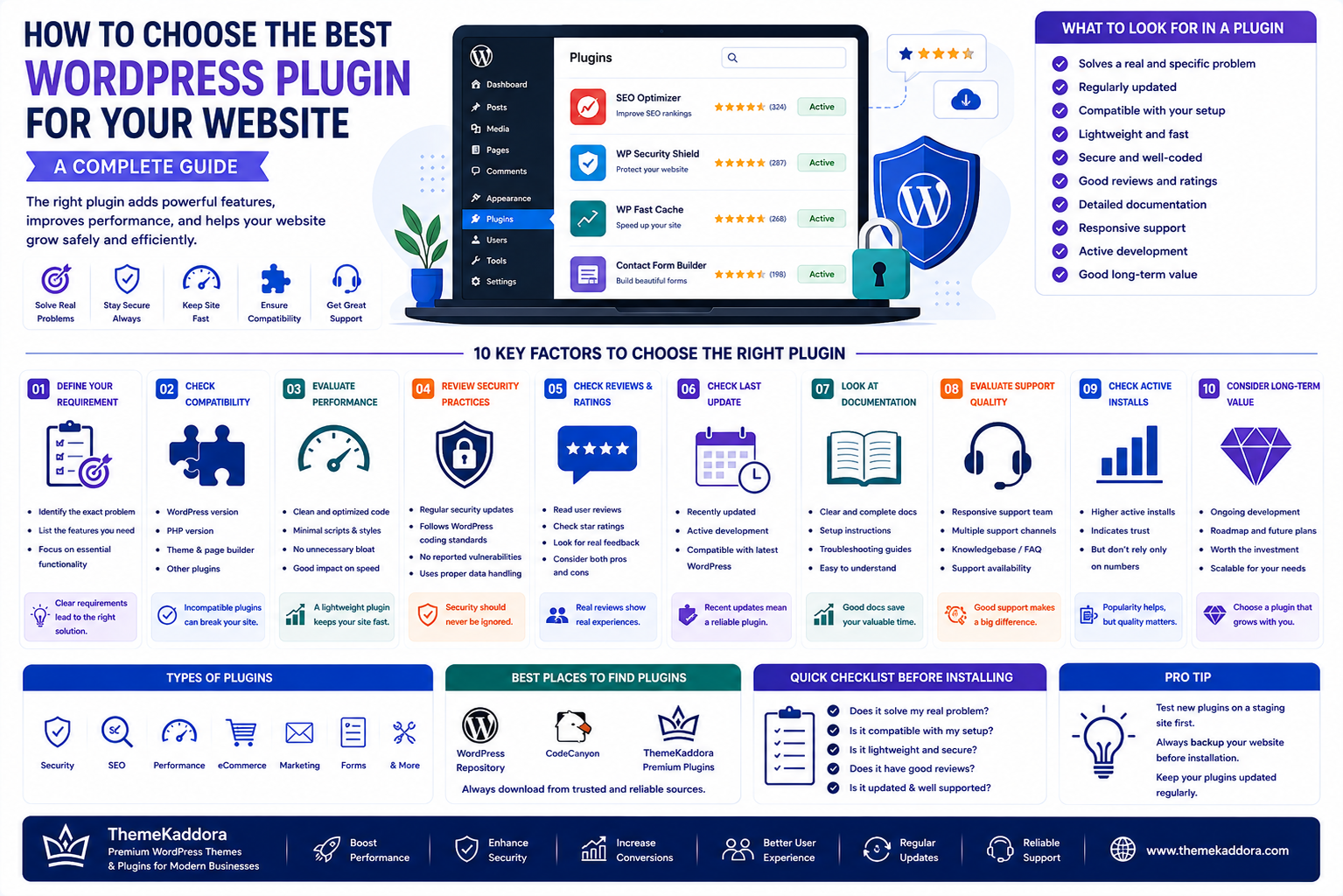
How to Choose the Best WordPress Plugin for Your Website: A Complete Guide
Introduction
WordPress plugins make it possible to add new functionality to a website without developing every feature from scratch.
Whether you want to improve SEO, add a contact form, secure your website, optimize performance, create an online store, automate marketing, or add advanced business functionality, there is likely a plugin designed for the job.
However, having thousands of available plugins creates another problem:
How do you choose the right one?
Installing the wrong plugin can lead to unnecessary features, poor performance, compatibility issues, security vulnerabilities, or difficult maintenance.
The best plugin is not necessarily the one with the largest number of installations or the longest feature list.
Instead, you should evaluate whether the plugin is:
Relevant to your needs
Secure
Well maintained
Compatible
Performant
Easy to configure
Properly documented
Supported by its developer
In this guide, you'll learn how to evaluate WordPress plugins before installing or purchasing them.
What Is a WordPress Plugin?
A WordPress plugin is a software extension that adds functionality to a WordPress website.
Plugins can provide features such as:
SEO optimization
Security
Backups
Caching
Contact forms
Analytics
eCommerce
Memberships
Marketing automation
Customer management
AI functionality
Instead of modifying WordPress core files, plugins allow functionality to be added through an extension-based architecture.
Why Plugin Selection Matters
A plugin becomes part of your website's technology stack.
A poorly selected plugin can potentially:
Slow down your website
Conflict with another plugin
Create security risks
Increase maintenance requirements
Cause unexpected errors
Make future migration more difficult
That is why plugin selection should be treated as a technical and business decision.
1. Define the Problem First
Before searching for a plugin, clearly define what you want to accomplish.
For example:
Instead of searching for:
"Best WordPress plugins"
Define the requirement as:
"I need to automatically send follow-up emails to customers after they purchase."
The second approach makes it much easier to identify relevant solutions.
Ask:
What problem am I solving?
What functionality do I actually need?
Who will use the feature?
How often will it be used?
Is the feature business-critical?
2. Avoid Installing Plugins You Don't Need
More plugins do not automatically create a better website.
Every additional plugin can introduce:
More code
More settings
More updates
More compatibility considerations
More maintenance
Install plugins because they solve genuine requirements, not simply because their features look interesting.
3. Check Plugin Compatibility
Compatibility is one of the first things to evaluate.
Check whether the plugin supports your:
WordPress version
PHP version
WooCommerce version, if applicable
Theme
Page builder
Hosting environment
Compatibility information should be clearly documented.
For business-critical websites, test new plugins in a staging environment before deploying them to production.
4. Evaluate Plugin Performance
A plugin should provide useful functionality without creating unnecessary performance problems.
Consider:
Script loading
Database queries
Asset size
Front-end impact
Admin performance
Background processes
A plugin that adds a small feature but significantly slows down every page may not be worth using.
5. Review Security Practices
Security should be a priority, especially for plugins handling:
Customer information
Payments
User accounts
Forms
Files
API credentials
Look for evidence of responsible development practices such as:
Proper input sanitization
Output escaping
Nonce protection
Capability checks
Secure database queries
Regular security updates
Users do not need to inspect every line of code, but the developer's reputation and maintenance history can provide useful signals.
6. Check Update History
A plugin that has not been updated for a long time may become incompatible with newer WordPress versions.
Check:
Last update
Update frequency
Compatibility information
Changelog
Version history
Regular maintenance is particularly important for plugins that affect security, payments, or core business processes.
7. Read Reviews Carefully
Reviews can provide valuable information, but do not judge a plugin only by its average rating.
Look for patterns in reviews.
Pay attention to comments about:
Support quality
Bugs
Performance
Compatibility
Documentation
Updates
Recent reviews may provide more useful information than very old reviews.
8. Check Active Installations Carefully
A large installation count can indicate that a plugin is widely used.
However, popularity is not a guarantee of quality.
A plugin with fewer users may still be an excellent solution for a specific business requirement.
Consider installation numbers alongside:
Updates
Reviews
Developer reputation
Compatibility
Features
Support
9. Evaluate Documentation
Good documentation makes installation and configuration easier.
Documentation should ideally explain:
Installation
Configuration
Settings
Features
Troubleshooting
Frequently asked questions
Integrations
Requirements
For advanced plugins, detailed documentation can significantly reduce implementation time.
10. Check Support Options
Support becomes especially important when a plugin is used for business-critical functionality.
Check whether the developer provides:
Documentation
Support tickets
Community support
Email support
Knowledge base
Troubleshooting guides
Understand what support is included before purchasing a premium plugin.
11. Compare Free and Premium Versions
Some plugins offer both free and premium editions.
Compare:
Features
Support
Updates
Integrations
Automation
Usage limits
Licensing
Do not assume the premium version is automatically better.
Choose the version that provides the functionality your website actually requires.
12. Understand the Pricing Model
Plugin costs can vary significantly.
Pricing may be based on:
Single-site license
Multiple-site license
Annual subscription
Lifetime license
Usage limits
Number of users
API consumption
Calculate the long-term cost rather than looking only at the initial price.
13. Check Licensing
Understand how the plugin can be used.
Check:
Number of websites allowed
License duration
Update rights
Support period
Commercial usage
Renewal terms
Clear licensing information helps prevent unexpected limitations later.
14. Consider Developer Reputation
The developer or marketplace behind a plugin can provide useful signals about quality.
Look for:
Existing products
Update history
Documentation quality
Customer feedback
Development activity
Support responsiveness
A developer with a consistent history of maintaining digital products may provide greater confidence.
15. Check Third-Party Integrations
Many modern plugins depend on external services.
Examples include:
Email providers
Payment gateways
Analytics platforms
AI APIs
CRM systems
Marketing platforms
Before installing such a plugin, understand:
What external services are used
What data may be transmitted
Whether an account is required
Whether additional costs apply
What happens if the external service becomes unavailable
Transparency is particularly important when customer or business data is involved.
16. Test Plugins Before Production
Whenever possible, test plugins in a staging environment.
Check:
Website speed
Existing functionality
Forms
Checkout
User accounts
Admin dashboard
Mobile experience
Testing can identify conflicts before they affect real visitors.
17. Consider Plugin Conflicts
Two plugins may attempt to modify the same functionality.
Potential conflict areas include:
Checkout
Caching
SEO
User authentication
Payment processing
JavaScript libraries
Database functionality
If problems appear after installing a plugin, temporarily disabling plugins can help identify conflicts.
18. Think About Long-Term Maintenance
A plugin should be evaluated based on its long-term usefulness.
Ask:
Will this plugin still be maintained as my website grows?
Consider:
Updates
Support
Compatibility
Documentation
Scalability
Developer activity
Choosing a plugin is not just a one-time decision.
It creates an ongoing dependency.
19. Avoid Feature Overlap
Sometimes multiple plugins provide nearly identical functionality.
For example, installing several plugins for:
SEO
Caching
Analytics
Security
Contact forms
may create unnecessary duplication.
Whenever possible, choose a solution that covers your actual requirements without overlapping heavily with other tools.
20. Consider Scalability
A plugin that works for a small website may not be suitable for a large business.
Consider future requirements such as:
More users
More products
More orders
More traffic
Multiple websites
Advanced integrations
Business-critical plugins should be able to support realistic growth.
21. Look for a Good User Experience
A plugin's admin interface matters.
Good plugins should make important settings easy to understand.
Look for:
Clear menus
Logical settings
Helpful descriptions
Useful notifications
Simple configuration
Accessible controls
Complexity should be justified by functionality.
22. Review Data and Privacy Considerations
If a plugin collects or processes personal information, understand how that data is handled.
Consider:
What information is collected
Where it is stored
Whether data is sent to external services
Retention practices
User controls
Applicable privacy requirements
Businesses should evaluate privacy obligations relevant to their location and customers.
23. Don't Ignore the Developer Documentation
Technical documentation can reveal important information that marketing pages do not.
Look for:
System requirements
Hooks and filters
APIs
Integrations
Database behavior
Troubleshooting
Upgrade instructions
This information is particularly valuable for developers managing complex WordPress projects.
24. Use a Plugin Evaluation Checklist
Before installing a plugin, ask:
Functionality
Does it solve my actual problem?
Does it provide the required features?
Technical
Is it compatible?
Is it performant?
Is it actively maintained?
Security
Does the developer follow good security practices?
Does it handle sensitive data responsibly?
Support
Is documentation available?
Is support accessible?
Business
What is the total cost?
Is the license suitable?
Can it scale?
25. Choose Digital Products From a Reliable Marketplace
A marketplace can make product discovery easier by bringing multiple digital solutions together.
When evaluating a marketplace, look for:
Clear product descriptions
Feature lists
Screenshots
Live previews where applicable
Documentation
Compatibility information
Licensing details
Update information
Support information
These details help customers make informed decisions instead of purchasing based solely on screenshots.
ThemeKaddora: Discover Digital Products for Modern Websites
ThemeKaddora is focused on providing digital products for businesses, developers, freelancers, agencies, and entrepreneurs.
A digital marketplace can bring different solutions together, including:
WordPress plugins
WordPress themes
WooCommerce solutions
Website templates
SaaS products
Business tools
UI resources
Digital assets
The objective is to make it easier to discover practical solutions for modern websites and online businesses.
Instead of building every feature from scratch, users can evaluate ready-made digital products and choose solutions that fit their specific requirements.
What Makes a Quality WordPress Plugin?
A high-quality plugin should focus on more than functionality.
Important characteristics include:
Reliable Development
The plugin should be built using appropriate WordPress development practices.
Performance
It should avoid unnecessary resource usage.
Security
It should protect data and follow secure development principles.
Compatibility
It should work with supported WordPress and related technologies.
Documentation
Users should be able to understand installation and configuration.
Maintenance
The product should receive appropriate updates and fixes.
Usability
The interface should make functionality easy to understand.
Common WordPress Plugin Selection Mistakes
Installing Too Many Plugins
More plugins can increase complexity and maintenance.
Choosing Only by Rating
Ratings provide useful signals but should not be the only consideration.
Ignoring Compatibility
A plugin may conflict with your current technology stack.
Ignoring Updates
Unmaintained plugins can become problematic over time.
Buying Without Checking Licensing
The cheapest license may not meet your long-term requirements.
Not Testing
Always test important plugins before deploying them to a production website when practical.
Conclusion
Choosing the right WordPress plugin requires more than searching for the highest-rated option.
Start with your actual business requirement.
Then evaluate functionality, compatibility, performance, security, updates, documentation, support, pricing, licensing, integrations, and scalability.
Remember that every plugin becomes part of your website's technology stack.
The best plugin is therefore not necessarily the one with the most features.
It is the one that solves your problem reliably without creating unnecessary complexity.
For businesses and developers exploring digital solutions, a focused marketplace such as ThemeKaddora can make it easier to discover themes, plugins, templates, WooCommerce solutions, and other products for modern web projects.
Choose carefully, test before deployment, and prioritize long-term value over short-term features.
Frequently Asked Questions
1. How do I choose the right WordPress plugin?
Start by defining your specific requirement, then evaluate functionality, compatibility, performance, security, updates, support, pricing, and scalability.
2. Are more WordPress plugins better?
No. Install only plugins that provide genuine value and avoid unnecessary feature duplication.
3. How do I know if a plugin is safe?
Review its maintenance history, developer reputation, security practices, user feedback, documentation, and update activity.
4. Should I test a plugin before installing it?
For important websites, testing in a staging environment is strongly recommended when practical.
5. What should I check before buying a premium plugin?
Review features, compatibility, licensing, renewal costs, support, updates, documentation, and integrations.
6. Can plugins slow down WordPress?
Yes. Poorly optimized or unnecessary plugins can affect performance.
7. How often should WordPress plugins be updated?
Plugins should generally be kept updated according to the developer's maintenance releases, while testing important updates before production deployment when practical.
8. What is plugin compatibility?
Compatibility means the plugin works correctly with your WordPress version, PHP version, theme, plugins, and other relevant technologies.
9. Why is plugin documentation important?
Documentation makes installation, configuration, troubleshooting, and maintenance easier.
10. What is ThemeKaddora?
ThemeKaddora is a digital marketplace focused on themes, plugins, templates, WooCommerce solutions, and other digital products for modern websites and online businesses.
Comments (0)