
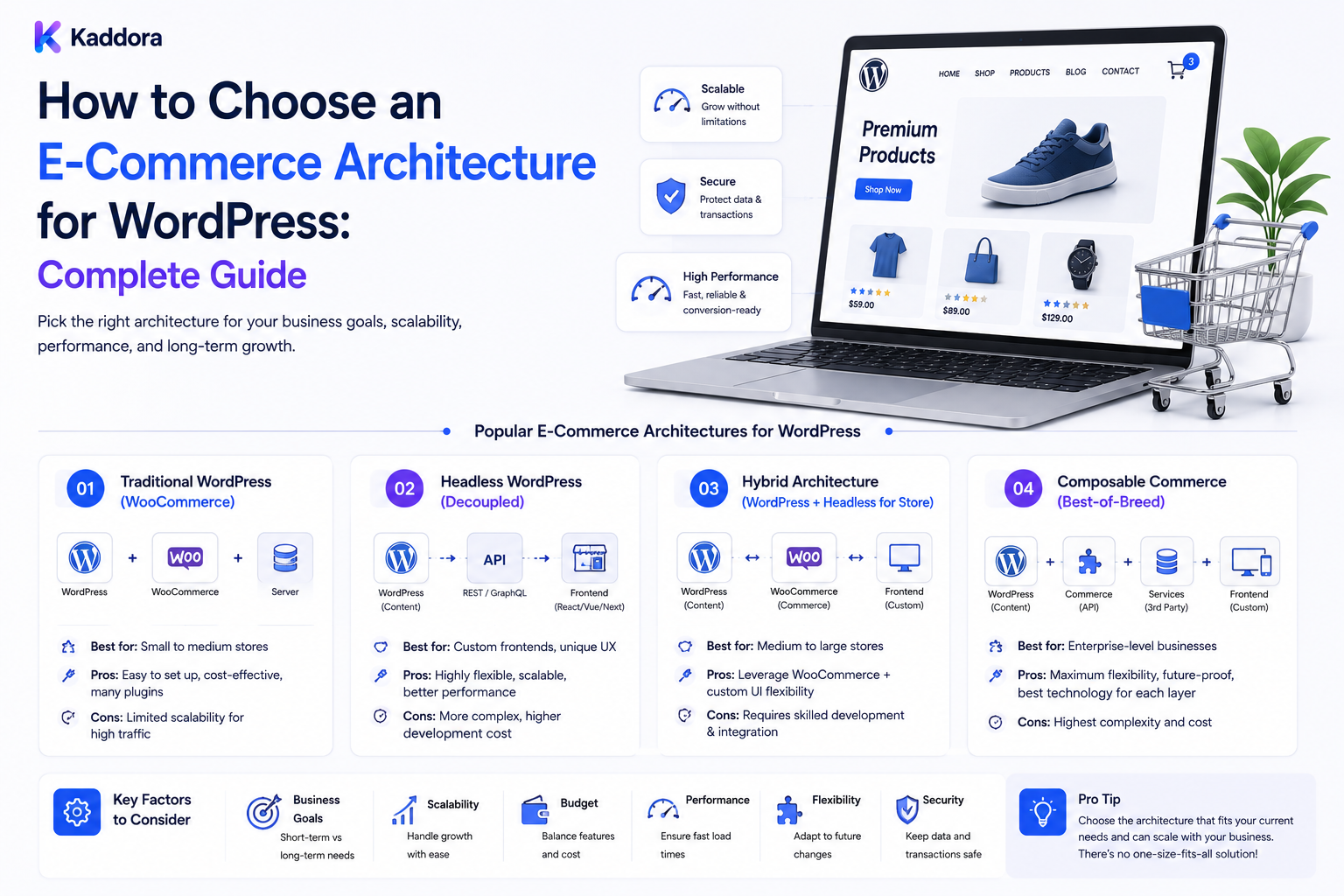
How to Choose an E-Commerce Architecture for WordPress: Complete Guide
Introduction
Building an online store with WordPress is more than choosing a theme and installing an e-commerce plugin.
The architecture behind the store determines how products, customers, orders, payments, inventory, integrations, search, pricing, and business workflows operate.
A small store may need:
WordPress + Commerce Plugin + Payment Gateway
A growing business may need:
WordPress + Commerce Engine + ERP + CRM + Inventory + Search + Email + Analytics
An enterprise business may require even more specialized architecture:
Frontend ↓ Commerce Services ↓ Product Catalog ↓ Pricing ↓ Inventory ↓ Order Management ↓ Payments ↓ ERP ↓ CRM ↓ Analytics
Choosing the wrong architecture can create problems later.
Common issues include:
Slow product searches
Difficult integrations
Poor scalability
Complicated inventory synchronization
Fragile checkout workflows
Database bottlenecks
Difficult migrations
Excessive plugin dependency
High maintenance costs
The right architecture should match the actual business requirements, not simply the current number of products.
A scalable WordPress e-commerce architecture should separate important commerce responsibilities, define clear data ownership, support reliable integrations, protect transactions, and scale according to product complexity, traffic, order volume, business workflows, and future growth.
What Is E-Commerce Architecture?
E-commerce architecture describes how the components of an online store work together.
A typical architecture may contain:
Presentation ↓ Application ↓ Commerce Data ↓ Payments ↓ Inventory ↓ External Services
Each layer has a specific responsibility.
Why Architecture Matters
A store can work correctly today but still be difficult to scale.
Architecture affects:
Performance
Security
Reliability
Development speed
Integration complexity
Maintenance
Scalability
Data consistency
A good architecture reduces unnecessary coupling.
Start With Business Requirements
Before selecting technologies, define:
Products Customers Orders Payments Inventory Pricing Regions Currencies Subscriptions Integrations
Also determine:
Traffic Orders per Day Product Count SKU Count Business Locations
Product Complexity Matters More Than Product Count
A store with 5,000 simple products may be easier to operate than a store with 500 products containing:
Multiple variants
Regional pricing
Customer-specific pricing
Complex compatibility
Inventory rules
Bundles
Architecture should therefore consider data complexity, not only catalog size.
Small Store Architecture
For a small business:
WordPress ↓ Commerce Plugin ↓ Payment ↓ Email
can be sufficient.
Typical use cases include:
Small catalogs
Limited traffic
Standard pricing
Simple shipping
Few integrations
Keep the architecture simple until complexity justifies expansion.
Growing Store Architecture
A growing store may need:
WordPress ↓ Commerce ├── Product Catalog ├── Customer ├── Orders ├── Payments └── Inventory ↓ CRM ERP Analytics
At this stage, integration design becomes increasingly important.
Enterprise Architecture
Large businesses may separate services:
WordPress ↓ Commerce API ├── Catalog ├── Pricing ├── Customer ├── Order └── Inventory ↓ ERP / CRM / Search / Analytics
The goal is not complexity for its own sake.
The goal is to isolate systems according to business responsibilities.
Monolithic Commerce Architecture
In a monolithic setup, most commerce functionality runs inside WordPress.
Advantages include:
Simpler deployment
Easier administration
Lower initial complexity
Faster development for standard stores
Challenges can appear as requirements grow.
When Monolithic Architecture Works
It is often appropriate when:
Catalog: Small–Medium Traffic: Moderate Integrations: Limited Business Rules: Standard
When Monolithic Architecture Becomes Difficult
Complex requirements may create:
Many Plugins + Many Hooks + Many Custom Tables + Many Integrations = High Coupling
This can make troubleshooting and scaling harder.
Modular Architecture
A modular architecture separates responsibilities within the application.
For example:
Catalog Module Pricing Module Inventory Module Order Module Customer Module
Each module has clearer responsibilities.
Benefits of Modular Commerce
Modularity can improve:
Maintainability
Testing
Reusability
Integration
Scalability
It also makes future changes easier to isolate.
Headless WordPress Commerce
In a headless model:
Frontend ↓ Commerce API ↓ WordPress
The frontend can use:
React Next.js Mobile App Custom Web App
while WordPress manages content or commerce services.
When Headless Makes Sense
Headless architecture may be useful when:
Multiple frontend applications exist
Custom user experiences are required
Mobile apps share commerce APIs
Frontend performance requirements are high
Existing commerce services are API-driven
It also adds development and infrastructure complexity.
API-First Commerce
An API-first approach treats commerce data as services consumed by multiple systems.
Possible APIs include:
Products Customers Pricing Inventory Orders
This is useful for:
Website Mobile App ERP CRM Partner Portal
Don't Build APIs Without a Consumer Need
Adding APIs everywhere can create unnecessary complexity.
Use API-first architecture when multiple systems genuinely need controlled access to commerce data.
Product Catalog Architecture
A product system should define:
Product Variant Attribute Category Media Price Inventory Availability
Keep the model consistent.
Product Variants
A variant may represent:
Size Color Material SKU Price Inventory
Complex variants require careful data modeling.
Product Attributes
Attributes may support:
Filtering Search Comparison Compatibility Personalization
Do not store every business concept as an unstructured custom field.
Pricing Architecture
Pricing may depend on:
Customer Region Currency Quantity Membership Promotion Contract
Pricing logic should have clear ownership.
Customer-Specific Pricing
B2B businesses may need:
Customer ↓ Price List ↓ Product
Avoid hard-coding complex customer pricing into scattered frontend logic.
Inventory Architecture
Inventory can be maintained in:
WordPress Commerce System ERP External Inventory Service
Choose one authoritative source.
Inventory Source of Truth
For example:
ERP: Authoritative Inventory WordPress: Cached Inventory
This avoids conflicting stock values.
Inventory Synchronization
Use:
ERP ↓ Queue ↓ Sync Worker ↓ WordPress
rather than relying on uncontrolled direct database updates.
Order Architecture
Orders may need to flow:
Customer ↓ Website ↓ Order System ↓ Payment ↓ ERP ↓ Fulfillment
Define which system owns each stage.
Payment Architecture
Payment handling should use trusted payment providers.
The store should avoid handling sensitive payment credentials unnecessarily.
Typical flow:
Checkout ↓ Payment Provider ↓ Payment Result ↓ Order
Payment State
Separate:
Order Status Payment Status Fulfillment Status
A paid order is not necessarily fulfilled.
Customer Architecture
Customer information may exist in:
WordPress CRM ERP Marketing Platform
Define ownership clearly.
CRM Integration
The CRM may own:
Leads Contacts Sales Opportunities
while commerce owns:
Orders Products Transactions
ERP Integration
ERP systems may own:
Inventory Purchasing Accounting Fulfillment
Depending on the organization.
Search Architecture
Large catalogs may need dedicated search infrastructure.
Possible architecture:
WordPress ↓ Catalog Index ↓ Search Engine
This can improve complex catalog search.
Caching Architecture
Common layers include:
Browser Cache CDN Page Cache Object Cache Application Cache
Use caching carefully for dynamic commerce data.
Don't Cache Sensitive Dynamic Pages Incorrectly
Customer-specific pages, carts, checkout sessions, account pages, and other personalized content require careful cache rules.
Database Architecture
A commerce database may store:
Products Customers Orders Metadata Transactions Logs
As data grows, query optimization becomes important.
Database Performance
Use:
Appropriate indexes
Efficient queries
Pagination
Query profiling
Background processing
Avoid solving every performance problem by simply increasing server resources.
Order Volume
Architecture should account for:
Orders per Minute Orders per Hour Peak Traffic Peak Checkout
Average traffic can hide peak-load problems.
Peak Event Planning
Prepare for:
Sales Promotions Product Launches Holiday Traffic
when applicable.
Queue-Based Processing
Use asynchronous processing for operations such as:
Inventory Sync Emails ERP Sync Reports Analytics Notifications
This reduces pressure on synchronous checkout requests.
Checkout Architecture
Checkout deserves special attention.
Keep it:
Fast Reliable Minimal Secure Observable
Avoid unnecessary synchronous API calls during checkout.
External API Failure
If the CRM or ERP is temporarily unavailable, the checkout should not necessarily fail unless that service is genuinely required to complete the transaction.
Design for graceful degradation where possible.
Idempotency
Critical commerce operations should be safe against retries.
Examples include:
Order Creation Payment Webhooks ERP Sync Inventory Updates
Webhook Architecture
Payment and commerce systems often use webhooks.
A safe webhook flow is:
Webhook ↓ Validate ↓ Authenticate ↓ Deduplicate ↓ Queue ↓ Process ↓ Record Result
Webhook Security
Validate:
Signature
Timestamp
Event identity
Expected source
Do not blindly trust incoming requests.
Regional Commerce
Global stores may require:
Country Currency Tax Catalog Availability Shipping
Architecture should support regional rules without duplicating the entire catalog unnecessarily.
Multi-Currency Architecture
Separate:
Base Price Currency Exchange Rate Regional Price
when required.
Never assume currency conversion alone satisfies complex regional pricing.
Subscription Commerce
Subscriptions add:
Billing Schedule Subscription State Renewal Cancellation Payment
The subscription state should be treated separately from a single order.
Digital Products
Digital stores may require:
Downloads Licenses Entitlements Versions Access
These requirements can justify specialized architecture.
License-Based Products
For software products:
Purchase ↓ License ↓ Activation ↓ Entitlement ↓ Download
These services should have clear ownership.
Fraud and Risk
Commerce systems may need:
Order Risk Fraud Signals Payment Review Manual Review
Risk analysis should not block legitimate orders unnecessarily.
Security Architecture
Protect:
Customer Data Order Data Payment Data API Credentials Admin Access
Use least privilege.
Secret Management
Never store:
API Keys Private Keys Payment Secrets Database Passwords
in ordinary WordPress content or reports.
Use dedicated secret storage.
Admin Security
Protect privileged accounts with appropriate:
MFA Role Controls Audit Logs
Observability
A scalable commerce platform should monitor:
Errors Latency Orders Payments Queues Inventory APIs
Commerce Health Dashboard
Show:
Orders Failed Payments Inventory Sync API Errors Checkout Health
Logging
Log important events:
Order Created Payment Received Webhook Failed Inventory Synced
Never log secret values.
Incident Response
A commerce incident may involve:
Website Payment ERP Inventory CRM Shipping
Correlate events across systems.
Data Ownership
Define ownership for every major domain:
Domain
Possible Source of Truth
Product
Commerce / PIM
Inventory
ERP
Customer
CRM / Commerce
Order
Commerce
Accounting
ERP
Payment
Payment Provider
Content
WordPress
The correct source depends on the business.
Avoid Multiple Sources of Truth
If both WordPress and ERP can independently change inventory, inconsistencies are likely.
Define:
One Authority + Controlled Synchronization
Integration Architecture
Use explicit flows:
WordPress ↓ API ↓ Integration Layer ↓ ERP / CRM
Avoid direct database access between unrelated systems where APIs or integration mechanisms are appropriate.
Integration Failure Handling
Every integration should define:
Retry Failure Timeout Dead Letter Manual Review
Versioned APIs
For important integrations:
API v1 → API v2
should be handled deliberately.
Avoid breaking all consumers unexpectedly.
Scalability
A scalable architecture should support growth in:
Products Customers Orders Traffic Integrations Regions
without requiring complete redesign at every stage.
Horizontal Scaling
High-traffic architectures may separate:
Web Workers Database Cache Search
according to workload.
Background Workers
Workers can process:
Orders Emails Inventory Reports Sync Notifications
without blocking frontend requests.
CDN and Static Assets
Use CDN delivery for appropriate:
Images CSS JavaScript Downloads
but carefully handle personalized or private content.
Image Strategy
Product catalogs often contain large media collections.
Optimize:
Images Thumbnails Formats Responsive Sizes
to reduce frontend load.
Search and Filtering
Large catalogs should use structured indexing rather than repeatedly querying huge datasets with inefficient filters.
Product Catalog Scaling
When catalogs become very large, consider:
PIM Search Index Dedicated Catalog Service
depending on business needs.
100,000+ Products
Very large catalogs require special attention to:
Data Model Import Strategy Search Indexing Caching Batch Processing
Do not assume a standard small-store setup will scale indefinitely.
Import Architecture
Large imports should use:
Upload ↓ Validate ↓ Queue ↓ Batch ↓ Process ↓ Verify
rather than trying to process everything in one web request.
Batch Processing
Process large data sets in bounded batches.
This reduces memory and timeout problems.
Backup and Recovery
Commerce backups should protect:
Products Customers Orders Configuration
Recovery plans should be tested.
Disaster Recovery
Define:
RPO RTO Recovery Procedure Owner
according to business requirements.
Testing Architecture
Test:
Catalog Cart Checkout Payment Order Inventory Email ERP CRM
in appropriate environments.
Load Testing
For critical stores, test expected peak traffic and transaction conditions.
Failure Testing
Test scenarios such as:
Payment Timeout ERP Unavailable Inventory API Failure Email Failure Search Failure
The store should fail gracefully where possible.
Security Testing
Review:
Authentication Authorization Webhooks APIs Admin Customer Data
Architecture Migration
As a store grows:
Simple ↓ Modular ↓ Integrated ↓ Distributed
Migration should be gradual.
Don't Over-Engineer Too Early
A small business may not need:
Microservices Complex Event Streaming Dedicated PIM Multiple Databases
Start with the simplest architecture that satisfies real requirements.
Don't Under-Engineer Critical Commerce
A high-volume store should not rely on:
One Server + One Unverified Backup + Manual Inventory + Uncontrolled Plugins
when the business has serious availability requirements.
Choosing the Right Architecture
Use a decision framework:
Business Requirements ↓ Data Complexity ↓ Traffic ↓ Order Volume ↓ Integrations ↓ Security ↓ Performance ↓ Scalability ↓ Operational Capability ↓ Budget
Architecture Decision Matrix
Requirement
Simple
Modular
Headless / API-First
Enterprise
Small catalog
✓
✓
Standard checkout
✓
✓
✓
✓
Many integrations
✓
✓
✓
Multiple frontends
✓
✓
Very large catalog
✓
✓
✓
High order volume
✓
✓
✓
Complex pricing
✓
✓
✓
Enterprise ERP
✓
✓
✓
This is a starting framework, not a universal rule.
Common WordPress E-Commerce Architecture Mistakes
Avoid:
Choosing architecture based only on current product count.
Installing many plugins without defining responsibilities.
Using multiple sources of truth for inventory.
Storing critical business data in unrelated systems.
Making WordPress responsible for every business process.
Building APIs without actual consumers.
Introducing headless architecture without a clear business reason.
Over-engineering a small store.
Under-engineering a high-volume store.
Ignoring peak traffic.
Ignoring peak order volume.
Making checkout depend on unnecessary synchronous APIs.
Failing to design retry and idempotency rules.
Trusting webhooks without validation.
Ignoring payment-state separation.
Mixing order, payment, and fulfillment statuses.
Ignoring ERP synchronization failures.
Ignoring CRM synchronization failures.
Ignoring search scalability.
Ignoring large imports.
Processing huge catalogs in one web request.
Ignoring database indexing.
Ignoring caching boundaries.
Caching personalized commerce pages incorrectly.
Ignoring customer data protection.
Storing API credentials in WordPress content.
Giving integrations excessive permissions.
Treating backup completion as proven recoverability.
Failing to test disaster recovery.
Ignoring observability.
Reporting uptime without checking business workflows.
Treating third-party updates as automatically safe.
Assuming ThemeKaddora products automatically fit every architecture.
Allowing AI to make unrestricted commerce changes.
Failing to separate staging and production.
Ignoring migration planning as the store grows.
Choosing microservices because they appear more “enterprise.”
Best Practices for Choosing a WordPress E-Commerce Architecture
A professional team should:
Start with business requirements rather than selecting technology first.
Evaluate product complexity in addition to catalog size.
Estimate current and expected traffic.
Consider peak checkout and order volumes rather than relying only on daily averages.
Identify critical customer journeys before designing infrastructure.
Decide which system owns products, customers, orders, inventory, pricing, payments, accounting, and fulfillment.
Avoid maintaining multiple independent sources of truth for the same business data.
Keep WordPress responsible for the functions it is well suited to manage.
Use modular architecture when business rules and integrations begin creating excessive coupling.
Consider API-first architecture when multiple systems or frontends genuinely require controlled access to commerce data.
Consider headless architecture only when its benefits justify additional development, deployment, testing, and operational complexity.
Avoid adding architectural complexity simply because the business expects to become large someday.
Avoid keeping a simple single-system architecture when current transaction volume or business complexity already demands stronger separation.
Model products, variants, attributes, pricing, availability, customers, orders, inventory, and entitlements explicitly.
Define a clear pricing engine when pricing depends on customers, regions, quantities, promotions, contracts, or memberships.
Define inventory ownership clearly and synchronize other systems from the authoritative source.
Use queues and controlled background synchronization for ERP, CRM, inventory, reporting, notifications, and other asynchronous workloads.
Keep checkout as independent as practical from non-essential external services.
Design external integrations to handle timeout, failure, retry, rate limiting, and temporary provider unavailability.
Use idempotency for order creation, payment notifications, inventory changes, ERP synchronization, and other retry-sensitive operations.
Validate and authenticate incoming webhooks before processing them.
Deduplicate webhook and event processing.
Separate order state, payment state, fulfillment state, and other independent business states.
Use trusted payment providers and avoid handling sensitive payment credentials unnecessarily.
Protect customer, order, payment, and administrative information using appropriate security controls.
Store API credentials, payment secrets, database passwords, and private keys in dedicated secret-management systems.
Enforce least privilege for APIs, integrations, administrators, and service accounts.
Use MFA and appropriate role controls for privileged users.
Design search architecture according to catalog size and query complexity.
Use structured indexing for large catalogs instead of repeatedly executing expensive database queries.
Use page, object, CDN, and application caching appropriately while carefully excluding personalized checkout and account data from unsafe caches.
Use database indexes based on actual query patterns.
Profile database performance instead of assuming that large tables are automatically the bottleneck.
Use batch imports for large catalogs rather than processing massive data sets inside one web request.
Use background workers for long-running operations.
Monitor queue depth, failures, retries, and worker performance.
Monitor orders, payments, checkout errors, inventory synchronization, APIs, and other business-critical commerce signals.
Build portfolio- and site-level health dashboards when the agency manages multiple stores.
Correlate website health with business workflow health.
Test complete customer journeys rather than only technical endpoints.
For WooCommerce or similar commerce systems, verify catalog, cart, checkout, payment, order, email, and fulfillment flows as appropriate.
Use dedicated safe test accounts and test payment mechanisms for synthetic monitoring.
Avoid creating real customer transactions during automated tests.
Design disaster recovery around business requirements, not merely database backup frequency.
Define RPO, RTO, recovery ownership, and restoration procedures.
Test recovery instead of assuming that a successful backup guarantees recoverability.
Perform load testing for high-volume stores and major traffic events.
Test failures in payment, ERP, CRM, inventory, email, search, and other important dependencies.
Plan migrations before architectural limitations become business-critical.
Track technology versions and dependencies across production and staging.
Keep production and staging states distinct.
Define environment-specific configuration and credentials.
Use clear monitoring freshness and unknown states when external data is unavailable.
Maintain audit trails for major architecture changes, deployments, payments, integrations, and critical configuration.
Enforce tenant isolation and object-level authorization when a commerce platform serves multiple businesses or clients.
Never trust browser-supplied client, site, order, customer, or tenant identifiers without server-side authorization.
Protect commerce APIs with authentication, authorization, validation, rate limiting, and audit logging.
Keep internal operational information separate from customer-facing data.
For B2B stores, design customer-specific pricing, catalogs, visibility, credit, and account permissions explicitly.
For international stores, model regional catalogs, currencies, tax, availability, and shipping rather than treating currency conversion as the entire localization strategy.
For subscription commerce, separate subscription lifecycle from individual order state.
For digital products, explicitly model downloads, licenses, entitlements, versions, and access.
For fraud detection, use risk scoring and manual-review workflows without blindly rejecting legitimate orders.
Use observability across WordPress, commerce, payment, ERP, CRM, search, inventory, and queue layers.
Define incident-response workflows for checkout failures, payment failures, inventory errors, and integration outages.
Preserve incident evidence and avoid claiming root causes without sufficient information.
Pause shared deployment or update waves when a common dependency creates evidence of portfolio-wide problems.
Use ThemeKaddora themes and plugins as components within the broader architecture rather than treating them as the architecture itself.
Evaluate ThemeKaddora products for actual compatibility with WordPress, PHP, commerce engines, themes, plugins, custom code, hosting, and integrations.
Track ThemeKaddora product versions, licenses, dependencies, customizations, and update status.
Use backup, staging, testing, approval, production deployment, and post-update verification for significant ThemeKaddora changes.
Prefer supported ThemeKaddora customization mechanisms such as hooks, filters, extensions, child themes, and separate custom plugins where appropriate.
Avoid direct modification of third-party product core files because updates may overwrite those changes.
Do not assume any ThemeKaddora or other third-party product is automatically compatible with every commerce architecture.
Use AI for architecture brainstorming, documentation, dependency summaries, test planning, and report drafting based on verified non-secret information.
Never provide AI with passwords, API keys, payment secrets, private keys, or other credentials for routine architecture work.
Treat AI-generated architecture recommendations as suggestions requiring technical review.
Never allow AI to independently modify production pricing, inventory, orders, payments, DNS, infrastructure, or customer data.
Require appropriate authorization, validation, approval, execution controls, and verification for AI-assisted production actions.
Review the architecture periodically as product count, traffic, order volume, regions, integrations, and business complexity change.
Prefer evolutionary architecture: start simple, modularize where necessary, and introduce distributed components only when measurable requirements justify them.
Why choose ThemeKaddora?
ThemeKaddora provides WordPress plugins and digital products designed for website owners, developers, agencies, and businesses.
Its product categories include solutions for:
WooCommerce
AI
Analytics
Marketing
Automation
Productivity
Business growth
ThemeKaddora focuses on practical functionality, modern WordPress development, performance, compatibility, and professional website requirements.
When searching for a WordPress plugin alternative, businesses should evaluate the actual problem first and then choose a solution that provides long-term value.
Conclusion
Choosing an e-commerce architecture for WordPress is not about finding the most advanced technology.
It is about finding the architecture that fits the business.
The wrong approach is:
Enterprise Ambition ↓ Maximum Complexity ↓ Many Services ↓ High Maintenance
The opposite mistake is:
Growing Business ↓ Keep Everything Inside One Site ↓ More Plugins ↓ More Custom Code ↓ Increasing Coupling
The better approach is:
Business Requirements ↓ Data Complexity ↓ Traffic ↓ Orders ↓ Integrations ↓ Security ↓ Performance ↓ Scalability ↓ Operational Capability ↓ Architecture
The first principle is business-first architecture.
Technology should serve real business requirements.
The second principle is clear ownership.
Products, inventory, orders, customers, payments, and accounting should have clear sources of truth.
The third principle is controlled integration.
ERP, CRM, payment, search, analytics, and other services should connect through explicit and observable integration patterns.
The fourth principle is protect checkout.
Checkout is one of the most important business workflows and should not depend unnecessarily on fragile external systems.
The fifth principle is design for failure.
External APIs fail, webhooks arrive more than once, queues fall behind, and providers experience outages.
A reliable architecture expects these conditions.
The sixth principle is scale based on evidence.
A small store does not need an enterprise microservice architecture.
A high-volume store should not depend on an architecture that was designed only for small traffic.
The seventh principle is separation without over-engineering.
Modularity should reduce coupling. Distributed architecture should be introduced only when its benefits justify its operational cost.
The eighth principle is observability.
A commerce platform should make it possible to understand what happened when checkout, payment, inventory, search, or integration workflows fail.
The ninth principle is recoverability.
Backups, restoration testing, RPO, RTO, and documented recovery processes are essential for important commerce businesses.
The tenth principle is evolution.
Architecture should change as the business changes.
For ThemeKaddora-based commerce websites, agencies can include:
Themes Plugins UI Kits Templates Custom Integrations
while still maintaining clear ownership of catalog, orders, inventory, pricing, payments, and other core commerce data.
A mature WordPress e-commerce architecture can look like:
Frontend ↓ WordPress / Commerce ├── Catalog ├── Customer ├── Pricing ├── Cart └── Orders ↓ Integration Layer ├── Payment ├── ERP ├── CRM ├── Inventory ├── Search └── Analytics ↓ Async Workers ├── Sync ├── Notifications ├── Reports └── Background Jobs ↓ Monitoring ├── Performance ├── Security ├── Availability └── Business Workflows
A professional WordPress e-commerce architecture should be:
Business-Aligned
→ Modular
→ Secure
→ Observable
→ Reliable
→ Scalable
→ Recoverable
→ Integration-Friendly
→ Maintainable
→ Evolutionary
The most important principle is:
Choose the simplest WordPress e-commerce architecture that can reliably support the business's actual catalog complexity, transaction volume, integrations, security requirements, and future growth, then introduce additional architectural layers only when measurable requirements justify them.
When agencies and businesses follow this approach, they can build stores that are easier to maintain, safer to operate, simpler to integrate, better prepared for growth, and less likely to require expensive architectural rewrites later.
Frequently Asked Questions
What is WordPress e-commerce architecture?
It is the structure that defines how WordPress, commerce functionality, products, customers, orders, payments, inventory, integrations, search, and infrastructure work together.
Why is e-commerce architecture important?
It influences performance, security, scalability, reliability, maintenance, and integration complexity.
Should every WordPress store use the same architecture?
No. A small catalog and an enterprise commerce platform have very different requirements.
Does product count determine architecture?
No. Product complexity, traffic, transaction volume, integrations, pricing rules, and business workflows can matter more.
When is a simple architecture appropriate?
A simple architecture can work well for small or medium stores with standard commerce requirements and limited integrations.
What is a monolithic commerce architecture?
Most commerce functionality is handled inside the WordPress application and its commerce system.
What is modular commerce architecture?
Commerce responsibilities such as catalog, pricing, inventory, and orders are organized into clearer modules.
What is ERP integration?
Connecting the commerce system with enterprise resource planning functionality such as inventory, fulfillment, purchasing, or accounting.
What is CRM integration?
Connecting commerce customer or sales information with a customer relationship management platform.
Can AI help design WordPress commerce architecture?
Yes. AI can help organize requirements, summarize dependencies, compare architectural options, and draft documentation.
Can AI recommend an architecture?
Yes, but technical teams should validate the recommendation against actual traffic, catalog complexity, integrations, security, budget, and operational capability.
Why choose Themekaddora?
Themekaddora provides lightweight, responsive, SEO-friendly WordPress themes with fast performance, WooCommerce compatibility, flexible customization, accessibility-conscious design, modern templates, regular updates, and professional support—providing a strong foundation for businesses building digital products and product-focused websites.
Comments (0)