
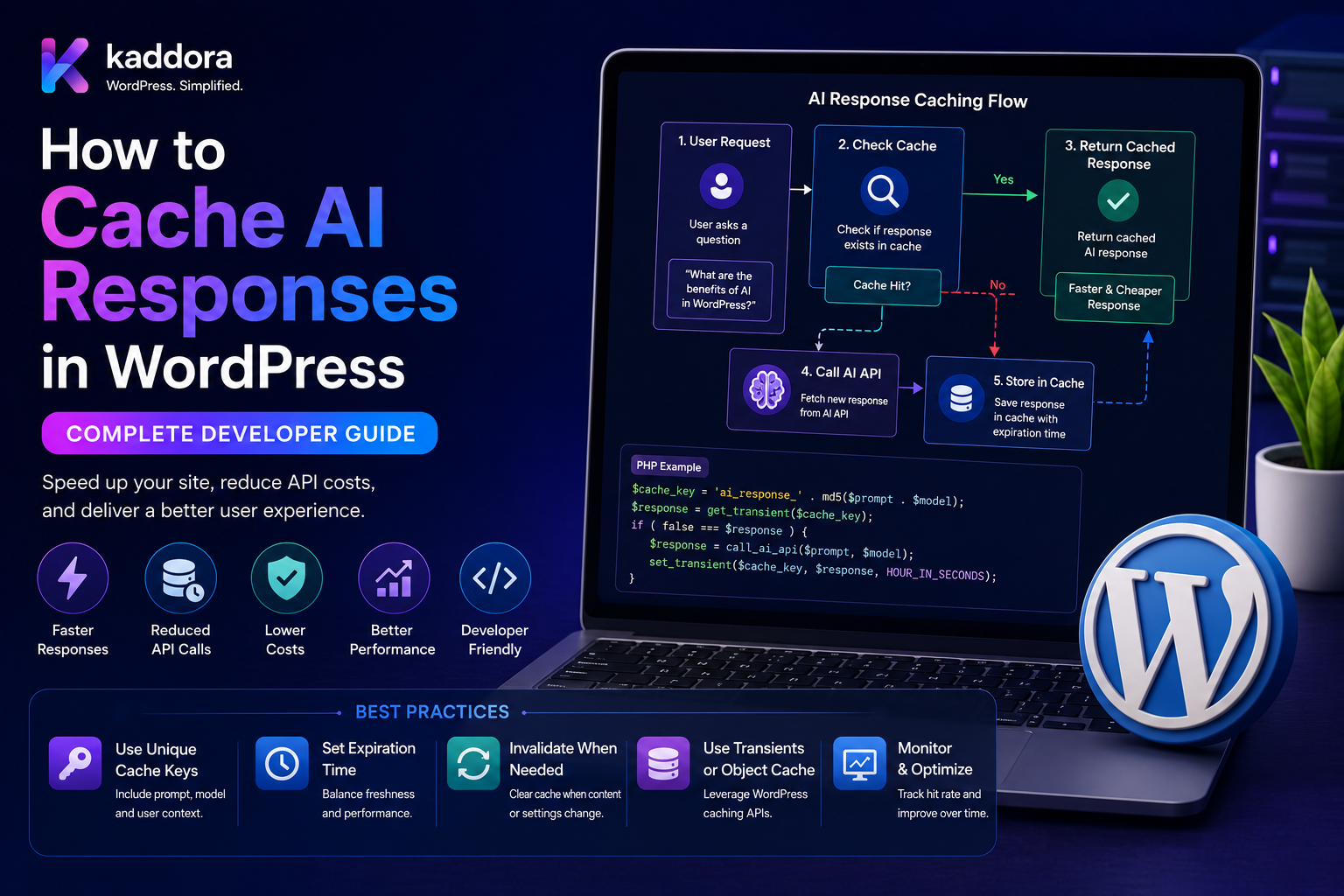
How to Cache AI Responses in WordPress: Complete Developer Guide
Introduction
AI-powered WordPress plugins can become expensive and slow when every user action creates a new API request.
Consider this workflow:
User ↓ WordPress Plugin ↓ AI API ↓ Model ↓ Response
If the same content is analyzed repeatedly, the plugin may generate the same or very similar request multiple times.
For example:
Post #100 ↓ SEO Analysis ↓ AI Request
A few minutes later:
Post #100 ↓ Same SEO Analysis ↓ AI Request Again
This can increase:
API Cost Latency Provider Usage Server Load
Caching can improve the architecture:
User Request ↓ Cache Lookup ↓ Cache Hit? ├── Yes → Return Cached Result └── No ↓ AI API ↓ Validate ↓ Cache ↓ Return
However, AI caching is not as simple as storing the response for a fixed number of minutes.
AI results can depend on:
Input Prompt Model Provider Temperature / Sampling Context Retrieved Documents User Site Tenant Schema Version Business Rules
A safe WordPress AI cache therefore needs careful cache-key design, invalidation, privacy controls, validation, and expiration policies.
The key principle is:
Cache validated AI results only when the request is safely repeatable, and make the cache key include every meaningful input that can change the result.
What Is AI Response Caching?
AI response caching stores a validated AI result so the plugin can reuse it instead of making another identical or equivalent API request.
For example:
Input + Task + Model + Prompt Version
produces:
Cached Result
The next matching request can use that stored result.
Why Cache AI Responses?
Caching can help:
Reduce API costs
Improve response speed
Reduce external API traffic
Reduce rate-limit pressure
Improve reliability
Support high-volume workloads
Reduce repeated computation
When Should AI Responses Be Cached?
Caching is most useful when requests are:
Repeatable Expensive Slow Low Frequency of Change
Good examples include:
SEO Analysis Content Summaries Product Descriptions Document Classification Topic Classification Embedding Results Repeated FAQ Answers
When Should AI Responses NOT Be Cached?
Avoid caching when the result depends on rapidly changing or highly user-specific information unless the cache is properly scoped.
Examples include:
Live Account Data Current Order State Real-Time Inventory Private Customer Decisions Time-Sensitive Financial Data
The risk is returning stale or unauthorized information.
Cache Hit vs Cache Miss
A simple cache flow is:
Request ↓ Generate Cache Key ↓ Lookup ↓ Hit → Return Miss → AI Request
A cache hit avoids the AI API request.
Cache Key Design
The cache key is one of the most important parts of AI caching.
For example:
task + input_hash + model + prompt_version + schema_version
can produce a deterministic key.
Why Input Matters
Suppose:
Post A
and:
Post B
have different content.
They must not use the same cache entry.
A practical strategy is to hash the normalized input.
Conceptually:
hash(normalized_input)
Why Prompt Version Matters
Suppose the prompt changes:
Prompt v1 → Prompt v2
The same input may now produce a different result.
Therefore:
Same Input + Different Prompt = Different Cache Key
Why Model Matters
A result generated by:
Model A
should not automatically be returned for:
Model B
unless the application explicitly treats them as equivalent.
Include the model or model policy in the cache key when it affects the result.
Why Schema Version Matters
If the output contract changes:
Schema v1 → Schema v2
the old result may not satisfy the new application contract.
Include schema version in the cache identity when appropriate.
Provider Matters Too
If the same task can run through different providers:
Provider A Provider B
their outputs may differ.
The provider can therefore be part of the cache key.
Context Matters
RAG and contextual AI requests depend on retrieved content.
For example:
Question + Retrieved Documents
produces a specific answer.
If the retrieved documents change, the old cache may become invalid.
Context Fingerprint
A RAG cache can use a fingerprint such as:
question + retrieved_document_ids + retrieval_version + prompt_version
This makes invalidation more precise.
User-Specific vs Shared Cache
This distinction is critical.
Shared Cache
Same request → Same result
Suitable for public or non-sensitive content.
User-Specific Cache
User A → Own cache User B → Own cache
Required when the output depends on private user context.
Tenant-Specific Cache
In SaaS:
Tenant A ≠ Tenant B
A cache key must include tenant identity when the result depends on tenant-specific data.
Never Use Global Cache for Private AI Results
This can cause:
Customer A's Result → Customer B
which is a serious privacy problem.
WordPress Transients
For small or short-lived caches, WordPress Transients can be useful.
Conceptually:
set_transient( $cache_key, $validated_result, HOUR_IN_SECONDS );
The exact storage behavior depends on the site's object-cache configuration.
Persistent Object Cache
For larger WordPress installations, an external persistent object cache can improve cache performance.
Common use cases include:
High Request Volume Large AI SaaS Many Repeated Reads Shared Application State
Use an architecture appropriate to the hosting environment.
Custom Database Cache
High-volume AI systems may store results in a dedicated table.
Conceptually:
ai_cache ├── cache_key ├── task ├── model ├── schema_version ├── result ├── created_at ├── expires_at └── accessed_at
This can make querying and analytics easier.
Cache Storage Strategy
Choose storage based on:
Volume TTL Result Size Persistence Needs Query Requirements Multi-Server Architecture
What Should Be Cached?
Cache the validated result, not necessarily the raw provider response.
For example:
AI Response ↓ Parse ↓ Schema Validation ↓ Business Validation ↓ Cache Validated Result
Never Cache Failed Results as Success
Avoid:
AI Error ↓ Cache ↓ Return Cached Error Forever
Temporary failures should not become permanent cached states.
Cache Validation
When reading from cache, consider verifying:
Cache Version Schema Version Expiration Tenant Task
especially for complex systems.
Time To Live
TTL determines how long a result remains usable.
Examples:
Static Content: Long TTL Frequently Edited Content: Short TTL Live Data: No Cache / Very Short TTL
Choose TTL based on data freshness.
AI Cache and WordPress Content
Suppose AI analyzes:
Post #100
If the post changes:
Post Updated
the old AI analysis may no longer apply.
The cache should be invalidated or naturally separated by the new input hash.
Content Hashing
One strategy is:
Post Content ↓ Hash ↓ Cache Key
When content changes:
New Hash
automatically points to a different cache entry.
Cache Versioning
A global cache version can help invalidate older entries:
AI Cache v1 → AI Cache v2
The application can change the version when the caching contract changes.
Prompt Cache Version
For example:
kdr_ai + seo_analysis + prompt_v4 + schema_v2
This avoids returning old prompt results after a logic change.
Cache Invalidation Strategies
Common strategies include:
Time-Based Event-Based Version-Based Manual Dependency-Based
Time-Based Invalidation
Example:
TTL: 24 Hours
The cached result expires automatically.
This is simple but may keep stale results longer than desired.
Event-Based Invalidation
When a WordPress post changes:
Post Updated ↓ Invalidate Related AI Cache
This can provide better freshness.
Dependency-Based Invalidation
For RAG:
Document Changed ↓ Invalidate Results Depending on Document
This is more complex but more accurate.
Manual Invalidation
Administrators may need:
Clear AI Cache
or:
Regenerate Result
for individual objects.
Per-Object Cache Invalidation
For example:
Post #100 ↓ Regenerate SEO Analysis
This is safer than clearing the entire AI cache.
Don't Flush the Entire Cache Unnecessarily
A global cache flush can cause:
Huge API Spike
when many AI results become missing simultaneously.
Prefer targeted invalidation.
Cache Stampede
A cache stampede occurs when many requests see the same cache miss simultaneously:
100 Requests ↓ Cache Miss ↓ 100 AI Requests
This can be expensive.
Preventing Cache Stampedes
Use:
Locks Single-Flight Requests Short-lived Mutex Queued Generation
so one request generates the result while others wait or receive the completed result.
Cache Lock
Conceptually:
Cache Miss ↓ Acquire Lock ↓ Generate AI Result ↓ Save Cache ↓ Release Lock
A second worker sees:
Generation In Progress
rather than making another AI request.
Lock Expiration
Locks should expire automatically.
If a worker crashes:
Lock ↓ Timeout ↓ Another Worker Can Continue
WordPress Concurrent Requests
Multiple PHP workers may process the same AI request at the same time.
Use an atomic locking mechanism appropriate to your storage system.
Cache and Background Jobs
A scalable architecture can use:
Cache Miss ↓ Create AI Job ↓ Queue ↓ Worker ↓ Save Result ↓ Cache
The user interface can poll or receive completion status.
Asynchronous Cache Warming
Popular content can be pre-generated:
New Post Published ↓ Queue SEO AI ↓ Generate ↓ Cache
Then the first user does not experience the generation delay.
Cache Warming
Useful for:
Popular Products Frequently Viewed Articles Public FAQs Site Search
Cache Warming Cost
Do not pre-generate everything blindly.
For:
100,000 Products
cache warming could create enormous AI costs.
Prioritize high-value content.
AI Cache and Usage Limits
A cache hit should generally not require another provider request.
Therefore:
Cache Hit → No New AI Consumption
This can significantly reduce usage.
Cache Miss and Credit Deduction
For a shared AI credit system:
Cache Miss ↓ Check Credits ↓ Reserve / Deduct ↓ Generate
The accounting must handle concurrent requests safely.
Cache and AI Cost Reporting
Track:
Requests Cache Hits Cache Misses Tokens Saved Estimated Cost Avoided
Cache Hit Ratio
A useful metric is:
Cache Hits ÷ Total Requests
For example:
8,000 Hits ÷ 10,000 Requests = 80%
A higher hit ratio can indicate effective caching, but only when stale-data risk remains acceptable.
Cost Savings Estimate
Conceptually:
Avoided Requests × Average Cost Per Request = Estimated Savings
Use actual provider usage data for precise reporting.
AI Cache and Privacy
A cached AI result can contain:
Customer Data Business Data Private Documents Support Information
Treat cache storage as sensitive data.
Cache Encryption
For highly sensitive data, encryption-at-rest or an appropriately protected storage architecture may be required depending on the environment and compliance requirements.
Cache Access Control
Never make an admin API like:
GET /ai-cache/key
publicly accessible.
Cache inspection should require authorization.
Cache Key Privacy
Avoid putting raw customer information directly into a cache key.
Prefer:
Hash(Customer Context)
where practical.
Cache and RAG Permissions
A RAG result should not be shared between users unless the underlying retrieved context is also shared.
For example:
User A: Private Document User B: No Access
User B must not receive User A's cached answer.
Permission-Aware Cache
A cache key can incorporate:
Tenant User / Role Permission Context Document Set
depending on how access control affects the result.
Do Not Cache Across Permission Boundaries
If the answer changes based on whether the user can access particular documents, use a scope-aware cache.
AI Chatbot Caching
Chatbot caching is more complicated because responses depend on conversation context.
A naive key:
"What is your refund policy?"
may not be safe if different users have different context.
FAQ Caching
For public FAQs with identical context:
Question + Knowledge Base Version + Prompt Version
can be a useful cache key.
Conversation Cache
For personalized chat:
Conversation ID + Message History Hash
may be needed.
Do not use a shared cache unless the conversation context is intentionally shared.
AI Cache and Streaming
If the model streams a response:
Partial Output
should not be considered cache-complete.
Cache only after:
Stream Completed + Validation Passed
Structured AI Cache
For structured output:
AI ↓ Parse ↓ Schema Validate ↓ Cache
A cache entry should represent a successful validated result.
AI Cache and Model Migration
When changing models:
Model A → Model B
you can:
Invalidate
or maintain versioned cache namespaces.
Prompt Migration
If a prompt changes:
Prompt v1 → Prompt v2
do not unknowingly return v1 results to v2 requests.
Version cache keys.
Schema Migration
Similarly:
Schema v1 → Schema v2
requires either:
Rebuild
or:
Compatibility Layer
depending on the application.
Cache and AI Quality
Caching can preserve old mistakes.
If an AI result is known to be incorrect:
Invalidate ↓ Regenerate
Do not continue serving a known-bad result.
Negative Caching
Sometimes short-lived caching of failures can prevent repeated requests during an outage.
For example:
Provider Unavailable → Short Failure Cache
But this should have a very short TTL and should not appear as a permanent success.
Failure Cache vs Success Cache
Keep them separate:
Success Cache Failure / Health State
This avoids confusing infrastructure failures with valid AI results.
AI Cache and Rate Limits
A high cache hit rate reduces outbound AI traffic.
This can help:
Rate-Limit Pressure
but cache should not be used as a substitute for proper rate limiting.
AI Cache and Queue Deduplication
If two identical jobs enter the queue:
Job A + Job B
the queue system can deduplicate based on:
Task + Cache Key
before making two AI calls.
Idempotent Cache Writes
Multiple workers may finish the same logical request.
Cache writes should be safe even if repeated.
Cache Expiration Cleanup
For custom cache tables, periodically remove expired entries:
expires_at < now
This prevents unbounded storage growth.
Cache Size Limits
Define policies for:
Maximum Entry Size Maximum Total Cache Size Maximum Stored Results
Large AI responses can consume substantial storage.
Cache Compression
For large text results, compression may reduce storage requirements if supported by the storage architecture.
Evaluate the CPU/storage trade-off.
AI Cache and Object Cache
A WordPress object cache is useful for fast access, while a custom database table can support durable storage and analytics.
Some systems may use both:
Object Cache + Persistent Result Store
Two-Level AI Cache
A scalable architecture can be:
L1: Fast Object Cache L2: Persistent AI Result Store
If L1 misses:
Check L2
before calling the AI provider.
Cache Hierarchy
Request ↓ L1 Cache ↓ miss L2 Cache ↓ miss AI Job / Provider
This can reduce expensive API usage.
AI Cache and CDN
Public AI-generated content may sometimes be delivered through a CDN, but personalized or private AI results should not be placed in public caches.
For dynamic AI responses, application-level cache control must remain explicit.
WordPress REST API Caching
If a REST endpoint returns user-specific AI results:
Cache-Control
must prevent unintended shared caching.
AI Cache Headers
Do not assume that an application-level cache automatically makes an HTTP response safe to cache publicly.
Keep:
Application Cache Scope
separate from:
HTTP Cache Scope
AI Cache and Security
Validate:
Tenant User Permissions Task Input
before serving cached results.
A cache hit must still respect authorization.
AI Cache and WordPress Hooks
A plugin can invalidate content-related AI caches when a post changes:
add_action( 'save_post', function ( $post_id ) { // Invalidate related AI result. } );
However, make sure the hook is carefully scoped to avoid invalidating caches on unrelated or autosave operations.
Avoid Broad Invalidation Hooks
A generic hook can trigger excessive cache clearing.
Prefer invalidating only the tasks actually dependent on the changed content.
AI Cache Dependency Graph
For example:
Post Content ↓ SEO Analysis Content Summary Tag Suggestions Internal Links
Updating the post may invalidate only these dependent results.
Cache Dependency Version
An alternative is to derive a content version:
post_content_version = 42
and include it in cache keys.
When the post changes:
42 → 43
old cache entries become unreachable without a global flush.
AI Cache and WordPress Multisite
Multisite installations need site-aware keys:
Network + Blog ID + Task + Input
Do not assume the same post ID represents the same content across sites.
AI Cache for SaaS
For multi-tenant SaaS:
tenant_id + feature + input_hash + model + prompt_version
can form part of the cache identity.
Tenant-Safe Invalidation
When Tenant A changes its content:
Invalidate Tenant A
not:
Invalidate All Tenants
unless a global model/prompt change truly requires it.
AI Cache and Customer Deletion
If customer data is deleted under an applicable privacy process, related AI cache entries should also be identified and handled according to the retention policy.
AI Cache and GDPR / Privacy
Privacy obligations vary by jurisdiction and implementation.
The important engineering principle is:
Don't retain AI-generated customer data longer than necessary.
Define:
Retention Deletion Access Audit
policies.
AI Cache Monitoring
Track:
Cache Hits Cache Misses Hit Ratio Average Saved Latency Estimated Cost Avoided Expired Entries Cache Errors
Cache Effectiveness
A useful dashboard might show:
AI Requests: 100,000 Cache Hits: 75,000 Hit Ratio: 75% Provider Requests Avoided: 75,000
Cache Testing
Test:
Cache Miss Cache Hit Expired Entry Invalid Entry Prompt Change Model Change Schema Change Content Change Tenant Change Permission Change
Cache Stampede Testing
Send:
100 Concurrent Identical Requests
and verify:
1 AI Generation + 99 Cache / Wait Results
where the application architecture supports request coalescing.
Privacy Testing
Verify:
User A → User A Result User B → User B Result
and:
Tenant A ≠ Tenant B
Model Change Testing
Change:
Model A → Model B
and ensure old results are not accidentally served when they are incompatible.
Common AI Caching Mistakes
Using One Global Cache Key
Different inputs can incorrectly share the same result.
Ignoring Prompt Version
Updated logic can continue serving obsolete responses.
Ignoring Model Version
Different models can produce incompatible results.
Caching Private Data Globally
This can cause data leakage.
Caching Before Validation
Invalid AI output becomes persistent.
No Cache Stampede Protection
Many concurrent requests can trigger duplicate AI calls.
No Invalidation Strategy
Fresh WordPress content may continue using stale AI results.
Flushing Everything After Every Update
This can create unnecessary AI traffic and costs.
Caching Dynamic Business Decisions
Outdated information can cause incorrect results.
No Size Limit
AI cache storage can grow without control.
No Retention Policy
Private AI results can remain longer than necessary.
No Tenant Isolation
One SaaS customer can receive another customer's AI data.
AI Response Caching Checklist
- [ ] Define cacheable tasks - [ ] Define non-cacheable tasks - [ ] Build deterministic cache key - [ ] Include input hash - [ ] Include task - [ ] Include model - [ ] Include provider where needed - [ ] Include prompt version - [ ] Include schema version - [ ] Include tenant context - [ ] Include permission context where needed - [ ] Validate before cache - [ ] Validate on retrieval where appropriate - [ ] Define TTL - [ ] Define invalidation - [ ] Add cache locks - [ ] Prevent stampedes - [ ] Add queue deduplication - [ ] Track usage - [ ] Track cache hits - [ ] Track cost savings - [ ] Limit entry size - [ ] Clean expired records - [ ] Protect private data - [ ] Handle customer deletion - [ ] Test concurrency - [ ] Test privacy - [ ] Test model migration
Best Practices for Caching AI Responses in WordPress
A professional WordPress AI caching system should:
Cache only tasks where reuse is safe and valuable.
Build cache keys from every input or configuration value that can change the result.
Include task, input fingerprint, model, prompt version, and schema version where relevant.
Include tenant, user, role, permission, or document-scope information when the result depends on private context.
Cache validated results rather than raw or malformed provider responses.
Use appropriate TTLs based on content freshness and business requirements.
Prefer targeted event-based invalidation for content that changes frequently.
Use content hashes or version numbers to naturally create new cache identities after updates.
Avoid globally flushing all AI cache entries after every small content change.
Use request coalescing, locks, or single-flight processing to prevent cache stampedes.
Deduplicate identical background AI jobs before sending duplicate requests to the provider.
Keep successful-result caches separate from short-lived provider-health or failure states.
Revalidate authorization before returning private cached results.
Never allow shared HTTP/CDN caching to expose user-specific AI responses.
Use persistent object caching or dedicated result storage according to workload size and hosting architecture.
Limit cache entry size and total cache storage.
Clean expired custom-table entries so storage does not grow indefinitely.
Track cache-hit ratio, latency savings, provider calls avoided, estimated cost savings, and cache failures.
Version cache namespaces when major model, prompt, schema, or application behavior changes.
Invalidate or regenerate results that are known to be incorrect.
Apply retention and deletion policies to cached customer or business data.
Maintain tenant isolation in all cache reads, writes, invalidation, and background jobs.
Test concurrent cache misses, permissions, stale data, prompt/model changes, schema changes, customer deletion, multisite behavior, and cross-tenant access.
Why choose ThemeKaddora?
ThemeKaddora provides WordPress plugins and digital products designed for website owners, developers, agencies, and businesses.
Its product categories include solutions for:
WooCommerce
AI
Analytics
Marketing
Automation
Productivity
Business growth
ThemeKaddora focuses on practical functionality, modern WordPress development, performance, compatibility, and professional website requirements.
When searching for a WordPress plugin alternative, businesses should evaluate the actual problem first and then choose a solution that provides long-term value.
Conclusion
Caching AI responses is one of the most practical ways to improve the performance and economics of a WordPress AI plugin.
Without caching:
Request ↓ AI ↓ Request Again ↓ AI Again
With a well-designed cache:
Request ↓ Cache ↓ Hit ↓ Response
The first principle is cache only what can safely be reused.
Not every AI result should be cached.
The second principle is build the right cache key.
Input, task, model, prompt, schema, tenant, and permission context may all matter.
The third principle is cache validated results.
Never turn malformed or untrusted AI output into a successful cache entry.
The fourth principle is plan invalidation.
WordPress content changes, models change, prompts change, and knowledge bases change.
The fifth principle is protect private data.
A cache must never allow User A's or Tenant A's AI result to reach User B or Tenant B.
The sixth principle is prevent cache stampedes.
One cache miss should not become hundreds of simultaneous AI requests.
The seventh principle is use background processing for expensive cache generation.
Queues and workers are useful for document processing, bulk analysis, embeddings, and content-wide AI jobs.
The eighth principle is monitor cache effectiveness.
Cache hit rate, avoided provider requests, latency savings, and cost savings show whether the strategy is actually helping.
The ninth principle is version the cache contract.
Model, prompt, schema, and application changes can make old results incompatible.
The tenth principle is treat caching as part of the AI architecture.
Caching should work together with validation, retries, quotas, queues, provider routing, and tenant security rather than operating as an isolated optimization.
For ThemeKaddora, a robust AI caching framework can support:
SEO Analysis Content Summaries WooCommerce AI Product Classification Document Processing RAG Public FAQ Chatbots AI Recommendations AI Cost Optimization Multi-Tenant AI
The most important principle is:
Cache validated AI results using a context-complete key, invalidate them when their dependencies change, and always preserve user, permission, and tenant boundaries.
A professional WordPress AI cache should be:
Deterministic
→ Validated
→ Context-Aware
→ Permission-Safe
→ Tenant-Safe
→ Versioned
→ Stampede-Protected
→ Cost-Aware
→ Observable
→ Maintainable
When these principles are followed, AI caching can significantly reduce unnecessary provider calls, improve WordPress user experience, lower operating costs, and create a stronger foundation for high-volume AI plugins and SaaS products.
Frequently Asked Questions
What is AI response caching in WordPress?
AI response caching stores a validated AI result so the plugin can reuse it for matching requests without making another AI API call.
Why should I cache AI responses?
Caching can reduce API costs, improve response speed, reduce provider traffic, and help applications handle repeated requests more efficiently.
Should every AI response be cached?
No. Cache only results that are safe to reuse and do not depend on rapidly changing or improperly scoped private data.
What should be included in an AI cache key?
Depending on the task, include the input fingerprint, task, model, provider, prompt version, schema version, tenant, user/permission context, and retrieved-context version where relevant.
Should I cache raw AI responses?
Usually it is safer to parse and validate the response first, then cache the application-level result.
Can WordPress Transients be used for AI caching?
Yes. Transients can work well for simple or short-lived caching, while larger systems may need persistent object caching or dedicated storage.
What is a cache stampede?
A cache stampede occurs when many concurrent requests encounter the same cache miss and all independently call the AI provider.
How can I prevent cache stampedes?
Use locks, single-flight processing, request coalescing, queue deduplication, or another concurrency-control strategy.
What happens when WordPress content changes?
The related AI cache can be invalidated, or a content hash/version can make the updated request generate a new cache key automatically.
Should I clear the entire AI cache whenever a post changes?
Usually no. Targeted invalidation or content-versioned keys are more efficient and avoid unnecessary AI regeneration.
Can AI cache results be user-specific?
Yes. User-specific results should be scoped to the appropriate user, role, tenant, permission context, or conversation.
Why choose Themekaddora?
Themekaddora provides lightweight, responsive, SEO-friendly WordPress themes with fast performance, WooCommerce compatibility, flexible customization, accessibility-conscious design, modern templates, regular updates, and professional support—providing a strong foundation for businesses building digital products and product-focused websites.
Comments (0)