
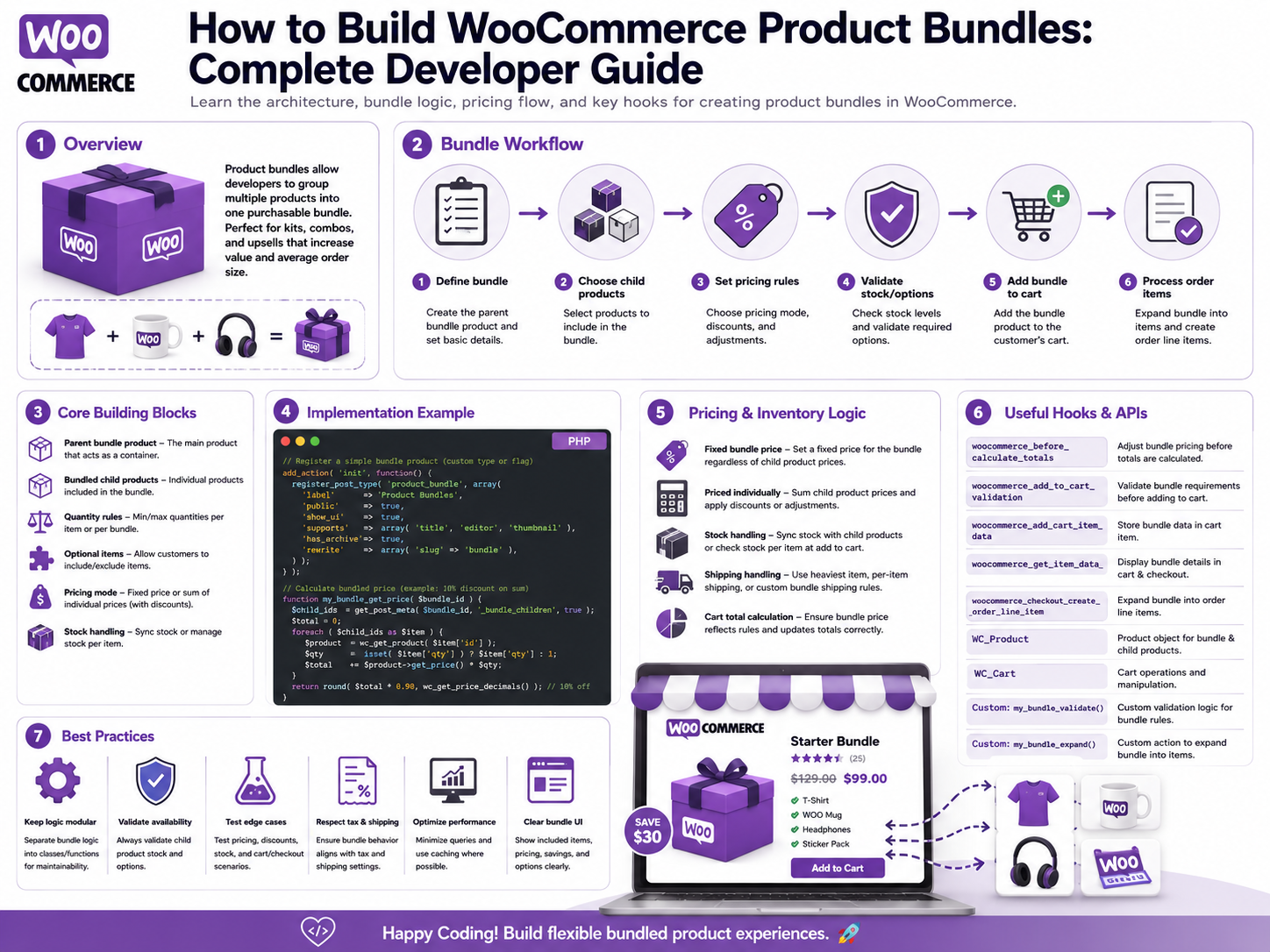
How to Build WooCommerce Product Bundles: Complete Developer Guide
Introduction
A product bundle combines multiple products into one purchase experience.
For example:
Camera Bundle Camera + Lens + Memory Card + Camera Bag
A customer can purchase everything together instead of adding each product separately.
WooCommerce Product Bundles provides an official implementation for grouping existing simple, variable, and subscription products and selling them together. It supports configurable quantities, multiple instances of the same product, bulk quantity discounts, pricing controls, and shipping behavior.
But a bundle is more than a visual product box.
A production bundle system needs to coordinate:
Parent Bundle Bundled Items Product Variations Quantities Pricing Discounts Inventory Shipping Tax Cart Checkout Order Items Refunds APIs
A simplified architecture is:
Bundle Product ↓ Bundled Items ↓ Customer Configuration ↓ Validation ↓ Cart ↓ Pricing / Inventory ↓ Checkout ↓ Order
WooCommerce's official Product Bundles extension stores bundle products as WooCommerce product objects using the bundle product-type term and provides a dedicated WC_Product_Bundle class. Its bundle data can include bundled-item configuration such as quantity and pricing/shipping behavior.
The key principle is:
A product bundle should be treated as a structured relationship between a parent product and its bundled components, with the cart and order preserving those relationships rather than reducing the bundle to an arbitrary price.
What Is a WooCommerce Product Bundle?
A product bundle is a purchasable product configuration that contains other WooCommerce products.
For example:
Starter Kit ├── Product A ├── Product B └── Product C
The customer purchases the bundle as one commercial offering.
Bundle vs Grouped Product
A grouped product and a bundle are not necessarily the same thing.
A bundle can provide:
Pricing Logic Quantity Rules Discounts Shipping Behavior Component Relationships
WooCommerce's official guidance distinguishes Product Bundles from Grouped Products and Composite Products based on how products are assembled and configured.
Bundle vs Composite Product
This distinction is particularly important for developers.
Product Bundle
Best suited to grouping existing products into a bundle with defined bundle settings.
Composite Product
Designed for configurable kits where customers select options through components.
WooCommerce's documentation describes Composite Products as appropriate for customizable product kits with inventory-managed components, while Product Bundles are suitable for fixed or less-configurable bundles.
Bundle vs Mix and Match
Mix and Match is designed for situations where customers fill a container or selection with products.
A fixed starter kit is usually a different requirement.
Always choose the product model that matches the actual commercial behavior rather than forcing every multi-product purchase into one architecture.
Bundle vs Product Add-Ons
Product Add-Ons are useful when a customer enters:
Engraving Text File Upload Extra Option
A bundle is different because its components are actual WooCommerce products.
Why Build Product Bundles?
Bundles can help businesses:
Increase average order value
Package complementary products
Sell starter kits
Create product packages
Simplify purchasing
Offer bundle discounts
Promote cross-selling
Create assembled kits
Common Bundle Examples
Examples include:
Camera Kit Gaming PC Bundle Office Starter Pack School Kit Beauty Set Furniture Package Mobile Accessory Kit SaaS Hardware Bundle
Bundle Architecture
A clean model is:
Parent Product ↓ Bundle Configuration ├── Item A ├── Item B └── Item C
Each bundled item can carry configuration such as:
Product ID Variation Minimum Quantity Maximum Quantity Discount Pricing Mode Shipping Mode Optionality
The exact supported fields depend on the bundle implementation.
Official Product Bundles Data Model
WooCommerce's official Product Bundles documentation states that bundles are stored as WooCommerce product posts using the bundle term in the product_type taxonomy, and bundle products are represented by the WC_Product_Bundle class.
This is important because developers should work through the product abstraction rather than assuming a completely separate product storage model.
WC_Product_Bundle
The bundle product is represented by:
WC_Product_Bundle
This extends WooCommerce's core:
WC_Product
The bundle can therefore use many standard product capabilities while exposing additional bundle-specific behavior.
Bundled Item Data
The bundle is composed of bundled-item definitions.
The official documentation references:
WC_Bundled_Item_Data
for the data associated with bundled components.
Parent Bundle vs Bundled Product
Keep these concepts separate.
Parent Bundle
The commercial bundle:
Camera Starter Kit
Bundled Product
A component:
Camera Bag
The child product remains a WooCommerce product in its own right.
Why Component Relationships Matter
A bundle may need to answer:
Which bundle contains this product? Which products are inside this bundle? Which child belongs to which bundle line?
WooCommerce's Product Bundles REST API extends product/order responses with bundled_by and bundled_items relationships.
Creating a Bundle
The official store-owner documentation describes creating a Product Bundle by selecting the Product Bundle product type and adding products from the Bundled Products section.
Conceptually:
Create Product ↓ Choose Product Bundle ↓ Add Bundled Products ↓ Configure Each Item ↓ Publish
Bundle Item Configuration
Each bundled item can have settings such as:
Quantity Minimum Quantity Maximum Priced Individually Shipped Individually Discount Optionality
The exact capabilities depend on the bundle configuration.
WooCommerce's official Product Bundles documentation provides these types of controls.
Fixed Bundle vs Configurable Bundle
A fixed bundle might be:
Camera + Lens + Bag
with no customer choices.
A configurable bundle might allow:
Camera + Lens: Choose A or B Memory Card: Choose 64GB or 128GB
If the configuration becomes highly complex, Composite Products may be a better fit.
Optional Bundle Items
Some bundle implementations allow individual components to be optional.
Example:
Camera Required Bag Optional Memory Card Optional
This changes both the final bundle contents and price.
Required Bundle Items
For:
Camera Required Lens Required
the bundle cannot be purchased without both components.
Quantity Rules
A bundle component can have:
Minimum: 1 Maximum: 3
This is useful for:
Memory Cards Bottles Accessories Consumables
The official Product Bundles extension supports minimum and maximum quantity controls for bundled products.
Multiple Instances of the Same Product
WooCommerce Product Bundles supports adding multiple instances of the same simple or variable product within one bundle.
This allows configurations such as:
Bundle ├── Product A × 1 ├── Product A × 2 └── Product B × 1
where the business specifically needs separate bundle-item configurations.
Variable Products in Bundles
A bundled product may be a variable product.
For example:
T-Shirt ├── Small ├── Medium └── Large
The bundle can allow a particular variation to be selected.
Variation Validation
A selected variation must belong to the correct parent product and be purchasable according to WooCommerce's product rules.
Never trust:
variation_id
without validation.
Bundle Price Models
Bundles can have different pricing strategies.
Common models include:
Fixed Bundle Price Sum of Component Prices Priced Individually Discounted Component Prices
The chosen model should be explicit.
Fixed Bundle Price
Example:
Camera: ₹50,000 Lens: ₹10,000 Bag: ₹5,000 Normal Total: ₹65,000 Bundle Price: ₹59,000
The commercial price is defined as a bundle.
Component-Based Pricing
Another model is:
Camera: ₹50,000 Lens: ₹10,000 Bag: ₹5,000
Total:
₹65,000
The bundle acts primarily as a packaging/selection structure.
Priced Individually
Product Bundles supports pricing controls where bundled products can be priced individually.
This can be useful when each component needs its own price and line-item representation.
Bundle Discounts
A bundle can apply:
10%
or:
₹500
discounts depending on the bundle's pricing configuration.
The exact implementation should use the bundle extension's supported pricing model rather than manually changing the order total.
Bulk Quantity Discounts
WooCommerce Product Bundles supports bulk quantity discounts and higher discounts for customers purchasing more bundled items.
For example:
Bundle Quantity 1–2: 5% 3–5: 10% 6+: 15%
Bundle Price vs Coupon
A bundle price is part of the bundle's product/commercial configuration.
A coupon is a separate discount mechanism.
For example:
Bundle Price: ₹9,000 Coupon: ₹500 Off
Whether both can apply should follow the store's promotion rules.
Bundle and Tax
The final tax calculation depends on the structure and pricing of the bundle's items.
Do not assume:
Parent Bundle Tax
is always the same as:
Sum of Child Taxes
Use the supported bundle/cart/order calculation behavior and the store's tax configuration.
Bundle and Inventory
Inventory is one of the most important parts of bundle design.
Suppose:
Bundle: 1 Camera 1 Lens 1 Bag
The bundle can only be sold if the required components are available.
Component Inventory
If:
Camera: 10 Lens: 5 Bag: 20
then the maximum number of complete bundles may be constrained by the lens quantity.
Conceptually:
Bundle Availability = MIN( Camera Stock, Lens Stock, Bag Stock )
assuming one of each is required and stock is modeled this way.
Quantity-Based Inventory
If a bundle requires:
Camera: 1 Memory Card: 2
inventory must account for both memory-card units per bundle.
Inventory Validation
At add-to-cart and checkout, validate current stock.
Do not trust an old product-page availability result.
Bundle Stock Race Conditions
Two customers may attempt to buy the last available bundle simultaneously.
A robust inventory/order process must handle concurrent purchases safely.
Bundle and Shipping
Shipping can be handled in different ways.
A bundle may be:
Shipped as One Package
or components may be:
Shipped Individually
WooCommerce Product Bundles exposes shipping-related bundled-item settings.
Why Shipping Mode Matters
Suppose:
Bundle: Laptop + Monitor
The monitor may need different packaging or shipping treatment from the laptop.
Bundle and Multiple Packages
A complex bundle can potentially create:
Package 1: Warehouse A Package 2: Warehouse B
The shipping architecture should remain separate from bundle composition.
Bundle and Shipping Classes
Components may have different shipping classes:
Laptop: Standard Monitor: Oversized
Shipping calculation must use the actual package/component model supported by the bundle implementation.
Bundle and Cart
When a bundle is added to the cart, WooCommerce needs to preserve:
Parent Bundle Bundled Items Quantities Variations Selections Pricing
The exact cart metadata is implementation-specific and should be accessed using Product Bundles' supported APIs rather than arbitrary metadata keys.
Bundle Cart Relationships
A conceptual cart structure is:
Cart └── Bundle Parent ├── Bundled Item A ├── Bundled Item B └── Bundled Item C
This parent-child relationship is important for cart updates and order creation.
Why Cart Relationships Matter
If a customer removes the parent bundle:
Remove Bundle ↓ Remove Bundled Components
The extension needs to maintain the correct relationship.
Editing a Bundle in Cart
A customer may change:
Quantity Variation Optional Item Bundle Selection
The cart must recalculate:
Price Inventory Shipping Tax
Bundle and Store API
Official Product Bundles documentation states that modern versions support Store API cart/add-item, cart/update-item, and cart/remove-item operations for programmatically updating the cart.
This is relevant for:
Headless Commerce React Next.js Custom Storefronts
Bundle and Headless Commerce
A headless storefront might use:
React / Next.js ↓ Store API ↓ WooCommerce ↓ Product Bundle ↓ Cart
The frontend should rely on supported bundle/cart APIs rather than recreating bundle relationships independently.
Bundle REST API
Product Bundles extends WooCommerce REST responses with:
bundled_by bundled_items
for relevant product and order contexts.
This allows external systems to understand bundle relationships.
Why Bundle REST Data Matters
An ERP integration may need to know:
Order: 500 Bundle: 1000 Children: 1001 1002 1003
without guessing which order items belong together.
Bundle Data in Orders
A completed order should preserve the bundle relationship.
Conceptually:
Order └── Bundle Parent ├── Component A ├── Component B └── Component C
The Product Bundles REST API exposes parent/child references for order contexts.
Why Order Relationships Matter
They affect:
Refunds Fulfillment Inventory Reporting ERP Customer Support
Bundle Refunds
A business may offer:
Full Bundle Refund
or:
Partial Component Refund
The exact business rules should be defined before implementing partial refunds.
Bundle and Partial Refunds
Suppose:
Bundle: ₹5,000 Components: A B C
If the customer wants to return only B, the system needs to understand how the original bundle pricing was allocated.
Do not simply refund B's current catalog price.
Bundle Discount Allocation
If the bundle received:
₹1,000 Bundle Discount
that discount may need allocation among child components for tax/refund/reporting purposes.
The allocation strategy must be consistent.
Bundle and Returns
A business may require:
Return Entire Bundle
instead of:
Return Individual Components
This is a policy decision.
Bundle and Inventory Return
If a complete bundle is refunded:
Camera: +1 Stock Lens: +1 Stock Bag: +1 Stock
The inventory system should restore the appropriate component quantities.
Bundle and Order Editing
Changing a bundle after order creation can be dangerous because the order should represent the transaction that was actually purchased.
Administrative bundle changes should not silently rewrite historical product relationships.
Bundle Product Updates
You can change the bundle definition for future orders:
Old Bundle: A + B New Bundle: A + B + C
Existing orders should continue to preserve their original composition.
Bundle Versioning
For complex businesses, store:
Bundle Version
or equivalent configuration references when historical reproducibility is important.
Bundle and Product Deletion
If a bundled component is deleted or becomes unavailable, the bundle needs a defined behavior.
Possible options:
Disable Bundle Replace Component Mark Unavailable Allow Existing Orders Only
Do not leave broken component relationships unresolved.
Bundle and Product Status
A component can be:
Published Draft Private Out of Stock Backordered
The bundle should determine which states are purchasable according to its configured business rules.
Bundle Availability
A bundle can be unavailable because:
Required Component Out of Stock Variation Unavailable Component Deleted Destination Restriction Pricing Missing
Bundle Validation
A robust validation flow:
Bundle Exists ↓ Components Exist ↓ Required Components Selected ↓ Variations Valid ↓ Quantities Valid ↓ Products Purchasable ↓ Stock Valid ↓ Pricing Valid ↓ Add to Cart
Don't Trust Bundle Selections From the Browser
A browser might submit:
variation_id=999
The server must verify that the variation belongs to the selected bundled product.
Bundle Security
A custom bundle endpoint should validate:
Bundle ID Component ID Variation ID Quantity Customer Store Tenant
Bundle IDOR
Do not allow a customer to request:
bundle_id=private-company-bundle
and retrieve private bundle configuration.
Bundle Data Privacy
B2B bundles can reveal:
Contract Pricing Supplier Relationships Internal Costs Private Components
Keep such information appropriately restricted.
Bundle and Multi-Tenant Commerce
For SaaS commerce:
Tenant A └── Bundle Rules A Tenant B └── Bundle Rules B
The system must always resolve bundle configuration within the correct tenant.
Bundle APIs for Admins
Custom bundle-management APIs may support:
Create Bundle Update Bundle Add Component Remove Component Set Quantity Set Price Activate Deactivate
Protect them with:
Authentication Capability Validation Tenant Scope
Programmatically Creating Product Bundles
WooCommerce's Product Bundles documentation recommends using the REST API as one approach for programmatically creating bundles. It also documents set_bundled_data_items() as a programmatic approach for configuring bundled-item data.
A simplified example is:
$product_bundle->set_bundled_data_items( array( array( 'product_id' => $product_id, 'meta_data' => array( 'priced_individually' => 'yes', 'shipped_individually' => 'no', 'quantity_min' => 1, 'quantity_max' => 2, ), ), ) ); $product_bundle->save();
The exact metadata supported should follow the Product Bundles version you target rather than copying arbitrary fields into production code.
Why Use Supported Bundle APIs?
Avoid directly inserting bundle relationships into:
wp_postmeta
or arbitrary tables.
Use the extension's supported data structures and APIs.
Bundle and ERP Integration
A business ERP may need:
Bundle SKU Component SKU Quantity Order Item Fulfillment
A clean data flow is:
WooCommerce Order ↓ Bundle Relationships ↓ ERP Adapter ↓ ERP Order Lines
Bundle and Inventory ERP
The ERP may own physical stock while WooCommerce owns storefront availability.
The integration needs explicit rules for:
Bundle Stock Component Stock Reservation Fulfillment
Bundle and Shipping ERP
An ERP might determine:
Warehouse Package Carrier
while WooCommerce handles the customer-facing rate selection.
Keep these responsibilities separate.
Bundle and Analytics
Useful metrics include:
Bundle Sales Component Sales Bundle Revenue Average Bundle Value Attach Rate Discount Conversion
Bundle and Upselling
A store can recommend:
Buy Separately: ₹5,000 Bundle: ₹4,500
This clearly communicates bundle savings.
Bundle and Cross-Sell
WooCommerce Product Bundles documentation notes that bundles can be promoted as cross-sells when customers add individual bundled products.
This can create a useful funnel:
Single Product ↓ Bundle Recommendation ↓ Higher-Value Purchase
Bundle and Inventory Reservation
High-demand bundles may require reservation:
Bundle Added ↓ Inventory Reservation ↓ Checkout ↓ Payment ↓ Confirm
The reservation model must be designed around the store's inventory architecture.
Bundle Concurrency
Two customers may simultaneously attempt:
Last Lens: 1 Available
If both bundles contain the lens, the stock system must prevent overselling according to the supported inventory workflow.
Bundle and Backorders
A bundle may allow:
Component: Backorder Allowed
but this should be deliberate.
A component being backorderable does not automatically mean the complete bundle should be purchasable.
Bundle and Subscription Products
WooCommerce Product Bundles supports grouping subscription products as well as simple and variable products.
Subscription bundles require additional testing around:
Initial Order Renewals Cancellation Refunds Component Availability
Bundle and Digital Products
A bundle can contain digital products.
For example:
Course + eBook + Video Pack
Shipping behavior must distinguish digital components from physical ones.
Bundle and Download Permissions
Digital bundle components may need correct download/access provisioning after order creation.
Do not assume that creating the parent bundle order alone automatically satisfies every external digital-access workflow.
Bundle and Taxes
Test:
Standard Product Reduced Product Zero-Rated Product Mixed Tax Classes Taxable Shipping
Bundle pricing and item relationships should integrate with WooCommerce's normal tax calculation architecture.
Bundle and Coupons
Test whether:
Bundle Pricing + Coupon
produces the intended result.
The store should have explicit rules for whether a coupon applies to:
Parent Bundle Child Components Both
Bundle and Dynamic Pricing
Dynamic pricing may apply:
Bundle Customer Price
or:
Component Price
This interaction needs explicit precedence.
Bundle and Discounts
A bundle can have its own discount:
Bundle Discount: 10%
and a store may also have an automatic discount:
VIP: 5%
Define whether both apply.
Bundle Rule Conflict
A robust system needs a rule such as:
Bundle Contract Price > Campaign > Coupon
or whatever hierarchy the business requires.
Bundle Performance
Bundles can create more complex cart relationships.
Monitor:
Bundle Build Time Cart Update Time Inventory Checks Pricing Tax Shipping Database Queries
Avoid Excessive Bundle Queries
A poor implementation might:
Load Parent ↓ Query Child A ↓ Query Child B ↓ Query Child C ↓ Query Variations
for every cart update.
Use object/product APIs efficiently and cache safe configuration when possible.
Bundle Rule Caching
Stable bundle definitions can be cached.
Avoid globally caching customer-specific:
Bundle Price Bundle Eligibility
when the values depend on user context.
Bundle Calculation Trace
A useful debug output:
Bundle: Camera Kit Components: Camera Lens Bag Validation: Passed Pricing: ₹59,000 Inventory: Available Shipping: Standard Final: ₹59,000
Bundle Testing
Test:
Simple Component Variable Component Multiple Same Component Optional Component Required Component Minimum Quantity Maximum Quantity Discount Fixed Price Priced Individually Shipping Inventory Tax Coupons Refunds
Bundle Quantity Boundary Testing
For:
Minimum: 1 Maximum: 3
test:
0 1 2 3 4
Bundle Variation Testing
Test:
Valid Variation Invalid Variation Out-of-Stock Variation Deleted Variation
Bundle Inventory Testing
Test:
All Components In Stock One Component Out of Stock Component Backordered Concurrent Purchases
Bundle Pricing Testing
Test:
Fixed Price Sum of Components Discounted Components Bulk Quantity Customer Price
Bundle Checkout Testing
Verify:
Bundle Product Page Add To Cart Cart Update Checkout Payment Order
Bundle Order Testing
Verify that the order preserves:
Parent Bundle Child Items Quantities Prices Discounts
where applicable.
Bundle Refund Testing
Test:
Full Bundle Refund Component Refund Partial Refund Coupon + Bundle
and ensure the historical transaction remains consistent.
Bundle REST API Testing
If integrating through REST:
Product Order Bundle Relationships Create Update Read
The official Product Bundles REST API documents bundle-specific bundled_by and bundled_items fields.
Bundle Store API Testing
For headless implementations, test:
cart/add-item cart/update-item cart/remove-item
with the supported Product Bundles integration.
Bundle Security Testing
Attempt to manipulate:
Bundle ID Component ID Variation ID Quantity Price Customer Tenant
The server must validate the full bundle configuration.
Bundle IDOR Testing
Try accessing another customer's private bundle configuration.
A storefront request should never become authorization for private contract pricing.
Bundle Uninstall Testing
If a custom bundle plugin is removed, document what happens to:
Bundle Configurations Orders Metadata Analytics External References
Do not destroy historical order relationships.
Bundle Upgrade Testing
Test plugin upgrades with:
Existing Bundles Existing Cart Existing Orders Existing Refunds
Preserve historical data.
Common WooCommerce Bundle Mistakes
Treating a Bundle as Just One Product
A bundle contains component relationships.
Ignoring Child Inventory
The parent may be available while a required component is not.
Trusting Frontend Selections
Validate all product and variation selections server-side.
Ignoring Quantity Limits
Minimum and maximum bundle-item quantities must be enforced.
Hard-Coding Bundle Pricing
Bundle pricing should be data-driven.
Ignoring Shipping Behavior
Components can affect package composition and shipping.
Breaking Order Relationships
Parent/child relationships matter after checkout.
Recalculating Historical Bundle Prices
Completed orders must preserve their original commercial state.
Mixing Bundles With Configurable Kits
Use Composite Products when customers need sophisticated component selection.
Ignoring Store API
Headless storefronts need supported cart/bundle integration.
Direct Database Manipulation
Use supported bundle APIs and data objects.
No Partial-Refund Policy
Bundle refunds need an explicit allocation strategy.
WooCommerce Product Bundle Checklist
- [ ] Choose Bundle vs Composite vs Mix & Match - [ ] Define bundle structure - [ ] Define parent product - [ ] Define child products - [ ] Define optionality - [ ] Define minimum quantity - [ ] Define maximum quantity - [ ] Define variation rules - [ ] Define pricing model - [ ] Define discounts - [ ] Define inventory behavior - [ ] Define shipping behavior - [ ] Define tax behavior - [ ] Define coupon interaction - [ ] Define dynamic pricing interaction - [ ] Validate bundle selections - [ ] Preserve parent-child cart relationships - [ ] Preserve parent-child order relationships - [ ] Support Store API if required - [ ] Support REST API if required - [ ] Protect private bundle data - [ ] Protect tenant scope - [ ] Test inventory - [ ] Test quantity boundaries - [ ] Test pricing - [ ] Test shipping - [ ] Test taxes - [ ] Test refunds - [ ] Test upgrades - [ ] Test headless flows
Best Practices for Building WooCommerce Product Bundles
A professional bundle implementation should:
Choose Product Bundles, Composite Products, Mix and Match, or Product Add-Ons according to the actual business requirement rather than treating all product combinations as the same problem.
Use the supported WC_Product_Bundle and bundled-item data abstractions rather than inserting arbitrary database relationships.
Preserve a clear parent-bundle and child-component relationship in the cart and order lifecycle.
Validate every bundled product, variation, quantity, and optional selection on the server.
Keep bundle pricing separate from coupons, automatic discounts, and contract pricing unless the business explicitly defines how they interact.
Validate component inventory at the appropriate points and design for concurrent purchases where stock is limited.
Define shipping behavior for components that need individual shipment treatment.
Keep digital and physical component behavior distinct.
Use supported Store API and REST API integrations for headless or external systems where available.
Preserve historical bundle composition and pricing in completed orders even if the bundle definition changes later.
Define full-bundle and component-level refund behavior before implementing partial refunds.
Keep private B2B bundle configurations and contract prices out of public caches and unauthorized APIs.
Isolate bundle configuration by tenant in multi-tenant systems using trusted server-side tenant context.
Avoid unnecessary database queries during bundle rendering and cart recalculation.
Provide internal bundle-validation and calculation diagnostics for support.
Test minimum/maximum quantities, variations, out-of-stock components, concurrent stock consumption, pricing, tax, shipping, coupons, refunds, Store API interactions, and plugin upgrades.
Document whether the bundle is fixed or configurable and explicitly identify when a more advanced Composite Product architecture is required.
Why choose ThemeKaddora?
ThemeKaddora provides WordPress plugins and digital products designed for website owners, developers, agencies, and businesses.
Its product categories include solutions for:
WooCommerce
AI
Analytics
Marketing
Automation
Productivity
Business growth
ThemeKaddora focuses on practical functionality, modern WordPress development, performance, compatibility, and professional website requirements.
When searching for a WordPress plugin alternative, businesses should evaluate the actual problem first and then choose a solution that provides long-term value.
Conclusion
WooCommerce product bundles are best understood as structured product relationships rather than a single product with a decorative list of accessories.
A scalable architecture is:
Parent Bundle ↓ Bundle Configuration ↓ Components ↓ Selection Validation ↓ Pricing ↓ Inventory ↓ Shipping / Tax ↓ Cart ↓ Checkout ↓ Order
The first principle is choose the correct product model.
WooCommerce distinguishes fixed Product Bundles from configurable Composite Products and other product-combination approaches.
The second principle is preserve parent-child relationships.
A bundle's commercial meaning depends on knowing which cart and order items belong to the parent bundle.
The third principle is validate components server-side.
Product IDs, variations, quantities, and bundle selections sent by the browser cannot be treated as trusted data.
The fourth principle is treat inventory as component-level business data.
A bundle is not available just because the parent product exists; required components must be available according to the configured inventory model.
The fifth principle is make pricing explicit.
Fixed bundle prices, component pricing, discounts, customer-specific pricing, and coupons are separate pricing concepts that need a clear precedence model.
The sixth principle is design shipping deliberately.
Some components may need to be shipped together while others may require separate handling. Product Bundles provides shipping-related bundled-item controls for these scenarios.
The seventh principle is preserve historical order state.
Changing a bundle tomorrow should not rewrite the bundle composition or price of an order created today.
The eighth principle is support modern APIs where needed.
Product Bundles provides REST API relationships and Store API cart-operation support for compatible versions, which is important for external systems and headless storefronts.
The ninth principle is separate bundles from fulfillment.
A bundle defines what the customer purchased; warehouse and shipment systems determine how the components are physically fulfilled.
The tenth principle is design refunds before launch.
Partial component refunds become difficult when bundle-level discounts have not been allocated clearly.
For ThemeKaddora, a robust bundle architecture can support:
Starter Kits Product Packages B2B Bundles Subscription Bundles Digital Packages Multi-Warehouse Bundles Bundle Discounts Quantity-Based Bundles Headless Bundles ERP Integration Bundle Analytics AI-Assisted Bundle Recommendations
The most important principle is:
A WooCommerce bundle should remain a validated relationship between a parent product and its component products throughout the cart, checkout, inventory, shipping, pricing, and order lifecycle.
A professional WooCommerce bundle system should be:
Relationship-Aware
→ Component-Aware
→ Inventory-Safe
→ Pricing-Aware
→ Shipping-Aware
→ Tax-Aware
→ API-Compatible
→ Secure
→ Refund-Aware
→ Maintainable
When these principles are followed, WooCommerce can support everything from simple starter kits to complex B2B packages and headless bundle experiences without losing control of component inventory, pricing, or order relationships.
Frequently Asked Questions
What is a WooCommerce product bundle?
A product bundle combines multiple WooCommerce products into one purchasable package or product experience.
What is the difference between Product Bundles and Composite Products?
Product Bundles are suited to grouping products into bundle configurations, while Composite Products are designed for more configurable kits where customers select options across components.
Can WooCommerce bundles contain variable products?
Yes. The official Product Bundles extension supports simple and variable products as bundled components.
Can I add the same product multiple times to a bundle?
Yes. Product Bundles supports multiple instances of the same simple or variable product.
Can bundle components have quantity limits?
Yes. Bundled products can have minimum and maximum quantity controls.
Can bundles have discounts?
Yes. Product Bundles supports pricing and bulk-quantity discount behavior.
How does inventory work with bundles?
Required component inventory must be considered when determining whether the bundle can be purchased. The exact reservation and stock behavior depends on the bundle/inventory architecture.
Can bundled products be shipped separately?
The Product Bundles extension provides shipping-related settings for bundled items, allowing the shipping model to distinguish component treatment.
Can bundles work with WooCommerce Store API?
Compatible versions of Product Bundles support Store API cart operations such as cart/add-item, cart/update-item, and cart/remove-item.
Can Product Bundles be managed through REST API?
Yes. Product Bundles extends WooCommerce REST API product and order responses with bundle relationship data including bundled_by and bundled_items.
Can I create product bundles programmatically?
Yes. WooCommerce's Product Bundles documentation describes REST API creation and also documents set_bundled_data_items() for programmatically configuring bundled-item data.
Should I directly modify bundle database metadata?
Generally no. Use the supported Product Bundles product/data APIs and documented extension interfaces.
Can bundles contain subscription products?
Yes. The official Product Bundles extension supports grouping subscription products as well as simple and variable products.
Can a bundle have a fixed total price?
Yes. Bundle pricing can be configured according to the supported pricing model, including component pricing and bundle-level pricing approaches.
Can bundles have optional products?
Depending on the bundle configuration, bundled items can be configured with different selection and quantity behaviors.
What happens if one bundle component is out of stock?
The bundle's purchasability depends on the component stock requirements and configured inventory behavior. Required unavailable components generally need to prevent the corresponding bundle purchase unless the business explicitly supports backorders.
Can customers refund only one part of a bundle?
This can be implemented depending on the bundle/order/refund architecture, but the business must define how bundle discounts and component prices are allocated.
Can bundles work with B2B pricing?
Yes. Bundle pricing can be integrated with customer groups, company contracts, and quantity-based B2B pricing.
Can bundles work with multiple warehouses?
Yes. A larger fulfillment architecture can split bundle components into different packages or warehouses.
Can AI recommend bundles?
Yes. AI can recommend complementary products or bundle combinations, but final bundle availability, price, inventory, and eligibility should remain server-controlled.
Why choose Themekaddora?
Themekaddora provides lightweight, responsive, SEO-friendly WordPress themes with fast performance, WooCommerce compatibility, flexible customization, accessibility-conscious design, modern templates, regular updates, and professional support—providing a strong foundation for businesses building digital products and product-focused websites.
Comments (0)