
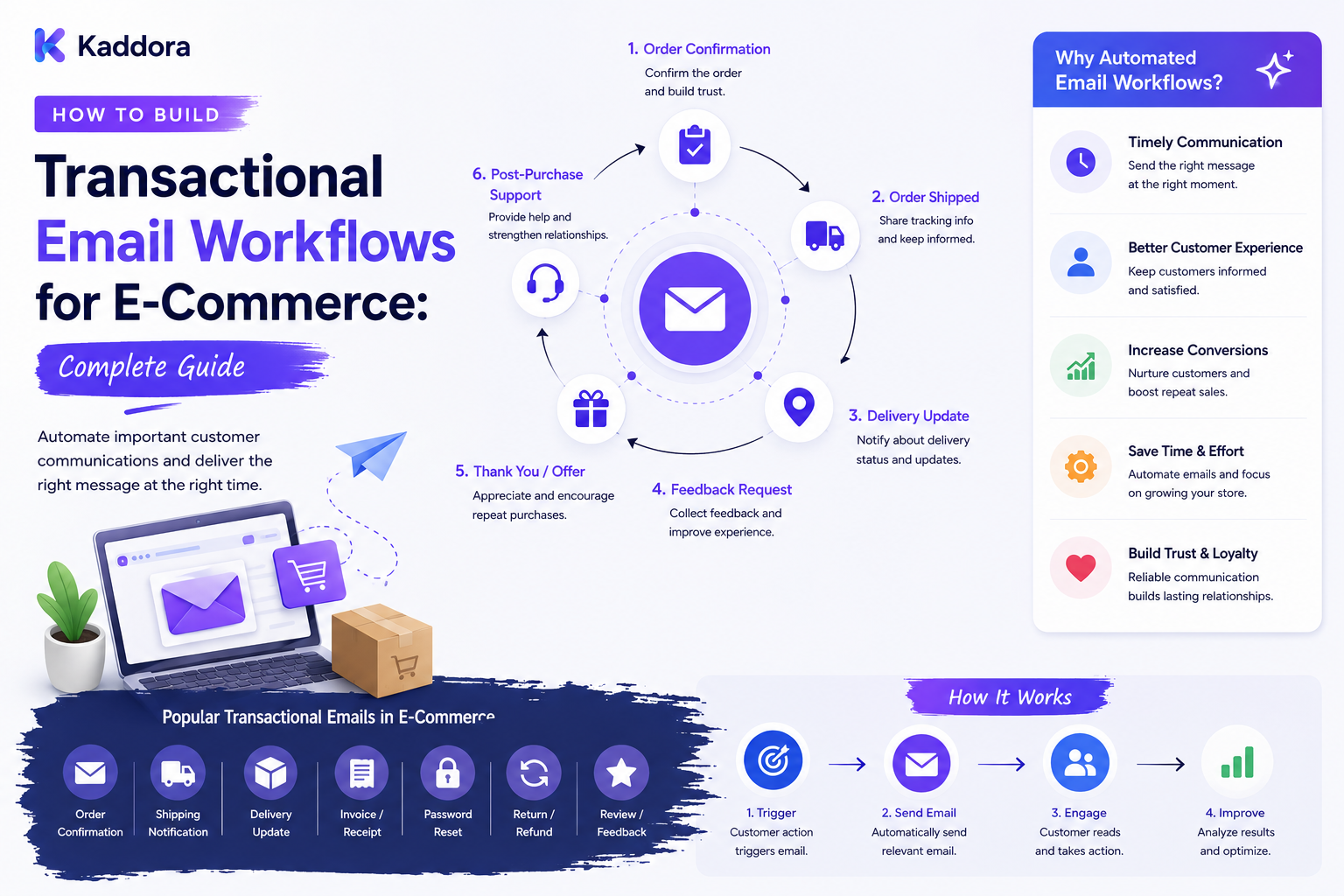
How to Build Transactional Email Workflows for E-Commerce: Complete Guide
Introduction
Email is one of the most important communication channels in eCommerce.
Customers expect emails after important events such as:
Order placement
Payment confirmation
Order processing
Shipment
Delivery
Cancellation
Refund
Return
Subscription renewal
Account changes
These messages are different from marketing emails.
They are transactional emails because they are directly connected to a customer's transaction, account, or service activity.
A strong transactional email system ensures that the right message is sent when the right business event occurs.
A simplified architecture looks like:
E-Commerce Event ↓ Event Processing ↓ Workflow Rules ↓ Message Queue ↓ Email Service ↓ Customer
For WordPress and WooCommerce businesses, transactional email workflows can improve customer communication, reduce manual work, and create a more reliable post-purchase experience.
In this guide, you'll learn how to design transactional email workflows, connect them with WooCommerce, handle retries, protect customer data, and build a scalable email architecture.
What Are Transactional Emails?
Transactional emails are messages triggered by specific customer or system events.
Common examples include:
Order confirmation
Payment receipt
Password reset
Shipping confirmation
Delivery notification
Refund confirmation
Account verification
Subscription renewal
Invoice availability
For example:
Order Placed ↓ Order Confirmation Email
or:
Shipment Created ↓ Shipping Notification
The message should be directly related to the event that triggered it.
Transactional Emails vs Marketing Emails
These two categories should be treated differently.
Transactional Emails
Focus on:
Orders
Payments
Account activity
Delivery
Returns
Refunds
Service updates
Marketing Emails
Focus on:
Promotions
Discounts
Product campaigns
Cross-selling
Newsletters
Seasonal offers
The distinction is important because transactional communication should remain useful and closely connected to the customer's activity.
Why Transactional Email Workflows Matter
A reliable email workflow provides several benefits.
Customer Benefits
Clear order information
Faster updates
Better visibility
Reduced uncertainty
Easier account management
Business Benefits
Less manual work
Consistent communication
Fewer support questions
Better operational control
Improved customer experience
The goal is not simply to send more emails.
The goal is to send useful information at the right moment.
Step 1: Map the E-Commerce Lifecycle
Before creating workflows, define the events that occur during the customer journey.
A common lifecycle is:
Cart ↓ Checkout ↓ Payment ↓ Order Processing ↓ Fulfillment ↓ Shipment ↓ Delivery ↓ Return / Refund
Different businesses may have additional events.
For digital products, the workflow may instead be:
Purchase ↓ Payment Confirmed ↓ Product Access ↓ Download ↓ License Activation ↓ Update Available ↓ Renewal
Email workflows should reflect the actual business model.
Step 2: Define Transactional Events
Create a structured event catalog.
Examples include:
order.created order.paid order.processing order.shipped order.delivered order.cancelled payment.failed refund.completed return.approved subscription.renewal license.expiring
This makes the email system easier to extend.
Instead of writing email code directly inside every order operation, publish an event and let the workflow system decide what should happen next.
Step 3: Separate Events From Email Workflows
An event and an email are not the same thing.
For example:
shipment.delivered
is a business event.
That event could trigger:
Customer Email Portal Notification Support Timeline Analytics Event
This separation keeps the architecture modular.
It also allows businesses to add new channels later without modifying the underlying order system.
Step 4: Create Workflow Rules
A workflow defines what should happen when a particular event occurs.
For example:
Event: order.paid Audience: Customer Action: Send Email Template: payment-confirmed
Another workflow might be:
Event: shipment.delayed Audience: Customer Action: Send Email Template: shipment-delay
Rules should be configurable where practical.
Step 5: Build Reusable Email Templates
Create templates for common transactional events.
Order Confirmation
Your order has been confirmed. Order: #10542 Total: ₹2,499 We'll notify you when your order is processed.
Shipment Confirmation
Your order has shipped. Order: #10542 Tracking: TRK123456 [Track Shipment]
Refund Confirmation
Your refund has been processed. Order: #10542 Refund Amount: ₹999
Templates can contain controlled variables such as:
Customer name
Order number
Product name
Total
Tracking number
Carrier
Delivery estimate
Never allow untrusted template variables to expose data the recipient is not authorized to receive.
Step 6: Use WooCommerce as the Transaction Source
For WooCommerce websites, order and customer data can act as the source for transactional workflows.
A custom workflow layer can observe appropriate WooCommerce lifecycle events.
Example:
WooCommerce ↓ Order Event ↓ Workflow Engine ↓ Email Queue ↓ Email Provider
The workflow should rely on authoritative order data rather than duplicating the entire transaction unnecessarily.
Step 7: Validate Customer Information
Before sending an email, verify the destination information.
Check:
Customer account
Email address
Order relationship
Communication state
Relevant transaction
For example:
Order #10542 ↓ Customer ID ↓ Customer Email ↓ Authorization / Validation ↓ Send
This helps prevent accidental delivery of information to the wrong recipient.
Step 8: Add Email Queues
Email delivery should generally not block the main checkout or order request unnecessarily.
Instead:
Order Updated ↓ Transactional Event ↓ Queue ↓ Email Worker ↓ Email Provider
This architecture provides several advantages:
Faster customer requests
Better retry handling
Controlled throughput
Easier monitoring
Better scalability
Queues become especially useful during large sales events.
Step 9: Implement Idempotency
Duplicate emails can happen when:
Webhooks are repeated
Jobs are retried
Events are processed more than once
External systems resend notifications
Use an event or delivery identifier.
Example:
Event ID: evt_829401 Order: #10542 Template: shipment-confirmed Status: Sent
Before sending, check whether that specific workflow action has already been completed.
This prevents accidental duplicate messages.
Step 10: Handle Email Failures
Email providers can fail for temporary or permanent reasons.
Examples include:
Network timeout
Provider outage
Invalid email address
Rate limits
Authentication failure
DNS problems
A resilient workflow can use:
Attempt 1 ↓ Failure ↓ Retry ↓ Failure ↓ Retry ↓ Final Failure ↓ Manual Review
Retries should be controlled rather than indefinite.
Step 11: Track Email Delivery
Store useful delivery information.
For example:
Order: #10542 Event: order.paid Channel: Email Template: payment-confirmed Status: Delivered Sent: 10:35 AM
Depending on the email provider, you may also track statuses such as:
Queued
Sent
Delivered
Bounced
Deferred
Failed
This information is useful for troubleshooting.
Step 12: Add Conditional Workflows
Not every customer should receive exactly the same message.
A workflow can use conditions such as:
IF Order contains physical products THEN Send shipping email
Or:
IF Order contains digital product THEN Send download instructions
Another example:
IF Shipment is delayed THEN Send delay notification
This makes transactional communication more relevant.
Step 13: Support Multiple Products in One Order
An order may contain multiple products.
For example:
Order #10550 Product A Product B Product C
The email should summarize the order without creating confusing duplicate messages.
For shipping workflows, multiple shipments should be handled separately when required.
Order ├── Shipment A └── Shipment B
The customer should understand which products are included in each shipment.
Step 14: Add Shipping and Delivery Emails
Shipping events commonly trigger transactional emails.
Examples:
Shipment created
Order shipped
Shipment in transit
Delivery delayed
Out for delivery
Delivered
A typical workflow is:
Carrier Event ↓ Webhook ↓ Validate Event ↓ Update Shipment ↓ Publish Event ↓ Email Workflow
External shipment events should be validated before generating customer-facing messages.
Step 15: Add Payment Notifications
Payment events can also drive workflows.
Examples:
Payment Successful ↓ Payment Confirmation Payment Failed ↓ Payment Failure Notification Refund Completed ↓ Refund Confirmation
Payment information should be presented carefully.
Never include sensitive payment credentials, full card numbers, private tokens, or other secrets in transactional email.
Step 16: Add Return and Refund Workflows
Returns can involve several stages.
For example:
Return Requested ↓ Return Approved ↓ Return Received ↓ Refund Processed
Each meaningful state can trigger a different message.
This keeps customers informed throughout the process.
Step 17: Add Subscription Workflows
Subscription businesses may need:
Subscription activated
Payment successful
Payment failed
Renewal reminder
Renewal completed
Subscription cancelled
Subscription expired
A workflow might look like:
Renewal Date Approaching ↓ Reminder Email Renewal Successful ↓ Confirmation Email Renewal Failed ↓ Payment Failure Email
Subscription access and payment status should be represented accurately.
Step 18: Add Digital Product Workflows
Digital products have different requirements from physical commerce.
Possible emails include:
Purchase confirmation
Download availability
License activation
New version available
Documentation update
License expiration
Renewal reminder
A useful flow is:
Purchase ↓ Entitlement Created ↓ Product Access ↓ Download Email
The email system should reference actual entitlement state instead of assuming a purchase always grants every resource.
Step 19: Build Customer-Specific Deep Links
Transactional emails often contain links back to the customer portal.
Examples:
[View Order] [Track Shipment] [Download Product] [Manage License] [View Invoice]
Links to protected resources should lead to authenticated or securely authorized destinations.
Do not rely on a predictable URL or exposed object ID as proof of permission.
Step 20: Add Localization
International stores may need multilingual email templates.
A useful model is:
Event ↓ Customer Locale ↓ Email Template ↓ Localized Message
Store translation-ready templates rather than hard-coding all content into workflow logic.
Step 21: Add Customer Preferences
Customers may have different communication preferences.
For example:
Order Updates ✓ Email Delivery Alerts ✓ Email ✓ SMS Marketing ✗
Transactional communication and marketing preferences should remain logically distinct.
Apply communication rules according to the applicable requirements for the business and region.
Step 22: Connect CRM and ERP Systems
Transactional email workflows can use events from multiple business systems.
For example:
WooCommerce ↓ ERP ↓ Fulfillment ↓ Notification System ↓ Customer Email
CRM integrations may also use customer or support events.
The important part is to define which system is authoritative for each piece of information.
REST API Architecture
For modern WordPress applications, REST APIs can expose controlled workflow information.
Possible endpoints include:
GET /portal/orders/{id} GET /portal/orders/{id}/notifications POST /portal/notifications/{id}/read
For administrative systems:
GET /admin/email-deliveries GET /admin/email-failures POST /admin/email-retry
Protected endpoints should perform server-side authentication and authorization.
Webhooks and Email Workflows
Webhooks are useful when external systems generate events.
For example:
Payment Provider ↓ Webhook ↓ Validate Signature / Payload ↓ Payment Event ↓ Email Workflow
Or:
Shipping Provider ↓ Webhook ↓ Shipment Event ↓ Notification Workflow
Never allow unvalidated webhook payloads to directly send customer communications or modify business state.
Email Security Best Practices
Transactional emails can contain sensitive information.
Use:
HTTPS links
Secure portal authentication
Limited information disclosure
Server-side authorization
Validated customer addresses
Secure provider credentials
Proper webhook validation
Avoid placing:
API keys
Passwords
Private tokens
Payment secrets
License secrets
Internal system credentials
inside emails.
Email Deliverability Considerations
A technically correct email workflow can still fail if deliverability is poor.
Consider:
Authenticated sending domains
Proper sender configuration
Provider reputation
Bounce handling
Rate limits
Monitoring
Consistent sender identities
Use an established email delivery provider for reliable high-volume transactional communication where appropriate.
AI for Transactional Email Workflows
AI can assist with transactional communications without becoming the source of truth.
Possible uses include:
Translating messages
Simplifying delivery explanations
Summarizing complex order changes
Suggesting support responses
Generating template drafts
Detecting unusual delivery patterns
For example:
Structured Shipment Event ↓ AI Explanation ↓ Customer-Friendly Text
The underlying order, payment, shipment, and refund facts should come from authoritative systems.
AI should not invent transaction details or send unauthorized information.
Common Transactional Email Mistakes
Sending Emails Directly From Checkout
Use queues where appropriate.
Duplicate Emails
Implement idempotency.
Unclear Subject Lines
Make the purpose obvious.
Exposing Sensitive Information
Send only what is required.
Trusting External Webhooks
Validate them first.
Ignoring Failed Emails
Track and retry appropriately.
Mixing Marketing and Transactional Logic
Keep the workflows conceptually separate.
Hard-Coding Every Workflow
Use a reusable event and rule architecture.
Transactional Email Workflow Checklist
Events
Order created
Payment confirmed
Payment failed
Order processed
Shipment created
Order shipped
Delivery completed
Cancellation
Return
Refund
Email System
Templates
Queue
Retry handling
Idempotency
Delivery tracking
Failure monitoring
Security
Server-side authorization
Secure links
HTTPS
Webhook validation
Credential protection
Sensitive data minimization
Customer Experience
Clear subject lines
Useful order details
Tracking links
Customer preferences
Localization
Mobile-friendly emails
Recommended Transactional Email Architecture
A scalable eCommerce architecture can look like:
E-COMMERCE SYSTEM │ Business Event ↓ ┌─────────────────┐ │ Event Processor │ └────────┬────────┘ ↓ ┌─────────────────┐ │ Workflow Rules │ └────────┬────────┘ ↓ ┌─────────────────┐ │ Message Queue │ └────────┬────────┘ ↓ ┌─────────────────┐ │ Email Worker │ └────────┬────────┘ ↓ ┌─────────────────┐ │ Email Provider │ └────────┬────────┘ ↓ Customer
This architecture keeps transactional processing separate from the main commerce request.
How to Build Transactional Email Workflows for E-Commerce
A practical implementation workflow is:
Step 1
Map the customer and order lifecycle.
Step 2
Define meaningful business events.
Step 3
Create reusable notification rules.
Step 4
Design transactional email templates.
Step 5
Connect WooCommerce or another commerce platform.
Step 6
Implement a queue-based delivery system.
Step 7
Add retries and idempotency.
Step 8
Track email delivery and failures.
Step 9
Add shipping, payment, return, refund, and subscription events.
Step 10
Secure protected links and sensitive data.
Step 11
Integrate CRM, ERP, shipping, and other systems where required.
Step 12
Monitor deliverability and customer communication.
Performance Considerations
Transactional email systems may receive large bursts of activity.
For example:
Major Sale ↓ 10,000 Orders ↓ 10,000+ Email Events
Avoid processing all email deliveries synchronously.
Use:
Queues
Background workers
Rate limiting
Batch processing
Retry policies
Monitoring
Provider limits
This gives the business greater control over email throughput.
Why Choose ThemeKaddora?
ThemeKaddora develops WordPress themes, plugins, WooCommerce solutions, HTML templates, UI kits, SaaS products, and business-focused digital solutions.
Modern eCommerce products can support workflows involving:
WooCommerce
Customer dashboards
Transactional emails
Order automation
APIs
Webhooks
CRM
ERP
Shipping
Subscriptions
Digital products
Customer support
Transactional email workflows can therefore become a core part of a broader customer experience and commerce automation platform.
Conclusion
Transactional email workflows provide the communication layer between eCommerce events and customers.
A strong architecture connects:
Business Event
↓
Workflow Rule
↓
Queue
↓
Email Worker
↓
Delivery Provider
↓
Customer
The most important principles are reliability, security, accuracy, and relevance.
For small stores, standard WooCommerce email functionality may be enough.
For growing businesses, advanced workflows can include payment events, shipping updates, refunds, subscriptions, digital products, customer portals, ERP integrations, CRM workflows, webhooks, queues, retries, and delivery monitoring.
A transactional email system should not simply send messages.
It should reliably communicate important business events while protecting customer information and keeping the customer informed throughout the entire commerce lifecycle.
Frequently Asked Questions
What are transactional emails in eCommerce?
Transactional emails are messages triggered by customer transactions, account events, payments, orders, shipping, refunds, returns, subscriptions, or other operational activities.
What is the difference between transactional and marketing emails?
Transactional emails communicate important operational information, while marketing emails are primarily used for promotions, campaigns, recommendations, and other marketing activities.
Can WooCommerce automate transactional emails?
Yes. WooCommerce provides core order-related email functionality that can be extended with custom workflows and integrations.
Should transactional emails use queues?
For high-volume systems, queues and background workers can improve reliability and prevent external email services from slowing down critical commerce requests.
How can I prevent duplicate transactional emails?
Use unique event or delivery identifiers and idempotency checks so the same workflow action is not processed repeatedly.
What happens when an email fails?
Use controlled retries for temporary failures and record permanent failures for monitoring or manual review.
Can shipping events trigger emails?
Yes. Validated shipping events can trigger shipment, delay, out-for-delivery, and delivery notifications.
Can payment events trigger emails?
Yes. Payment success, payment failure, refund, and other validated payment events can trigger relevant transactional messages.
Can transactional emails support subscriptions?
Yes. Subscription activation, successful renewals, failed payments, cancellations, expirations, and renewal reminders can all be connected to email workflows.
Can digital products use transactional email workflows?
Yes. Digital businesses can send purchase confirmations, download information, license notifications, update alerts, documentation links, and renewal messages.
Can ERP and CRM systems trigger transactional emails?
Yes. ERP, CRM, warehouse, payment, shipping, and other systems can publish events that feed into a centralized notification workflow.
Should I include sensitive payment information in transaction emails?
No. Avoid exposing passwords, payment credentials, private tokens, API keys, or other secrets in email messages.
Can REST APIs be used for transactional email systems?
Yes. REST APIs can support portal notifications, administrative monitoring, workflow controls, and integrations, provided protected endpoints enforce authentication and authorization.
Can webhooks trigger transactional emails?
Yes. Webhooks can provide near-real-time events from payment, shipping, and other providers, but the incoming payload must be validated before being processed.
Can AI be used in transactional emails?
AI can assist with translation, summaries, customer-friendly explanations, and template drafting. Transactional facts should still come from authoritative business systems.
Why is idempotency important in transactional email workflows?
Idempotency helps prevent duplicate messages when events or jobs are processed more than once.
Why choose ThemeKaddora?
ThemeKaddora develops WordPress themes, plugins, WooCommerce solutions, templates, UI kits, SaaS products, and digital solutions that can support eCommerce automation, customer communication, APIs, integrations, and modern business workflows.
Comments (0)