
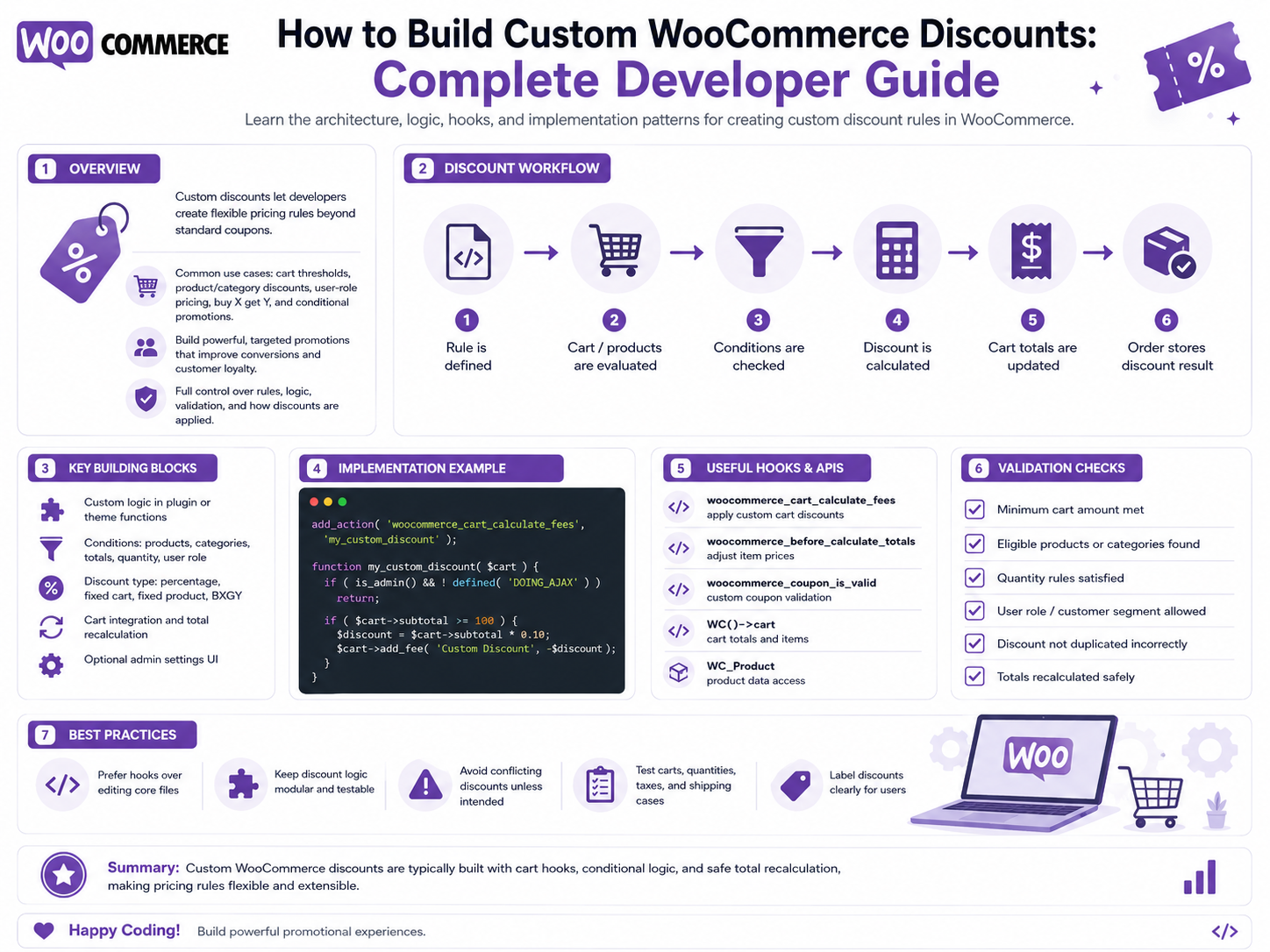
How to Build Custom WooCommerce Discounts: Complete Developer Guide
Introduction
WooCommerce provides a flexible coupon and cart-calculation system, but many businesses need discount rules that go beyond a simple coupon code.
For example:
Buy 3 Products → 10% Off Buy 5 Products → 20% Off
Or:
VIP Customer + Order ≥ ₹5,000 → ₹500 Off
Or:
Category: Electronics Quantity: 3+ Discount: 15%
A B2B business may need:
Company: ABC Ltd Product: Product A Quantity: 100+ Special Price: ₹850
These are not simply marketing coupons.
They are custom discount rules.
WooCommerce's current discount engine is built around the WC_Discounts class. The class can operate on a WC_Cart or WC_Order, tracks discount allocations by coupon and item, and provides methods for applying and retrieving discounts.
WooCommerce's cart totals pipeline uses WC_Discounts when calculating coupon-based discounts and then incorporates those results into cart totals.
This provides an important architectural lesson:
Custom discounts should integrate with WooCommerce's calculation model instead of subtracting arbitrary amounts from the final cart total.
What Is a Custom WooCommerce Discount?
A custom WooCommerce discount is a business rule that changes the effective price of eligible products or cart items.
Examples include:
Percentage Discount Fixed Discount Quantity Discount Tiered Pricing Customer Discount Category Discount Bundle Discount Buy X Get Y Spend X Get Y B2B Pricing Loyalty Discount Subscription Discount
Discount vs Coupon
These terms are often confused.
Coupon
A coupon is usually a customer-applied promotion object.
Example:
SAVE20 → 20% Off
Custom Discount
A discount can be automatic.
Example:
Customer buys 5 units → 10% automatically applied
No coupon code is required.
Automatic Discounts
Automatic discounts can be triggered by:
Cart Contents Quantity Order Value Customer Group Date Product Category
For example:
Cart >= ₹3,000 → ₹200 Off
The customer does not have to enter a coupon.
Why Build Custom Discounts?
Custom discount systems are useful when:
Promotions should be automatic.
Pricing depends on quantity.
Discounts depend on customer segmentation.
A business has B2B contracts.
Different products need different discount structures.
Discounts must integrate with ERP/CRM rules.
A loyalty system determines eligibility.
Discounts need complex combinations.
WooCommerce Discount Architecture
A useful conceptual architecture is:
Cart ↓ Discount Context ↓ Eligibility Rules ↓ Discount Engine ↓ Discount Allocation ↓ WooCommerce Totals ↓ Checkout ↓ Order
For a larger system:
WooCommerce ↓ Context Builder ↓ Rule Engine ↓ Discount Calculator ↓ WC_Discounts / Cart Totals ↓ Order
Understanding WC_Discounts
WC_Discounts is WooCommerce's dedicated discount-calculation class.
The current code reference shows that it can be constructed with:
WC_Cart
or:
WC_Order
and maintains discount allocations against cart/order items.
Why WC_Discounts Matters
Instead of:
Cart Total: ₹5,000 Custom Plugin: Subtract ₹500 New Total: ₹4,500
a proper discount system needs to understand:
Which items are eligible Which amount is discounted How the discount is distributed How taxes interact How the order records the discount
WooCommerce's discount abstraction exists specifically to handle this type of calculation.
Discount Allocation
Suppose:
Product A: ₹1,000 Product B: ₹500 Discount: 20%
The discount is not simply a single invisible ₹300 subtraction.
The discount needs to be associated with eligible items for totals, taxation, and order calculations.
The WooCommerce order totals implementation reads discount allocations and applies them to order items.
Why Item-Level Discount Allocation Matters
Discount allocations affect:
Line Totals Taxes Order Totals Refunds Reporting
A custom discount engine should therefore work at the appropriate cart/item level.
Automatic Discount vs Coupon
Consider:
Automatic Rule: Buy 5 → 10% Off
versus:
Coupon: BUY5 → 10% Off
Both may produce a discount, but their business workflows differ.
Automatic discounts may require no customer action.
Coupons are explicit promotion objects.
Build an Automatic Discount Engine
A scalable engine can use:
Cart ↓ Context Builder ↓ Discount Rules ↓ Eligibility ↓ Discount Calculation ↓ Allocation ↓ WooCommerce Totals
Step 1: Define Discount Requirements
Before writing code, define:
Who qualifies? What products qualify? What quantity is required? What date applies? What is the discount? Can discounts stack? What is the maximum discount? What happens when rules conflict?
Step 2: Define Discount Types
Possible discount types:
Percentage Fixed Amount Fixed Product Price Tiered Price Buy X Get Y Spend X Get Y Bundle Price Free Item Shipping Discount
Not every type should be implemented through the same calculation path.
Percentage Discount
Example:
Product: ₹1,000 Discount: 20% Discount Amount: ₹200
Fixed Discount
Example:
Product: ₹1,000 Discount: ₹100 Final: ₹900
Eligibility still needs to be evaluated before the fixed amount is applied.
Fixed Product Price
Example:
Regular Price: ₹1,000 Promotion: ₹800
This is conceptually different from:
₹200 Off
because the business may want the final eligible unit price to be explicitly ₹800.
Quantity-Based Discounts
A classic model:
1–2 Units: Normal Price 3–4 Units: 10% Off 5+ Units: 20% Off
Tiered Quantity Pricing
Another model:
10 Units: ₹900 each 50 Units: ₹850 each 100 Units: ₹800 each
This is often more appropriately modeled as product pricing rather than a final-cart coupon.
The architecture should distinguish discounts from tiered product pricing.
Buy X Get Y
Example:
Buy 2 Get 1 Free
The engine must determine:
Eligible Quantity Free Quantity Discounted Quantity
and allocate the corresponding discount correctly.
Buy One Get One
Example:
Buy 1 Get 1 50% Off
The discount can be represented as a reduction against eligible lines rather than arbitrarily reducing the final cart total.
Spend X Get Y
Example:
Spend ₹5,000 → ₹500 Off
The engine first determines whether the threshold is met.
Spend X Get Percentage
Example:
Spend ₹5,000 → 10% Off
The calculation should use a clearly defined eligible spend.
Discount Eligibility Context
A normalized context can contain:
Products Categories Quantities Cart Value Customer Customer Group Currency Date Time Coupons Previous Orders
Use only the information required by the rule.
Product-Based Discounts
Example:
Product A → 15% Off
This is useful for clearance, launches, and promotions.
Category-Based Discounts
Example:
Electronics → 10% Off
All eligible products in the category can participate.
Excluded Products
A rule might say:
Electronics → 10% Off Except: Product X
The discount engine must process exclusions before applying the discount.
Excluded Categories
For example:
Storewide: 10% Excluded: Gift Cards
This is common for promotional campaigns.
Sale-Item Restrictions
Some discounts should not apply to products already discounted.
Example:
Promotion: 20% Exclude: Sale Items
This needs to be an explicit eligibility rule.
Customer-Based Discounts
Automatic customer discounts can use:
Customer Role Customer Group Company Loyalty Tier Previous Orders Membership
VIP Discounts
Example:
Customer Group: VIP Automatic Discount: 10%
The customer group must be determined server-side.
Wholesale Discounts
A wholesale system may use:
Customer Group: Wholesale Quantity >= 20 Discount: 15%
This can combine customer and quantity rules.
B2B Contract Discounts
A complex business may have:
Company: ABC Ltd Product: Product A Quantity: 100+ Contract Price: ₹800
This is often better modeled as contract pricing than as a generic cart discount.
Loyalty Discounts
A loyalty engine might define:
Gold: 5% Platinum: 10% Diamond: 15%
The loyalty service should own the loyalty tier while WooCommerce applies the resulting discount.
First-Order Discounts
A business may offer:
First Qualifying Order: 10% Off
The definition of "qualifying order" should be explicit.
For example:
Exclude: Cancelled Orders Fully Refunded Orders Test Orders
Customer Lifetime Value Discounts
An advanced business may calculate:
Customer Lifetime Spend
and use it to determine eligibility.
However, this can be computationally expensive if calculated directly during every cart request.
Use precomputed customer segmentation where appropriate.
Date-Based Discounts
Examples:
Weekend: 10% Black Friday Campaign: 20% August Promotion: 15%
Always define:
Timezone Start End
Scheduled Discount Rules
A structured rule can contain:
{ "start": "2026-08-01", "end": "2026-08-31", "timezone": "store", "discount": "15%" }
Store-specific implementation details should be adapted to the plugin architecture.
Flash Sales
A flash sale might run:
14:00–16:00
The engine needs accurate time handling and cache invalidation.
Discount Rule Priority
Suppose:
Rule A: VIP: 10% Rule B: Weekend: 15%
A VIP customer shopping on the weekend qualifies for both.
You need an explicit policy:
Best Discount First Match Highest Priority Stack
Best Discount Strategy
The engine evaluates all eligible discounts:
Rule A: ₹500 Rule B: ₹300 Selected: ₹500
This is often easier for customers to understand than uncontrolled stacking.
Highest-Priority Strategy
Each rule gets:
Priority: 100 50 10
Highest eligible priority wins.
Stacking Discounts
A business may deliberately allow:
VIP: 10% Campaign: 5% Total: 15%
But stacking needs strict controls.
Maximum Total Discount
A business might set:
Maximum Discount: ₹2,000
Even if several rules match, the total discount cannot exceed that amount.
Minimum Product Price
Discounts should never accidentally produce negative product prices.
For example:
Product: ₹100 Discount: ₹150
The final eligible price should not become:
-₹50
unless the system explicitly models credits separately.
Discount Caps
A percentage discount can have:
20% Maximum: ₹1,000
The engine calculates the percentage and then applies the cap.
Discount Floors
Some promotions may have:
20% Minimum Discount: ₹100
If the computed discount is only ₹70, the promotion may not qualify.
Discount Allocation Across Items
Suppose:
Product A: ₹800 Product B: ₹200 Discount: ₹100
If both are eligible, the discount needs an allocation strategy.
This matters because WooCommerce tracks discount amounts at item level.
WC_Discounts maintains applied discounts and exposes discount totals by item and by coupon.
Why Not Modify the Cart Grand Total Directly?
Avoid:
WC()->cart->set_total( WC()->cart->get_total( 'edit' ) - 500 );
This can bypass normal line-level discount and tax calculations.
Instead, integrate with WooCommerce's discount/totals architecture.
WC_Cart_Totals
WooCommerce uses WC_Cart_Totals to calculate cart totals, including coupon discounts. Its current implementation instantiates WC_Discounts, sets cart items, applies coupons, and then incorporates the resulting discount amounts into totals.
This demonstrates why a custom discount should fit into the totals pipeline rather than directly rewriting the final total.
Custom Discounts and WC_Discounts
For discount logic that genuinely belongs in the discount calculation layer, a plugin can integrate with WooCommerce's discount mechanisms and available hooks rather than replacing the entire totals system.
The current WooCommerce code exposes discount-related hooks including:
woocommerce_coupon_get_items_to_apply woocommerce_coupon_get_apply_quantity woocommerce_coupon_get_discount_amount woocommerce_coupon_is_valid
among others.
When to Use a Coupon
Use a coupon when:
Customer Enters Code Campaign Has Shareable Code Affiliate Provides Code Marketing Wants Explicit Redemption
When to Use Automatic Discounts
Use automatic discounts when:
Quantity Triggers Price Customer Group Triggers Price Order Threshold Triggers Discount Promotion Is Automatic
When to Use Product Pricing
Use product-level pricing when:
Quantity Tier B2B Contract Customer-Specific Price Catalog Price
is the main business requirement.
Do not force all pricing logic into the coupon system.
Discount Architecture Decision
A useful model is:
Coupon → Explicit Promotion Automatic Discount → Cart Rule Product Pricing → Catalog / Contract Price Fee → Additional Charge
This separation keeps the system easier to understand.
Custom Discount Rule Structure
A rule can contain:
Name Status Priority Conditions Discount Type Discount Value Maximum Discount Start Date End Date Exclusions
Example Rule
{ "name": "VIP Weekend Discount", "priority": 100, "conditions": [ { "field": "customer_group", "operator": "=", "value": "vip" }, { "field": "day_of_week", "operator": "IN", "value": ["sat", "sun"] } ], "action": { "type": "percent", "value": 10 } }
Rule Engine Architecture
A scalable discount engine can use:
Cart ↓ Context Builder ↓ Eligibility Engine ↓ Matching Rules ↓ Discount Calculator ↓ Allocation ↓ WooCommerce Totals
Context Builder
Normalize:
Product IDs Categories Quantities Prices Customer Customer Group Currency Cart Value Date Coupons
Build this once per calculation cycle when possible.
Eligibility Engine
The eligibility engine determines:
Eligible Not Eligible
It should not calculate the discount amount yet.
Discount Calculator
After eligibility:
Eligible Items + Discount Rule ↓ Discount Amount
Discount Allocation
Finally:
Discount Amount ↓ Eligible Line Items ↓ Per-Item Allocation
This allocation can then be consumed by the broader WooCommerce totals process.
Avoid N+1 Queries
A bad discount engine might do:
100 Cart Items × Product Query × Customer Query × Category Query
This can make checkout extremely slow.
Load the required context efficiently.
Cache Rule Definitions
Discount rules can often be cached:
Rule Configuration ↓ Cache
But final eligibility/discount results should remain correctly scoped to the current customer/cart.
Avoid Global Customer Discount Caches
A discount calculated for:
VIP Customer A
must not be reused for:
Retail Customer B
Discounts and External APIs
An ERP may provide:
Customer Discount: 12%
The architecture can be:
WooCommerce ↓ Discount Service ↓ ERP ↓ Validated Result ↓ Discount Engine
External Discount Service Failure
If the ERP is unavailable:
ERP: Timeout
do not automatically assume:
Discount: 100%
Define an explicit fail-open or fail-closed policy.
For financial calculations, fail-closed is often safer unless business requirements say otherwise.
Discount API
A custom administrative API may expose:
Create Rule Update Rule Delete Rule Simulate Rule Activate Rule Deactivate Rule
Protect it with:
Authentication Capability Validation Tenant Scope
Discount Rule Import
Large organizations may import:
Customer Prices Product Discounts Campaign Rules
from ERP/CSV systems.
Validate all imported records before activating them.
Discount Rule Versioning
For financial reproducibility:
Rule Set 1 Rule Set 2 Rule Set 3
can preserve the configuration used during a promotion period.
Discount Audit Trail
Record:
Rule ID Changed By Changed At Old Config New Config
This is valuable when a customer asks why a particular discount was applied.
Discount Calculation Trace
An internal simulator can show:
Cart: ₹5,000 Customer: VIP Matched Rule: VIP10 Discount: 10% Amount: ₹500
Rule Conflict Trace
For multiple rules:
Rule 100: VIP10 → Match Rule 90: Weekend15 → Match Rule 80: Category20 → No Match Resolution: Best Discount Selected: Weekend15
This is extremely useful for support.
Automatic Discounts and Coupons Together
A store may have:
Automatic VIP Discount: 10% Coupon: SAVE5
The business must decide:
Stack Best One Coupon Replaces Automatic Automatic Replaces Coupon
Do not let the result be accidental.
Discount Stacking Matrix
A scalable system can define:
Discount A
Discount B
Allowed?
VIP
Campaign
Yes
VIP
Coupon
No
Quantity
Campaign
Yes
B2B Contract
Coupon
No
This makes promotion behavior explicit.
Discounts and Free Products
A promotion may result in:
Product Price: ₹0
This can affect:
Tax Inventory Shipping Reporting
Zero-price products therefore require careful testing.
Discounts and Tax
Discounts can affect taxable values.
WooCommerce's order totals logic accounts for discount allocations when recalculating item totals and taxes.
This is another reason not to manipulate the final cart total directly.
Discounts and Shipping
A discount may:
Reduce Product Price
or:
Make Shipping Free
These are different business operations.
Use the appropriate WooCommerce mechanism for each.
Discounts and Refunds
A refund must preserve the original transaction's discount allocation.
Do not recalculate a historical discount from today's active rules.
Discounts and Order Items
When an order is created, the discount allocation should be reflected in the order's item totals and coupon/discount information according to WooCommerce's calculation model.
Discounts and Reporting
Reports may need:
Gross Sales Discounts Net Sales Tax Shipping
A custom discount system should make its discount amounts available in a way that does not corrupt reporting.
Discounts and Analytics
Useful metrics include:
Discount Used Discount Amount Rule Customer Group Campaign Order Value Conversion
Avoid exposing unnecessary customer data.
Discounts and CRM
A CRM may segment:
Customers who used VIP discount Customers who received 20% promotion
The integration should consume order/promotion data rather than attempting to recalculate historical discounts independently.
Discounts and Loyalty
Loyalty points can produce:
Points: 1,000 Discount: ₹100
The loyalty system should manage points balances, while WooCommerce manages the resulting order pricing.
Discounts and Subscriptions
A discount can apply:
Initial Order
or:
Recurring Orders
These should be modeled explicitly.
Discounts and B2B Pricing
For large B2B stores, contract pricing may be:
Product + Customer Group + Quantity = Contract Price
This may be more appropriate as a pricing engine than a cart discount.
Discounts and Multi-Tenant Commerce
A SaaS commerce platform may have:
Tenant A Rules Tenant B Rules Tenant C Rules
The discount engine must resolve rules within the correct tenant context.
Multi-Tenant Discount Security
Never trust:
tenant_id=5
from the browser to determine which discount rules are used.
Tenant scope must come from trusted server-side context.
Discount Rule Security
A custom discount API should prevent:
Discount: ₹999,999
from being created by an unauthorized user.
Discount IDOR
Do not let a customer request:
GET /discount-rules/123
and access private B2B pricing information simply by changing the ID.
Discount Code Injection
If rules are stored as structured data:
Operator: >= Value: 5000
validate the operator/value pair.
Do not interpret configuration as executable code.
Do Not Use eval()
Avoid designs such as:
eval( $rule_expression );
Use structured rule evaluation instead.
Discount Performance
Measure:
Rule Evaluation Product Eligibility Customer Lookup External API Discount Allocation Total Calculation
Reduce Calculation Cost
A good engine can:
Load Rules Once ↓ Build Context Once ↓ Evaluate Rules In Memory ↓ Calculate Only Eligible Discounts
Discount Rule Scheduling
Promotions can be:
Draft Scheduled Active Expired Disabled
This is useful for campaign management.
Discount Preview
Merchants should be able to preview:
Current Cart + Rule = Expected Discount
before activating a rule.
Discount Calculation Debugger
For complex systems:
Product A: Eligible Product B: Excluded VIP Rule: Matched Quantity Rule: Matched Final Rule: Best Discount Discount: ₹750
Discount Testing
Test:
No Rule Single Rule Multiple Rules Conflict Stacking Exclusion Boundary Customer Segment Quantity Date Coupon
Quantity Boundary Testing
For:
3+ Units → 10%
test:
2 3 4
Order Value Boundary Testing
For:
₹5,000+ → ₹500 Off
test:
₹4,999 ₹5,000 ₹5,001
Discount Cap Testing
For:
20% Maximum: ₹1,000
test:
₹4,999 ₹5,000 ₹10,000
Discount Conflict Testing
Test:
VIP10 + Weekend15 + Category20
and verify the documented conflict/stacking strategy.
Concurrent Discount Testing
Two requests may recalculate the same cart simultaneously.
The result should remain deterministic and should not cause discount duplication.
Checkout Testing
Verify that:
Cart ↓ Discount ↓ Tax ↓ Shipping ↓ Final Total
produces the expected amount.
Order Testing
After checkout, verify:
Line Totals Discount Tax Order Total
remain correct.
Refund Testing
Test:
Full Refund Partial Refund Coupon + Custom Discount Discounted Product
and make sure historical discount allocations remain accurate.
Performance Testing
Test carts with:
10 Items 50 Items 100 Items 500 Items
where the store's scale requires it.
External Integration Testing
Test:
ERP Available ERP Timeout ERP Error ERP Invalid Response
and verify the discount engine behaves according to the defined policy.
Common Custom Discount Mistakes
Modifying the Final Cart Total Directly
This can bypass item-level discount and tax allocation.
Rebuilding WC_Discounts
WooCommerce already provides a discount calculation abstraction.
Ignoring Item Allocation
Discounts affect line totals, tax, refunds, and reporting.
No Rule Priority
Multiple promotions create unpredictable behavior.
Uncontrolled Stacking
Discounts can reduce prices excessively.
Trusting Client Data
Customer groups and discount values must be server-controlled.
Hard-Coding Business Rules
Promotions change frequently.
Using eval()
Never execute arbitrary rule expressions.
No Historical Preservation
Old orders should retain their original discount results.
Ignoring External Failures
ERP and loyalty systems can fail during checkout.
Overusing External APIs
Repeated discount requests can slow the cart.
Mixing Pricing With Discounts
Contract pricing may belong in a pricing system rather than a generic discount engine.
Custom WooCommerce Discount Checklist
- [ ] Define discount requirements - [ ] Choose discount model - [ ] Distinguish coupon vs automatic discount - [ ] Distinguish pricing vs discount - [ ] Define conditions - [ ] Define actions - [ ] Define priorities - [ ] Define stacking - [ ] Define caps - [ ] Define exclusions - [ ] Build context - [ ] Evaluate eligibility - [ ] Calculate discount - [ ] Allocate discount - [ ] Integrate with WooCommerce totals - [ ] Avoid direct total manipulation - [ ] Use WC_Discounts where appropriate - [ ] Validate client input - [ ] Protect discount APIs - [ ] Handle customer groups - [ ] Handle B2B - [ ] Handle coupons - [ ] Handle tax - [ ] Handle shipping - [ ] Handle refunds - [ ] Handle concurrency - [ ] Add audit logging - [ ] Add simulation - [ ] Add calculation trace - [ ] Test boundaries - [ ] Test stacking - [ ] Test conflicts - [ ] Test performance - [ ] Test external integrations
Best Practices for Building Custom WooCommerce Discounts
A professional custom-discount system should:
Distinguish automatic discounts, coupons, product pricing, fees, and shipping discounts rather than putting every promotion into one mechanism.
Use WooCommerce's discount and totals architecture rather than directly changing the final cart total.
Understand WC_Discounts as the core discount-calculation abstraction and use supported extension points where appropriate.
Allocate discounts at the appropriate item level so line totals, taxes, refunds, and reporting remain consistent.
Keep eligibility rules separate from discount calculation and discount allocation.
Define explicit rule priorities and stacking behavior before activating overlapping promotions.
Never trust browser-provided discount amounts, customer groups, product prices, tenant IDs, or rule IDs.
Use tax and shipping calculations already integrated into WooCommerce's totals system rather than creating conflicting parallel calculations.
Use structured rule data instead of executable expressions or eval().
Use product/contract pricing for cases that are fundamentally pricing rules rather than temporary promotions.
Keep customer-specific discount results properly scoped and prevent global cache leakage.
Avoid expensive external CRM, ERP, loyalty, or AI requests on every cart calculation unless genuinely required.
Define explicit failure behavior for external eligibility services.
Preserve historical discount results on completed orders instead of recalculating old orders from current promotion rules.
Add rule versioning and audit records for financially important discount systems.
Provide a calculation simulator or debug trace for administrators.
Test quantity, order-value, date, customer, product, category, exclusion, stacking, and discount-cap boundaries.
Test refunds, partial refunds, tax interactions, shipping interactions, guest checkout, registered checkout, and concurrent requests.
Keep multi-tenant discounts strictly isolated by trusted server-side tenant context.
Monitor rule-evaluation time and cart/checkout latency as the number of rules grows.
Why choose ThemeKaddora?
ThemeKaddora provides WordPress plugins and digital products designed for website owners, developers, agencies, and businesses.
Its product categories include solutions for:
WooCommerce
AI
Analytics
Marketing
Automation
Productivity
Business growth
ThemeKaddora focuses on practical functionality, modern WordPress development, performance, compatibility, and professional website requirements.
When searching for a WordPress plugin alternative, businesses should evaluate the actual problem first and then choose a solution that provides long-term value.
Conclusion
Custom WooCommerce discounts should be treated as a pricing-calculation problem rather than a simple subtraction.
A robust architecture is:
Cart ↓ Context Builder ↓ Eligibility Rules ↓ Discount Rules ↓ Discount Calculator ↓ Item-Level Allocation ↓ WooCommerce Totals ↓ Checkout ↓ Order
The first principle is choose the correct domain model.
A coupon, automatic discount, contract price, tiered quantity price, fee, and shipping discount are not the same business operation.
The second principle is use WooCommerce's discount architecture.
WC_Discounts exists specifically to calculate and track discount allocations for cart/order items.
The third principle is never rewrite the grand total directly.
A discount changes the underlying calculation, which can affect taxes, line totals, order records, and refunds.
The fourth principle is allocate discounts correctly.
WooCommerce's order calculation logic consumes item-level discount amounts when setting order item totals.
The fifth principle is define promotion conflicts explicitly.
Multiple rules need a clear decision about stacking, priority, best-discount selection, or exclusions.
The sixth principle is keep customer and pricing context server-side.
A browser should never be able to declare itself VIP or submit a discount amount.
The seventh principle is separate pricing from promotion logic.
A B2B contract price may belong in a product-pricing system rather than a generic cart-discount engine.
The eighth principle is make discounts explainable.
For important promotions, administrators should be able to identify which rules matched and how the final discount was calculated.
The ninth principle is preserve historical results.
When a promotion ends, existing orders should continue to reflect the discount they actually received.
The tenth principle is test discounts like financial business logic.
Boundary conditions, concurrency, taxes, refunds, stacking, and external service failures all require deliberate testing.
For ThemeKaddora, a custom discount engine can support:
Automatic Discounts Quantity Pricing VIP Promotions B2B Pricing Buy X Get Y Spend X Get Y Loyalty Discounts Affiliate Campaigns Customer Segmentation ERP Pricing CRM Promotions AI-Assisted Campaign Configuration
The most important principle is:
Integrate custom discounts into WooCommerce's item-level discount and totals architecture instead of directly rewriting the final cart total.
A professional custom WooCommerce discount system should be:
Rule-Driven
→ Server-Authoritative
→ Item-Aware
→ Tax-Aware
→ Refund-Aware
→ Stacking-Aware
→ Auditable
→ Secure
→ Performance-Conscious
→ Maintainable
When these principles are followed, WooCommerce can support sophisticated automatic promotions, B2B pricing, tiered discounts, loyalty programs, campaign rules, and custom commercial agreements without corrupting cart totals or order history.
Frequently Asked Questions
What is a custom WooCommerce discount?
A custom WooCommerce discount is a business rule that automatically reduces the price of eligible products or cart items based on conditions such as quantity, customer group, order value, product, category, or date.
What is the difference between a coupon and an automatic discount?
A coupon is normally an explicit promotion object that a customer applies, while an automatic discount can be triggered by cart or customer conditions without requiring a code.
What is WC_Discounts?
WC_Discounts is WooCommerce's discount-calculation class. It can operate on carts or orders and tracks discount allocations by item and coupon.
Should I modify the WooCommerce cart total directly?
No. Directly changing the grand total can bypass item-level discounts, taxes, refunds, and reporting. Integrate with WooCommerce's discount and totals architecture instead.
Can I build quantity-based discounts?
Yes. For example, customers can receive 10% off at three units and 20% off at five units.
Can I build Buy X Get Y promotions?
Yes. The discount engine can determine eligible quantities and allocate the corresponding discount to cart items.
Can discounts be based on customer groups?
Yes. VIP, Wholesale, Distributor, or B2B customer groups can be used as eligibility conditions, provided the customer context is determined server-side.
Can discounts be based on order value?
Yes. A rule such as "Spend ₹5,000, get ₹500 off" can be implemented as an automatic discount.
Can discounts be combined?
Yes, but stacking should be explicitly defined. A discount engine should specify whether rules stack, use the highest priority, or select the best eligible discount.
Can a discount have a maximum amount?
Yes. Percentage discounts can have caps such as "20% off, maximum ₹1,000."
Can discounts affect taxes?
Yes. Discounts can change taxable amounts and therefore affect the overall WooCommerce totals calculation. WooCommerce's order totals logic accounts for discount allocations when calculating item totals and tax.
Can custom discounts work with coupons?
Yes. A store can have both automatic discounts and coupons, but the promotion system should explicitly define whether they stack or compete.
Can discounts work with B2B contract pricing?
Yes, but contract pricing is often better modeled as a pricing rule rather than a generic cart discount when the price is a persistent customer/product relationship.
Can discounts be integrated with ERP or CRM systems?
Yes. An external system can provide customer eligibility or pricing information, but the integration should be idempotent, validated, and designed for external service failures.
Should custom discount rules be stored as executable PHP?
No. Use structured conditions and actions rather than eval() or arbitrary PHP expressions.
Can discounts be scheduled?
Yes. Rules can include start/end dates and times, provided the store defines the correct timezone behavior.
Should discounts be cached?
Rule definitions can often be cached, but customer-specific eligibility and final discount results must be properly scoped.
How should custom discounts affect refunds?
Refunds should use the original order's discount allocations rather than recalculating discounts using current promotion rules.
Can AI create discount rules?
AI can help administrators draft or explain promotion rules, but the final calculation and eligibility must remain governed by deterministic server-side WooCommerce logic.
Why choose Themekaddora?
Themekaddora provides lightweight, responsive, SEO-friendly WordPress themes with fast performance, WooCommerce compatibility, flexible customization, accessibility-conscious design, modern templates, regular updates, and professional support—providing a strong foundation for businesses building digital products and product-focused websites.
Comments (0)