
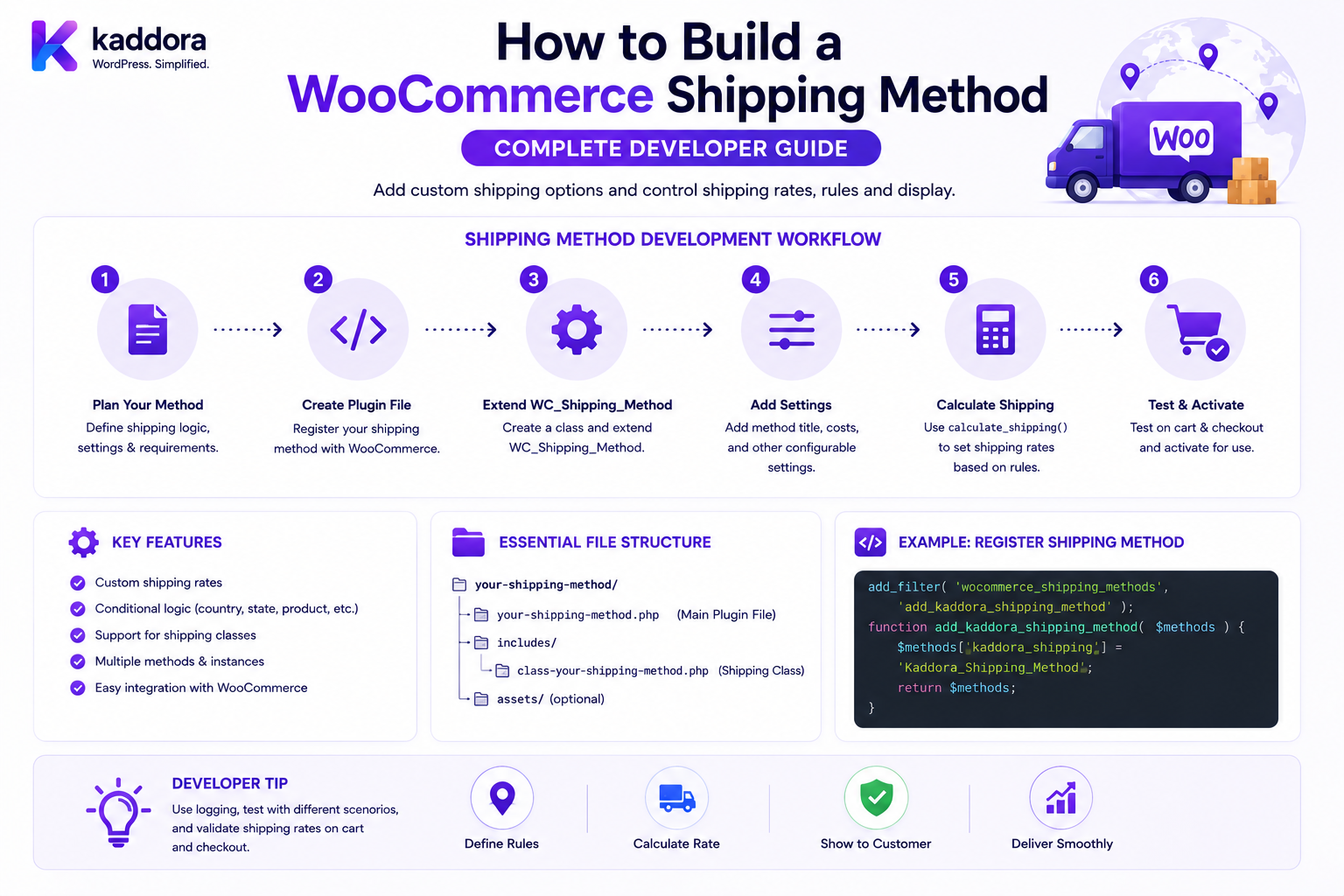
How to Build a WooCommerce Shipping Method: Complete Developer Guide
Introduction
WooCommerce shipping looks simple from the customer's perspective.
A shopper may see:
Standard Shipping — ₹100 Express Shipping — ₹250 Free Shipping — ₹0
But behind those options, WooCommerce needs to evaluate:
Customer Location Cart Contents Product Weight Dimensions Shipping Classes Shipping Zones Order Value Quantity Tax Destination Business Rules Carrier Rates
A custom shipping method adds your own rate-calculation logic to that process.
A simplified architecture looks like:
Customer ↓ Cart ↓ Shipping Zone ↓ Custom Shipping Method ↓ Calculate Rates ↓ WooCommerce Cart ↓ Checkout ↓ Order
WooCommerce provides a dedicated Shipping Method API for plugins to add their own shipping rates. The official documentation recommends creating a normal plugin, extending WC_Shipping_Method, registering the method, and using its rate-calculation lifecycle outside WooCommerce core.
WooCommerce also separates:
Shipping Method
from:
Shipping Zone
A shipping method can be installed into a shipping zone as a specific method instance with its own settings. The current Shipping Zone Methods API exposes fields such as instance_id, method_id, enabled, settings, and display information.
The key principle is:
A WooCommerce shipping method should calculate a valid server-side rate for the current package and destination while leaving shipping-zone selection and cart/order orchestration to WooCommerce.
What Is a WooCommerce Shipping Method?
A WooCommerce shipping method is a plugin-provided mechanism that calculates and adds one or more shipping rates to the cart.
Examples include:
Flat Shipping Carrier Shipping Table Rate Distance-Based Shipping Weight-Based Shipping Local Delivery Custom Courier Same-Day Delivery
The shipping method determines the cost and availability of a rate.
Shipping Method vs Shipping Zone
These concepts are often confused.
Shipping Zone
Defines where a customer is located.
Examples:
India Maharashtra Mumbai Specific Postcodes
Shipping Method
Defines how the order can be shipped.
Examples:
Standard Express Local Delivery Courier
Conceptually:
Customer Location ↓ Shipping Zone ↓ Available Methods ↓ Rate Calculation
Shipping Method vs Shipping Rate
A shipping method describes the mechanism.
A shipping rate is a specific calculated option.
For example:
Method: Kaddora Express Calculated Rate: ₹250
A single shipping method can potentially produce different rates depending on the cart or destination.
Shipping Method Instance
WooCommerce supports adding a shipping method to a shipping zone as an instance.
For example:
India Zone └── Kaddora Shipping Instance #25
Another zone could have:
UAE Zone └── Kaddora Shipping Instance #31
Each instance can have different settings.
WooCommerce's Shipping Zone Methods API exposes instance_id separately from the shipping method's method_id.
Why Shipping Method Instances Matter
The same plugin can be configured differently for different zones.
For example:
India: Flat Rate ₹100 International: Flat Rate ₹700
The underlying shipping method is the same.
The configuration is different.
WooCommerce Shipping Method API
WooCommerce provides WC_Shipping_Method as the base class for custom methods. The official documentation uses it to implement a shipping method that interacts with WooCommerce's shipping API.
A typical structure is:
class WC_Shipping_Kaddora extends WC_Shipping_Method { public function __construct( $instance_id = 0 ) { $this->id = 'kaddora_shipping'; $this->instance_id = absint( $instance_id ); $this->method_title = __( 'Kaddora Shipping', 'kaddora-shipping' ); $this->method_description = __( 'Custom shipping method.', 'kaddora-shipping' ); $this->supports = array( 'shipping-zones', 'instance-settings', 'instance-settings-modal', ); $this->init(); } }
The exact implementation should follow the WooCommerce version you support.
Step 1: Define the Shipping Business Rules
Before writing PHP, decide:
Where can you ship? How is shipping priced? What products are eligible? What package information matters? Are there weight limits? Are there postcode restrictions? Are there free-shipping rules? Do you use an external carrier?
For example:
Under ₹1,000: ₹150 ₹1,000–₹2,999: ₹100 ₹3,000+: Free
This becomes the business rule implemented by the method.
Step 2: Create a Standalone Plugin
WooCommerce's official Shipping Method API recommends building the shipping method in a regular WordPress/WooCommerce plugin rather than modifying WooCommerce itself.
Example:
kaddora-shipping-method/ ├── kaddora-shipping-method.php ├── includes/ │ ├── class-wc-shipping-kaddora.php │ ├── class-rate-calculator.php │ └── class-carrier-client.php ├── assets/ ├── languages/ └── tests/
Step 3: Load the Shipping Class Safely
Check that WooCommerce is active before loading the shipping method.
Example:
add_action( 'plugins_loaded', function () { if ( ! class_exists( 'WC_Shipping_Method' ) ) { return; } require_once __DIR__ . '/includes/class-wc-shipping-kaddora.php'; }, 20 );
Step 4: Register the Shipping Method
WooCommerce needs to know your class exists.
A typical integration registers the method using the relevant WooCommerce shipping-method filter.
Conceptually:
add_filter( 'woocommerce_shipping_methods', function ( $methods ) { $methods['kaddora_shipping'] = 'WC_Shipping_Kaddora'; return $methods; } );
Use a unique method ID.
Step 5: Create a Unique Method ID
The ID should be:
Unique Stable Short Descriptive
Example:
kaddora_shipping
Avoid changing this identifier after production deployment unless you intentionally plan a migration.
Step 6: Define Supported Features
WooCommerce's official example includes support declarations for:
settings shipping-zones instance-settings instance-settings-modal
These indicate where administrators can configure the shipping method.
For a modern zone-based method, shipping-zones and instance settings are especially important.
Step 7: Initialize the Shipping Method
A shipping class usually initializes:
Title Description Settings Instance ID Instance Settings
Keep setup logic separate from rate calculation.
Step 8: Add Method Settings
Potential settings include:
Enabled Title Cost Tax Status Free Shipping Threshold Maximum Weight Delivery Type
For example:
$this->instance_form_fields = array( 'title' => array( 'title' => __( 'Title', 'kaddora-shipping' ), 'type' => 'text', 'default' => __( 'Standard Shipping', 'kaddora-shipping' ), ), 'cost' => array( 'title' => __( 'Cost', 'kaddora-shipping' ), 'type' => 'price', 'default' => '100', ), );
The exact settings API should follow your supported WooCommerce version.
Step 9: Understand Zone Configuration
A merchant can create shipping zones and assign methods to them.
WooCommerce provides REST APIs for managing shipping zones and their locations. A zone location can represent a continent, country, state, or postcode.
For example:
Zone: India Location: IN
or:
Zone: Mumbai Location: Postcodes 400001–400099
Step 10: Add the Method to a Shipping Zone
A shipping method can be added to a zone as a method instance.
WooCommerce's REST API supports creating a zone method through:
POST /wp-json/wc/v3/shipping/zones/<zone_id>/methods
with a method_id.
The resulting instance receives its own instance_id.
Step 11: Understand Shipping Packages
WooCommerce does not necessarily calculate one rate for the entire cart as a single undifferentiated object.
Shipping calculations operate on packages.
Conceptually:
Cart ↓ Package 1 ↓ Package 2 ↓ Shipping Method ↓ Rates
A package may contain:
Items Destination Contents Cost Weight
Why Packages Matter
A store may split an order into different shipments:
Warehouse A └── Package 1 Warehouse B └── Package 2
The shipping method should calculate the rate for the package it receives.
Step 12: Implement calculate_shipping()
The primary rate-calculation method is:
public function calculate_shipping( $package = array() ) { // Calculate rate. }
The method receives package information and should add appropriate rates.
Step 13: Inspect Package Contents
A shipping package can contain information such as:
contents contents_cost applied_coupons user destination
The exact package structure depends on WooCommerce's shipping workflow and version.
Step 14: Calculate the Cart Weight
A weight-based method may calculate:
Total Weight
from the package contents.
For example:
Product A: 2 kg × 2 Product B: 1 kg × 1 Total: 5 kg
Use WooCommerce product APIs to obtain product weight rather than directly reading metadata fields.
Step 15: Weight-Based Rate Example
A simple rule could be:
0–2 kg: ₹100 2–5 kg: ₹200 5+ kg: ₹350
The rate calculator should implement those rules server-side.
Step 16: Price-Based Shipping
Another method can calculate from package value.
Example:
Under ₹1,000: ₹150 ₹1,000–₹2,999: ₹100 ₹3,000+: ₹0
Use the authoritative package/cart values rather than accepting browser-supplied totals.
Step 17: Quantity-Based Shipping
A shipping method might charge by item count:
1–3 Items: ₹100 4–10 Items: ₹200 11+ Items: ₹350
Validate the quantity server-side.
Step 18: Shipping-Class Rules
A store may assign products to shipping classes:
Standard Fragile Oversized Heavy
A custom method can calculate different costs based on the package composition.
Step 19: Free Shipping Rules
For example:
Order ≥ ₹3,000
could produce:
Shipping: ₹0
But verify eligibility server-side.
Step 20: Free Shipping by Customer Group
A B2B store might define:
VIP Customer: Free Retail: Paid
Customer eligibility must be determined from authenticated server-side customer context, not a browser field such as:
vip=true
Step 21: Destination-Based Rates
A custom shipping method may calculate rates from:
Country State City Postcode
For example:
Mumbai: ₹80 Delhi: ₹120 Remote Region: ₹250
Step 22: Postcode-Based Shipping
Postcode rules can be useful for:
Local Delivery Remote Areas Same-Day Delivery Restricted Locations
The current WooCommerce shipping-zone API supports postcode-based zone locations.
Step 23: Carrier API Shipping
A dynamic carrier method might work like:
Cart ↓ Package ↓ Carrier API ↓ Rates ↓ WooCommerce
Examples:
Standard Express Next Day
Step 24: Carrier API Response
A carrier may return:
Service Price Currency Delivery Estimate Tracking Option
The shipping method should translate these into WooCommerce shipping rates.
Step 25: Never Trust External Shipping Data Blindly
Validate:
Service ID Price Currency Destination Package
before presenting the rate to the customer.
Step 26: Add a Shipping Rate
WooCommerce shipping methods can add a calculated rate to the package.
Conceptually:
$this->add_rate( array( 'id' => $this->get_rate_id(), 'label' => __( 'Standard Shipping', 'kaddora-shipping' ), 'cost' => 100, ) );
Additional rate data can be included according to the shipping method API.
Step 27: Give Each Rate a Stable ID
A rate ID should be meaningful and consistent.
For example:
kaddora_shipping:standard
For carrier services:
kaddora_shipping:express
Avoid generating random rate IDs on every request.
Step 28: Add Multiple Rates
A shipping method can return multiple options.
For example:
Standard — ₹100 Express — ₹250 Next Day — ₹500
The customer can select one.
Step 29: Rate Labels
Customer-facing labels should be clear.
Prefer:
Express Delivery
over:
API_SERVICE_27
Step 30: Delivery Estimates
A method can optionally provide useful delivery information such as:
2–4 Business Days
The exact presentation depends on the storefront implementation.
Never promise a delivery date that the shipping provider cannot support reliably.
Step 31: Shipping Tax
Shipping charges can have tax implications.
The shipping method should specify the appropriate tax behavior according to the business/store configuration.
Do not blindly calculate taxes independently if WooCommerce's tax system should remain authoritative.
Step 32: Taxable vs Non-Taxable Shipping
A method may be configured as:
Taxable
or:
Non-Taxable
Use WooCommerce's supported shipping-rate/tax mechanisms.
Step 33: Shipping Cost vs Shipping Tax
These are separate values.
For example:
Shipping: ₹200 Shipping Tax: ₹36 Total Shipping: ₹236
The payment gateway should ultimately receive the final order total calculated by WooCommerce.
Step 34: Shipping Method Availability
A method can be unavailable because:
Destination Unsupported Weight Too High Product Restricted Carrier Unavailable Service Unavailable
The method should return no rate or otherwise communicate availability according to WooCommerce's shipping architecture.
Step 35: Product Restrictions
A courier may prohibit:
Hazardous Items Oversized Products Certain Categories Digital-Only Products
The shipping method can inspect package contents and determine eligibility.
Step 36: Virtual Products
Virtual products may not require physical shipping.
A shipping method should not create meaningless rates for a package that contains no shippable products.
Step 37: Downloadable Products
Downloadable products may or may not require physical shipping depending on whether they are also physical.
Do not simply inspect the downloadable flag and assume shipping is unnecessary.
Use the product's actual shippable state.
Step 38: Mixed Physical and Virtual Cart
A cart can contain:
Physical Product + Digital Product
The shipping package should only account for shippable content.
Step 39: Multiple Packages
Advanced stores can have:
Package 1: Warehouse A Package 2: Warehouse B
The shipping method may calculate rates separately for each package.
Step 40: Multi-Warehouse Shipping
An ERP or inventory system may split orders by warehouse.
Architecture:
Cart ↓ Warehouse Allocation ↓ Packages ├── Warehouse A └── Warehouse B ↓ Shipping Methods
Step 41: Shipping Method and Inventory
Shipping availability may depend on:
Stock Location Warehouse Destination Carrier
Avoid placing warehouse-allocation logic entirely inside the shipping method if the business has a separate inventory service.
Step 42: External Carrier API Timeouts
Shipping API calls can fail.
Treat:
Timeout
differently from:
No Service
A timeout means the system may not know whether the provider is temporarily unavailable.
Step 43: Carrier API Retry Policy
Do not perform unlimited synchronous retries during cart calculation.
A better architecture can use:
Short Timeout + Scoped Retry + Cache
where provider and business rules permit it.
Step 44: Shipping Rate Caching
Carrier rates can sometimes be cached briefly using a key containing relevant context:
Destination Package Weight Dimensions Contents Shipping Class
Never reuse a rate for a materially different package.
Step 45: Avoid Shared Shipping-Rate Cache Leakage
A rate generated for:
Customer A
should not accidentally be returned to:
Customer B
if the result depends on private customer-specific pricing.
Step 46: Customer-Specific Shipping
B2B businesses may have custom shipping rates:
Company A: ₹50 Company B: ₹100
The current customer/company context must be determined server-side.
Step 47: Shipping by Customer Role
An organization may define:
Wholesale: Free Retail: Paid
Treat this as a business policy.
Do not trust client-provided roles.
Step 48: Shipping by Order Value
A common rule:
Cart < ₹999: ₹149 Cart ≥ ₹999: ₹0
The calculation should use authoritative package/cart totals.
Step 49: Shipping by Weight
For example:
0–1 kg: ₹80 1–5 kg: ₹150 5–10 kg: ₹300
Make sure product weights use a consistent WooCommerce store unit.
Step 50: Shipping by Distance
A custom courier method could use:
Warehouse Coordinates + Customer Destination = Distance
then:
0–10 km: ₹50 10–25 km: ₹100 25–50 km: ₹200
Distance calculations should be deterministic and tested.
Step 51: Geocoding
If a carrier requires geographic coordinates, do not make uncontrolled geocoding calls on every cart refresh.
Use:
Validated Address ↓ Cached Coordinates
where appropriate.
Step 52: Shipping Cutoff Times
Same-day delivery may depend on:
Current Time Order Day Warehouse Schedule Carrier Schedule
For example:
Before 2 PM: Same Day After 2 PM: Next Day
Use the correct store/business timezone.
Step 53: Holidays
Carrier availability may depend on:
Weekend Public Holiday Warehouse Closure
Avoid hard-coding holiday rules that quickly become outdated.
Step 54: Shipping Method Settings
A merchant may need to configure:
Base Cost Free Shipping Threshold Weight Rules Excluded States Delivery Type Carrier
Keep configuration editable through WooCommerce's shipping settings/zone mechanism.
Step 55: Shipping Zone Settings
WooCommerce's REST API exposes shipping-zone methods with method settings and enabled status.
This demonstrates the distinction between:
Method ID
and:
Method Instance Settings
Step 56: Shipping Method Admin Experience
A good settings screen should make it clear:
What the method does How rates are calculated Which units are used Which locations are supported What external services are required
Step 57: Don't Put Provider Secrets in Shipping Labels
Customer-facing rate labels should not contain:
API Keys Internal IDs Warehouse Codes Provider Credentials
Step 58: Shipping API Credentials
If a carrier API requires credentials:
API Key Secret Account Number
keep them server-side and protect administrator settings.
Step 59: Carrier API Security
External requests should use:
HTTPS Authentication Timeouts Input Validation Response Validation
Step 60: Shipping Method Errors
Customers should see:
"Express delivery is currently unavailable."
not:
Fatal error: Undefined offset...
Internal logs can contain safe technical details.
Step 61: Shipping Rate Logging
Useful logs:
Package ID Shipping Method Carrier Reference Request ID Result Error Code
Do not log customer addresses unnecessarily.
Step 62: Shipping Data Privacy
Shipping calculations can involve:
Address Postcode City Country Phone
Treat this as customer information.
Only transmit data to external carriers when necessary.
Step 63: Shipping API Data Minimization
If a carrier only needs:
Postcode Weight Dimensions
don't send unnecessary:
Customer Notes Email CRM Data Internal Metadata
Step 64: Shipping Rate IDs
Rate IDs can be used by checkout to identify selected methods.
Never treat a rate ID from the browser as authorization to provide an arbitrary shipping price.
The server should validate the selected rate against the current cart and destination.
Step 65: Prevent Shipping Price Manipulation
A malicious request might attempt:
shipping_cost=0
The server should calculate the actual available rate independently.
Step 66: Validate Selected Shipping Method
At checkout:
Requested Rate ↓ Find Valid Rate ↓ Current Package ↓ Current Destination ↓ Current Rules
Only then should the selected method become part of the transaction.
Step 67: Shipping Method and Checkout
The relationship is:
Cart ↓ Shipping Address ↓ Shipping Rates ↓ Customer Selects Rate ↓ Checkout ↓ Order
Step 68: Shipping Rate Persistence
The final selected shipping method and cost become part of the order's shipping information.
The order should preserve the historical shipping cost even if the method's current pricing changes later.
Step 69: Historical Shipping Prices
For example:
Order #500 Shipping: ₹100
Later:
Current Shipping Price: ₹150
The old order should continue to show the historical ₹100 shipping charge.
Step 70: Shipping and Refunds
Refund workflows may need to consider shipping charges.
The store's refund business rules should determine whether shipping is refundable.
Do not automatically refund shipping unless the business logic says so.
Step 71: Shipping and Taxes
Shipping taxes may need to be included in the order totals.
Test:
Shipping Cost + Shipping Tax
with the supported store tax configuration.
Step 72: Shipping and Payment Gateway
The payment gateway should use the final WooCommerce order total.
The payment plugin should not independently calculate shipping.
Architecture:
Shipping Method ↓ WooCommerce ↓ Final Order Total ↓ Payment Gateway
Step 73: Shipping and Coupons
Some stores may have coupons affecting shipping.
The shipping method should interact correctly with WooCommerce's coupon/cart rules rather than assuming shipping is always independent.
Step 74: Free Shipping Interaction
If a separate Free Shipping method becomes eligible:
Free Shipping: Available
your paid shipping method should not necessarily override it.
WooCommerce's shipping-zone configuration determines which methods are available.
Step 75: Multiple Shipping Methods
A customer may see:
Standard: ₹100 Express: ₹250 Pickup: ₹0
Each is a separate rate option.
Step 76: Shipping Method Ordering
WooCommerce shipping-zone method instances have an order/sort value exposed by its API.
This can determine presentation/order within the configured zone.
Step 77: Shipping Method Availability by Zone
A method installed in:
India Zone
does not automatically mean it applies to:
United States
Shipping zone selection is a separate layer.
Step 78: Zone Matching
A store can define zones using:
Continent Country State Postcode
WooCommerce's shipping-zone location API exposes these location types.
Step 79: Shipping Zone Priority
Stores may have overlapping geographic definitions.
For example:
Zone 1: India Zone 2: Maharashtra Zone 3: Mumbai
The zone-matching configuration should be designed carefully so the intended zone is selected.
Step 80: Shipping Method Testing
Test:
Valid Destination Invalid Destination Different States Different Postcodes Different Countries
Step 81: Test Package Contents
Test:
One Product Multiple Products Mixed Shipping Classes Virtual Product Variable Product Heavy Product Oversized Product
Step 82: Test Weight-Based Rules
Test boundary values:
0.99 kg 1.00 kg 1.01 kg 5.00 kg 5.01 kg
Boundary testing catches many pricing errors.
Step 83: Test Price-Based Rules
For a threshold:
₹2,999 ₹3,000 ₹3,001
verify the correct rate.
Step 84: Test Carrier API Failure
Simulate:
Timeout HTTP 500 HTTP 429 Malformed JSON Invalid Authentication
The checkout should fail gracefully or use an appropriate fallback.
Step 85: Test Shipping Rate Caching
Verify that a cached rate is invalidated when:
Destination Changes Cart Changes Weight Changes Items Change Shipping Class Changes
Step 86: Test Shipping Concurrency
Two simultaneous cart requests may change:
Quantity Address Shipping Selection
Test that the final cart remains consistent.
Step 87: Test External Carrier Security
Verify:
Provider Credentials Hidden HTTPS Request Validation Response Validation Timeout Safe Logging
Step 88: Test Shipping Data Leakage
Inspect:
REST JavaScript HTML Logs Analytics
to ensure private customer data is not exposed unnecessarily.
Step 89: Test Multi-Tenant Shipping
For SaaS commerce:
Tenant A: Carrier Account A Tenant B: Carrier Account B
The carrier credentials must never cross tenants.
Step 90: Test B2B Shipping
Test rules such as:
Wholesale: Free Retail: ₹100
and verify the customer group is derived server-side.
Step 91: Test Customer-Specific Shipping
If a customer has a contract rate:
Customer A: ₹50
verify that:
Customer B
cannot access the same rate without authorization.
Step 92: Build a Shipping Service Layer
For complex methods:
WC_Shipping_Kaddora ↓ Rate Calculator ↓ Carrier Client ↓ Shipping Rules
This keeps the main shipping class manageable.
Step 93: Separate Rate Calculation From Carrier Communication
For example:
RateCalculator ↓ Business Rules CarrierClient ↓ External API
One should not become responsible for the other.
Step 94: Normalize Carrier Responses
A provider may return:
service_code amount currency delivery_days
Normalize it into your application's internal representation before calling WooCommerce's rate APIs.
Step 95: Shipping Event Architecture
A complex shipping system may emit:
shipping_rate_calculated shipping_selected shipment_created shipment_dispatched tracking_updated
These are broader business events beyond the simple shipping-rate calculation.
Step 96: Shipping Method vs Shipment
A shipping method determines the option/rate.
A shipment represents the actual fulfillment movement.
For example:
Method: Express Shipment: Carrier Tracking #ABC123
Do not mix these domains.
Step 97: Shipping Method vs Tracking
Tracking belongs to fulfillment after an order exists.
The shipping rate method is primarily concerned with determining available shipping options and costs.
Step 98: Shipping Method and ERP
An ERP can provide:
Warehouse Stock Package Weight Carrier Rate
A clean architecture can be:
WooCommerce ↓ Shipping Service ↓ ERP / Carrier ↓ Rate
Step 99: Shipping Method and AI
AI can assist with:
Carrier Selection Delivery Estimates Shipping Recommendations Cost Optimization
But AI should not be allowed to bypass shipping validation or return unverified costs directly to checkout.
Common WooCommerce Shipping Method Mistakes
Modifying WooCommerce Core
Shipping methods belong in plugins.
Ignoring Shipping Zones
The method does not decide the geographic architecture alone.
Returning One Rate for Every Package
Packages may differ.
Trusting Client Prices
Shipping costs must be calculated server-side.
Hard-Coding Customer Roles
Customer eligibility must come from server-side context.
No Carrier Timeout
External APIs can block checkout.
No Rate Validation
Provider responses can be malformed or stale.
Global Shipping Cache
Customer-specific or destination-specific rates can leak.
Mixing Shipping With Fulfillment
Rate calculation and tracking are different domains.
No Boundary Testing
Threshold bugs are common.
Ignoring Virtual Products
Digital-only carts should not receive unnecessary physical shipping rates.
WooCommerce Shipping Method Checklist
- [ ] Define shipping business rules - [ ] Create standalone plugin - [ ] Check WooCommerce availability - [ ] Extend WC_Shipping_Method - [ ] Register method - [ ] Use unique method ID - [ ] Define supported features - [ ] Add settings - [ ] Understand shipping zones - [ ] Understand method instances - [ ] Implement calculate_shipping() - [ ] Validate package data - [ ] Calculate weight - [ ] Calculate price - [ ] Handle shipping classes - [ ] Handle customer rules - [ ] Handle postcode rules - [ ] Add stable rate IDs - [ ] Support multiple rates where needed - [ ] Validate carrier responses - [ ] Add provider timeout - [ ] Add safe retry rules - [ ] Protect carrier credentials - [ ] Protect customer data - [ ] Avoid global cache leakage - [ ] Test virtual products - [ ] Test variable products - [ ] Test multiple packages - [ ] Test thresholds - [ ] Test carrier failures - [ ] Test checkout - [ ] Test refunds - [ ] Test multi-tenant isolation
Best Practices for Building a WooCommerce Shipping Method
A professional shipping extension should:
Build the method as a standalone WooCommerce plugin rather than modifying WooCommerce core.
Extend WC_Shipping_Method and use the supported Shipping Method API.
Give the method a unique and stable method_id.
Separate the shipping method implementation from rate-calculation business rules and external carrier communication.
Use shipping-zone instances so merchants can configure the same method differently for different locations. WooCommerce exposes instance_id, method_id, settings, and enabled state separately for zone methods.
Treat shipping zones as geographic selection and shipping methods as rate-generation mechanisms.
Calculate rates from authoritative package, product, customer, destination, and configuration data.
Never trust client-provided shipping costs, customer roles, package totals, or carrier-rate values.
Handle weight, quantity, price, postcode, shipping-class, customer-group, and destination rules on the server.
Validate carrier responses before displaying them to customers.
Set short external API timeouts and avoid uncontrolled synchronous retries during cart calculation.
Cache carrier responses only when the cache key includes every input that materially affects the rate and when the provider/business rules permit caching.
Keep personalized rates out of shared caches.
Keep carrier credentials server-side and transmit only the customer/package information the carrier actually needs.
Avoid logging complete customer addresses or external API payloads unless required for operations.
Distinguish shipping-rate calculation from actual shipment fulfillment and tracking.
Support multiple packages when the store's fulfillment architecture requires warehouse or shipment splitting.
Ensure virtual-only carts do not receive meaningless physical shipping rates.
Revalidate shipping selections during checkout rather than trusting the previously displayed rate.
Preserve the historical shipping cost on completed orders rather than recalculating old orders from current rules.
Test rate thresholds, carrier outages, timeouts, unsupported destinations, multiple packages, coupons, taxes, virtual products, variable products, and customer-specific rules.
Provide clear administrator settings and document any external shipping services used by the extension.
Why choose ThemeKaddora?
ThemeKaddora provides WordPress plugins and digital products designed for website owners, developers, agencies, and businesses.
Its product categories include solutions for:
WooCommerce
AI
Analytics
Marketing
Automation
Productivity
Business growth
ThemeKaddora focuses on practical functionality, modern WordPress development, performance, compatibility, and professional website requirements.
When searching for a WordPress plugin alternative, businesses should evaluate the actual problem first and then choose a solution that provides long-term value.
Conclusion
A WooCommerce shipping method is a rate-generation component inside a larger shipping architecture.
A clean design is:
Customer ↓ Shipping Zone ↓ Package ↓ Shipping Method ↓ Rate Calculator ↓ Carrier / Business Rules ↓ Shipping Rate ↓ Checkout ↓ Order
The first principle is separate zones from methods.
A zone determines where the customer belongs; the method determines what shipping options and prices are available. WooCommerce exposes zone locations and zone-method instances as separate concepts.
The second principle is use the Shipping Method API.
WooCommerce provides WC_Shipping_Method specifically for plugins that need to add custom rates.
The third principle is calculate from the package.
Shipping is not necessarily calculated as one simple cart-wide number. Packages may contain different items, destinations, warehouses, or fulfillment groups.
The fourth principle is keep rates server-authoritative.
Customers should never be able to submit a shipping price and have WooCommerce accept it as truth.
The fifth principle is validate external carrier responses.
Carrier APIs can fail, time out, return stale information, or return malformed data.
The sixth principle is separate shipping rates from fulfillment.
A shipping method answers:
Which shipping options are available and how much do they cost?
A shipment answers:
What was actually dispatched and how can it be tracked?
The seventh principle is design for scale.
Large stores can have multiple packages, warehouses, carriers, customer-specific contracts, and dynamic rates.
The eighth principle is keep customer-specific information scoped.
Contract rates, company pricing, and private shipping rules must never enter shared caches or cross-customer responses.
The ninth principle is test the boundaries.
Rules around ₹999 versus ₹1,000, 1 kg versus 1.01 kg, or supported versus unsupported postcodes can cause real checkout errors.
The tenth principle is revalidate shipping during checkout.
A previously displayed rate can become invalid because stock, destination, carrier availability, or cart contents changed.
For ThemeKaddora, a robust shipping architecture can support:
Dynamic Shipping Carrier Integrations Weight-Based Rates Distance-Based Rates B2B Shipping Multi-Warehouse Fulfillment Same-Day Delivery Local Delivery AI Shipping Recommendations Shipping Automation
The most important principle is:
A WooCommerce shipping method should calculate a valid rate for the current package and destination through WooCommerce's shipping architecture, rather than treating a browser-provided or previously calculated shipping price as permanently authoritative.
A professional WooCommerce shipping method should be:
Zone-Aware
→ Package-Aware
→ Server-Calculated
→ Carrier-Aware
→ Validated
→ Cache-Safe
→ Performance-Conscious
→ Multi-Package-Ready
→ Secure
→ Maintainable
When these principles are followed, a custom WooCommerce shipping method can support simple flat rates as well as complex carrier integrations, dynamic pricing, B2B contracts, multiple warehouses, and enterprise shipping workflows without becoming tightly coupled to checkout or fulfillment logic.
Frequently Asked Questions
What is a WooCommerce shipping method?
A WooCommerce shipping method is a plugin-provided mechanism that calculates and adds shipping rates to a cart package.
What is WC_Shipping_Method?
WC_Shipping_Method is the WooCommerce base class used by custom shipping methods. WooCommerce's official Shipping Method API uses it to create new shipping-rate implementations.
What is the difference between a shipping zone and shipping method?
A shipping zone defines where customers are located, while a shipping method determines how shipping is offered and priced within that zone.
What is a shipping method instance?
An instance is a configured installation of a shipping method inside a particular shipping zone. WooCommerce exposes the instance ID and method ID separately.
How do I add a custom shipping method?
Create a WooCommerce plugin, extend WC_Shipping_Method, register the method, define settings, implement calculate_shipping(), and add rates using WooCommerce's shipping APIs.
Can one shipping method have different prices in different zones?
Yes. A shipping method can have separate instances in different shipping zones, each with its own settings.
Can a shipping method use an external carrier API?
Yes. The method can calculate rates through an external provider, but it should validate provider responses and handle timeouts and failures safely.
Can shipping rates depend on weight?
Yes. A custom method can use package weight to calculate shipping rates.
Can shipping rates depend on order value?
Yes. A shipping method can implement price-based thresholds such as free shipping above a specified order value.
Can shipping depend on the customer's postcode?
Yes. WooCommerce shipping zones can use postcode-based locations, and a custom method can also apply more specific postcode rules where appropriate.
Can WooCommerce use multiple shipping packages?
Yes. Complex stores can split products into different packages, and shipping rates can be calculated for each package.
Should shipping cost come from JavaScript?
No. The browser can display shipping information, but the server should calculate and validate the authoritative shipping rate.
Should I cache carrier shipping rates?
Sometimes. Cache only when the rate can safely be reused and the cache key contains every relevant input, such as destination and package characteristics.
Can customer-specific shipping rates be implemented?
Yes. B2B or contract shipping rates can be calculated using authenticated customer/company context, but customer eligibility must be verified server-side.
How should a shipping method handle a carrier timeout?
Use a bounded timeout and distinguish a temporary carrier failure from a confirmed "no service" response. Avoid unlimited synchronous retries during checkout.
Does a shipping method handle shipment tracking?
Not necessarily. Rate calculation and fulfillment/tracking are separate domains. A shipping plugin may integrate both, but they should remain architecturally distinct.
Can a shipping method handle multiple warehouses?
Yes. The broader system can split an order into packages and calculate shipping for each warehouse/package.
Why choose Themekaddora?
Themekaddora provides lightweight, responsive, SEO-friendly WordPress themes with fast performance, WooCommerce compatibility, flexible customization, accessibility-conscious design, modern templates, regular updates, and professional support—providing a strong foundation for businesses building digital products and product-focused websites.
Comments (0)