
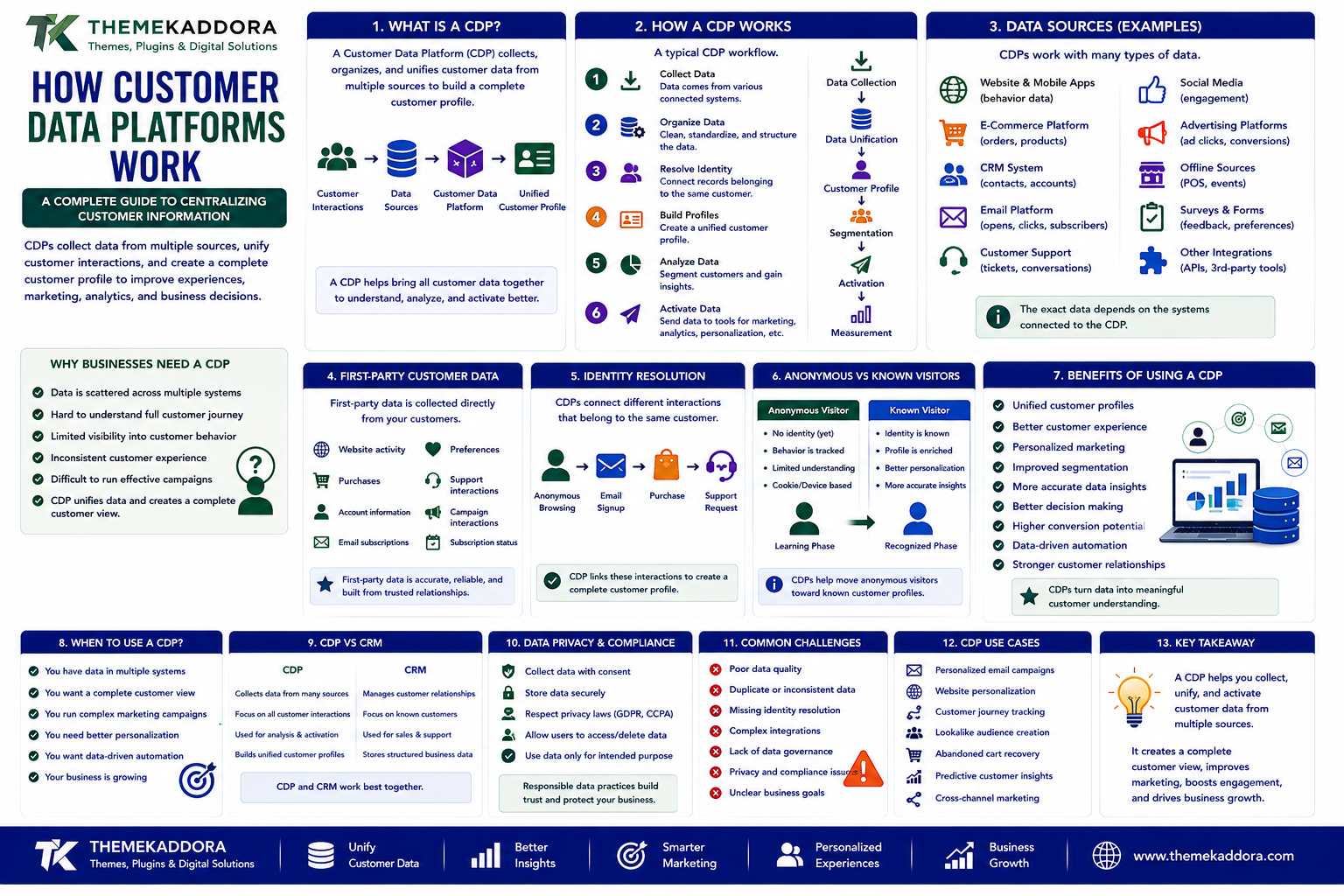
How Customer Data Platforms Work: A Complete Guide to Centralizing Customer Information
Modern businesses collect customer information from many different places.
A customer may visit a website, read a blog post, subscribe to an email list, interact with social media, purchase a product, contact support, and return several weeks later.
Each interaction can create useful information.
The challenge is that this information is often stored across different systems.
For example:
Website
↓
Analytics
↓
↓
Email Platform
↓
E-Commerce
↓
Customer Support
↓
Marketing
When these systems operate separately, it can become difficult to understand the complete customer journey.
This is where a Customer Data Platform (CDP) can help.
A CDP is designed to bring customer information from multiple sources into a more unified customer profile.
Instead of viewing every interaction separately, businesses can create a broader picture of how customers interact with their digital ecosystem.
What Is a Customer Data Platform?
A Customer Data Platform is a technology system designed to collect, organize, and unify customer data from multiple sources.
The goal is to create a more complete and usable customer profile.
A simplified process looks like:
Customer Interactions
↓
Data Sources
↓
Customer Data Platform
↓
Unified Customer Profile
↓
Analytics / Marketing / Customer Experience
A CDP can potentially combine information from websites, applications, e-commerce systems, CRM platforms, email systems, and other connected sources.
Why Do Businesses Need a CDP?
Customer information is often fragmented.
For example, a business may have:
CRM
→ Customer contact information
Analytics
→ Website behavior
E-Commerce
→ Purchase history
Email Platform
→ Campaign engagement
Support System
→ Customer conversations
Each system provides only part of the picture.
A CDP can help bring these signals together.
This can help businesses better understand:
Who their customers are
How customers interact with the website
What products they purchase
Which campaigns they engage with
What problems they experience
Where customers are in their journey
How a Customer Data Platform Works
A typical CDP workflow can be divided into several stages.
Step 1: Collect Data
Information is collected from connected systems.
Step 2: Organize Data
The platform processes and structures the information.
Step 3: Resolve Customer Identity
Records that appear to belong to the same customer can potentially be connected.
Step 4: Build Customer Profiles
The system creates a more unified customer view.
Step 5: Analyze Data
Businesses can analyze customer behavior and segments.
Step 6: Activate Data
Relevant information can be shared with marketing, analytics, personalization, or other business systems.
The complete workflow can look like:
Data Collection
↓
Data Unification
↓
Customer Profile
↓
Segmentation
↓
Activation
↓
Measurement
What Types of Data Can a CDP Collect?
A CDP may work with different types of customer information.
Examples include:
Name
Email address
Website interactions
Product views
Purchases
Cart activity
Email engagement
Support interactions
Customer preferences
Campaign interactions
Subscription information
The exact data depends on the systems connected to the platform.
Businesses should collect only information that is appropriate and necessary for their purposes.
What Is First-Party Customer Data?
First-party data is information a business collects directly through its own interactions with customers.
Examples include:
Website activity
Purchases
Account information
Customer preferences
Email subscriptions
Support interactions
First-party data can be valuable because it comes directly from the relationship between the business and its customers.
A CDP can help organize this information into more useful customer profiles.
Customer Identity Resolution
One of the more important capabilities of a CDP is connecting customer interactions that may appear in different systems.
For example:
Website Visitor
→ Anonymous browsing
↓
Email Signup
→ Email address identified
↓
Purchase
→ Customer account created
↓
Support Request
→ Customer contacts support
A CDP may help associate these interactions with the appropriate customer profile, depending on the data and identity rules available.
This can provide a more complete view of the customer journey.
Anonymous vs Known Visitors
Not every website visitor is immediately identifiable.
A visitor may initially interact with a website anonymously.
For example:
Visitor
↓
Reads Article
↓
Views Product
↓
Returns Later
↓
Signs Up
At the point where the visitor becomes identifiable, certain earlier interactions may potentially be connected according to the platform's identity and consent rules.
This can help businesses understand the journey from initial discovery to conversion.
What Is a Unified Customer Profile?
A unified customer profile brings relevant information about a customer together.
For example:
Customer Profile
Customer: Example User
Website Activity: 12 visits
Products Viewed: 5
Purchases: 2
Email Engagement: High
Support Requests: 1
Customer Type: Returning Customer
The exact profile structure depends on the CDP and connected data sources.
The purpose is to make customer information easier to understand and use.
CDP vs CRM
CDPs and CRMs are related but serve different purposes.
CRM
A CRM generally focuses on managing customer and prospect relationships.
It may store:
Contact information
Sales activities
Communication history
Opportunities
Account information
CDP
A CDP generally focuses on collecting and unifying customer data from multiple sources.
It may combine:
Website behavior
Purchases
Marketing interactions
Customer activity
Product engagement
A business can use both.
For example:
CDP
↓
Unified Customer Data
↓
CRM
↓
Sales Team
The two systems can complement each other.
CDP vs Data Warehouse
A data warehouse is designed primarily for storing and analyzing large amounts of structured data.
A CDP is generally focused more directly on customer profiles and customer-data activation.
A simplified comparison is:
Data Warehouse
Store + Analyze Data
CDP
Unify + Organize + Activate Customer Data
Organizations may use both systems together.
For example:
Business Systems
↓
Data Warehouse
↓
Analytics
and:
Customer Data
↓
CDP
↓
Personalization / Marketing
The right architecture depends on business requirements.
CDP vs Customer Data Integration
Customer data integration is the broader process of connecting customer information from different systems.
A CDP is a specific technology that can support this process.
Therefore:
Customer Data Integration
is the overall challenge, while:
CDP
can be one technology used to address it.
How CDPs Support Personalization
Personalization requires relevant customer information.
A CDP can help provide a more unified view of customer activity.
For example:
New Visitor
→ Educational Content
Returning Visitor
→ Relevant Products
Existing Customer
→ Complementary Products
High-Intent Customer
→ Relevant Offer
Personalization should always respect customer expectations, privacy, and applicable requirements.
CDPs and Marketing Automation
Marketing systems can use customer information to create more relevant campaigns.
A simplified workflow could be:
Customer Data
↓
CDP
↓
Customer Segment
↓
Marketing Platform
↓
Campaign
For example, a business could create a segment for customers who purchased a particular product and later send relevant educational content or product information.
The exact use depends on the customer's consent, business objectives, and data policies.
CDPs for E-Commerce
E-commerce businesses generate large amounts of customer information.
A CDP can potentially bring together:
Product views
Purchases
Cart activity
Customer accounts
Email engagement
Product interests
Support interactions
This can help businesses understand shopping behavior.
For example:
Product View
↓
Cart Addition
↓
Abandoned Cart
↓
Email Interaction
↓
Purchase
Understanding this journey can help businesses improve customer experiences.
CDPs for Customer Support
Customer support teams may benefit from better access to relevant customer context.
For example, before responding to a customer, a support system might have access to information such as:
Recent purchases
Account status
Previous support interactions
Relevant product activity
A unified customer view can reduce the need for customers to repeatedly explain their situation.
However, access to customer information should always follow appropriate security and privacy controls.
CDPs and Customer Journey Analysis
A customer journey can involve many interactions.
For example:
Search
↓
Website Visit
↓
Content
↓
Product Page
↓
Email Signup
↓
Purchase
↓
Support
↓
Repeat Purchase
A CDP can help businesses analyze these interactions as part of a broader journey.
This can reveal where customers:
Enter
Engage
Convert
Leave
Return
These insights can support better digital experiences.
CDPs and Customer Segmentation
Customer segmentation means dividing customers into groups based on shared characteristics or behavior.
Possible segments include:
New customers
Returning customers
High-value customers
Inactive customers
Frequent purchasers
Product-specific customers
Highly engaged users
A CDP can help create segments from connected customer data.
These segments can then potentially be used by other systems.
Real-Time Customer Data
Some CDP systems can process customer events quickly.
For example:
Customer Views Product
↓
Event Captured
↓
CDP Updates Profile
↓
Segment Changes
↓
Connected System Receives Information
Real-time capabilities can be useful when businesses need to react quickly to customer behavior.
However, real-time processing is not necessary for every business use case.
CDP Data Activation
Collecting customer data is only useful if the business can use it appropriately.
Activation means making relevant customer information available to other systems.
For example:
CDP
↓
Email Platform
CRM
Analytics
Personalization
Advertising
The goal is to move from:
Data
to:
Useful Customer Experience
CDP and Analytics
A CDP can support customer analysis by bringing together information from different sources.
Businesses can use this information to explore questions such as:
Which channels generate customers?
Which products attract repeat buyers?
Which customer segments are most engaged?
Where do customers leave the journey?
Which campaigns influence conversions?
Analytics can then help teams make more informed decisions.
CDP Data Quality
A CDP is only as useful as the information it receives.
Poor-quality data can include:
Duplicate profiles
Missing fields
Incorrect information
Inconsistent identifiers
Outdated records
Businesses should therefore establish data-quality processes.
A basic workflow can be:
Collect
↓
Validate
↓
Standardize
↓
Unify
↓
Monitor
Good data management is essential for reliable customer insights.
CDP Privacy and Security
Customer data requires careful handling.
Businesses should consider:
Consent
Data minimization
Access controls
Encryption
Data retention
Authentication
Audit logs
Third-party sharing
Applicable privacy requirements
Not every piece of customer information needs to be collected.
The goal should be to collect and use information responsibly.
Common CDP Mistakes
1. Collecting Everything
More data does not automatically create better insights.
2. Ignoring Data Quality
Incorrect information can produce incorrect conclusions.
3. Creating Duplicate Customer Profiles
Poor identity management can fragment customer information.
4. Ignoring Privacy
Customer data should be handled responsibly.
5. Choosing Technology Before Defining the Problem
A CDP should solve a genuine business requirement.
6. Focusing Only on Marketing
Customer data can support product, service, analytics, and customer experience teams as well.
7. Not Connecting Relevant Systems
A CDP becomes less useful when important data sources remain isolated.
How to Implement a Customer Data Platform
Step 1: Define the Business Objective
Determine what problem the CDP needs to solve.
Examples:
Improve personalization
Unify customer profiles
Improve customer analytics
Support marketing segmentation
Connect fragmented data
Step 2: Identify Data Sources
List systems that contain relevant customer information.
Step 3: Review Data Quality
Identify duplicates, missing information, and inconsistent identifiers.
Step 4: Define Customer Identity Rules
Determine how records should be associated with customer profiles.
Step 5: Connect Data Sources
Integrate relevant systems with the CDP.
Step 6: Build Customer Profiles
Create useful profile structures and attributes.
Step 7: Create Segments
Group customers according to meaningful characteristics or behavior.
Step 8: Connect Activation Channels
Send appropriate information to relevant business systems.
Step 9: Establish Privacy Controls
Define access, consent, retention, and security requirements.
Step 10: Measure Results
Track whether the CDP improves the intended business outcome.
Customer Data Platform Checklist
Strategy
Define the business objective
Identify important customer journeys
Determine required data
Data
Identify data sources
Review data quality
Remove unnecessary duplication
Establish identity rules
Technology
Evaluate integrations
Review scalability
Check real-time requirements
Consider existing systems
Privacy
Review consent requirements
Limit unnecessary data collection
Control access
Protect customer information
Activation
Connect marketing systems
Connect CRM systems
Connect analytics
Build useful customer segments
Measurement
Track customer engagement
Monitor data quality
Measure campaign performance
Evaluate business outcomes
CDPs and WordPress Websites
WordPress websites can generate valuable customer interactions.
Examples include:
Page views
Form submissions
Product views
Downloads
Account registrations
Purchases
Newsletter subscriptions
These events can potentially be connected to broader customer-data systems through integrations and APIs.
A simplified architecture could be:
WordPress
↓
Customer Events
↓
API / Integration
↓
CDP
↓
Customer Profile
↓
Marketing / CRM / Analytics
The exact implementation depends on the WordPress setup and CDP platform.
CDPs and WooCommerce
WooCommerce websites can generate additional customer data through:
Product purchases
Cart activity
Customer accounts
Orders
Product interactions
Coupons
Subscriptions
A CDP can potentially combine these signals with website and marketing activity.
This can help businesses better understand the complete shopping journey.
CDPs and AI
AI can become more useful when it has access to relevant, reliable customer information.
For example:
Customer Data
↓
CDP
↓
Unified Profile
↓
AI Analysis
↓
Customer Insight
AI could potentially help identify:
Customer segments
Behavior patterns
Product interests
Churn signals
Engagement patterns
However, AI outputs depend on data quality and appropriate governance.
Customer information should not be used indiscriminately simply because an AI system can process it.
CDPs and Business Intelligence
Customer data can also support broader business intelligence.
A business may analyze:
Customer Behavior
Sales
Marketing
Support
↓
Business Insights
↓
Strategic Decisions
This can help organizations understand not only what customers are doing but also how customer behavior relates to business outcomes.
Why Choose Themekaddora?
ThemeKaddora provides WordPress plugins and digital products designed for website owners, developers, agencies, and businesses.
Its product categories include solutions for:
WooCommerce
AI
Analytics
Marketing
Automation
Productivity
Business growth
ThemeKaddora focuses on practical functionality, modern WordPress development, performance, compatibility, and professional website requirements.
When searching for a WordPress plugin alternative, businesses should evaluate the actual problem first and then choose a solution that provides long-term value.
The Future of Customer Data Platforms
Customer data is becoming increasingly important as digital experiences become more connected.
Future customer-data systems may increasingly combine:
- Websites
- Mobile Apps
- E-Commerce
- CRM
- AI
- Analytics
- Customer Support
- Marketing
This can create a more connected customer experience.
AI may also make it easier to identify patterns across large amounts of customer information.
However, future customer-data strategies will need to balance personalization with privacy.
The goal should not be to collect unlimited information.
The goal should be to use relevant, accurate, and responsibly managed data to create better experiences.
Conclusion
A Customer Data Platform can help businesses bring fragmented customer information together into a more unified view.
Instead of managing website activity, purchases, marketing engagement, and support interactions separately, organizations can connect relevant information across systems.
A typical CDP strategy involves:
Data Collection
↓
Data Unification
↓
Customer Profiles
↓
Segmentation
↓
Activation
↓
Measurement
CDPs can support personalization, analytics, marketing, customer service, eCommerce, AI, and broader digital strategy.
However, technology alone does not create better customer experiences.
Businesses also need:
Reliable data
Clear objectives
Strong privacy practices
Good integrations
Data governance
Human oversight
As digital systems become more connected, understanding customer data architecture will become increasingly important.
The future is not simply about collecting more customer information.
It is about turning the right customer data into useful insights and better digital experiences.
Frequently Asked Questions
1. What is a Customer Data Platform?
A Customer Data Platform is a technology system designed to collect, organize, and unify customer information from multiple sources into usable customer profiles.
2. What is the difference between a CDP and a CRM?
A CRM generally focuses on managing customer and prospect relationships, while a CDP focuses more on collecting and unifying customer data from multiple sources.
3. What data can a CDP collect?
Depending on the platform, a CDP can work with website activity, purchases, customer accounts, email engagement, support interactions, product activity, and other customer information.
4. What is first-party data?
First-party data is information a business collects directly through its own interactions with customers, such as purchases, website activity, subscriptions, and support interactions.
5. Can a CDP work with WordPress?
Yes. WordPress can potentially connect with customer-data platforms through APIs, integrations, plugins, and other data connections.
6. Can WooCommerce use a CDP?
Yes. WooCommerce customer and purchase activity can potentially be connected to a CDP to support customer profiles, segmentation, analytics, and personalization.
7. Can a CDP improve personalization?
A CDP can provide a more unified customer view that may help businesses deliver more relevant content, offers, recommendations, or communications.
8. Is a CDP the same as a data warehouse?
No. A data warehouse is primarily designed for storing and analyzing data, while a CDP is generally focused on unifying customer data and making it useful for customer-facing activities.
9. Can AI work with customer data platforms?
Yes. AI can potentially analyze unified customer data to identify patterns, segments, recommendations, or other insights, subject to appropriate privacy and governance controls.
10. Why Choose Themekaddora?
Themekaddora provides practical knowledge covering WordPress, APIs, AI, eCommerce, SEO, plugins, web technology, and digital business, helping readers understand how modern digital systems work together.
Comments (0)