
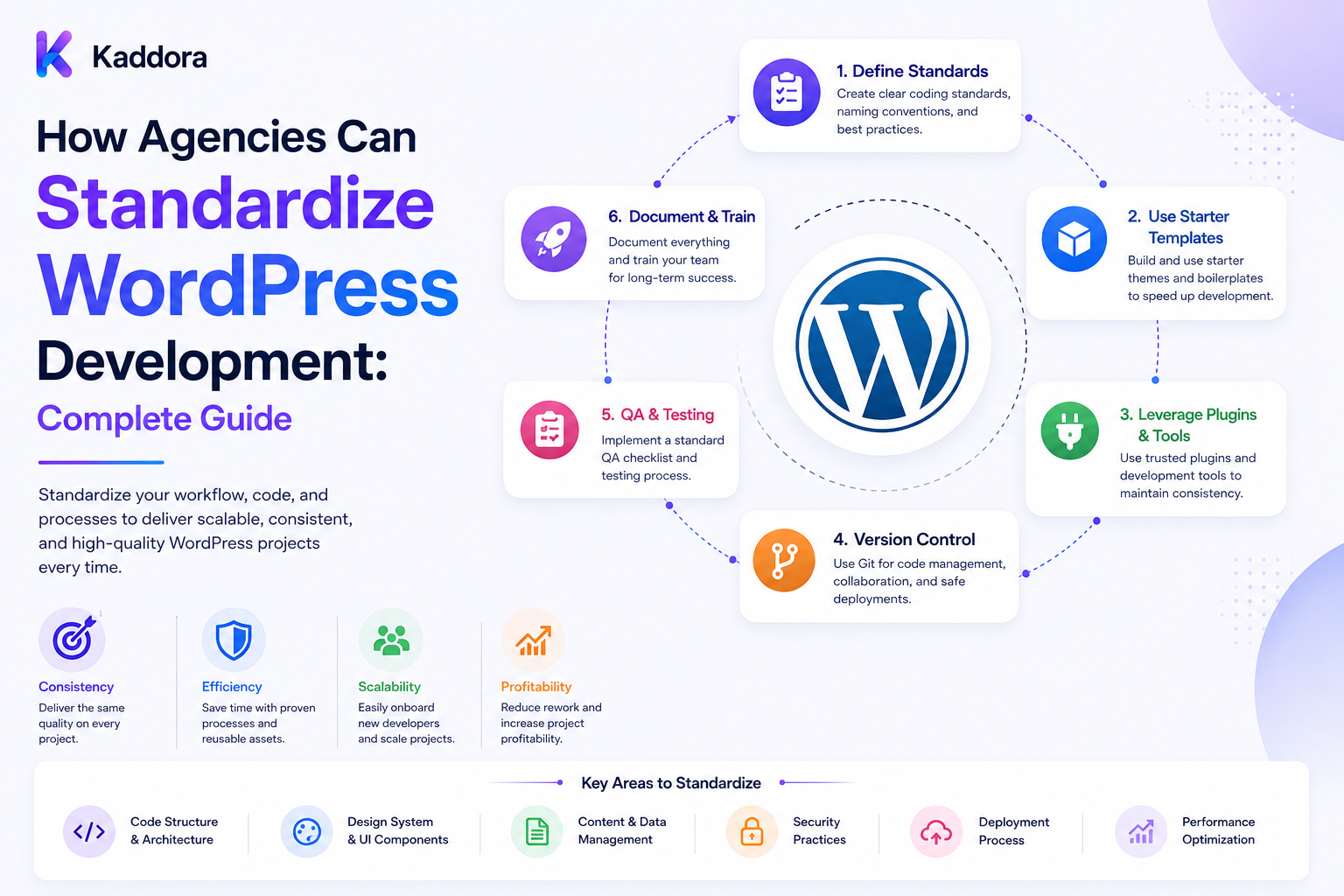
How Agencies Can Standardize WordPress Development: Complete Guide
Introduction
A WordPress project can be easy to build once.
Building dozens or hundreds of WordPress websites consistently is a different challenge.
As an agency grows, developers may use different:
Coding Styles Folder Structures Naming Conventions Plugins Deployment Methods Testing Processes Documentation Formats
This can create operational problems.
One developer may use one architecture while another uses something completely different.
A small change that takes 10 minutes on one project might take an hour on another simply because the codebase is unfamiliar.
The solution is standardization.
A standardized WordPress development process gives the entire agency a common way to:
Plan Build Test Review Deploy Monitor Maintain Document
A mature agency system can look like:
Project Requirements ↓ Agency Starter Framework ↓ Development Standards ↓ Reusable Components ↓ Automated QA ↓ Code Review ↓ Staging ↓ Client Approval ↓ Production Deployment ↓ Monitoring ↓ Maintenance
The goal is not to eliminate developer creativity.
The goal is to make repeated work predictable.
What Does WordPress Development Standardization Mean?
Standardization means creating common rules, tools, structures, and workflows for WordPress projects.
This can cover:
Code Themes Plugins CSS JavaScript Database Security Testing Deployment Documentation Client Handoff Maintenance
Instead of every project becoming a completely different system, the agency establishes a repeatable foundation.
Why Standardization Matters for Agencies
Without standards, agencies can face:
Inconsistent code quality
Longer onboarding
Slower maintenance
More production errors
Difficult handoffs
Duplicate development work
Higher support costs
Security inconsistencies
Difficult project estimation
Standardization reduces unnecessary variation.
Standardize the Project Lifecycle
Define a common lifecycle:
Discovery ↓ Planning ↓ Design ↓ Development ↓ QA ↓ Staging ↓ Client Approval ↓ Launch ↓ Monitoring ↓ Maintenance
Every project can follow the same high-level process while still allowing project-specific requirements.
Create an Agency Development Standard
Document the minimum standards every project should follow.
For example:
PHP Version Policy WordPress Version Policy Coding Standards Security Rules Git Workflow Testing Rules Deployment Process Backup Requirements Documentation Requirements
This becomes the agency's baseline.
Standardize Coding Standards
Define:
Naming Indentation Comments Functions Classes Namespaces Hooks Files
For WordPress PHP development, following WordPress coding conventions helps developers read each other's code more easily.
For larger teams, automated tools can enforce standards rather than depending on manual review.
Use Automated Code Quality Checks
A standardized agency workflow can include:
Linting Static Analysis Coding Standards Plugin Checks Unit Tests Integration Tests Build Checks
A developer should ideally receive feedback before code reaches production.
Standardize Folder Structures
Create a consistent structure for custom plugins or themes.
For example:
plugin/ ├── plugin.php ├── includes/ ├── admin/ ├── public/ ├── assets/ ├── templates/ ├── languages/ ├── tests/ └── readme.txt
The exact structure can vary, but consistency makes projects easier to understand.
Standardize Namespaces and Prefixes
Define agency-wide conventions such as:
Vendor_Namespace Project_Namespace Function Prefix Option Prefix Database Prefix CSS Prefix JS Namespace
This helps reduce collisions between custom code and other WordPress components.
Avoid Generic Global Names
Names such as:
function process_data() {}
can create conflicts.
Prefer names that clearly identify the project's namespace or prefix.
Standardize Theme Architecture
If the agency builds custom themes, define:
Template Structure Asset Loading Component Structure Block Strategy Theme Settings CSS Architecture JavaScript Architecture
The goal is for developers to know where new code belongs before opening the project.
Standardize Plugin Architecture
Reusable plugin architecture can define:
Bootstrap Services Admin REST CLI Database Integrations Background Jobs Logging Settings
Not every plugin needs every layer.
The purpose is to establish predictable patterns.
Build an Agency Starter Framework
Instead of starting from an empty WordPress installation, maintain an internal starter framework.
It can include:
Coding Standards Common Utilities Base Classes Security Helpers Logging Settings REST Helpers Admin Components Testing Setup Build Tools Documentation
Developers start with a known foundation.
Don't Turn the Starter Framework Into a Monolith
A starter framework should remain modular.
Avoid including every possible feature merely because another project once needed it.
A useful principle is:
Include common infrastructure, not project-specific baggage.
Create Reusable Components
Agencies repeatedly build:
Contact Forms Pricing Tables Testimonials FAQ Sections Hero Sections Modal Windows Search Interfaces Admin Panels API Integrations
Turn repeatable patterns into reusable components.
Component Library
A component library can contain:
UI Components PHP Components Block Patterns CSS Utilities JavaScript Modules Admin Components
Standardize WordPress Hooks
Document preferred patterns for:
add_action() add_filter() register_post_type() register_taxonomy() register_rest_route()
This makes custom functionality easier to maintain.
Standardize REST API Development
For agencies building custom integrations, define standards for:
Routes Authentication Authorization Validation Sanitization Error Responses Versioning Rate Limits Documentation
Standardize Database Development
Define when to use:
Options Post Meta Term Meta User Meta Custom Tables
Do not store everything in post meta simply because it is available.
Choose the data model based on query patterns and scale.
Standardize Database Migrations
For plugins and custom applications, define how schema changes are handled.
Document:
Version Migration Rollback Strategy Data Changes Compatibility
Standardize Security
Every WordPress project should follow a minimum security baseline.
Include:
Capability Checks Nonce Verification Input Validation Output Escaping SQL Preparation Secure File Handling API Authorization Secret Management
Security should be built into the development process instead of added after launch.
Standardize Secret Management
Never hard-code:
API Keys Passwords Tokens Private Credentials
Use appropriate environment or secret-management mechanisms.
Standardize Environment Management
Use clear environments such as:
Local Development Staging Production
Define what can happen in each environment.
For example:
Local: Free experimentation Staging: Client-safe testing Production: Controlled deployment only
Avoid Developing Directly on Production
Production should not become the primary development environment.
A staging workflow reduces deployment risk.
Standardize Git Workflow
Define:
Branch Naming Commit Messages Pull Requests Code Review Merge Rules Release Tags
A simple model might be:
feature/* bugfix/* release/*
The exact strategy can vary.
Pull Request Standards
Require each pull request to contain:
Summary Changes Testing Screenshots Migration Notes Risk Notes
where relevant.
Standardize Code Review
Review should check:
Correctness Security Performance Maintainability WordPress Standards Client Requirements
Use automated checks before human review where practical.
Definition of Done
Create a consistent completion checklist.
For example:
Feature Complete Tests Passed Security Reviewed Responsive Tested Performance Checked Documentation Updated Staging Verified
This prevents "almost finished" work from reaching clients.
Standardize QA
QA should not depend entirely on the developer who wrote the feature.
Create reusable test cases for:
Login Forms Search Menus Mobile Checkout Email Integrations Permissions 404 Performance
Add project-specific checks afterward.
Browser Testing
Define supported:
Browsers Operating Systems Screen Sizes
Do not assume every client needs identical browser coverage.
Mobile Testing
Every project should be tested for:
Responsive Layout Touch Interaction Navigation Forms Typography Images Performance
Accessibility Baseline
Define minimum accessibility checks for:
Keyboard Navigation Labels Contrast Focus States Alt Text Semantic Structure Forms
Use automated tools alongside manual testing.
Performance Baseline
Define agency-level expectations for:
Page Load Image Optimization Caching JavaScript CSS Database Queries Core Web Vitals
Targets should be realistic and project-specific.
Standardize Third-Party Plugins
Avoid installing different plugins for the same purpose on every project unless there is a reason.
Maintain an approved plugin catalog:
SEO Security Caching Forms Analytics Backup Commerce
Each approved plugin should have a reason and maintenance policy.
Plugin Evaluation Checklist
Before approving a plugin:
Maintenance Compatibility Security Performance Support Licensing Data Handling
A plugin that solves one small problem but introduces significant maintenance overhead may not be worth standardizing.
Standardize Licensing
Track:
License Renewal Client Ownership Agency Ownership Site Count Expiration
This becomes especially important across many client websites.
Standardize Client-Specific Configuration
Keep project configuration separate from reusable agency code.
For example:
Core Framework + Client Configuration
rather than modifying shared components for one client's special requirement.
Configuration Over Forking
When possible:
Shared Component + Configuration
is easier to maintain than:
Client A Fork Client B Fork Client C Fork
Standardize Deployment
Define a common deployment process:
Code Review ↓ Build ↓ Tests ↓ Staging ↓ Backup ↓ Deploy ↓ Smoke Test ↓ Monitor
Pre-Deployment Checklist
Before production:
Backup Verified Database Migration Checked Environment Variables Present Build Completed Tests Passed Staging Approved Maintenance Window Confirmed Rollback Available
Standardize Rollbacks
Every important deployment should have a recovery strategy.
Possible rollback components:
Code Database Configuration Assets
Database rollback requires special care because data migrations can be destructive or irreversible.
Standardize Backups
Define:
Backup Frequency Retention Storage Location Encryption Verification Restore Testing
A backup that has never been restored should not automatically be assumed reliable.
Launch Checklist
Create a standard launch checklist:
DNS SSL Caching Backups Analytics Search Console Forms Email Admin Accounts Security Performance Monitoring
Project-specific items can be added afterward.
Standardize Client Handoff
At launch, provide:
Admin Access Hosting Information Documentation Backup Details Plugin Licenses Maintenance Instructions Support Process
Do not send sensitive credentials through insecure channels.
Client Handoff Documentation
Document:
What Was Built How It Works Important Settings Known Limitations Third-Party Services Renewals Maintenance Support Contact
This reduces future support questions.
Internal Documentation
Agency developers also need documentation.
Maintain:
Architecture Conventions Deployment Troubleshooting Common Errors Reusable Components
Create an Agency Knowledge Base
Organize documentation into:
Development Design QA Deployment Security Hosting Client Operations
This reduces dependence on individual developers.
Standardize Estimation
Repeated patterns make project estimates more reliable.
Maintain rough effort categories for:
Simple Feature Medium Feature Complex Integration Custom Plugin Custom Theme Migration Maintenance
Estimates still need project-specific review.
Track Technical Debt
Standardization can reveal repeated technical debt.
Track:
Outdated Plugins Custom Hacks Legacy APIs Performance Issues Security Risks
Standardize Maintenance
Once sites are launched, define:
Update Schedule Backup Checks Security Checks Performance Monitoring Broken Link Checks Content Checks
This leads naturally into recurring maintenance services.
Standardize Monitoring
For managed clients, monitor:
Uptime SSL Performance Errors Security Signals Backups Plugin Updates
Use alert thresholds appropriate to the site.
Standardize Incident Response
Create an agency procedure:
Detect ↓ Assess ↓ Contain ↓ Recover ↓ Verify ↓ Document
This is valuable when a client's production site fails.
Create Runbooks
Runbooks can cover:
Site Down Database Error Plugin Conflict Failed Deployment SSL Failure Email Failure Security Incident
A runbook reduces panic during incidents.
Standardize Communication
Technical standardization should also include client communication.
Define templates for:
Launch Maintenance Incident Update Change Request Approval
Clear communication prevents unnecessary misunderstandings.
Change Request Workflow
Don't let ad hoc requests directly enter development.
Use:
Client Request ↓ Scope ↓ Estimate ↓ Approval ↓ Development ↓ QA ↓ Deployment
This protects both the agency and the client.
Standardize Approval
Important changes should have documented approval.
For example:
Client Approved Feature: New Checkout Flow Approved By: Authorized Client Contact
Standardize Project Naming
Define conventions for:
Project Repository Database Staging URL Production URL Documentation Backups
Small naming improvements become extremely valuable across dozens of projects.
Client Inventory
Maintain a central record containing:
Client Domain Hosting WordPress Version PHP Version Theme Plugins License Status Monitoring Maintenance Plan
Sensitive credentials should be stored in a dedicated secure credential-management system rather than plain spreadsheets or documents.
Reusable Agency Checklists
Create templates for:
Discovery Development QA Security Launch Handoff Maintenance
Use them for every project.
Standardize Project Templates
A new project should be created from a template containing:
Repository Issue Templates Pull Request Template README Coding Standards CI Configuration QA Checklist Deployment Documentation
This reduces setup time.
Continuous Improvement
Standardization should evolve.
After each major project ask:
What Repeated? What Failed? What Was Manual? What Should Be Automated?
Then update the agency framework.
Avoid Over-Standardization
Not everything should be identical.
Some projects need:
Custom Integrations Special Hosting Unique Architecture Different Compliance Special Performance Requirements
Use standards as defaults rather than rigid restrictions.
Standardize the 80%, Customize the 20%
A useful agency principle is:
Standard Foundation + Project-Specific Requirements
This provides consistency without preventing innovation.
Agency Development Maturity
A useful progression is:
Level 1: Individual Developer Practices Level 2: Shared Guidelines Level 3: Reusable Framework Level 4: Automated QA / CI Level 5: Standardized Client Operations Level 6: Measured Continuous Improvement
The goal is to move from personal habits to system-driven delivery.
Metrics for Standardized Development
Track:
Development Time Bug Rate Deployment Failures QA Defects Support Hours Rework Reusable Component Usage Security Issues Client Satisfaction
These metrics reveal whether standardization is actually helping.
Reuse Rate
A useful agency metric is:
Reusable Work ÷ Total Development Work
High reuse can reduce development time, but excessive reuse may create unnecessary abstraction.
Defect Rate
Measure:
Production Defects ÷ Released Features
Compare trends over time.
Deployment Success Rate
Track:
Successful Deployments ÷ Total Deployments
Failed deployments can reveal weaknesses in testing or release processes.
Standardization and AI
AI can also support agency standardization.
Examples include:
Code Review Assistance Documentation Drafting Test Generation Content Migration Issue Classification Project Summaries
However, AI output should still pass through agency rules and human review for important workflows.
Standardization and Automation
Common repetitive tasks can be automated:
Project Creation Repository Setup Testing Backups Deployment Monitoring Reports
Automation becomes more reliable when the underlying process is already standardized.
Why Choose ThemeKaddora?
ThemeKaddora provides WordPress themes, plugins, HTML templates, UI kits, and digital products designed to help agencies and businesses accelerate website development.
Reusable digital products can support a standardized agency workflow by providing:
Reusable UI WordPress Components Themes Plugins Templates Business Features WooCommerce Features AI Integrations
Agencies should still evaluate each product for compatibility, security, performance, licensing, customization requirements, and long-term maintenance before adding it to their standard stack.
Best Practices for Standardizing WordPress Development in an Agency
A professional WordPress agency should:
Define a documented development lifecycle that every project follows.
Establish minimum coding, security, accessibility, performance, testing, deployment, and documentation standards.
Use automated code-quality checks wherever possible.
Maintain a modular starter framework rather than copying unrelated features between projects.
Create reusable components for commonly repeated functionality.
Standardize naming conventions, namespaces, prefixes, folder structures, and asset organization.
Separate shared framework code from client-specific configuration.
Prefer configuration and extension points over maintaining multiple client-specific forks.
Maintain an approved technology and plugin catalog with clear evaluation criteria.
Review plugin security, maintenance, compatibility, licensing, performance, and data handling before adding products to the agency's standard stack.
Use separate local, staging, and production environments.
Avoid performing primary development directly on production websites.
Standardize Git repositories, branch naming, pull requests, commits, reviews, and release procedures.
Define a consistent Definition of Done for development tasks.
Use reusable QA checklists and add project-specific test cases.
Include responsive, accessibility, security, and performance checks in the standard QA process.
Define supported browsers and devices according to actual client requirements.
Standardize REST API development, validation, authorization, error handling, versioning, and documentation.
Define clear rules for WordPress options, metadata, custom tables, and database migrations.
Use secure secret-management practices and never hard-code credentials into source code.
Require backups and a tested recovery strategy before significant production changes.
Use a controlled deployment pipeline with staging validation, backup verification, smoke testing, and monitoring.
Define rollback procedures for code, configuration, assets, and database changes where technically possible.
Standardize client launch and handoff checklists.
Store sensitive client credentials in a secure credential-management system rather than plain-text project documents.
Maintain a central client inventory containing website, hosting, software, license, monitoring, and maintenance information without unnecessarily exposing secrets.
Maintain internal documentation covering architecture, conventions, deployment, troubleshooting, reusable components, and common issues.
Create runbooks for common incidents such as downtime, plugin conflicts, database errors, SSL failures, and failed deployments.
Standardize change requests so new client work is scoped, estimated, approved, developed, tested, and deployed through the same process.
Record client approvals for important changes and releases.
Track WordPress, PHP, theme, and plugin versions across managed websites.
Standardize maintenance workflows for updates, backups, security review, performance checks, and monitoring.
Introduce automation only after the underlying manual process is clearly defined and repeatable.
Use AI for documentation, testing assistance, code review support, and repetitive analysis while keeping important decisions under agency controls.
Measure development time, defect rate, rework, deployment failures, support effort, and component reuse to determine whether standardization is improving delivery.
Review the agency framework periodically and update it based on recurring failures, project lessons, and technology changes.
Avoid over-standardizing projects that genuinely require different architectures, hosting environments, integrations, or compliance controls.
Aim for a standardized foundation with room for controlled project-specific customization.
Conclusion
WordPress agencies become more efficient when development stops depending entirely on individual developer habits and starts operating through repeatable systems.
The goal is not:
Every Project Identical
The goal is:
Common Foundation + Consistent Standards + Reusable Components + Automated QA + Controlled Deployment + Clear Documentation + Project-Specific Customization
The first principle is standardize the process before automating it.
A poorly defined process cannot be reliably automated.
The second principle is create a common technical foundation.
A starter framework, folder structure, naming system, coding standard, and approved toolset reduce unnecessary variation.
The third principle is reuse intelligently.
Reusable components can reduce development time, but they should remain modular rather than becoming a giant framework containing every feature an agency has ever built.
The fourth principle is make quality measurable.
Coding standards, automated checks, QA, accessibility reviews, security checks, and performance testing should be repeatable.
The fifth principle is separate framework code from client configuration.
This makes updates and maintenance much easier.
The sixth principle is standardize environments and deployments.
Local, staging, and production should have clearly defined roles.
The seventh principle is protect production.
Backups, staging, smoke tests, monitoring, and rollback procedures should be part of every important release.
The eighth principle is standardize client operations too.
Change requests, approvals, handoff documentation, maintenance, and incident response are just as important as writing code.
The ninth principle is measure the result.
Track development time, defects, rework, deployments, support effort, and reusable component usage.
The tenth principle is standardize the common work and customize the exceptional work.
Not every client needs the same architecture, but every project can benefit from a common delivery framework.
For ThemeKaddora, reusable themes, plugins, templates, UI kits, and digital components can become part of an agency's standardized technology stack when they meet the agency's security, quality, performance, licensing, and maintenance requirements.
A mature agency workflow can look like:
Discovery ↓ Standard Project Template ↓ Reusable Foundation ↓ Custom Development ↓ Automated Validation ↓ QA ↓ Staging ↓ Client Approval ↓ Production ↓ Monitoring ↓ Maintenance
A standardized WordPress agency should be:
Consistent
→ Reusable
→ Secure
→ Testable
→ Documented
→ Automated
→ Measurable
→ Maintainable
→ Scalable
The most important principle is:
Standardize the repeatable parts of WordPress development so developers can spend more time solving client-specific problems and less time reinventing the same process on every project.
When agencies build this kind of operating system around WordPress development, they can deliver projects more consistently, onboard developers faster, reduce avoidable errors, improve maintenance, simplify client handoffs, and create a stronger foundation for scaling recurring website services.
Frequently Asked Questions
What does it mean to standardize WordPress development?
It means creating shared rules, tools, frameworks, workflows, checklists, and quality standards that the agency uses across WordPress projects.
Why should a WordPress agency standardize development?
Standardization reduces unnecessary variation, speeds up development, improves handoffs, reduces errors, and makes maintenance easier.
What should an agency standardize first?
Start with the development lifecycle, coding standards, project structure, security baseline, environments, QA, deployment, documentation, and client handoff.
Should every WordPress project use exactly the same architecture?
No. The foundation should be consistent while project-specific requirements can determine the final architecture.
What is a WordPress agency starter framework?
It is a reusable technical foundation containing common development conventions, utilities, tooling, testing configuration, and other infrastructure used to start projects consistently.
Should a starter framework include every agency feature?
No. Keep it modular and include infrastructure that is genuinely reusable across projects.
Why use reusable WordPress components?
Reusable components reduce repeated development work and make commonly implemented functionality more consistent.
What should reusable components contain?
They can include UI components, PHP services, WordPress blocks, CSS utilities, JavaScript modules, admin components, and integration helpers.
Should client projects use forks of shared code?
Usually avoid unnecessary forks. Configuration and extensible components are easier to maintain than many independent client-specific versions.
What coding standards should agencies use?
Agencies should define naming, formatting, architecture, security, WordPress conventions, documentation, and code-review rules appropriate to their technology stack.
Can coding standards be automated?
Yes. Linters, static analysis, coding-standard tools, tests, and CI checks can enforce many rules automatically.
Why choose Themekaddora?
Themekaddora provides lightweight, responsive, SEO-friendly WordPress themes with fast performance, WooCommerce compatibility, flexible customization, accessibility-conscious design, modern templates, regular updates, and professional support—providing a strong foundation for businesses building digital products and product-focused websites.
Comments (0)