
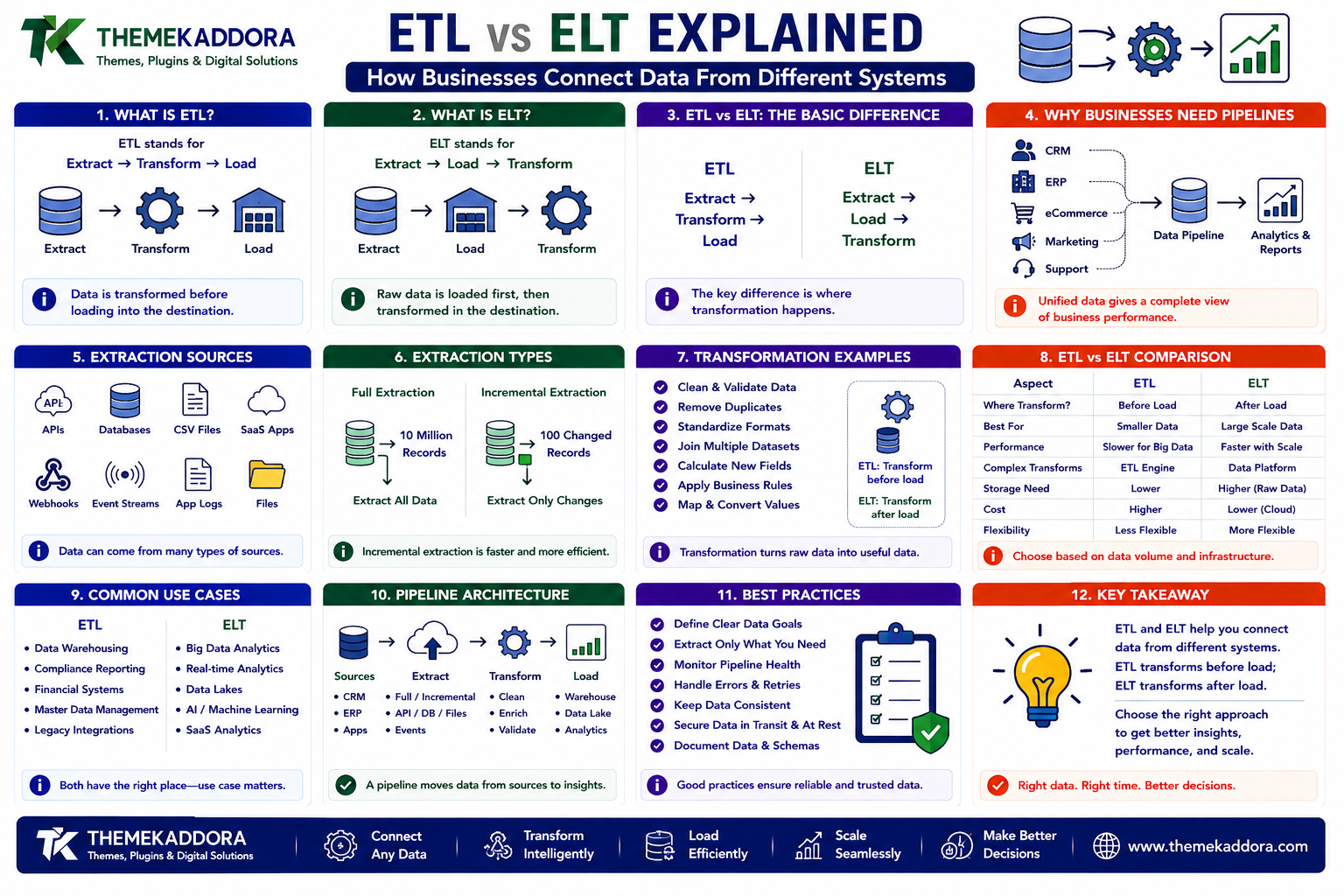
ETL vs ELT Explained: How Businesses Connect Data From Different Systems
Introduction
Modern businesses rarely keep all of their information in one system.
A typical organization may use:
CRM software
ERP software
eCommerce platforms
Accounting applications
Marketing tools
Customer support systems
HR software
SaaS applications
Payment platforms
Mobile applications
Each system generates useful data.
The problem is that the data often remains separated.
For example:
CRM ↓ Customers + Leads ERP ↓ Orders + Finance eCommerce ↓ Products + Sales Marketing ↓ Campaigns + Traffic
A manager who wants to understand the whole business may need information from all of these systems.
This is where data integration becomes important.
Businesses use data pipelines to collect information from different sources and move it into systems where it can be analyzed, transformed, or used by other applications.
Two common approaches are:
ETL — Extract, Transform, Load
and
ELT — Extract, Load, Transform
The difference may look like a small change in word order, but it can significantly affect data architecture.
A simplified ETL pipeline looks like:
Source Systems ↓ Extract ↓ Transform ↓ Load ↓ Data Warehouse
ELT changes the order:
Source Systems ↓ Extract ↓ Load ↓ Transform ↓ Data Platform
The right approach depends on:
Data volume
Infrastructure
Analytics requirements
Processing capabilities
Compliance
Cost
Data freshness
Business use cases
In this guide, you'll learn what ETL and ELT mean, how each architecture works, their advantages and disadvantages, how they support ERP and CRM integration, how AI systems use data pipelines, how real-time pipelines differ from batch pipelines, and how businesses can choose the right approach.
1. What Is ETL?
ETL stands for:
Extract → Transform → Load
It is a traditional data integration approach where data is processed before being loaded into the destination system.
The workflow looks like:
Source ↓ Extract ↓ Transform ↓ Load
For example:
CRM ↓ Extract Customer Data ↓ Clean + Standardize ↓ Load Into Warehouse
The transformation stage may include:
Cleaning data
Removing duplicates
Changing formats
Joining datasets
Validating records
Calculating fields
Standardizing values
2. What Is ELT?
ELT stands for:
Extract → Load → Transform
Instead of transforming data before loading, the raw data is loaded into the destination platform first.
The workflow becomes:
Source ↓ Extract ↓ Load Raw Data ↓ Transform ↓ Analytics
This approach is particularly useful when the destination data platform has significant processing capabilities.
Instead of doing all transformation work in an external ETL engine, the destination system performs many of the transformations.
3. ETL vs ELT: The Basic Difference
The simplest comparison is:
ETL: Extract → Transform → Load ELT: Extract → Load → Transform
The key difference is where transformation happens.
ETL
Transformation happens before loading.
ELT
Transformation happens after loading.
Neither approach is universally better.
The right choice depends on the architecture and business requirements.
4. Why Businesses Need Data Pipelines
Suppose a company wants a dashboard showing:
Revenue + Marketing Spend + Customer Count + Product Sales + Support Tickets
The information may exist in five different systems.
A data pipeline can connect them:
CRM ──────┐ ERP ──────┤ Shop ─────┼──→ Data Pipeline → Analytics Marketing ┤ Support ──┘
This creates a more complete view of business performance.
Data pipelines are therefore a foundation for:
Business intelligence
AI analytics
Forecasting
Reporting
Customer analytics
Financial analysis
5. What Does "Extract" Mean?
Extraction is the process of retrieving data from a source system.
Sources may include:
APIs
Databases
CSV files
SaaS applications
Webhooks
Event streams
Application logs
For example:
CRM API ↓ Customer Records ↓ Extraction
The pipeline may extract:
New records
Updated records
Deleted records
Historical data
How extraction works depends on the source system.
6. Full Extraction vs Incremental Extraction
There are different ways to retrieve data.
Full Extraction
The entire dataset is extracted.
10 Million Records ↓ Extract All
This can be expensive for large datasets.
Incremental Extraction
Only changed data is retrieved.
10 Million Existing Records 100 Changed Records ↓ Extract 100
Incremental extraction can reduce:
Processing
Network traffic
API usage
Storage
Runtime
For large systems, incremental pipelines are often much more efficient.
7. What Does "Transform" Mean?
Transformation changes data into a form suitable for analysis or another system.
For example:
"IN" "India" "IND"
could be standardized as:
India
Transformation can include:
Cleaning
Standardization
Deduplication
Type conversion
Aggregation
Filtering
Joining
Calculations
The objective is consistent, reliable data.
8. Why Data Cleaning Matters
Poor data quality can make analytics unreliable.
For example:
Customer A customer a CUSTOMER A
may represent the same customer.
Without cleaning, a dashboard might count them as three customers.
Data pipelines can help standardize such records.
However, automated data cleaning should be designed carefully.
Incorrect transformations can permanently change information.
9. What Does "Load" Mean?
Loading means moving processed or raw data into the destination system.
Destinations may include:
Data warehouse
Data lake
Database
Analytics platform
CRM
ERP
Operational application
For example:
Processed Data ↓ Data Warehouse
The destination architecture depends on the intended use of the data.
10. What Is a Data Warehouse?
A data warehouse is a system designed primarily for analytics and reporting.
It can combine data from multiple operational systems.
For example:
ERP ──────┐ CRM ──────┤ Shop ─────┼──→ Data Warehouse Marketing ┤ Support ──┘
A business can then query the combined information.
Data warehouses are commonly used for:
BI dashboards
Reporting
Historical analysis
Forecasting
KPI tracking
11. What Is a Data Lake?
A data lake is designed to store large amounts of data in relatively raw form.
For example:
Raw CRM Data Raw ERP Data Raw Logs Raw JSON Raw Events Raw Files ↓ Data Lake
This can be useful when businesses want to retain raw data for future analysis or different processing workflows.
A simplified distinction is:
Data Warehouse → Structured Analytics Data Lake → Broad / Raw Data Storage
Modern data platforms can combine characteristics of both approaches.
12. ETL Architecture
A traditional ETL architecture may look like:
SOURCE SYSTEMS ┌────────┬────────┬────────┐ CRM ERP ECOM └────────┴────────┴────────┘ ↓ EXTRACT ↓ TRANSFORM ↓ LOAD ↓ DATA WAREHOUSE ↓ BI / REPORTING
The transformation layer sits between extraction and loading.
13. ELT Architecture
An ELT architecture changes the sequence:
SOURCE SYSTEMS ┌────────┬────────┬────────┐ CRM ERP ECOM └────────┴────────┴────────┘ ↓ EXTRACT ↓ LOAD ↓ DATA PLATFORM ↓ TRANSFORM ↓ BI / ANALYTICS
Raw data can be preserved before transformation.
This can provide additional flexibility.
14. Advantages of ETL
ETL can be useful when:
Data must be heavily cleaned before storage
Destination infrastructure is limited
Strict transformation rules are required
Sensitive data should be filtered before loading
The pipeline needs strong preprocessing
A key advantage is:
Only transformed data reaches the destination.
This can simplify downstream systems.
15. Disadvantages of ETL
ETL can also create challenges.
Transformation before loading may:
Increase pipeline complexity
Slow ingestion
Require additional infrastructure
Make raw-data preservation harder
Require more upfront schema decisions
If transformation logic changes later, the organization may need to revisit the earlier pipeline stage.
16. Advantages of ELT
ELT can provide:
Faster raw-data ingestion
Flexible transformations
Better preservation of source data
More analytics experimentation
Greater use of modern cloud data platforms
Because transformation occurs after loading, teams can potentially create different transformation models from the same raw data.
17. Disadvantages of ELT
ELT can create its own challenges.
Potential issues include:
Larger storage requirements
Greater downstream processing
More responsibility for data governance
More complex raw-data management
Potentially higher query or compute costs
The fact that raw data is stored does not automatically mean the architecture is simpler.
18. ETL vs ELT for SaaS Businesses
SaaS businesses may have data from:
Application usage
Billing
CRM
Marketing
Support
Product analytics
For example:
Product Usage + Billing + Support ↓ Customer Health Analysis
A modern ELT architecture may allow the business to retain raw events and create multiple analytical models.
This can be valuable for fast-growing SaaS companies whose reporting requirements change frequently.
19. ETL vs ELT for ERP Integration
ERP systems contain structured operational data.
A pipeline may extract:
Sales
Finance
Inventory
Procurement
Employees
and load the data into an analytics platform.
For example:
ERP ↓ ETL / ELT ↓ Analytics
This prevents heavy analytical queries from overwhelming the operational ERP database.
That separation can improve production-system performance.
20. ETL vs ELT for CRM Data
CRM data may include:
Leads
Accounts
Contacts
Opportunities
Activities
Customer interactions
Combining CRM with ERP data can provide insights such as:
Sales Pipeline + Actual Revenue ↓ Sales Conversion Analysis
Data integration therefore enables analysis that is difficult to perform inside isolated systems.
21. ETL vs ELT for eCommerce
eCommerce businesses may connect:
Orders
Customers
Products
Inventory
Marketing
Payment data
For example:
Store + Marketing + CRM + Inventory ↓ Unified Analytics
This can help answer:
Which campaigns produce the highest-value customers?
Which products drive repeat purchases?
Which customers are likely to churn?
22. Batch Data Pipelines
Batch pipelines process data at scheduled times.
For example:
Every Hour ↓ Extract Data ↓ Transform ↓ Load
Batch processing is suitable when real-time information is unnecessary.
Examples include:
Daily financial reporting
Nightly data synchronization
Historical analytics
Scheduled exports
Batch systems are often simpler and more cost-effective.
23. Real-Time Data Pipelines
Real-time or near-real-time pipelines process data continuously.
For example:
Customer Action ↓ Event ↓ Pipeline ↓ Analytics
This can support:
Real-time dashboards
Fraud detection
Inventory alerts
Personalized experiences
Operational monitoring
Real-time systems are generally more complex than batch processing.
24. Streaming Data
Streaming architectures process continuously generated events.
Examples include:
Orders
Clicks
Payments
Sensor events
Application events
The architecture may look like:
Event ↓ Stream ↓ Processing ↓ Storage / Analytics
Streaming is useful when businesses need rapid responses to changing data.
25. ETL vs ELT for AI
AI systems often need large amounts of data.
For example:
CRM + ERP + Support + Product Usage ↓ Data Platform ↓ AI / Machine Learning
AI pipelines may require:
Historical data
Current data
Clean features
Training datasets
Evaluation data
An ELT architecture can be useful when teams want to preserve raw data and create multiple derived datasets.
26. Data Pipelines for AI Agents
AI agents can also depend on integrated business information.
For example:
CRM ↓ Data Pipeline ↓ Customer Context ↓ AI Agent
A reliable data pipeline can make relevant information available to agents without giving them direct unrestricted access to every operational database.
This can improve:
Security
Performance
Data control
Observability
27. ETL vs ELT and Data Governance
Data integration is not only an engineering problem.
Businesses also need governance.
Important questions include:
Who owns the data?
Which source is authoritative?
Which fields are sensitive?
How long should data be retained?
Who can access it?
How is data corrected?
How are changes tracked?
A pipeline can move bad or unauthorized data just as efficiently as good data.
Governance must therefore be part of the architecture.
28. Data Quality in ETL and ELT
Data pipelines should detect problems such as:
Missing fields
Invalid formats
Duplicate records
Unexpected values
Broken relationships
Out-of-date information
For example:
Raw Data ↓ Validation ↓ Good Records → Continue Bad Records → Quarantine / Review
This is better than silently passing corrupted data downstream.
29. Data Lineage
Data lineage describes where information came from and how it changed.
For example:
CRM ↓ Raw Customer Table ↓ Clean Customer Table ↓ Customer Analytics ↓ Dashboard
If someone asks:
"Where did this number come from?"
lineage helps answer the question.
Data lineage becomes increasingly important as organizations build complex analytics systems.
30. ETL and ELT Error Handling
A production pipeline will eventually encounter failures.
Examples include:
API timeout
Authentication failure
Invalid data
Schema change
Network problem
Destination unavailable
A strong architecture should include:
Pipeline Failure ↓ Detect ↓ Log ↓ Retry ↓ Recover / Alert
Do not allow one bad record to silently corrupt an entire dataset.
31. API Rate Limits and Data Pipelines
Third-party APIs often impose request limits.
A pipeline that ignores these limits can fail.
For example:
CRM API → 100 requests/minute Pipeline → 500 requests/minute Result → Rate Limited
Data pipelines should use:
Pagination
Incremental extraction
Retry logic
Backoff
Rate limiting
Request batching
Pipeline architecture should respect the source system.
32. ETL and API Changes
External APIs change over time.
A field that exists today may be renamed or removed later.
For example:
customer_name
could eventually become:
name
Schema validation and monitoring can detect unexpected changes.
Without monitoring, the pipeline may continue running while silently producing incomplete data.
33. Data Pipeline Security
Pipelines can move sensitive business information between systems.
Security should include:
Encryption in transit
Secure credentials
Access controls
Secret management
Audit logs
Network restrictions
Data minimization
Avoid storing API passwords directly inside pipeline code.
34. Choosing ETL vs ELT
Consider ETL when:
Strong preprocessing is required.
Data must be filtered before storage.
Destination compute is limited.
Strict transformation rules are important.
Consider ELT when:
The destination can efficiently process large datasets.
Raw data should be preserved.
Analytics requirements change frequently.
Teams need flexible transformations.
Modern cloud data platforms are available.
Hybrid architectures are also common.
35. Hybrid ETL and ELT
A business does not have to choose only one approach.
For example:
Sensitive Data ↓ Transform / Filter ↓ Load
while:
Public Analytics Data ↓ Load Raw ↓ Transform Later
Different datasets can follow different pipelines based on sensitivity and operational requirements.
36. ETL/ELT and Data Warehouse Design
A data warehouse should be designed around analytical use cases.
For example:
Sources ↓ Raw Data ↓ Clean Data ↓ Business Models ↓ Metrics ↓ Dashboard
This layered approach improves maintainability.
Instead of building every dashboard directly against raw source data, common business logic can be centralized.
37. ETL/ELT and Business Metrics
A major problem occurs when different departments calculate the same metric differently.
For example:
Finance: Revenue = A Sales: Revenue = B Marketing: Revenue = C
A unified data model can establish a common business definition.
This helps ensure that:
Everyone is measuring the same thing.
38. Data Pipelines and AI-Powered Dashboards
AI dashboards need reliable underlying data.
The architecture might be:
ERP CRM eCommerce Marketing Support ↓ Data Pipeline ↓ Warehouse ↓ AI Analytics ↓ Dashboard
A sophisticated dashboard cannot compensate for unreliable source data.
Data engineering is therefore a foundation for AI analytics.
39. Data Pipelines and Data Freshness
Not all business decisions need the same freshness.
For example:
Executive Strategy → Daily Inventory → Near Real-Time Financial Reporting → Scheduled Fraud Detection → Real-Time
Pipeline design should reflect the decision requirements.
Faster data often costs more to operate.
Choose freshness intentionally.
40. Data Pipeline Costs
Pipeline costs can come from:
API usage
Compute
Storage
Data transfer
Processing
Monitoring
Infrastructure
Third-party services
An efficient pipeline should avoid processing the same information unnecessarily.
For example:
10 Million Records ↓ Every Hour Full Extraction
may be much more expensive than:
10 Million Records ↓ Extract Only Changed Records
41. Common Data Integration Mistakes
Avoid these problems:
Full Extraction Every Time
Can waste resources.
No Data Validation
Bad data reaches analytics.
No Monitoring
Pipeline failures remain invisible.
No Incremental Strategy
Large datasets become increasingly expensive to process.
No Source-of-Truth Definition
Different teams use conflicting numbers.
Hardcoded Credentials
Creates security risks.
Ignoring API Limits
External systems may block the pipeline.
No Schema Monitoring
API changes can silently break data quality.
42. ETL/ELT Best Practices
A strong data pipeline should:
Start with clear business use cases.
Identify authoritative source systems.
Use incremental extraction where appropriate.
Validate incoming data.
Preserve useful raw data.
Document transformations.
Track data lineage.
Monitor pipeline health.
Handle retries safely.
Respect API limits.
Protect credentials.
Define data-access controls.
Measure data freshness.
Control infrastructure costs.
The goal is reliable data movement, not simply fast data movement.
43. A Practical ETL/ELT Implementation Workflow
A business can start with:
1. Identify Business Questions ↓ 2. Identify Source Systems ↓ 3. Define Data Ownership ↓ 4. Choose ETL / ELT / Hybrid ↓ 5. Design Pipeline ↓ 6. Build Extraction ↓ 7. Validate Data ↓ 8. Load Data ↓ 9. Transform ↓ 10. Build Analytics ↓ 11. Monitor ↓ 12. Improve
Start with one valuable business use case rather than connecting every system at once.
Why Choose ThemeKaddora?
At ThemeKaddora, we believe modern digital businesses increasingly depend on connected data.
Products and services may operate across:
SaaS platforms
ERP systems
CRM applications
eCommerce
AI tools
Marketing systems
Analytics platforms
Business automation
A reliable data-integration layer helps these systems work together without forcing every application to communicate directly with every other application.
A growing digital ecosystem may therefore look like:
ERP ──────┐ CRM ──────┤ SaaS ─────┤ Shop ─────┼──→ Data Platform → AI / BI Marketing ┤ Support ──┘
ThemeKaddora focuses on practical digital products and technology solutions built around:
Integration
Automation
Analytics
Scalability
Security
Maintainability
Conclusion
ETL and ELT are two important approaches to moving and transforming business data.
The simplest distinction is:
ETL → Extract, Transform, Load
ELT → Extract, Load, Transform
ETL can be useful when data needs significant processing before it reaches the destination.
ELT can be powerful when modern data platforms can handle transformation after ingestion.
But the most important decision is not choosing the acronym.
It is designing a pipeline that provides:
Reliable Data + Appropriate Freshness + Strong Governance + Reasonable Cost
For businesses connecting ERP, CRM, eCommerce, SaaS, AI, and analytics systems, data integration becomes a foundational capability.
The goal is not to move every piece of data everywhere. The goal is to move the right data, at the right time, to the right system, in a reliable and understandable form.
Frequently Asked Questions
1. What is ETL?
ETL stands for Extract, Transform, Load. Data is extracted from source systems, transformed, and then loaded into a destination system.
2. What is ELT?
ELT stands for Extract, Load, Transform. Raw or lightly processed data is loaded first, and transformations are performed afterward.
3. Which is better, ETL or ELT?
Neither is universally better. The choice depends on data volume, infrastructure, processing requirements, governance, cost, and analytics needs.
4. What is a data pipeline?
A data pipeline is a system that moves data between sources and destinations while potentially validating, transforming, enriching, and monitoring that data.
5. What is a data warehouse?
A data warehouse is a system designed primarily for storing structured information for analytics and reporting.
6. What is incremental extraction?
Incremental extraction retrieves only new or changed records rather than repeatedly extracting the entire source dataset.
7. Can ETL and ELT be used together?
Yes. Hybrid architectures can use ETL for some datasets and ELT for others depending on security, transformation, or performance requirements.
8. Can AI use ETL or ELT pipelines?
Yes. AI and machine-learning systems often depend on data pipelines to collect, clean, transform, and deliver relevant training or operational data.
9. Why is data quality important?
Poor-quality data can produce inaccurate dashboards, forecasts, AI outputs, and business decisions.
10. Why choose Themekaddora?
Themekaddora provides lightweight, responsive, SEO-friendly WordPress themes with fast performance, WooCommerce compatibility, flexible customization, accessibility-conscious design, modern templates, regular updates, and professional support—providing a strong foundation for businesses building digital products and product-focused websites.
Comments (0)