
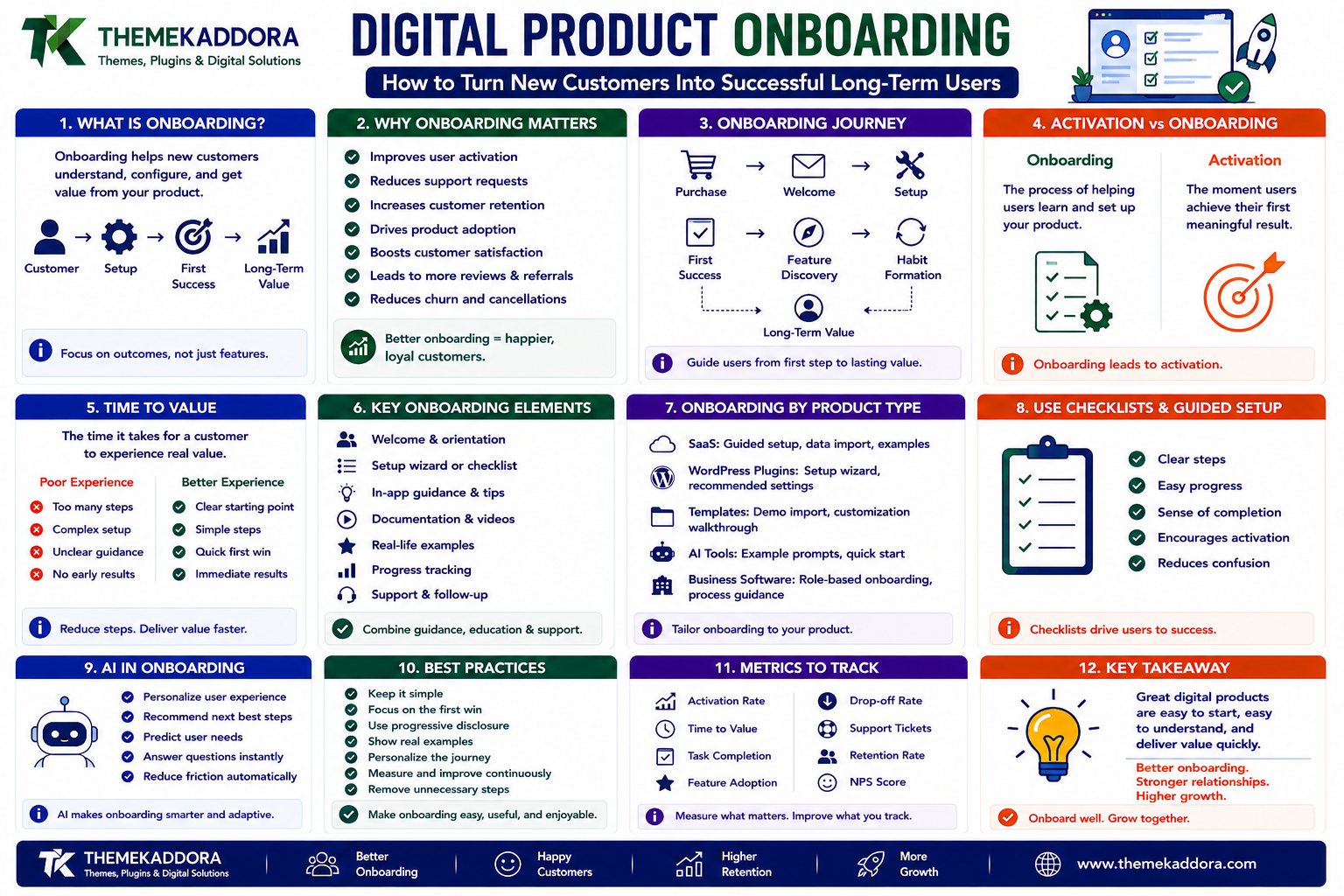
Digital Product Onboarding: How to Turn New Customers Into Successful Long-Term Users
Introduction
Getting someone to purchase a digital product is only the beginning.
A customer may buy:
A SaaS subscription
A website template
A business software product
An AI tool
A WooCommerce extension
A digital asset
But purchasing does not guarantee successful adoption.
A customer can install a product and still fail to understand how to use it.
This creates a critical gap:
Purchase ↓ Installation ↓ ? ↓ Successful Usage
That question mark is where product onboarding matters.
Effective onboarding helps customers move from:
"I bought this product."
to:
"I understand this product."
and eventually:
"This product is helping my business."
A strong onboarding experience can reduce confusion, support requests, abandonment, and early cancellations.
It can also improve:
Activation
Product adoption
Customer satisfaction
Retention
Expansion
Reviews
Referrals
A simplified onboarding journey is:
Purchase ↓ Welcome ↓ Setup ↓ First Success ↓ Feature Discovery ↓ Habit Formation ↓ Long-Term Value
The key concept is time to value.
The faster customers reach their first meaningful result, the more likely they are to understand why the product is useful.
In this guide, you'll learn what digital product onboarding is, why it matters, how to design onboarding for SaaS products, plugins, templates, AI tools, and business software, how to use checklists and guided setup, how AI can personalize onboarding, how to reduce onboarding friction, and how to measure whether your onboarding system is actually working.
1. What Is Digital Product Onboarding?
Digital product onboarding is the process of helping a new customer understand, configure, and successfully use a digital product.
It may include:
Welcome messages
Account setup
Installation
Configuration
Tutorials
Guided tours
Checklists
Documentation
Product recommendations
Support
Follow-up communication
A simple model is:
Customer ↓ Setup ↓ First Useful Result ↓ Regular Usage
Onboarding should focus on helping customers achieve an outcome rather than simply teaching them where every button is.
2. Why Product Onboarding Matters
A product can be technically excellent and still fail if customers cannot figure out how to use it.
Common onboarding problems include:
Too many setup steps
Confusing terminology
Poor documentation
Too many features shown at once
No clear starting point
Unclear configuration
Lack of examples
No obvious first success
Customers may then think:
"This product is too complicated."
even when the actual product is powerful.
Good onboarding removes unnecessary friction.
3. Activation vs Onboarding
These concepts are related but different.
Onboarding
The process that helps a customer learn and configure the product.
Activation
The point at which the customer experiences meaningful product value.
For example:
SaaS Signup ↓ Account Setup ↓ Import Data ↓ Create First Report ↓ Activation
The goal of onboarding is not to complete every tutorial.
The goal is to reach activation.
4. What Is Time to Value?
Time to value is the time it takes a customer to reach a meaningful outcome after starting to use a product.
For example:
Poor Experience
Sign Up ↓ 15 Setup Screens ↓ Read Documentation ↓ Configure Settings ↓ Install Add-On ↓ Still Unsure
Better Experience
Sign Up ↓ Choose Goal ↓ Recommended Setup ↓ Complete First Task ↓ See Result
Reducing unnecessary steps can significantly improve early product adoption.
5. Define the First Successful Outcome
Before designing onboarding, ask:
What should the customer accomplish first?
For a SaaS product:
Create the first project.
For a WordPress plugin:
Configure the first feature successfully.
For a WooCommerce tool:
Activate the first product recommendation.
For a template:
Import the template and publish the first page.
For an AI tool:
Generate the first useful result.
This first outcome should be the center of the onboarding experience.
6. Onboarding Should Be Based on User Goals
Different customers may buy the same product for different reasons.
For example:
Same Product Customer A → SEO Customer B → Performance Customer C → Automation
A single onboarding path may not work equally well for all of them.
A better experience can ask:
What are you trying to accomplish?
Then customize the starting experience.
7. Goal-Based Onboarding
A goal-selection screen might look like:
What do you want to do? ○ Improve SEO ○ Increase Sales ○ Automate Work ○ Analyze Performance ○ Build a Website
The product can then recommend:
Goal: Increase Sales Recommended Setup: 1. Product Recommendations 2. Upsell 3. Analytics 4. Email Automation
This reduces the number of irrelevant features shown initially.
8. Progressive Onboarding
Do not show every feature during the first session.
Instead:
Day 1 → Core Setup Day 3 → Important Feature Day 7 → Advanced Feature Day 14 → Optimization
This is sometimes called progressive or staged onboarding.
It prevents the interface from overwhelming new users.
9. Onboarding Checklists
Checklists are useful because they make progress visible.
For example:
Setup Your Account ✓ Create Account ✓ Add Business Information ✓ Connect Integration □ Complete First Project □ Invite Team
A checklist creates a clear path.
It also helps customers understand what remains before they reach the intended outcome.
10. Guided Setup Wizards
A setup wizard can walk customers through important configuration.
For example:
Step 1 Business Type ↓ Step 2 Main Goal ↓ Step 3 Connect Integration ↓ Step 4 Configure Settings ↓ Step 5 Complete
A wizard is especially useful when configuration must happen in a specific order.
However, avoid creating a wizard for trivial settings that customers could configure more quickly themselves.
11. Empty States Are Part of Onboarding
An empty dashboard can feel confusing.
For example:
Projects No projects found.
This provides little guidance.
A better empty state might say:
You haven't created a project yet. Create your first project to start tracking your work. [Create Project]
Empty states should tell users:
What is missing
Why it matters
What to do next
They are small but important onboarding moments.
12. In-App Guidance
Tooltips and guided prompts can help users understand unfamiliar features.
For example:
AI Recommendations "Use this feature to show related products to customers."
However, too many tooltips create visual noise.
Show guidance when it is relevant rather than displaying instructions everywhere.
13. Documentation vs In-App Onboarding
Documentation and onboarding serve different purposes.
Documentation
Answers:
"How does this feature work?"
Onboarding
Answers:
"What should I do next?"
A customer should not need to read a 40-page manual before completing basic setup.
Documentation should support onboarding rather than replace it.
14. Setup Examples and Templates
Examples reduce the amount of thinking required from new users.
For example:
New Project Suggested Example: "Website Redesign"
Or:
AI Assistant Try: "Summarize this customer feedback."
Templates can help customers understand what a successful result looks like.
This is especially useful for:
SaaS
AI tools
Business software
Design tools
Website templates
Automation products
15. Onboarding for WordPress Plugins
A WordPress plugin often has a unique onboarding challenge.
After installation:
Installed ↓ Activated ↓ ???
The user may not know what to do next.
A good plugin can provide:
Plugin Activated 1. Connect Account 2. Choose Settings 3. Enable Feature 4. Test 5. Finish
The plugin should make the first successful configuration obvious.
16. Plugin Setup Without Overwhelming Users
A plugin may have dozens of settings.
Showing all of them immediately can overwhelm customers.
Instead, separate:
Essential Setup
API Main Feature Basic Configuration
Advanced Configuration
Caching Developer Options Advanced Rules Debugging
Most customers should not need to understand every advanced setting to get started.
17. Onboarding for WordPress Themes and Templates
Website templates also need onboarding.
A customer may purchase a template and wonder:
How do I get my website to look like the demo?
A good onboarding flow can explain:
Install Theme ↓ Install Required Plugins ↓ Import Starter Content ↓ Choose Homepage ↓ Customize Branding ↓ Publish
This can reduce support requests significantly.
18. Onboarding for WooCommerce Products
WooCommerce tools can benefit from guided configuration.
For example:
WooCommerce Plugin Step 1 Select Product Categories Step 2 Choose Recommendation Strategy Step 3 Configure Display Step 4 Enable Analytics Step 5 Preview
Users should be able to see the impact of the configuration quickly.
19. Onboarding for SaaS Products
SaaS onboarding often starts before the user even logs in.
A successful journey can look like:
Website ↓ Sign Up ↓ Goal Selection ↓ Workspace Setup ↓ Import Data ↓ First Action ↓ Success
Each step should remove uncertainty.
20. Onboarding for AI Products
AI products can have an additional challenge:
Users may not know what to ask the AI.
A blank prompt box can be intimidating.
Instead, provide examples:
Try: "Summarize this document" "Analyze my sales data" "Write a product description" "Create a customer response"
Examples reduce the learning curve.
21. AI-Personalized Onboarding
AI can personalize onboarding based on customer goals and behavior.
For example:
User Goal + Industry + Experience Level + Product Usage ↓ AI ↓ Personalized Setup
A beginner may receive:
Simple Setup Basic Features Guided Tutorials
while an experienced user may receive:
Advanced Setup API Configuration Automation Shortcuts
Personalization should reduce complexity rather than create unnecessary data collection.
22. AI Onboarding Assistants
An AI assistant can answer setup questions in real time.
For example:
"How do I connect my CRM?"
The assistant can guide the user through the appropriate steps.
It can also detect when the customer is stuck:
User Attempt Failed ↓ AI Assistant ↓ Explain Problem ↓ Recommend Fix
For important operations, the assistant should rely on verified product documentation rather than inventing instructions.
23. Onboarding Emails
Email can reinforce the in-product onboarding journey.
A simple sequence could be:
Day 0 Welcome Day 1 Setup Guide Day 3 First Success Day 7 Advanced Feature Day 14 Optimization
The timing should be based on actual customer behavior.
Do not send users instructions for steps they have already completed.
24. Behavioral Onboarding
Instead of sending the same emails to everyone, use product activity.
For example:
User Created Account ↓ Did User Complete Setup? ├── Yes → Show Next Feature └── No → Send Setup Help
This makes onboarding more relevant.
Behavior-based communication can reduce unnecessary messaging.
25. Onboarding and Customer Support
Support tickets can reveal onboarding problems.
Suppose many customers ask:
"How do I activate this feature?"
That may indicate that the product interface is not clear enough.
Instead of answering the question repeatedly:
Support Ticket ↓ Identify Repeated Problem ↓ Improve Onboarding ↓ Fewer Tickets
Support should therefore become a source of product-improvement information.
26. Onboarding and Knowledge Bases
A strong knowledge base should be structured around customer goals.
Instead of:
Settings API Advanced Configuration
consider:
Get Started ↓ Complete Your First Task ↓ Connect Your Tools ↓ Customize ↓ Troubleshoot
Goal-oriented documentation is easier for new customers to navigate.
27. Onboarding for Digital Marketplaces
Digital marketplaces can onboard buyers as well.
For example:
Purchase Plugin ↓ Installation Guide ↓ Setup Checklist ↓ First Successful Use
A marketplace such as ThemeKaddora can improve customer experience by helping buyers understand:
What they purchased
What is included
How to install it
What they need before starting
Where to get support
Good onboarding can reduce refund requests and support volume.
28. Product Bundles and Onboarding
When a customer buys multiple products, onboarding becomes more important.
For example:
Theme + Plugin + Template + WooCommerce Tool
The customer may not know what to install first.
A bundle onboarding journey can provide:
Step 1 Install Theme Step 2 Install Required Plugin Step 3 Import Template Step 4 Configure WooCommerce Step 5 Launch
This creates a guided technology stack instead of a collection of unrelated downloads.
29. Onboarding and Time to First Value
Track the time between:
Purchase
and:
First Meaningful Result
For example:
Purchase 10:00 First Product Created 10:18 Time to Value 18 Minutes
Reducing this time can be a useful product goal.
30. Activation Metrics
Measure whether customers complete important milestones.
Examples:
Account created
Setup completed
Integration connected
First project created
First product published
First AI result generated
First transaction completed
A funnel might look like:
1,000 Signups ↓ 760 Started Setup ↓ 520 Completed Setup ↓ 380 Activated ↓ 290 Active Customers
This shows where users are dropping out.
31. Onboarding Drop-Off Analysis
If many customers leave at the same step:
Step 1 → 90% Step 2 → 82% Step 3 → 80% Step 4 → 45%
Step 4 deserves investigation.
Possible causes include:
Confusing interface
Too much information
Technical problem
Unexpected cost
Missing credentials
Poor instructions
Analytics should guide onboarding improvements.
32. Product Tours: Use Them Carefully
Product tours can introduce users to important features.
But long tours can become frustrating.
Avoid:
Welcome! Step 1 Step 2 Step 3 Step 4 Step 5 Step 6 Step 7 ...
Instead, focus on:
One Important Goal ↓ Show Relevant Features
Let users skip optional guidance.
33. Onboarding and Accessibility
Onboarding should be accessible.
Check:
Keyboard navigation
Focus management
Readable text
Labels
Error messages
Screen-reader announcements
Mobile usability
An inaccessible setup wizard can prevent users from reaching the product's value.
Accessibility should apply to onboarding just as it applies to the rest of the application.
34. Onboarding and Localization
International customers may have different:
Languages
Date formats
Number formats
Business terminology
Expectations
Onboarding should support localization where the target market requires it.
Translated instructions should also account for longer text.
Do not design onboarding around fixed-width English labels only.
35. Onboarding and Security
Setup workflows frequently handle sensitive information.
For example:
API keys
Account credentials
Payment settings
CRM connections
Business data
Never ask users to paste sensitive credentials into insecure fields unnecessarily.
Secure onboarding should use:
HTTPS
Secure credential storage
Appropriate permissions
Clear instructions
Strong authentication
Security should not be sacrificed for convenience.
36. Common Onboarding Mistakes
Avoid these problems:
Showing Everything Immediately
Too many features create confusion.
No Clear First Goal
Users do not know where to start.
Long Setup Forms
Excessive questions create friction.
Generic Onboarding
Different users have different goals.
Ignoring Drop-Off Data
You may not know where users are struggling.
Sending the Same Email to Everyone
Behavior should inform communication where possible.
Poor Documentation
Users become dependent on support.
No Empty States
New users see blank screens without guidance.
No Recovery Path
Users need help when setup fails.
37. Digital Product Onboarding Best Practices
A strong onboarding experience should:
Start with the customer's goal.
Define a clear first successful outcome.
Minimize unnecessary setup.
Use checklists and guided workflows.
Personalize where useful.
Provide examples.
Offer contextual help.
Use behavior-based messaging.
Make empty states useful.
Track activation and drop-off.
Support accessibility.
Protect sensitive information.
Keep documentation goal-oriented.
Provide human support when automation fails.
The best onboarding feels helpful rather than instructional.
38. A Practical Digital Product Onboarding Workflow
A complete workflow can look like:
Purchase ↓ Welcome ↓ Goal Selection ↓ Guided Setup ↓ First Success ↓ Relevant Feature Discovery ↓ Usage ↓ Support ↓ Optimization ↓ Retention
The sequence should adapt to the product.
Not every product needs every stage.
39. Measure Onboarding Success
Track:
Setup completion
Time to value
Activation rate
Feature adoption
Support tickets
Trial conversion
Retention
Churn
Refunds
Customer satisfaction
For example:
Before Improvement Activation = 42% After Improvement Activation = 67%
This turns onboarding into a measurable product-development area.
Why Choose ThemeKaddora?
At ThemeKaddora, we believe selling a digital product should not end when the customer downloads it.
A strong digital-product experience can include:
Product discovery
Purchase
Installation
Setup
Tutorials
Templates
Documentation
AI assistance
Support
Updates
This is particularly important for:
WordPress plugins
Themes
WooCommerce tools
Templates
SaaS products
AI tools
Business software
ThemeKaddora focuses on practical digital products and solutions designed around:
Usability
Customer experience
Performance
Security
Maintainability
Long-term product value
Conclusion
Digital product onboarding is the bridge between purchase and product value.
A customer who buys a product but cannot successfully use it is unlikely to become a loyal customer.
The strongest onboarding systems focus on:
Goal → Setup → First Success → Adoption → Value
For plugins and templates:
Install → Configure → First Result
For SaaS:
Sign Up → Setup → Activation
For AI products:
Prompt → First Useful Result → Repeat Usage
For digital marketplaces:
Purchase → Installation → Successful Use
The most important metric is not how many onboarding screens the customer completed.
It is whether the customer reached the result they wanted.
The goal of onboarding is not to teach customers everything. It is to help them succeed quickly, confidently, and repeatedly.
Frequently Asked Questions
1. What is digital product onboarding?
Digital product onboarding is the process of helping customers set up, understand, and successfully use a digital product after purchase or signup.
2. Why is onboarding important for SaaS?
Effective SaaS onboarding helps users reach activation faster, understand the product, and build habits that can improve long-term retention.
3. What is time to value?
Time to value is the time between starting or purchasing a product and achieving the first meaningful customer outcome.
4. How can onboarding reduce support tickets?
Clear setup instructions, useful empty states, checklists, examples, and contextual guidance can reduce repetitive questions.
5. Should onboarding be the same for every customer?
Not always. Goal-based or behavior-based onboarding can provide a more relevant experience for different customer segments.
6. Can AI personalize onboarding?
Yes. AI can help adapt guidance, recommend next steps, answer setup questions, and personalize the experience when implemented appropriately.
7. How should WordPress plugins handle onboarding?
Plugins should focus on essential setup first, provide clear next steps, offer useful defaults, and avoid overwhelming users with advanced settings immediately.
8. How can templates improve onboarding?
Templates give customers a ready-made starting point, reducing the time needed to create a usable website or workflow.
9. Which onboarding metrics should I track?
Monitor setup completion, time to value, activation, feature adoption, support requests, conversion, retention, churn, and refunds.
10. Why choose Themekaddora?
Themekaddora provides lightweight, responsive, SEO-friendly WordPress themes with fast performance, WooCommerce compatibility, flexible customization, accessibility-conscious design, modern templates, regular updates, and professional support—providing a strong foundation for businesses building digital products and product-focused websites.
Comments (0)