
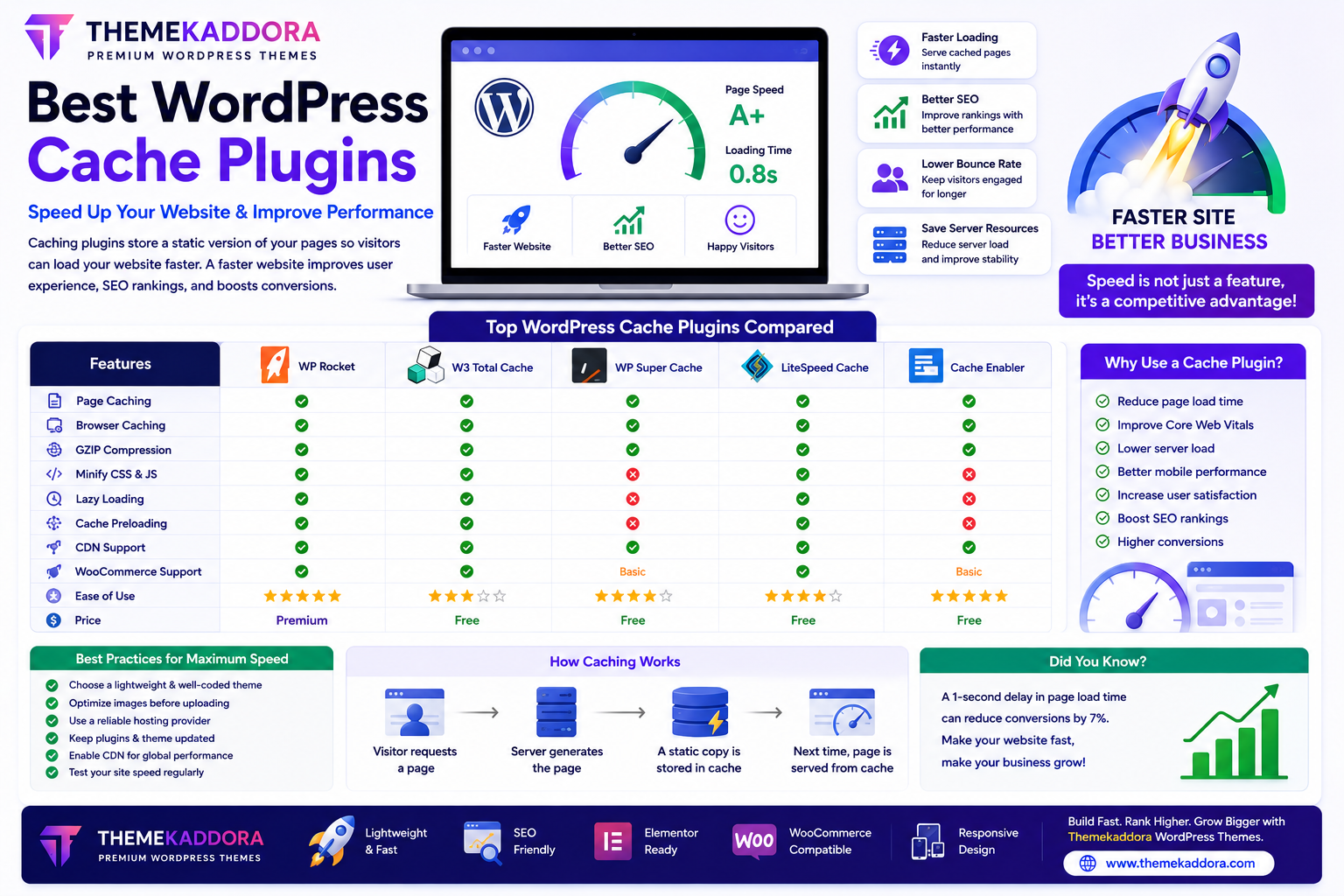
Best WordPress Cache Plugins to Speed Up Your Website and Improve Performance
Introduction
Website speed is one of the most important factors affecting user experience, search engine rankings, and conversion rates. Visitors expect pages to load quickly, and even a few seconds of delay can increase bounce rates and reduce customer satisfaction.
While choosing fast hosting and a lightweight WordPress theme is essential, caching is another powerful way to improve website performance.
WordPress cache plugins help your website serve pages more efficiently by reducing server workload and decreasing page load times. Whether you run a personal blog, business website, WooCommerce store, or portfolio, a caching plugin can significantly improve performance.
This guide explains how cache plugins work, their benefits, and how to choose the best one for your website.
What is Website Caching?
Caching is the process of storing a ready-to-display version of your website so visitors don't have to wait for WordPress to rebuild the page every time it loads.
Instead of processing:
PHP files
Database queries
Theme files
Plugin functions
the server delivers a cached version of the page, which loads much faster.
Why Website Speed Matters
A fast website helps:
Improve user experience
Reduce bounce rates
Increase conversions
Support better SEO
Improve Core Web Vitals
Reduce server load
Speed benefits both visitors and search engines.
Benefits of WordPress Cache Plugins
Faster Page Loading
Caching reduces loading times by serving pre-generated pages instead of rebuilding them for every visitor.
Better SEO Performance
Search engines consider page experience and loading speed when evaluating websites.
A faster website supports stronger SEO performance.
Reduced Server Load
Caching decreases the number of database queries and server processes required for each visitor.
This helps websites handle higher traffic more efficiently.
Improved User Experience
Visitors are more likely to stay on websites that load quickly and respond smoothly.
Better Core Web Vitals
Caching contributes to improvements in important performance metrics such as:
Largest Contentful Paint (LCP)
Interaction responsiveness
Layout stability
These metrics influence user experience and search visibility.
Features to Look for in a Cache Plugin
Page Caching
Stores complete web pages for faster delivery.
Browser Caching
Allows returning visitors to load website assets from their browser instead of downloading them again.
GZIP Compression
Compresses website files before they are sent to visitors, reducing download size.
CSS & JavaScript Optimization
Many cache plugins can:
Minify CSS
Minify JavaScript
Combine files (where appropriate)
Reduce unnecessary code
Always test these optimizations after enabling them.
Lazy Loading
Lazy loading delays the loading of images and videos until they are needed on the screen.
This helps improve initial page speed.
Cache Preloading
Automatically generates cached versions of important pages before visitors request them.
Cache Plugins for Different Websites
Business Websites
Focus on:
Fast homepage loading
Service pages
Contact pages
Blogs
Improve:
Article loading
Category pages
Archive pages
WooCommerce Stores
Look for cache plugins that properly handle:
Shopping carts
Checkout pages
Customer accounts
These dynamic pages often require special caching rules.
Portfolio Websites
Optimize:
Large images
Galleries
Project pages
Common Website Speed Problems
Slow websites are often caused by:
Large images
Too many plugins
Poor hosting
Heavy themes
Unoptimized JavaScript
Excessive CSS
Slow databases
Caching helps address some of these issues but works best alongside other optimization practices.
Best Practices for Speed Optimization
In addition to caching:
Optimize Images
Compress images before uploading and use modern formats when supported.
Use a Lightweight Theme
A well-coded theme provides a faster foundation for your website.
Keep Plugins Updated
Updated plugins often include performance improvements and security fixes.
Remove Unused Plugins
Deactivate and delete plugins you no longer use to reduce unnecessary overhead.
Choose Reliable Hosting
Fast hosting plays a major role in website performance.
Common Caching Mistakes
Avoid:
Caching dynamic checkout pages
Ignoring cache after major updates
Enabling every optimization without testing
Using multiple caching plugins at the same time
Forgetting to clear the cache after content changes
Testing after configuration helps ensure everything works correctly.
Why Pair Cache Plugins with Themekaddora WordPress Themes?
Caching delivers the best results when combined with a performance-focused theme.
Themekaddora WordPress themes include:
Lightweight code
Fast loading architecture
Responsive design
SEO-friendly structure
WooCommerce compatibility
Elementor support
Clean HTML markup
Easy customization
These features provide an excellent foundation for achieving high website performance.
Website Speed Optimization Checklist
Before launching your website, make sure you:
✅ Install one reliable cache plugin
✅ Compress and optimize images
✅ Remove unused plugins
✅ Keep WordPress updated
✅ Use a lightweight theme
✅ Enable browser caching
✅ Test website speed regularly
✅ Optimize Core Web Vitals
Conclusion
Website speed directly affects SEO, user experience, and business success.
A quality WordPress cache plugin can significantly improve loading times by reducing server workload and delivering pages more efficiently. When combined with optimized images, reliable hosting, and a lightweight theme like Themekaddora, caching helps create a fast, responsive, and high-performing WordPress website.
Investing in website performance benefits both your visitors and your long-term search visibility.
Frequently Asked Questions (FAQs)
What is a WordPress cache plugin?
A cache plugin stores optimized versions of your website's pages so they can be delivered faster to visitors.
Do cache plugins improve SEO?
They can support SEO by improving page speed and user experience, both of which are important ranking considerations.
Can I use multiple cache plugins?
It is generally recommended to use only one caching plugin to avoid conflicts and unnecessary complexity.
Are cache plugins useful for WooCommerce?
Yes, but ensure the plugin properly excludes dynamic pages such as the cart, checkout, and customer account pages from caching.
Why choose Themekaddora WordPress themes?
Themekaddora themes are lightweight, responsive, SEO-friendly, WooCommerce-ready, and built for performance, making them an excellent choice for fast-loading WordPress websites when paired with a quality cache plugin.
Comments (0)