
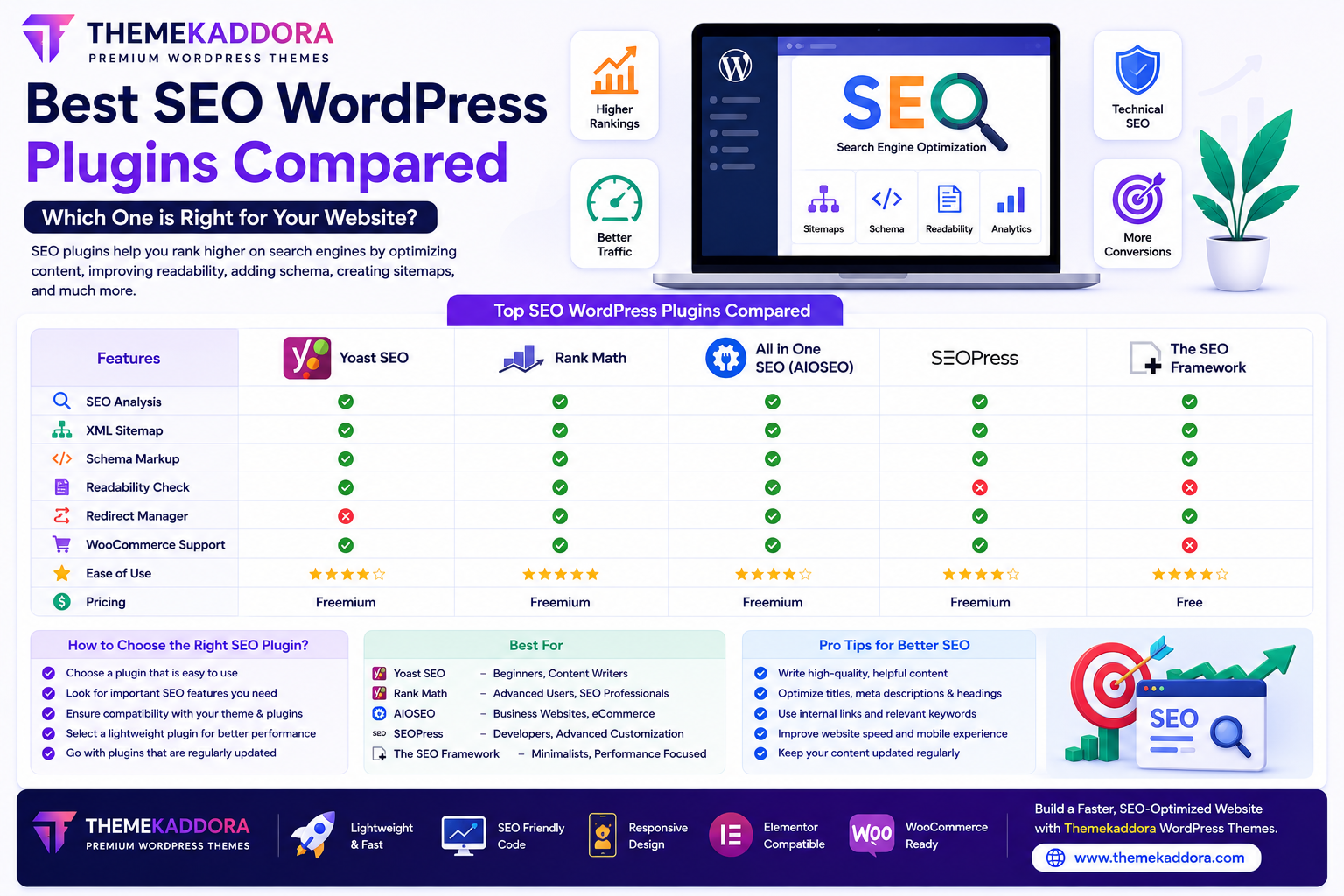
Best SEO WordPress Plugins Compared: Which One is Right for Your Website?
Introduction
Search Engine Optimization (SEO) is one of the most effective ways to increase organic traffic and improve the visibility of your WordPress website. Whether you run a business website, personal blog, WooCommerce store, portfolio, or agency website, a reliable SEO plugin can simplify optimization and help improve your website's search engine performance.
Although WordPress is built with SEO-friendly features, dedicated SEO plugins offer advanced functionality such as XML sitemaps, schema markup, metadata management, content analysis, redirects, and technical SEO improvements.
With many SEO plugins available, selecting the right one depends on your website's needs, goals, and level of experience.
In this guide, we'll compare the features that matter most and help you choose the best SEO WordPress plugin for your website.
Why Use an SEO Plugin?
SEO plugins simplify many optimization tasks, including:
Creating XML sitemaps
Managing SEO titles
Writing meta descriptions
Adding schema markup
Managing redirects
Improving readability
Optimizing WooCommerce products
Enhancing technical SEO
These tools make SEO more manageable while helping search engines understand your content.
Features Every Good SEO Plugin Should Include
XML Sitemap Generation
An XML sitemap helps search engines discover and index your website pages more efficiently.
SEO Titles & Meta Descriptions
Every page should have:
Unique SEO title
Optimized meta description
Target keyword
Compelling search snippet
These elements can improve click-through rates.
Schema Markup
Schema helps search engines better understand your content.
Common schema types include:
Articles
Products
FAQs
Reviews
Local businesses
Organizations
Structured data may improve your appearance in search results.
Content Analysis
Many SEO plugins provide suggestions for:
Heading structure
Keyword placement
Content length
Readability
Internal linking
These recommendations help improve on-page SEO.
Redirect Management
Redirect tools help:
Prevent broken links
Preserve SEO value
Improve user experience
This is especially useful when updating URLs.
Image SEO
Image optimization includes:
Alt text
Image titles
Compression support
File naming suggestions
Optimized images improve accessibility and search visibility.
Choosing an SEO Plugin for Different Websites
Business Websites
Look for features such as:
Local SEO support
Service page optimization
Schema markup
Contact page optimization
Blogs
Bloggers benefit from:
Readability analysis
Article schema
Internal linking suggestions
XML sitemaps
WooCommerce Stores
Essential eCommerce SEO features include:
Product schema
Product metadata
Category optimization
Breadcrumb navigation
Portfolio Websites
Portfolio websites benefit from:
Image optimization
Fast indexing
Clean metadata
Gallery optimization
How to Choose the Right SEO Plugin
Before making a decision, consider the following.
Ease of Use
Choose a plugin with a clean dashboard and simple setup if you're new to WordPress SEO.
Performance
A lightweight plugin helps maintain fast loading speeds and good Core Web Vitals.
Compatibility
Make sure your SEO plugin works well with:
WordPress
WooCommerce
Elementor
Your active theme
Other essential plugins
Regular Updates
Choose plugins that receive consistent updates to ensure security, compatibility, and new features.
Documentation & Support
Quality documentation and active support make troubleshooting much easier.
Common SEO Mistakes
Even with an SEO plugin installed, avoid:
Duplicate meta titles
Missing meta descriptions
Keyword stuffing
Broken links
Slow-loading pages
Thin content
Poor mobile optimization
SEO plugins provide guidance, but quality content remains the most important ranking factor.
Should You Install Multiple SEO Plugins?
In most cases, no.
Using multiple SEO plugins simultaneously can lead to:
Duplicate metadata
Conflicting settings
Performance issues
Indexing problems
It's generally best to use one comprehensive SEO plugin and configure it properly.
Best Practices for WordPress SEO
To maximize your SEO efforts:
Publish original, high-quality content.
Optimize every page individually.
Keep plugins updated.
Compress images.
Improve page speed.
Use internal links.
Monitor website performance.
Refresh outdated content regularly.
SEO is an ongoing process rather than a one-time task.
Why Pair an SEO Plugin with Themekaddora WordPress Themes?
An SEO plugin performs best when supported by a well-optimized WordPress theme.
Themekaddora WordPress themes include:
Lightweight coding
Fast loading performance
SEO-friendly structure
Responsive design
WooCommerce compatibility
Elementor support
Clean HTML markup
Easy customization
Together, Themekaddora themes and a quality SEO plugin provide a strong technical foundation for better search engine performance.
Future of SEO Plugins
SEO plugins continue to evolve with intelligent features such as:
AI Content Optimization
Helping users improve content quality and relevance.
Automatic Schema Generation
Simplifying structured data implementation.
Voice Search Optimization
Preparing websites for conversational search.
Predictive SEO Insights
Identifying optimization opportunities using data analysis.
Technical SEO Monitoring
Detecting common website issues before they affect rankings.
Conclusion
SEO plugins are valuable tools that simplify technical optimization, metadata management, schema implementation, and website analysis.
Choosing the right SEO plugin—and pairing it with a fast, responsive, and SEO-friendly WordPress theme like Themekaddora—creates a strong foundation for long-term organic growth.
While plugins make SEO easier, success ultimately depends on publishing helpful content, maintaining a fast website, and providing an excellent user experience.
Frequently Asked Questions (FAQs)
Why do I need an SEO plugin for WordPress?
An SEO plugin simplifies important optimization tasks such as metadata management, XML sitemaps, schema markup, redirects, and technical SEO improvements.
Can an SEO plugin guarantee higher rankings?
No. SEO plugins provide optimization tools, but rankings also depend on content quality, competition, website speed, and user experience.
Should I install more than one SEO plugin?
No. Running multiple SEO plugins may create conflicts and duplicate functionality.
Are SEO plugins useful for WooCommerce websites?
Yes. Many SEO plugins include features specifically designed for product pages, category pages, and structured product data.
Why choose Themekaddora WordPress themes?
Themekaddora themes are lightweight, responsive, SEO-friendly, WooCommerce-ready, and built with clean code, providing the ideal foundation for any modern SEO plugin.
Comments (0)