
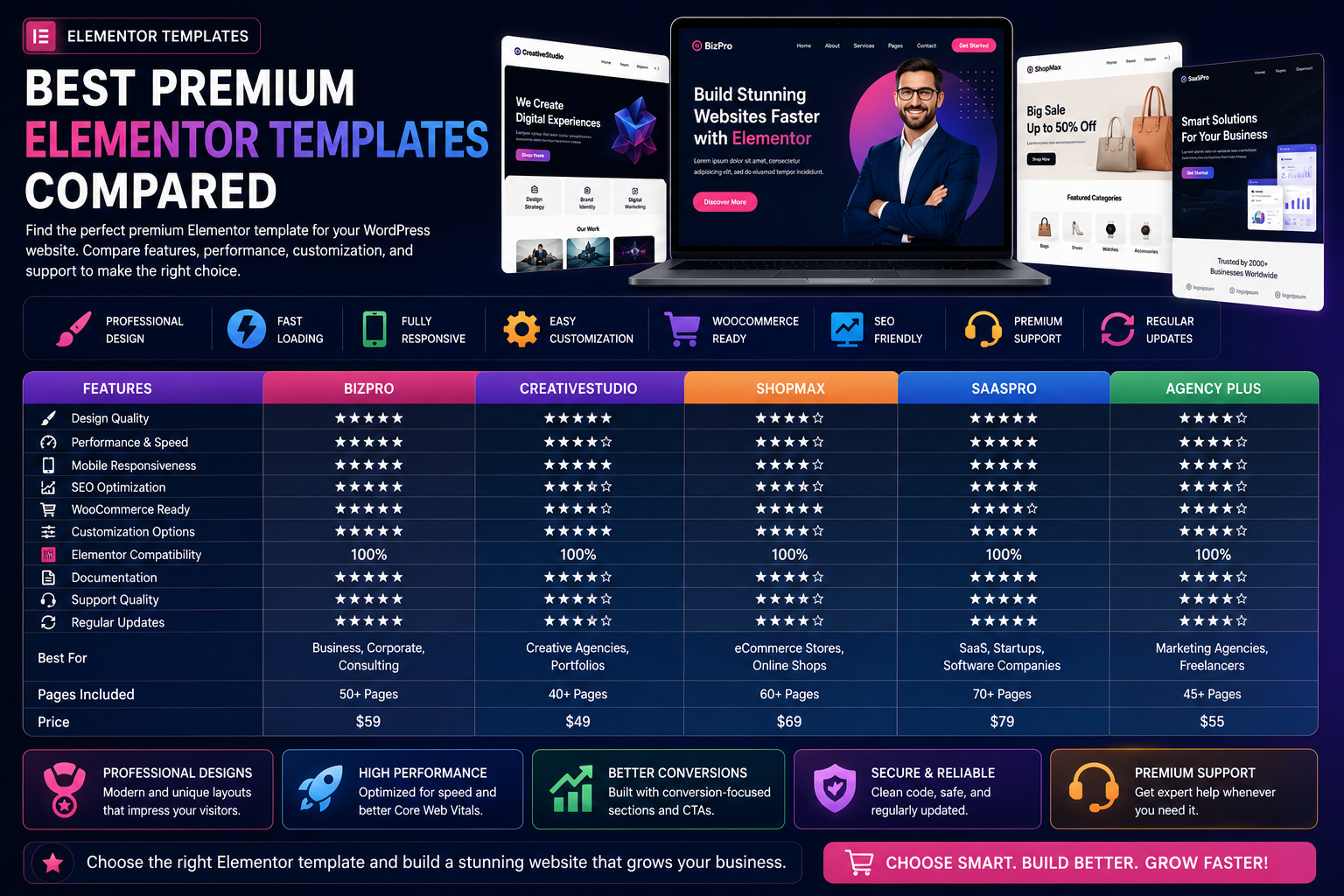
Best Premium Elementor Templates Compared
Creating a professional WordPress website has become much easier with Elementor. Its drag-and-drop builder allows anyone to design beautiful pages without writing code. However, while Elementor provides the tools, the quality of your website largely depends on the template you choose.
Premium Elementor templates offer more than attractive layouts. They provide responsive designs, faster loading times, advanced customization, WooCommerce compatibility, and long-term support. Whether you're building a corporate website, online store, agency portfolio, SaaS landing page, or personal blog, investing in a premium template can save development time and improve your website's performance.
With hundreds of premium Elementor templates available, selecting the right one can feel overwhelming. This guide compares the most important features to help you make an informed decision.
Why Choose Premium Elementor Templates?
Premium templates are designed for businesses and professionals who require higher quality, better support, and long-term reliability.
Compared with many free templates, premium options often include:
Professional layouts
Responsive design
Faster loading speed
Advanced customization
WooCommerce integration
SEO-friendly structure
Regular updates
Dedicated support
Premium widgets
Lifetime improvements
For growing websites, these benefits often justify the investment.
What to Compare Before Buying
Before choosing a premium Elementor template, evaluate these important areas.
Design Quality
A modern business website should include:
Clean layouts
Professional typography
Consistent spacing
High-quality visuals
Well-structured content sections
An attractive design builds trust and encourages visitors to explore your website.
Performance
Website speed affects:
User experience
SEO rankings
Bounce rate
Conversion rate
Choose templates that provide:
Lightweight code
Optimized CSS
Minimal JavaScript
Lazy loading support
Core Web Vitals optimization
Fast websites generally perform better across all devices.
Mobile Responsiveness
A premium template should work seamlessly on:
Smartphones
Tablets
Laptops
Desktop computers
Responsive layouts help ensure a consistent user experience regardless of screen size.
SEO Optimization
Search-friendly Elementor templates should support:
Proper heading structure
Clean HTML
Schema compatibility
Fast loading pages
Breadcrumb support
Accessibility standards
These technical foundations contribute to better search visibility.
WooCommerce Features
If you're running an online store, compare templates based on:
Product pages
Shop layouts
Product filters
Wishlist support
Quick view
Optimized checkout
Mobile shopping experience
An eCommerce-focused template helps improve the customer journey.
Customization
Premium Elementor templates should allow you to customize:
Colors
Typography
Global styles
Headers
Footers
Buttons
Icons
Layouts
Flexible customization makes it easier to maintain consistent branding.
Best Types of Premium Elementor Templates
Business Templates
Suitable for:
Corporate companies
Agencies
Consultants
Financial firms
Service businesses
Common sections include:
Hero banners
Services
Team members
Testimonials
Pricing
Contact forms
WooCommerce Templates
Ideal for:
Fashion stores
Electronics
Furniture
Grocery
Beauty
Digital products
Useful features include:
Product grids
Shop filters
Product galleries
Mobile checkout
Promotional banners
SaaS Templates
Perfect for:
Software companies
AI startups
Technology firms
Cloud platforms
Typical sections include:
Product features
Integrations
Pricing plans
FAQs
Customer testimonials
Call-to-action blocks
Portfolio Templates
Designed for:
Designers
Developers
Photographers
Architects
Creative agencies
Portfolio templates emphasize visual presentation while keeping navigation simple.
Blog Templates
Content-focused templates usually include:
Featured posts
Author profiles
Newsletter signup
Category layouts
Reading progress
Related articles
These layouts help improve readability and visitor engagement.
Premium vs Free Elementor Templates
Feature
Free Templates
Premium Templates
Design Quality
Good
Excellent
Customization
Limited
Extensive
Performance
Basic
Optimized
WooCommerce
Basic
Advanced
Support
Community
Dedicated
Updates
Occasional
Frequent
Documentation
Basic
Comprehensive
Businesses often benefit from the additional flexibility and support provided by premium templates.
Common Mistakes to Avoid
Avoid these mistakes:
Choosing based only on screenshots
Ignoring loading speed
Forgetting mobile testing
Installing unnecessary widgets
Ignoring update history
Overlooking SEO structure
The best template balances aesthetics with performance.
Best Practices
To maximize performance:
Keep Elementor updated.
Optimize images.
Use caching.
Compress CSS and JavaScript.
Limit third-party widgets.
Test website speed regularly.
Maintain consistent branding.
Small improvements can have a significant impact on user experience.
Final Thoughts
Premium Elementor templates provide a professional foundation for building fast, responsive, and SEO-friendly WordPress websites.
Rather than selecting a template solely based on appearance, evaluate speed, customization, WooCommerce support, documentation, updates, and long-term flexibility.
Choosing the right template today can reduce future redesign work while helping you create a website that grows alongside your business.
Whether you're building a personal brand, agency website, online store, or SaaS platform, a carefully selected premium Elementor template is an investment in your website's long-term success.
Frequently Asked Questions
Are premium Elementor templates worth buying?
Yes. They generally offer better design quality, more features, regular updates, improved performance, and dedicated support.
Can Elementor templates improve SEO?
A well-coded template contributes to technical SEO through clean structure, responsive layouts, and faster loading speeds.
Which Elementor template is best for WooCommerce?
Choose templates specifically designed for WooCommerce with optimized product pages, checkout layouts, and mobile shopping experiences.
Can beginners use premium Elementor templates?
Absolutely. Most templates are built for visual editing and require little or no coding knowledge.
How often should Elementor templates be updated?
Use templates that receive regular updates to maintain compatibility with the latest versions of WordPress, Elementor, and WooCommerce.
Comments (0)