
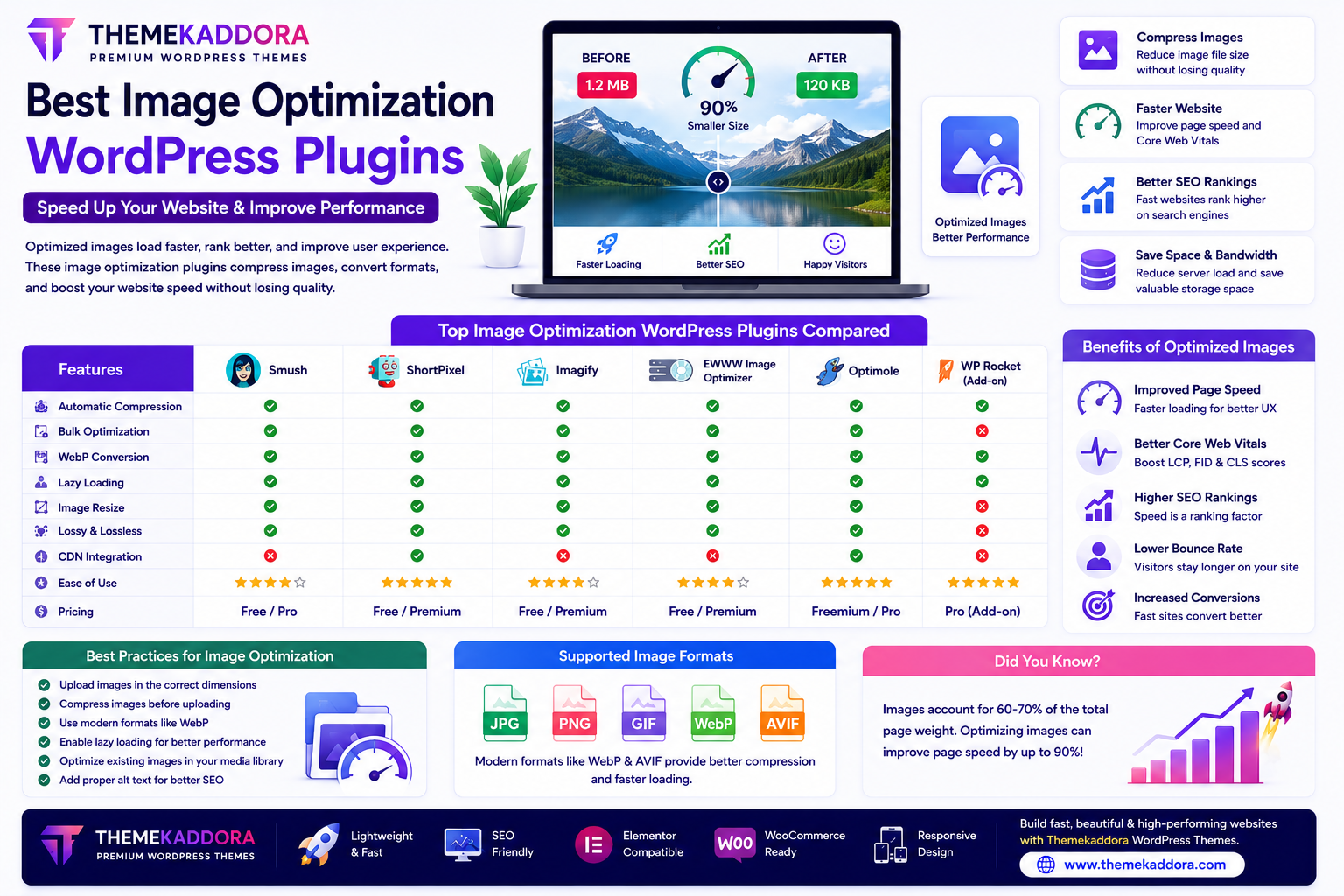
Best Image Optimization WordPress Plugins to Speed Up Your Website
Introduction
Images make websites more attractive, engaging, and informative. However, large image files are one of the biggest reasons WordPress websites load slowly.
A slow website affects user experience, increases bounce rates, and may reduce search engine visibility. Fortunately, image optimization plugins help reduce image file sizes while maintaining good visual quality.
Whether you run a blog, WooCommerce store, business website, or photography portfolio, optimizing images is one of the easiest ways to improve website performance.
In this guide, you'll learn why image optimization matters, the features to look for in an optimization plugin, and best practices for keeping your WordPress website fast.
Why Image Optimization Matters
Optimized images help you:
Improve page speed
Boost SEO
Reduce bandwidth usage
Improve Core Web Vitals
Enhance user experience
Increase conversions
Fast-loading pages encourage visitors to stay longer and interact with your content.
What Does an Image Optimization Plugin Do?
Image optimization plugins automatically:
Compress images
Resize large uploads
Convert image formats
Optimize existing images
Generate modern image formats
Reduce storage usage
This improves performance without requiring manual editing.
Essential Features to Look For
Automatic Image Compression
Automatically compress newly uploaded images while maintaining visual quality.
Bulk Image Optimization
Optimize hundreds or thousands of existing images with a single operation.
Ideal for older websites with large media libraries.
WebP & Modern Image Formats
Modern image formats can significantly reduce file sizes compared to traditional formats.
Many optimization plugins support automatic conversion when appropriate.
Lazy Loading
Lazy loading delays image downloads until visitors scroll to them.
Benefits include:
Faster initial page loading
Reduced bandwidth usage
Better user experience
Image Resizing
Automatically resize uploaded images to prevent unnecessarily large files from slowing down your website.
Lossless & Lossy Compression
Most plugins offer two compression methods:
Lossless Compression
Maintains maximum image quality while reducing file size.
Lossy Compression
Achieves greater file size reduction with minimal visual differences for most users.
Choose the method that best fits your website's needs.
Image Optimization for Different Websites
Blogs
Optimize:
Featured images
Article images
Infographics
WooCommerce Stores
Compress:
Product images
Category banners
Promotional graphics
Fast product pages improve the shopping experience.
Photography Websites
Balance image quality with loading speed using appropriate compression settings.
Business Websites
Optimize:
Hero banners
Team photos
Service illustrations
Portfolio images
Best Practices for Image Optimization
Upload Correct Image Sizes
Avoid uploading images much larger than they will appear on the page.
Compress Before Uploading
Whenever possible, optimize images before uploading them to WordPress.
Use Modern Image Formats
Modern formats often provide better compression while maintaining visual quality.
Enable Lazy Loading
Load images only when visitors need them.
Optimize Existing Images
Don't forget older images already stored in your media library.
Common Image Optimization Mistakes
Avoid:
Uploading huge image files
Using images directly from cameras without resizing
Compressing images excessively
Ignoring mobile performance
Forgetting to optimize older uploads
Good optimization balances quality and performance.
Image Optimization and SEO
Optimized images contribute to SEO by improving:
Page speed
User experience
Mobile performance
Core Web Vitals
Additionally, remember to:
Write descriptive alt text
Use meaningful filenames
Add captions where appropriate
These practices improve accessibility and search visibility.
Why Pair Image Optimization Plugins with Themekaddora WordPress Themes?
Image optimization works best with a lightweight WordPress theme.
Themekaddora themes include:
Fast-loading architecture
Lightweight code
Responsive layouts
SEO-friendly structure
WooCommerce compatibility
Elementor support
Mobile optimization
Clean HTML markup
Together with image optimization plugins, these features help create fast, visually appealing websites.
Image Optimization Checklist
Before publishing your website, make sure you:
✅ Compress all images
✅ Resize oversized uploads
✅ Enable lazy loading
✅ Use modern image formats when available
✅ Add descriptive alt text
✅ Optimize your media library
✅ Test website speed regularly
✅ Keep optimization plugins updated
Conclusion
Image optimization is one of the simplest and most effective ways to improve WordPress performance.
A quality image optimization plugin reduces file sizes, speeds up page loading, and enhances both SEO and user experience. Combined with a lightweight, responsive, and SEO-friendly WordPress theme like Themekaddora, optimized images help create a faster and more professional website.
Small improvements in image performance can make a significant difference to overall website success.
Frequently Asked Questions (FAQs)
Why should I optimize images in WordPress?
Optimized images load faster, improve user experience, reduce bandwidth usage, and support better search engine performance.
Will image compression reduce quality?
Most optimization plugins provide settings that maintain excellent visual quality while significantly reducing file sizes.
What is lazy loading?
Lazy loading delays image downloads until they are needed on the screen, improving initial page speed.
Are image optimization plugins useful for WooCommerce?
Yes. Optimized product images improve shopping experiences and help online stores load faster.
Why choose Themekaddora WordPress themes?
Themekaddora themes are lightweight, responsive, SEO-friendly, WooCommerce-ready, and designed for high performance, making them an excellent match for image optimization plugins.
Comments (0)