
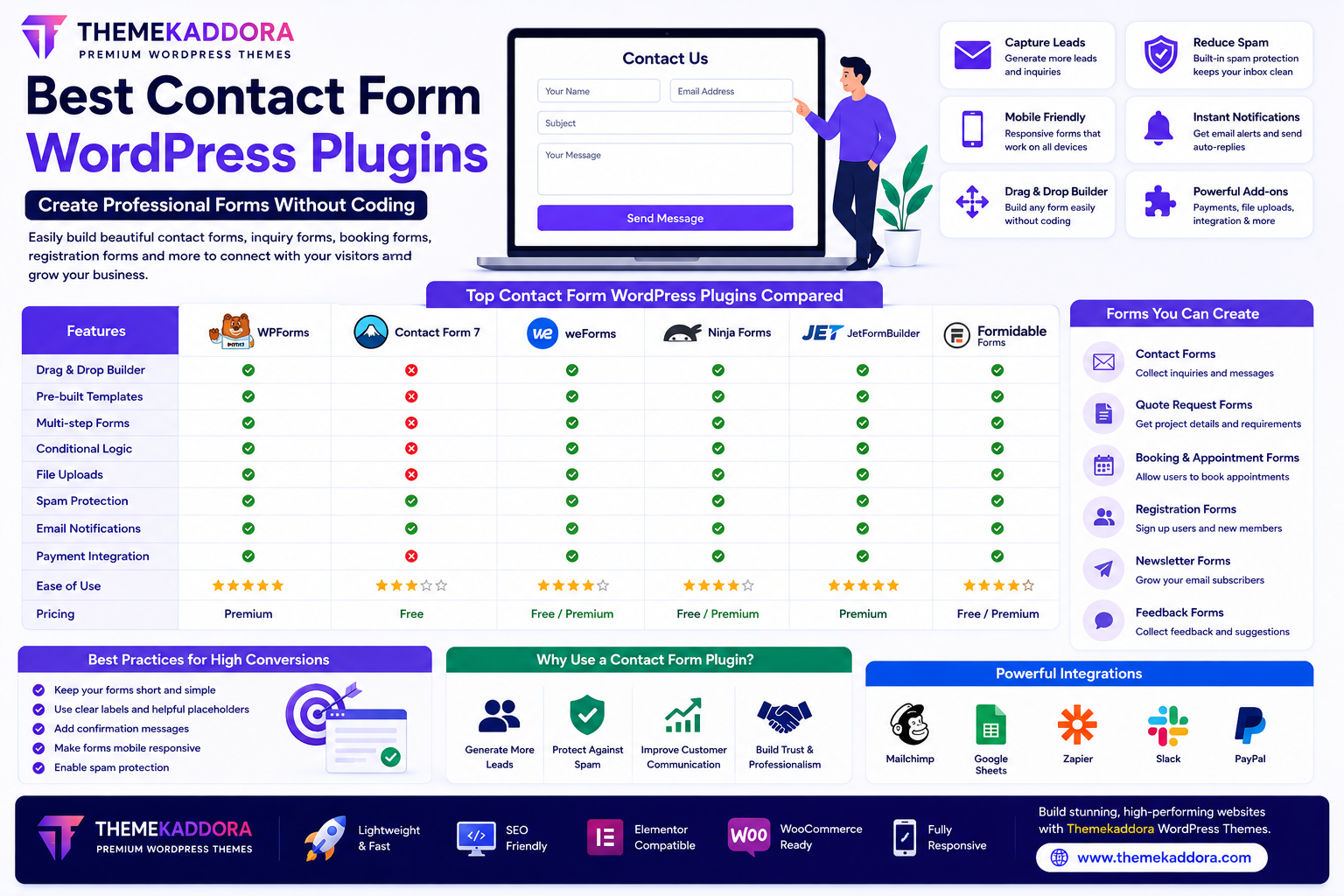
Best Contact Form WordPress Plugins: Create Professional Forms Without Coding
Introduction
Every successful website needs an easy way for visitors to communicate. Whether someone wants to ask a question, request a quote, schedule a consultation, or submit feedback, a contact form provides a simple and professional way to connect.
Instead of displaying an email address publicly—which can increase spam—a contact form collects inquiries in an organized and secure manner.
Modern WordPress contact form plugins allow anyone to create beautiful forms without writing a single line of code. From simple contact forms to advanced booking systems, these plugins make communication effortless.
In this guide, you'll learn how contact form plugins work, their essential features, and how to choose the best solution for your WordPress website.
Why Every WordPress Website Needs a Contact Form
A contact form helps you:
Generate business leads
Reduce spam emails
Improve customer communication
Collect important information
Increase trust
Make your website more professional
Whether you operate a personal blog or a large business website, contact forms are an essential feature.
Types of Forms You Can Create
Modern form plugins support many different form types.
Contact Forms
Allow visitors to:
Ask questions
Request information
Submit inquiries
Quote Request Forms
Perfect for:
Agencies
Freelancers
Contractors
Service providers
Collect project details before contacting potential clients.
Appointment Booking Forms
Useful for:
Doctors
Dentists
Consultants
Coaches
Salons
Allow visitors to request appointments directly through your website.
Registration Forms
Create forms for:
User registration
Membership websites
Online communities
Event registration
Newsletter Signup Forms
Grow your email list by collecting subscriber information.
Feedback Forms
Receive valuable customer opinions to improve your products and services.
Essential Features to Look For
Drag-and-Drop Builder
Visual builders make it easy to create forms without coding.
Simply drag fields into place and customize the layout.
Mobile Responsive Design
Your forms should work perfectly on:
Smartphones
Tablets
Laptops
Desktop computers
Spam Protection
Look for features such as:
CAPTCHA
Honeypot protection
Spam filtering
These help reduce unwanted submissions.
Email Notifications
Receive instant notifications whenever someone submits a form.
You can also send automatic confirmation emails to visitors.
File Upload Support
Useful for:
Job applications
Project documents
Images
PDFs
Support requests
Conditional Logic
Display different questions based on previous answers.
This creates shorter, more user-friendly forms.
Payment Integration
Some form builders support online payments for:
Registrations
Bookings
Donations
Services
Contact Forms for Different Businesses
Business Websites
Collect customer inquiries and sales leads.
WooCommerce Stores
Support customers with:
Product inquiries
Return requests
Warranty claims
Bulk order requests
Educational Websites
Create:
Student registration forms
Admission inquiries
Course applications
Healthcare Websites
Allow patients to:
Book appointments
Request consultations
Submit inquiries
Agencies & Freelancers
Generate qualified leads through detailed project inquiry forms.
Best Practices for Contact Forms
To improve conversion rates:
Keep Forms Short
Ask only for information you actually need.
Use Clear Labels
Visitors should immediately understand each field.
Add Confirmation Messages
Let users know their message has been received successfully.
Make Forms Mobile Friendly
Most visitors submit forms from mobile devices.
Protect Against Spam
Enable spam protection without making the form difficult to complete.
Common Mistakes to Avoid
Avoid:
Asking for too much information
Long and confusing forms
Missing confirmation emails
Poor mobile design
No spam protection
Unclear submit buttons
Simple forms usually achieve better completion rates.
Why Pair Contact Form Plugins with Themekaddora WordPress Themes?
A professionally designed website improves trust and encourages more visitors to complete your forms.
Themekaddora WordPress themes provide:
Responsive layouts
Fast loading speed
SEO-friendly structure
Elementor compatibility
WooCommerce support
Clean code
Modern design
Easy customization
These features create the perfect environment for high-converting contact forms.
Contact Form Optimization Checklist
Before publishing your forms, ensure you have:
✅ Clear form title
✅ Short and simple fields
✅ Spam protection enabled
✅ Mobile responsiveness
✅ Confirmation message
✅ Email notifications configured
✅ Privacy policy link (if applicable)
✅ Fast loading performance
Conclusion
Contact form plugins make it easy to build professional forms that improve communication, generate leads, and enhance user experience.
Whether you need a simple contact page or advanced booking and registration forms, the right plugin can streamline customer interactions without requiring technical knowledge.
Combined with Themekaddora's responsive, SEO-friendly, and performance-optimized WordPress themes, contact forms become an effective tool for growing your business online.
Frequently Asked Questions (FAQs)
Why should I use a contact form instead of displaying my email address?
Contact forms help reduce spam, organize inquiries, and provide a more professional communication channel.
Can I create forms without coding?
Yes. Most modern WordPress form plugins include drag-and-drop builders that require no coding experience.
Are contact forms mobile-friendly?
Most quality form plugins are fully responsive and work well on smartphones, tablets, and desktops.
Can contact forms help generate leads?
Absolutely. Quote requests, consultation forms, and inquiry forms help collect valuable customer information and support lead generation.
Why choose Themekaddora WordPress themes?
Themekaddora themes are lightweight, responsive, SEO-friendly, WooCommerce-ready, and designed to work seamlessly with modern WordPress form plugins, helping you create professional, high-converting websites.
Comments (0)