
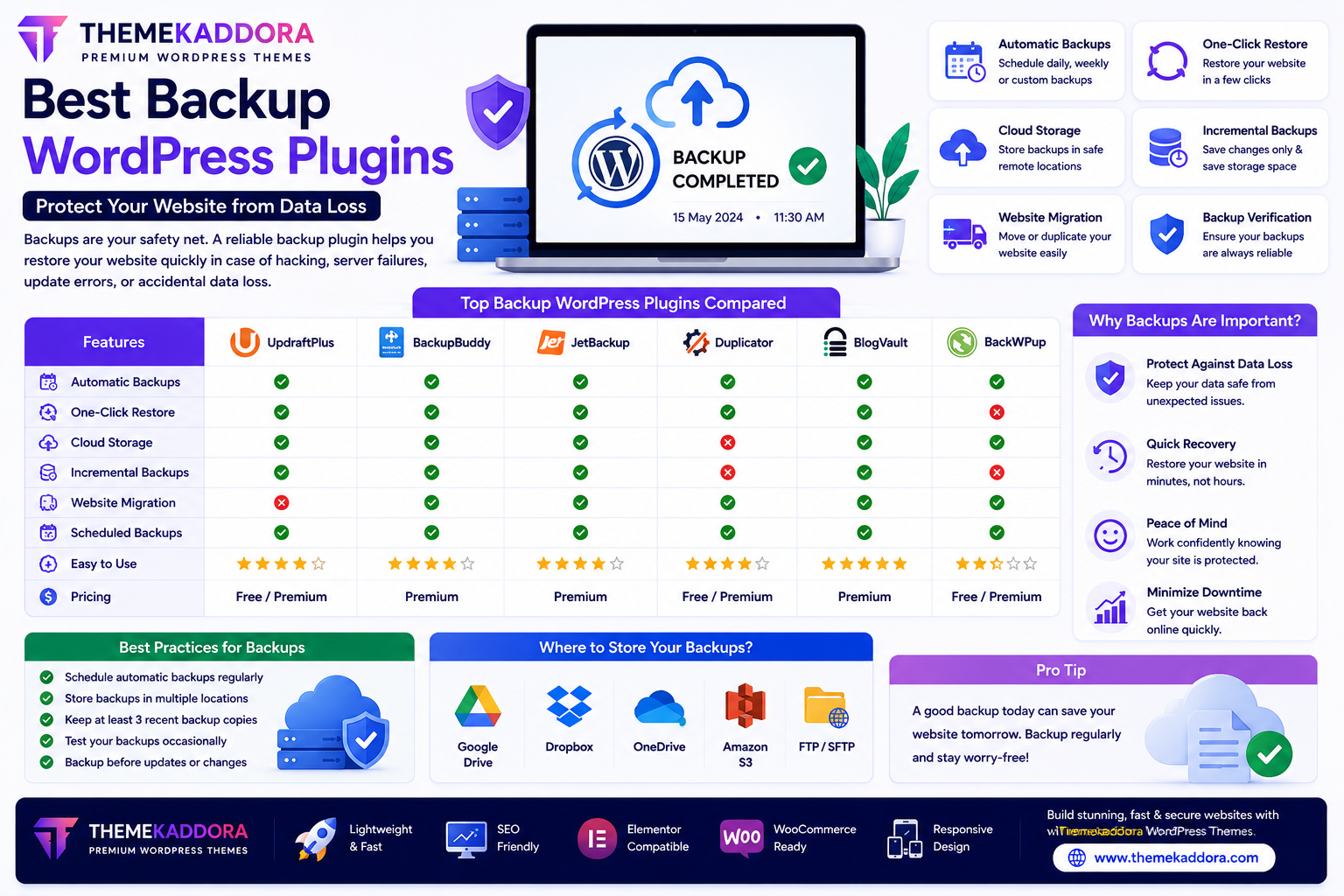
Best Backup WordPress Plugins: Protect Your Website from Data Loss
Introduction
Your WordPress website is one of your most valuable digital assets. It contains your content, customer information, products, images, settings, and countless hours of work. Losing that data because of hacking, server failures, accidental deletion, or software conflicts can be devastating.
A reliable backup plugin ensures that you always have a copy of your website ready to restore if something goes wrong.
Whether you run a personal blog, business website, WooCommerce store, or membership platform, regular backups are one of the simplest and most effective ways to protect your website.
In this guide, you'll learn why backups matter, what features to look for, and how to choose the best backup plugin for your WordPress website.
Why Website Backups Are Essential
Website backups protect you from unexpected problems such as:
Server crashes
Malware infections
Hacking attempts
Plugin conflicts
Theme errors
Accidental file deletion
Failed updates
Human mistakes
Having a recent backup allows you to recover quickly and minimize downtime.
What Does a Backup Plugin Do?
A backup plugin creates copies of your website, including:
WordPress files
Database
Themes
Plugins
Media library
Website settings
These backups can be stored locally or in remote storage for added protection.
Essential Features to Look For
Automatic Scheduled Backups
Automation ensures backups occur regularly without manual effort.
You can schedule:
Daily backups
Weekly backups
Monthly backups
The ideal schedule depends on how frequently your website changes.
One-Click Restore
A good backup plugin should allow you to restore your website quickly if something goes wrong.
Simple restoration minimizes downtime.
Cloud Storage Support
Remote storage helps protect backups if your server fails.
Common storage options include:
Cloud storage services
External drives
Remote servers
Keeping backups in multiple locations increases reliability.
Incremental Backups
Instead of backing up the entire website every time, incremental backups save only the changes made since the previous backup.
This helps reduce storage usage and backup time.
Migration Support
Some backup plugins also allow you to:
Move websites
Clone websites
Create staging copies
Transfer websites to new hosting providers
Backup Verification
Reliable plugins verify backup integrity so you know your files can be restored successfully.
Backup Strategies for Different Websites
Business Websites
Schedule regular backups whenever content changes frequently.
WooCommerce Stores
Because customer orders and inventory change often, online stores usually benefit from more frequent backups.
Blogs
Back up your website whenever new articles or significant updates are published.
Membership Websites
Frequent backups help protect member accounts and user-generated content.
Best Practices for Website Backups
Backup Before Updates
Always create a backup before:
Updating WordPress
Installing plugins
Changing themes
Editing important files
Store Multiple Backup Copies
Avoid relying on a single backup.
Maintain copies in different storage locations whenever possible.
Test Your Backups
Occasionally verify that backups can be restored successfully.
A backup is only useful if it works when you need it.
Remove Old Backups
Delete outdated backups to free storage space while keeping a reasonable backup history.
Protect Backup Files
Ensure backup files are stored securely and accessible only to authorized users.
Common Backup Mistakes
Avoid:
Never creating backups
Storing backups only on the same server
Forgetting to test backups
Ignoring backup schedules
Deleting recent backups too early
Updating WordPress without a backup
These mistakes can make recovery much more difficult.
Why Pair Backup Plugins with Themekaddora WordPress Themes?
A backup plugin protects your website, while a high-quality theme reduces the likelihood of technical issues.
Themekaddora WordPress themes provide:
Lightweight code
Responsive design
SEO-friendly structure
WooCommerce compatibility
Elementor support
Fast loading performance
Clean architecture
Easy customization
Combined with regular backups, these features help create a more reliable WordPress website.
Website Backup Checklist
Before launching or updating your website, confirm that you have:
✅ Automatic backups enabled
✅ Off-site backup storage configured
✅ Recent backup available
✅ Backup restoration tested
✅ WordPress updated
✅ Plugins updated
✅ Themes updated
✅ Security plugin installed
Conclusion
Website backups are one of the most important parts of WordPress maintenance.
A reliable backup plugin helps protect your website from data loss caused by hacking, server failures, software conflicts, or accidental mistakes. Combined with regular maintenance, strong security practices, and a well-coded WordPress theme like Themekaddora, backups provide peace of mind and make website recovery much easier.
Investing a few minutes in backup planning today can save countless hours of work in the future.
Frequently Asked Questions (FAQs)
Why do I need a WordPress backup plugin?
A backup plugin creates copies of your website so you can restore it if data is lost due to technical issues, hacking, or accidental mistakes.
How often should I back up my website?
The ideal schedule depends on how often your content changes. Frequently updated websites usually require more frequent backups.
Should I store backups on my hosting server?
It's generally recommended to keep at least one backup copy in a separate location to reduce the risk of losing both your website and your backups during a server failure.
Can backup plugins migrate websites?
Many backup plugins include migration features that help move WordPress websites between hosting providers or domains.
Why choose Themekaddora WordPress themes?
Themekaddora themes are lightweight, responsive, SEO-friendly, WooCommerce-ready, and built with clean code, providing a reliable foundation for secure, high-performing WordPress websites.
Comments (0)