
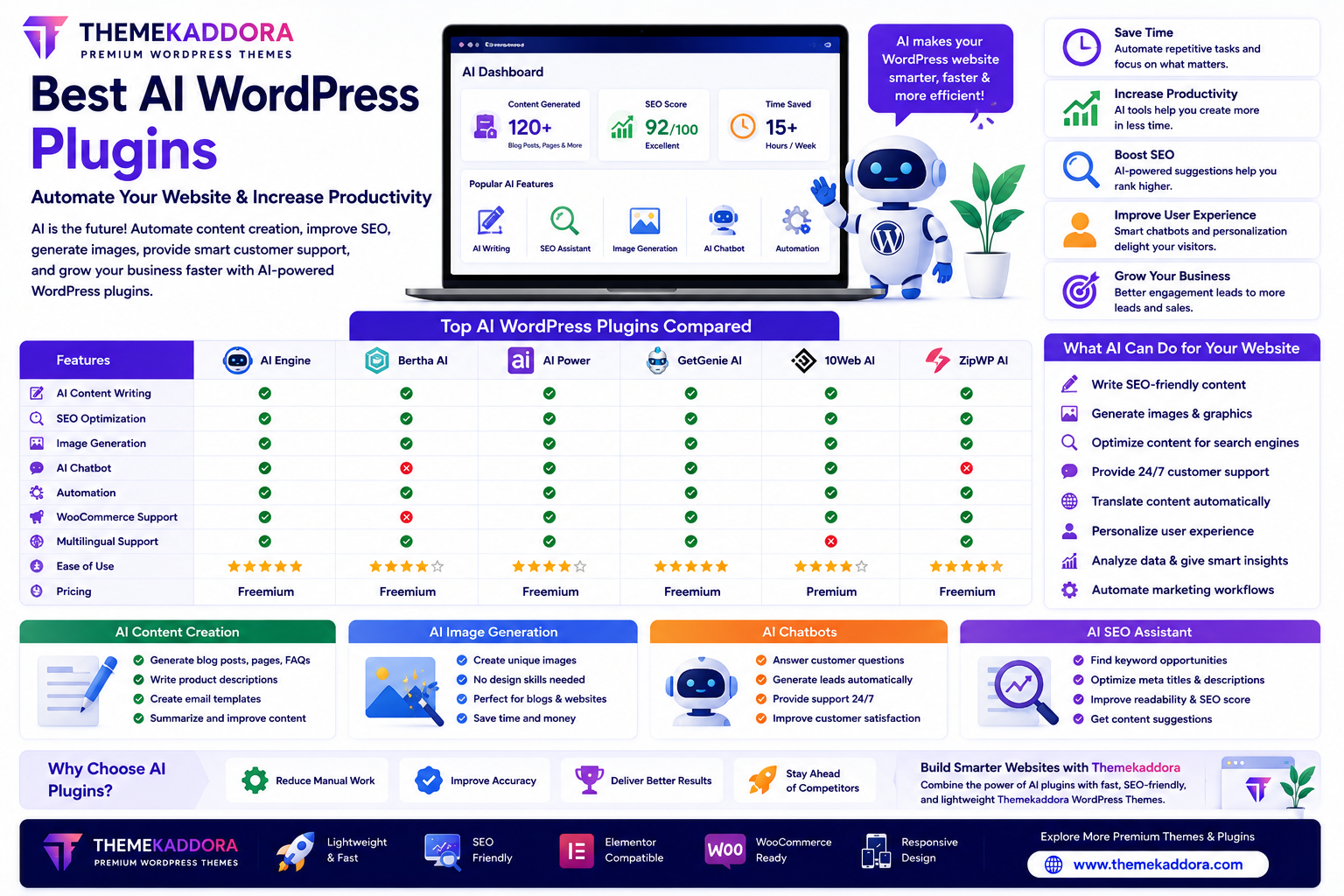
Best AI WordPress Plugins to Automate Your Website and Increase Productivity
Introduction
Artificial Intelligence (AI) is transforming the way WordPress websites are built, managed, and optimized. From writing blog posts and generating images to improving SEO and providing instant customer support, AI-powered plugins help website owners automate repetitive tasks and focus on growing their businesses.
Whether you manage a blog, business website, WooCommerce store, or digital agency, AI plugins can improve productivity, enhance user experience, and simplify website management.
In this guide, you'll learn what AI WordPress plugins do, the features to look for, and how to choose the right AI tools for your website.
Why Use AI WordPress Plugins?
AI plugins help automate everyday tasks, including:
Content creation
Image generation
Customer support
Website personalization
Marketing automation
Analytics
Workflow management
By reducing manual work, AI allows website owners to spend more time on strategy and business growth.
Types of AI WordPress Plugins
AI Writing Plugins
AI writing tools can assist with creating:
Blog posts
Product descriptions
Landing pages
Service pages
FAQs
Email newsletters
They help speed up content creation while maintaining consistency.
AI SEO Plugins
SEO-focused AI plugins assist with:
Keyword suggestions
Meta titles
Meta descriptions
Content optimization
Internal linking ideas
Readability improvements
These tools simplify on-page SEO.
AI Chatbot Plugins
AI chatbots help businesses:
Answer customer questions
Generate leads
Schedule appointments
Recommend products
Provide support 24/7
They improve customer engagement while reducing support workload.
AI Image Generation Plugins
Generate unique:
Featured images
Hero banners
Blog graphics
Marketing visuals
Website illustrations
AI-generated images help strengthen branding and reduce design time.
AI Translation Plugins
Serve global audiences by automatically translating website content into multiple languages.
AI Personalization Plugins
Deliver customized experiences by recommending:
Products
Blog articles
Services
Special offers
Personalization can improve visitor engagement.
Features to Look For
Easy Integration
Choose plugins that work well with:
WordPress
WooCommerce
Elementor
Popular themes
Other essential plugins
User-Friendly Interface
A clean dashboard makes AI features accessible, even for beginners.
Automation Options
Look for plugins that automate repetitive tasks while still allowing manual review and control.
Performance Optimization
AI plugins should be lightweight and avoid slowing down your website.
Regular Updates
Frequent updates improve security, compatibility, and access to new AI features.
AI Plugins for Different Websites
Blogs
Automate:
Article outlines
Draft creation
SEO suggestions
Content planning
Business Websites
Improve:
Lead generation
Customer support
Marketing workflows
WooCommerce Stores
Enhance:
Product descriptions
Product recommendations
Customer service
Sales automation
Agencies
Increase productivity by assisting with:
Website creation
Client content
SEO optimization
Workflow automation
Best Practices for Using AI
To get the best results:
Review AI Content
Always check AI-generated text for accuracy, tone, and relevance before publishing.
Keep Your Brand Voice
Use AI as an assistant while maintaining a consistent brand identity.
Combine AI with Human Expertise
AI accelerates workflows, but human creativity and judgment remain essential.
Protect User Privacy
Choose trusted plugins and configure them responsibly, especially when handling visitor data.
Common Mistakes to Avoid
Avoid:
Publishing AI-generated content without editing
Installing multiple AI plugins that duplicate the same functions
Ignoring plugin updates
Over-automating customer interactions
Choosing plugins from untrusted developers
A balanced approach delivers the best results.
Why Pair AI Plugins with Themekaddora WordPress Themes?
AI tools work best when combined with a high-performance theme.
Themekaddora WordPress themes offer:
Lightweight code
Fast loading performance
Responsive design
SEO-friendly structure
WooCommerce compatibility
Elementor support
Clean architecture
AI-ready layouts
Together, AI plugins and Themekaddora themes help create fast, modern, and scalable WordPress websites.
AI Website Automation Checklist
Before using AI plugins, make sure you:
✅ Select plugins from trusted developers
✅ Review AI-generated content
✅ Optimize website speed
✅ Keep plugins updated
✅ Test compatibility
✅ Maintain regular backups
✅ Protect customer data
✅ Monitor AI performance regularly
Conclusion
AI WordPress plugins are changing the way websites are managed by automating content creation, SEO, customer support, and marketing tasks.
By choosing the right AI tools and combining them with a lightweight, responsive, and SEO-friendly WordPress theme like Themekaddora, you can build a smarter website that saves time, improves productivity, and delivers a better experience for your visitors.
AI is most effective when it enhances human creativity rather than replacing it.
Frequently Asked Questions (FAQs)
What are AI WordPress plugins?
AI WordPress plugins use artificial intelligence to assist with tasks such as content creation, SEO, chat support, image generation, and workflow automation.
Can AI plugins improve website SEO?
Yes. Many AI plugins provide keyword suggestions, content optimization, metadata assistance, and internal linking recommendations.
Are AI plugins useful for WooCommerce?
Absolutely. AI can help improve product descriptions, personalize recommendations, and support customer service.
Should I review AI-generated content before publishing?
Yes. Reviewing AI output helps ensure accuracy, relevance, and alignment with your brand voice.
Why choose Themekaddora WordPress themes?
Themekaddora themes are lightweight, responsive, SEO-friendly, WooCommerce-ready, Elementor-compatible, and designed to work seamlessly with modern AI plugins, providing a strong foundation for high-performance WordPress websites.
Comments (0)