
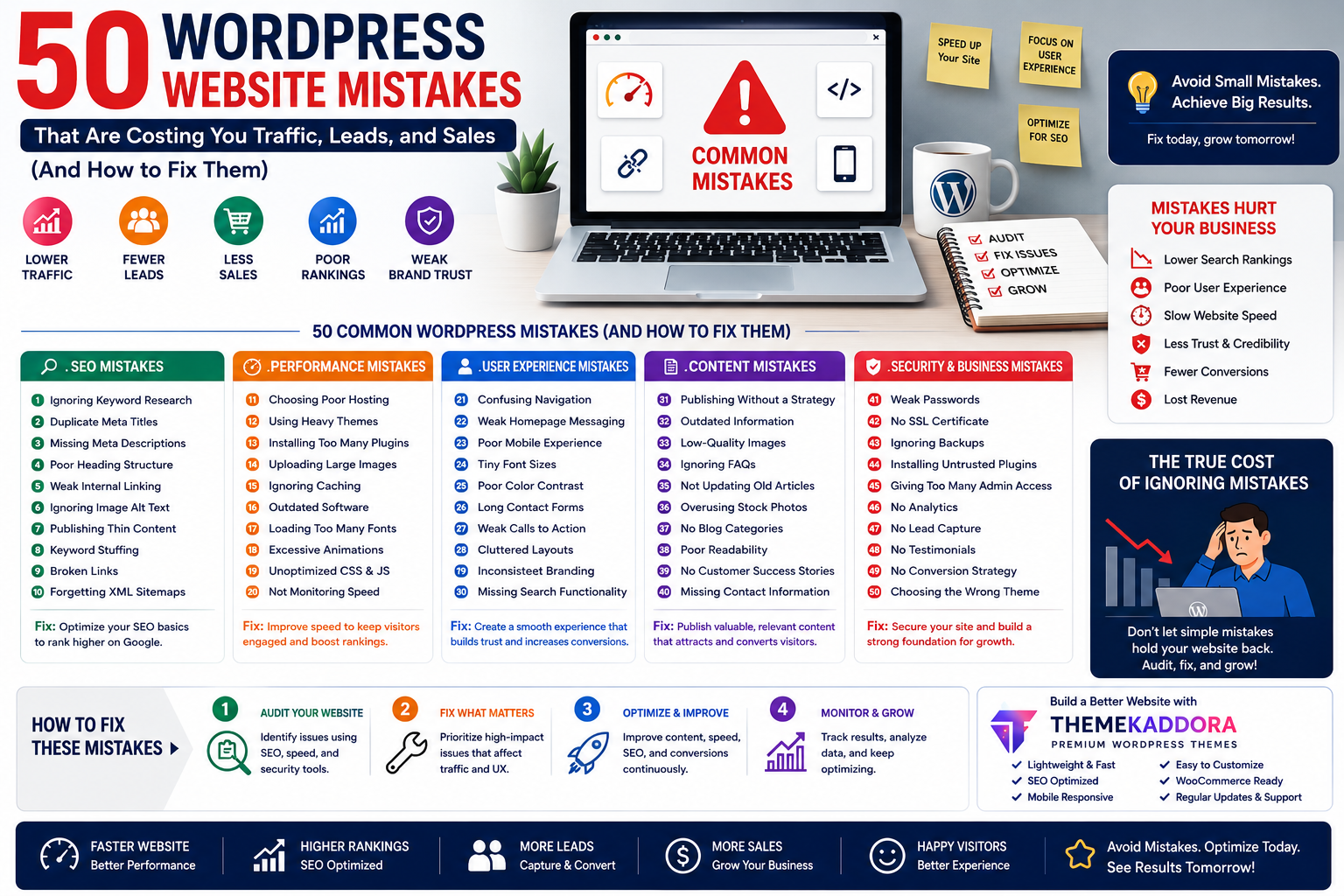
50 WordPress Website Mistakes That Are Costing You Traffic, Leads, and Sales (And How to Fix Them)
Introduction
Many business owners believe their website isn't generating enough traffic because of increasing competition or changes in search engine algorithms. While these factors can play a role, the real issue is often much closer to home.
Small mistakes in website design, SEO, content, speed, security, and user experience can quietly reduce your rankings, discourage visitors, and lower conversion rates.
The good news? Most of these problems are easy to identify and fix.
In this comprehensive guide, we'll explore 50 common WordPress mistakes, explain why they matter, and show you how to avoid them so your website can perform at its full potential.
Why Small Website Mistakes Matter
One issue alone may not have a noticeable impact, but multiple problems can create a poor experience for both users and search engines.
Fixing these mistakes can help you:
Improve search visibility
Increase website speed
Build trust
Generate more leads
Increase conversions
Create a better user experience
Think of website optimization as a series of small improvements that work together.
SEO Mistakes
1. Ignoring Keyword Research
Publishing content without understanding what your audience is searching for can make it harder for people to discover your website.
Fix: Research relevant keywords and align content with user intent.
2. Duplicate Meta Titles
Using the same page title across multiple pages makes it difficult for search engines to understand your content.
Fix: Write unique titles for every page.
3. Missing Meta Descriptions
A missing description can reduce click-through rates.
Fix: Create compelling summaries for important pages.
4. Poor Heading Structure
Using headings inconsistently makes content harder to understand.
Fix: Organize pages with a logical heading hierarchy.
5. Weak Internal Linking
Visitors and search engines benefit from connected content.
Fix: Link related pages naturally throughout your website.
6. Ignoring Image Alt Text
Alternative text improves accessibility and helps search engines understand images.
Fix: Add descriptive alt text to important visuals.
7. Publishing Thin Content
Very short pages may not answer visitor questions effectively.
Fix: Create comprehensive, useful content.
8. Keyword Stuffing
Repeating keywords excessively can reduce readability.
Fix: Write naturally for people first.
9. Broken Links
Broken links create frustration and reduce credibility.
Fix: Check links regularly and update or remove broken ones.
10. Forgetting XML Sitemaps
Sitemaps help search engines discover your content.
Fix: Generate and maintain an updated sitemap.
Performance Mistakes
11. Choosing Poor Hosting
Low-quality hosting can negatively affect speed and reliability.
12. Using Heavy Themes
Themes with unnecessary features may increase loading times.
13. Installing Too Many Plugins
Every plugin should provide clear value.
Remove plugins you no longer use.
14. Uploading Large Images
Oversized images slow websites significantly.
Optimize images before uploading.
15. Ignoring Caching
Caching improves performance for returning visitors.
16. Outdated Software
Keep WordPress, themes, and plugins updated.
17. Loading Too Many Fonts
Multiple font families increase page size.
Choose fonts carefully.
18. Excessive Animations
Animations should enhance—not distract from—the user experience.
19. Unoptimized CSS and JavaScript
Efficient code improves page performance.
20. Not Monitoring Website Speed
Regular performance testing helps identify opportunities for improvement.
User Experience Mistakes
21. Confusing Navigation
Visitors should easily find important pages.
22. Weak Homepage Messaging
Explain your value clearly.
23. Poor Mobile Experience
Responsive design is essential.
24. Tiny Font Sizes
Readable typography improves usability.
25. Poor Color Contrast
Accessible design benefits all visitors.
26. Long Contact Forms
Ask only for essential information.
27. Weak Calls to Action
Guide visitors toward meaningful next steps.
28. Cluttered Layouts
White space improves readability.
29. Inconsistent Branding
Maintain consistent colors, typography, and messaging.
30. Missing Search Functionality
Search features help visitors find information on larger websites.
Content Mistakes
31. Publishing Without a Strategy
Develop a content plan aligned with your audience.
32. Outdated Information
Keep pages current.
33. Low-Quality Images
Professional visuals strengthen credibility.
34. Ignoring FAQs
Answer common customer questions.
35. Not Updating Old Articles
Refreshing existing content can improve its long-term value.
36. Overusing Stock Photos
Whenever possible, include authentic business imagery.
37. No Blog Categories
Organized content improves navigation.
38. Poor Readability
Use headings, bullet lists, and short paragraphs.
39. No Customer Success Stories
Case studies demonstrate real-world value.
40. Missing Contact Information
Transparency builds trust.
Security Mistakes
41. Weak Passwords
Use strong passwords for administrator accounts.
42. No SSL Certificate
HTTPS is essential for modern websites.
43. Ignoring Backups
Regular backups protect against unexpected problems.
44. Installing Untrusted Plugins
Only install extensions from reputable developers.
45. Giving Too Many Administrator Accounts
Assign the minimum permissions required.
Business Mistakes
46. No Analytics
Measure visitor behavior to guide improvements.
47. No Lead Capture
Offer visitors opportunities to stay connected.
48. No Testimonials
Social proof strengthens trust.
49. No Conversion Strategy
Every important page should have a clear objective.
50. Choosing the Wrong WordPress Theme
Your theme affects:
Performance
SEO
User experience
Mobile responsiveness
Customization
Conversion potential
Choosing the right theme provides a stronger foundation for success.
How Themekaddora Helps You Avoid These Mistakes
Themekaddora WordPress themes are designed with modern best practices in mind.
Features include:
Lightweight performance
Responsive design
SEO-friendly architecture
WooCommerce compatibility
Clean HTML5 and CSS3 code
Easy customization
Cross-browser support
Regular updates
Professional documentation
By starting with a high-quality theme, businesses can avoid many common website problems before they occur.
Your WordPress Improvement Plan
Rather than trying to fix everything at once, prioritize improvements in this order:
Week 1
Improve page speed
Update WordPress
Remove unused plugins
Week 2
Optimize SEO
Improve internal linking
Refresh old content
Week 3
Enhance mobile usability
Add trust signals
Improve calls to action
Week 4
Review analytics
Test conversions
Continue publishing valuable content
Small improvements made consistently often produce meaningful long-term results.
Conclusion
Building a successful WordPress website isn't about avoiding every possible mistake—it's about identifying the issues that have the greatest impact and improving them over time.
By focusing on SEO, performance, user experience, content quality, security, and conversions, you can create a website that attracts visitors, builds trust, and supports business growth.
Themekaddora WordPress themes provide a strong technical foundation with responsive design, fast performance, SEO-friendly architecture, and flexible customization, helping businesses build websites that avoid common pitfalls and are ready for long-term success.
Frequently Asked Questions (FAQs)
What are the most common WordPress mistakes?
Some of the most common issues include slow loading speeds, poor SEO practices, weak internal linking, outdated content, excessive plugins, poor mobile usability, and choosing an unsuitable theme.
Do these mistakes affect SEO?
Yes. Technical issues, content quality, page speed, and user experience all influence search visibility and overall website performance.
How often should I audit my WordPress website?
A comprehensive review every few months, along with regular monitoring of performance, security, and content, helps keep your website in good condition.
Can changing my WordPress theme improve performance?
A lightweight, well-coded theme can improve speed, responsiveness, and overall user experience, especially when replacing an outdated or poorly optimized theme.
Why choose Themekaddora WordPress themes?
Themekaddora themes are built with responsive layouts, SEO-friendly architecture, WooCommerce compatibility, clean code, and performance-focused design, providing businesses with a reliable foundation for long-term website success.
Comments (0)